
22% of residency programs account for roughly 80% of the “serious concern” comments in online resident reviews.
That concentration should bother you. Because it means a small subset of programs generate a disproportionate amount of red‑flag noise, and most applicants have no systematic way to detect them. They just “get a bad vibe” on interview day, or worse, find out after they match.
You can do better than vibes. You can build a weighted, data‑driven Red‑Flag Index from public program data.
Below I will walk through a concrete, numbers‑first approach: defining signals, collecting data, assigning weights, and turning scattered public info into a single risk score per program.
1. What a “Red‑Flag Index” Actually Is
A Red‑Flag Index is a composite score that attempts to quantify one thing:
“How risky is it to train here compared to peer programs?”
Think of it as a credit score for residency programs, but inverted: higher means more risk.
In data terms, you are:
- Selecting observable variables that correlate with risk (attrition, ACGME citations, etc.).
- Normalizing them to a common scale.
- Weighting them according to importance and reliability.
- Aggregating into a single index.
If you have done any basic factor analysis, this will feel familiar. The difference here: the stakes are your next 3–7 years.
You are not trying to be perfect. You are trying to be less blind.
2. What Public Data You Actually Have
Everyone fantasizes about an all‑seeing dataset with internal program surveys, mid‑rotation evaluations, and whistleblower reports. You do not have that. You have a messy patchwork of public sources:
- ACGME ADS / public program search
- FREIDA (AMA)
- NRMP Charting Outcomes + Program Director Survey aggregates
- Program websites
- State GME reports (in some states)
- Board pass‑rate reports (specialty boards)
- Online reviews (Reddit, SDN, Doximity, Glassdoor‑like sites)
- NRMP violation notices (Match sanctions)
- News / public court cases (rare but real)
The trick is not to complain about missing data. It is to extract maximum signal from what exists.
Here are the main categories I recommend converting into red‑flag signals.
2.1 Structural and Stability Signals
These tell you whether the program is stable or on fire in slow motion.
Common examples:
- Rapid resident complement changes (expansions or cuts).
- Frequent leadership turnover (PDs, APDs).
- Sudden loss / gain of accreditation status.
- Repeated ACGME citations.
- Chronic under‑fill in the Match.
Most of this you can pick up from:
- ACGME program history (new, continued, withdrawn, probation).
- FREIDA / program site announcements (“New PD as of July 2024” three times in 5 years).
- NRMP data on number of positions offered vs filled.
2.2 Educational Quality and Outcomes
Red flags rarely show up as a single catastrophic event. They show up as a pattern of “not quite meeting the mark.”
Signals:
- Board pass rates below specialty averages.
- Residents failing boards repeatedly.
- Low scholarly output relative to program size.
- Very high service‑to‑education ratio comments (“We are just scut monkeys”).
Public sources:
- Specialty board websites (many publish pass rates by program).
- Program sites bragging—or not—about board pass rates and research.
- Resident and alumnus comments on forums.
2.3 Culture and Work Environment
This is where subjective data matters.
Signals:
- Systematic themes in anonymous comments (bullying, retaliation, blatant favoritism).
- Reports of duty‑hour violations being ignored or “fixed in the EMR.”
- High resident attrition for “personal reasons” that all seem to happen mid‑PGY2.
Sources:
- Reddit residency/program‑specific threads.
- Doximity residency navigator comments.
- SDN program reviews.
- Occasional public ACGME letters summarizing site visit findings.
No single anonymous post should drive your rating. But 30 posts with the same complaints? That is a pattern.
2.4 Compliance and Ethics
Rare but non‑negotiable when present.
Signals:
- ACGME probation or warning status.
- NRMP match violations and sanctions.
- Legal actions involving resident mistreatment, discrimination, or fraud.
Sources:
- ACGME accreditation status search.
- NRMP violation reports.
- News / court databases.
These are “nuclear” flags. They merit much heavier weights.
3. From Mess to Metrics: Designing Your Feature Set
To build an index, you need features: specific, quantifiable variables. Here is an example starter set that I actually like for most specialties.
| Feature Category | Variable (per program) |
|---|---|
| Stability | PD changes in last 5 years (count) |
| Stability | ACGME adverse actions in last 5 years (0/1) |
| Match Performance | 3-year average unfilled positions (%) |
| Education Quality | 5-year board pass rate (%) |
| Resident Outcomes | 5-year resident attrition rate (%) |
| Culture | Negative comment share (0–1) |
| Compliance / Ethics | NRMP violation history (0/1) |
You can easily expand this to 15–20 features. But start lean. Every variable should either:
- Directly reflect harm to residents.
- Or be strongly associated, based on logic and experience, with potential harm.
Let me unpack a few of these.
3.1 PD Changes in Last 5 Years
Why it matters: Leadership churn correlates with instability, moving goalposts, and inconsistent culture. A program that has had 3 PDs in 5 years is not the same as one with 1 PD over 15 years.
How to quantify:
Count the number of PD announcements you can verify over the last 5 years from:
- Program site archived pages (Wayback Machine helps).
- ACGME ADS snapshots, when available.
- Press releases / social posts.
You can treat it as a simple count, then cap at 3+ to avoid over‑penalizing tiny outliers.
3.2 3‑Year Average Unfilled Positions (%)
Why it matters: Programs that chronically fail to fill all positions often have reputational or internal problems. Sometimes it is location. Often it is something else.
Formula for given program:
Unfilled % = (Unfilled positions / Total positions) across last 3 cycles.
You can approximate from NRMP’s “Results and Data” tables.
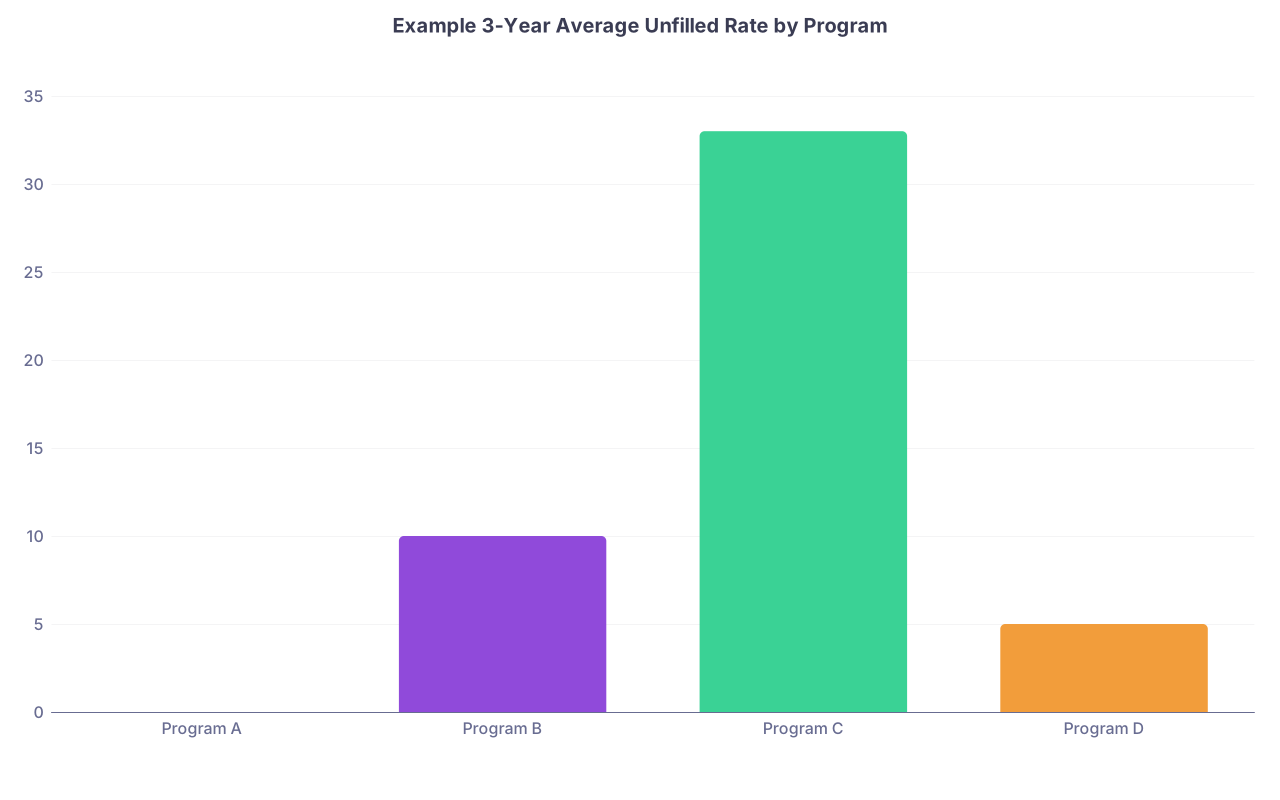
| Category | Value |
|---|---|
| Program A | 0 |
| Program B | 10 |
| Program C | 33 |
| Program D | 5 |
Program C, with a 33% unfilled rate averaged across 3 years, absolutely deserves flags.
3.3 Board Pass Rate
Why it matters: If a program cannot get its graduates across the board exam finish line, you should question the training environment.
You can treat this as:
Board deficit = Specialty average pass rate − Program pass rate
So if the specialty runs at 95% and the program is at 82%, its deficit is 13 percentage points. Higher deficit → more risk.
3.4 Resident Attrition Rate
Harder to find, but high‑yield when available. Some state GME reports list number of residents who leave programs early. Otherwise, you may need to triangulate from:
- Program sites (suddenly missing people from class photos).
- Alumni lists.
- Whisper networks (not ideal, but reality).
If you can compute even a rough 5‑year attrition percentage, treat anything above 10–15% as highly suspicious unless very well explained.
3.5 Negative Comment Share
Crude but powerful.
Approach:
- Scrape or manually tally comments about a program from major forums.
- Code each comment as positive, neutral, or negative.
- Compute: Negative share = negative / (positive + neutral + negative).
You can refine with sentiment analysis, but even simple manual coding (10–20 comments per program) gives signal.
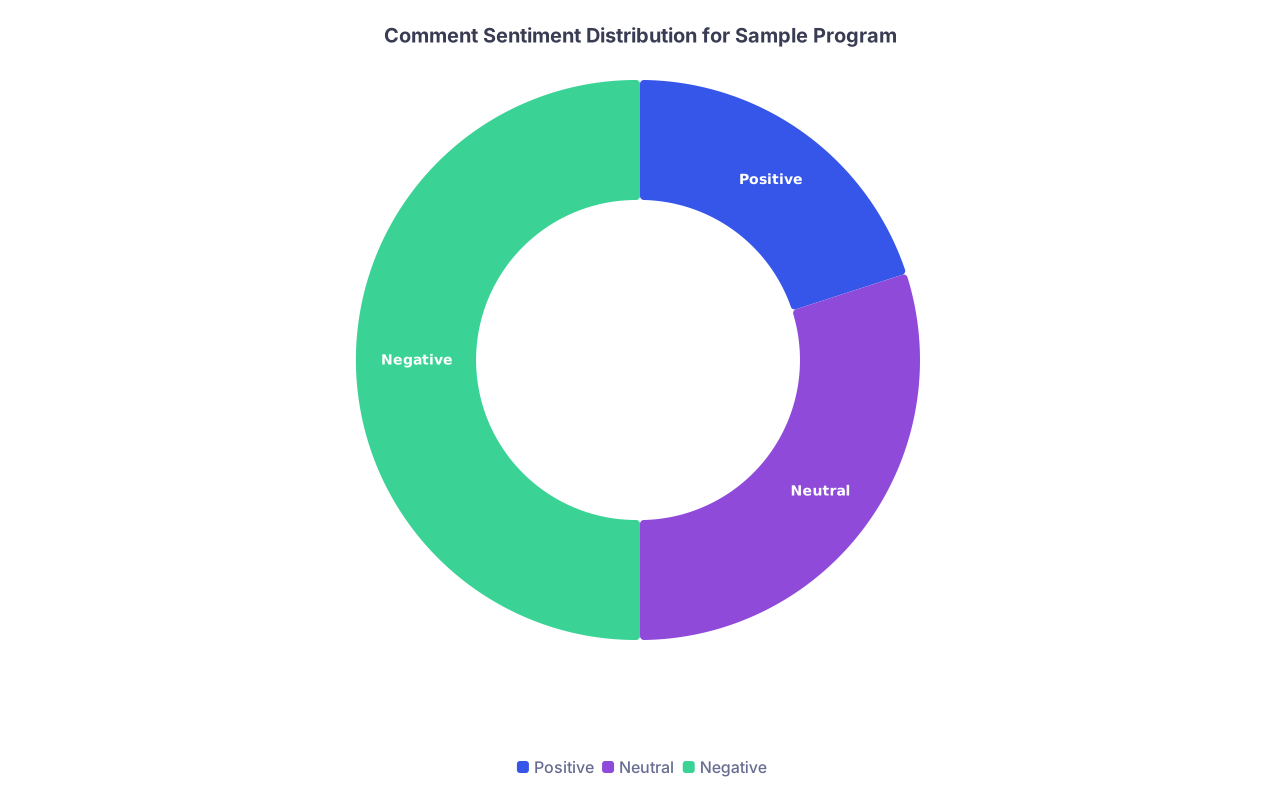
| Category | Value |
|---|---|
| Positive | 20 |
| Neutral | 30 |
| Negative | 50 |
A program where half the publicly visible comments are negative is not unlucky. It is a pattern.
4. Normalizing and Scaling the Data
You now have heterogeneous variables: some percentages, some counts, some yes/no flags. To combine them, you need to normalize.
You have three main tools:
- Min‑max scaling (0 to 1).
- Z‑scores.
- Bucket / categorical scoring.
For a red‑flag index aimed at applicants, I prefer a hybrid:
- Min‑max or bucket scoring for continuous measures.
- Binary 0/1 or 0/2 for very serious binary events (probation, NRMP violations).
4.1 Example: 3‑Year Unfilled Rate
Define buckets:
- 0–5% unfilled → 0 points
- 5–15% → 1 point
- 15–30% → 2 points
30% → 3 points
You then transform raw percentages into a 0–3 risk score.
4.2 Example: Board Pass Deficit
Here I like a continuous approach:
Let deficit d = specialty average − program rate (in percentage points).
Define:
- Score = min(3, max(0, d / 5))
So:
- 0–5 point deficit → up to 1
- 5–10 point deficit → up to 2
- 10+ point deficit → capped at 3
You can refine these thresholds by looking at the distribution across programs.
5. Weighting the Components
This is where people get philosophical. I prefer data‑informed pragmatism.
You have two main sources for weights:
- Expert judgment (what do residents actually fear most?).
- Empirical correlation (which features are most associated with “I regret matching here” outcomes?).
You will not have a giant labeled dataset of “regret scores” for each program. But you can approximate:
- Use aggregated online ratings (1–5 stars) as a proxy for satisfaction.
- Correlate your raw features with those ratings across many programs.
- Features with higher correlation (negative direction) get higher weight.
Let me give a simple example weight schema that aligns with how residents talk about risk.
| Feature | Scaled Range | Weight (w) |
|---|---|---|
| ACGME probation/adverse | 0–3 | 4.0 |
| NRMP violation | 0–2 | 3.0 |
| Board pass deficit score | 0–3 | 2.5 |
| Unfilled rate score | 0–3 | 2.0 |
| PD turnover score | 0–3 | 1.5 |
| Resident attrition score | 0–3 | 2.5 |
| Negative comment share | 0–3 | 2.0 |
Notice a few things:
- Formal sanctions (probation, NRMP violation) are weighted heavily. They are rare but serious.
- Attrition and board failure are near the top. Those events hurt residents directly.
- PD turnover and negative comment share are meaningful but less catastrophic.
5.1 Putting It Together: Formula
Define each scaled feature as fᵢ (already in 0–3 or similar).
Define weights wᵢ.
Red‑Flag Index (RFI) = Σ (wᵢ × fᵢ)
You can standardize the maximum possible score if you want a 0–100 scale:
RFI% = 100 × (Σ wᵢ fᵢ) / (Σ wᵢ × max fᵢ)
If each feature tops out at 3 and you have the weight table above, maximum sum Σ wᵢ fᵢ = 3 × Σ wᵢ.
You do not have to show applicants the raw formula. But you should hold yourself to consistent math.
6. Worked Example: Comparing Three Hypothetical Programs
Let’s run numbers on three toy internal medicine programs: Alpha, Beta, and Gamma.
Assume the following scaled feature scores (0–3):
| Feature | Alpha | Beta | Gamma |
|---|---|---|---|
| ACGME probation/adverse | 0 | 3 | 0 |
| NRMP violation | 0 | 0 | 2 |
| Board deficit score | 0.5 | 2.0 | 1.0 |
| Unfilled rate score | 0 | 2.0 | 1.0 |
| PD turnover score | 1.0 | 2.0 | 1.0 |
| Resident attrition score | 0.5 | 2.5 | 1.5 |
| Negative comment share | 0.5 | 2.0 | 1.5 |
Using the weights from the previous section:
Alpha:
- RFI = 40 + 30 + 2.50.5 + 20 + 1.51 + 2.50.5 + 2*0.5
- = 0 + 0 + 1.25 + 0 + 1.5 + 1.25 + 1.0 = 5.0
Beta:
- RFI = 43 + 30 + 2.52 + 22 + 1.52 + 2.52.5 + 2*2
- = 12 + 0 + 5 + 4 + 3 + 6.25 + 4 = 34.25
Gamma:
- RFI = 40 + 32 + 2.51 + 21 + 1.51 + 2.51.5 + 2*1.5
- = 0 + 6 + 2.5 + 2 + 1.5 + 3.75 + 3 = 18.75
Now put all three on a 0–100 scale. Maximum possible if every feature is 3:
Max raw score = 3 × Σ wᵢ
Σ wᵢ = 4 + 3 + 2.5 + 2 + 1.5 + 2.5 + 2 = 17
Max raw = 3 × 17 = 51
So:
- Alpha: RFI% ≈ 100 × 5.0 / 51 ≈ 9.8
- Beta: RFI% ≈ 100 × 34.25 / 51 ≈ 67.2
- Gamma: RFI% ≈ 100 × 18.75 / 51 ≈ 36.8
Visualizing this:
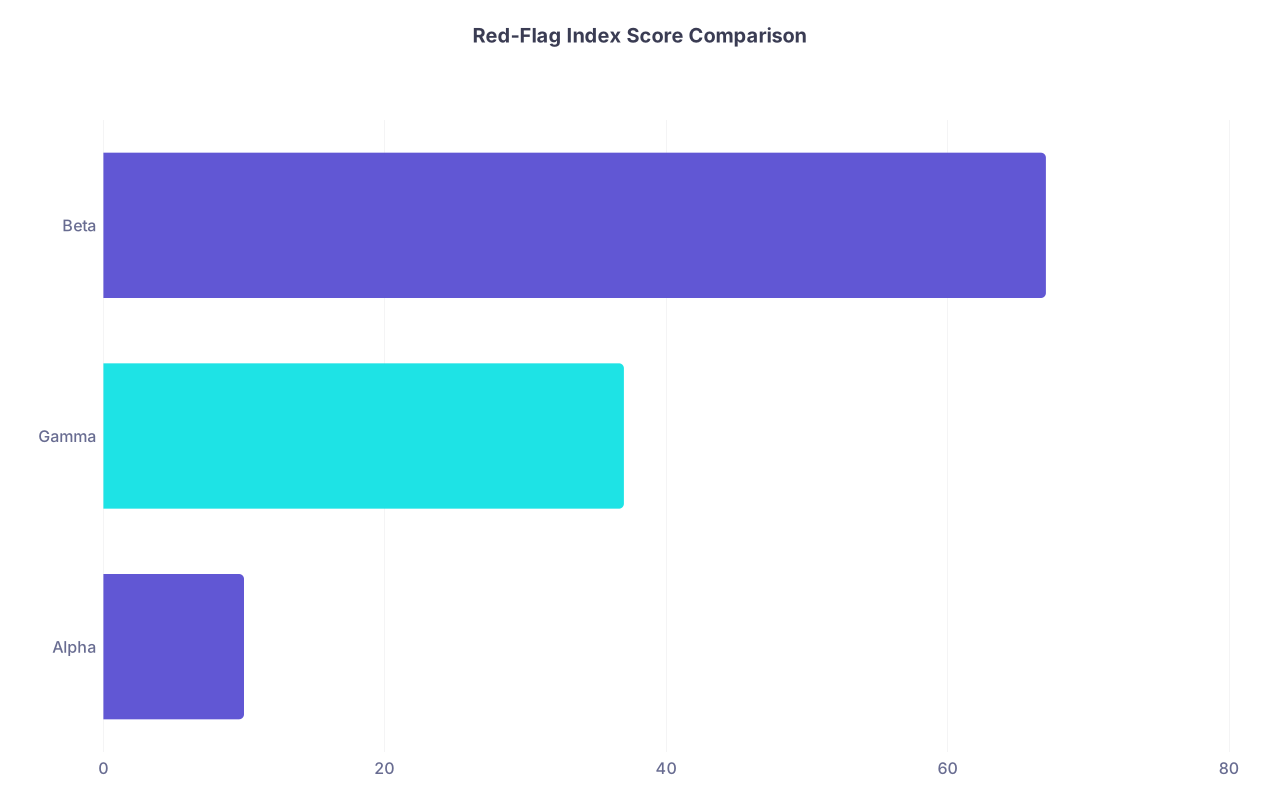
| Category | Value |
|---|---|
| Alpha | 10 |
| Gamma | 37 |
| Beta | 67 |
Program Beta is screaming red. Gamma is a moderate concern. Alpha is relatively safe by these metrics.
This is exactly what you want the index to do: separate the routine imperfect from the clearly hazardous.
7. Dealing with Missing and Messy Data
Reality: you will not have complete data for every program and every feature.
You have three options, and you should be explicit about which one you choose:
- Impute with specialty‑wide averages.
- Shrink the weight of features with missing data for that program.
- Flag the program as “insufficient data” and avoid a false sense of precision.
My recommendation:
- If a feature is missing for <20% of programs, impute with the median and keep it in.
- If a feature is missing for >40% of programs, either drop it or treat it only as a binary “known bad” flag when data exists (for example, NRMP violation: 0 for unknown, 1 for verified).
Also: maintain a “data completeness score” per program (0–1). Programs with RFI=20 but completeness=0.3 should be interpreted more cautiously than ones with completeness=0.9.
8. How to Actually Build This (Without a PhD)
You do not need complicated machine learning models. A reasonable Python stack or even a brutal but consistent Excel + R process will do.
Rough workflow:

| Step | Description |
|---|---|
| Step 1 | Define Features |
| Step 2 | Collect Public Data |
| Step 3 | Clean and Normalize |
| Step 4 | Assign Weights |
| Step 5 | Compute RFI Scores |
| Step 6 | Validate Against Known Good Bad Programs |
| Step 7 | Refine Thresholds and Weights |
A few practical notes from actually doing this kind of work:
- Start with one specialty. Internal medicine or family medicine have rich data and lots of programs.
- Hand‑curate a “training set” of, say, 30 programs everyone knows are great and 30 programs everyone whispers about. See whether your index separates them. If it does not, your weights or features are off.
- Do not be overly impressed with fancy algorithms. A transparent weighted sum beats a black‑box model that overfits a noisy sentiment scrape.
9. How to Use the Index as an Applicant
The Red‑Flag Index is not a ranking system. It is a risk filter.
A disciplined way to use it:
- For all programs on your target list, compute or approximate an RFI.
- Sort by descending RFI.
- For the top‑risk quartile, ask: “Do I have a compelling reason to keep this program on my list?”
- For interviews at high‑RFI programs, tailor your questions:
- “What changes were made after the recent ACGME citation?”
- “How does the program monitor resident attrition and why do residents leave?”
- “Can you walk me through board prep resources and recent pass rates?”
The data is not a verdict. It is a list of topics to interrogate aggressively.
10. Where This Can Go in the Future
If enough residents start treating this approach as standard, pressure rises on programs to clean up.
If enough data nerds in medicine coordinate, you can imagine:
- A public, continuously updated Red‑Flag Registry for each specialty.
- A standard set of metrics that ACGME and NRMP publish in machine‑readable format.
- Residents contributing verified, structured feedback instead of scattered one‑off posts.
And yes, eventually, richer models that predict actual resident‑level outcomes (burnout, retention, career trajectories) from program‑level features. But do not wait for that.
Right now, today, the available public data is already enough to separate ordinary imperfection from chronic dysfunction.
Key points:
- A small set of well‑chosen public signals, properly weighted, can identify high‑risk programs far more reliably than interview‑day impressions.
- A transparent, weighted Red‑Flag Index is best treated as a risk filter and conversation starter, not a one‑number “quality” ranking.