
Most premeds obsess over MCAT scores and shadowing hours while ignoring the tools that actually run modern clinical research: REDCap and Qualtrics.
If you plan to touch clinical or survey-based research at any point in medical school, you are going to see these names. They are not “optional software skills.” They are infrastructure. The students who know how to use them stop being “extra hands” and start being indispensable.
Let me break this down specifically.
Why REDCap and Qualtrics Matter Before You Even Start Med School
Think about how most academic research runs today:
- A cardiology fellow is tracking 300 heart failure patients across 5 clinics.
- A psychiatry resident is running an anonymous survey on burnout.
- A health services researcher is analyzing patient satisfaction across a hospital system.
- A med student is doing a summer project on vaccine attitudes in college students.
Almost every one of those projects needs:
- A way to collect data in a structured, secure, reproducible way
- A way to manage surveys, follow-ups, and branching logic
- A way to export to statistical tools (R, SPSS, Stata, SAS) without chaos
That is the domain of REDCap and Qualtrics.
The basic split
REDCap = research database platform
- Built for clinical research, registries, longitudinal studies
- Emphasis on security, compliance, audit trails
- Common in academic medical centers
Qualtrics = enterprise survey platform
- Built for sophisticated surveys and experience data
- Common in universities, public health, health services research
- Very powerful for complex survey designs, panels, and distribution
You do not need to be a biostatistician to be useful here. You just need to be the student who can say, “Yes, I can build that REDCap project” or “I can set up that Qualtrics survey correctly and link the data to the analysis plan.”
That alone can get you on abstracts and papers.
REDCap: The Backbone of Many Clinical Research Projects
REDCap (Research Electronic Data Capture) is not just “a fancy spreadsheet.” It is a structured, database-driven system designed for research workflows in medicine.
Where you will see REDCap as a med student
Concrete scenarios:
- Retrospective chart review with standardized data abstraction
- Prospective registry tracking surgical outcomes over time
- Quality improvement projects where you collect process and outcome data
- Multi-site studies with centralized, secure data entry
- Longitudinal cohorts with repeated visits, follow-up surveys, or labs
If you are working with a PI in cardiology, surgery, oncology, EM, ICU, or any clinical department, there is a high chance REDCap is somewhere in their workflow.
Core concepts of REDCap (the pieces you must know)
Do not memorize everything. Focus on these core ideas:
Projects
A REDCap “project” is a self-contained environment: forms, variables, events, users, data. One study = one project (almost always).Instruments (forms)
These are your data collection forms: baseline visit, follow-up visit, lab values, demographics, etc.
Each question = a field, with:- Field type (text, dropdown, radio, checkbox, calculated, etc.)
- Variable name (what shows up in your dataset)
- Prompt/label shown to users
Example:
- Field label: “Systolic blood pressure (mmHg)”
- Variable name:
sbp - Field type: Text (number, integer, min 40, max 300)
Records
Each participant or unit of analysis is a record.- Record ID = unique identifier (
study_id,mrn_encrypted, etc.)
- Record ID = unique identifier (
Events (longitudinal projects)
For longitudinal or multi-visit studies, you define events: baseline, 3-month visit, 6-month visit, surgery date, etc., then link instruments to specific events.User roles & permissions
- You can explicitly control who can view, edit, export, or design instruments.
- Critical for maintaining IRB compliance and data security.
Data dictionary
- A CSV file that defines all variables, types, options, and structure.
- You can build or edit projects by uploading an updated data dictionary instead of clicking through the web UI.
These concepts show up repeatedly in research meetings. If you understand them, you can follow and contribute.
The workflow of building a REDCap project (the practical sequence)
Most med students are handed a half-built mess. A better pattern looks like this:
Start with the research question and analysis plan
Example: “We want to know whether pre-op frailty predicts 30-day postoperative complications in patients >65 years.”Define primary outcome and covariates
- Outcome: 30-day major complication (yes/no)
- Predictors: age, frailty score, comorbidities, surgical type, ASA class, etc.
Translate into variables
Create a clean variable list:record_idage(integer)frailty_score(integer 0–9)asa_class(1–5)complication_30d(0 = No, 1 = Yes, -9 = Unknown)- etc.
Build instruments to match real-world workflows
- Instrument 1: Demographics & baseline assessment
- Instrument 2: Surgical details
- Instrument 3: 30-day follow-up outcomes
Implement in REDCap
- Use Online Designer or upload Data Dictionary
- Set appropriate validation (dates, integers, ranges)
- Use branching logic (e.g., only show pregnancy questions if
sex = femaleandage < 50)
Test with fake data
Enter 5–10 test records.
Export to Excel or R.
Check variable coding, missingness, and logic.Move to Production mode
- Once finalized, change project status from Development to Production.
- Any structure changes later are logged and harder to make. You want that.
If you can articulate this workflow to a mentor, you sound like someone who understands research infrastructure—not just someone looking for “a research line on my CV.”
Features med students should actually learn (not everything, just the right things)
Focus on these areas:
Basic field types and validation
- Text, dropdowns, radio buttons, checkboxes
- Date/time formats (
YYYY-MM-DD), integer enforcement, min–max ranges - Why: Clean data upfront saves you hours later in R or SPSS.
Branching logic
- Simple expression language:
- Example: Show pregnancy questions only if
[sex] = 'F' and [age] >= 12 and [age] <= 50
- Example: Show pregnancy questions only if
- Why: Prevents irrelevant questions, improves user experience.
- Simple expression language:
Calculated fields
- Example: BMI = weight (kg) / height (m)^2
- Or composite scores (e.g., Charlson comorbidity index, risk scores)
- Why: Standardizes derived variables, avoids manual calculation errors.
Longitudinal setup
- Define events (baseline, 6 months, 12 months).
- Assign instruments to events.
- Why: Essential for cohorts, follow-up studies, and many residency QI projects.
User rights and roles
- Who can see PHI? Who can export identifiers?
- How to add a student, coordinator, or PI with correct access.
- Why: This is what makes you “trusted” with real clinical data.
Data export options
- Learn to export to CSV, R, STATA, SPSS.
- Understand the difference between raw values vs. labeled exports.
- Why: Smooth handoff to analysis, less frustration with recoding.
If you can confidently navigate these, you are already ahead of a large percentage of early trainees.
Qualtrics: The Workhorse of Survey-Based Research
If REDCap is the workhorse database system for clinical data, Qualtrics is the high-end machine for survey design and delivery.
You will encounter it in:
- Medical education research (student experience, evaluations, OSCE feedback)
- Public health and population surveys
- Behavioral and social science projects
- Patient experience or satisfaction studies
- Needs assessments for community interventions
What Qualtrics does differently than REDCap
Yes, REDCap can do surveys. But Qualtrics is built around surveys as the core product, not as an added feature. Key differences:
More advanced survey logic and flows
- Complex branching, randomization, embedded data
- Multiple blocks with different logic paths
Distribution tools
- Email campaigns, personalized links, reminder automations
- Anonymous links, QR codes, social media sharing
Panel and respondent management
- Track completion, partial responses
- Contact lists with metadata
Presentation and UX
- More polished theming, layouts, multi-device optimization
- Better for patient- or public-facing surveys
For medical school and early research, knowing how to build a well-structured Qualtrics survey is an extremely practical, high-yield skill.
Core Qualtrics concepts you need
Projects and surveys
Each survey lives within a project.
You build questions, logic, and distribution here.Question types
- Multiple choice (single or multiple answer)
- Matrix tables (Likert scales)
- Text entry (short, long, essay)
- Slider, dropdown, ranking, etc.
- Descriptive text and graphics
Blocks
Group questions into blocks (e.g., Demographics, Attitudes, Behaviors).
Blocks are the unit you move around, randomize, or apply flow logic to.Survey Flow
This is the control center for:- Order of blocks
- Branching logic (if X, then show Y block)
- Randomization of blocks or questions
- Embedded data (store variables about respondents)
Embedded data
Variables you can attach to each response, often not shown directly to the respondent:- Group assignment
- Recruitment source
- Site or clinic
- Timepoint (baseline, follow-up)
Distributions and anonymous vs. tracked surveys
- Anonymous link: one URL, anyone with link can respond, limited tracking
- Personal links: unique to each email, track who responded, send reminders
- You will align this with your IRB protocol and consent language.
Building a survey in Qualtrics the right way
You can absolutely create a survey by randomly clicking around. You will also create analysis pain and IRB complications that way. Better pattern:
Clarify the purpose and endpoints
Example: “Measure burnout in internal medicine residents and correlate with weekly work hours and EMR time.”Select or import validated instruments when possible
- Maslach Burnout Inventory, PHQ-9, GAD-7, etc.
- Many have strict wording, ordering, and scoring rules—do not alter casually.
Draft on paper or in a document first
- Group into conceptual sections (blocks): Consent, Demographics, Burnout Scale, Workload, Open feedback.
- Mark where branching will occur (e.g., only ask about parenting if children = yes).
Implement in Qualtrics
- Create separate blocks for major sections.
- Use matrix tables appropriately for scales (Likert questions).
- Label variable names meaningfully (e.g.,
burnout_q1rather thanQ1when exported).
Set up Survey Flow
- Add consent block at the beginning.
- Branch logic: If they do not consent, end survey.
- Randomize order of certain blocks or questions if needed for design.
- Add embedded data (e.g., cohort = “IM PGY-1”, site = “Hospital A”).
Pilot test
- Have 5–10 people similar to your target population take the survey.
- Time how long it takes.
- Ask them what was confusing or annoying.
- Check data export for coding and missingness.
Finalize and distribute
- Align distribution type with IRB and anonymity needs.
- Plan reminders carefully: 1–3 reminders spaced out is typical.
If you understand this process, you can run a full survey project from scratch as an MS1 or premed.
REDCap vs Qualtrics: Which Should You Use for What?
You will often have both tools available through your institution, especially at a major academic medical center or large university. The question then becomes: Which is appropriate for your study?
Use REDCap when…
You are doing:
- Clinical data collection from charts or visits
- Prospective observational cohorts with multiple timepoints
- Registries where multiple users enter data on patients
- Studies involving PHI and heightened security needs
- Multi-site clinical collaborations where audit trails matter
Advantages here:
- Strong role-based access control
- Fine-grained export permissions (with/without identifiers)
- Robust audit trails of each data change
- Excellent longitudinal and event-based structure
- Closer alignment with typical clinical research data models
Example:
You are tracking 200 patients undergoing a specific surgery with baseline, intraoperative, and 90-day follow-up data. You need charts abstracted by different residents, data integrated from the EMR, and secure storage. REDCap wins.
Use Qualtrics when…
You are doing:
- Survey research on attitudes, knowledge, behaviors
- Medical education surveys of students, residents, faculty
- Public-facing or community surveys
- Complex survey logic with advanced randomization
- Studies focusing on user experience of the survey itself
Advantages:
- Highly flexible survey design and layout
- Better for large-scale email surveys and panel management
- Strong tools for randomization and experimental survey designs
- Clean, user-friendly interface for participants
Example:
You are surveying all medical students at your institution about mental health resource usage, using validated scales and some customized questions, with email invitations and reminders. Qualtrics wins.
Gray zones and hybrid approaches
Sometimes you will see:
Survey in Qualtrics + data import into REDCap
- For instance, patient-reported outcomes collected in Qualtrics then linked to a clinical REDCap registry.
REDCap for core data + Qualtrics for one-time feedback
- Example: REDCap registry of ICU patients, and a Qualtrics survey to staff about protocol implementation.
The key is that you understand:
- Security and compliance needs
- Complexity of the survey logic
- Longitudinal structure vs one-time responses
Then choose the tool accordingly.
IRB, Ethics, and Data Security: Where These Tools Intersect with Real Responsibility
As you move from “I want a publication” to “I am responsible for human subjects data,” you must connect REDCap and Qualtrics to IRB requirements and ethical basics.
Typical IRB-relevant questions for these tools
When you submit an IRB protocol, you will often need to specify:
- Where will data be stored? (REDCap, institutional Qualtrics, secure server)
- Who will have access? (roles, permissions, project members)
- Will any PHI be collected? (names, MRN, DOB, contact info, IP addresses)
- How will identifiers be separated from research data?
- How will data be exported and analyzed, and by whom?
REDCap helps you with:
- Separate fields / instruments for identifiers
- De-identified export options
- Restricted access roles for PHI-containing fields
- Audit trails to show exactly what happened
Qualtrics helps you with:
- Anonymous vs. trackable responses
- Control over IP address collection (can be disabled)
- Separation of contact list from survey responses
As a student, if you can clearly explain to your mentor or PI:
- “We should disable IP logging on Qualtrics because the IRB classifies this as identifiable.”
- “Let us store identifiers as a separate REDCap instrument with limited access and only export de-identified data for analysis.”
You stop sounding like a novice. You become the person who makes the project IRB-safe and operational.
How Premeds and Early Med Students Can Actually Learn These Tools
You do not need a formal course called “REDCap & Qualtrics” to become competent. Use a layered approach.
Step 1: Institution access and sandbox projects
Check if your university or medical school has licenses:
- Many have campus-wide Qualtrics.
- Most academic medical centers have REDCap.
Ask for a test or training project:
- Many REDCap administrators will enable “practice” projects.
- In Qualtrics, simply create a new project and mark it as practice.
Step 2: Work through a real mini-project
Make it specific, not hypothetical.
For REDCap:
- Build a small project for a “mock” retrospective study:
- “Outcomes of ED patients with asthma exacerbation over 1 year.”
- Create variables: age, sex, smoking status, ED visit dates, admission yes/no, LOS.
- Build instruments, enter 10 fake patients, export to CSV.
For Qualtrics:
- Build a 10–15 question survey:
- Topic: study habits among premeds, or wellness among classmates.
- Include: consent, demographics, Likert scales, open-ended question.
- Use Survey Flow to exclude responses without consent.
- Distribute to a few friends and review the data export.
You will learn more doing that than from 2 hours of passive video watching.
Step 3: Use official and local resources
REDCap
- Many institutions have REDCap training sessions (often 1–2 hours).
- There are also short online tutorials and REDCap Consortium resources.
- Local REDCap admins are often extremely helpful if you ask focused questions.
Qualtrics
- Qualtrics has extensive official guides and a built-in “Learn” section.
- Many universities provide tailored documentation or workshops.
Targeted practice:
- Practice building branching logic in both platforms.
- Practice setting user rights in REDCap with a test collaborator account.
- Practice exporting data and importing it into Excel and then into R or SPSS.
Step 4: Leverage these skills in real research opportunities
When you approach a potential mentor, do not just say, “I am interested in research.”
Say something like:
- “I have intermediate experience with REDCap, including building instruments and setting longitudinal events. If your project needs help with data infrastructure or cleaning, I can contribute there.”
or
- “I know how to structure Qualtrics surveys with branching logic and ensure IRB-compliant settings (anonymous responses, no IP tracking, etc.). If you are planning a survey-based study with residents or patients, I would be glad to help set that up.”
Mentors remember the student who makes their life easier.
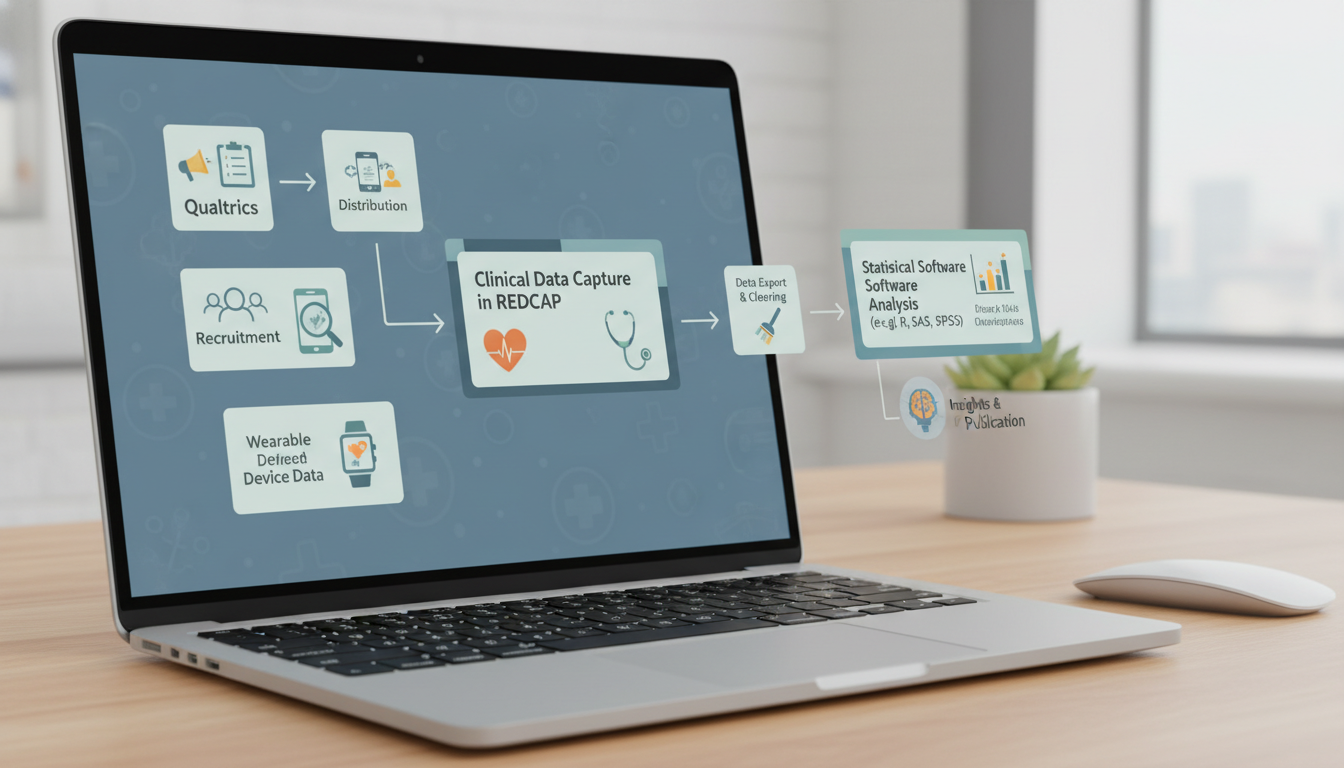
How This Translates into Match-Relevant Outcomes
Let us be blunt. A lot of students want “research” mainly because they know it matters for residency applications.
Knowing REDCap and Qualtrics in a substantive way helps you in three concrete, non-hand-wavy ways.
1. You move up the authorship ladder faster
You are not just “data entry 1 of 4.” You become:
- The person who designed the REDCap project or structured the Qualtrics survey
- The one who can fix logic issues or redesign the instrument when reviewers ask
- The one everyone emails when they cannot export or clean the dataset
That often transforms your role from peripheral to central.
2. You handle more complex and publishable projects
The projects that get into better journals often have:
- Clean, well-documented data structures
- Clear timepoints and longitudinal follow-up
- Validated surveys integrated correctly
- Fewer data quality problems
These all depend heavily on the initial data infrastructure—precisely where REDCap and Qualtrics are critical. If you can contribute there, you can attach yourself to projects with higher yield.
3. You speak the language of research teams
When you say:
- “We should add an audit trail–relevant field in REDCap for tracking who updated outcomes.”
- “We can set up randomization at the block level in Qualtrics for this vignette study.”
- “Our IRB requires truly anonymous responses, so we need to avoid identifiable embedded data.”
You sound like a junior collaborator, not an extra set of hands.
Residency PDs who do research themselves tend to recognize this kind of involvement when they read your application and letters.
Key Takeaways
- REDCap and Qualtrics are not “extra tech skills”; they are foundational infrastructure for modern clinical and survey research.
- Learn targeted, practical features: in REDCap, focus on instruments, events, validation, branching logic, user rights, and export; in Qualtrics, focus on blocks, Survey Flow, branching, embedded data, and distribution.
- Use these tools strategically to become indispensable on research teams, taking on central roles in study design, data collection, and IRB-compliant implementation long before you graduate medical school.