
Most applicants are uploading too many letters to ERAS and assigning them badly.
Let me cut through the noise and give you the actual numbers and strategy.
The Core Answer: Upload vs Assign
Here’s the clean distinction you need in your head:
- ERAS upload limit: You can upload up to 4 LORs per program per specialty in your assignments.
- ERAS total letters: You can have many more letters stored in ERAS overall (e.g., 6–10 total), but you can’t assign more than 4 to any one program.
So the real question is not “how many can I upload?” but:
- How many LORs should I collect and upload in total?
- How many LORs should I assign to each program, and which ones?
Here’s the short framework:
- Total letters to upload:
- Most applicants: 5–7 letters total in ERAS
- Very letter-heavy specialties (derm, ortho, neurosurg): 6–8 letters total
- Letters to assign per program:
- Nearly always: 3 or 4 letters per program
- Competitive specialties: 4 letters to almost every program
- Less competitive or community-heavy: 3–4 letters is fine
If you’re routinely assigning fewer than 3 or more than 4, you’re doing it wrong.
Program Requirements vs Strategy
Programs don’t all want the same thing. Some specify exact numbers or types; others are vague.
You always follow this logic:
- Minimum required (non‑negotiable)
- Optimal number (your strategic choice)
- Type mix (specialty vs non‑specialty vs chair letter)
| Specialty | Common Min | Recommended Assignments | Notes |
|---|---|---|---|
| Internal Med | 3 | 3–4 | 1 Chair often preferred |
| General Surg | 3 | 3–4 | Mostly surgery letters |
| Pediatrics | 3 | 3–4 | Peds-heavy mix ideal |
| EM | 2 SLOEs | 3–4 (2 SLOE + others) | SLOE = king |
| Derm/Ortho/ENT | 3 | 4 | Max out quality letters |
If a program says:
- “Minimum 3 letters” → you send 3 or 4, not 2.
- “No more than 3” → you send exactly 3.
- “We require at least 1 letter from [specialty]” → you make sure that’s included in your 3–4.
Programs that explicitly cap at 3 are rare, but they exist. When they do, respect the cap. They’re telling you they actually read them.
(Related: The Truth About Signals and Preference Signaling in Residency)
How Many Letters Should You Upload in Total?
This is where people over-collect and under-think.
Here’s the rule:
Only upload letters you might realistically assign.
You do not need 10 letters unless your situation is unusual (multiple specialties, couples match with very different program types, IMG with extra backup plans, etc).
General targets
1 specialty only (most people):
5–7 total uploaded
Example for Internal Medicine:- 3 IM letters (ward, subspecialty, ICU)
- 1 Chair letter (if your school uses them)
- 1 non‑IM letter (medicine‑adjacent, e.g., neuro, cards, research mentor)
- Optional 6th: strong research heavy letter if relevant
2 specialties (e.g., IM + EM, IM + Neuro):
6–8 total uploaded
Because you’ll maintain two different assignment “sets” of 3–4 letters.Heavy research applicant (MD/PhD, multiple first-author):
You still don’t spray 8 letters per program. You just have 1–2 research letters in the pool to swap in where appropriate.
Uploading more than 8 letters as an ordinary applicant is usually a red flag that you’re collecting paper, not strategy.
How Many Letters to Assign per Program?
Let’s be very specific.
Baseline rule
Assign 4 letters when:
- Specialty is competitive (derm, ortho, ENT, neurosurg, ophtho, plastics, EM, some IM subspecialty tracks)
- You have 4 genuinely strong letters (or 3 strong + 1 solid chair letter)
- Program doesn’t cap max LORs
Assign 3 letters when:
- Program limits you to 3
- One of your letters is clearly weaker or generic
- You’re applying to less competitive programs where “enough” quality is better than “more” noise
Most programs are designed to handle 3–4 letters. They’re not impressed that you hit “upload” more times.
Example: Internal Medicine applicant
Your pool (6 letters):
- IM ward attending: very strong
- IM subspecialty elective: strong
- ICU attending: strong
- Chair letter: solid, but formulaic
- Research mentor: very strong but not an IM doc
- Neurology attending: decent but generic
Smart assignments:
Academic IM programs:
- Ward IM
- Subspecialty IM
- Research mentor
- Chair letter (4 total)
Community IM programs:
- Ward IM
- ICU IM
- Chair letter
(maybe drop the research letter if they’re not research‑heavy)
If a program caps at 3:
- Most competitive academic: Ward IM + Subspecialty IM + Research mentor
- Less competitive: Ward IM + ICU IM + Chair letter
You’re curating, not just maxing.
Redundancy vs Flexibility: Letter “Sets”
ERAS is built to let you assign different combinations of letters to different programs. Use that.
Smart approach: Create 2–3 “sets” of letters
Think of them as playlists:
Academic‑heavy set (4 letters)
- 2–3 specialty clinical letters
- 1 research or academic letter
- Optional: Chair letter if your school pushes it
Community‑heavy set (3–4 letters)
- 2 strong specialty clinical letters
- 1 more broadly clinical or Chair letter
- Often skip the pure research letter
Backup‑specialty set (3–4 letters)
- Majority from that backup specialty
- 1 general medicine/surgery letter shows versatility
You can assign these sets almost like templates in ERAS. Saves you time, keeps your strategy consistent.
Special Situations and How Many Letters You Need
Let’s deal with the edge cases quickly but clearly.
1. Emergency Medicine (SLOE world)
EM is its own planet.
- Programs usually want:
- 2 SLOEs (standardized EM letters)
- Optional: 1 non‑SLOE clinical letter
- Optional: 1 research or other letter
Realistically you should upload:
- 2–3 SLOEs (if you did 2–3 EM rotations)
- 1 IM or surgery letter
- 1 research or other letter
So: 4–5 total in ERAS, assign 3–4 per program.
2. Very competitive surgical subspecialties (ortho, ENT, neurosurg, plastics)
Their culture: “We want to see everyone you’ve impressed.”
Upload:
- 4–5 specialty letters
- 1 Chair/departmental letter
- Optional 1–2 research letters
So 6–8 uploaded, but still assign 4 per program. Quality over absolute count.
3. Dual‑applicants (e.g., IM + Anesthesia)
You do not use the same 4 letters for both specialties if you can help it.
- Plan for:
- 3–4 letters skewed IM
- 3–4 letters skewed Anesthesia
With some overlap (e.g., ICU letter counts for both).
Total you might upload: 7–8.
But per program, still 3–4. You’re just swapping which ones.
Common Mistakes With ERAS LOR Numbers
I’ve watched people screw this up in predictable ways.
Mistake 1: Uploading every possible letter
Students proudly tell me, “I have 9 letters!” like it’s a flex.
Reality:
- Programs don’t see the total you’ve uploaded.
- They only see what you assign.
- Extra weak letters dilute your judgment and increase your chance of sending a mediocre one by accident.
Only upload letters you’re genuinely willing to assign to at least some programs.
Mistake 2: Assigning 4 letters when you only have 2–3 strong ones
Three excellent letters beat 3 great + 1 bland every time.
If your fourth letter is from:
- A resident who barely knew you
- An attending who writes “hardworking and punctual” 10 times
- A preclinical course director who never saw you with patients
…you leave it out. Seriously.
Mistake 3: Ignoring specific program caps
Sometimes on a program’s website or in ERAS they’ll say:
- “We review a maximum of 3 letters.”
- “Do not send more than 3 LORs.”
If you send 4, that’s not “ambitious.” It’s “cannot follow instructions.” Residency is full of instructions.
Mistake 4: Collecting too late
Another trap: waiting on the “perfect” letter and ending up with only 2 uploaded when ERAS opens. Programs start reviewing quickly.
You want at least 3 letters uploaded and assignable by the time you submit. A late 4th letter can still be added, but don’t hold your entire application hostage for it.
Practical Step‑by‑Step Plan
Let’s turn all of this into action.

| Step | Description |
|---|---|
| Step 1 | Decide Specialty/ies |
| Step 2 | Target 5-7 Total Letters |
| Step 3 | Map Letters by Type |
| Step 4 | Create 2-3 Letter Sets |
| Step 5 | Check Program Requirements |
| Step 6 | Assign 3-4 Per Program |
| Step 7 | Adjust for Caps or Special Cases |
Step 1: Decide on 1 or 2 specialties.
Step 2: Aim for 5–7 total letters (up to 8 if 2 specialties or uber‑competitive field).
Step 3: Categorize each letter: specialty, chair, research, general clinical.
Step 4: Build 2–3 standard assignment “sets” of 3–4 letters.
Step 5: Check program requirements and tweak:
- Cap at 3 → trim to your strongest 3
- Research‑heavy program → include your best research letter
- Community program → prioritize strong clinical specialty letters
Step 6: Lock your assignments for the first wave of applications.
You can always adjust later for individual programs if needed.
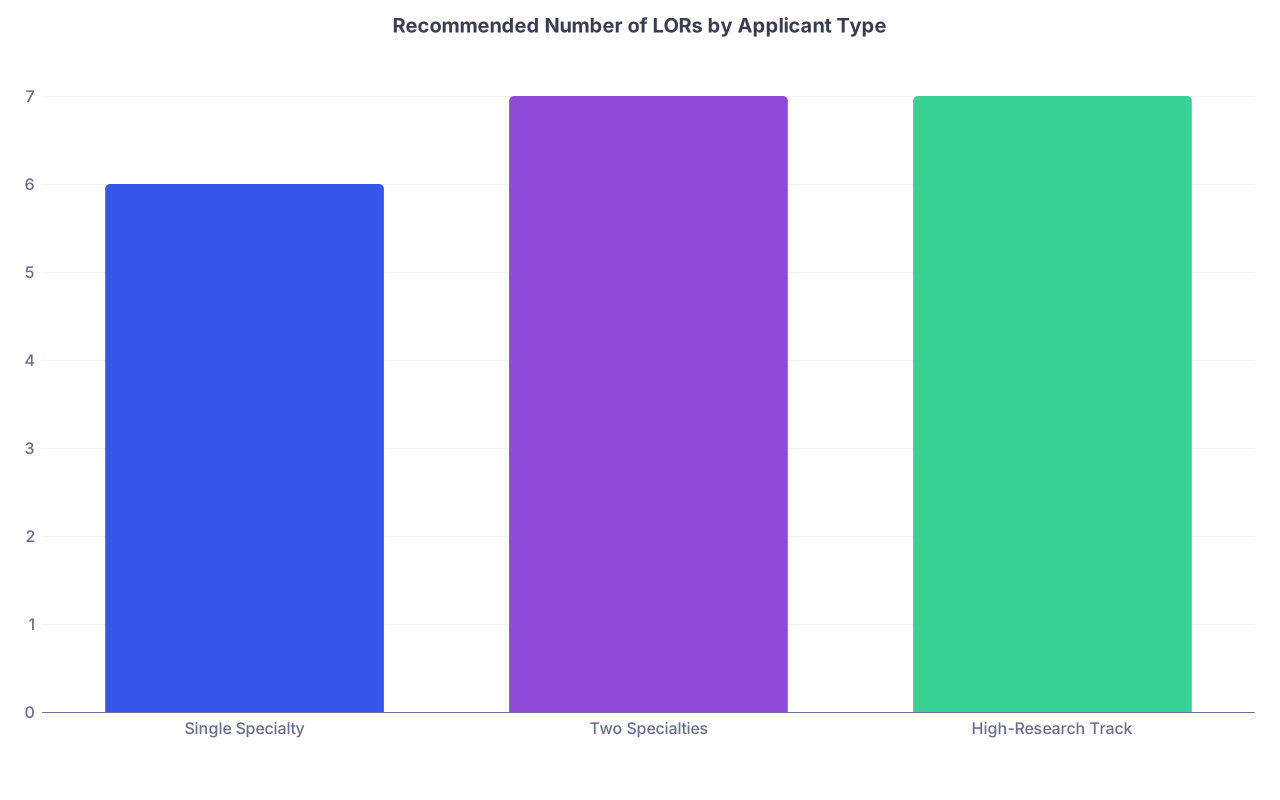
| Category | Value |
|---|---|
| Single Specialty | 6 |
| Two Specialties | 7 |
| High-Research Track | 7 |
FAQ: Letters of Recommendation in ERAS (7 Questions)
1. How many LORs should I upload to ERAS overall?
For most single‑specialty applicants, 5–7 total letters is the sweet spot. If you’re applying to two specialties or a very competitive surgical subspecialty, 6–8 is reasonable. More than that and you’re usually hoarding letters you’ll never use.
2. How many LORs should I assign to each program?
Usually 3 or 4. Competitive programs and specialties: default to 4 strong letters. If you only truly trust 3 of your letters, send 3. When a program clearly states a maximum (e.g., “we accept 3 letters”), send that number exactly.
3. Do programs see all the letters I uploaded, or just the ones I assign?
They only see the letters you assign to them. They cannot see your entire letter bank. That means you can safely upload extra letters you might use selectively, but you still need discipline about what gets assigned where.
4. Is there any benefit to sending fewer letters (e.g., just 3 instead of 4)?
Yes, if your fourth letter is mediocre. Three strong, specific letters are better than three strong plus one generic filler. Also, when programs cap at 3, following that instruction matters more than squeezing in one more voice.
5. How do I handle letters when I’m applying to two different specialties?
Plan on two overlapping sets of 3–4 letters:
- A set heavy on Specialty A letters, with 1 general clinical or research letter
- A set heavy on Specialty B letters, with some overlap from strong general or ICU letters
That usually requires 6–8 total letters uploaded, but you’re still assigning only 3–4 per individual program.
6. If a new letter arrives late, should I add it and reassign?
If it’s clearly stronger than something you’re using, yes. You can:
- Upload it to ERAS
- Start assigning it to future programs
- Optionally swap it into existing applications where it obviously improves your set
You don’t need to panic and update every single program unless the upgrade is dramatic (e.g., big‑name specialty PD letter).
7. Is a Chair letter mandatory, and does it “take up” a slot from a clinical letter?
At many schools, the Chair letter is strongly encouraged or automatically generated. If it’s at least decent, treat it as one of your 3–4 letters for most programs, especially academic ones. But it should not replace your best hands‑on specialty letters. If your Chair letter is weak or generic and not required, prioritize strong clinical letters instead.
Key points:
You should usually upload 5–7 total letters and assign 3–4 letters per program, tailored by type and program style.
When in doubt, send fewer, stronger letters rather than maxing out with mediocre ones.
(See also: Should I Do an Away Rotation in My Desired Specialty? for more details.)