
The way most applicants compare call schedules is flawed. “Q4” vs “Q5,” “home call,” “night float.” Hand-wavy labels that hide the actual workload. If you want to choose the right residency, you need to convert call schedules into hard, comparable numbers. Otherwise you are guessing.
This is about treating call like what it is: a time-series workload problem with real downstream effects on burnout, learning, and your life outside the hospital.
Why Call Frequency Metrics Matter More Than Marketing
Programs sell call like a product. You will hear:
- “We switched to night float, so call is better now.”
- “Home call only, very manageable.”
- “Q4 call but the interns are super protected.”
None of that is quantifiable. The data that actually matters sits behind those phrases:
- How many nights in-house per month?
- How many hours of disruption on home call?
- How many true 24–28 hour periods per year?
- What is the monthly distribution (clustered vs spread out)?
Here is the core problem: two programs can both say “Q4 call” and deliver completely different realities.
Program A:
- Q4 in-house overnight, 24-hour shifts, 1 day off after.
- Intern has 7–8 calls in a 28-day block.
Program B:
- Q4 “short call” till 10 pm, no overnight, no post-call day.
- Same label. Totally different fatigue profile.
So you need a way to strip away labels and convert call into standardized metrics. Once you do that, patterns pop out fast: some programs are outliers, some are moderate, and a few are legitimately cushy.
Step 1: Define the Core Call Metrics
Before you start comparing anything, you need a framework. There are four high-yield metrics that capture most of the reality.
1. Call Nights per Month (CNM)
This is the simplest:
CNM = number of nights when you are primarily responsible for cross-cover or admissions after 6–7 pm.
Break it down by:
- In-house overnight call nights
- Night float nights
- Home call nights
You want approximate annual totals and typical per-month ranges on heavy services.
2. Call Intensity Score (CIS)
Not all call nights are created equal. A 24-hour ICU call with 12 admissions is not equivalent to a quiet home call with 2 phone calls.
You can assign a crude intensity weight:
- 24–28 hr in-house call: weight = 1.0
- 12–16 hr in-house night (night float): weight = 0.7
- Short call (stay late till 9–11 pm): weight = 0.4
- Home call with frequent pages / likely to come in: weight = 0.4–0.6
- Home call with rare pages / rare to come in: weight = 0.2
Then:
CIS per month = Σ (number of each call type × weight)
No, this is not perfect. But it is a hell of a lot better than comparing raw “call days” without weighting intensity.
3. Overnight Hours per Month (OHM)
Now we care about actual time awake and disrupted.
A simple version:
OHM = Σ (hours between 10 pm and 7 am where you are required to be available / in-house)
For:
- 24-hr in-house call: count 9 hours (10 pm–7 am)
- 16-hr night shift (7 pm–11 am): ~9 overnight hours
- Home call: estimate based on typical disruption; if they say you “usually get called 2–3 times and sometimes go in,” estimate 3–4 hours of true disruption.
This is the closest metric to what fatigue actually tracks with: fragmented sleep and circadian disruption.
4. Call Saturation (CS)
This is about clustering. Five calls in one week is worse than five calls spread out over a month.
Define:
CS = maximum number of call nights in any 7-day period on a typical heavy month.
Example:
- Program X: max 3 call nights in any week → CS = 3
- Program Y: sometimes 5 calls in 7 days → CS = 5
Same month-level volume, very different lived experience.
Step 2: Turn a Call Schedule into Numbers
Take a concrete example. You are comparing two internal medicine programs that publish sample PGY-1 schedules.
Program 1 (Traditional Q4 + Night Float on some rotations):
- Wards, 4 months:
- Q4 24-hr call: ~7 calls per 28-day block
- ICU, 2 months:
- Q3 24-hr call: ~9–10 calls per 28-day block
- Night float, 1 month:
- 6 nights / week, 2 weekend days off per month
- Electives / clinic, 5 months:
- No overnight call
Program 2 (Strict Night Float, no 24-hr call):
- Wards, 4 months:
- Day team only, no overnight, occasional “late stay” till 9 pm (2–3 per month)
- ICU, 3 months:
- 6 nights / 14-day block of night float per ICU month
- Dedicated Night Float, 2 months:
- 5 nights / week, no weekends
- Electives / clinic, 3 months:
- No overnight call
Let us quantify.
Program 1: Example Metrics
We will approximate PGY-1.
- Call Nights per Month (CNM)
- Wards: 4 months × 7 calls/month = 28 in-house 24-hr calls
- ICU: 2 months × 9.5 avg calls/month ≈ 19 calls
- Night float: 1 month × 24–26 nights/month ≈ 24 nights
Total overnight call nights: 28 + 19 + 24 = 71 nights/year
Average per month (over 12 months): 71 / 12 ≈ 5.9 CNM
But the distribution is spiky: on ward / ICU blocks, it is higher; on electives, zero.
- Call Intensity Score (CIS)
Weights:
- 24-hr calls: 1.0
- Night float: 0.7 (hefty but usually no post-call day, more defined)
Compute:
- Wards: 28 × 1.0 = 28
- ICU: 19 × 1.0 = 19
- Night float: 24 × 0.7 = 16.8
Total CIS ≈ 63.8 per year
Monthly average ≈ 5.3
- Overnight Hours per Month (OHM)
Assume:
24-hr call: count 9 overnight hours (10 pm–7 am)
Night float 12–14 hours: count 9 overnight hours
24-hr calls: 47 calls × 9 hr = 423 hr
Night float: 24 shifts × 9 hr = 216 hr
Total overnight hours PGY-1 ≈ 639 hr
Monthly average: 639 / 12 ≈ 53.3 hours of overnight work per month
- Call Saturation (CS)
On ICU Q3:
- In 7 days you might have 2–3 calls. On some blocks with frontloading you might hit 3–4, but most likely CS = 3.
On wards Q4:
- Max about 2 calls in 7 days.
We will define Program 1 CS ≈ 3 (rare peaks maybe 4, but use stated norms, not worst-case horror stories).
Program 2: Example Metrics
- Call Nights per Month (CNM)
Wards:
- 4 months × ~0 overnight calls = 0 CNM (ignore late stays; not overnight disruption)
ICU:
- 3 months; each month has a 14-day block with 6 nights
- 3 × 6 = 18 nights on ICU
Night float (dedicated):
- 2 months, 5 nights/week
- Approx 4.3 weeks/month → 2 × (5 × 4.3) ≈ 43 nights
Total overnight call nights: 18 + 43 = 61 nights/year
Average per month: ~5.1 CNM
Already you see something people routinely miss: the “night float” program might have almost as many overnight nights overall as the Q4 program.
- Call Intensity Score (CIS)
Weights:
- Night shifts (ICU and NF): 0.7
CIS:
- ICU nights: 18 × 0.7 = 12.6
- Night float months: 43 × 0.7 = 30.1
Total CIS ≈ 42.7 per year
Monthly avg ≈ 3.6
So Program 2 has a lower CIS than Program 1 (42.7 vs 63.8), even though the CNM difference is small (61 vs 71).
- Overnight Hours per Month (OHM)
Again use 9 overnight hours per night shift.
- 61 nights × 9 hr ≈ 549 hr per year
Monthly avg: 549 / 12 ≈ 45.8 hr/month
So Program 2 has lower overnight exposure (about 46 vs 53 hr/month). Not a miracle, but real.
- Call Saturation (CS)
ICU night blocks:
- 6 nights in 14 days ≈ max 3–4 nights in 7 days
Dedicated night float:
- 5 nights per week → CS = 5
So Program 2 CS ≈ 5. That is harsher weekly clustering than Program 1, which was mostly CS ≈ 3.
Now you have a nuanced numerical picture:
Program 1:
- CNM ≈ 5.9
- CIS ≈ 5.3
- OHM ≈ 53 hr/mo
- CS ≈ 3
Program 2:
- CNM ≈ 5.1
- CIS ≈ 3.6
- OHM ≈ 46 hr/mo
- CS ≈ 5
The choice now depends on your tolerance for:
- Sustained heavy but more evenly distributed call (Program 1), vs
- Intense, highly clustered stretches with more recovery time and more normal non-call months (Program 2).
You are no longer reacting to “we do not have 24-hour calls!” as if that automatically means a lighter residency.
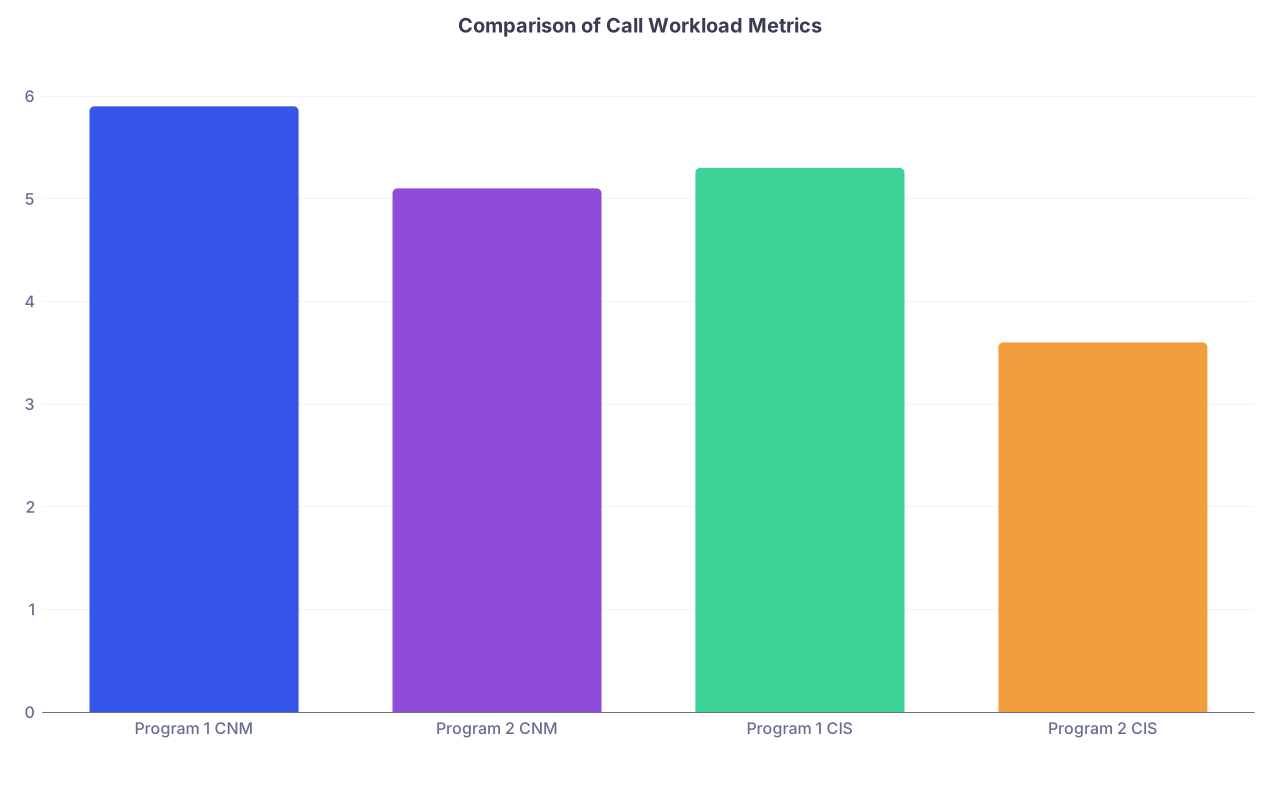
| Category | Value |
|---|---|
| Program 1 CNM | 5.9 |
| Program 2 CNM | 5.1 |
| Program 1 CIS | 5.3 |
| Program 2 CIS | 3.6 |
Step 3: Normalize for Year and Specialty
The numbers above are per PGY-1 for one specialty. You need to think in three dimensions:
- Year of training (PGY-1 vs PGY-2 vs PGY-3)
- Total residency length (3 vs 4 vs 6–7 years)
- Specialty culture (surgery vs peds vs psych)
Longitudinal Call Burden
If you can get data (or at least reasonable estimates) for each PGY year, compute:
- Annual CNM, CIS, OHM per year
- Cumulative totals over the entire program
Example for a categorical IM program:
- PGY-1: OHM ≈ 640
- PGY-2: OHM ≈ 450
- PGY-3: OHM ≈ 350
Total ≈ 1,440 overnight hours
Compare to a heavier IM program:
- PGY-1: 750
- PGY-2: 600
- PGY-3: 500
Total ≈ 1,850 overnight hours
That is a 28–30% higher cumulative overnight load. Over three years, that is real.
Specialty Baseline
You cannot directly compare psych and general surgery just on raw call numbers. The baselines differ.
But you can compare within specialty:
- For psychiatry, a program with 50% more overnight hours than its peers is a red flag.
- For surgery, a program that has aggressively moved away from 24+ hour calls to night float with reasonable caps is relatively lighter, even if still heavier than IM.
A simple approach: when you collect data, normalize each program to the median of the group you are considering.
If median OHM for your set of programs in a specialty is 50 hr/month:
- Program A: 65 hr/mo = 130% of median
- Program B: 40 hr/mo = 80% of median
What you care about is where each program sits relative to its peers, not an imaginary absolute perfect program that does not exist.
| Program | Specialty | OHM (hr/mo) | Relative to Peer Median |
|---|---|---|---|
| A | IM | 65 | 130% |
| B | IM | 50 | 100% |
| C | IM | 40 | 80% |
Step 4: How to Extract the Data from Programs
Programs rarely hand you CIS and OHM. You have to reverse-engineer it from what they tell you and what residents quietly admit when the PD steps out.
Here is a practical sequence.

| Step | Description |
|---|---|
| Step 1 | Review Website |
| Step 2 | Note Stated Call Patterns |
| Step 3 | Ask Residents for Real Numbers |
| Step 4 | Estimate Monthly Call Metrics |
| Step 5 | Normalize Across Programs |
1. Scrape the Website
Look for:
- “Typical day” or “call schedule” pages
- Rotation block diagrams
- Mentions of “Q4 call,” “night float,” “no 24-hour call,” “home call only”
Log raw phrases and numbers:
- X months of wards, with Q4 call
- 1 month ICU with night float
- 3 months electives, no call
2. Direct Questions on Interview Day
When you ask residents, do not ask, “Is call bad?” You will get useless answers.
Ask questions that force numbers:
- “On your heaviest ward month, how many overnights did you do?”
- “For your ICU month, how many nights in a row is typical?”
- “How many 24-hour calls did you do as an intern, roughly?”
- “On home call, how many nights were you actually called enough to lose significant sleep?”
Then cross-check:
- Ask two different residents the same question separately.
- If ranges differ widely, assume the higher value is closer to reality.
3. Reality-Check Against ACGME Rules
Remember the ACGME duty hour rules (which programs sometimes stress-test):
- 80 hours/week averaged over 4 weeks
- 1 day off in 7, averaged
- 24 + 4 hour maximum continuous duty for most specialties
If a program’s call data combined with a realistic daily workload is close to the 80-hour line consistently, they are not “chill.” They are at maximum throttle.
4. Standardize Your Notes Immediately
After each interview, before you forget, convert what you heard into your metrics:
- Approx CNM for PGY-1 heavy rotations
- Rough CIS using the weights
- OHM estimate
- Call saturation (max nights in 7-day stretch)
Put those in a spreadsheet. Once you have ≥5 programs, patterns emerge quickly.
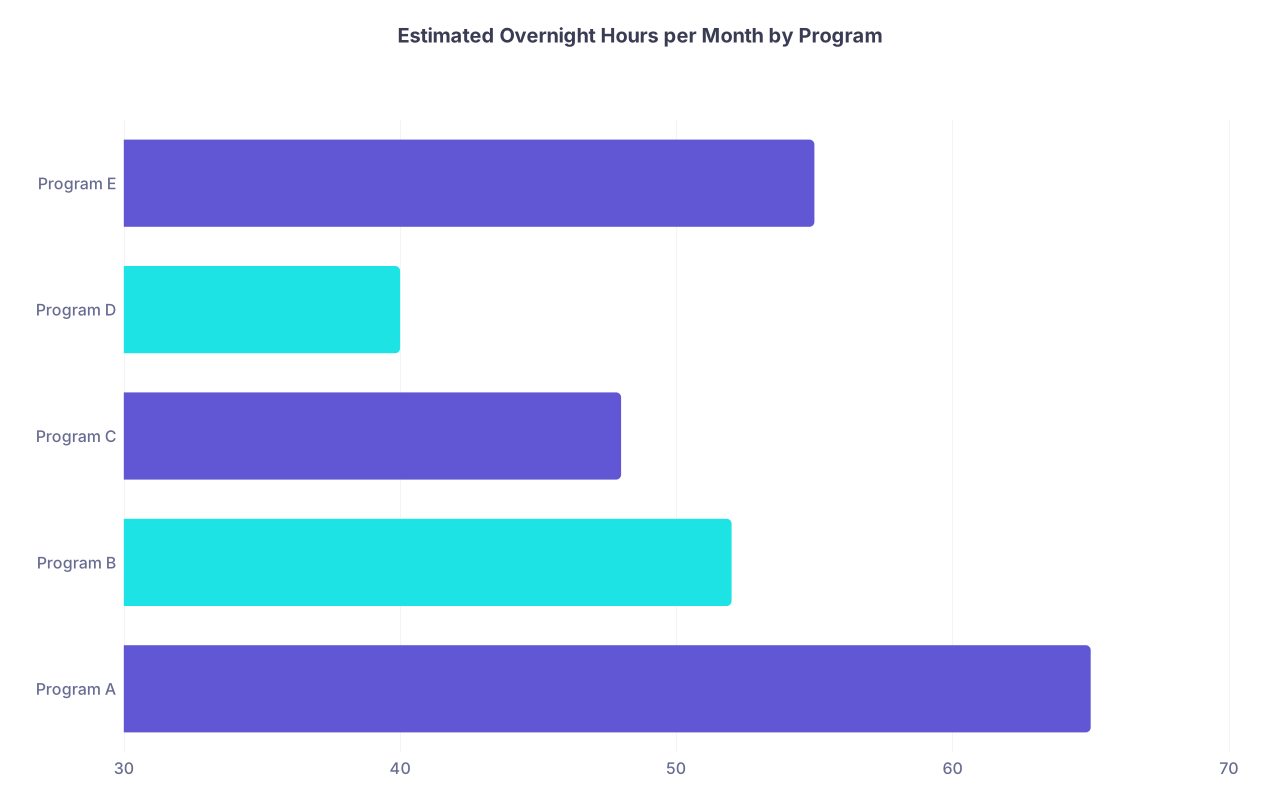
| Category | Value |
|---|---|
| Program A | 65 |
| Program B | 52 |
| Program C | 48 |
| Program D | 40 |
| Program E | 55 |
Step 5: Integrate Call Metrics into Your Rank List
You are not picking the “lowest call” program. You are choosing a combination of:
- Training quality
- Culture
- Location and support systems
- Call/workload profile
Call frequency metrics are one variable. A big one, but not the only one.
The data-driven way to do this:
Assign weights to what you care about. Example:
- Clinical training strength: 30%
- Location/personal: 25%
- Culture / support: 25%
- Call/workload: 20%
Score each program 1–10 on each dimension. For call/workload, use your normalized OHM/CIS/CNM data to anchor the score (not vibes).
Multiply and sum to generate a composite score.
You might discover this:
- Your “favorite” program emotionally is a 9 on culture/location but a 3 on workload (brutal call).
- Another program is a 7 on culture/location and a 7 on workload.
If you are honest, the 7/7 program might produce a better three years of your life, even if the tours and smiling PD made the first one feel like “home.”

A Few Subtle but Critical Call Distinctions
Not all call structure tweaks are marketing fluff. Some matter; others are cosmetic.
Home Call vs In-House
Home call can be deceptive. You need to know:
- How often do you actually get called in?
- How far is your housing from the hospital?
- Are you covering a unit where “home call” is functionally in-house by volume?
If a program says:
- “Home call on weekends for ICU, but I end up going in 80% of nights for 3–4 hours”
Treat that like partial in-house call with CIS ~0.6, not the 0.2 you would give to truly light home call.
True 24–28 Hour Calls vs Strict Night Float
There is decent evidence and plenty of lived experience that 24+ hour calls, especially stacked, correlate with more fatigue, burnout, and errors. So they deserve full weight.
But night float is not a free lunch. Intensely repetitive night shifts with limited cross-cover help can be just as draining. Programs that claim “no 24-hour calls” and then run you on 6-night stretches repeatedly are not magically humane.
This is why your OHM and CS metrics matter more than the presence or absence of a “24+4” label.
Post-Call Days That Are Not Real
Post-call protection varies wildly:
- Program X: strict, you leave by 10–11 am, no clinic, no pages.
- Program Y: “post-call” but you still have a required noon conference, maybe an afternoon clinic, and pages “until coverage arrives.”
For your metrics, you can:
- Keep call weights high (1.0) when post-call is fake.
- Slightly discount them (0.9) if post-call is actually protected and you reliably sleep.
Residents will tell you the truth if you ask, “What time did you usually leave post-call last month? And were you actually off call?”
Common Misinterpretations You Should Ignore
A few patterns I see repeatedly that lead applicants astray:
“We rarely hit 80 hours”
Translation sometimes: “We under-document” or “We push 78–79 every heavy week.” Use your call metrics and realistic daily hours (10–12+ on wards) to gauge likely averages. Simple math beats slogans.“We do nights but they’re chill”
Unless the resident gives you concrete numbers like, “I usually got 2–3 hours of downtime and 5–8 admissions,” you should model nights as high CIS. The default for nights is busy until proven otherwise.“Senior residents take the brunt of call”
Sometimes true, sometimes not. Ask specifically for PGY-1, PGY-2, PGY-3 patterns. You might be signing up for a brutal second year you will forget to factor in while fixating on intern year.“You get used to it”
Human beings do not physiologically “get used to” chronic circadian disruption. They adapt behaviorally, and they stop complaining. That is different.

What the Data Actually Helps You Avoid
Once you quantify call, you avoid three big traps:
The Shiny-Hard Program Trap
Famous program, sparkling reputation, brutal and poorly structured call that drives you into chronic sleep debt. Your metrics will flag that its OHM and CIS are 30–40% higher than your next best option.The Fake-Light Program Trap
Program saying “no 24-hour calls” and “protected hours” but with night float saturation and home call that behaves like in-house. CNM and CS expose this pretty fast.The “All Programs Are the Same” Myth
They are not. When you plot call metrics for 8–10 programs in the same specialty, you will see a spread. Often 1.5–2× differences in overnight hours and cumulative intensity.
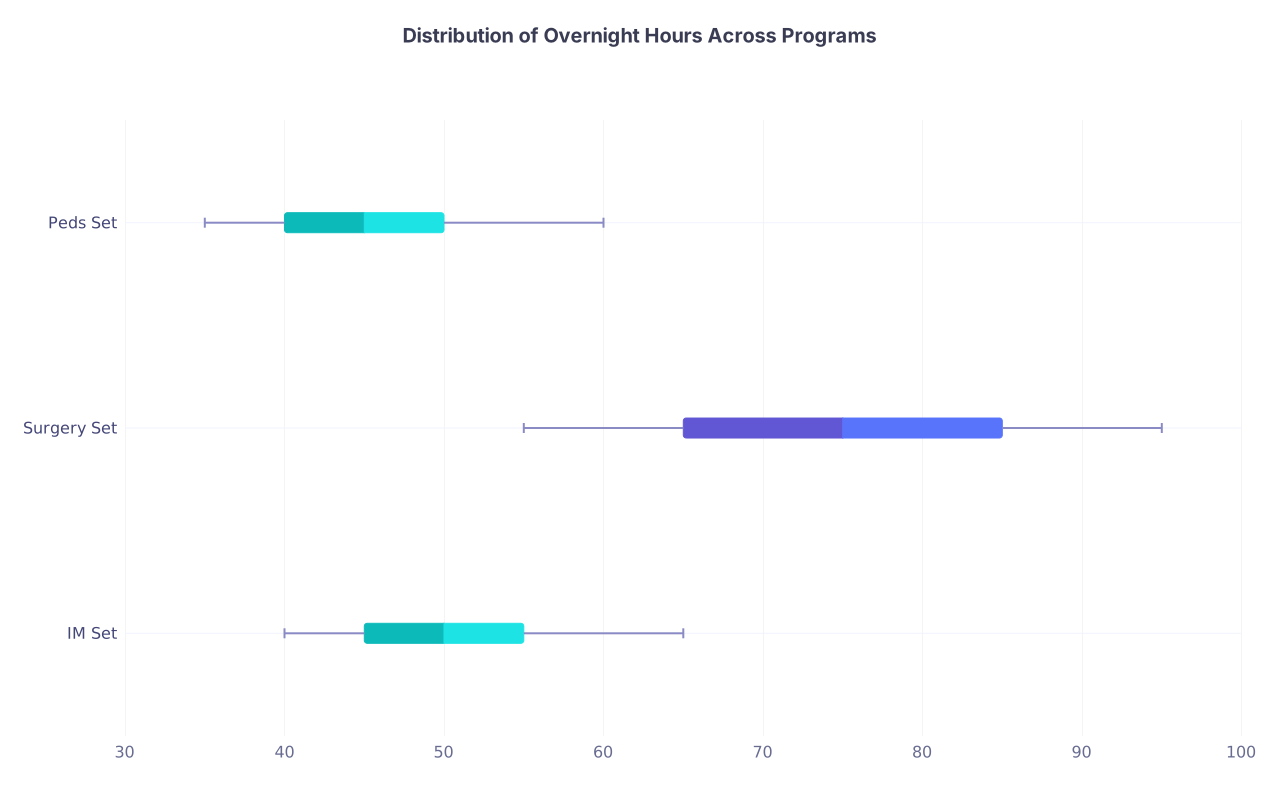
| Category | Min | Q1 | Median | Q3 | Max |
|---|---|---|---|---|---|
| IM Set | 40 | 45 | 50 | 55 | 65 |
| Surgery Set | 55 | 65 | 75 | 85 | 95 |
| Peds Set | 35 | 40 | 45 | 50 | 60 |
You will not find a residency with zero call and world-class training. That program does not exist. But you can find a program where the work is intense, well-structured, and not gratuitously miserable.
Once you turn call schedules into numbers, that search becomes much more rational.
Three points to keep in your head:
- Do not compare call labels. Convert every program’s rotation structure into CNM, CIS, OHM, and CS.
- Normalize across years and within specialty. You care about relative, not absolute, workload.
- Use these metrics as one weighted input into your rank list, not the only one—but ignore them at your peril.