The way you move through a half‑day clinic today will quietly dictate which jobs you can actually survive in five years from now.
Let me be very clear: clinic flow and documentation templates are not small workflow preferences; they are core determinants of your marketability, longevity, and sanity in your first attending job.
You already know about compensation models, non‑competes, and RVUs. That’s the loud stuff. Clinic flow is the quiet killer. Poor templates and chaotic scheduling will beat a generous salary every single time.
Let me break this down specifically.
1. Why Clinic Flow Matters More Than You Think
Most residents completely misjudge what actually burns people out in outpatient jobs. It is not usually “the patients” or “the EHR” in isolation. It is the collision of:
- A schedule you cannot clear in real time
- Templates that force constant context switching
- Documentation tasks that spill outside clinic hours
- Admins who only care that every slot is filled
I have watched new attendings walk into jobs with “great pay” and quit within 18 months because:
- Their template started at 15 min visits and was “graduated” to double‑booked 15s by month 6.
- Every chronic patient was randomly mixed with acute, new, and procedural visits.
- The organization measured productivity only in wRVUs, not in after‑hours documentation time, and they were regularly charting past 9 p.m.
You need to understand clinic flow as a skill and currency:
- As a skill: the ability to see a certain volume, with a certain mix, while keeping documentation mostly inside clinic hours.
- As currency: systems that can plug you in and bill reliably will pay you more and tolerate more of your “asks”—if you fit their flow well.
If you are slow, scattered, or template‑dependent on a dysfunctional pattern, your job options shrink, your leverage shrinks, and your burnout risk skyrockets.
2. The Three Pillars of Outpatient Flow
Outpatient flow is not mysterious. It lives on three pillars:
- Template structure
- Support staff and workflows
- Your documentation habits
2.1 Template structure: the skeleton of your day
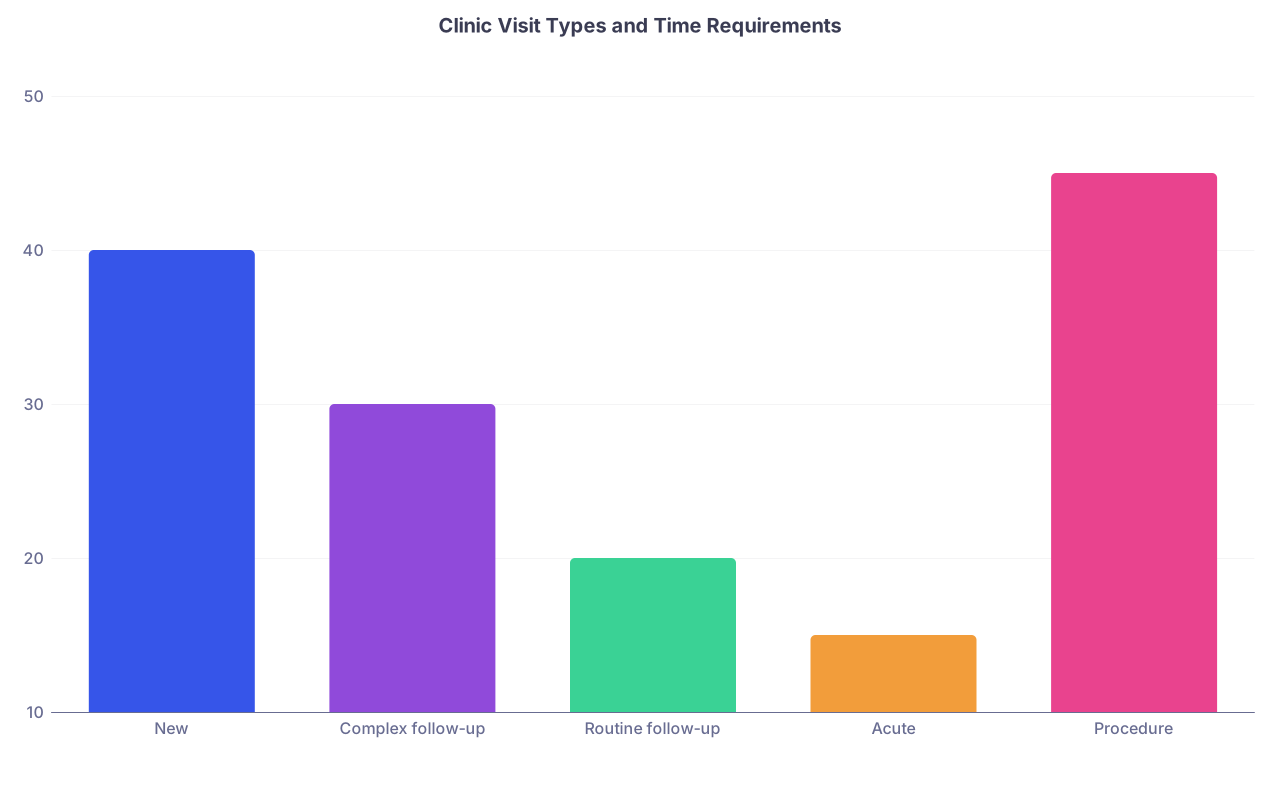
A template is not just “10s vs 15s vs 20s.” That’s amateur talk. A functional clinic template answers:
- How many new vs established per session?
- How are acute vs chronic visits distributed?
- How are procedures anchored in the day?
- What is the plan for double‑booking and no‑show risk?
- Where are the administrative/overflow blocks?
And critically: how does this align with how you personally move through an encounter?
Here is where people get burned:
- PGY‑3 Internal Medicine resident used to 30‑minute visits in a continuity clinic run by a saintly office manager. First job? 20‑minute slots, 16–18 patients per half day, no protected admin time. They simply have no internal schema for that tempo.
- FM resident used to a well‑blocked OB + procedure clinic joins a “full‑spectrum” private group where everything is slammed into the same template. Every procedure is a traffic accident.
Most job offers show you a number (“you’ll see 20–22 per day”). That tells you almost nothing. You want to see the actual template.
| Category | Value |
|---|---|
| New | 40 |
| Complex follow-up | 30 |
| Routine follow-up | 20 |
| Acute | 15 |
| Procedure | 45 |
2.2 Support staff and workflows
You can survive a mediocre template if the support is strong. You cannot survive a high‑volume template with weak support, no matter how “efficient” you think you are.
Look at:
- Who rooms the patient and what they actually do. Just vitals, or full HPI + meds + ROS + reconciling outside notes?
- Who does refills, forms, and prior authorizations?
- How are results handled? Pooled inbox vs individual? RN triage vs everything to MD?
- Scribes vs no scribes vs “virtual scribes” that barely exist.
I have seen attendings double their effective capacity overnight simply because they got a competent MA who knew to close care gaps, reconcile meds thoroughly, and pre‑load common orders.
2.3 Your documentation habits
This is the part residents most underestimate. Your personal documentation style—note structure, timing, decision‑making—will directly shape which clinics you can work in.
Patterns I see repeatedly:
- Residents who hover at the workstation for 10 minutes after every patient, rewriting the HPI. They never learned to document within the flow of the interview.
- People who rely fully on autopopulated ROS and exam, then spend 8 minutes adjusting face‑sheet junk every visit.
- Heavy narrative writers who feel every note must be a brief essay. Good medicine, bad for a 25‑patient day.
The goal is not to be a robot. The goal is to align your note style with the template intensity you are accepting in a job contract.
3. How Residency Templates Train (or Misinform) You
Your continuity clinic template is quietly training your expectations. Sometimes well. Sometimes disastrously.
3.1 The “residency bubble” problem
Typical residency patterns:
- 30–40 minute new and follow‑up visits
- Faculty quietly cap your daily volume at 6–10 patients
- No double‑booking
- An attending who shares part of the panel or absorbs walk‑ins
- Hidden infrastructure: residents rarely see the full refill burden or message volume
Then your first job lands like this:
- 15–20 minutes for all established visits
- 30–40 for new (if you are lucky)
- 18–24 patients per day, sometimes 25–30 in private groups
- Message queue fully your responsibility
- No attending “backstop” smoothing things behind the scenes
There is a predictable pattern here: used to residency clinic? You will overestimate what you can do alone under a high‑volume template.
3.2 Specialty‑specific distortions
Some concrete examples:
- Internal Medicine: big residency continuity panels, but protected time, low speed. Many IM residents have never done a 22‑patient day with full ownership of lab/scan follow‑up and refill burden.
- Family Medicine: often the best prepared for outpatient chaos—OB, procedures, multi‑acutely‑ill families—but many FM programs shield residents from the raw inbox volume.
- Pediatrics: mix of well‑child checks and acute visits in residency, but first job in a busy private peds office is usually far more compressed, especially during viral season.
- Surgical subspecialties: clinic days packed around OR blocks. Residents see attendings chart in between cases or at 6 a.m. and think “they are just fast.” No. They have spent years optimizing templates to support that workflow.
The point: your sense of “normal clinic flow” is anchored to your training environment, which often does not resemble the job market reality.
4. Template Design 101: What You Should Actually Look For
You want to walk into interviews ready to dissect a template like a path report. Not just nod while someone says “you’ll see 18–20 a day, it’s very manageable.”
Here are the specific elements that matter.
4.1 Core template architecture
Ask to see a printed or screenshot version of:
- A typical full day schedule for someone in your role
- A template build from the EMR (Epic, Cerner, Athena, etc.) showing slot types and durations
- What changes over time—from “ramp up” to “full panel”
Then ask:
- How many new patients per session?
- How many established?
- Any designated procedural slots? Or shoved into regular slots?
- Any same‑day/sick slots blocked? How are they filled?
- Any buffer/admin blocks? Start or end of sessions?
The logic is straightforward: more complex visits (new, chronic, multi‑morbid) require longer blocks or lower daily totals. If those are not built into the template, you’re expecting magic from yourself.
4.2 No‑show and double‑booking policy
This is where real chaos lives.
I have seen jobs where:
- The organization double‑books the first hour and last hour of every session “because no-shows,” then uses guilt when patients actually show and you are instantly 30–45 minutes behind.
- New patients are casually put into 15‑minute slots on “busy days” during flu season.
- Late arrivals are slotted in wherever the front desk feels like, regardless of complexity.
You want hard answers on:
- Double‑booking: when, for whom, and who controls it.
- Late arrivals: firm policies vs “we squeeze everyone in.”
- No‑show rates: actual percentages by clinic, not vibes.
| Setting | Slot Lengths | Daily Patients | New:Est Ratio | Admin Time |
|---|---|---|---|---|
| Academic IM Clinic | 30/30 | 10–12 | 3:7 | 30–60 min |
| Hospital‑employed FM | 20/20 (few 40) | 18–22 | 2:8 | 15–30 min |
| High‑volume private FP | 15/15 (double-book) | 24–28 | 1:9 | 0–15 min |
| Concierge IM | 30/60 | 8–10 | 4:6 | 60+ min |
| Peds Group Practice | 15/20 (WCC longer) | 22–26 | 2:8 | 15–30 min |
4.3 Ramp‑up versus “final form”
Many new grads get seduced by a gentle year 1 and never ask what year 3 will look like.
Questions you must ask:
- What is the expected panel size by year 1, 2, 3?
- “At maturity,” how many patients do your attendings actually see per day?
- Does the template change when you are considered “full”? Shorter visits? More double‑books? More procedures stuffed in?
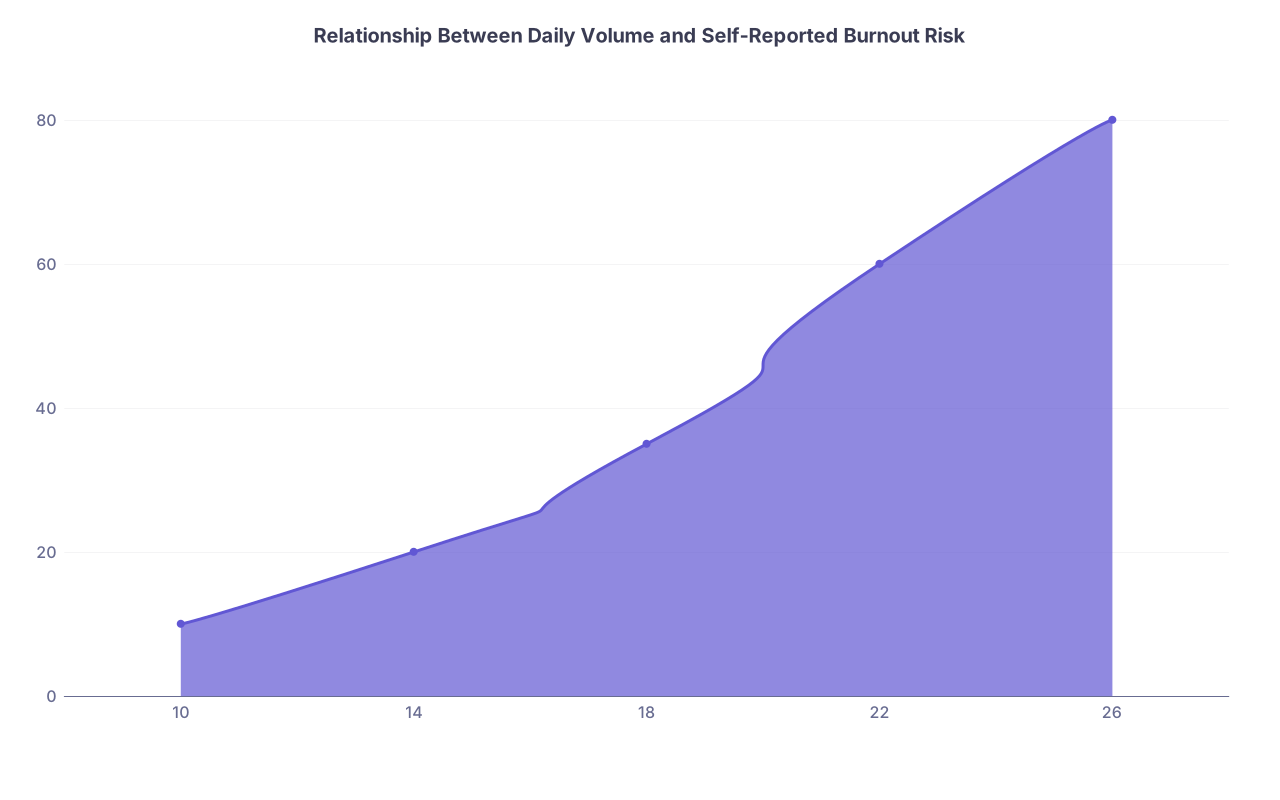
A Schedule that starts at 14/day and drifts to 26/day without more staff is not “you becoming more efficient.” That is you subsidizing the organization with your free time.
5. Documentation Templates: Your Hidden Multiplier
You cannot talk about flow without talking about note templates. People either worship them or hate them. Both extremes are wrong.
5.1 The wrong way to use templates
Common self‑sabotage:
- Long monster templates with 20 auto‑populated sections you never fully clean up → every note is a liability.
- Reliance on generic templates that do not match your mental model; you spend time hunting where to put what.
- Copy‑forward habits that bloat the chart and make it impossible to actually read your last visit quickly.
These look efficient early in the day. They destroy you at 4:30 p.m. when you have to scroll through your own mess to remember what you did.
5.2 The right way to use templates
Templates should:
- Mirror how you think through a case: chief complaint, focused HPI, key chronic issues, concise assessment, and a directly actionable plan.
- Be modular: a simple base note with add‑in phrases or smartphrases for common conditions (diabetes visit, hypertension follow‑up, depression follow‑up).
- Be short enough that you can re‑orient to your own note in under 15 seconds.
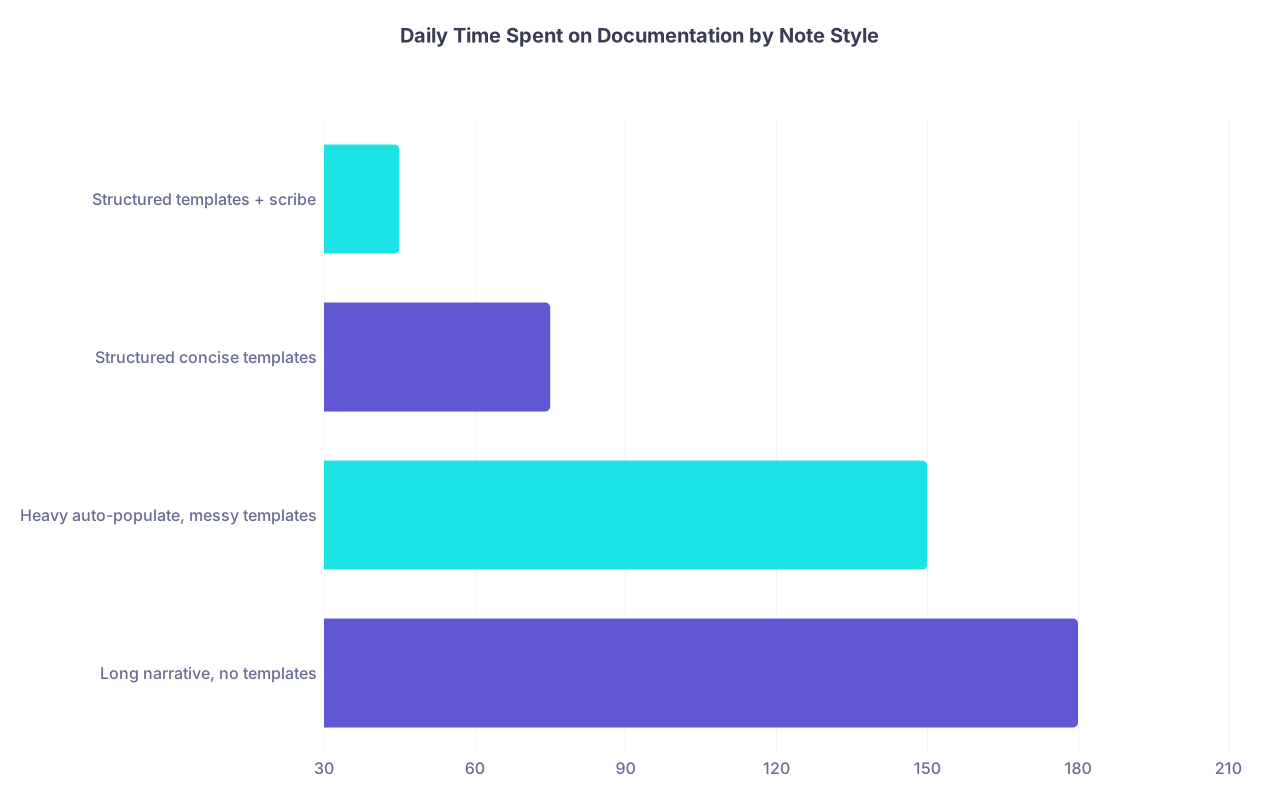
I have watched a new attending cut end‑of‑day charting from 2 hours to 30 minutes without changing volume, purely by:
- Rebuilding their templates from scratch to be concise
- Turning off auto‑import of full outside reports into every note
- Writing active, problem‑based assessments instead of repeating ROS in prose
| Category | Value |
|---|---|
| Long narrative, no templates | 180 |
| Heavy auto-populate, messy templates | 150 |
| Structured concise templates | 75 |
| Structured templates + scribe | 45 |
5.3 Matching documentation style to job type
Different job environments tolerate different documentation speeds:
- High‑volume primary care group: you must be aggressively structured and template‑driven. Narrative reflection belongs in select complex notes, not every viral URI.
- Academic subspecialty clinic: longer visits, more complex thought processes. You can afford more narrative. But too much fluff still bleeds into your research / teaching time.
- Direct primary care / concierge: fewer patients, high relationship emphasis. More narrative is fine, but you still want efficient reuse of prior plans.
You cannot cut and paste your residency note style into each environment and expect it to work. You adapt deliberately before accepting volume promises.
6. How Schedule and Template Shape Your Actual Job Options
Your first job is not just about “fit” in the broad sense. Clinic flow and template design directly influence:
- What types of practices will even consider you
- How much leverage you have in negotiations
- How quickly you will burn out and reenter the job market looking desperate
6.1 Marketability: fast, clear, predictable
From the employer’s perspective, they want:
- Predictable throughput: you see X patients, reliably; you do not chronically run 60 minutes behind.
- Clean documentation: bills are supported, payers are not constantly downcoding or denying.
- Minimal after‑hours noise: not every decision deferred to “after clinic,” generating callbacks and messages.
If you show up as someone who needs:
- 30‑minute slots for routine follow‑ups, and
- Time between each visit to write long notes, and
- Heavy attending‑like help sorting inboxes
You will fit only in a small subset of jobs: usually academic, low‑RVU, lower‑pay, with a lot of competition.
If you can:
- See 18–20 mixed‑complexity patients in 8 hours
- Finish 90–95% of notes same‑day
- Handle your inbox in a predictable block
You are employable almost anywhere.
| Category | Value |
|---|---|
| 10 | 10 |
| 14 | 20 |
| 18 | 35 |
| 22 | 60 |
| 26 | 80 |
6.2 Compensation models and template pressure
Different compensation setups weaponize your template differently.
- Straight salary, low RVU expectations: more flexibility to refine templates, but also risk of admin pushing volumes up over time.
- Base + RVU bonus: template becomes a revenue engine. There will be pressure to shorten visits, increase daily counts, or stuff quick visits (like med checks) into small slots.
- Pure productivity: your template is essentially your paycheck. You can, in theory, design it how you want, but the financial pressure to increase throughput will always exist.
Real example I have seen:
- Two hospital‑employed internists. Same panel size, same payer mix.
- Physician A accepted default template: 15‑minute established, 30‑minute new, 22 pts/day. Charts until 8 p.m. many nights. High RVUs, high burnout.
- Physician B negotiated: 20‑minute established, 40‑minute new, 16–18 pts/day, but insisted on strong MA support and restructured templates. Slightly lower RVUs, but still hit bonus threshold. No evening charting. Still there at year 7.
The job “offer” in both cases looked similar on paper. The template and documentation realities made them completely different jobs.
7. Vetting a First Job: The Clinic Flow Checklist
Let me walk you through what you should actually do when you are evaluating an outpatient‑heavy job.
7.1 During the interview visit
Do not just sit in a conference room all day.
Ask to:
- Sit in on a half‑day clinic with someone in your future role.
- Stand at the nurses’ station and watch how patients move.
- Glance at their actual clinic schedule for the week: how many visits per day, what types.
Watch closely for:
- How often are they behind?
- When do they do documentation—during visit, immediately after, or lunchtime sprint?
- How many clicks per order/set? Is the EMR optimized or a mess?
- How much does the MA/RN actually prep? Are notes partially started before the physician enters?
And ask the attending privately:
- “What was your volume in your first year, and what is it now?”
- “When do you usually finish your notes?”
- “What burns people out here?” (There is always something. Listen carefully.)

| Step | Description |
|---|---|
| Step 1 | Receive Job Offer |
| Step 2 | Request Sample Template |
| Step 3 | Shadow Half Day Clinic |
| Step 4 | Clarify Volume Expectations |
| Step 5 | Ask About Inbox and Admin Time |
| Step 6 | Decline or Deprioritize |
| Step 7 | Negotiate Template Changes |
| Step 8 | Decide on Offer |
| Step 9 | Flow Reasonable? |
| Step 10 | Willing to Negotiate? |
7.2 Questions to ask explicitly
You do not need to be obnoxious. You do need to be specific.
Ask:
- “Can I see what a typical schedule looks like for Dr X on a clinic day?”
- “How many new vs established patients do your clinicians usually see per day?”
- “How has the template changed over the last 3–5 years?”
- “What is your policy on double‑booking and late arrivals?”
- “How is inbox work handled—nurse triage, shared pool, or all to the individual physician?”
- “How much admin time is blocked in the schedule each week, and is it protected?”
- “Do clinicians have input into their own templates?”
If they cannot answer these without hand‑waving, that tells you everything.
8. Training Yourself Now: Residency as Your Laboratory
You are not helpless. You can use the rest of residency to build the skills you will need to survive realistic outpatient templates.
8.1 Treat clinic like a test environment
Start doing this:
- Time your visits. Not obsessively, but realistically. How long from “knock on door” to “note signed”?
- Experiment with shortening 30‑minute follow‑ups to 20 without sacrificing quality. You are simulating your future job.
- Practice closing notes before you leave the room for simpler visits. Yes, while the patient is still there. It forces clarity.
Ask your clinic admin if you can:
- See what your attending’s template looks like in the EMR.
- Try an extra patient or two in a half‑day and see how your flow changes. Better to fail in residency than as an attending whose paycheck depends on it.
8.2 Optimize your own templates now
Do not wait until you are drowning in your first job.
In your residency EMR:
- Build one clean default template for “routine follow‑up” that matches how you think.
- Create small smartphrases for common conditions with embedded guideline‑aligned plans.
- Ruthlessly trim auto‑populated fluff. If you never use a section to make decisions, it should not be in every note.
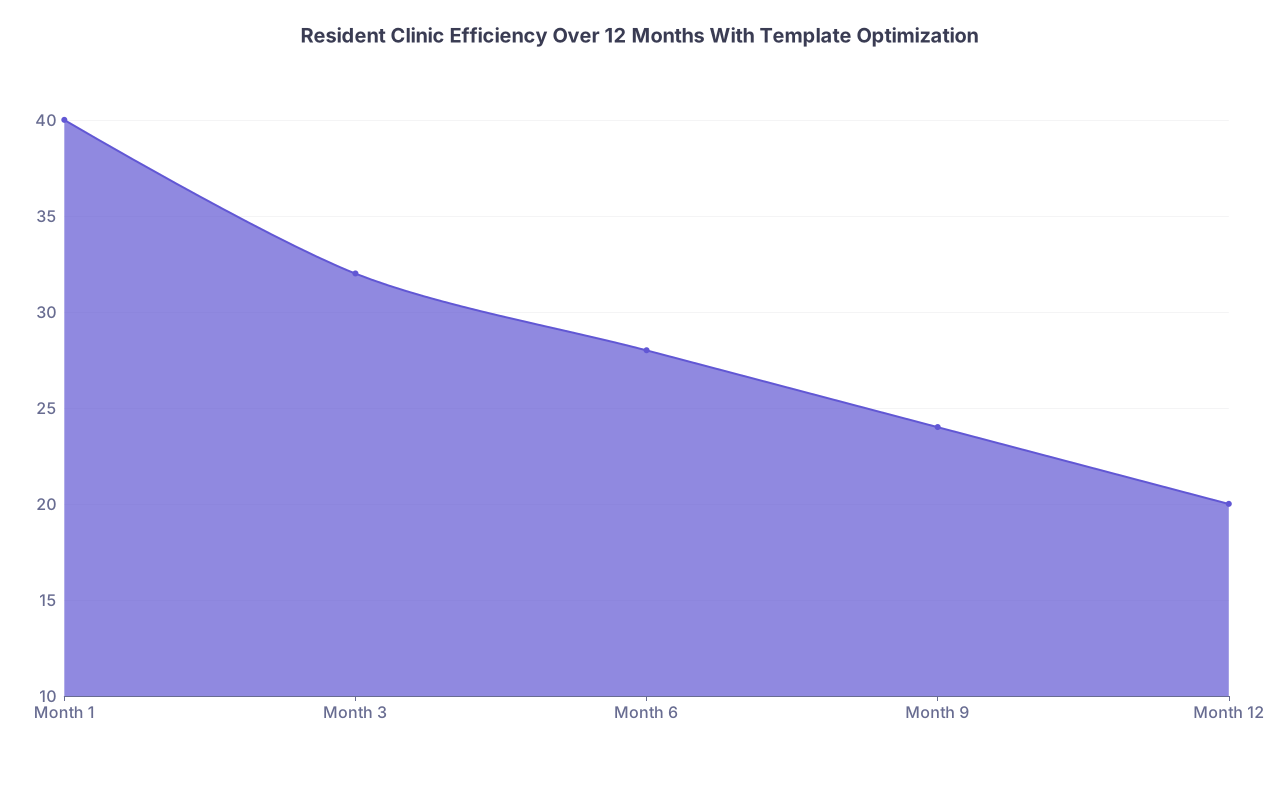
Test them under pressure: can you use that template to complete a visit‑note in 5–7 minutes on a straightforward patient?
| Category | Value |
|---|---|
| Month 1 | 40 |
| Month 3 | 32 |
| Month 6 | 28 |
| Month 9 | 24 |
| Month 12 | 20 |
8.3 Learn to negotiate small changes
You probably will not redesign your employer’s entire template as a new grad. But you can nearly always carve out:
- A small block of admin time mid‑session
- Slightly longer new-patient slots, especially for complex referrals
- Protected slots for procedures instead of random add‑ons
- A cap on same‑day double‑booking
Practice this in micro at your training site:
- Ask your chief or clinic director: “Can I trial a slightly different template in my continuity clinic for one month and collect data on no‑show rates, visit lengths, and satisfaction?”
- Show them that you can see similar or more patients with fewer delayed notes.
That experience will make you far more credible when you ask for changes in a real job.
9. The Long View: How Today’s Flow Shapes Your 10‑Year Career
Let’s zoom out.
Your early attending years do two things:
- Set your habits: how you chart, how quickly you make decisions, how you handle conflicting demands.
- Set your reputation: among staff, administrators, and patients.
If you start your career on a template you cannot handle:
- You normalize running late, apologizing constantly, and finishing charts at home.
- Staff see you as “the slow one” and route complex things away from you.
- Administration sees you as less “productive,” and that sticks when it is time for raises or leadership roles.
On the other hand, if you land in an environment whose flow you can match:
- You build a reputation as reliable and efficient.
- You preserve the energy to develop niche skills, academic roles, or side projects.
- You keep optionality. You are not desperate to escape at any cost.
I have seen mid‑career attendings trapped because:
- They adapted by sacrificing their personal lives instead of their template.
- Now they are so burnt out that they will accept almost any alternative, including worse pay or commute, just to escape the current schedule.
- They never developed the language or confidence to demand better flow.
You can avoid that. But you have to treat clinic flow and template design as central, not peripheral, when you look at your first job.



Key Takeaways
- Your clinic template and documentation habits are not minor workflow details; they are core determinants of which jobs you can tolerate, how long you last, and how much leverage you have.
- When evaluating a first job, demand to see real schedules, clarify volume and ramp‑up expectations, understand double‑booking and inbox policies, and assess support staff—then decide if that flow matches how you actually practice.
- Use residency now to train under more realistic visit lengths, build efficient templates, and practice small‑scale template negotiation, so you enter the job market as someone who can handle real‑world outpatient flow without sacrificing your entire life.