
The way most applicants handle interview invite season is sloppy—and it costs them interviews.
You cannot wing this. During interview season, you’re not just being evaluated in the interview itself. You’re being evaluated on how fast, how clearly, and how professionally you respond the moment that email hits your inbox. That’s where people quietly lose out.
I’ll walk you through a day‑by‑day, even hour‑by‑hour strategy for interview invite season so you’re never that person emailing, “Dear Program Coordinator, are there any dates left?” after they all vanished in 12 minutes.
One Week Before Interview Invite Season: Set Your System Up
At this point you should be preparing your infrastructure, not “hoping for the best.”
Day –7 to –5: Lock down your email and alerts
You need a professional, paranoid setup.
Do this now:
- Use one primary email for ERAS and all programs.
- Clean it out. Unsubscribe from junk. Archive old stuff.
- Create folders/labels:
- “Residency – Invites”
- “Residency – Waitlists”
- “Residency – Rejections”
- “Residency – Admin / Other”
- Set up filters:
- Keyword filter for: “interview”, “invitation”, “ERAS”, “Thalamus”, “Interview Broker”, “scheduler”.
- Auto-label them as “High Priority – Residency”.
- Whitelist:
- Your med school domain
- Any program domains you’re applying to (if you know them)
- [email protected], any scheduling platforms, etc.
Then:
- Turn on VIP / Important alerts on your phone for this email.
- Make sure you get push notifications on both phone and laptop.
- Disable “smart” filters that might hide stuff in Promotions/Updates.
You want interview emails to scream at you.
Day –4 to –2: Build your scheduling framework
At this point you should be designing your calendar rules before the chaos hits.
Create your master calendar.
- Use Google Calendar, Outlook, or Apple—whatever syncs perfectly across all devices.
- Create a new calendar: “Residency Interviews 2024–2025”.
- Set default view to week and time zone clearly visible.
Decide your maximums and boundaries up front:
- Max interviews per week: e.g., 3–4.
- Max interviews on back‑to‑back days: e.g., 2 days in a row, then a break.
- Any blackout times:
- Required clerkship exams
- Major family commitments you won’t move
- Time zones you’re in vs. typical program time zones (EST, CST, PST).
Create a color code:
- Green = Confirmed interview
- Yellow = Pending/hold/waitlist
- Red = Conflict / must resolve
- Purple = Travel (if any in‑person)
Draft response templates now (you’ll tweak them later):
- Accepting invite
- Declining invite
- Asking about additional dates
- Requesting change in date
- Thank-you after scheduling
You don’t want to be writing from scratch when 5 invites hit within 30 minutes.
48–24 Hours Before: Prime Yourself for Rapid Response
Day –2: Practice your “invite response drill”
At this point you should rehearse exactly what you’ll do when an invite lands.
Run a simulation:
- Have a friend or partner send you a fake “interview invite” email.
- When it arrives:
- Check how long it took for you to notice.
- Time how long it takes to:
- Open it
- Check your calendar
- Decide on a date
- Send a professional response
- Add to calendar with details
Goal: This entire sequence should take under 10 minutes when it’s real.
You’re training muscle memory.
Day –1: Final pre‑season checklist
Run through this the day before you expect invites to start flowing:
- Phone and laptop fully updated.
- Email test: send yourself mail from another account, confirm notifications.
- Calendar test: add an event on your phone, confirm it appears on laptop.
- Clear tomorrow’s schedule where possible.
- Tell your people:
- Your partner, roommates, close friends: “If I suddenly go quiet or jump up to my laptop, it’s invite season.”
You’re setting expectations so nobody gets offended when you drop a brunch to grab a slot.
When Invite Season Starts: Your First 24 Hours

| Step | Description |
|---|---|
| Step 1 | Invite Email Arrives |
| Step 2 | Check Calendar Quickly |
| Step 3 | Select Date/Time |
| Step 4 | Send Accept Email |
| Step 5 | Add to Calendar with Details |
| Step 6 | Ask for Alternate Dates |
| Step 7 | Send Polite Decline |
| Step 8 | Track as Pending |
| Step 9 | Update Tracking Sheet |
| Step 10 | Can You Attend? |
| Step 11 | Want Program? |
Hour 0: The moment an invite hits
At this point you should be moving fast but not sloppy.
When you see an invite:
- Open it immediately. Don’t just read the preview.
- Scan for:
- Scheduling instructions (direct date list vs scheduling platform)
- Time zone
- Response deadline or “first come, first served”
- Any required steps (portal signup, attached forms)
Then:
Flip to your calendar (same device or second screen).
Identify top 2–3 preferred dates that:
- Avoid back‑to‑back with your highest‑priority programs.
- Fit your weekly interview max.
- Don’t collide with big exams or key rotations if you can help it.
Reply or schedule within 10–20 minutes:
- If it’s a link (Thalamus / Interview Broker): click it and book.
- If they ask you to list preferences: give 3 options, clearly ordered.
Sample quick reply for listing dates:
Dear [Coordinator Name],
Thank you very much for the invitation to interview at [Program Name]. I’m excited about the opportunity.
My preferred dates, in order, are:
- [Date 1]
- [Date 2]
- [Date 3]
I’m happy to consider other dates if these are no longer available.
Best regards,
[Your Name], [AAMC ID]
Hour 1–2: Lock the invite into your system
Once you’ve scheduled:
Add it to your calendar with these details in the event:
- Program name + specialty
- Exact time with time zone (e.g., “8:00–12:00 CST (9–1 EST)”)
- Virtual vs in‑person + platform (Zoom, Thalamus, etc.)
- Coordinator’s name and email
- Any pre‑interview events (socials, info sessions)
Screenshot or save:
- Confirmation email
- Portal confirmation page
- Any instructions PDF
Update your tracking sheet (yes, you should have one):
| Program | City | Date | Time (TZ) | Format | Status |
|---|---|---|---|---|---|
| Program A | Boston | 11/10 | 8–12 EST | Virtual | Confirmed |
| Program B | Chicago | 11/15 | 9–1 CST | Virtual | Confirmed |
| Program C | Denver | 11/20 | TBD | Virtual | Pending dates |
You want one glance to tell you your whole season.
The First Week of Invite Season: Daily Rhythm
At this point you should assume any day can explode with emails.
Every Morning (Weeks 1–4): 10–15 minute routine
Do this before rounds, class, or whatever else:
- Open email on a real screen (not just your phone notification bar).
- Check:
- Inbox
- Spam/Junk
- Promotions/Updates tabs
- Sort new residency emails into folders:
- Invites → immediate action
- Waitlist/hold → read and log
- Rejections → file, do not obsess
- Open your tracking sheet and calendar side by side for 5 minutes:
- Confirm yesterday’s changes are in both.
- Note any clusters forming (e.g., 3 interviews the same week).
Don’t ignore the subtle ones. I’ve seen invites buried in what looked like an automated system email.
Midday Quick Check: 3–5 minutes
Between noon–2 pm local time (when a lot of programs send stuff):
- Glance at email.
- Respond immediately to any time‑sensitive things:
- “Please respond with your preferred date today.”
- “Limited slots remaining.”
Everything else can wait until evening, but these can’t.
Evening Deep Check: 20–30 minutes
Once you’re home or off‑service:
- Go through all new messages carefully.
- For each invite or date‑related email:
- Decide: Accept, decline, ask for alternatives.
- Draft clear, short, respectful replies.
- Adjust your calendar for:
- New interviews
- Date changes
- Rescheduled exams/rotations
This is when you keep the season under control instead of drifting into chaos.
Day‑By‑Day Strategy for Common Invite Scenarios
Now we’ll walk through typical days and what your play should be.
Day X: You get your first 3 invites… all on the same two days
At this point you should prioritize, not panic.
Step‑by‑step that evening:
Rank these programs in your head (roughly):
- Dream / top‑tier
- Solid / mid‑tier
- Safety / backup
Give your top program the most ideal slot:
- A day when you’ll be fully rested.
- Not the fifth interview in 5 days.
- Not the same week as a shelf exam if you can help it.
For conflicts:
- Accept the date that fits best.
- For the less desired program, write:
Dear [Coordinator Name],
Thank you again for the interview invitation. I’m very interested in [Program Name]. Unfortunately, I have a previously scheduled interview on [conflicting date].
Are there any alternative dates still available? I’d be grateful for any flexibility.
Best regards,
[Your Name]
- Update tracking:
- Mark “Requested alternate date” so you don’t double‑book later.
Do this day‑by‑day. Don’t stack 4 low‑priority interviews in your best week while punting your stronger options to exhaustion days.
Day Y: You miss an email for 8 hours; most dates are gone
This happens. I’ve watched it sink people in competitive fields.
That same evening:
- Respond immediately with humility and clarity:
Dear [Coordinator Name],
Thank you very much for the invitation to interview at [Program Name]. I apologize for my delayed reply; I’m still very interested in the opportunity.
If any interview dates are still available, I’d be grateful to take one. If your current dates are filled, I’d be happy to be considered if additional slots open.
Best regards,
[Your Name]
Mark this program as “High alert”:
- Check email more often next 24–48 hours.
- Watch for “additional dates added” or “a spot opened” messages.
Learn from it:
- If the delay was your fault (muted notifications, etc.), fix that tonight.
Day Z: You get a “We’re full, but we’ll put you on a waitlist” email
At this point you should stay on their radar without being clingy.
Same day, or next morning at the latest:
Dear [Coordinator Name],
Thank you for letting me know, and I appreciate being placed on the waitlist for an interview. I remain very interested in [Program Name].
Please keep me in mind if any additional interview slots become available.
Best regards,
[Your Name]
Then:
- Add to calendar: “Waitlist – [Program]” on a generic date in the likely interview window.
- Add to tracking sheet: Status = Waitlist.
- Do not email weekly asking for updates. That’s how you become “That Applicant.”
Weekly Strategy: Prevent Burnout and Double‑Booking
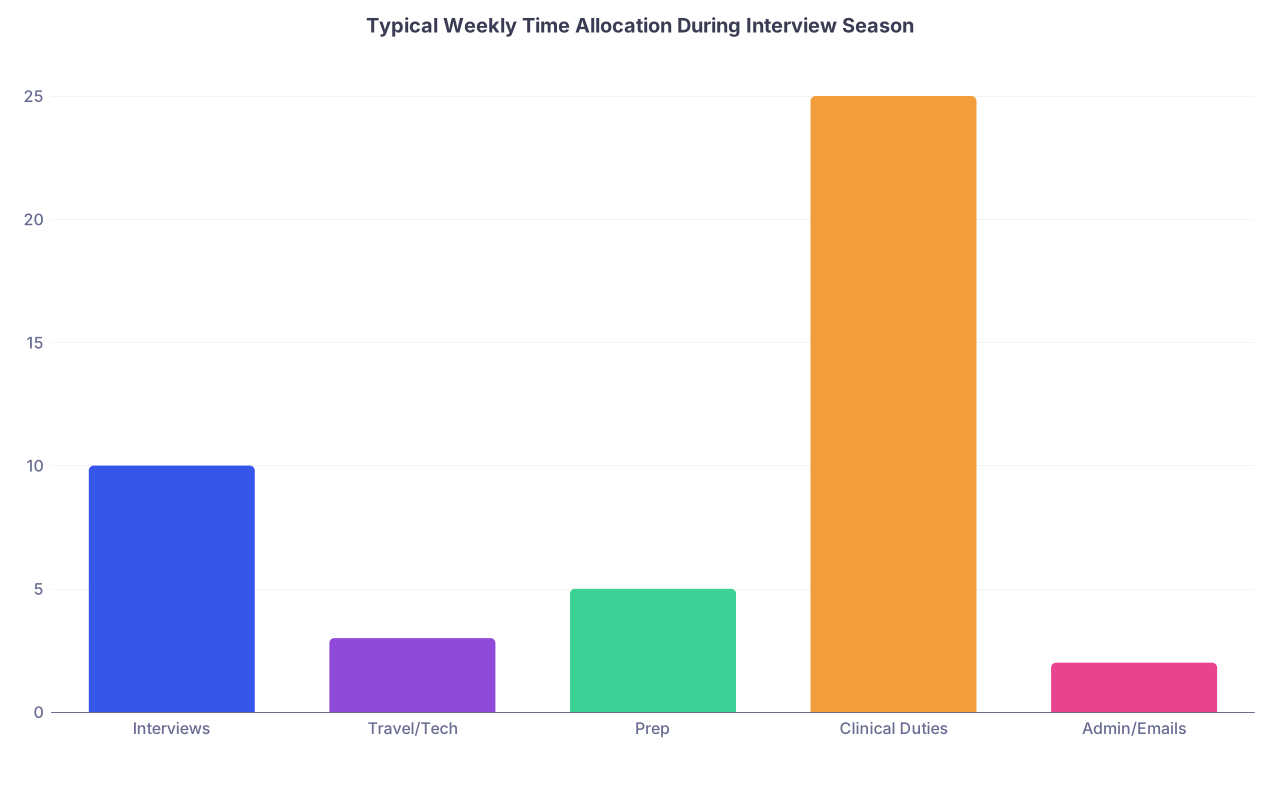
| Category | Value |
|---|---|
| Interviews | 10 |
| Travel/Tech | 3 |
| Prep | 5 |
| Clinical Duties | 25 |
| Admin/Emails | 2 |
End of Week 1: Evaluate your pattern
At this point you should review the shape of your season.
Friday night or Saturday morning:
- Print or open your calendar in monthly view.
- Look for:
- Clusters of 3–4 interviews in 5 days → risk for fatigue.
- Weeks with zero interviews → potential to move some dates into them.
- Decide:
- Do you want to ask any programs for date switches?
- Are you starting to run out of “free” days for additional interviews?
If your calendar is already heavy and you’re in a very competitive specialty, you may eventually need to start declining low‑priority programs. Better to do that earlier than cancel late.
Every Sunday: 30‑minute planning session
Do this once a week:
- Review next 2 weeks of interviews.
- For each scheduled interview:
- Confirm you have:
- Tech/platform instructions
- Time zone correct
- Pre‑interview social info (if any)
- Confirm you have:
- Set a note: “Program prep” 2–3 days before each interview.
- Check for:
- Conflicts with exams, big clinical duties.
- Double bookings caused by time zone confusion.
If you spot an issue, email programs early. Program coordinators hate last‑minute chaos.
Handling Date Changes and Cancellations (Day‑By‑Day)
Day You Realize You Must Change a Date
At this point you should act immediately, ideally >7 days before the interview.
Same day:
- Write a short, respectful email:
Dear [Coordinator Name],
I’m very grateful for the opportunity to interview at [Program Name]. Unfortunately, an unavoidable conflict has arisen on [original interview date].
If possible, I’d be very thankful for the chance to move my interview to another available date. I’m flexible and happy to take any remaining slot.
Best regards,
[Your Name]
- Don’t suggest that something “more important” came up. Keep it neutral.
- Do not request moves more than once for the same program unless it’s a true emergency.
Day You Decide to Cancel an Interview
Be honest: some programs are going to fall off your list.
Same day you decide:
- Cancel as soon as you’re sure. Don’t hoard spots.
- Send:
Dear [Coordinator Name],
Thank you again for the invitation to interview at [Program Name]. After careful consideration of my interview schedule and personal circumstances, I’ve decided to withdraw my interview.
I appreciate your time and consideration and wish the program all the best this season.
Sincerely,
[Your Name]
- Immediately:
- Remove it from your calendar.
- Update your tracking sheet.
- Open space for a higher‑priority program or for your own sanity.
Programs remember applicants who free up spots early. You look professional, not flaky.
Micro‑Habits for Each Day to Avoid Catastrophe
Here’s the unglamorous but critical stuff.
Every single day during invite season:
Email sweep (5–10 minutes total)
- Morning: Full check + spam.
- Midday: Quick skim for high‑priority.
- Evening: Deep check + replies.
Calendar cross‑check (3–5 minutes)
- Open calendar on phone and computer.
- Spot mismatches or missing entries.
- Confirm time zones.
Tracking sheet update (5 minutes)
- New invites
- Status changes
- Waitlist updates
Tech sanity check (2–3 minutes)
- Phone notifications still on.
- Email still syncing.
- No “storage full” messages blocking downloads.
This is how you quietly outperform the disorganized people without needing to be smarter than them.
Final Move: Do This Today
Open your email and calendar right now and run a 15‑minute “invite season drill”:
- Create or clean your residency folders and filters.
- Set up or verify your interview tracking sheet.
- Draft your accept/decline/reschedule email templates.
- Add a recurring Sunday 30‑minute planning event labeled “Interview Season Review.”
If those four things aren’t done, you’re not ready for interview invite season yet.