
The worst residency decisions are made by gut feeling in October about programs you barely remember from June.
You fix that now. The summer before ERAS is when you build the residency comparison spreadsheet that will quietly make half your decisions for you. If you wait until interview season to organize this, you will drown in half‑remembered notes and vague impressions.
Here is how to build it, step by step, on a clear timeline from early summer through interview season.
Early June: Decide Your System Before You Touch ERAS
At this point you should not be randomly clicking through program websites. You should decide how you will think about programs first.
Week 1 (First week of June): Pick your tool and structure
You need one master file. Not five half-finished lists.
Choose your platform:
- Excel or Google Sheets (preferred for sorting, filters, conditional formatting)
- Notion/Airtable only if you already use them well. Otherwise you will waste time setting them up.
Create one main tab: “Master List”
Create 2–3 supporting tabs:
- “Priority Criteria”
- “Programs to Research”
- Optional: “Interview Ranking Notes”
At this point you should open a blank sheet and set these column headers (you will refine later):
- Program Name
- Institution / Hospital System
- City, State
- Specialty (if you apply to more than one)
- Program Type (Community / University / Hybrid)
- Size (Residents per class)
- Visa Friendly (Yes/No) if relevant
- Website URL
- ERAS/AAMC ID
Stop there for now. Do not add 40 columns on day one. You will overbuild and underuse.
Mid June: Define Your Criteria Like an Adult, Not a Tourist
By mid June, you should be deciding what actually matters to you before you look at specific programs. Otherwise you fall in love with glossy websites and skyline photos.
Week 2: Rank your priorities
On your “Priority Criteria” tab, make a short list of what you will use to compare programs. Example:
- Geography (region, distance to family, cost of living)
- Training environment (academic vs community, level 1 trauma, subspecialty exposure)
- Fellowship match strength
- Call schedule / workload
- Program culture (supportive vs malignant, resident happiness)
- Board pass rates
- Research opportunities
- Lifestyle (night float vs 24‑hour call, vacation structure)
- Moonlighting (allowed or not)
- Pay and benefits
Now force yourself to weight them. Use a simple 1–5 or 1–3 scale.
Add a small table on this tab:
| Criterion | Weight (1–5) |
|---|---|
| Geography | 4 |
| Training Environment | 5 |
| Fellowship Outcomes | 4 |
| Culture / Wellness | 5 |
| Workload / Schedule | 3 |
| Research Opportunities | 2 |
This is not theoretical. You will use these weights later to generate an overall “fit score” for each program.
At this point you should:
- Lock in 6–10 criteria
- Assign each a weight
- Agree with yourself not to add new criteria every week
Late June: Build the Skeleton of the Spreadsheet
Now you begin turning that empty sheet into a tool you can actually sort and filter.
Week 3: Expand your columns—deliberately
Go back to your “Master List” tab. For each criterion you weighted, create 1–2 concrete columns that capture it.
For example:
Geography / Cost of Living
- Region (Northeast / Midwest / South / West)
- City Type (Major / Medium / Small / Rural)
- Cost of Living Category (High / Medium / Low)
Training Environment
- Program Type (Academic / Community / Hybrid)
- Primary Hospital Type (County / Private / VA / Children’s, etc.)
- Trauma Level (if relevant)
Fellowship Outcomes
- Fellowship Match Strength (Subjective 1–5)
- Home Fellowships Available (Yes/No)
Culture / Wellness
- Resident Culture Score (1–5, your impression)
- Does program have wellness half‑days / protected time? (Yes/No)
- Attrition Concerns (None / Mild / Concerning)
Workload / Schedule
- Call Structure (Night Float / 24‑hr Call / Shift)
- Average Hours (Self‑reported)
- Weekends per Month (Estimate)
Research
- Required Scholarly Project? (Yes/No)
- Dedicated Research Time? (Yes/No)
- Publication Output (Strong / Moderate / Minimal – based on your read)
Then add 2 more key columns at the far right (you will fill later):
- Overall Fit Score (0–100)
- Notes / Red Flags
Your sheet now has 20–30 columns. That is fine. You can always hide ones you do not use frequently.
Late June: Fill the Basic Program List
You cannot compare programs that are not even in the sheet.
Week 4: Get the raw program list in there
At this point you should:
Pull an initial program list from:
- FREIDA
- AAMC Residency Explorer
- Your school’s match list (past 3–5 years)
Decide on a target number:
- Most applicants end up applying to:
- 20–30 programs in less competitive fields
- 40–60+ in moderately competitive
- 70+ in highly competitive or weaker applications
- Most applicants end up applying to:
Add every plausible program to the sheet:
- Program name
- City/state
- Basic program type
- Rough size if obvious
Use quick filters to remove places you would absolutely never live (for legit reasons, not “it snows there”).
You should end June with:
- A complete list of “reasonably possible” programs
- Basic demographic columns filled for all of them
Early July: Systematically Pull Objective Data
Stop skimming. This week you go program by program and pull hard data you can sort.
Week 5: Objective metrics pass
Set a 60–90 minute daily block. No interruptions. This is clerical but crucial.
For each program, from the website, FREIDA, and Residency Explorer, fill:
- Program Type (Academic / Community / Hybrid)
- Program Size (Residents per PGY year)
- Fellowship Options (in-house yes/no; list main ones)
- Call Structure (as best described)
- Vacation Weeks
- Salary (PGY‑1 base)
- Location / Region / City size
- Board Pass Rate (if listed)
- Notable red flags (e.g., recent probation, missing ACGME status info)
Use consistent categories. For example, Program Type should not have 8 different spellings.
To keep yourself honest, track progress:
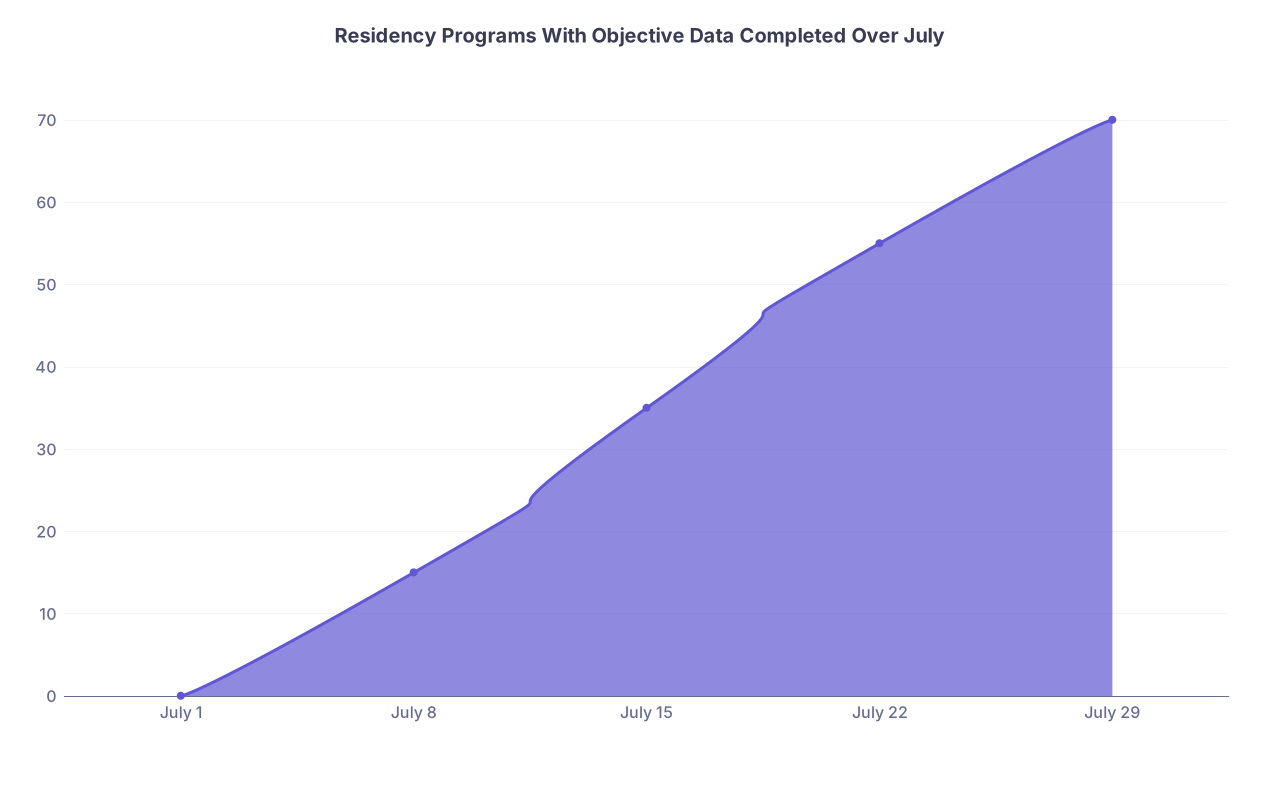
| Category | Value |
|---|---|
| July 1 | 0 |
| July 8 | 15 |
| July 15 | 35 |
| July 22 | 55 |
| July 29 | 70 |
If you are at 0 by mid July, you are behind.
Mid July: Start Scoring Programs Against Your Criteria
Now you make the spreadsheet actually useful. Numbers you can sort. Scores you can compare.
Week 6: Create rating columns and formulas
For your major criteria, add numeric score columns on a 1–5 or 1–10 scale:
- Geography Score (1–5)
- Training Environment Score (1–5)
- Fellowship Score (1–5)
- Culture / Wellness Score (1–5)
- Workload Score (1–5)
- Research Score (1–5)
Then, using your weights from the “Priority Criteria” tab, create an “Overall Fit Score” formula.
Example (if you use 1–5 scores and 1–5 weights):
Overall Fit Score =(Geography Score*4 + Training Score*5 + Fellowship Score*4 + Culture Score*5 + Workload Score*3 + Research Score*2) / (4+5+4+5+3+2) * 20
That converts to a 0–100 scale. Nice and sortable.
Use conditional formatting:
- Green for scores ≥ 80
- Yellow for 60–79
- Red for < 60
Now when you glance at the sheet, you see where you are likely to be happy. Not just where the skyline looks good.
Mid–Late July: Fill Subjective Scores Intentionally
Subjective does not mean random. You assign scores based on specific signals.
Week 7: One focused review pass
At this point you should allocate 2–3 days of focused work. For each program:
- Read the website “About the Program” and resident bios
- Glance at recent alumni destinations (they usually show this off)
- Look for:
- Are there clear wellness initiatives or just buzzwords?
- Are rotations detailed or vague?
- Do they proudly share board pass rates and fellowship matches or hide them?
Then assign:
Culture / Wellness Score: Based on:
- Resident photo + bios (do residents seem diverse? human? or like stock images)
- Described mentorship, retreats, wellness days
- Any obvious malignant vibes (you will see them)
Fellowship Score: Based on:
- Actual fellowship match list if posted
- Presence of in‑house fellowships in your interests
- Reputation you have heard from mentors
Document your rationale quickly in the Notes column:
“Strong peds fellowship; residents mention good support” or
“No board data; vague about evaluation; multiple recent leadership changes”
Do not overthink individual scores. They are meant to separate “probably good fit” from “probably not,” not to rank #7 vs #8.
Late July: Create Your Apply / Maybe / No Buckets
By now your sheet should feel heavy with data. Time to use it.
Week 8: First cut decisions
Add another column: “Application Tier”
Use 3–4 categories:
- Apply – High Priority
- Apply – Standard
- Maybe / Backup
- Do Not Apply
Use this process:
Auto-flag by score
- Fit Score ≥ 80 → Candidate for High Priority
- 70–79 → Standard
- 60–69 → Maybe
- < 60 → Do Not Apply (unless special reason)
Manual overrides
- Family reasons
- Ties to city or institution
- Specific fellowship or niche interest
Reality check by competitiveness
Look at your Step scores, class rank, specialty competitiveness. You might like MGH IM, but that does not mean it is realistic.
Your sheet now directly shapes your initial ERAS program list.
Early August: Clean Up for ERAS Submission
At this point you should be about to submit ERAS or finalizing your list. Use the spreadsheet to prevent panic‑adding random programs at the last second.
Week 9: Final ERAS list using the sheet
Do this in order:
Filter to “Apply – High Priority”
- Are there enough programs here? If you only have 5–10, you are probably over‑selective.
Add “Apply – Standard” until you hit a reasonable total number for your situation.
Sprinkle in some “Maybe / Backup” from lower‑tier but safer programs, especially if:
- You are in a competitive specialty
- You have any application weaknesses
At this point, create a new column: “Applied (Y/N)”
Once you actually submit ERAS, mark “Y” for each program you included. This freezing step matters. You will not misremember later when interview invites show up.
September–October: Turn Your Spreadsheet Into an Interview Tracker
Once interviews start rolling in, this same file becomes your control center.
Add interview-specific columns
As invitations arrive, add:
- Invite Received (Date)
- Interview Date
- Interview Format (Virtual / In person / Hybrid)
- Pre‑interview Social (Yes/No, date)
- Post‑interview Impression Score (1–10)
- Rank List Tier (Top / Middle / Bottom / No Rank)
You can also track yield:
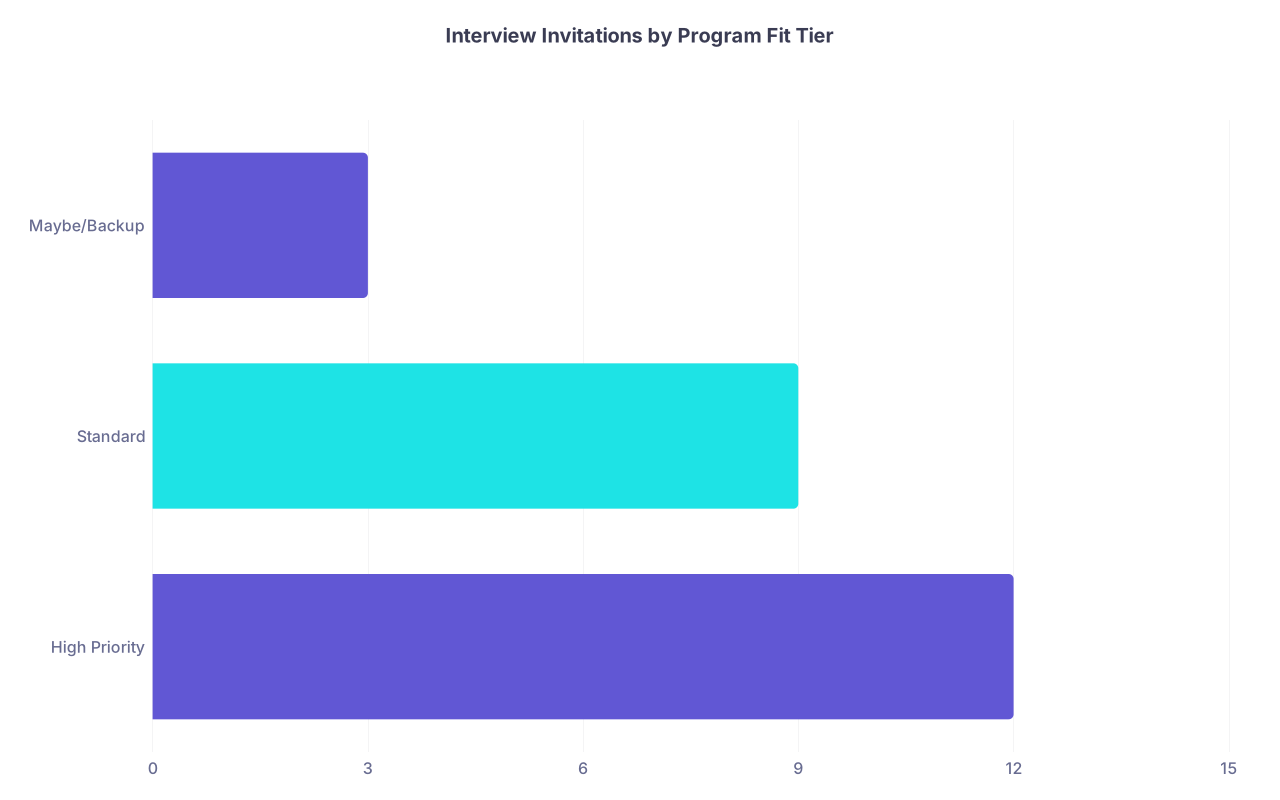
| Category | Value |
|---|---|
| High Priority | 12 |
| Standard | 9 |
| Maybe/Backup | 3 |
If your “High Priority” list is not generating interviews but the backups are, that is valuable feedback for future decisions and SOAP risk.
Use the sheet during interview days
Print or have a filtered view ready:
- Filter to that day’s program
- Skim:
- Your initial scores
- Previous concerns
- Any mentors or alumni you know there
During or immediately after the interview, update:
- Culture / Wellness Score if your impression changes
- Notes with specific quotes:
- “PD: ‘We never cap patients here.’ Red flag.”
- “Residents: ‘We actually like each other.’ Strong vibe.”
- Post‑interview Score (1–10 gut feeling)
Do not rely on memory. By interview #10, they all blur into “seemed nice.”
Late January–February: Use the Spreadsheet to Build Your Rank List
If you have maintained this file, ranking becomes almost mechanical.
Rank list building workflow
Filter to programs where:
- Applied = Y
- Interviewed = Yes
Then sort by:
- Post‑interview Score (descending)
- Overall Fit Score (descending)
- Culture / Wellness Score (descending)
Now you have a rational ordering. At this point you should:
- Scan down the sorted list and mark “Rank Tier” (Top / Mid / Low)
- Reality check:
- Any program you would be miserable at? Mark “No Rank” even if safer.
- Any program you initially underrated but loved on interview day? Bump it up.
You can visualize the alignment between pre‑interview fit and post‑interview feel:
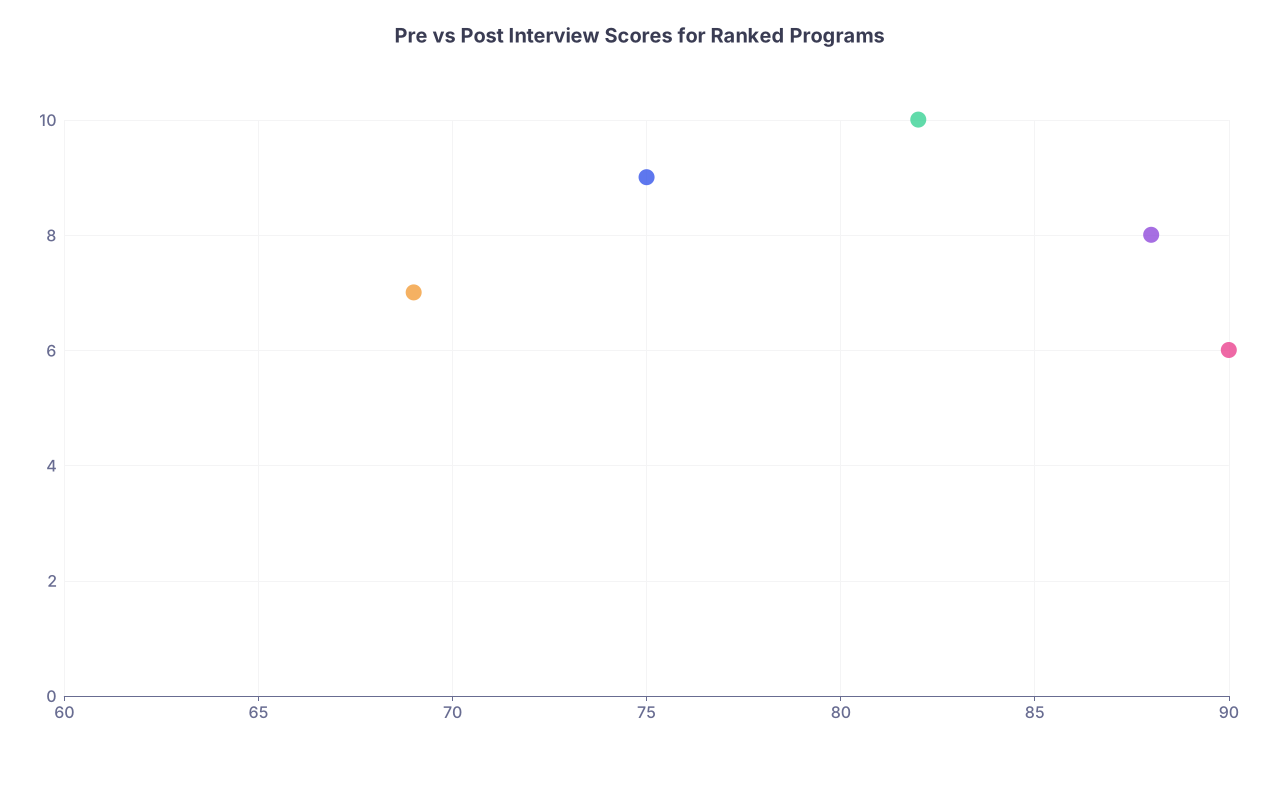
| Category | Value |
|---|---|
| Program A | 75,9 |
| Program B | 88,8 |
| Program C | 82,10 |
| Program D | 69,7 |
| Program E | 90,6 |
X‑axis: Pre‑interview Fit Score
Y‑axis: Post‑interview Impression (1–10)
The outliers (high pre score but low impression, or vice versa) deserve a second look before you lock your rank list.
Visual Timeline: Your Summer Residency Spreadsheet Plan
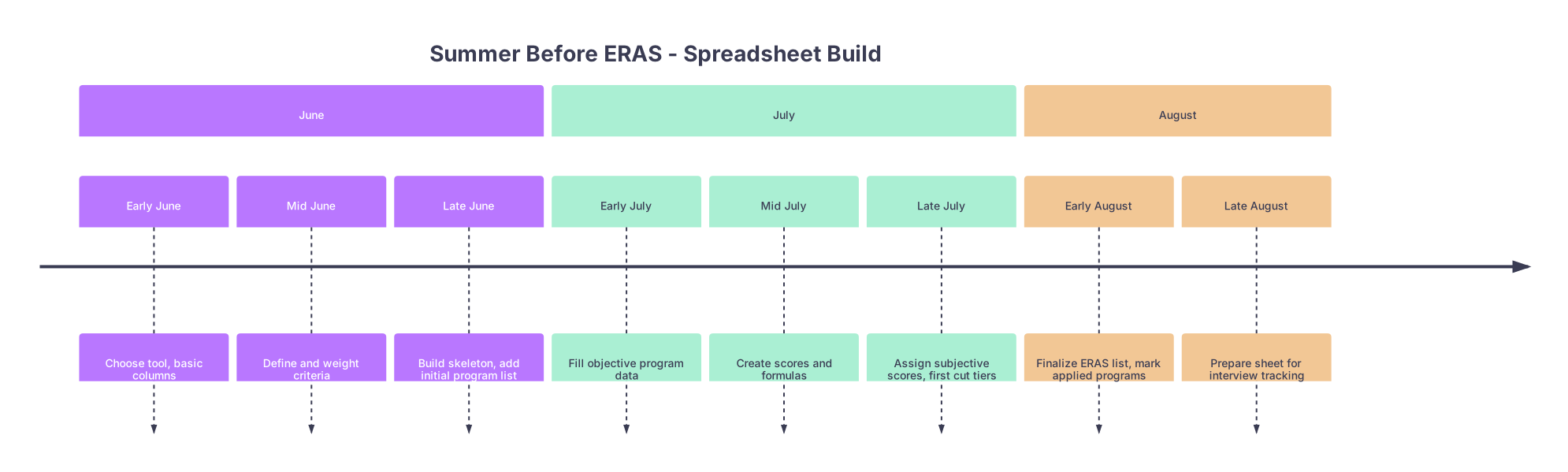
| Period | Event |
|---|---|
| June - Early June | Choose tool, basic columns |
| June - Mid June | Define and weight criteria |
| June - Late June | Build skeleton, add initial program list |
| July - Early July | Fill objective program data |
| July - Mid July | Create scores and formulas |
| July - Late July | Assign subjective scores, first cut tiers |
| August - Early August | Finalize ERAS list, mark applied programs |
| August - Late August | Prepare sheet for interview tracking |
How Your Columns Evolve Over Time
| Phase | Key New Columns Added |
|---|---|
| Early June | Program basics, location, IDs |
| Mid June | Criteria weights (separate tab) |
| Late June | Training environment, size, program type |
| Early July | Salary, call, vacation, board pass, fellowships |
| Mid July | Criterion scores, Overall Fit Score |
| Late July | Application Tier, Notes / Red Flags |
| Sept–Oct | Invite date, interview date, impression score |
| Jan–Feb | Rank Tier, Final Rank Order (optional) |
Where People Screw This Up (And You Will Not)
I have seen this pattern every year:
- Student builds gorgeous, hyper‑detailed sheet in September. Too late.
- They track 60 columns, fill 10 of them, then quit.
- They end up ranking based on which PD sent the nicest email.
You avoid that by:
- Starting in June
- Limiting yourself to criteria you actually care about
- Forcing numeric scores and weights
- Using the same file from pre‑ERAS through rank list
Three Things to Remember
- Build early, then just maintain. The heavy lift belongs in June and July, not in the middle of interview season.
- Force your preferences into numbers. Weights, scores, tiers. Your future self will thank you when emotions and fatigue kick in.
- Use one spreadsheet for the entire cycle. From program discovery to rank list. One source of truth, not scattered notes and random PDFs.