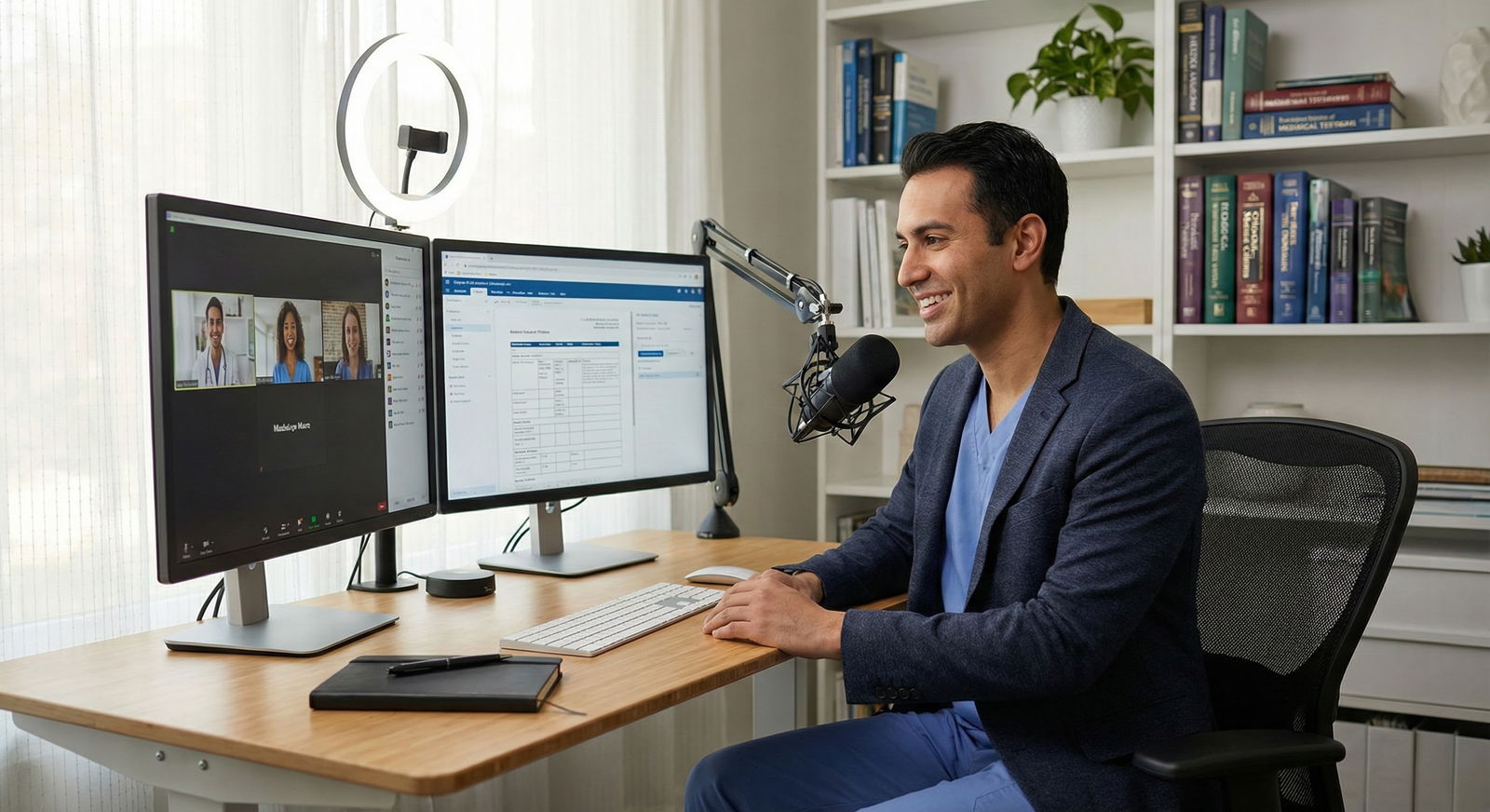
Telehealth-heavy practice models are not the future. They are already the default for a huge chunk of “lifestyle” medicine, and residents who ignore this are setting themselves up to be replaceable.
Let me break this down specifically: if you want a lifestyle-friendly specialty and you plan to build a telehealth-heavy practice, you need to understand three things at a granular level—billing, scheduling, and your home setup. If you get those wrong, your “chill telehealth job” turns into low-paid, chaotic, camera-on burnout.
This is the stuff nobody really teaches you in residency noon conference. They’ll talk about RVUs and malpractice, but not about how a bad webcam angle and poorly designed schedule can tank your patient satisfaction scores and your pay.
We will fix that.
1. Where Telehealth-Heavy Models Actually Work (and Where They Don’t)
You cannot just pick any specialty and “go telehealth.” Certain specialties lend themselves to telemedicine-heavy practice models; others absolutely do not unless you want to practice dangerously or illegally.
For lifestyle-friendly specialties, here is where telehealth-heavy practice is realistic and sustainable:
- Psychiatry (adult, child, addiction)
- Outpatient neurology (migraine, epilepsy follow-up, MS, movement)
- Endocrinology
- Allergy/immunology
- Rheumatology (with in-person anchor clinic or supervising physical exam structure)
- Sleep medicine
- Obesity medicine / lifestyle medicine / integrative medicine
- Dermatology (with constraints and good triage)
- GI, heme/onc, cardiology follow-up and chronic management work (not procedure-based income, obviously)
- Primary care (chronic care, medication management, quick follow-ups, triage)
Compare that to procedural surgical fields or EM: telehealth there is add-on, not core.
| Specialty | Telehealth-Heavy Feasibility | Typical Telehealth % (Mature Practice) |
|---|---|---|
| Psychiatry | Excellent | 70–100% |
| Endocrinology | High | 50–80% |
| Neurology (outpt) | High | 40–80% |
| Allergy/Immunology | High | 40–70% |
| Rheumatology | Moderate-High | 30–60% |
| Sleep Medicine | Excellent | 70–100% |
| Dermatology | Moderate | 30–60% |
If your aim is lifestyle—meaning schedule control, minimal commute, and less physical exhaustion—telehealth must be designed into your practice model from the start: licensing, coding, clinic template, documentation style, and tech stack.
Residents usually make one of two mistakes:
- They assume telehealth pays “about the same” as in-person no matter how it is structured.
- They assume telehealth is just clicking a different visit type and turning on the camera.
Both are wrong.
2. Telehealth Billing: The Part That Actually Gets You Paid
Mess up billing details and your “easy 20-minute tele-visit” becomes $0 or $15 instead of $120–$200. I have watched attendings realize this the hard way when their hybrid clinic moved to “virtual-first” and their gross collections dropped 20–30% because nobody fixed the codes and workflows.
2.1. Core Telehealth Visit Types You Must Know
For outpatient telehealth-heavy practice, three families of codes matter most:
- Synchronous video visits
- Telephone-only visits
- Asynchronous / digital E/M (portal messages, e-visits)
The exact reimbursement and rules change by payer and state, but the basic structure is stable.
1. Video-based Telehealth (Most Important)
These are usually billed with standard outpatient E/M codes (99202–99215) with telehealth modifiers/pos indicators added. This is where most of your revenue will live in a teleheavy model.
Key basics:
- Use 9920x (new) or 9921x (established) codes based on total time or MDM same as in-person.
- Add appropriate telehealth modifier (often 95 or GT) if required by payer.
- Ensure place of service (POS) is correct (telehealth vs office). Medicare often wants POS 10 (patient home) or 02 (other telehealth), but many private payers have their own quirks.
If your group is sloppy about POS or modifiers, you will lose revenue quietly. Months later, you see the denial patterns. Too late.
2. Audio-only (Telephone) Visits
Phone-only codes (e.g., 99441–99443 for physicians) exist but often pay less and may not be covered by all payers post-pandemic flexibilities.
You should know:
- Which payers still reimburse phone-only.
- Whether your clinic policy says “no planned phone-only; convert to video when possible” vs “phone acceptable for established low-complexity follow-up.”
- Minimum increments—often 5–10 minutes documented, and no overlap with a billable visit in the prior 7 days for same issue.
If you work in psychiatry, geriatrics, or low-tech populations, phone-only visits are not rare. They must be consciously integrated into your financial model, not treated as “free time.”
3. Asynchronous / Digital E/M
These are the portal/e-visit codes (e.g., 99421–99423, 99444 historically, and their advanced practice variants), often called “digital evaluation and management.”
They matter when:
- You practice in specialties where patients send long, complex messages with new problems.
- You work in large systems that have flipped to “billable MyChart message” models.
Rules you must internalize:
- They are for cumulative time over 7 days responding to a patient-initiated digital request that requires clinical decision-making.
- You cannot double-dip—no using them if the patient had a visit for the same issue in that 7-day period.
- Time is physician/APP time, not staff.
If you plan a telehealth-heavy, lifestyle-friendly practice, digital E/M can be either a nice additional revenue stream—or a massive uncompensated time sink if your employer refuses to bill them or your workflows are poorly defined.
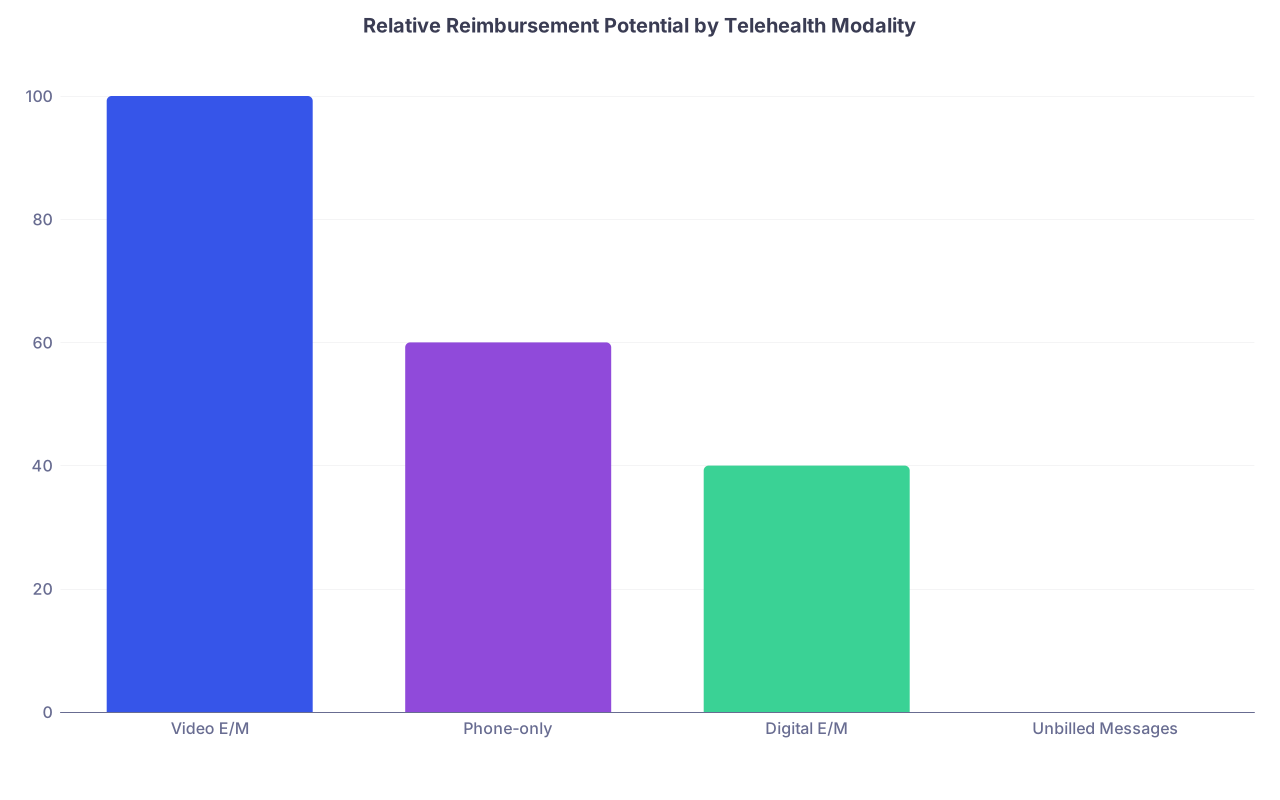
| Category | Value |
|---|---|
| Video E/M | 100 |
| Phone-only | 60 |
| Digital E/M | 40 |
| Unbilled Messages | 0 |
(Video E/M normalized to 100 for comparison; actual dollar values vary.)
2.2. Time-Based vs MDM for Telehealth
Telehealth lends itself to time-based coding because:
- You have precise encounter start/end in the platform log.
- You often spend more time on counseling, care coordination, education.
But clinicians get this wrong in two main ways:
- They under-document the total time (forgetting pre- and post-visit work that counts).
- They do not align their schedule template to realistic time windows, so they “run over” and then do not feel comfortable using time-based codes.
Remember: total time for that encounter (for time-based coding under 2021+ guidelines) often includes:
- Preparing to see the patient (reviewing records, imaging, lab results)
- Obtaining and reviewing history
- Performing a medically appropriate exam and/or mental status assessment
- Counseling and education
- Ordering tests, medications, referrals
- Documenting in the EHR
- Care coordination and communication with other professionals (same day)
If you are routinely spending 30 minutes on complex psych follow-ups and coding 99213 out of habit, you are setting money on fire.
2.3. Interstate Licensure and Location Rules
Here is the common telehealth legal mistake: residents think “I am licensed in State X, so if I am physically in State X, I can see anyone by video.” Wrong.
The rule that matters: where the patient is physically located at the time of the encounter.
- If the patient is in State Y and you are in State X, you usually must be licensed (or telehealth-registered) in State Y.
- Many lifestyle-oriented telehealth groups will push you to pick up multiple state licenses (IMLC helps).
- Some states have temporary telehealth registration or limited licenses; others require full licensure.
If your dream is “live in Colorado, see patients in 10 states, and ski on weekdays,” build your licensure plan early. Budget the time and fees.
3. Scheduling for a Telehealth-Heavy Clinic: Where Lifestyle Is Won or Lost
Residents tend to obsess over “what days will I work” and ignore “how the day is structured.” For telehealth-heavy clinics, the micro-structure of your template is where burnout and underpayment happen.
3.1. The Template: Don’t Copy the In-Person Model
Copying your old in-person template for telehealth is lazy and costly. A 20-minute in-person slot is not the same as a 20-minute video slot. Different friction points:
- Less walking and room turnover, but more tech friction and messaging.
- Patients show up underprepared (no vitals, no med list, poor environment).
- You will spend more time staring at screens and documenting in real time.
A clean starting model for a lifestyle-friendly telehealth day (for, say, psych or endocrine):
- 20–30 minute follow-up slots, not 15s, unless your case mix is extremely low complexity.
- 40–60 minute new patient slots.
- Protected 10–15 minute “buffer blocks” every 90–120 minutes.
- Dedicated 30–60 minutes per half-day for messages/digital E/M.
Do not let anyone convince you that because there is no room turnover, you can “handle 6 per hour” safely.
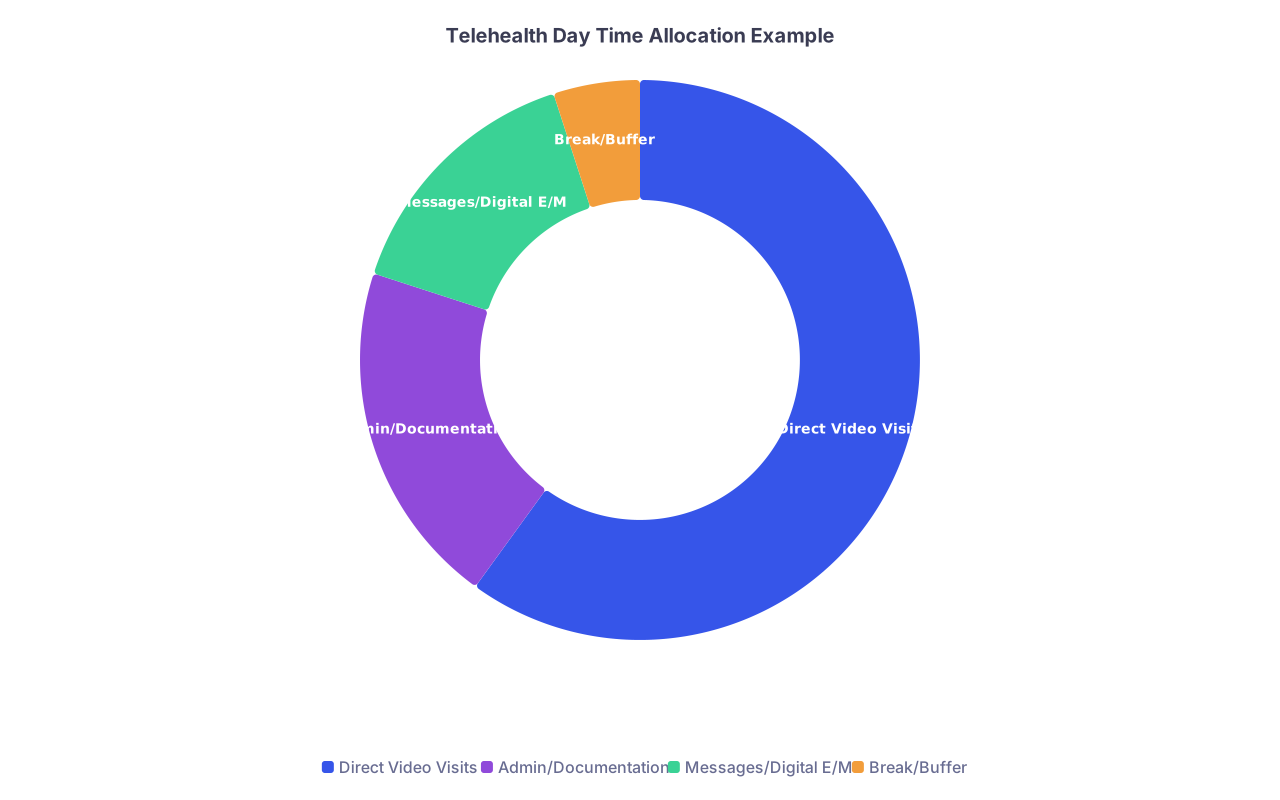
| Category | Value |
|---|---|
| Direct Video Visits | 60 |
| Admin/Documentation | 20 |
| Messages/Digital E/M | 15 |
| Break/Buffer | 5 |
3.2. Synchronous vs Asynchronous Work: Guard the Boundaries
Telehealth-heavy practice tends to blur lines between:
- Scheduled video visits
- “Just a quick portal message”
- Medication refills
- Care coordination and prior auths
If your day is all video with no built-in asynchronous block, you will:
- Run behind constantly.
- Do 60–90 minutes of unpaid message work after hours.
- Start hating the job you thought would be “chill remote work.”
Fix it by design:
- Reserve 30–45 minutes mid-morning and mid-afternoon to do messages, sign orders, review labs.
- Use standardized message routing: nursing/MA protocols for refills, templated responses for common issues.
- Decide, explicitly, which messages become billable digital E/M and which are truly “administrative.”
3.3. No-shows, Tech Failures, and Backups
Telehealth has fewer “waiting room” losses but more tech failures, especially in older or low-bandwidth populations.
You need:
- A clear policy: if video fails → immediate transition to phone-only or reschedule? Who decides?
- Staff with a script to call patients who have not joined within 3–5 minutes: “We see you are not in the virtual room; can we help you connect?”
- A backup phone number visible in your telehealth platform invite.
For lifestyle, the key is to reduce friction. Nothing ruins a work-from-home day like 4 straight patients “not appearing” then calling 15 minutes later confused.
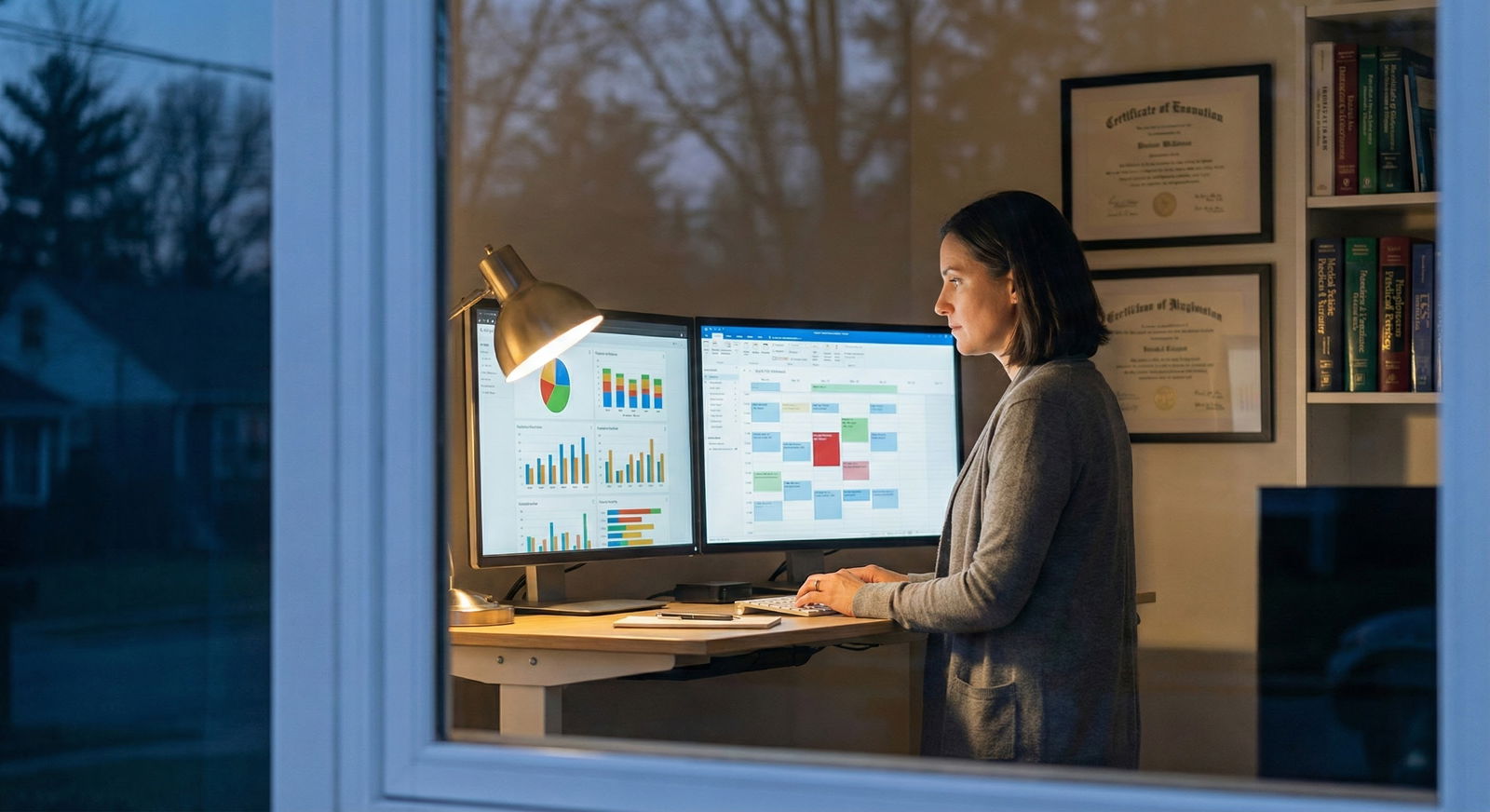
4. Home Office Setup: Treat It Like a Procedure Room
Most residents think home setup = “laptop + white wall + earbuds.” That is amateur hour. Your telehealth room is your procedural room. It affects:
- Patient trust and satisfaction.
- Your cognitive fatigue and neck/back pain.
- The professionalism your employer (and malpractice carrier) expects.
Let me walk through the components you actually need.
4.1. Hardware: Non-negotiables
You do not need a YouTube streamer’s setup. You do need more than a hospital-issued laptop on Wi-Fi.
Minimum viable telehealth rig:
- Stable wired internet (or excellent Wi-Fi, >50–100 Mbps down, >10–20 Mbps up).
- External 1080p or 4K webcam at eye level. Laptop cameras are usually poorly positioned and low quality.
- Quality microphone (USB mic or a good headset). Patients will forgive slightly grainy video; they will not forgive muffled or echoing audio.
- Dual monitors. One for video, one for EHR / PACS / references. This is the single biggest productivity booster.
Ergonomics:
- Monitor at or slightly below eye level, about an arm’s length away.
- Chair that supports your lower back and allows neutral hip/knee angles.
- Keyboard and mouse at a height that does not force wrist extension.
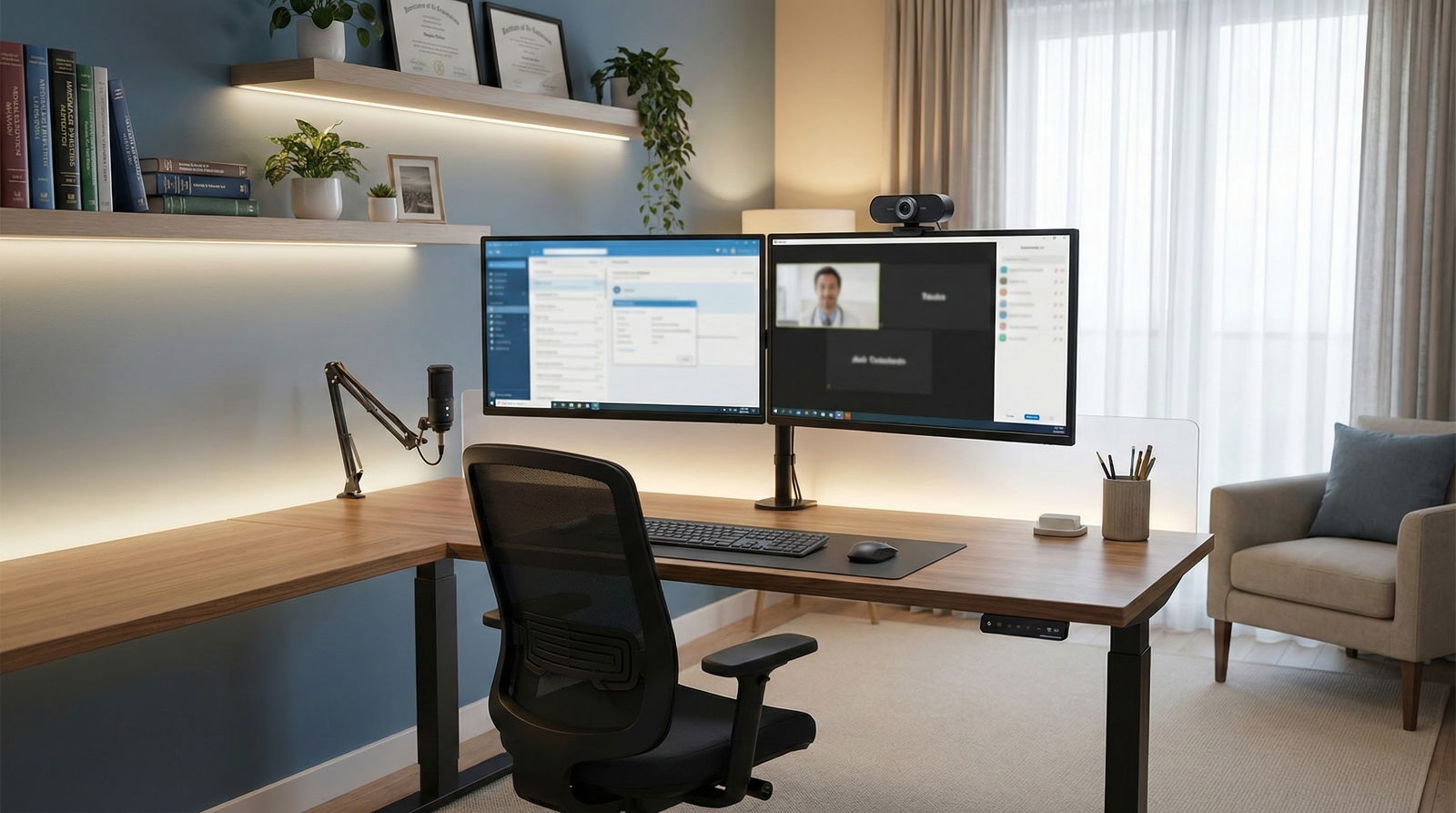
4.2. Lighting and Background: You Are the Environment
Many physicians underestimate how much lighting affects patients’ perception of empathy and competence.
Rules that work:
- Light your face from the front or slightly off to the side with a soft source: a ring light or softbox, or simply a window with a shade.
- Avoid strong backlighting (bright window behind you = silhouette).
- Background: neutral, uncluttered. A bookshelf, plant, or framed art is fine. Dirty laundry and chaotic kid toys are not.
Do not use cutesy or busy virtual backgrounds unless your group requires them. They glitch. They distract. Patients may not say anything, but they notice.
4.3. Privacy, Noise, and Security
If your family can hear you say “So, about your suicidal thoughts last week” through a thin wall, your setup is not private.
You need:
- A door that closes. Ideally, a room that can be dedicated or reliably converted to “clinic mode.”
- White noise machine or fan outside the door if others are home.
- Headphones or an in-ear monitor to keep patient audio from broadcasting.
- Clear policy on where PHI can appear. No printed charts taped nearby. No unsecured laptop on a kitchen counter.
And yes, you must think about what your smart devices are doing. Turn off Alexa/Google devices in that room or move them. Paranoid? Maybe. But better than explaining to your hospital compliance officer why Amazon might have recorded patient data.
5. Workflow: End-to-End Telehealth Day That Actually Works
Let me show you what a functional telehealth-heavy morning actually looks like in, say, an outpatient neurology or psych practice.

| Step | Description |
|---|---|
| Step 1 | Pre-visit Day Before |
| Step 2 | Check Schedule and Labs |
| Step 3 | Patient Tech Check by Staff |
| Step 4 | Patient Enters Virtual Waiting Room |
| Step 5 | MA Intake and Vitals if Available |
| Step 6 | Physician Video Visit |
| Step 7 | Real-time Documentation |
| Step 8 | Orders and Referrals |
| Step 9 | Schedule Next Visit or Labs |
| Step 10 | Post-visit Messages and Tasks Block |
Step-by-step reality:
- Day before: You or your MA team review the next day’s patients. Identify those needing labs before visit, forms, or device data (glucose logs, BP device, CPAP data, etc.). Send messages with clear instructions.
- 15–30 minutes before each visit: Staff performs “virtual rooming”—confirm meds, allergies, pharmacy, recent vitals if patient has them, reason for visit.
- Visit start: You enter, confirm patient identity (name, DOB, location), and verify they are in a private space.
- During visit: Document in real time as much as possible. Use templates and smart phrases aggressively.
- End: Summarize plan verbally (for telehealth visits, this is even more important), send AVS via portal, and ensure follow-up is scheduled before coming off call.
- After block: Use your message/admin block to address anything left over, send addenda, and bill digital E/M where appropriate.
This structure is what separates a professional telehealth practice from “I click a link and hope for the best.”
6. Mistakes Residents Make When Imagining Their Future Telehealth Lifestyle
Let me be blunt about the five most common errors I see in residents and early attendings planning telehealth-heavy careers:
Assuming employer will handle all billing details.
They will handle something. Not necessarily in a way that optimizes your income or even your compliance. You still need to understand what codes are being used for your work and whether telehealth parity exists for your payers.Ignoring licensure strategy.
Getting 4–8 state licenses is time-consuming. If your dream is “work-from-anywhere multi-state telehealth,” you plan those applications during late residency or early attending years, not 2 weeks before a job starts.Overbooking because ‘no commute.’
Residents often say “If I can see 16 per half day in person, I can do 18–20 on telehealth.” After 3 months of 18 short tele-visits + messages + prior auths from a chair at home, their neck, eyes, and sanity are fried.Underinvesting in hardware.
You will spend hundreds of hours in that video box. Spending a few hundred dollars on a proper webcam, mic, lighting, and ergonomic chair is not a luxury. It is risk mitigation.Not clarifying expectations for off-hours availability.
Many telehealth-heavy practices (especially direct-to-consumer companies) blur “clinic time” and “PRN availability.” You must know: Are evenings/weekends expected? What counts as “on call”? Are messages time-capped?
7. Telehealth in Lifestyle-Friendly Specialties: Specific Nuances
Let us get more focused and specialty-specific since that is the point of this series.
7.1. Psychiatry (and Psych-Adjacent)
Psych is the current king of telehealth-heavy lifestyle work. Most new outpatient psych groups assume 50–100% virtual.
Billing nuances:
- Almost all standard psych E/M + psychotherapy combinations can be done via telehealth if payer/regs allow.
- Time-based coding is often best due to long visits.
- High risk assessments (SI/HI, psychosis) require robust protocols: you must know the patient’s location, local emergency resources, and have policies for welfare checks.
Scheduling:
- 30–60 minute follow-ups common for med management + therapy elements.
- You can cluster high-intensity patients earlier in the day when your attention is best.
- Electronic prescribing with PDMP checks becomes a core workflow piece. Build it into your daily blocks.
Home setup:
- Absolute privacy is non-negotiable.
- Patients notice visual cues; sloppy backgrounds or constant family noise erodes trust fast in mental health settings.
7.2. Endocrinology / Obesity Medicine / Lifestyle Medicine
These fields adapt extremely well to telehealth with structured data collection.
Billing:
- Standard E/M with time or MDM.
- Remote monitoring codes (e.g., CGM, RPM) can add meaningful revenue if your practice supports them.
- Dietitian and health coach time may be billable under specific codes or subscription models if you are in a cash/concierge setup.
Scheduling:
- New consults often 40–60 minutes (complex diabetes, thyroid, PCOS, obesity).
- Follow-ups 20–30 minutes, with asynchronous review of CGM logs, food diaries, or BP data.
- Message blocks are critical; glucose questions and dose adjustments generate a ton of portal traffic.
Home setup:
- Screen-sharing to review graphs (A1c trends, CGM traces, weight curves) is powerful. Dual monitors make this painless.
7.3. Neurology (Migraine, Epilepsy, MS, Movement)
Telehealth is excellent for follow-up, less ideal for first-ever neuro exam unless you have infrastructure.
Billing:
- Use standard E/M codes, often complexity-based because neuro histories and testing/interp are substantial.
- Documentation should spell out which parts of the neuro exam were done via video, what was limited, and why the visit was still adequate.
Scheduling:
- New visits 45–60 minutes, follow-ups 20–30.
- Build labs and imaging review time in; neuro imaging is time-consuming if you are doing it properly.
- Some conditions (e.g., MS infusions, EMG) obviously require in-person integration.
Home setup:
- Camera framing should allow you to see at least torso/head clearly and occasionally limbs if you need basic movement assessment.
- Good bandwidth to avoid lag. You cannot meaningfully assess speech, facial expression, or limb movements if the video is jittery.
7.4. Allergy/Immunology and Rheumatology
These are “hybrid best” but telehealth-heavy follow-up is totally viable.
Billing:
- Allergy: in-person for testing and immunotherapy; telehealth for follow-up on asthma, rhinitis, medication titrations.
- Rheum: heavy lab/imaging review, DMARD titration, symptom management—great for tele after an initial in-person diagnosis.
Scheduling:
- Be careful not to load your day with 80% complex multi-morbidity rheum patients back-to-back virtually. Give yourself breathing space.
- Schedule labs/imaging ahead, build protocols for staff to chase missing data 3–5 days before visit.
Home setup:
- Patients with chronic pain/fatigue appreciate a physician who is not hurried and distracted. Eye contact via camera position matters more than you think.
8. Money Reality: RVUs and Compensation in Telehealth-Heavy Jobs
Here is the unpleasant truth: some telehealth-heavy jobs are lifestyle-friendly because they underpay. You get flexibility in exchange for lower compensation and sometimes worse benefits.
Patterns you will see:
- W-2 employed telehealth in large health systems with RVU targets: similar pay to in-person, provided billing is optimized and volumes reasonable.
- Direct-to-consumer telehealth companies (e.g., mental health startups, weight loss platforms): can pay well or terribly. Often per-encounter or per-RVU with no benefits.
- Part-time telehealth side gigs: decent hourly if you are fast and efficient, but easily encroach on your off time.
You judge an offer by:
- How many visits per day are expected?
- What is the average time per visit?
- Who handles no-shows and tech failures?
- How are digital messages compensated, if at all?
- Are you responsible for your own malpractice, hardware, and connectivity?
Without those answers, “$140/hour telehealth” can quickly become $80 effective hourly once you factor uncompensated time.
9. Putting It Together: Designing Your Own Telehealth-Heavy Practice Plan
You are in residency now, or early attendinghood, so what do you do with all this?
Here is a concrete, no-nonsense roadmap:
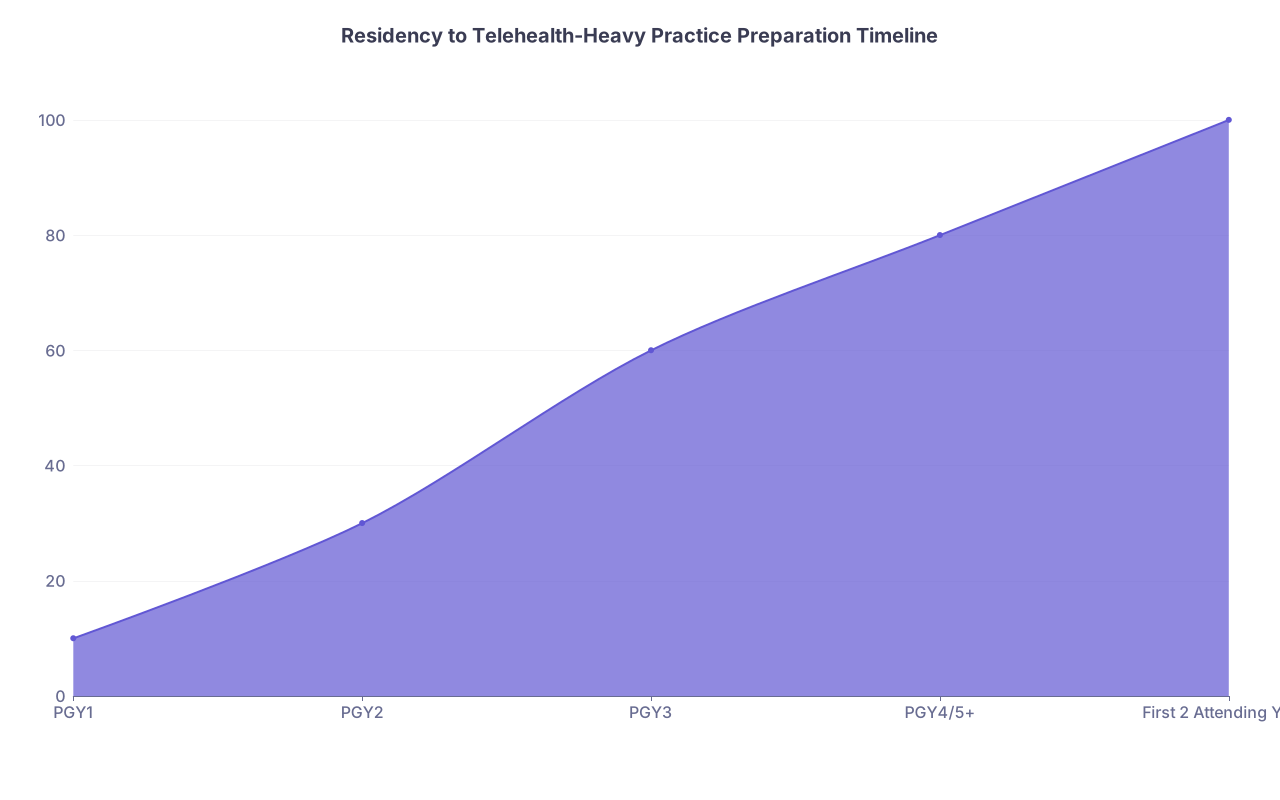
| Category | Value |
|---|---|
| PGY1 | 10 |
| PGY2 | 30 |
| PGY3 | 60 |
| PGY4/5+ | 80 |
| First 2 Attending Years | 100 |
(Values represent relative level of telehealth-specific skills and infrastructure you should aim to have built.)
PGY1–PGY2:
- Start paying attention to how your attendings bill telehealth and in-person. Ask why they choose time vs MDM codes.
- Do enough telehealth shifts to understand what feels cognitively exhausting and what feels sustainable.
- Take mental notes on templates that work (visit length, buffer blocks, mix of new vs follow-up).
PGY3+:
- Decide whether your specialty lends itself to a telehealth-heavy lifestyle and how much in-person you realistically want.
- Learn the telehealth policies of your main target employers or health systems.
- If multi-state telehealth is in your plans, research which states are in the IMLC (if applicable) and which licenses are strategic.
Final year / early attending:
- Build your own home setup before you are 100% remote. Test it while you still have backup options.
- Sit down with your billing/coding department and explicitly review the codes used for your telehealth visits, the modifiers, and denial rates.
- Negotiate scheduling templates that are actually realistic. “I want 30s for new, 20s for follow-up, with two 10-minute buffer blocks and at least 30 minutes per half-day for messages.”
First 1–2 years in practice:
- Regularly audit your own schedule and billing reports. Are your RVUs per half-day where you expect? Are denied claims clustering around telehealth codes?
- Adjust template density and visit length based on your data, not wishful thinking.
- Refine your telehealth exam techniques and patient instructions (e.g., “Before your visit, please have your weight, blood pressure, and a list of your medications available”).
10. The Bottom Line
If you want a lifestyle-friendly specialty with a telehealth-heavy practice, here is the distilled reality:
Telehealth is not a feature; it is a practice model. It changes your billing, your schedule, and your physical work environment. Treat it like a core design decision, not an optional add-on.
Billing details determine whether telehealth is financially sustainable. Know your codes (video, phone, digital), know your modifiers and POS, and do not outsource all financial understanding to “billing will handle it.”
Your schedule template and home setup are the difference between flexible, high-autonomy work and screen-based burnout. Longer, realistic slots; dedicated message time; dual monitors; good audio; private, ergonomic workspace.
If you handle those three pillars correctly—billing, scheduling, and setup—you can actually build the lifestyle-friendly, telehealth-heavy practice everyone on Reddit fantasizes about. If you ignore them, you just moved your clinic chaos into your living room.