
Most applicants misuse ERAS filters during SOAP and quietly destroy their own chances. Not programs. Not NRMP. Their own filters.
Let me fix that.
SOAP is a 48–72 hour triage exercise, not a standard application season. If you use ERAS the same way you did in September, you will miss programs that would have interviewed you in a heartbeat.
This is not about being “more organized.” It is about rebuilding your ERAS filtering and keyword logic for SOAP realities: unfilled programs, time pressure, program desperation, and your limited bandwidth.
I am going to walk you straight through how to set up filters, what to never filter out, and which keywords actually surface SOAP-friendly programs vs time‑wasting dead ends.
1. The SOAP Reality That Changes How You Use ERAS
SOAP is not Match 2.0. It is a different game with different rules.
Key constraints that matter for filters and keywords:
- You have a fixed number of applications (up to 45 programs in SOAP).
- Programs are under time pressure and sometimes less picky than in main match, but not blind.
- ERAS search is not magically “SOAP aware.” You have to force it to behave.
If you treat SOAP like “let me find my dream program that just happened to go unfilled,” you will over-filter and under-apply. The biggest pattern I see every year: applicants filter away half the realistic options.
Your priorities in SOAP:
- Identify all realistic programs that can legally rank you (visa, grad year, USMLE/COMLEX).
- Prioritize those with a realistic bar for your metrics (not fantasy land).
- Avoid wasting your 45 slots on programs that clearly did not want your profile in the autumn and still do not.
That means filters and keywords must be looser in some dimensions and brutal in others.
2. The Core ERAS Filters: How to Tighten and Where to Loosen
Let me break the ERAS filter categories down specifically for SOAP use.
A. Specialty and Track: Cast Just Wide Enough
You do not have the luxury in SOAP to hover forever over “primary specialty identity.” If you want to match, you have to be honest about which specialties will still take you during SOAP.
Strategy:
- Primary target specialty: 60–70% of your applications.
- Neighboring or backup specialties: 30–40%, if you are willing to actually do them.
Examples of rational specialty groupings:
- Internal Medicine primary → also filter Family Medicine, Preliminary Internal Medicine, Transitional Year (if you truly accept prelim + reapply).
- General Surgery primary → include Prelim Surgery, maybe TY if your longer play is reapplication or another specialty.
- Pediatrics primary → stick to Peds + Med-Peds + possibly FM if you actually accept FM as a career.
Do not click every specialty out of panic. ERAS will drown you in irrelevant results you cannot realistically build a credible application for in 24 hours.
B. State / Region Filters: Stop Over-Filtering Geography
In the main season, “I want to be in California or New York” is cute. In SOAP, filtering by 2–3 states is how you end up unmatched again.
My stance is blunt:
- Unless you have true, hard limits (visa sponsorship only in certain states, dependent care, legal constraints), do not use state filters in SOAP for your main pass.
- Use region or state only as a secondary sorting tool once you have your big list.
Practical approach:
- First pass: no geography filter OR a very broad region filter (e.g., “Midwest + South”).
- After you build your long list, if you have too many hits, then you can trim by state preference as a last step.
SOAP is about a job, not a zip code.
C. USMLE / COMLEX Score Filters: Hidden Traps
Many applicants shoot themselves in the foot here.
Two problems:
- Programs often do not update their “minimum score” fields aggressively before SOAP.
- ERAS filters by what programs say, not how they act when they are desperate to fill spots.
So if you set “USMLE Step 2 ≥ 230,” you are not “showing strong programs.” You are simply hiding programs that either did not enter data or used old cutoffs they are now quietly relaxing.
My recommendation:
- Do not set a numeric score filter on ERAS during SOAP.
- Instead, use Program Descriptions + Keywords + historical behavior (Charting Outcomes, program websites) to judge.
The only score‑related filters that make sense:
- “Accepts COMLEX only” vs “Requires USMLE” for DO students who did not take USMLE.
- “Accepts Step 1 Pass/Fail” – relevant mostly for older DO/IMG cohorts vs new MD cohorts.
If you absolutely must filter by score, use it only as an internal mental threshold, not an ERAS toggle.
D. Visa and IMG Filters: Non‑Negotiable
This is where you cannot be idealistic.
If you are:
Non‑US IMG requiring visa → You must use:
- “Accepts IMGs”
- “Sponsor J-1 visa” and/or “Sponsor H-1B visa” as appropriate
US-IMG or DO/FM needing no visa → You can relax the visa filters but still use the “Accepts IMGs” or “DO friendly” information from other sources (FREIDA, program websites).
What you never do as an IMG in SOAP:
- Apply to programs that explicitly state “Do not sponsor visas” or “US grads only.” SOAP will not change their legal constraints or institutional policies.
E. Graduation Year / YOG Filters
If your year of graduation is older (3+ years out), this matters.
- Do not set a YOG filter on ERAS.
- But absolutely read each program’s description, because many will say “Graduated within last 3–5 years.”
Programs are more flexible in SOAP, but very few will go from “YOG ≤ 3 years” to “we will take someone 10 years out” overnight. Use YOG as a manual exclusion when you triage, not an automated ERAS filter.
3. Keyword Strategy: What Actually Surfaces SOAP-Friendly Programs
Most people type useless fluff into the keyword box: “supportive,” “teaching,” “mentorship.”
That is decorative. You are in a burn‑down search phase. Keywords should be blunt instruments that map to:
- Program philosophy (“welcomes IMGs,” “holistic review”).
- Structural realities (“no Step 1 cutoffs,” “SOAP eligible,” “prelim only”).
- Mission focus that aligns with common applicant strengths (“underserved,” “community,” “rural”).
Let’s sort them.

A. High‑Yield Keywords for IMG / DO / Lower Scores
These are the phrases that tend to appear in programs that are actually flexible and SOAP‑friendly:
- “Holistic review”
- “No minimum score”
- “No cutoff”
- “IMG friendly” or “International graduates welcome”
- “Osteopathic friendly” or “Accepts DO”
- “Community based”
- “Rural” / “Rural track”
- “Underserved” / “Medically underserved”
- “J-1 visa”
- “H-1B visa”
- “Language” (e.g., Spanish speaking community) – if you have that skill
You do not need to get cute. Use these to identify programs likely to:
- Care about the whole file instead of just a Step number.
- Have a service need in communities where patient volume is king.
Example ERAS keyword sequences for an IMG in Internal Medicine SOAP:
- “holistic review community internal”
- “no minimum score underserved internal”
- “J-1 visa community hospital internal”
- “international graduates welcome internal”
You are not trying to find a poetic program description. You are trying to produce a shorter, more realistic hit list.
B. Keywords Signaling Realistic Work Environment
SOAP outcomes improve when you align with the actual mission of the program. If you have strong primary care interest, speaking rural and community is not fluff – it is leverage.
Useful filters by mission:
- “Community health center”
- “Federally qualified health center” or “FQHC”
- “Safety net hospital”
- “County hospital”
- “Track” plus “primary care,” “rural,” or “urban underserved”
For surgery / prelim slots:
- “Preliminary surgery”
- “Non designated prelim”
- “Designated prelim”
- “High operative volume”
- “Trauma center”
Again, use these not to narrow too much but to cluster programs by type so your applications read coherent for that environment.
C. What Not to Waste Keywords On During SOAP
Words that tell you nothing about whether a program will rank you:
- “Cutting edge”
- “Prestigious”
- “Top tier”
- “Research excellence”
- “Highly competitive”
- “Ivy League”
If a program is bragging primarily about research, NIH funding, and international reputation and went unfilled, there is usually a reason. Sometimes they miscalculated their rank list. More often, they are still not interested in borderline scores or older grads.
I have seen too many applicants burn 10–15 SOAP slots on “prestige” that was never meant for them, even in SOAP. Do not repeat that.
4. A Rational SOAP Filtering Blueprint (Step by Step)
Let me give you a concrete workflow. This is how you avoid paralysis at 12:00 pm Monday when the unfilled list drops.
Step 1: Pre‑SOAP Preparation (Before Monday)
You should have this ready before the unfilled programs list opens:
- A ranked list of:
- Primary specialty (e.g., IM).
- Secondary acceptable specialties (e.g., FM, Prelim IM, TY).
- Your non‑negotiables:
- Visa type, if needed.
- Absolute geography constraints (caregiving, legal, severe health issues).
- Your honest profile:
- Step/COMLEX scores.
- Attempts.
- YOG.
- US clinical experience (Y/N; how much).
Then build saved keyword sets in a note or document, ready to paste:
- Set A: For flexible academic/community IM:
- “holistic review community internal”
- “no minimum score international graduates internal”
- Set B: For FM backup:
- “holistic review community family medicine”
- “underserved FQHC family medicine”
- Set C: For prelim/TY:
- “transitional year community hospital”
- “preliminary internal surgery prelim”
You will not have time to think all this up from scratch on Monday.
Step 2: First ERAS Pass Right After Unfilled List Release
Once unfilled programs are visible:
- Filter by primary specialty only. No geography, no score filter.
- Add visa status filter if you require sponsorship.
- Sort by program name or state first just to get a sense of volume.
Then:
- Use your SOAP‑specific keyword sets in the “Search Program Descriptions” box to identify likely matches.
- Open a new spreadsheet or document and start a running list of “Potential Targets – Primary Specialty.”
For each program you consider:
- Quickly scan for:
- Visa statement.
- YOG limit.
- Score / attempts policy.
- Specific “US experience required” lines.
If you are borderline (e.g., 1 attempt, slightly lower score), but the rest of your profile fits, tentatively keep the program on your long list.
Step 3: Second Pass – Backup Specialties
Once you have a working long list for your main specialty:
- Switch ERAS to your backup specialty (FM, prelim, TY, etc.).
- Apply the same visa filter logic.
- Run the backup keyword sets.
You build a separate section in your sheet:
- “Backup – FM”
- “Backup – Prelim Surgery”
- “Backup – TY”
Why separate? Because you will need to decide proportional allocation: maybe 25 IM + 15 FM + 5 TY, or similar, based on where the realistic spots are.
Step 4: Triage and Prioritization
Now you have more potential programs than your 45‑slot limit. Good.
Sort each category (IM / FM / Prelim / TY) by:
- Programs that explicitly:
- Accept IMGs or DOs.
- Have “holistic review,” “no minimum score,” or “no cutoffs.”
- Programs whose current residents or website show:
- Recent IMGs / DOs.
- Non‑stellar stats (from alumni blogs, Reddit anecdotes, etc.).
- Programs in communities where high need = more flexibility:
- Rural.
- Border regions.
- Underserved inner city.
- State hospitals.
This is where your judgement matters. You are not ranking by “prestige.” You are ranking by “probability they rank me highly enough in SOAP to actually match here.”
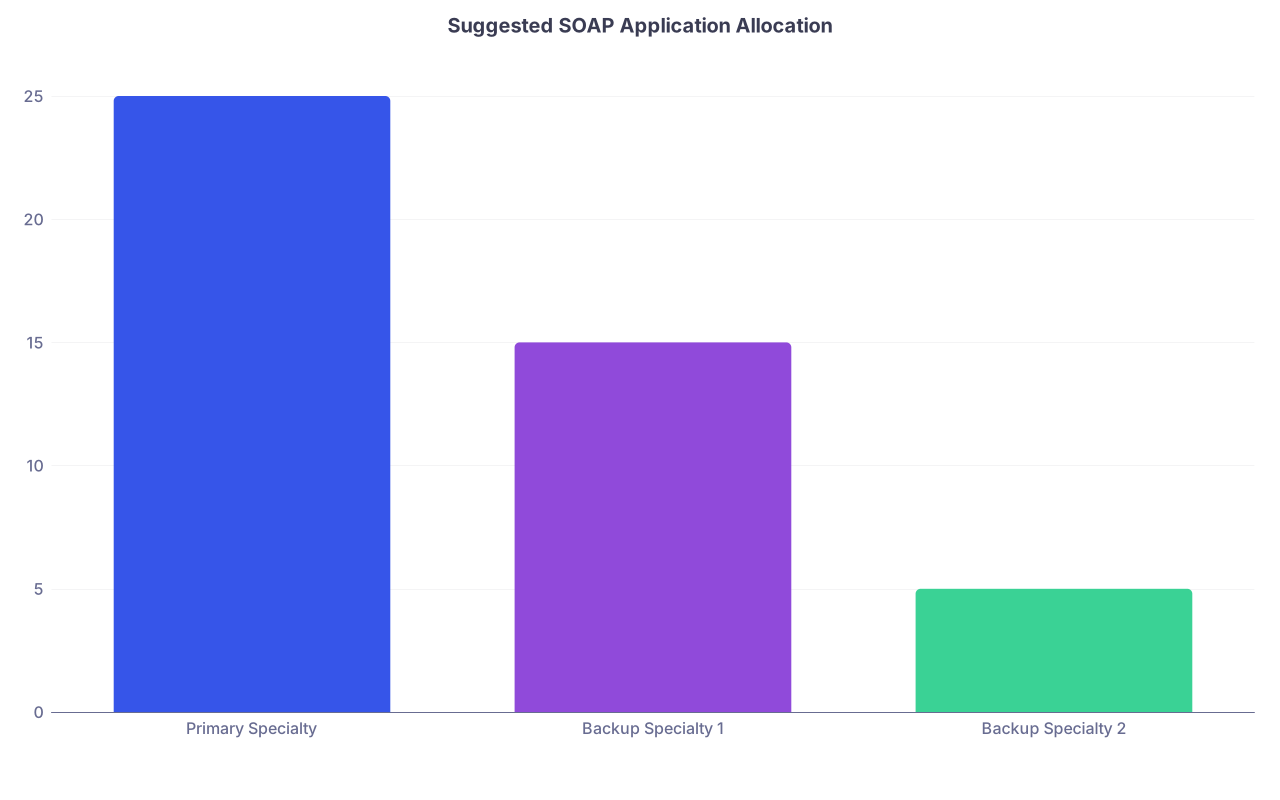
| Category | Value |
|---|---|
| Primary Specialty | 25 |
| Backup Specialty 1 | 15 |
| Backup Specialty 2 | 5 |
A 25/15/5 split is fairly typical for someone serious about their main specialty but realistic about backups.
5. Common Filtering and Keyword Mistakes That Kill SOAP Chances
Let me be blunt about what I see every year.
Mistake 1: Geographic Fantasy
Example: “I will only go to California, New York, Boston, or Miami.”
These regions are notoriously competitive, have many home programs, and often attract huge oversupply of applicants. In SOAP, staying tied to this kind of geography is how strong, otherwise matchable candidates end up unmatched.
Fix: Drop state filters. Embrace the Midwest, South, and interior states. At least in SOAP.
Mistake 2: Over-Trusting Program-Posted Cutoffs
Programs may list “Step 2 ≥ 230” but still fill in SOAP with multiple 220–225 applicants because they need bodies. I have watched IM programs that swore “we rarely go below 235” interview candidates with 215 in SOAP when they failed to fill.
Fix: Use score-related statements as soft guidance, not iron law, especially if:
- They explicitly mention holistic review.
- They have a clear service / underserved mission.
- They are community‑based.
If they say “no applicants with failures will be considered” – unfortunately, believe that one. They usually mean it.
Mistake 3: Ignoring Prelim and TY Slots Until Too Late
People treat prelim/TY as “if everything fails, maybe I will consider it.” That is backwards.
If your specialty is extremely competitive (Derm, Ortho, ENT, etc.) and you are in SOAP, your realistic path might be:
- Prelim medicine or surgery this year.
- Reapply stronger with US references and PGY‑1 completed.
The time to filter for prelim/TY options is parallel, not after burning all 45 applications on a doomed categorical attempt.
Mistake 4: Wasting Keywords on Vibes
You are not shopping for a vibe. You are trying to avoid unemployment.
Keywords like “supportive culture,” “collaborative,” “wellness” mean nothing in SOAP filtering. Every program believes they have those. It does not help you pick the ones likely to rank you.
Focus your keyword strategy on:
- Policy: holistic review, no minimum, visa type.
- Structure: community, rural, safety net, prelim.
- Mission alignment with your realistic narrative.
Mistake 5: Not Rechecking Filters Before Submitting
ERAS will remember some of your last‑used filters. I have seen people accidentally leave:
- State = “CA”
- USMLE Step 2≥ 240
…and then wonder why they only see 7 programs. Check the sidebar before you panic.
| Filter Type | Risky Setting | Better SOAP Setting |
|---|---|---|
| State | 1–2 favorite states | No state filter or broad region |
| Score (Step 2) | ≥ 230–240 | No numeric filter |
| Program Type | Categorical only | Include prelim and TY if acceptable |
| Visa | No explicit filter | Explicit J-1/H-1B if needed |
| Specialty | Single hyper-competitive only | Primary + realistic backups |
6. Advanced Moves: Using External Data with ERAS Filters
If you want to play this like an adult instead of in panic mode, you combine ERAS with:
- FREIDA
- Program websites
- Old NRMP Charting Outcomes data
- Anecdotal reports (Reddit, SDN, forums – with a grain of salt)
Two efficient ways to use this under time pressure:
A. Quick “Program Reality Check” Loop
For any program you are iffy about:
- Google “[Program Name] residency FREIDA”.
- Check:
- % IMGs.
- Current residents list – look for DOs, IMGs, older grads.
- If you see multiple IMGs/DOs and a YOG spread, it stays on your list even if ERAS description looks stiff.
- If website screams “top research, NIH funding, only US MDs” and you are a borderline IMG…cut it.
This 2‑minute reality check per program can save 10 wasted applications.
B. Aligning Your Personal Statement and Experience Quickly
SOAP personal statements are not novels. But they must be aligned.
If you know you are applying to:
- 25 community IM with high underserved focus.
- 15 FM with rural/underserved missions.
- 5 TY.
Then you should have:
- One IM statement emphasizing service, community, and team‑based care.
- One FM statement with primary care continuity, underserved/rural focus, preventive medicine.
- One very neutral “clinical growth and flexibility” PS for TY/prelim.
Your ERAS filters and keywords tell you what flavor of program you are mostly hitting. Your PS should not contradict that.

| Step | Description |
|---|---|
| Step 1 | Unfilled List Released |
| Step 2 | Set Specialty and Visa Filters |
| Step 3 | Run Primary Specialty Keyword Sets |
| Step 4 | Build Long List Primary Specialty |
| Step 5 | Run Backup Specialty Keyword Sets |
| Step 6 | Build Long List Backups |
| Step 7 | Triage By Realistic Criteria |
| Step 8 | Allocate 45 Applications |
| Step 9 | Submit Tailored PS and Documents |
7. Quick Specialty-Specific Notes for SOAP Filtering
I will not cover every field, but a few high-yield patterns.
Internal Medicine
- Community IM in Midwest/South is the core SOAP workhorse.
- Keywords: “community,” “underserved,” “county hospital,” “holistic review,” “J-1.”
- Do not overprioritize big-name university IM programs that oddly went unfilled. Many are still not IMG/low‑score friendly, even in SOAP.
Family Medicine
- Very SOAP friendly, especially in rural and underserved tracks.
- Keywords: “rural track,” “FQHC,” “community health center,” “Spanish,” “Medically underserved.”
- If you have strong primary care experience, highlight that. FM PDs care less about Step flex and more about who will stay in their communities.
General Surgery / Prelim Surgery
- Categorical GS rarely rescues low‑score/attempt candidates in SOAP.
- But prelim surgery is a real and sometimes excellent stepping stone.
- Keywords: “preliminary surgery,” “designated prelim,” “non designated prelim,” “high volume.”
- Be realistic: prelim is a year of intense work, not a guaranteed doorway to categorical.
Transitional Year
- Historically used by Radiology, Anesthesia, etc. But in SOAP, it is where many people park for a year to regroup.
- Keywords: “transitional year,” “community,” “broad clinical exposure.”
- Many TY programs are in community hospitals with IM/FM orientation. If you hated medicine, do not lie to yourself here. It will be miserable.
FAQ (Exactly 6 Questions)
1. Should I ever filter programs by a minimum USMLE score during SOAP?
Generally no. You risk hiding programs that are quietly flexible in SOAP. Use posted cutoffs as a soft guide when reading program descriptions, but keep the ERAS numeric score filters off unless you are intentionally limiting yourself to ultra‑competitive programs (which is almost never smart in SOAP).
2. How many specialties should I include in my SOAP applications?
Most applicants should focus on 1–2 specialties, occasionally 3 if one is prelim/TY. Beyond that, your personal statement and application lose coherence. A typical successful SOAP strategy might be: 25 IM + 15 FM + 5 TY, or 30 FM + 15 IM, depending on your competitiveness and career flexibility.
3. Is it safe to ignore geographic preference entirely during SOAP?
If your only objection to a location is “I don’t really want to live there,” then yes, you should ignore geography in SOAP. The exceptions: true family/caregiver responsibilities, visa/job constraints for a spouse, or severe personal health limitations. Otherwise, filtering by coast or “big city only” is a luxury many SOAP applicants simply cannot afford.
4. How do I know if a program is truly IMG or DO friendly during SOAP?
Combine three signals: explicit language in ERAS (“international graduates welcome,” “osteopathic friendly”), current resident lists showing IMGs/DOs across multiple classes, and historically reported behaviors (FREIDA, forums). Programs that consistently have several IMGs or DOs per class are far likelier to consider you in SOAP than those with a single token IMG from ten years ago.
5. Are prelim and transitional year positions really worth applying to in SOAP?
For many unmatched applicants, yes. A good prelim or TY year can provide US clinical experience, strong evaluations, and time to reapply from a much stronger position. It is not ideal for everyone, and it is not a guaranteed bridge into categorical training, but if the alternative is “no residency at all,” prelim/TY spots are very rational options to include in your filter and keyword strategy.
6. How many programs should I shortlist before narrowing to the 45 SOAP applications?
Aim for at least 1.5–2 times your final application number in your initial long list. So for 45 allowed applications, build an initial pool of 70–90 programs across your primary and backup specialties. Then triage down using visa, YOG, IMG/DO friendliness, and realistic score policies. Starting with too few options is how you end up filling your 45 slots with poor choices at the last minute.
Key takeaways:
Use ERAS filters in SOAP to exclude only what is truly impossible (visa, absolute YOG/attempt rules) and keep everything else as open as you can tolerate. Deploy keywords that map to policy and mission, not vibes, to surface realistically flexible programs. And build a bigger, structured long list first, then cut down to 45 applications based on probability of being ranked, not prestige or geography.