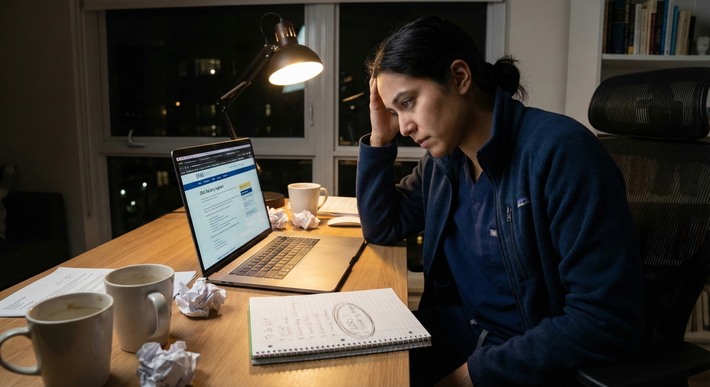
It’s 10:56 PM on ERAS opening day. You’ve checked your experiences 15 times, your personal statement 40, and your Programs list looks like a carefully balanced Jenga tower of reach, target, and safety. Your cursor hovers over “Certify and Submit.” You click. The wheel spins. And spins. And then:
“Error. Page cannot be displayed.”
Your stomach drops. You refresh. Same thing. You look at the clock. 10:57 PM. You start doing the math: “What if I can’t submit tonight? What if everyone else submits and I don’t? What if this ruins my entire match?”
This is that panic spiral I want to stop.
Let’s walk through what actually happens when ERAS crashes, what’s realistic worst‑case vs imaginary apocalypse, and what safety nets you actually have.
First: Does It Really Matter If ERAS Crashes?
Let me be blunt: the internet makes ERAS feel like Taylor Swift tickets. It’s not.
There is an advantage to being complete early, but there’s a difference between:
- Being months late
- Being late by a few days
- Being “late” by a few hours because ERAS melted down under 40,000 stressed applicants clicking at once
Programs don’t screen by timestamp down to the minute. They care about whether your application is complete in that early review window, not if you submitted at 9:02 AM vs 10:58 PM the first day.
Where timing really matters:
- The first wave of application downloads (usually a few days after apps open)
- Whether your letters and scores are in when programs pull applications
- Specialty-specific competitiveness (derm vs FM, etc.)
Where timing matters way less than your anxiety says:
- Submitting at 8:00 AM vs 11:30 PM opening day
- Submitting opening day vs 1–3 days later, especially if tech issues are widespread
If ERAS crashes for you, it’s extremely likely it’s crashing for lots of people. And when that happens, programs know. Coordinators talk. NRMP and ERAS send blast emails. Nobody’s sitting there saying, “Well, we’ll only look at people who submitted before the server died.”
What Actually Happens When ERAS Crashes
Here’s the part you don’t see when you’re grinding your teeth at your laptop.
When ERAS has major issues:
- They usually post a system alert on the ERAS login page or AAMC website.
- There are often emails or social media updates from ERAS / AAMC about known outages.
- When there are large, documented outages, programs are notified.
- Historically, outage days lead to:
- Updates in messaging like “if you experienced technical problems, don’t panic”
- Sometimes soft flexibility in how programs view “early” applicants.
No, they don’t extend deadlines every time. But they also don’t pretend nothing happened. The worst‑case “everyone else submitted smoothly but you” fantasy is almost never reality during a real outage.
Step‑By‑Step: What To Do The Moment ERAS Starts Glitching
You’re in the moment. Things are breaking. Here’s what I’d actually do, in order.
1. Don’t spam-click “Certify and Submit”
Worst instinct: click submit 20 times in a row as the page half-loads. That can:
- Cause duplicate weird partial requests
- Make it hard to know if any submission actually processed
- Just make you more panicked
Click once. If it fails, breathe. Then:
2. Take screenshots of everything
This feels paranoid but it’s your insurance policy.
Grab screenshots of:
- The time and date (include your system tray/clock)
- The error message
- Your almost-complete application screen (showing all sections green/complete)
- Any other weird glitch (“your session has expired,” blank screen after clicking submit, etc.)
If your computer can’t screenshot cleanly, literally take phone photos of the screen. Ugly but fine.
3. Check ERAS status and official channels
Before deciding this is a personal curse:
- Check ERAS home page for banners or alerts
- Check AAMC/ERAS official X (Twitter) or other social media
- Check your email for any “system issues” messages
If you see others online complaining at the same time (Reddit, Discord, GroupMe), that’s actually reassuring. System-wide problem = you’re not uniquely screwed.
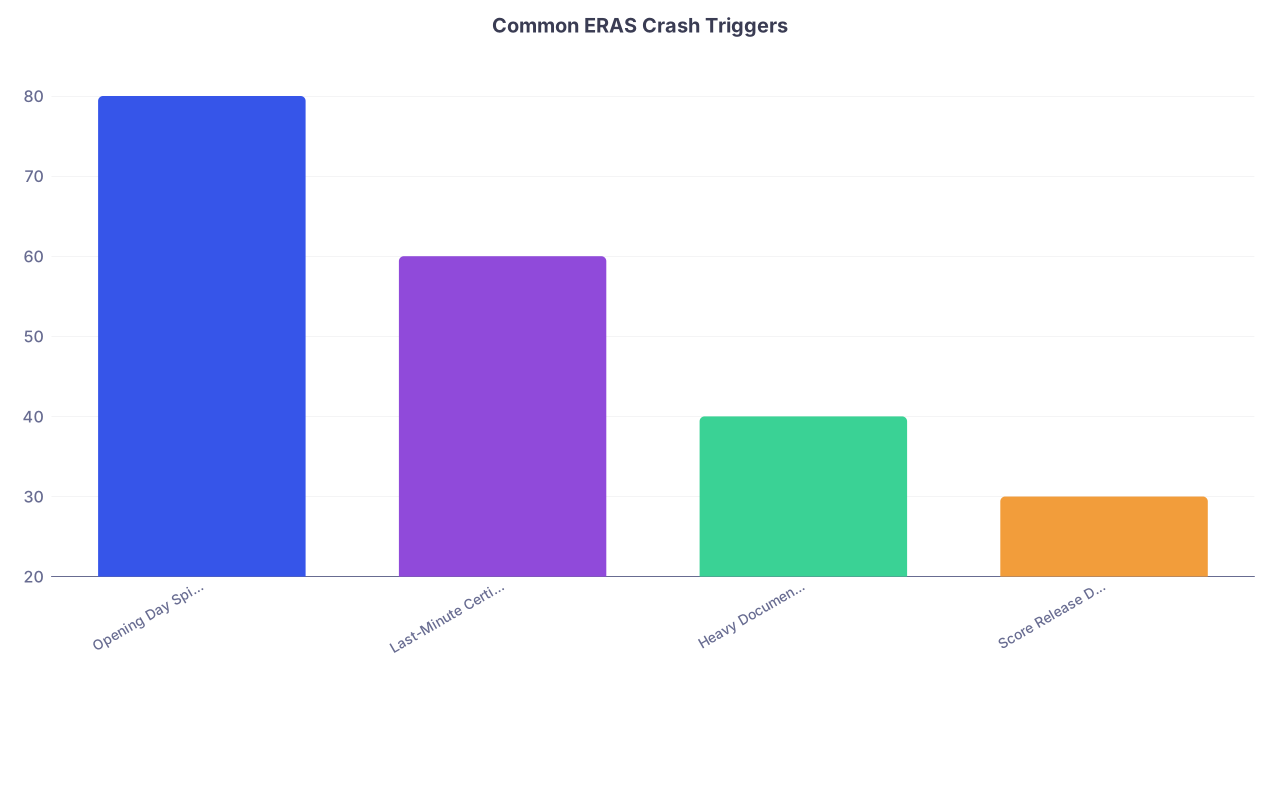
| Category | Value |
|---|---|
| Opening Day Spike | 80 |
| Last-Minute Certify Rush | 60 |
| Heavy Document Uploads | 40 |
| Score Release Days | 30 |
4. Try the boring technical fixes (once)
Do a basic sanity check, but don’t waste 2 hours troubleshooting like you’re IT support.
Things worth trying:
- Log out, close browser, log back in
- Try a different browser (Chrome to Firefox, etc.)
- Try disabling a VPN if you’re using one
- Try a different network (tether to phone briefly if you normally have weird campus Wi-Fi)
What’s not worth doing all night:
- Reinstalling browsers
- Trying five different devices one after another
- Resetting your router five times
You don’t need to fix ERAS. You just need to document what’s happening and show that you tried in good faith.
5. Check: Are you actually blocked from submitting, or just uncertain?
Sometimes the confusion is: “Did it go through or not?”
Check:
- Does it still say “Certify and Submit” or now show “Submitted”?
- Did you get a confirmation email from ERAS?
- Is the Programs tab showing applications sent?
If it’s pending, consider this: there might be a processing delay, not a true crash. That’s annoying, but less catastrophic than your brain is telling you.
Backup Plans: If You Still Can’t Submit
Ok. Let’s say it actually won’t let you submit, you’ve tried reasonable things, and the clock is ticking. Here are your realistic backup plans.
1. Use time zones to your advantage
ERAS doesn’t run on your local clock; it runs on Eastern Time. Clarify what “opening” or “first day” timing really is.
If it’s:
- 11:30 PM your time but earlier ET, you might still have a cushion.
- Already past opening day? A few hours delay doesn’t suddenly yeet you from consideration.
Most “best time to submit ERAS” guidance is talking about day scale, not minute scale.
2. Try a different device/network combo
This is the one “extra” thing that sometimes actually works:
- If you were on your med school Wi‑Fi, try your home Wi‑Fi or phone hotspot.
- If you were on a laptop, try a desktop or vice versa.
You do this once, maybe twice, not all night long.
3. Contact ERAS—yes, even late
No, you’re not the first person to email them in a panic. They’re used to it.
Use:
- The official ERAS Support contact form or email
- Phone if you’re within hours of them opening the next morning (and you still can’t submit)
In your message, include:
- Your AAMC ID
- Date/time window when you tried to submit
- What happened (“Clicked Certify & Submit at approx 10:52 PM ET, got ‘page cannot be displayed’ multiple times”)
- Screenshots if possible
Does this magically move your application to the front of the line? No. But it:
- Creates a paper trail that you tried to submit on time
- Gives you something to show a program later if needed
- Calms the “what if they think I just procrastinated?” terror
4. Recalibrate the actual risk of being 1–2 days “late”
Let’s talk about how programs look at timing.
For most specialties, the real breakpoints are:
| Submission Timing | Practical Impact for Most Applicants |
|---|---|
| Opening day ± 1–3 days | Functionally the same for the first review wave |
| Within first 2 weeks | Still early enough for most programs |
| After 4–6 weeks | Noticeably later, fewer interview spots remaining |
| Months late | High risk of significantly fewer interviews |
So if an ERAS outage turns your “opening day” submission into “2 days later,” is that ideal? No. Is it match-ending? No.
Programs do not:
- Compare micro-timestamps for 40,000 applications
- Prefer someone who submitted at 9:00 AM over 11:30 PM that same day
- Reject you because ERAS itself crashed
They do care about:
- Whether your app is complete when they batch-download
- Whether your letters and scores are ready
- Whether you applied in a reasonable early window
Worst-Case Scenarios Your Brain Is Inventing (And Reality Checks)
Let’s walk through the specific nightmare thoughts.
“Everyone will submit but me, and I’ll be way behind”
Reality:
- If ERAS has a real outage, tons of people are stuck.
- Programs see slower inflow of apps.
- Even if a subset got through earlier, it doesn’t mean programs lock in their interview lists by noon on day one.
Programs usually:
- Pull first big batches days after opening
- Review in waves over weeks, not hours
“Programs will think I didn’t care enough to submit on time”
Reality:
- No one at a program can see: “Ah yes, this applicant tried to submit at 9 PM but gave up and went to sleep.” They just see the timestamp when ERAS processed it.
- If there is a huge, documented ERAS crash, programs mentally adjust. They’re human. Many of them remember when ERAS broke for their class.
And if you ever felt compelled to explain (extreme case), having emailed ERAS with documentation helps your story sound like “this actually happened” not “I procrastinated.”
“If I don’t submit this exact second, I’ll never match”
Reality:
- People submit within the first week, not first minute, and match just fine.
- Plenty of solid applicants have had tech issues, LOR delays, Dean’s letter delays, etc., and still matched at good programs.
The people who really get hurt by timing are the ones who:
- Submit literal months after apps open
- Don’t have Step 2 or letters in until very late for competitive fields
Not the ones who got blocked for a night by technical issues.
How to Protect Yourself Before ERAS Crashes
If you’re reading this before you submit, you can lower your chances of a disaster night.
1. Do NOT wait until the literal last hour of “best time”
Submit early in the day, or even a day before the rush if the system allows certification. That 11:59 PM adrenaline rush? Overrated. And stupidly risky.
If everyone at your school is planning “We’ll all submit at 11 PM together!”—don’t. Be the boring one who submits at 10 AM with a stable server.
2. Have everything finalized a day earlier than you “need”
Pretend your internal deadline is one day before your real target. That way, if:
- ERAS glitches
- Your internet drops
- The server melts down briefly
You still have a buffer. Your future self at 11:42 PM will thank you.
3. Save copies of everything outside ERAS
Keep:
- Your personal statement in a Word/Google doc
- Your experiences text somewhere safe
- Your program list in a spreadsheet
If anything corrupts or a weird bug resets something, you don’t have to rewrite in a panic.
If Things Really Go Sideways: Emotional Damage Control
I’m not going to pretend you won’t freak out. You probably will. But you can limit the spiral.
If you’ve:
- Documented the issue
- Tried a couple reasonable tech fixes
- Reached out to ERAS if it’s clearly broken
You’ve done your part. Past that, losing sleep and refreshing every 30 seconds doesn’t change anything—except maybe how sharp you are the next day when you actually can submit.
You’re also allowed to:
- Text a trusted friend/classmate and say “ERAS is dying on me, please tell me I’m not the only one”
- Step away for 10–15 minutes, walk, shower, reset
- Decide, “I’ve done what I can tonight; I’ll recheck in the morning”
You not staring at the spinning icon doesn’t make it spin slower or faster.
Quick Process Map: What To Do When ERAS Breaks

| Step | Description |
|---|---|
| Step 1 | Click Certify and Submit |
| Step 2 | Confirm Submitted and Log Off |
| Step 3 | Take Screenshots |
| Step 4 | Try Simple Fixes Once |
| Step 5 | Submit and Confirm |
| Step 6 | Check ERAS/AAMC Alerts |
| Step 7 | Attempt Different Device/Network |
| Step 8 | Email ERAS Support with Evidence |
| Step 9 | Submit When System Back, Sleep, Move On |
| Step 10 | Error or Freeze? |
| Step 11 | Still Blocked? |
| Step 12 | Still Cant Submit? |
Mental Reframe: “Best Time to Submit” ≠ “Only Minute I Can Match”
Here’s the healthier way to think about this:
- Best time to submit ERAS: Early enough that when programs do their first big pull, your app is complete and ready.
- Not: A single magical minute where if you miss it, you’re dead.
Your real priorities:
- Submit in the early window (days, not hours)
- Have letters and scores in or coming very soon
- Don’t create self-inflicted delays by obsessively “perfecting” while ignoring timelines
An ERAS crash is annoying. Stressful. Sometimes genuinely scary. But it’s not the single point of failure your brain wants to make it.
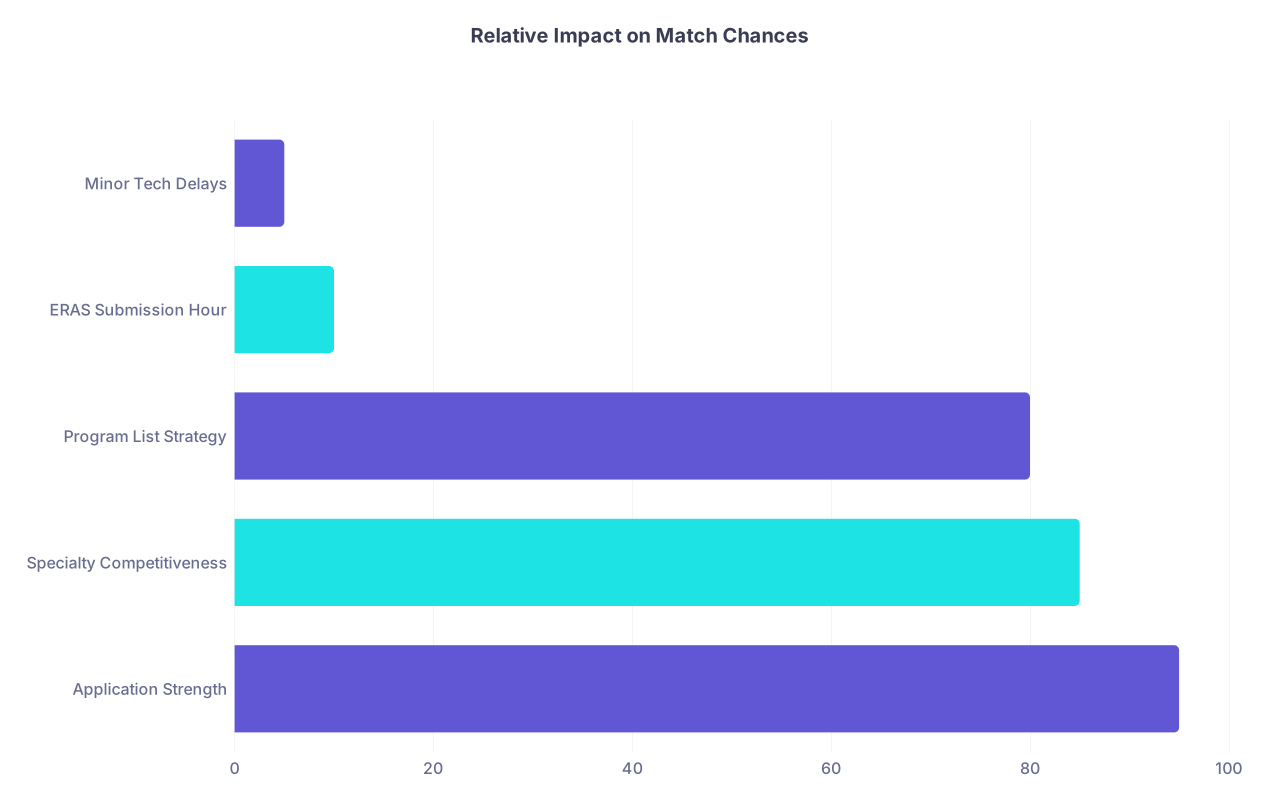
| Category | Value |
|---|---|
| Application Strength | 95 |
| Specialty Competitiveness | 85 |
| Program List Strategy | 80 |
| ERAS Submission Hour | 10 |
| Minor Tech Delays | 5 |
FAQ (Exactly 4 Questions)
1. If ERAS crashes and I end up submitting 1–2 days after opening, will programs see me as “late”?
No. They’ll see your actual submission date in the context of thousands of other apps. For the vast majority of specialties, submitting within the first few days looks the same on their end. They’re not ranking people by who submitted at 8:03 AM vs 11:47 PM on day one. What matters is that you’re in their first major review batch, not that you beat some imaginary midnight cutoff by 6 minutes.
2. Should I email programs and tell them ERAS crashed when I tried to submit?
Usually, no. It just makes you look anxious and doesn’t help them. Programs don’t want 400 emails saying, “I tried to submit early, I swear.” The exception: if you’re applying somewhere tiny or very specific (like a single‑spot specialty program you have a strong connection to) and the crash pushed you much later and there was a documented widespread problem, you could mention it briefly if you’re emailing for another valid reason. But as a blanket rule, this isn’t something you broadcast.
3. What if ERAS says my application was submitted, but I never got a confirmation email?
First, log into ERAS and check your dashboard. If it shows “Submitted” and your programs are listed with a submitted status, that matters more than your email. Email systems are flaky; portals are the source of truth. If the portal is unclear, after a short wait (to allow for processing delays), contact ERAS support with your AAMC ID and ask them to confirm. Don’t panic-resubmit or start deleting things. One verified submission is enough.
4. Is it safer to submit a “good enough” app a bit earlier than a “perfect” one right at the busy time?
Yes. Every time. A 99% polished application submitted in a calm, stable window beats a 100% polished one you’re trying to cram through during the most overloaded hour of the year. Tiny wording tweaks in an experience description will not make or break your match. Being weeks late sometimes can. Aiming to be “early and solid” instead of “last‑second perfect” is the smarter, safer play.
Bottom line, if ERAS crashes when you try to submit:
- Document it, try basic fixes once, and reach out to ERAS if it’s truly blocking you.
- Remember that being off by a few hours or even a day doesn’t kill your chances, especially if it’s a widespread problem.
- The real threat to your match isn’t a short technical delay; it’s letting the panic convince you you’re already doomed when you’re actually still very much in the game.