
It’s exactly 60 days before ERAS opens for submission. Your CV is “basically done.” Your ERAS profile is 80% filled. You’ve got drafts of your personal statement and some half‑finished experience descriptions sitting in a Google Drive folder.
And you’re about to make one of two moves:
- You’ll assume it’s fine and “just needs a quick proofread” (it doesn’t), or
- You’ll use these 60 days to quietly turn a mediocre application into a sharp, coherent, residency‑ready package.
This guide is for option 2.
I’m going to walk you through a time‑based plan for the last 60 days before ERAS: what to do at 60 days, 45 days, 30 days, 14 days, 7 days, and the final 72–0 hours. At each point: what should be locked, what should still be flexible, and what absolutely shouldn’t change anymore.
Big Picture: What Must Be Final When
At this point you should stop thinking of “my CV” as a single document. Residency programs see a system:
- ERAS work/activities section
- Education and training
- Honors/awards
- Publications/posters/presentations
- Personal statement(s)
- Program signaling choices (if applicable)
- LoRs (not your CV, but your CV should match what they say)
Here’s how I’d structure decisions over the last 60 days:
| Time Left | What Should Be Final | What Can Still Change |
|---|---|---|
| 60 days | CV master list, experience inventory | Wording, categorization |
| 45 days | Experience list & order | Polishing bullets, minor edits |
| 30 days | ERAS entries, headings, categories | Micro‑edits for clarity |
| 14 days | All content & structure | Tiny grammar/typo fixes |
| 7 days | Entire application | Emergency corrections only |
If you’re behind this schedule, fine. Just compress, don’t skip.
60–45 Days Out: Build and Audit Your Master CV
It’s 60 days out. At this point you should stop adding new commitments and start documenting what you already did.
Step 1 (Day 60–55): Create a Real Master CV
Not the ERAS version yet. A full, ugly, everything‑you‑ever‑did document.
Include:
- Every clinical experience (school and extracurricular)
- Research (projects, abstracts, in‑progress manuscripts)
- Teaching/tutoring/TA roles
- Leadership positions and committee work
- Volunteer and community service
- Work experience (paid, non‑clinical)
- Honors, awards, scholarships
- Presentations (local, regional, national)
For each entry, add:
- Exact title/role
- Organization, city, state
- Start and end months/years
- Typical hours per week
- 2–4 bullets in rough form: what you actually did and what actually changed because of you
Do not write for beauty. Write for completeness.
Step 2 (Day 55–50): Ruthless Relevance Filter
At this point you should prioritize. Programs don’t care equally about everything.
Use this filter:
- Directly relevant to specialty → keep and likely highlight
- Indirect but clearly transferable (leadership, teaching, QI) → keep, but don’t oversell
- Distant and old (high school, random college clubs) → usually cut, unless extremely distinctive or nationally competitive
If you’re torn, ask: “Would a program director bother to ask me about this in an interview?”
If the answer is no, demote it or drop it.
Step 3 (Day 50–45): Convert to ERAS Structure
Now you start mapping to ERAS categories. No polishing yet—just structure.
Common ERAS buckets:
- Work
- Volunteer – medical/clinical
- Volunteer – non‑medical/community
- Research
- Teaching
- Leadership
- Honors/Awards
- Publications/Presentations
At this point you should:
- Assign each entry to a single ERAS category
- Decide which 3 will be “most meaningful” (if your specialty or system uses that label)
- Estimate accurate hours and dates
- Flag anything that looks inflated or suspicious (e.g., 600 hours in 3 months while you were on surgery… come on)
45–30 Days Out: Rewrite Experience Descriptions Like an Adult
It’s 45 days out. The content is mostly set. Now the question is whether it reads like a resident‑in‑training or an undergrad applying to a shadowing gig.
Step 4 (Day 45–40): Rewrite Bullets for Impact
Most med students write experience bullets that sound like job descriptions. That’s lazy.
Bad:
- “Responsible for taking vital signs and helping with patient care.”
- “Participated in quality improvement project.”
Better:
- “Obtained vitals and triaged 15–20 patients per shift in a free clinic, escalating abnormal results directly to supervising physician.”
- “Co‑designed and implemented resident handoff checklist that reduced missing critical labs from 18% to 6% over 3 months.”
Template that works:
- Start with a strong verb (Led, Implemented, Analyzed, Coordinated)
- Add scope or volume (how many hours, patients, sessions)
- End with an outcome when you have one (improvement, product, change, feedback)
If you don’t have numbers, you still have outcomes:
- “Standardized…”
- “Streamlined…”
- “Created resource used by X…”
- “Improved…” (only if you can explain how)
Step 5 (Day 40–35): Eliminate CV Red Flags
At this point you should actively look for things that make PDs roll their eyes. I’ve seen these too often:
- Overusing “passionate,” “aspiring,” “lifelong dream”
- Calling routine student tasks “leadership” (you did vitals, you didn’t “lead a patient care team”)
- Inflated titles (don’t call yourself “co‑investigator” if you were a data entry RA)
- Listing “publications” that are actually “in preparation” (ERAS has a field for that—use it honestly)
Clean this now. If an attending has to squint to believe it, you’re overselling.
Step 6 (Day 35–30): Order and Emphasis
Programs skim. You don’t control their attention completely—but you can stack the deck.
At this point you should:
- Put the most relevant and impressive experiences higher within each section
- Mark the 3 “most meaningful” (or equivalent) based on
- Relevance to your specialty
- Longevity and depth, not just prestige
- What you actually can talk about intelligently for 10 minutes
- Make sure your 3 highlighted items match your personal statement themes
If your PS is all about underserved care and your most meaningful experiences are lab‑only bench work, that dissonance is obvious.
30–14 Days Out: Fine‑Tuning, Consistency, and Cross‑Checks
Now we’re 30 days out. At this point you should have no new content. Only editing, alignment, and error‑hunting.
Step 7 (Day 30–25): Cross‑Check Dates, Titles, and Stories
Programs notice inconsistencies more than they notice brilliance.
Go line by line and cross‑check:
- Do dates match between your CV, ERAS, and what your LoR writers might reference?
- Are job titles spelled and capitalized consistently? (Resident vs resident, Program vs program)
- Are publication citations identical anywhere they appear (CV, ERAS, PS, if mentioned)?
- Do the experiences in your personal statement exist in ERAS with matching timelines?
You want a PD to feel like they’re reading a single coherent story, not three half‑aligned documents.
Step 8 (Day 25–21): Style and Readability Pass
Now you refine how it reads.
At this point you should:
- Standardize tense
- Past roles → past tense
- Ongoing active roles → present tense
- Standardize person (no “I” in ERAS descriptions; keep it impersonal but active)
- Remove filler words: “very,” “really,” “various,” “numerous”
- Avoid jargon that isn’t universally understood (local committee abbreviations, random institutional acronyms)
Do a quick formatting sanity check:
- Are bullets roughly the same length?
- Are you starting every bullet with “Responsible for…”? Fix that.
- Does each significant experience have at least one outcome‑oriented bullet?
If you want a visual of how your editing time should skew now:
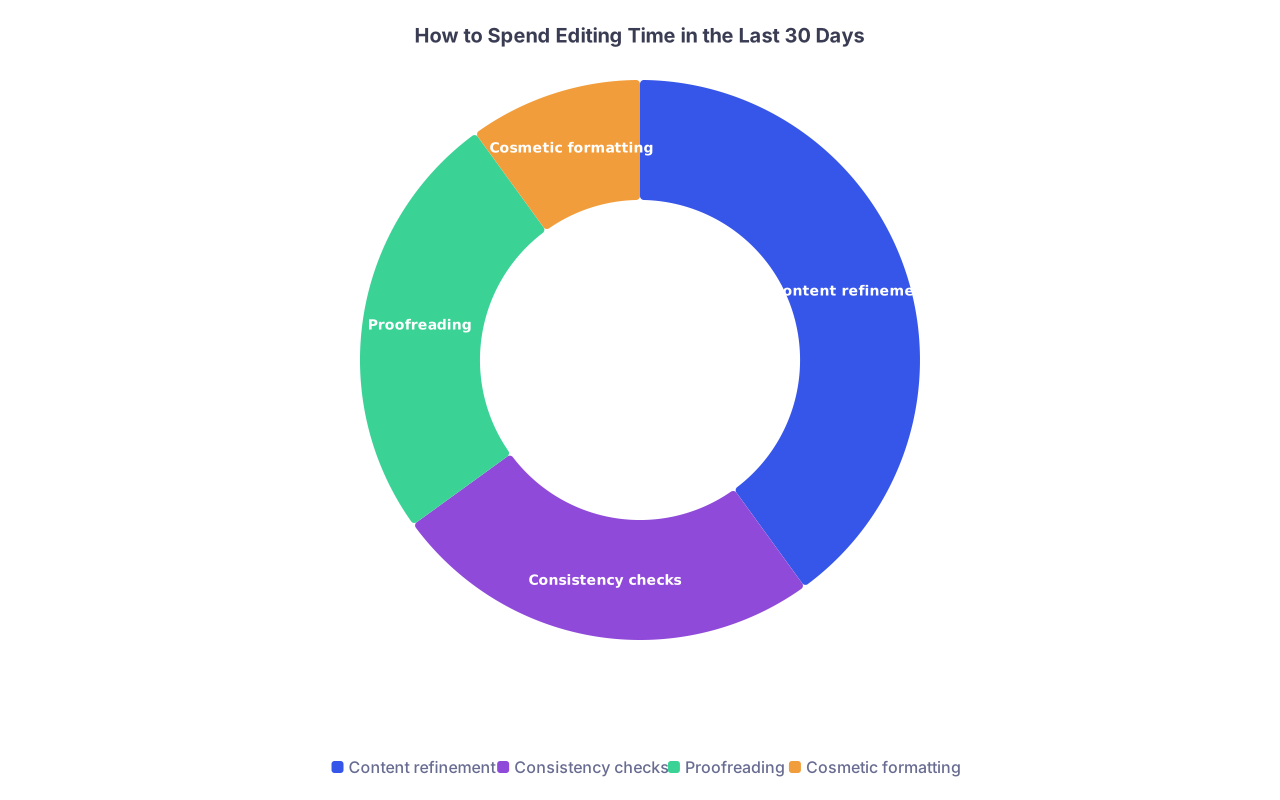
| Category | Value |
|---|---|
| Content refinement | 40 |
| Consistency checks | 25 |
| Proofreading | 25 |
| Cosmetic formatting | 10 |
Step 9 (Day 21–14): External Proofreaders (Choose Wisely)
At this point you should stop tweaking alone. You’re blind to your own mistakes.
Get 2–3 types of readers:
- Detail person – someone who lives for grammar, typos, missing commas
- Content person – attending, chief resident, or senior resident in your specialty
- Reality check person – classmate or friend who’ll say, “This sounds fake” or “This doesn’t sound like you”
What they should check:
- Clarity: “Do you understand what I actually did here?”
- Believability: “Does anything feel exaggerated?”
- Coherence: “Would you guess I’m applying to [your specialty] from this?”
- Mechanics: spelling, punctuation, repeated phrases (you’d be shocked how many “passionate about”s I’ve found in one app)
You do not need 10 people editing every sentence; that’s how you end up with a bland, committee‑written application.
14–7 Days Out: Lock Content, Only Polish Surface
You’re 2 weeks out. At this point you should decide: content is frozen. No new experiences. No new sections. No new clever ideas for that one bullet.
From now on, your only jobs:
- Fix surface errors
- Tighten wording slightly
- Ensure internal consistency across the whole application
Step 10 (Day 14–10): Global Consistency Pass
Now this becomes a systems check.
Run through the whole application in this order:
- ERAS work/activities
- Education and training
- Honors and awards
- Publications, presentations, abstracts
- Personal statement(s)
- Program signaling (if relevant) and geographic text, if any
You’re looking for:
- Consistent capitalization of institutions and roles
- Publication formatting (pick one style and stick with it—AMA is fine, just be consistent)
- Matching numbers: hours per week, total months—none of this 150 hours in one place and 90 in another
- Internal logic: don’t claim full‑time lab work during a known full‑time rotation block unless you can explain how
If you find a real error, fix it. But no more “adding one more bullet” or “rephrasing the entire section.”
Step 11 (Day 10–7): Read It Out Loud
Sounds dumb. It isn’t.
At this point you should literally read every experience entry out loud. You will catch:
- Awkward phrasing
- Repeated words (“developed” 6 times in 4 bullets)
- Sentences that are way too long for anyone to follow
If you trip over a sentence, shorten it. Programs do not give extra credit for complexity.
Final 7 Days: Proofreading and Sanity Checks Only
You’re in the last week now. You should assume that any content change could break something else. So you do not change content unless there’s a genuine error.
Step 12 (Day 7–4): Fresh‑Eyes Final Review
Take a full day away from your application, then:
- Print key sections or export as PDF (yes, physical or PDF view catches different errors than the ERAS browser window)
- Review line by line with a pen or highlighter
Focus on:
- Typos in institution names, cities, states
- Incorrect or inconsistent abbreviations (USMLE, not “U.S.M.L.E.”; ICU vs I.C.U., pick one)
- Double spaces, missing periods, stray capitalization
Optional but useful: run your text through a grammar tool, but don’t blindly accept its suggestions. Clinical and academic language breaks those checkers all the time.
Step 13 (Day 4–2): Application Integrity Check
Now you’re not editing text. You’re checking that the whole thing functions.
At this point you should:
- Log in to ERAS and click through every section as if you’re a program director seeing it for the first time
- Confirm every imported document is the correct and final version (CV if uploaded, PS, photo if required)
- Confirm LoR assignations: right letters to right programs
- Confirm no accidental “TBD” or placeholder text left in any field
I’ve seen students submit with “[insert exact dates later]” in a description. Don’t be that person.
Final 48–0 Hours: Hands Off the Content
You’re at the end. The temptation now is to keep fiddling. That’s a good way to introduce new mistakes.
Step 14 (Final 48–24 Hours): Last Micro‑Proofread
One last pass, but with strict rules:
- Allowed changes: clear typos, obvious grammar errors, spacing issues
- Forbidden changes: adding bullets, rewriting sentences, changing dates or hours without a confirmed factual error
Have one trusted person do a quick, not obsessive, skim.
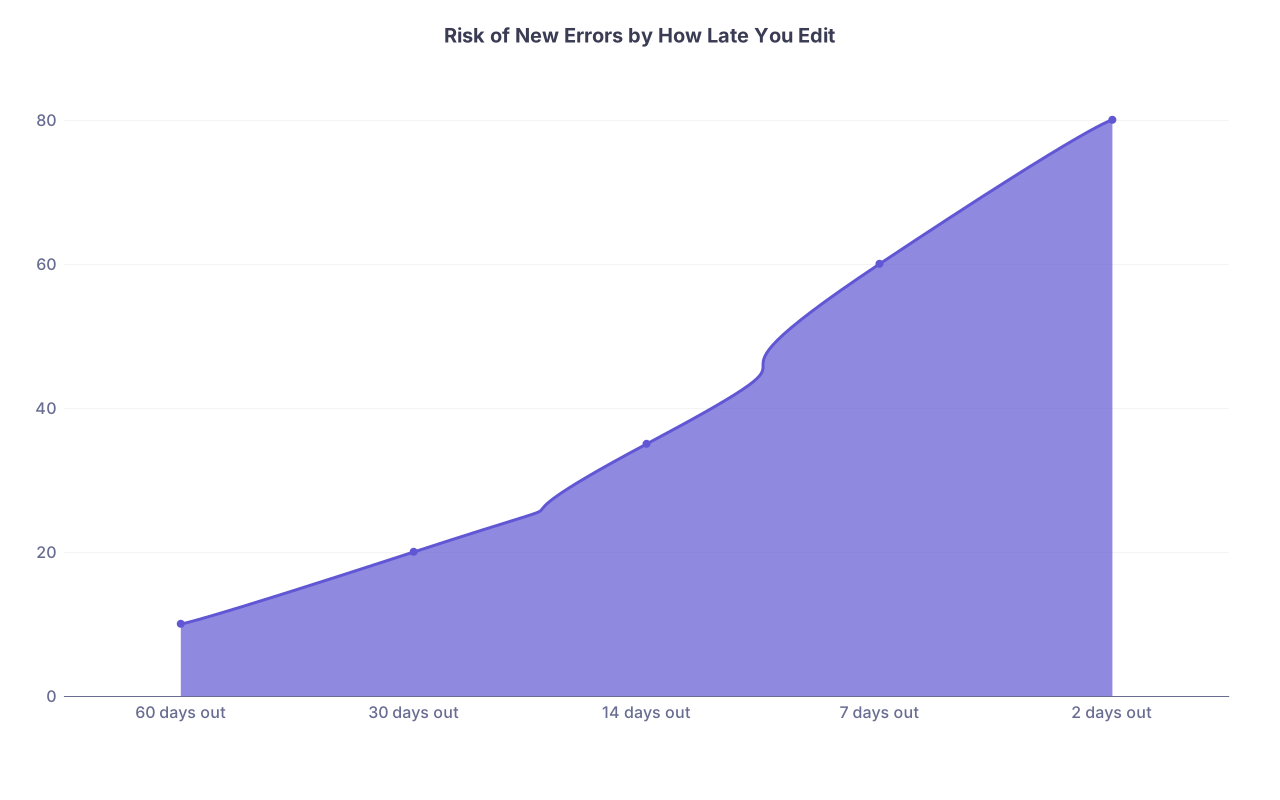
| Category | Value |
|---|---|
| 60 days out | 10 |
| 30 days out | 20 |
| 14 days out | 35 |
| 7 days out | 60 |
| 2 days out | 80 |
The closer you are to submission, the more likely a “small tweak” creates a bigger problem.
Step 15 (Final 24–0 Hours): Technical Submit Readiness
At this point you shouldn’t be editing at all. You’re doing pre‑flight checks:
- Time zone correctness for submission
- Payment method ready
- Backup of all application text saved offline (Word/Google Doc)
- Screenshots or PDF exports of the final submitted version for your records
Do a quick mental review:
- If a PD asked, “Tell me what you did that you’re proudest of in medical school,” does your application point clearly to that?
- If someone skimmed your application in 2 minutes, would they know:
- Your specialty
- Your main strengths (research, teaching, service, leadership)
- Your approximate trajectory and story
If yes, you’re ready. If no, that should’ve been fixed weeks ago. Don’t panic‑edit now.
Specialty‑Specific CV Tweaks (Do This Around 45–30 Days)
Short detour, because this actually matters and nobody tells you when to do it.
Around the 45–30 day mark, you should lean your CV slightly toward your specialty:
| Specialty Type | Emphasis in CV | Things to De-Emphasize |
|---|---|---|
| Competitive (Derm, Ortho, ENT) | Research, productivity, specialty exposure | Light, scattered shadowing |
| Cognitive (IM, Neuro) | Longitudinal clinical roles, QI, teaching | One-off events or short projects |
| Primary care (FM, Peds) | Community work, continuity clinics | Pure bench research without patient tie-in |
| Surgically oriented | OR exposure, procedures, team roles | Short unrelated volunteer gigs |
You don’t change facts. You change order, emphasis, and level of detail.
Visual: 60‑Day CV Prep Timeline
Here’s the flow of what you should be doing when:
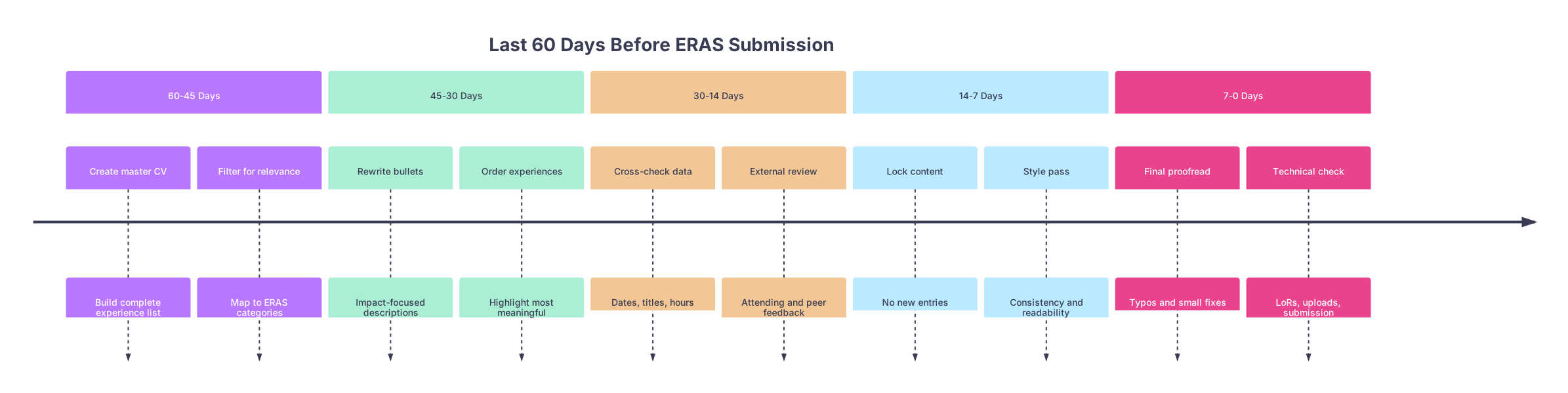
| Period | Event |
|---|---|
| 60-45 Days - Create master CV | Build complete experience list |
| 60-45 Days - Filter for relevance | Map to ERAS categories |
| 45-30 Days - Rewrite bullets | Impact-focused descriptions |
| 45-30 Days - Order experiences | Highlight most meaningful |
| 30-14 Days - Cross-check data | Dates, titles, hours |
| 30-14 Days - External review | Attending and peer feedback |
| 14-7 Days - Lock content | No new entries |
| 14-7 Days - Style pass | Consistency and readability |
| 7-0 Days - Final proofread | Typos and small fixes |
| 7-0 Days - Technical check | LoRs, uploads, submission |
And if you’re wondering how to split your time over the whole 60 days:
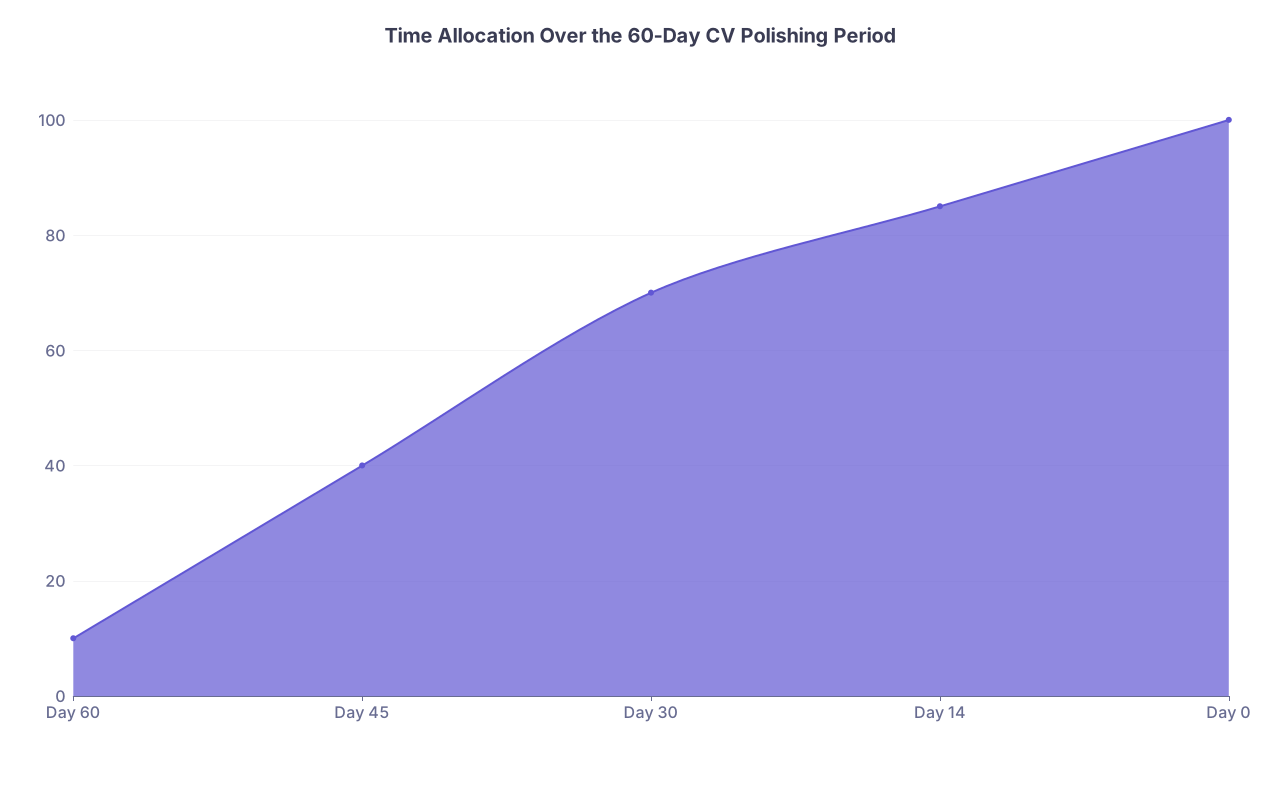
| Category | Value |
|---|---|
| Day 60 | 10 |
| Day 45 | 40 |
| Day 30 | 70 |
| Day 14 | 85 |
| Day 0 | 100 |
(That’s cumulative completion. By day 30, ~70% of your CV work should be done. If you’re at 20%, you’re behind.)
Common Last‑Minute Mistakes to Avoid
Quick hit list, based on what I’ve seen sink decent applications:
- Adding brand‑new “experiences” in the last week that are obviously filler
- Backdating start dates to make something look longer than it was
- Listing “in press” or “accepted” publications that are actually “submitted”
- Using your ERAS CV to explain red flags (leave that for additional info sections or advisor‑guided statements)
- Letting 6 different people rewrite your bullets until they sound nothing like you
You’re not trying to look perfect. You’re trying to look reliable, honest, and coherent.
Quick Recap: What Actually Matters
You’ve read a lot. Here’s the distilled version:
- Front‑load the heavy work. By 30 days out, your experiences, bullets, and structure should be essentially done. The last month is for refinement, not invention.
- Prioritize clarity and integrity over flash. Clean, believable, tightly written entries beat inflated, buzzword‑heavy nonsense every time.
- Freeze content early, then protect it. Two weeks out, stop changing what you did and only fix how it looks on the page.
Do this, and your CV won’t just be “good enough.” It’ll be the kind of application a tired program director can skim at 11:30 PM and still think: “Okay. This one’s solid.”