

The worst chief transitions are silent. No roadmap, no passwords, no context—just a locked call room and a mysterious Excel file named “final_final_schedule_REAL.xlsx”. You can do better than that.
This is your month‑by‑month, week‑by‑week, and day‑by‑day guide to a clean, professional chief handover that doesn’t burn the next team—or your reputation.
3–4 Months Before Handover: Build the Foundation
At this point you should stop thinking “end of the year” and start thinking “handover is a project.”
Month –4: Create the Handover Spine
Your job now is to build the skeleton that everything else will attach to.
Create three master documents (Google Drive, OneDrive, or your hospital’s shared drive—doesn’t matter, just not on your personal laptop only):
Chief Operations Manual
- What it covers:
- Daily workflows (who does what by 6 am, noon, 5 pm)
- How scheduling is built and updated
- Vacation and jeopardy rules
- Call swap policy and what actually gets enforced
- Escalation pathways (who you call first, second, third)
- Start with headings only. Fill detail over the coming months.
- What it covers:
Annual Calendar of “Must‑Not‑Miss” Events
- Go month by month:
- When recruitment starts and ends
- When block schedules must be built
- CCC meetings and evaluation deadlines
- ACGME survey timelines
- Graduation, orientation, retreat dates
- Mark each item with:
- Owner (chief, PD, coordinator)
- Lead time (e.g., “start 6 weeks before”)
- Go month by month:
Key Contacts and Access Sheet
- Program director(s)
- APDs
- GME office contacts
- IT, paging, EMR superuser
- Department admin for budget and reimbursements
- Clinic managers, nurse managers, fellowship coordinators
- For each: email, phone, when to contact, and what they actually respond to
| Document | Primary Purpose |
|---|---|
| Chief Operations Manual | Daily/weekly how-to guide |
| Annual Program Calendar | Time-sensitive obligations |
| Key Contacts & Access List | People and systems map |
| Scheduling Playbook | Rules and examples |
| Project/Initiative Tracker | What’s midstream and status |
At this stage, completeness doesn’t matter. Structure does. You’re building containers for your future self to fill.
Month –3: Make Your Work Visible and Repeatable
At this point you should stop being a magician and start being a system.
Focus on things you do on autopilot that the next chiefs will have to recreate:
Document Routine Tasks
- Weekly:
- How you generate the weekly coverage email
- How you review duty hour violations
- How you approve swaps
- Monthly:
- How you reconcile schedules with payroll/HR
- How you prepare agendas for chief‑PD meetings
- How you assign conference presenters
- For each, write:
- Trigger (what reminds you to do it)
- Tools used (specific templates/links)
- Steps to completion
- Who needs to be informed when it’s done
- Weekly:
Lock Down Where Files Will Live
- Create clearly labeled folders:
- “Schedules – Archived by Year”
- “Policies & Procedures”
- “Recruitment”
- “Wellness & Events”
- Ban mystery folders like “misc” or “old stuff”; they’re useless.
- Create clearly labeled folders:
Start a “Things I Wish I’d Known” Log
- Every time you think “I wish someone had told me this,” add it:
- “Clinic manager hates last‑minute schedule changes—call 2 weeks out.”
- “MedEd office needs conference schedule by July 1 or they will email you 9 times.”
- This log will become gold for the incoming team’s first 30 days.
- Every time you think “I wish someone had told me this,” add it:
2 Months Before Handover: Systematize the Hard Stuff
This is where most chiefs fail. They say, “We’ll just walk them through the schedule at the end.” That’s how you end up with chaos.
At this point you should be converting what’s in your head into concrete, reusable tools.
Month –2: Scheduling and Coverage Playbook
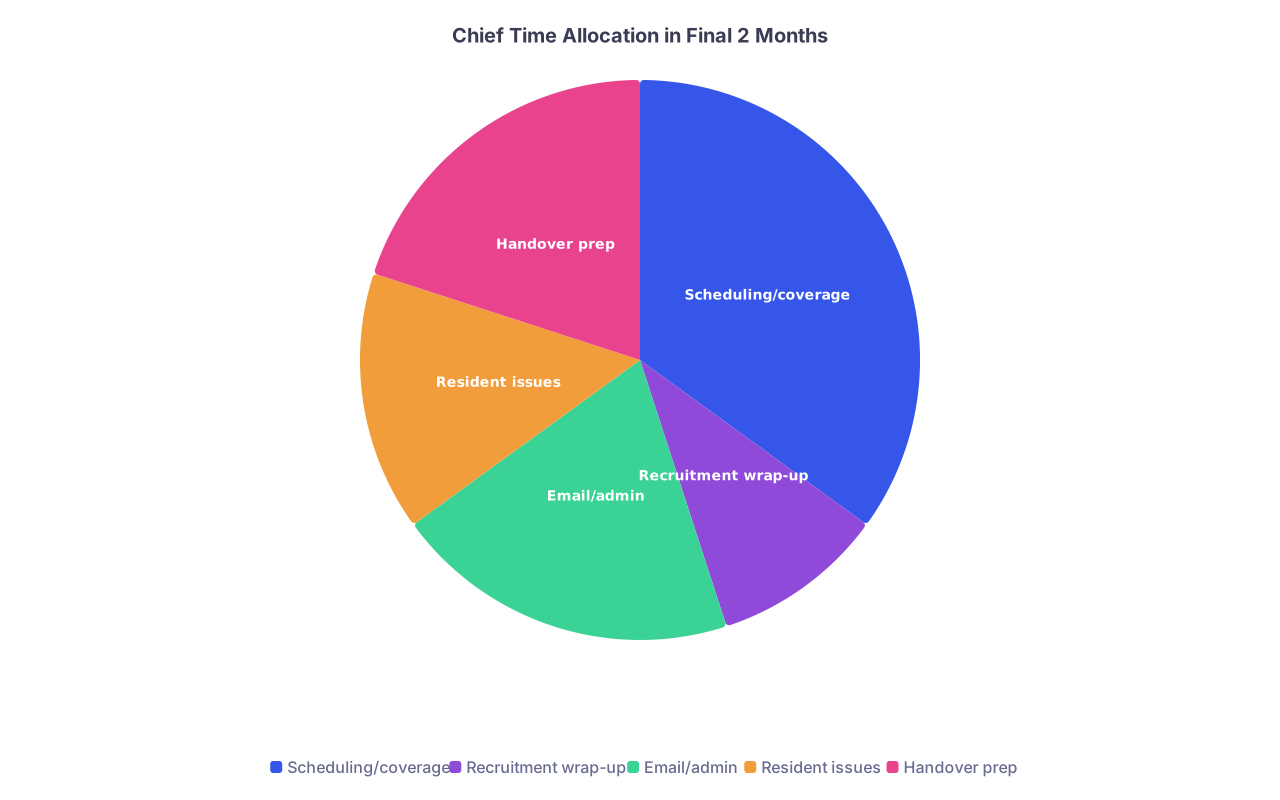
| Category | Value |
|---|---|
| Scheduling/coverage | 35 |
| Recruitment wrap-up | 10 |
| Email/admin | 20 |
| Resident issues | 15 |
| Handover prep | 20 |
Write a Scheduling Playbook
- Include:
- How you build the annual block schedule (step‑by‑step)
- Rules and constraints (work hour rules, clinic requirements, call caps)
- Priority rules (who gets first pick for vacations, how seniority works)
- How you balance fairness over the full year (not just one block)
- Attach real examples:
- One “easy” block schedule
- One problem block with annotations: what went wrong, how you fixed it
- Include:
Vacation and Leave Management
- Spell out:
- How requests are submitted (exact forms/portals, not “they email us”)
- Deadlines and exceptions
- What is truly negotiable vs non‑negotiable (e.g., post‑night float PTO)
- Include fringe scenarios:
- Parental leave
- Medical leave
- Sudden extended absence and how you rebuilt coverage
- Spell out:
Coverage Crises: Case Studies
- Pick 3–5 memorable disasters:
- “Flu outbreak: 5 residents out in one week”
- “Unexpected resignation mid‑year”
- For each: what happened, your first three steps, who helped, what you’d do differently
- This teaches judgment, not just mechanics.
- Pick 3–5 memorable disasters:
6 Weeks Before Handover: Map People and Politics
At this point you should switch from “systems” to “relationships.” The next chiefs are inheriting a political environment, not just a calendar.
Week –6: Stakeholders and Landmines
-
- For each key person:
- What they care about
- What drives them crazy
- How they prefer to communicate
- Examples:
- PD: “Hates surprises, wants early warning on resident performance issues.”
- Clinic Director: “Will back you up publicly if you brief them privately first.”
- For each key person:
Resident Culture Snapshot
- Write a blunt one‑pager:
- What morale has been like this year
- What residents complain about most
- What changed for the better
- Any brewing conflicts or personality clashes
- This isn’t gossip. It’s context so they aren’t blindsided in July.
- Write a blunt one‑pager:
Ongoing Initiatives List
- Columns:
- Project name
- Purpose
- Status (not started / in progress / implemented)
- Owners
- Next steps with realistic timelines
- Examples:
- “Night float redesign – in progress – needs resident feedback + PD approval”
- “New feedback forms – piloted on wards, pending CCC review”
- Columns:
1 Month Before Handover: Onboard the Incoming Chiefs
At this point you should stop hoarding responsibilities and start sharing them. This is the “shadow and share” phase.
Month –1: Progressive Responsibility Plan
Think of this like intern orientation, but for chiefs.
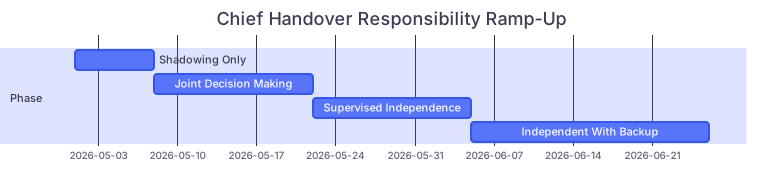
| Task | Details |
|---|---|
| Phase: Shadowing Only | a1, 2026-05-01, 7d |
| Phase: Joint Decision Making | a2, 2026-05-08, 14d |
| Phase: Supervised Independence | a3, 2026-05-22, 14d |
| Phase: Independent With Backup | a4, 2026-06-05, 21d |
Week 1: Shadow Only
- They:
- Sit in on your meetings with PD, GME, clinic
- Watch you handle schedule changes and resident complaints
- Read your ops manual and ask questions
- You narrate your thinking:
- “Here’s why I’m saying no to this swap.”
- “Here’s who I BCC on this email and why.”
- They:
Week 2–3: Joint Decisions
- They:
- Draft responses to schedule/change requests; you review and send
- Co‑run chief‑resident meetings
- Take notes during higher‑stakes meetings
- You:
- Push decision‑making onto them
- Correct in real time
- Start saying, “What do you think we should do?”
- They:
Week 4–5: Supervised Independence
- They:
- Run at least one normal week of scheduling and coverage with you as backup
- Handle an actual conflict (with you present but largely silent)
- Send all emails from their accounts, you just cc’d
- You:
- Only intervene if they’re about to burn a bridge
- Debrief after missteps; this is where real growth happens
- They:
2 Weeks Before Handover: Tighten the Screws
At this point you should assume: if it isn’t written, saved, and shared, it does not exist.
Week –2: Lock Down Logistics
Access and Permissions Audit
- List every system you touch:
- EMR admin functions
- Call room access
- Paging system editor
- Learning management systems
- Schedule software (Amion, QGenda, homegrown horror)
- With your program coordinator, confirm:
- What needs transferring
- What needs new logins vs role changes
- When each change occurs (don’t kill your own access too early)
- List every system you touch:
“Single Source of Truth” Setup
- Decide where everything lives:
- One master shared drive or folder
- Clear naming conventions:
- “PGY Schedules 2025–2026”
- “Policies – Final”
- “Policies – Drafts”
- Give incoming chiefs:
- Editor access to everything
- A simple map: “Start here” document with links to key files
- Decide where everything lives:
Clean Up and Archive
- Delete:
- Outdated drafts that will only confuse them
- Redundant copies of schedules
- Archive:
- This year’s final versions in a labeled “Archive 20XX–20XX” folder
- Label clearly:
- “Historical – do not edit”
- “Active – current year”
- Delete:
1 Week Before Handover: High‑Yield Walkthroughs
At this point you should stop editing documents and start running through real‑world drills.
Week –1: Scenario-Based Handover

Run them through the situations that actually blow up at 2 am.
Coverage Nightmares Simulation
- Give them scenarios:
- Two sick calls on night float
- A resident refusing to come in for jeopardy
- Attending demanding extra coverage for an elective clinic
- Have them:
- Talk through their approach out loud
- Draft the actual texts/emails they’d send
- Then you show them:
- What you actually did in similar real cases
- Where the politics are sharper than the policy
- Give them scenarios:
Conflict and Feedback Scenarios
- Sample:
- Resident chronically late on rounds
- Nurse complaint about disrespectful behavior
- Attending unhappy with sign‑out quality
- Practice:
- How they’d structure the conversation
- What they’d document and where
- When to loop in PD vs handle themselves
- Sample:
High‑Stakes Calendaring
- Sit with your annual calendar and ask:
- “Walk me through your to‑do list for August.”
- “What needs to start in October for recruitment?”
- You’re looking for:
- Whether they’re thinking 6–8 weeks ahead
- Whether they’re building buffers around exams, holidays, retreat
- Sit with your annual calendar and ask:
Handover Week: The Actual Transition
At this point you should be orchestrating a clean “you’re in charge now” moment—not a slow, vague oozing of responsibility.
Day –3 to –1: Final Pass
Document Freeze
- Stop rewriting policy paragraphs
- Apply a simple rule:
- If it’s 80–90% good, leave it
- Let the new chiefs own version 2.0
Physical Handover Kit
- If your program still has physical stuff:
- Call room keys
- Whiteboard markers, printed templates, emergency phone lists
- Plus:
- One printed “Quick Start” packet, 10–15 pages max:
- Daily routines
- Access instructions
- Key contacts
- First month checklist
- One printed “Quick Start” packet, 10–15 pages max:
- If your program still has physical stuff:
Meeting With PD and Incoming Chiefs
- Agenda:
- Officially mark the role change date/time
- Clarify:
- When the new chiefs start handling calls
- When PD expects them in regular meetings
- Agree on:
- How you’ll be available for questions after you step down
- Agenda:
Handover Day: The Switch
At this point you should make it very clear, to everyone, who is running the show.
Handover Day Steps
Resident‑Facing Announcement
- Send a clear program‑wide message:
- Thank the outgoing team (short and specific, not a novel)
- Introduce each new chief with their roles (schedule chief, clinic chief, wellness chief, etc.)
- State explicitly:
- “Starting today, all schedule and coverage questions go to X.”
- “Concerns about rotations, conference, and curriculum go to Y.”
- Bonus: PD or chair co‑sends this email for authority.
- Send a clear program‑wide message:
System Switches
- Update:
- Schedule software “contact” field
- Email distribution lists
- On‑call rosters for “chief on call”
- Flip a simple rule internally:
- You do not answer first. You let it route to them.
- You only step in if they ask or if high‑level safety is at stake.
- Update:
Short, Focused Handover Meeting
- 60–90 minutes max:
- Walk physically through:
- Chief office
- Call rooms
- Where paper forms live (if your hospital still lives in 2008)
- Final rapid Q&A
- Walk physically through:
- End with: “From this point forward, you’re in charge. I’m backup.”
- 60–90 minutes max:
First 2 Weeks After Handover: Healthy Letting Go
At this point you should resist the urge to be the “shadow chief.”
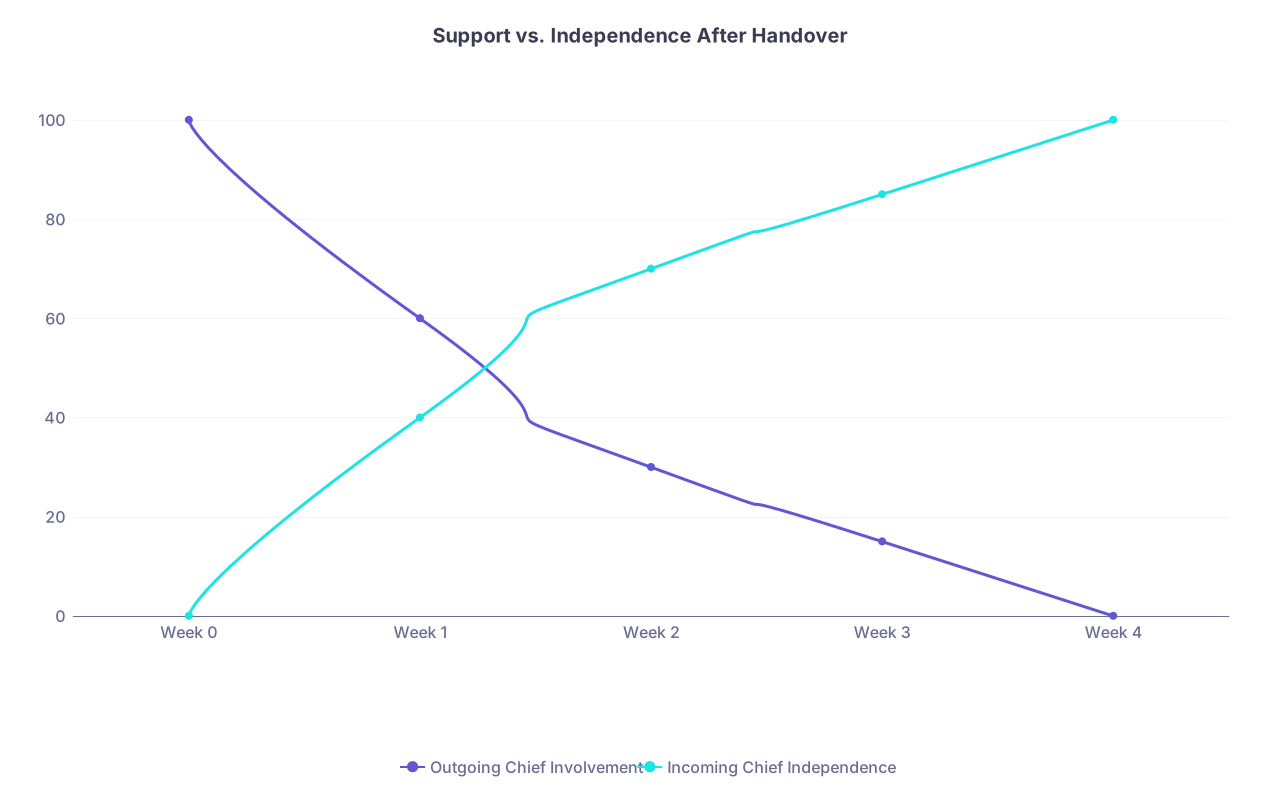
| Category | Outgoing Chief Involvement | Incoming Chief Independence |
|---|---|---|
| Week 0 | 100 | 0 |
| Week 1 | 60 | 40 |
| Week 2 | 30 | 70 |
| Week 3 | 15 | 85 |
| Week 4 | 0 | 100 |
Week +1: Available but Not In Charge
Designated Office Hours
- Offer:
- One or two scheduled check‑ins in week 1
- 30 minutes, focused on their questions only
- Boundaries:
- They run the agenda
- They decide what they want your advice on
- Offer:
No Back‑Channel Scheduling
- Do not:
- Quietly fix schedule problems for residents who “used to text you”
- Undermine the new chiefs’ decisions, even if you’d do it differently
- You can say:
- “That’s a question for the current chief team. They’re in charge now.”
- Do not:
Week +2: Final Debrief
One Last Meeting With PD and New Chiefs
- You offer:
- What patterns you’re seeing (from a distance)
- A few “watch out for this month” reminders
- Then you stop. They need space to lead.
- You offer:
Archive Yourself
- Move all chief‑related email folders to “Archive”
- Remove yourself from internal chief group chats
- Keep:
- Your handover documents as “historical reference,” not living files
Visual Summary: Chief Handover Timeline
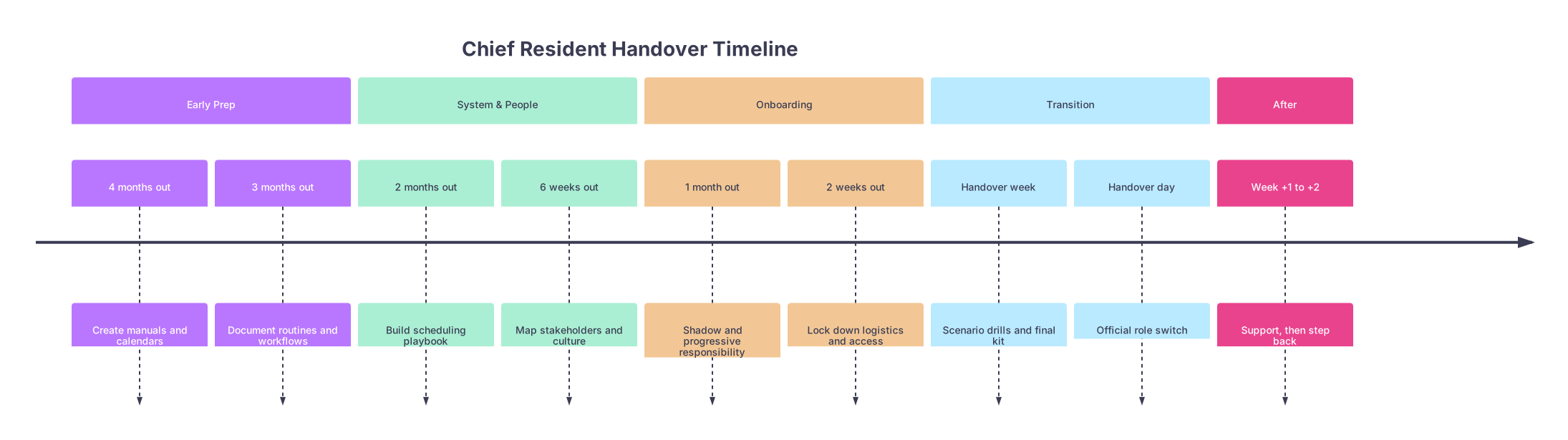
| Period | Event |
|---|---|
| Early Prep - 4 months out | Create manuals and calendars |
| Early Prep - 3 months out | Document routines and workflows |
| System & People - 2 months out | Build scheduling playbook |
| System & People - 6 weeks out | Map stakeholders and culture |
| Onboarding - 1 month out | Shadow and progressive responsibility |
| Onboarding - 2 weeks out | Lock down logistics and access |
| Transition - Handover week | Scenario drills and final kit |
| Transition - Handover day | Official role switch |
| After - Week +1 to +2 | Support, then step back |
Two Things to Remember
- A good handover is not a brain dump the night before; it’s a three‑month project of turning instincts into systems and stories.
- Your real legacy as chief isn’t the perfect schedule—it’s whether the next chiefs start their year confident, informed, and not cleaning up your mess.


