

Most chief residents misuse group texts and paging so badly they create chaos instead of coordination.
Let me be specific: the tool is not the problem. Your rules are. Or your lack of them.
You can run a smooth, safe, high-functioning team with group texts and pagers. Or you can end up with 200-message threads at 2 a.m., missed critical results, and burned-out interns rage-quitting the “night float chat.” The difference is leadership discipline and structure.
This is resident leadership territory. Not IT. Not administration. You.
Below is how I would teach a new chief or senior resident to build a sane communication system using group texts and pagers that actually improves care and protects your people.
1. The Core Principle: Right Channel, Right Message, Right Time
Before anything else, you create a shared mental model: not every message belongs everywhere.
Think in three buckets:
- Critical, time-sensitive, patient-care impacting
- Operational and schedule-related
- Educational, culture, “nice to know”
Now map those to channels. As a resident leader, your default rule set should look something like this:
| Use Case | Best Channel |
|---|---|
| STAT / urgent clinical issues | Pager |
| Rapid team mobilization (codes) | Pager / official system |
| Same-day logistical changes | Group text |
| Schedule swaps / coverage | Group text + email |
| Policy changes / official info | Email / intranet |
| Pearls, teaching, resources | Optional group text |
If you remember nothing else:
Pager = “I need you to act now.”
Group text = “I need the team to be aware and aligned.”
The moment you blur these, you start losing people. Either they ignore the noise, or they get anxious every time their phone buzzes.
2. Structuring Group Texts Like a Grown-Up
Group chats are not a dumping ground. They are a tool. Treat them like a clinical workflow.
2.1 You need multiple groups, not one monster thread
One giant “Residency chat” for 60 people is useless. It turns into memes, random consult vents, and the occasional lost important message. You need purpose-built groups.
At a minimum, you should have:
Service-based groups
- “Med Wards Day Team A”
- “Med ICU Nights Week 1”
- “OB L&D Team”
Role-based groups
- “PGY-1 Internal Med (current year)”
- “Night Float Residents”
- “Chiefs + Admin Chief + Program Coordinator”
Event-based / temporary groups
- “Flu surge response week 3”
- “Holiday coverage Dec 24–Jan 2”
Anything that tries to be “everyone, for everything” will fail.

2.2 Write and enforce ground rules (yes, enforce)
Post your rules in the description or pinned message of each group. Very concrete, not aspirational nonsense.
Example for a “Med Wards Day Team” group:
- Hours: 6 a.m.–7 p.m. only, except true emergencies.
- Use for: bed availability, urgent discharges, team location, brief heads-up about big admits or escalations.
- Do NOT use for: personal schedule swaps, meme sharing, non-urgent questions that can wait for rounds.
- Escalation: If no reply in 5 minutes for a time-sensitive issue, page.
If someone keeps using the group incorrectly, you as a leader say something. Directly. Calmly. “Please keep this thread to X; move Y to Z channel.”
Silence equals permission.
2.3 Message hygiene: subject lines for texts
You cannot stop people from scrolling past walls of text. So make scanning easier.
Train your team to start every message with a short tag. For example:
- “LOGISTICS – Rounds starting on 6W today.”
- “COVERAGE – Need someone to trade Sunday call.”
- “URGENT (BUT NOT STAT) – Please call radiology about CT contrast issue.”
- “FYI – Patient 402 transferring to SICU around 11.”
In high-volume services, these tags save time and prevent missed issues.
3. Paging Systems: Still the Backbone of Urgent Clinical Communication
Pagers are not “outdated.” They are focused. They cut through the noise of WhatsApp/Signal/GroupMe.
Your job as a leader is to define what must go through pager, and make it consistent.
3.1 What belongs on pager vs text
A simple framework:
Pager for:
- Changes that require a clinical decision within minutes
- New critical labs, imaging, or vitals
- Rapidly evolving patient condition
- Time-critical consults
- Any situation where delay can harm a patient or blow up flow (e.g., ED boarding crisis)
Group text for:
- “We are swamped, anticipate later sign-out.”
- “3 new admits in last 20 min; try to dispo fast where appropriate.”
- “Nephrology is backed up; please triage consults carefully.”
Stop allowing nurses or consultants to text residents’ personal phones for emergent issues. That is how things get missed. The official channel for urgent is the pager. Full stop.
3.2 Standardizing page content
A lot of “bad paging” is not malicious. It is unstructured.
As a resident leader, you can write and circulate a paging template and actually teach it during orientation and nurse education.
For example, a basic SBAR-style pager message:
- “S: Pt 204, chest pain worsened, BP 82/50.”
- “B: Admitted for pneumonia, had mild chest discomfort earlier.”
- “A: Now pale, diaphoretic, HR 120.”
- “R: Please come evaluate now.”
Or shorter for systems limited by character count:
- “204 – CP worse, BP 82/50, pale/diaphoretic, HR 120 – please come now.”
Then make sure your own team replies in a structured way too:
- “On my way – ETA 2 min – Dr Smith PGY-2 Medicine.”
You model the behavior you want.
4. Integrating Group Texts and Paging into a Coherent System
Right now in most programs, texts and pagers live in parallel universes. That is why things slip.
You want an integrated pattern. A rhythm.

| Step | Description |
|---|---|
| Step 1 | Event occurs |
| Step 2 | Page responsible resident |
| Step 3 | Send group text with tag |
| Step 4 | Use direct text or email |
| Step 5 | Document if needed |
| Step 6 | Urgent clinical risk? |
| Step 7 | Affects whole team workflow? |
| Step 8 | Systemic issue? |
4.1 The “page first, text second” rule
For anything emergent that also impacts the team, build this sequence:
- Page the responsible clinician first.
- After immediate safety actions occur, send a brief, tagged group text to align the team.
Example:
- Pager: “Room 510. Pt desat to 70% on HFNC, RR 40, tripodting. Please come now.”
- Then, after you respond and stabilize or escalate:
- Group text (ICU Team): “URGENT – 510 acutely decompensated, now intubated, bed blocked for at least 1–2 hrs. Please triage consults / cross-cover.”
You are respecting urgency, then preserving situational awareness.
4.2 Avoiding double-documentation chaos
Do not turn group texts into pseudo-charting. Keep clinical decisions documented in the EMR. Use texts for coordination only:
Bad pattern:
- “Give 40 IV furosemide now” in a group chat, never documented.
Better:
- Order and document the furosemide in EMR.
- If needed for coordination: “LOGISTICS – Just gave 40 IV lasix to 612; please watch urine output and page if no response in 1 hr.”
The more you stuff patient-specific decisions into chats, the more medicolegal risk and confusion you create.
5. Protecting Residents from 24/7 Digital Exhaustion
If you are leading and you ignore this, you will quietly burn your people out.
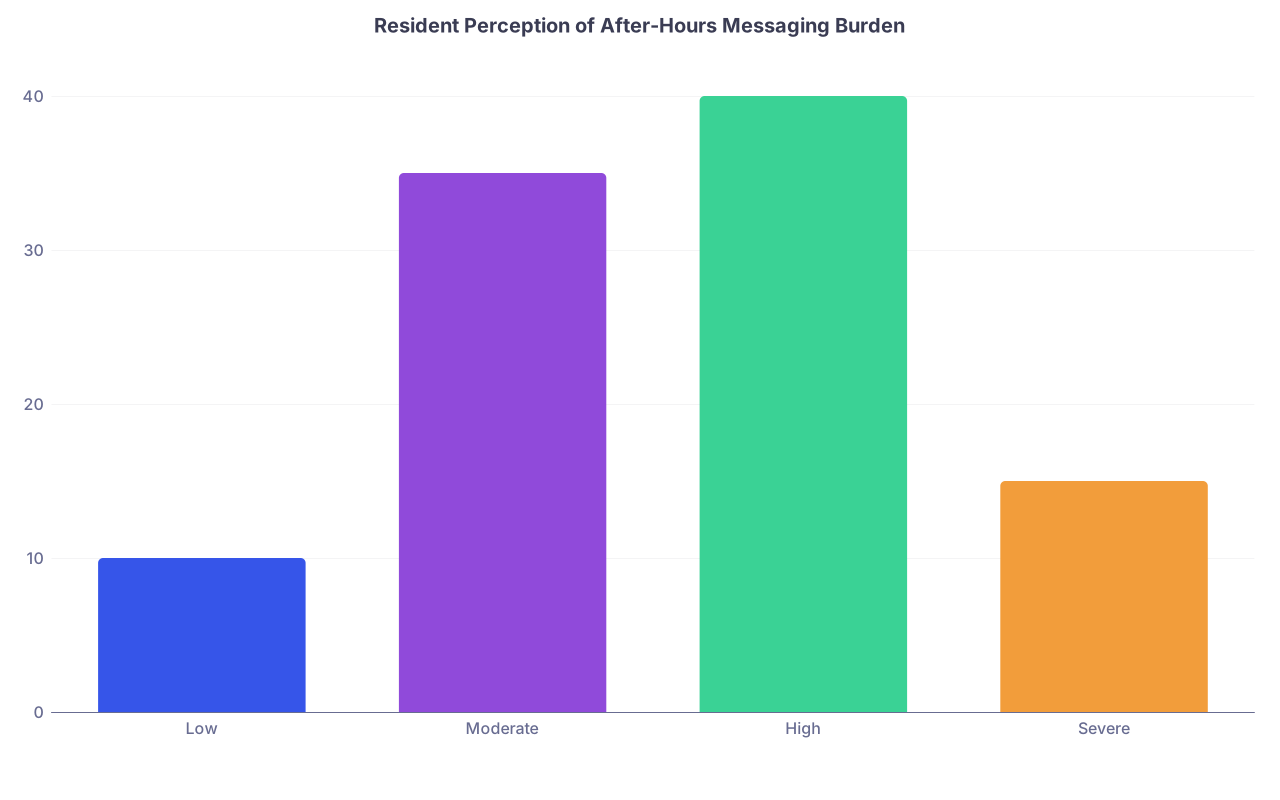
| Category | Value |
|---|---|
| Low | 10 |
| Moderate | 35 |
| High | 40 |
| Severe | 15 |
This is roughly what I see when I actually ask residents: most are living in the “high” zone. Because no one set boundaries.
5.1 Define protected time from non-urgent group texts
You can do this. It just takes spine.
Sample policy for a service:
- No non-urgent group texts 7 p.m.–6 a.m.
- Chiefs only message during these hours if:
- There is an emergent staffing crisis (no show, illness).
- There is a true safety or institutional emergency.
Everything else can wait.
You post this, you repeat it in orientation, and you call it out when violated. If attendings or administrators bypass it, you have that awkward conversation. That is leadership.
5.2 Mute intelligently, without missing what matters
Teach your juniors to:
- Mute large non-essential groups permanently (memes, social, etc.).
- Set “high priority” alerts only for:
- Pagers.
- One or two critical chat groups (like “Code Team” if your hospital routes that way).
If they feel obligated to respond to every midnight teaching pearl drop, that is not “culture building”, that is harassment with good intentions.
6. Communication During Crises: Surge, Codes, Disasters
Your usual patterns will fail under surge pressure unless you plan ahead.

| Step | Description |
|---|---|
| Step 1 | Declared surge status |
| Step 2 | Activate surge group chat |
| Step 3 | Assign triage roles |
| Step 4 | Pager for red level patients |
| Step 5 | Group text for bed and flow updates |
| Step 6 | Document in EMR |
| Step 7 | Debrief and adjust rules |
6.1 Build a “surge mode” system in advance
During major ED boarding, flu, or COVID-like surges, you want:
- A dedicated, time-limited “Surge Ops” group for each major service.
- Clear roles: one senior per shift as “communication lead” who filters and posts only higher-level updates, not every micro-issue.
- A template for updates:
- “STATUS – 23 patients waiting, 8 ICU holds, 4 ward beds opening in next 2 hrs.”
- “ASSIGNMENT – Dr Lee to triage new ED admits only; Dr Patel to manage all floor cross-cover.”
Paging remains for individual critical patients. Surge chat is for system load and resource allocation.
6.2 Codes and rapid responses
Do not rely on ad-hoc texting to call codes. That belongs to the hospital’s overhead or alert system.
Where group texts help:
- Post-code debrief arrangements
- Alerting team to “hot” zones (e.g., “ICU Team – multiple codes in ED in last hour, expect higher acuity admits.”)
- Quick role clarification: “For next hour, Dr Gomez is code leader; Dr Shah handles all new ICU consults.”
Again, pager = “move now”. Group text = “all of you, align around this change.”
7. Leadership Use of Group Texts: Setting Tone and Culture
You set the ceiling and the floor of behavior by how you use these tools.

7.1 Use texts for clarity, not micromanagement
Your job is not to narrate every thought to your residents.
Good uses:
- Clarifying expectations for the day:
- “LOGISTICS – Rounds: senior + attending start on 4W at 8:15; intern pre-rounds done by 7:45.”
- Supporting boundary setting:
- “REMINDER – Please send non-urgent sign-out questions before 9 p.m.; nights need time to triage.”
- Rapid correction of dangerous patterns:
- “URGENT – We have had 3 near-misses with missed critical labs in last 2 weeks. From now on, whoever receives a critical result must verbally confirm with the primary resident and document the conversation.”
Bad uses:
- Live-commentary on trivial things (“Where is everyone?” every 10 minutes).
- Public shaming (“Who forgot to sign out patient X?” in front of 30 people).
- Night-time “motivational” messages that just wake people up.
7.2 Venting and emotional content
Every program has at least one “vent chat.” Be very careful as a leader. Screenshots are forever. So is reputation.
If you want a safe place for emotional processing, keep it:
- Small.
- Off the institutional grid.
- Clearly not a venue for discussing patient-identifiable information.
And do not drag your entire residency into group emotional swings every time administration announces a new metric. Process with your peers first, then communicate with restraint.
8. Teaching Juniors How to Communicate Up and Across
Do not assume interns “just know” when to text, page, or email. They do not. And they are afraid to ask.
You should deliberately teach:
- “When you page me versus when you text me”
- “What level of detail I expect when you group-text the team”
- “How to escalate if your page is not answered in X minutes”
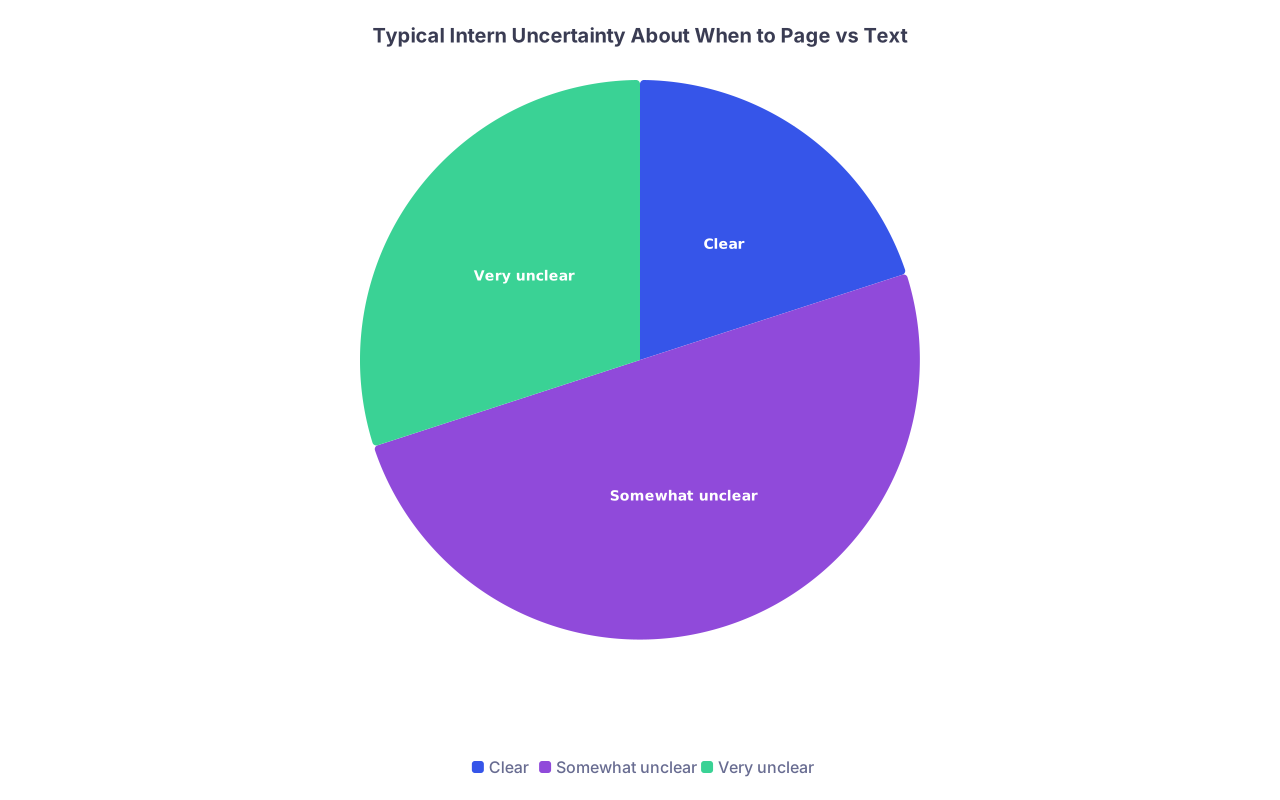
| Category | Value |
|---|---|
| Clear | 20 |
| Somewhat unclear | 50 |
| Very unclear | 30 |
8.1 Concrete scripts help
Give them sample phrases.
For upward escalation by pager:
- “Hi Dr Lee, this is Sam the intern on 3W. I just paged because 302’s BP dropped to 80/40 and lactate is 4.2. I would appreciate your guidance on next steps.”
For group text to seniors:
- “URGENT (BUT NOT STAT) – 3W intern here. We are at 6 admits already and 2 more in ED. I am concerned about missing tasks. Can we redistribute or call for backup?”
Teaching language is part of teaching judgment.
9. Common Failure Modes and How to Fix Them Quickly
Let me call out the patterns I see repeatedly, and what you should do as a resident leader.
9.1 Failure: The “everything chat” nightmare
Symptoms:
- 200+ messages per day in one group.
- Interns muting it and missing logistics.
- Important reminders scroll away in 10 minutes.
Fix:
- Split into function-based groups.
- Move teaching pearls to a separate, opt-in channel.
- Announce: “From today, this group is ONLY for X. All Y goes to Z. Violations will be deleted or redirected.”
9.2 Failure: Paging used for trivial nonsense
Symptoms:
- Residents ignore pagers because 70% of pages are low-yield.
- Nurses page for everything because “that’s how we’ve always done it.”
Fix:
- Do joint training with nursing leadership.
- Create and post a 1-page “When to page medicine” guideline.
- As senior, give feedback on the spot: “This could have been communicated on sign-out; let us streamline so we can respond faster to true emergencies.”
9.3 Failure: Chiefs spamming off-hours messages
Symptoms:
- “Just a quick update” texts at 9:30 p.m.
- Holiday schedule arguments playing out in public threads at midnight.
- Residents report anxiety every time their phone lights up.
Fix:
- Institute a “no non-urgent texts after 7 p.m.” rule.
- Use delayed-send email for non-urgent content.
- Ask for anonymous feedback and actually show you adjusted behavior.
10. Practical Implementation Blueprint for a New Chief
You want something you can do this month, not a philosophy textbook. Here is a concrete sequence:
Map your current channels
- List all active WhatsApp/Signal/GroupMe/Slack groups + paging patterns.
- Identify redundancy and chaos zones.
Define 4–8 core groups with clear purposes
- Service-based, role-based, leadership, optional social/education.
Write and publish communication “standards”
- One page. Channel -> purpose -> examples of appropriate/inappropriate use.
- Include paging templates, tagging conventions for texts, and off-hours rules.
Get buy-in from nursing and administration
- Especially on “what belongs on pager.”
- Show them you are doing this to improve responsiveness, not dodge work.
Model and enforce
- Chiefs must obey the same rules.
- Call out (privately) repeat offenders; praise good usage publicly.
Reassess after 4–6 weeks
- Run a tiny anonymous survey:
- “Are you missing fewer important messages?”
- “Do you feel less overwhelmed by group texts?”
- Adjust group structure and rules based on real feedback.
- Run a tiny anonymous survey:

You iterate. Like QI. Because it is QI.
FAQ (Exactly 5 Questions)
1. Should residents ever use personal texting instead of pagers for urgent issues?
No. Urgent, safety-relevant issues belong on the official channel: your hospital’s paging or alert system. Personal texts are too easy to miss, impossible to audit, and they blur work–life boundaries. You can follow an urgent page with a confirming text if you are already in an active conversation, but the initial alert should be through the formal system.
2. How many group chats are “too many”?
When residents cannot tell which group to post in, you have too many. When “everything ends up in the same two threads,” you probably have too few or poorly defined groups. A typical medium-sized residency can function well with about 5–10 high-utility groups: a couple of service-based, one for nights, one for each PGY class, one for chiefs/leadership, and one opt-in social/education channel.
3. What about using Slack, Teams, or other platforms instead of plain group texts?
Those are fine if your institution supports them and they are mobile-friendly. They give you channels, threads, and sometimes better privacy controls. The same principles still apply: channel purpose, off-hours boundaries, clear rules for what belongs there versus pager. Do not let “fancier platform” distract you from basic communication discipline.
4. How do I handle attendings who text residents directly for non-urgent things at all hours?
You set norms early. At orientation and faculty meetings, state the standard: non-urgent issues belong in email or daytime texts; urgent issues belong on pager. If a specific attending repeatedly violates this, a chief or program director should have a direct conversation: “We are trying to reduce burnout and message fatigue; can we shift non-urgent communication to daytime email/text?”
5. Is it ever appropriate to discuss patients in group chats?
Very briefly, and with extreme restraint. No full names, no MRNs, no unique identifiers. Use them for high-level coordination only: “ICU – new septic shock admit from ED in 10 min; everyone please be on unit.” All substantive clinical discussion, orders, and decisions belong in the EMR and verbal communication, not in group chats that are easily screen-shotted and stored on personal devices.
Key points, stripped down:
- Define strict, explicit rules for what belongs on pager versus group text, and enforce them.
- Build purpose-specific chat groups with tagging conventions and off-hours boundaries to prevent chaos and burnout.
- Use your own behavior as a chief or senior to model disciplined communication; the team will follow your patterns, for better or worse.


