
You just signed your first locum tenens contract.
The recruiter told you the hourly rate. The credentialing emails are piling up. Your first shift is next week.
And on your kitchen table:
- One contract
- One W-9 you signed without really thinking
- Zero systems for getting paid, tracking money, or dealing with taxes
You know you are basically “your own business” now. Everyone loves to say that. No one hands you a one-page playbook that says:
“Here. This is how you invoice, where the money goes, and how to not get destroyed at tax time.”
That is what you are getting here.
A simple, minimum-viable locum financial system. From invoice to tax buckets. Step-by-step. No fluff, no 9-part Excel monstrosity.
If you do what I outline here for the next 12 months, you will:
- Get paid on time with clear, professional invoices
- Automatically set aside enough for taxes instead of scrambling in April
- Know, in real time, how much is actually yours to spend
- Avoid the classic “first locum year $30–$80k tax surprise” I have watched too many people eat
Let us build it.
Step 1 – Set Up the “Locum Money Infrastructure” Before Your First Paycheck
You cannot build a system if all your money is dumping into one checking account mixed with DoorDash, student loans, and rent.
You need separate containers.
1. Open a dedicated locum checking account
Use a bank you already like or an online bank. Call it something obvious:
- “Locum Operating Account”
- “Locum Income Account”
Requirements:
- No (or minimal) fees
- Easy online transfers
- Ability to open multiple savings accounts or “buckets”/sub-accounts
This account is where all locum payments land. Not your personal checking. Not your joint account. This one.
2. Open 3–4 high-yield “bucket” savings accounts (or sub-accounts)
Same bank if possible, otherwise any good online bank works. Label them clearly:
- “Locum – Federal Taxes”
- “Locum – State Taxes”
- “Locum – Retirement / SEP-IRA Hold” (or “Solo 401k Hold”)
- “Locum – Business Reserve” (optional but smart)
You will be shoveling money into these buckets every single time you get paid. On autopilot.
3. Decide if you are staying sole proprietor (for now)
Most first-year locums can start as a sole proprietor with a DBA (“Doing Business As”) if needed.
You do not need an LLC or S-corp in month one to function like a professional. Often that is step 2 or 3 once income is stable.
Immediate steps:
- Use your own name + SSN for W-9 (or EIN if you open one)
- Keep everything clean and separate via these accounts
- Later, if you form an LLC or S-corp, you move the system over
If you are making under, say, $200k–$250k locums income in year one, you are usually fine starting with this simple setup.
Step 2 – Build a Dead-Simple Invoicing System That Gets You Paid
You do not need custom software. You do need to look professional and be consistent.
1. Create a one-page invoice template
Use Google Docs, Word, or a simple PDF template. Make a base version and save it as “Template – Locum Invoice”.
Your invoice should include:
- Your name (or business name if you have one)
- Address, email, phone
- Tax ID (SSN or EIN) – can be on W-9 instead if you prefer not to include on invoice
- Invoice number (start with 2024-001 and go sequentially)
- Invoice date
- Service period (e.g., “Services from 10/1/2026 to 10/15/2026”)
- Location / facility name
- Detail line items:
- Dates worked, hours, rate, total
- Total amount due
- Payment terms: “Due upon receipt” or “Net 30”
- Payment instructions:
- ACH / bank info
- Or “Payment via agency portal” if they pay through their system
Example description line:
“Hospitalist coverage – 7 shifts @ 12 hours, $220/hour – 10/1/26 to 10/7/26”
Do not overcomplicate. One page, clearly readable.
2. Standardize your invoice numbering and storage
You want to be able to look back and instantly see: what you billed, what is unpaid, and what got paid.
Basic system:
- Use format: YEAR–### (e.g., 2026-001, 2026-002)
- Create a folder in Google Drive / Dropbox: “Locum Invoices 2026”
- Inside:
- “Sent – Unpaid” folder
- “Paid” folder
When you send an invoice:
- Save as PDF: “2026-001 – FacilityName – $Amount.pdf”
- Put it in “Sent – Unpaid”
- Once paid, move it to “Paid”
Takes 30 seconds. Saves you hours later.
3. Set your invoicing cadence
Never let your invoicing be random. Make it a routine:
- If direct with hospital: invoice every 2 weeks or after each block
- If through agency: some have their own portals; still keep your own record
Pick one rule, like:
“On the 1st and 15th of every month, I send invoices for all shifts completed up to that date.”
Put it on your calendar with a 30-minute repeating event.
Step 3 – Track Your Hours and Shifts Without Making It a Second Job
This is where people get sloppy. Then something does not match the pay stub and they have no idea what is wrong.
You need minimal, reliable tracking.
1. Use a single tracking tool
I do not care if it is:
- A dedicated Google Sheet
- An app like HoursTracker or Toggl
- A simple notes app with a table
What matters: one source of truth.
Bare minimum columns in a spreadsheet:
| Column | Example Entry |
|---|---|
| Date | 10/01/2026 |
| Facility | St. Mary’s Hospital |
| Shift Type | Day shift |
| Hours Worked | 12 |
| Rate per Hour | 220 |
| Expected Gross Pay | 2640 |
At the end of each week or block, total the “Expected Gross Pay”. That should match what you invoice.
2. Reconcile pay vs. tracking
When a payment hits your locum operating account:
- Check the amount vs. the corresponding invoice and your tracking
- If it matches, mark that invoice as paid in your spreadsheet or a simple list
- If it does not match, contact payroll / agency quickly while details are fresh
This habit keeps underpayments from sliding past you.
Step 4 – Build Your Tax Bucket System (So April Is Just a Form, Not a Disaster)
You are now self-employed for this income. Translation:
- No one is withholding taxes for you
- You owe both income tax and self-employment tax (Social Security + Medicare)
- You probably need to make quarterly estimated tax payments
The way to stay out of trouble is not “remember to save money.” That fails. The way is automatic buckets.
1. Start with conservative default percentages
Until an accountant gives you custom numbers, use a simple, slightly overcautious formula on gross locum pay:
- 30% → Federal tax bucket
- 5–10% → State tax bucket (depends on your state; use 0% if no income tax)
- 10–20% → Retirement bucket (SEP-IRA or Solo 401k)
- 5–10% → Business reserve (for CME, travel, dry months)
For many high-income locums in average-to-high tax states, starting with 45–55% total “not yours” money is reasonable.
That sounds painful. It is less painful than a $70k bill with $15k in your checking account.
Here is what that looks like over time:
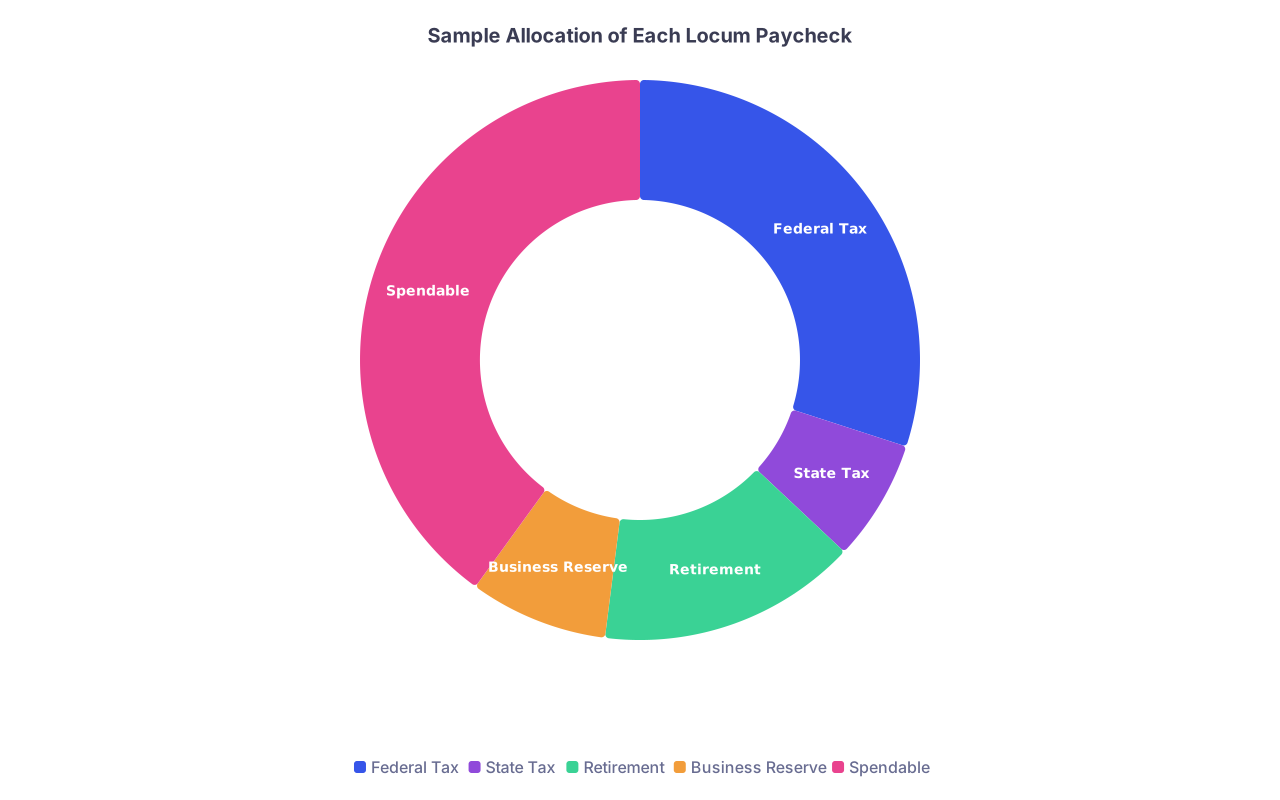
| Category | Value |
|---|---|
| Federal Tax | 30 |
| State Tax | 7 |
| Retirement | 15 |
| Business Reserve | 8 |
| Spendable | 40 |
2. Create a simple transfer ritual for every payment
When $10,000 hits your locum operating account, you do not have $10,000. You have buckets to feed.
Let me walk it through with numbers.
Assume you choose:
- 30% federal
- 7% state
- 15% retirement
- 8% business reserve
- 40% spendable
Payment: $10,000 gross
Immediately (same day if possible):
- Transfer $3,000 → Locum – Federal Taxes
- Transfer $700 → Locum – State Taxes
- Transfer $1,500 → Locum – Retirement Hold
- Transfer $800 → Locum – Business Reserve
- What is left in operating account: $4,000
That $4,000 is your max “for life” money until next payment. Rent, food, student loans, etc. You want more? Work more, not skip buckets.
Make this a non-negotiable habit:
“Every time a locum payment hits, I move the percentages the same day.”
Set calendar reminders if you need to. Or a recurring to-do in whatever task app you use.
3. Use those buckets to make quarterly estimated payments
Four times a year, you send the IRS and your state money from those tax buckets.
Estimated tax due dates for individuals are typically:
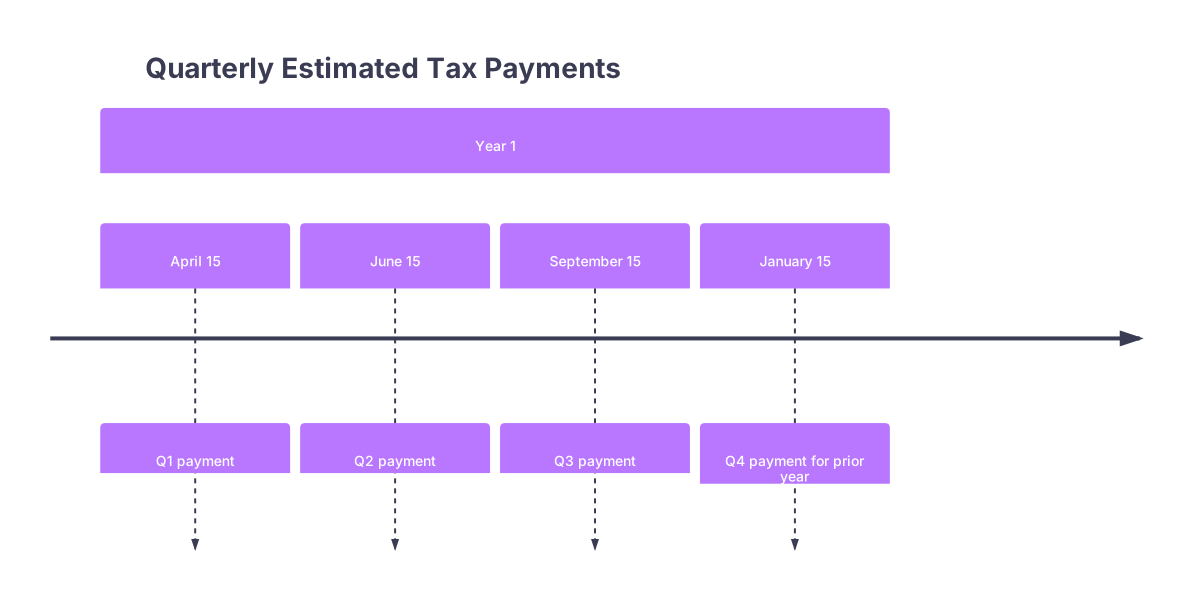
| Period | Event |
|---|---|
| Year 1 - April 15 | Q1 payment |
| Year 1 - June 15 | Q2 payment |
| Year 1 - September 15 | Q3 payment |
| Year 1 - January 15 | Q4 payment for prior year |
What you do:
- A few days before each date, check your “Federal Taxes” bucket
- Send a chunk to the IRS using EFTPS or IRS Direct Pay
- Do the same for state via your state’s website
If you overshoot and build a surplus in tax buckets: good. Next year your accountant will tell you to dial down the % or you will get a nice refund.
Step 5 – Decide on a Retirement Vehicle and Plug It into the System
As a locum, you are your own HR department. No one is setting up your 401(k) for you.
You want one primary tax-advantaged retirement bucket attached to your locum income.
1. Pick your retirement account type
For pure 1099 locum work, most use:
- SEP-IRA – Simple to set up, contribution limit up to 25% of net business income (capped by IRS yearly limit)
- Solo 401(k) – More flexible, especially if you want Roth options or larger contributions at lower income
If you have a W-2 job with a 401(k) and locums on the side, the Solo 401(k) math gets trickier. At that point, involve a CPA.
Baseline rule of thumb:
- Not sure and want easy? Start with SEP-IRA at a brokerage (Vanguard, Fidelity, Schwab).
2. Connect your “Retirement Hold” bucket to actual contributions
Your “Retirement Hold” bucket is cash. Once or twice a year, you move that into investments.
Process:
- Meet with an accountant to calculate your max allowable contribution based on net profit
- Transfer that amount from “Retirement Hold” → your SEP-IRA or Solo 401(k)
- Invest it in a simple low-cost index fund or target-date fund
Do not let retirement money sit in a savings account for 5 years “waiting” for you to decide. That is just lost compounding.
Step 6 – Track Business Expenses in a Way That Does Not Make You Hate Life
You get tax deductions as a self-employed physician. Good. But only if you can find them.
Again, you do not need to become a bookkeeper. You need one small habit.
1. Run all locum expenses through one card or account
Pick:
- One credit card = “Locum Card”
- Or your locum operating account debit card
Use that card / account exclusively for:
- Travel to assignments
- CME and board fees
- Licensing, DEA, hospital privileging fees
- Work-related equipment (laptop, scrubs, stethoscope, etc.)
- Malpractice insurance premiums (if you pay them)
Now every month, that statement is basically a list of your business expenses.
2. Keep a simple expense log monthly
No 45-category custom chart of accounts. Just a spreadsheet or basic accounting app with a few broad categories:
| Category | Examples |
|---|---|
| Travel | Flights, mileage, hotels, rental car |
| Licensing/Cred | State licenses, DEA, boards |
| CME/Education | Courses, conferences, materials |
| Equipment | Laptop, stethoscope, white coats |
| Insurance | Malpractice, disability (if paid personally) |
Once a month:
- Pull the statement for your “Locum Card”
- Enter each transaction into the sheet with: date, vendor, amount, category
- Or connect that card to an app like QuickBooks Simple Start / Wave and categorize transactions
Doing this monthly = 20–30 minutes. Doing it all at once next March = a miserable weekend and missed deductions.
Step 7 – Use a Simple Dashboard to Know if Locums Are Actually Working for You
You are not doing locums for fun. You are doing them to hit goals: pay off loans, stack cash, get flexibility.
You need a quick way to see:
- How much you are actually making after taxes and expenses
- Whether your buckets are funded properly
- Whether the work is worth the hassle
1. Build a one-page “Locum Snapshot” spreadsheet
Keep it brutally simple. One tab. A few lines:
- Total gross locum income year-to-date
- Total business expenses year-to-date
- Net profit (gross – expenses)
- Balance in:
- Federal Tax bucket
- State Tax bucket
- Retirement Hold
- Business Reserve
Now add one more derived number:
- “True spendable” = Net profit – (Federal + State + Retirement Hold + Business Reserve balances)
This tells you how much of what you earned has actually become usable money in your life vs. sitting in buckets or going to taxes.
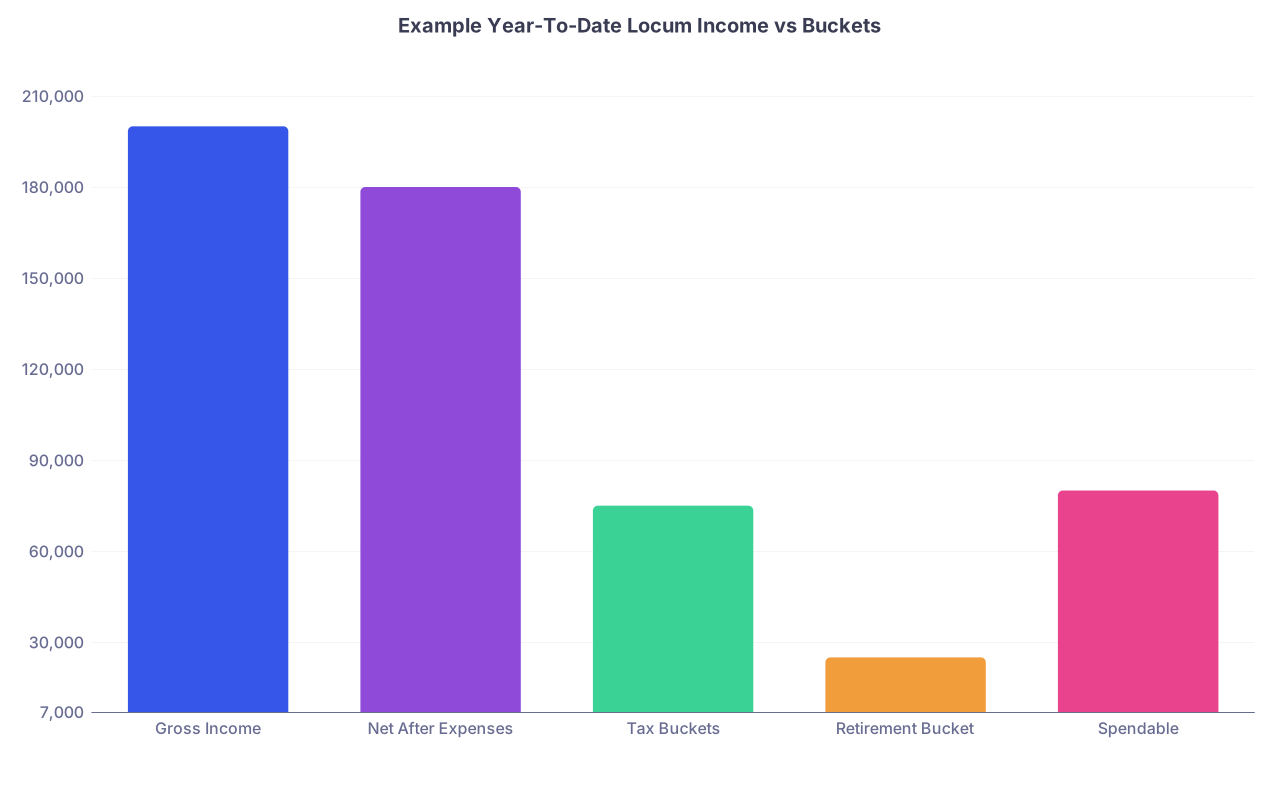
| Category | Value |
|---|---|
| Gross Income | 200000 |
| Net After Expenses | 180000 |
| Tax Buckets | 75000 |
| Retirement Bucket | 25000 |
| Spendable | 80000 |
Glance at this once a month. Adjust work volume, tax percentages, or spending based on reality, not vibes.
Step 8 – When to Level Up: CPA, LLC, S-Corp, and All the “Fancy” Stuff
You will eventually outgrow the “just me with buckets” model. That is fine. But do it based on numbers, not Instagram.
1. Hire a CPA once your 1099 locum income is real
“Real” meaning:
- You expect to make at least $75–100k in 1099 income this year
- Or your locums are more than a tiny side hustle
A CPA who actually works with physicians and 1099 contractors will:
- Fine-tune your tax percentages
- Help you avoid underpayment penalties
- Advise on SEP vs. Solo 401(k) vs. S-corp timing
- Take your organized spreadsheet and turn it into a return
You hand them:
- Your income spreadsheet
- Your expense log
- Your invoice folder
- Your bank statements / credit card statements
They will be happier than they are with 90% of their clients. And they will charge you less time.
2. Consider an LLC or S-corp when the math justifies it
LLC – Liability and structure, but by itself does not change federal taxes for one-owner entities (taxed as sole proprietor by default). Often worth doing for clean separation and contract purposes.
S-corp – Can reduce self-employment taxes by splitting income into “reasonable salary” + distributions. But adds payroll, more filings, and complexity. Not always worth it at $100k, more likely worth discussing once you are regularly >$200k–$250k 1099.
The key:
- Your system (invoicing, buckets, tracking) survives the entity change
- You just change where invoices are from and where money lands
Do not let entity questions delay building the basic system. You can retrofit entities onto a functioning structure. You cannot retroactively unscrew a year of chaos.
Putting It All Together – Your Locum Financial System in One Flow
Here is the whole thing, start to finish:

| Step | Description |
|---|---|
| Step 1 | Work Locum Shifts |
| Step 2 | Track Shifts and Hours |
| Step 3 | Create Invoice from Template |
| Step 4 | Send Invoice and Save Copy |
| Step 5 | Payment Arrives in Locum Account |
| Step 6 | Apply Percentage Transfers to Buckets |
| Step 7 | Update Income and Expense Sheets |
| Step 8 | Make Quarterly Tax Payments |
| Step 9 | Fund Retirement from Retirement Bucket |
| Step 10 | Review Monthly Locum Snapshot |
You:
- Work shifts
- Track them
- Invoice on schedule
- Money lands in the locum account
- Same day, you move fixed percentages to tax, retirement, reserve
- You pay taxes quarterly from those buckets
- You fund retirement annually from that bucket
- You track expenses monthly and keep a one-page dashboard
That is it. That is the system. Not elegant. Effective.
FAQs
1. What percentages should I actually use for my tax buckets?
If you are starting with no guidance:
- 30% to federal
- 5–10% to state (depending on your state’s top bracket)
- 10–20% to retirement
- 5–10% to business reserve
So total “not yours” could be 50–60% initially. After your first tax return, ask your CPA:
- “Given my actual numbers, what should my federal and state percentages be next year?”
Then adjust down if appropriate. Start high, back off. Never the reverse.
2. Do I really need a separate bank account just for locums?
Yes. If you mingle all income and spending in one account, you make everything harder: reconciling invoices, tracking expenses, proving business vs. personal, and preparing taxes. A separate locum operating account turns your bank statement into a clean record of business activity. It also forces you to see that gross deposits ≠ spendable money.
3. When should I stop DIY and hand this to a professional?
Use this rule:
- Under $50k 1099 / year and simple life: you can probably DIY with good record-keeping and tax software
- Between $50–100k: at least have a paid consult with a CPA once to check your system
- Over $100k consistent locum income: get a CPA annually and consider ongoing advisory help
The more money flowing through your system, the more a small % improvement in tax planning and mistake-avoidance is worth in pure dollars.
Open your bank’s website right now and create that dedicated locum checking account and at least two savings buckets: “Federal Taxes” and “State Taxes.” Once those exist, you have somewhere for your next locum dollar to go on purpose, instead of by accident.