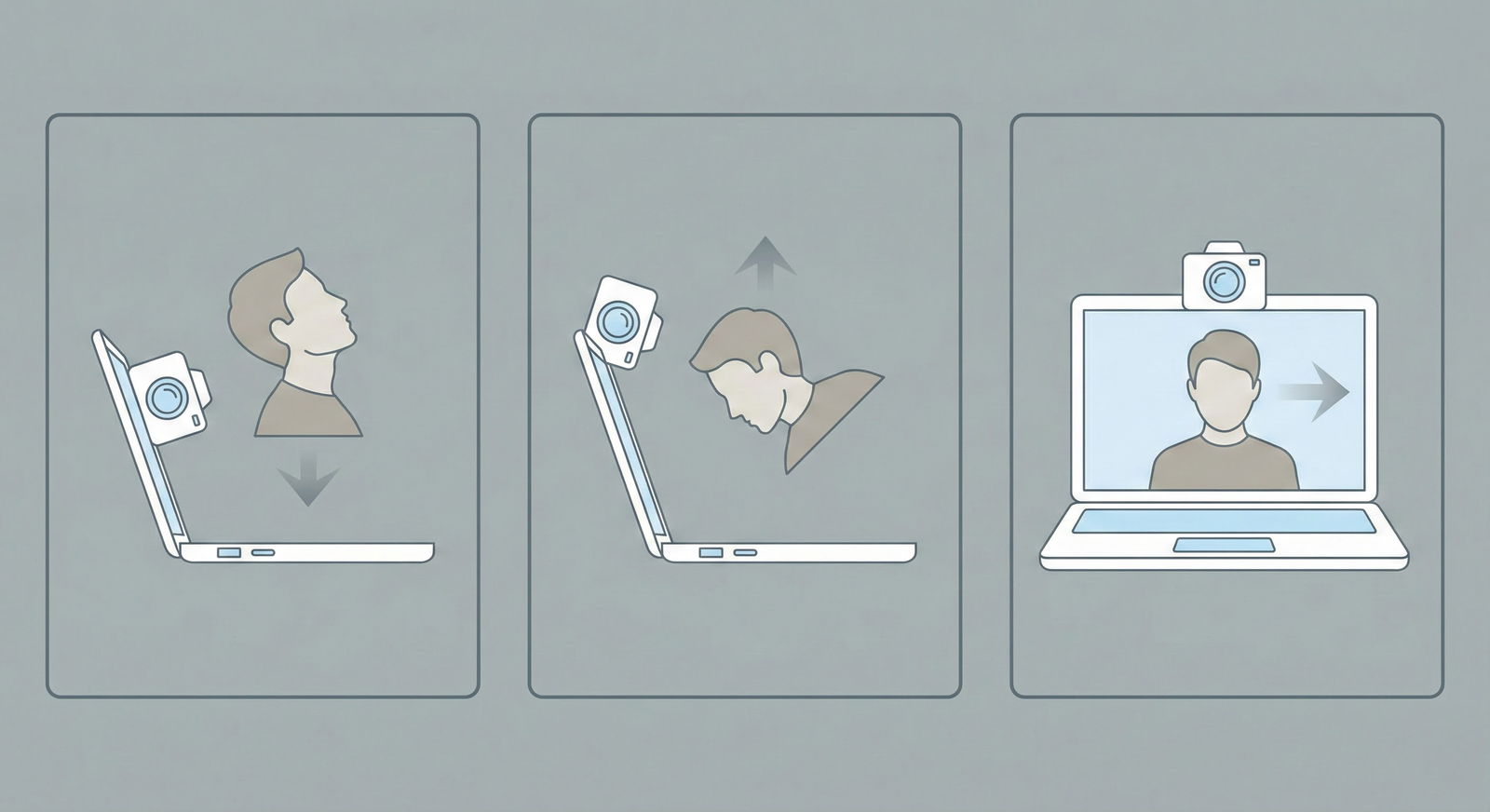
The way most applicants “practice” for video residency interviews is useless.
They read a list of common questions. They think about answers in their head. Maybe they do one awkward Zoom with a friend. Then they wonder why their real interviews feel off, their answers ramble, and they look stiff on camera.
If you want to be good at video interviews, you must practice on video. Recorded. Reviewed. Critiqued. Repeated. Anything less is just wishful thinking.
Here is a concrete, step‑by‑step system to practice video residency interviews using recorded sessions so you actually improve, not just “prepare.”
Step 1: Build a Minimal but Realistic Setup
You do not need a studio. You do need to stop looking like you are calling from a dorm at 2 a.m.
A. Hardware checklist
Use what you have, but be intentional:
- Computer: Laptop or desktop. Avoid doing this on a phone or tablet if you can.
- Camera:
- Acceptable: Built‑in laptop webcam (if 720p+).
- Better: External 1080p USB webcam (Logitech C920/C922 level).
- Microphone:
- Acceptable: Decent laptop mic in a quiet room.
- Better: USB mic (Blue Yeti, Fifine, or similar), or wired earbuds with an inline mic.
- Internet (for real interviews): Aim for at least 10 Mbps up/down. For practice, offline recording is fine.
Do a quick test: open your camera app (or Zoom), record 10 seconds of you talking, and play it back. If the audio is muffled or the image is grainy in normal lighting, adjust.
B. Lighting and background that do not sabotage you
You can fix 80% of “unprofessional” appearance with two things: light and background.
Lighting
- Face a window during the day if possible. Light on your face, not behind you.
- If no window:
- Put a desk lamp behind your laptop pointing at your face (diffuse it with a white sheet of paper if harsh).
- Avoid overhead lighting only. It creates shadows and tired‑looking eyes.
Background
- Aim for: Neutral, tidy, non‑distracting.
- Good options:
- Plain wall
- Bookshelf with neat arrangement
- Clean corner of your room with minimal decor
- Bad options:
- Bed with messy sheets
- Open closet
- Busy kitchen or hallway
- Remove anything that screams controversy: political posters, jokes, memes, alcohol bottles.
C. Camera framing
Frame yourself like a human, not a floating head.
- Sit about an arm’s length from the camera.
- Top of your head near the top of the frame.
- Shoulders and upper chest visible.
- Camera at eye level. If you are looking down, stack books under your laptop.
Spend 10 minutes fixing this once. Then you can reuse it for all practice.
Step 2: Choose Your Recording Tools (and Set Them Up Once)
Do not overcomplicate this. You just need a reliable way to:
- See yourself while you talk (or at least know you are in frame).
- Record video and audio.
- Play it back easily.
A. Simple options you already have
Use what is installed:
Zoom (free):
- Start a new meeting with only yourself.
- Turn video and audio on.
- Hit “Record to this computer.”
- Answer questions.
- Stop recording. Zoom saves an .mp4 file automatically.
Microsoft Teams / Google Meet:
- Similar concept, but recording features can be more limited or require organizational accounts. Use if you already know how; otherwise, skip.
Camera app / Photo Booth / QuickTime:
- Windows: “Camera” app.
- Mac: QuickTime Player → File → New Movie Recording.
- Click record, answer questions, stop.
B. Tools that simulate interview platforms
If you want more structure, there are mock interview platforms, but you do not need them at first. Free and simple beats “fancy but unused.”
Step 3: Build a Question Bank That Matches Real Interviews
Random internet lists will waste your time. You want questions that match:
- Residency video interviews (including asynchronous/video response formats).
- The specialties you are applying to.
- Your own vulnerabilities.
A. Core categories of questions you must practice
You should have at least 5–10 questions in each of these buckets:
Motivation and fit
- “Tell me about yourself.”
- “Why this specialty?”
- “Why our program?”
- “Where do you see yourself in 5–10 years?”
Clinical and professionalism
- “Tell me about a difficult patient interaction.”
- “Describe a time you made a mistake in clinical care.”
- “How do you handle conflict with a nurse or colleague?”
Teamwork and communication
- “Tell me about a time you worked on a team where not everyone pulled their weight.”
- “Describe a time you had to give difficult feedback.”
Stress, resilience, and wellness
- “Tell me about a time you were under significant stress. How did you handle it?”
- “How do you take care of yourself during demanding rotations?”
Red flag / gaps
- “I see you repeated a course / had a leave of absence. Can you tell me about that?”
- “Your Step score is below our average. How do you think you can still succeed in our program?”
Behavioral / situational
- “Give an example of a time you demonstrated leadership.”
- “Describe a time you had to quickly learn something new.”
Ethics and judgment
- “You see a senior resident cutting corners. What do you do?”
- “What would you do if you suspected a colleague was impaired at work?”
Create a document (Google Doc, Notion, whatever) with 20–40 questions. Label them by type.
| Category | Sample Question |
|---|---|
| Motivation/Fit | Why this specialty? |
| Clinical/Prof | Tell me about a difficult patient interaction |
| Teamwork | Time when a team member did not pull weight |
| Stress/Resilience | Time you were under significant stress |
| Red Flags | Explain your leave of absence |
| Ethics/Judgment | Senior resident cutting corners scenario |
That is your practice pool.
Step 4: Design Short, Focused Recording Sessions
You are not going to do 20 questions in a row and learn anything. You will just burn out and repeat bad habits.
Structure your practice like this:
A. Session length and frequency
- Length: 20–30 minutes per session.
- Frequency (during peak season): 3–5 times per week for 2–3 weeks will make a visible difference.
- Format: Each session = focused theme + recording + review.
Think of it like lifting weights. Short, heavy sets with proper form beat 2 hours of flailing.
B. A simple practice schedule
Week 1:
- Session 1: “Tell me about yourself” + “Why this specialty?” (drill these hard)
- Session 2: Clinical / professionalism questions
- Session 3: Teamwork and conflict
- Session 4: Red flag / gaps (if relevant)
Week 2:
- Session 1: Mix of all categories, 5–7 questions
- Session 2: Program‑specific “Why us?” answers (record for 3–4 representative programs)
- Session 3: Mock full interview (intro, 6–8 questions, closing, asking them questions)
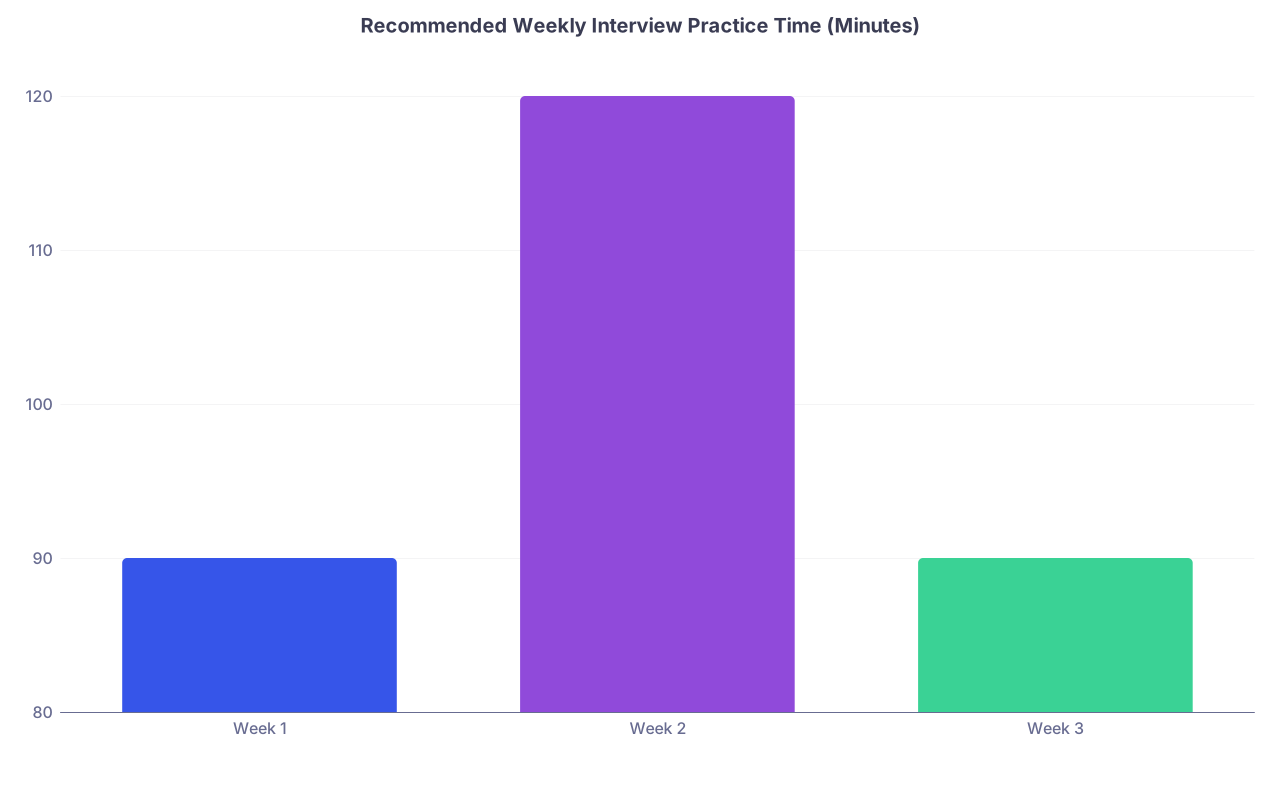
| Category | Value |
|---|---|
| Week 1 | 90 |
| Week 2 | 120 |
| Week 3 | 90 |
That is 1.5–2 hours per week of real practice. Which is more than 95% of applicants ever do.
Step 5: Run a Structured Recorded Practice Session
Here is exactly how to run one 30‑minute recorded session that actually improves you.
A. Pre‑session: Set your constraints
- Time per answer: Aim for 60–90 seconds for most questions; 2 minutes for complex ones.
- Note rule: For practice, you can have a few bullet ideas visible off-screen, but do not read.
- Posture and eye contact: Back supported but upright, shoulders relaxed, eyes toward the camera.
Decide these before you hit record.
B. Start the recording
- Open your recording tool (Zoom/QuickTime/etc.).
- Ensure:
- Mic levels are good (test phrase: “Today I am practicing interview questions for 30 minutes”).
- Framing and lighting look decent.
- Hit record.
C. Ask yourself questions realistically
Two decent options:
Self‑prompt method:
- Keep your question list open on a second screen or printed page.
- Read a question silently.
- Look back at the camera.
- Pause 2–3 seconds (simulating thinking).
- Answer.
Timer / randomization method:
- Number your questions.
- Use a random number generator (Google “random number 1–30”).
- Whatever number comes up, that is your next question.
- Answer as above.
Treat it like the real thing:
- Do not stop in the middle because you stumbled.
- Do not restart because you hate the first sentence.
- Get through your full answer, then move on.
D. Time yourself aggressively
You must learn what 60–90 seconds feels like.
Options:
- Use a small desk timer or phone timer in your peripheral vision.
- Or use an on‑screen timer (small, not taking over your whole view).
Rules:
- If you consistently go >2:00, you must shorten your structure.
- If you finish in 20 seconds, you are under‑answering.
E. End and save immediately
When you are done with 5–8 questions:
- Stop recording.
- Save the file with a name that tells you:
- Date
- Focus
- E.g.,
2025-09-15_Motivation_Fit_Practice1.mp4
Do not stack 10 recordings with names like “Zoom_0.mp4.” You will never watch them again.
Step 6: Use a Ruthless Review Process (This Is Where You Improve)
Most people hate watching themselves on camera. Tough. This is where the gains happen.
You are not watching to feel bad. You are watching to extract data and adjust.
A. First quick pass: 10–15 minutes
Do not overanalyze yet. For each answer, quickly rate:
- Content clarity (1–5): Did I answer the actual question? Is there a clear beginning–middle–end?
- Conciseness (1–5): Within 60–90 seconds? Any rambling?
- Delivery (1–5): Eye contact with camera? Natural tone? Excessive “um/like”?
Make a simple grid in your notes:
| Question # | Content (1–5) | Concise (1–5) | Delivery (1–5) |
|---|---|---|---|
| 1 | 3 | 2 | 4 |
| 2 | 4 | 3 | 3 |
| 3 | 2 | 4 | 2 |
Patterns pop up very fast.
B. Second pass: Focus on 2–3 specific habits
Do not try to fix everything at once. That is how you freeze on camera.
Watch again, but only look for two or three of these at a time:
- Verbal tics: “Um,” “like,” “you know,” “sort of.”
- Filler phrases: “That is a great question,” “I would say that,” “I guess.”
- Eye contact: Are you staring at your own video instead of the camera?
- Posture: Slouching, fidgeting, rocking.
- Facial expression: Completely flat? Over‑smiling? Furrowed brows?
- Structure: Are you telling a story or dumping unrelated details?
Write down 1–2 concrete behavior changes for next time:
- “Pause 1 second before answering instead of starting with ‘So…’”
- “Use the word ‘because’ once per answer to explain my reasoning.”
- “Finish with a clear final sentence instead of trailing off.”
C. Keep an improvement log
You want to see progress over sessions. Use a simple log:
- Date
- Session type
- Key fixes I worked on
- What actually improved
- What is still terrible (yes, be blunt)
Over 4–5 sessions, you will watch your worst habits shrink. That is real feedback. Not vibes.
Step 7: Fix Your Content Using a Simple Answer Framework
If your answers are long, scattered, or confusing, this is not a “personality” issue. It is a structure issue.
A. Use one primary structure: STORY
For almost all behavioral / “tell me about a time” questions, use a stripped‑down STAR:
- Situation: One sentence.
- Task: One sentence.
- Action: 2–3 sentences.
- Result / Reflection: 1–2 sentences + what you learned.
Example (compressed):
- “During my third‑year internal medicine rotation, we had a complex patient with uncontrolled diabetes who kept missing follow‑up appointments. (Situation)
- I was tasked with updating his discharge plan and coordinating outpatient care. (Task)
- I realized transportation and work schedule were his main barriers, so I involved social work, arranged morning appointments, and set up reminder calls through the clinic. (Action)
- Over the next month he attended his visits and his A1c improved. The experience reinforced that problem‑solving often means understanding the patient’s life, not just their labs. (Result/Reflection)”
This naturally fits into 60–90 seconds if you do not wander.
B. For “Why this specialty/program/you?” use 3 pillars
Use a 3‑point structure:
- Origin: Where the interest came from (brief).
- Evidence: Concrete experiences backing it up.
- Fit: Why this specialty or this program, specifically.
Example for “Why Internal Medicine?”:
- Origin: One sentence about what drew you (e.g., cognitive complexity, continuity).
- Evidence: Two specific experiences (rotation, patient case, research).
- Fit: Two qualities of IM that match your strengths/values.
Practice that on video 5–6 times. Watch each. Refine until it feels natural and under 2 minutes.
C. For red‑flag questions: 3‑step damage control
Keep it clean and direct:
- Own it briefly: “During my second year I failed X…”
- Explain context without making excuses: One or two sentences max.
- Demonstrate growth with evidence: Concrete steps you took and better performance afterward.
Do not over‑justify. Do not cry on camera. Do not throw others under the bus.
Record yourself answering your biggest red‑flag question 3–4 times. You want to sound calm, practiced, and not defensive.
Step 8: Simulate the Real Thing: Full Mock Video Interviews
Once your individual answers are no longer a mess, you move to full simulations.
A. Build one “standard” interview script
You want a reproducible mock format. Something like:
- Introduction: “We will ask you a series of questions today… ready?”
- 6–8 mixed questions covering:
- Motivation
- Clinical scenario
- Team conflict
- Stress/resilience
- Ethics
- Red flag (if relevant)
- “Do you have any questions for us?” (You should have 2–3 ready.)
You can:
- Ask a friend or mentor to run this script live over Zoom and record it.
- Or simulate both sides by reading the question aloud, then answering, in one continuous recording.
B. Treat it exactly like a real interview
Rules for mock interviews:
- Dress in your interview outfit (top half at least).
- Sit in the exact place you will use on interview day.
- No pausing or restarting. If you mess up, recover on the fly.
- Use the same intro and closing lines you plan to use with actual programs.
This builds “muscle memory” and reduces interview‑day anxiety.
C. Get external feedback on at least one recording
You are too close to your own performance. Ask:
- A faculty mentor
- A chief resident
- Your school’s career office
- A trusted co‑applicant who is not going to sugarcoat it
Send a 20‑minute recording and ask very specific questions:
- “Do I come across as engaged or flat?”
- “Any answers that made you less confident in me?”
- “If you were on a selection committee, would anything here be a red flag?”
In other words: “What would keep you from ranking me highly?”

| Step | Description |
|---|---|
| Step 1 | Set up equipment |
| Step 2 | Create question bank |
| Step 3 | Record short sessions |
| Step 4 | Self-review with ratings |
| Step 5 | Target specific habits |
| Step 6 | Full mock interview |
| Step 7 | External feedback |
| Step 8 | Refine and repeat |
Use their feedback to plan your next 2–3 practice sessions.
Step 9: Track Progress and Avoid Over‑Practicing
Yes, you can overdo this and become robotic. The fix is structure and stopping at the right time.
A. Track 3 simple metrics
Over your recordings, track:
- Average answer length (target: 60–90 seconds).
- Content clarity rating (your own 1–5 scale).
- Delivery comfort (how stiff you look/feel, 1–5 scale).
You want:
- Answer length: Stabilizes.
- Content clarity: Trend upward.
- Delivery comfort: Trend upward then plateau.
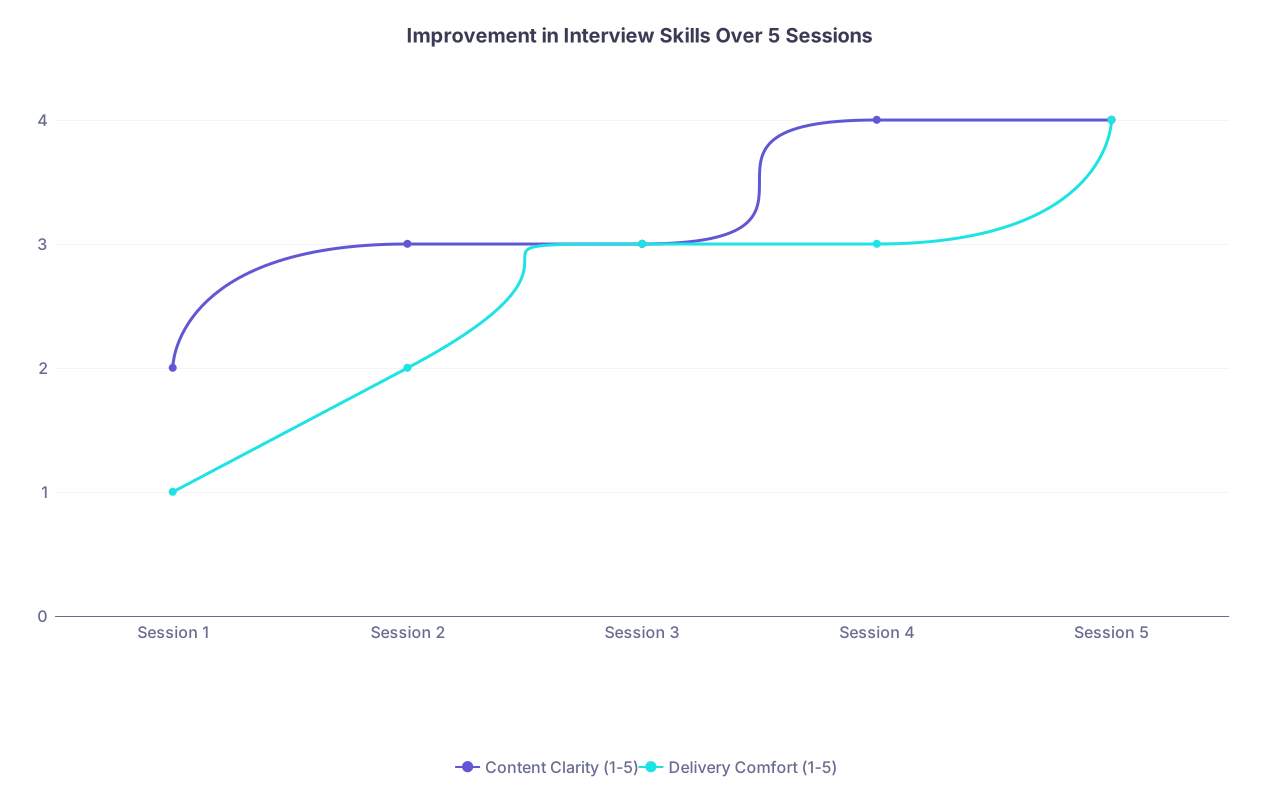
| Category | Content Clarity (1-5) | Delivery Comfort (1-5) |
|---|---|---|
| Session 1 | 2 | 1 |
| Session 2 | 3 | 2 |
| Session 3 | 3 | 3 |
| Session 4 | 4 | 3 |
| Session 5 | 4 | 4 |
When your metrics stop improving significantly and you are consistently performing at a “4,” you are ready. After that, do light maintenance, not constant drilling.
B. Signs you are over‑practicing
You probably need to back off if:
- You can recite your “tell me about yourself” verbatim without thinking.
- Your answers sound memorized, not conversational.
- You feel bored listening to yourself.
Shift to:
- One short (15–20 minute) tune‑up practice the day before a big interview block.
- Five minutes of silent review (key bullet points only) the morning of.
Step 10: Day‑Before and Day‑Of Interview Practice Protocol
Last thing: how to use recorded practice strategically right before interviews.
A. Day‑before routine (20–30 minutes)
- Do one short recording:
- 3 questions: “Tell me about yourself,” “Why this specialty?”, “Why our program?” (or “Why this type of program?”)
- Record once. No restarts.
- Quick review:
- Check lighting, framing, audio with your exact interview outfit.
- Make one tweak if needed.
- Then stop. You are not rewriting your answers the night before.
B. Morning‑of routine (5–10 minutes)
No recording needed now. Focus on confidence:
- Stand up, speak your 30–60 second version of “Tell me about yourself” out loud once.
- Run through bullet‑point outlines (not scripts) for:
- Why this specialty
- One clinical story
- One teamwork story
- One resilience/stress story
- Skim your list of questions to ask programs.
Then log on early, check tech once, and trust the reps you put in already.
Key Takeaways
- Real improvement in video residency interviews comes from recording, rewatching, and refining—not just “thinking through” questions.
- Short, structured practice sessions with targeted feedback beat marathon unfocused prep every time.
- Once your answers are clear, concise, and natural on video, stop over‑practicing and use light tune‑ups to stay sharp without sounding scripted.