
The biggest mistake applicants make going into SOAP is thinking they can “tweak a few ERAS fields” on Monday morning. By the time SOAP opens, you either have a SOAP‑ready ERAS… or you are already behind.
You need a timeline. Down to the day and, frankly, down to the hour.
This guide walks you from two weeks before Match Week through SOAP lock, with exactly what to update in ERAS, when to stop touching things, and how to avoid the classic “I meant to change that” disasters.
Two Weeks Before Match Week: Build a SOAP-Ready ERAS
At this point you still hope you match. You still prepare as if you will not.
Your goal for this phase: create a fully updated, SOAP‑appropriate version of your ERAS that can be deployed with minor edits in hours, not days.
10–14 Days Before Match Week: Global Updates
Focus: anything that applies to every program.
At this point you should:
Update your CV content in ERAS
- Experiences:
- Add:
- New rotations (e.g., “Internal Medicine Sub‑I, Jan–Feb 2026”)
- Recent volunteer, leadership, or teaching roles
- Any new employment, even short term (scribe, research assistant)
- Edit:
- Convert vague bullets (“Assisted with patient care”) into SOAP‑level concrete bullets:
- “Managed 8–10 inpatients daily, wrote daily notes, presented on rounds”
- Move the most clinically relevant experiences to the top within each section.
- Convert vague bullets (“Assisted with patient care”) into SOAP‑level concrete bullets:
- Add:
- Publications and research:
- Add anything accepted, in press, or preprint with a DOI.
- Clean up duplicates, fix author order, add PMIDs where missing.
- Experiences:
Refresh your personal statement library
- You must not use a single generic PS for all SOAP programs. That is lazy and it shows.
- At this point you should have:
- 1–2 primary specialty PS versions (tailored but consistent core story).
- 1 backup non‑competitive specialty PS (e.g., FM, IM, Peds, Psych depending on your profile).
- 1 transitional year / prelim medicine PS if you are open to that path.
- Strategy:
- Tighten paragraphs. SOAP reviewers skim. Long, rambling statements die here.
- Make your “why this specialty” paragraph very explicit. No vague “I like holistic care” fluff.
Check your LoRs situation
- You cannot upload new LoRs during SOAP, but you can:
- Ensure all intended letters are assigned to appropriate specialties.
- Remove irrelevant letters from automatic use (e.g., derm letter for FM).
- At this point you should:
- Create LoR sets by specialty:
- Example:
- IM: 2 medicine attendings + research mentor
- FM: 1 FM attending + 1 IM + dean’s letter
- TY/Prelim: strongest clinical letters, regardless of specialty
- Example:
- Create LoR sets by specialty:
- Confirm that:
- All LoRs are properly marked complete in ERAS.
- You know exactly which set you will assign for each SOAP specialty.
- You cannot upload new LoRs during SOAP, but you can:
Update exam information
- Confirm:
- All USMLE/COMLEX scores display correctly.
- Step 2 CK/Level 2 scores are present if available.
- If you failed anything:
- Make sure the failure is already disclosed and explained in your experiences or PS (short, direct, not dramatic).
- Confirm:
Revise your program list strategy (pre‑SOAP)
- You are not applying yet, but you need a plan.
- Build an internal list (spreadsheet) of:
- Programs likely to SOAP in your primary specialty.
- Reasonable backup specialties based on your metrics.
- Include columns for:
- Specialty
- Program name
- Location
- Preliminary vs categorical
- Your interest level (High / Medium / If desperate)
- Which PS and LoR set you will use
| Specialty | Target Tier | Typical Step 2 CK | Your Priority |
|---|---|---|---|
| Internal Medicine | Community | 220–235 | High |
| Family Medicine | Community | 210–225 | High |
| Pediatrics | Community | 215–230 | Medium |
| Transitional Year | Mixed | 220–240 | Medium |
| Prelim Medicine | Community | 215–235 | If necessary |
The Week Before Match Week: Lock Your Structure, Polish Your Content
By now, the “big rocks” in ERAS should be in place. This week is about polishing and creating templates that you can deploy fast.
7 Days Before Match Week: Final Structural Pass
At this point you should:
Clean the Experiences section with SOAP in mind
- Remove:
- Extremely old, irrelevant items (e.g., high school awards).
- Redundant shadowing entries of the same type.
- Reorder:
- Clinical rotations at the top.
- Leadership and teaching next.
- Research closer to the bottom unless applying to academic-heavy fields.
- For each key experience:
- Ensure 2–4 concise bullets, each outcome‑oriented, e.g.:
- “Independently wrote daily progress notes for 6 patients, pre‑rounded and presented on rounds”
- Ensure 2–4 concise bullets, each outcome‑oriented, e.g.:
- Remove:
Align your ERAS “Profile” details
- Double‑check:
- Contact info
- Visa status (if applicable)
- Languages
- Geographic preferences only if they are strong and honest
- Anything that causes confusion here will slow a SOAP program down.
- Double‑check:
Finalize your personal statement variants
- End of the week, you should have:
- Specialty‑specific PSs saved, named clearly, and ready to assign.
- Name them intelligently:
- “PS_IM_SOAP_2026”
- “PS_FM_SOAP_2026”
- “PS_TY_SOAP_2026”
- Avoid:
- Overly emotional Match‑Week commentary.
- Explanations about “not matching” within the PS. SOAP PDs know where you are; you do not need to narrate your disappointment.
- End of the week, you should have:
Prepare SOAP email and phone readiness
- Not strictly ERAS, but directly related:
- Use a professional email address that you check obsessively.
- Record a neutral voicemail greeting.
- Clear your voicemail inbox.
- Not strictly ERAS, but directly related:
Match Week: Day-by-Day Timeline for ERAS Updates
Now it gets real. The timelines below assume the typical NRMP schedule:
- Monday 11:00 a.m. ET: You learn if you matched.
- Tuesday 10:00 a.m. ET: SOAP applicants can start applying to unfilled programs.
- Thursday 9:00 a.m. ET: Last SOAP offer round ends; SOAP concludes.
Double‑check exact current year times, but the structure is stable year to year.
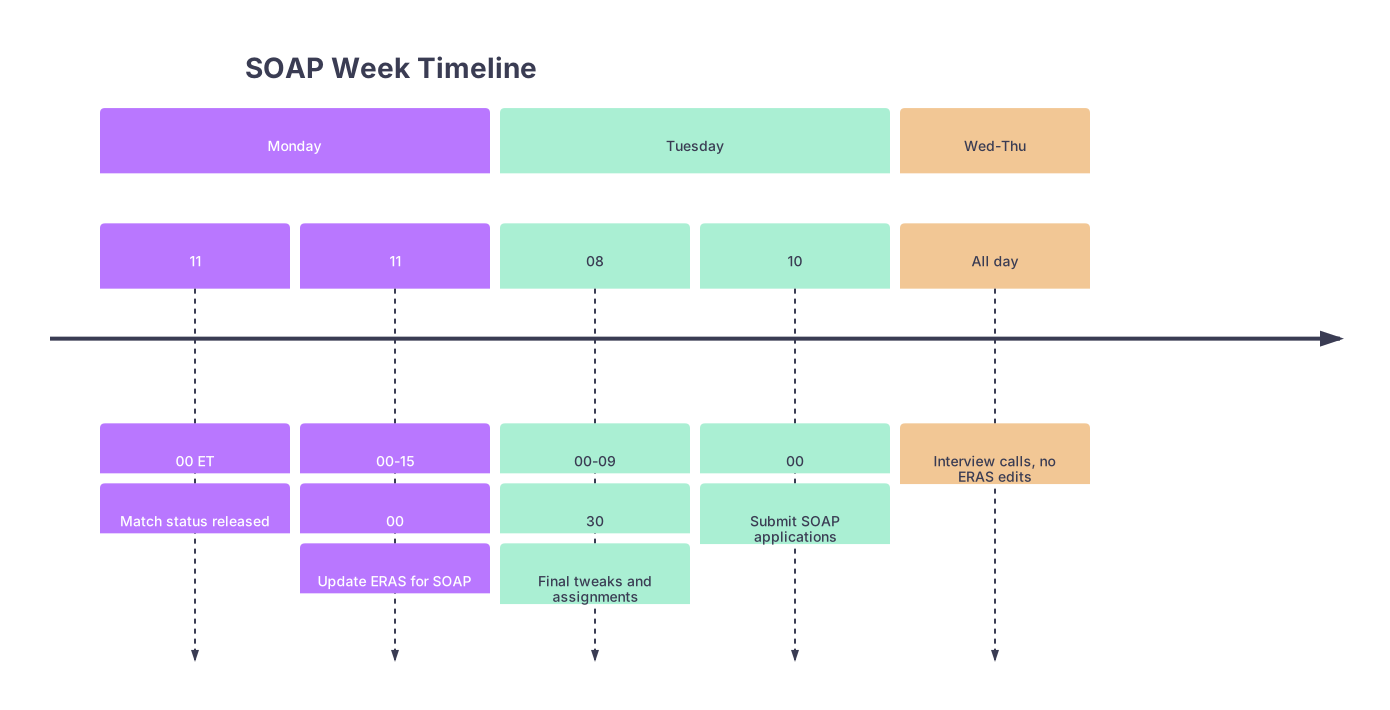
| Period | Event |
|---|---|
| Monday - 11 | 00 ET |
| Monday - 11 | 00-15 |
| Tuesday - 08 | 00-09 |
| Tuesday - 10 | 00 |
| Wed-Thu - All day | Interview calls, no ERAS edits |
Monday of Match Week: 11:00 a.m. – 3:00 p.m. ET
You open the email. You did not match or partially matched.
You now enter emergency execution mode.
From 11:00–12:00 p.m. ET: Confirm Eligibility and Gather Info
At this point you should:
- Log into NRMP and confirm:
- You are SOAP‑eligible.
- Your unmatched/partially matched status is clear.
- Log into ERAS and:
- Confirm access to the SOAP environment.
- Check that all your uploaded documents (LoRs, PSs, MSPE) are visible.
From 12:00–1:30 p.m. ET: Rapid Specialty Strategy Reset
This is not yet about clicking “apply.” It is about deciding where you are realistically aiming.
At this point you should:
Review the list of unfilled programs (when released to you via NRMP)
- Sort by:
- Specialty
- Program type (categorical, prelim, TY)
- Location
- Compare to your pre‑built spreadsheet and update it.
- Sort by:
Choose 1–3 primary SOAP specialties
- Major trap: spraying 45 applications across 6 specialties with no coherent story.
- You want:
- 1 main specialty.
- 1–2 secondary/backup specialties (e.g., FM + TY, or IM + Prelim Medicine).
Assign personal statements per specialty
- Decide:
- IM programs → PS_IM_SOAP_2026
- FM programs → PS_FM_SOAP_2026
- TY/Prelim → PS_TY_SOAP_2026
- You will not rewrite from scratch today. You will tweak only if absolutely necessary.
- Decide:
From 1:30–3:00 p.m. ET: Final ERAS Content Adjustments
These are the last major content edits you should attempt.
At this point you should:
Refine your “most meaningful” or standout experiences (if applicable)
- Highlight:
- High-intensity inpatient rotations.
- Experiences showing resilience, adaptability, and reliability.
- Edit for brevity:
- Make bullets skimmable. PDs may spend 30–60 seconds on your entire application.
- Highlight:
Align your ERAS entries with your SOAP specialties
- If shifting specialties (e.g., originally applied to Surgery, now SOAPing into IM/FM):
- Adjust a few bullet points to emphasize:
- Continuity of care
- Breadth of pathology
- Team communication
- Remove or shorten extremely procedure-heavy, surgically biased bullets that make you look reluctant to pivot.
- Adjust a few bullet points to emphasize:
- If shifting specialties (e.g., originally applied to Surgery, now SOAPing into IM/FM):
Stop major content rewrites by ~3:00 p.m. ET
- After this, your changes should be:
- Minor typo fixes
- Small phrasing edits
- You need mental bandwidth to plan your actual applications, not fuss with prose.
- After this, your changes should be:
Monday Evening: Build Your SOAP Application Map
Now the real SOAP chessboard comes into focus.
From 3:00–7:00 p.m. ET: Program-Level Planning (Outside ERAS)
At this point you should:
- Use your spreadsheet to:
- Select 30–45 programs you are realistically targeting.
- Group them by:
- Specialty
- Program type
- For each group, define:
- Which personal statement you will assign.
- Which LoR set you will assign.
- Any program notes (e.g., prefers FMGs, community-based, accepts visa).
From 7:00–10:00 p.m. ET: Dry Run in ERAS (Assignments Only)
Do not submit yet. Just set the structure.
At this point you should:
In ERAS, build document assignment templates by specialty
- For each target specialty:
- Prelim/Medicine template:
- PS: PS_TY_SOAP_2026
- LoRs: strongest 3–4 clinical letters
- IM template:
- PS: PS_IM_SOAP_2026
- LoRs: IM‑focused set
- Prelim/Medicine template:
- Even if ERAS does not offer literal “templates,” you mentally (and on your sheet) decide which combination belongs to which group.
- For each target specialty:
Check that every program on your list is SOAP‑eligible and unfilled
- Confirm in NRMP’s unfilled list.
- Remove any duplicates or mis‑categorized programs from your plan.
Tuesday Morning: Final Check and Submission
This is where many applicants panic and start rewriting everything. You will not do that.
7:00–9:30 a.m. ET: Last ERAS Touches
At this point you should:
Do a single, top‑to‑bottom ERAS review
- Profile
- Education
- Experiences
- Publications
- Personal statements list
- LoR uploads and status
- Photo (appropriate, professional; do not change it now unless it is clearly unprofessional)
Make micro edits only
- Correct typos.
- Standardize tense and formatting in bullets (present vs past).
- Remove any obviously confusing or unfinished lines.
Assign documents to specific programs
- As unfilled lists and decisions are now stable, you:
- For each program in a specialty, ensure:
- Correct PS attached.
- Correct LoR set attached.
- For each program in a specialty, ensure:
- Triple‑check:
- You did not accidentally attach a highly specialty‑specific PS (e.g., Derm PS) to a FM SOAP application. I have seen this happen. Programs notice.
- As unfilled lists and decisions are now stable, you:
9:30–10:00 a.m. ET: Stop Editing, Start Breathing
From 9:30 a.m. ET onward:
- You should not be:
- Rewriting personal statements.
- Reordering experiences.
- Uploading anything new.
- You should be:
- Reviewing your program list.
- Verifying assignments.
- Preparing to click submit at/after 10:00 a.m. ET.
10:00 a.m. ET: Submit SOAP Applications
Once ERAS opens for SOAP applications:
At this point you should:
- Submit to your pre‑selected 30–45 programs.
- Resist:
- The urge to “just add 5 more random specialties.”
- Last‑second rearrangements that are not grounded in your metrics or goals.
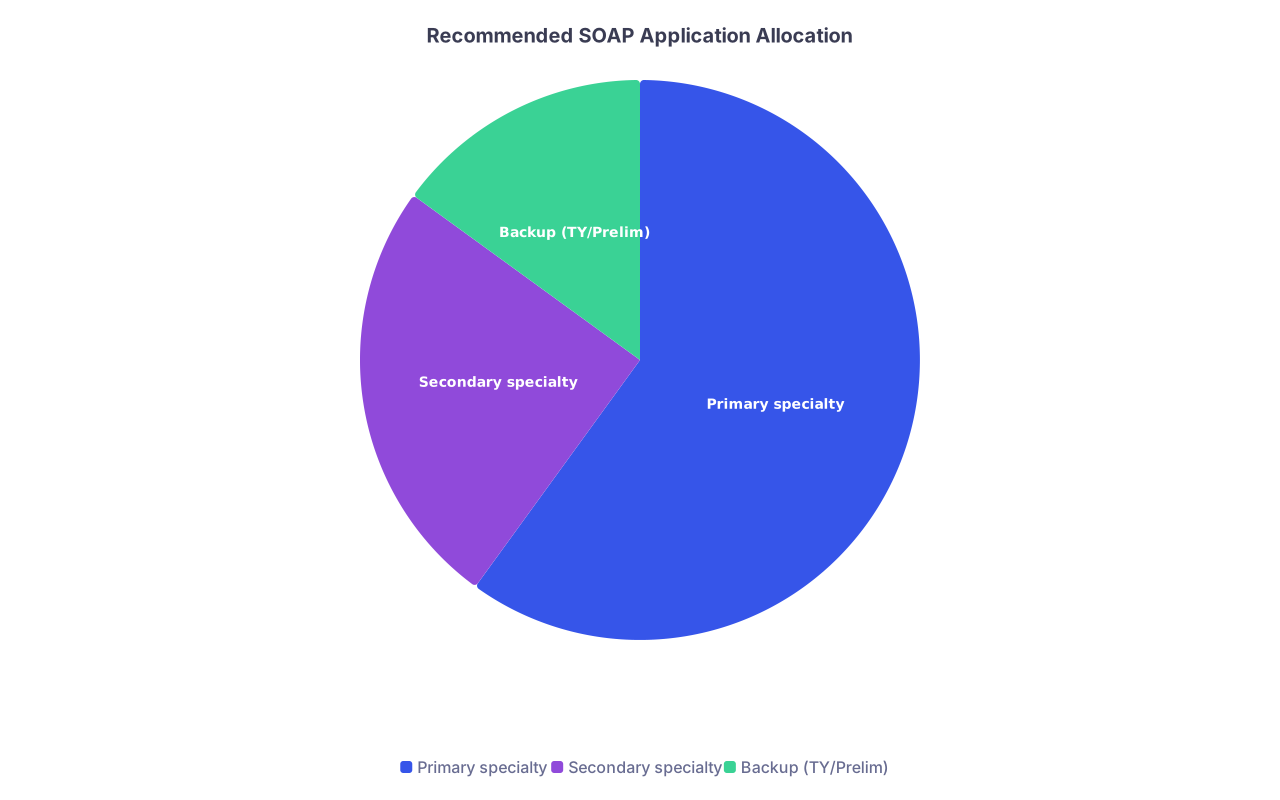
| Category | Value |
|---|---|
| Primary specialty | 60 |
| Secondary specialty | 25 |
| Backup (TY/Prelim) | 15 |
After Submission: What You Do Not Touch in ERAS
From Tuesday late morning through Thursday:
Programs are reviewing. Calling. Interviewing. Ranking. They are doing this fast.
At this point you do not:
- Change your personal statements.
- Add or remove experiences substantially.
- Reorder your entire CV.
- Upload “updated” publications or test scores unless absolutely critical and late‑breaking (and even then, proceed very carefully and consider emailing programs instead).
You can:
- Fix an egregious typo (if you notice one).
- Update contact info if there is a real change.
- Add a very time‑critical new test score if it posts and is a clear improvement and you are sure programs value it.
But do not treat Tuesday–Thursday as an ongoing editing window. SOAP programs do not continuously re‑download your application. Many will read it once.

If You Go Unmatched After SOAP: Post-Mortem on Your ERAS
If Thursday ends and you remain unmatched, the ERAS you built for SOAP becomes the base for:
- Off‑cycle positions
- Next cycle ERAS (with modifications)
Within 48–72 hours after SOAP ends:
At this point you should:
Save a copy of your exact ERAS content
- Screenshots or exports.
- You want a record of what PDs saw.
Critically evaluate
- Did your experiences support the specialties you targeted?
- Were your personal statements specific enough?
- Did you present a clear, coherent profile or a scattered one?
Plan for structural, not cosmetic, changes for the next cycle
- This is when you rethink:
- Specialty choice.
- New rotations or additional clinical experience.
- Getting fresh, stronger LoRs.
- This is when you rethink:
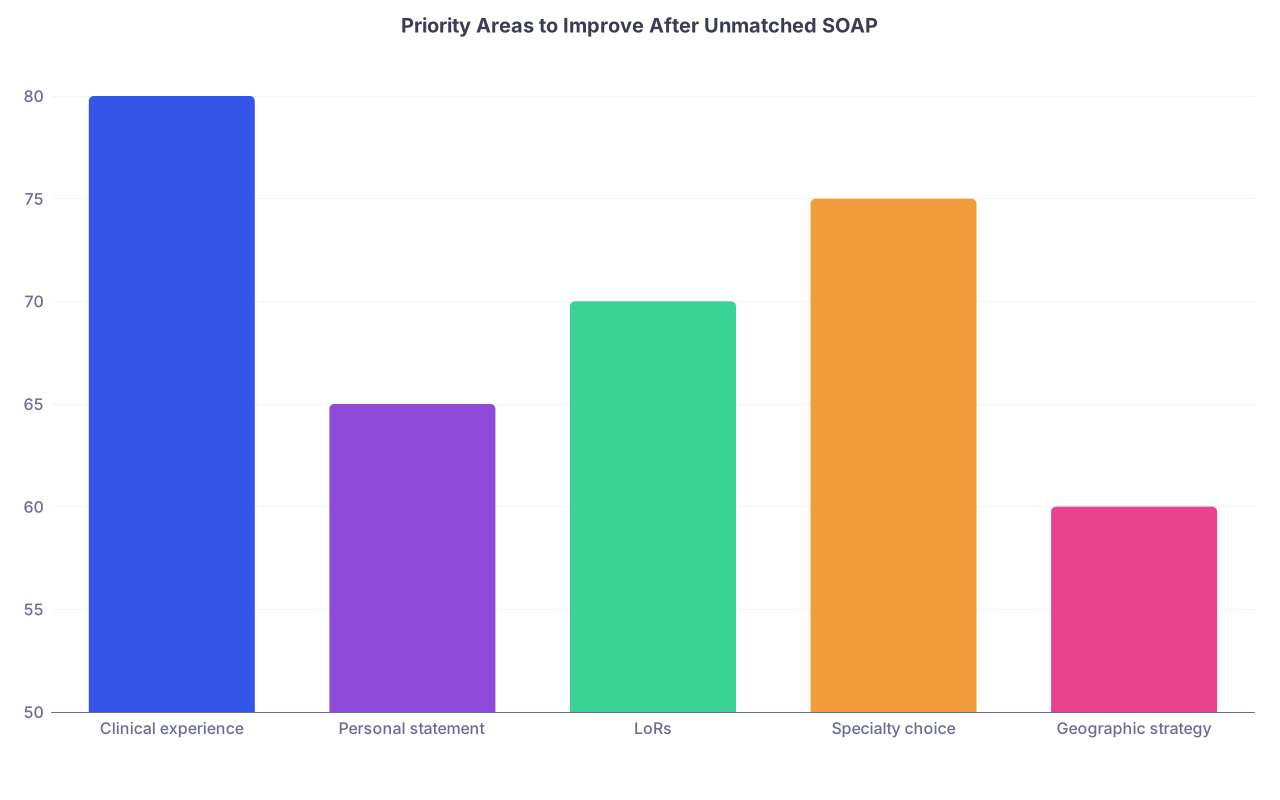
| Category | Value |
|---|---|
| Clinical experience | 80 |
| Personal statement | 65 |
| LoRs | 70 |
| Specialty choice | 75 |
| Geographic strategy | 60 |
Visual Summary: Pre‑SOAP vs SOAP‑Week Tasks
| Timeframe | Primary ERAS Tasks | What To Avoid |
|---|---|---|
| 2 weeks before | Major CV updates, new experiences, PS drafts, LoR assignment strategy | Waiting “to see if I match” before preparing |
| 1 week before | Polishing bullets, finalizing PS variants, cleaning profile | Rewriting whole narrative, switching specialties impulsively |
| Monday (Match Week) | Strategy reset, minor edits, specialty alignment | Long rewrites, emotional PS additions |
| Tuesday morning | Final micro fixes, document assignments, submit | Last-minute specialty changes, adding random programs |
| Tue–Thu SOAP | Answer calls, interview prep | Continuous ERAS overhauls |
Final Key Points
- ERAS for SOAP must be 90 percent built before Match Week starts. SOAP is not the time for reinvention; it is the time for execution.
- Use Monday for targeted, strategy‑driven adjustments and document assignments, then freeze major edits by Tuesday morning.
- During SOAP itself, stop tinkering with ERAS and focus on being available, responsive, and prepared for rapid‑fire interviews.