
The week before ERAS submission makes or breaks your application timing. Most people waste it “polishing” instead of executing a concrete, day‑by‑day plan.
You will not do that.
Below is a strict, seven‑day countdown. If you follow it, you will submit ERAS early, clean, and on time—without the usual 2 a.m. panic and last‑minute letter disasters.
Overall Structure: Your 7‑Day ERAS Countdown
At this point you should stop making major strategy changes. No new specialty. No new region. You are in execution mode now.
Think of the week like this:
| Day | Primary Focus |
|---|---|
| -7 | Strategy lock + document audit |
| -6 | Personal statement finalization |
| -5 | Experiences & CV polish |
| -4 | Letters of recommendation check |
| -3 | Program list + filters |
| -2 | Technical checks + payment prep |
| -1 | Final review + scheduled submit |
And yes, that means if you are still “figuring things out,” you are late. But you can still salvage this if you move deliberately.
Day -7: Lock Strategy and Audit Everything
Seven days before submission, at this point you should stop “brainstorming” and start locking decisions.
1. Decide your application structure
By the end of today, you must have:
- Chosen your primary specialty (and any realistic backup)
- Decided if you will submit:
- One personal statement vs. specialty‑specific statements
- One CV structure vs. duplicate entries (e.g., same research tailored differently to IM vs. Neuro)
- A rough target number of programs per specialty
Use simple, reality‑based targets:
- Competitive specialties (Derm, Ortho, ENT, etc.): often 60–80+ programs if your stats are borderline
- Mid‑range competitiveness (IM, Peds, FM, Psych): 30–50 programs is common
- Extremely region‑restricted: you may need more programs in a smaller map
2. Full document inventory
At this point you should know exactly what exists and what is missing:
Make a one‑page checklist:
- Personal statement(s): draft complete?
- CV / Experiences section: all items entered?
- Transcript: uploaded and verified?
- MSPE (Dean’s Letter): status known (school controls this, but you should know when it goes out)
- USMLE/COMLEX scores: released and in ERAS?
- Letters of recommendation: requested, assigned, and uploaded? (write names + dates)
- Photo: professional and uploaded?
Then open ERAS and cross‑match this checklist with what is actually there. Not what you remember. What is actually present in the system.
3. Set a fixed submission time and protect it
Pick a specific submission time on Day 0:
- Example: “Submit at 8:00 a.m. ET on opening day.”
Block off:
- 2–3 hours on Day -1 for full review
- 1–2 hours on Day 0 for final click + confirmation
If you do not put this on a calendar (your real one, not the imaginary one in your head), you will be squeezed by rotations, call, or travel.
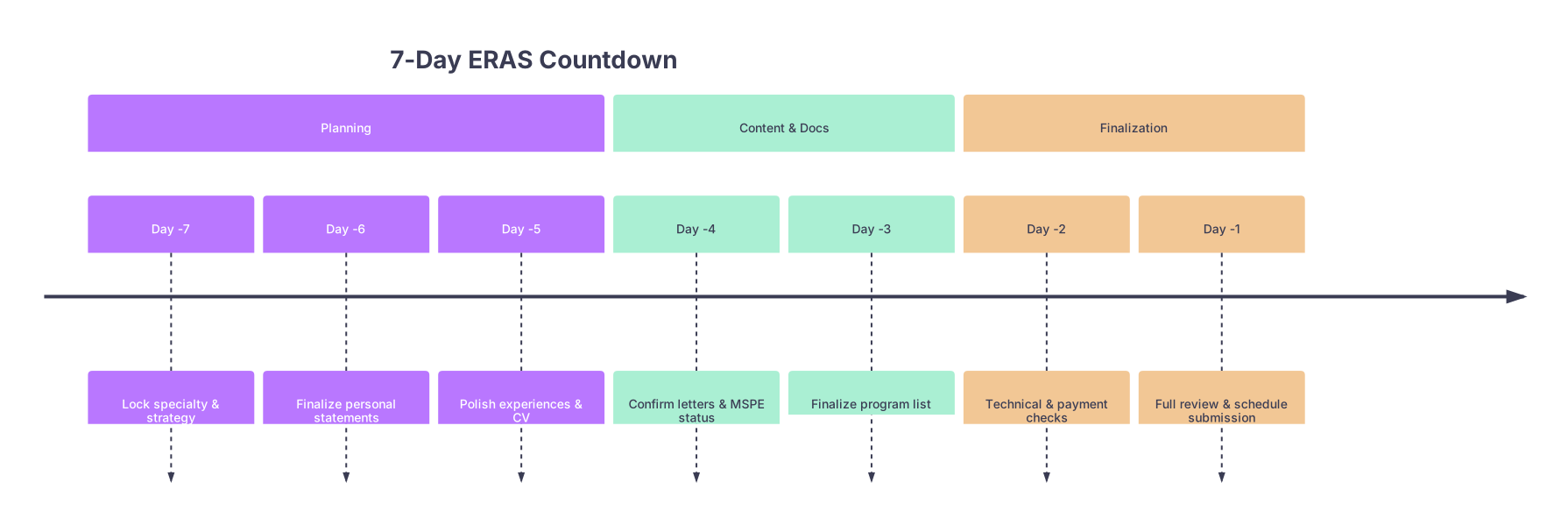
| Period | Event |
|---|---|
| Planning - Day -7 | Lock specialty & strategy |
| Planning - Day -6 | Finalize personal statements |
| Planning - Day -5 | Polish experiences & CV |
| Content & Docs - Day -4 | Confirm letters & MSPE status |
| Content & Docs - Day -3 | Finalize program list |
| Finalization - Day -2 | Technical & payment checks |
| Finalization - Day -1 | Full review & schedule submission |
Day -6: Personal Statements – Final Draft, No More Reinventing
Six days out, at this point you should stop rewriting from scratch. The personal statement is a performance risk now if you keep tinkering.
1. Commit to your core narrative
Ask yourself, out loud if needed:
- What 1–2 themes define why I chose this specialty?
Example: longitudinal relationships (FM), diagnostic complexity (IM), procedures (EM), advocacy (Psych). - What 1 specific patient or rotation story best illustrates that?
- What 1–2 traits do I want readers to remember? (“Calm under pressure,” “teacher,” “systems thinker”)
Everything in the statement should point back to these. If a paragraph does not support that, cut it.
2. Line‑by‑line clean‑up
This is not “vibes.” This is technical editing:
- Remove filler: “I have always wanted…,” “I am writing to express…”
- Kill repetition: 3 different “I learned the importance of teamwork” lines is lazy.
- Replace generic with concrete:
- Bad: “I enjoy continuity of care.”
- Better: “In our community clinic, following patients with uncontrolled diabetes for months taught me…”
Then do one read‑through focused only on:
- Spelling
- Grammar
- Tense consistency
- Name checks (no wrong program or specialty names—yes, I have seen ‘I am excited to apply to Psychiatry’ in an IM PS)
3. Finalize specialty‑specific versions
If you are dual applying (e.g., IM + Neuro, FM + Psych), at this point you should:
- Duplicate and modify:
- Intro paragraph: specialty‑specific hook
- Middle: remove anything that screams “other specialty”
- Closing: explicitly name the specialty
Name the files cleanly for yourself:
PS_Internal_Medicine_FinalPS_Psychiatry_Final
Then upload into ERAS and triple‑check which programs get which statement. This is where people blow it.

Day -5: Experiences and CV – Tighten, Clarify, Quantify
Five days before submission, at this point you should stop inventing new activities. You are refining.
1. Audit your Experiences entries
Open the ERAS Experiences section and go item by item. For each:
- Is the title clear and non‑cryptic?
- “Clinic Volunteer – Free Community Health Initiative” is better than “FCCHI.”
- Is the description short but specific?
- Aim for 3–5 concise bullet‑style sentences in paragraph form.
- Are there numbers?
- “Followed ~50 patients with chronic conditions” beats “Many patients.”
Common mistakes I see:
- Redundant entries (three separate “Volunteer – Hospital” items that could be one, clearly described activity)
- Overinflated leadership roles that programs can smell from a mile away
- Jargon only your school understands
2. Prioritize and mark “Most Meaningful” / key entries
If ERAS or your specialty highlights key experiences, use that intelligently:
- Mark major longitudinal items:
- Long‑term clinic involvements
- Significant research with publications/posters
- Major leadership (e.g., class president, not “pizza committee treasurer”)
Write those descriptions like mini‑stories with:
- Context: where and what
- Role: what you actually did
- Impact: what changed because you were there (even modestly)
3. Publications, presentations, and research
Do a quick accuracy pass:
- Are all authors named correctly and in the right order?
- “In press” vs “submitted” vs “accepted” correctly labeled?
- Conference names spelled correctly (no “Americal College of Physicians”)—yes, I have seen worse.
If something is likely never getting accepted, stop promising it. Call it what it is: “Manuscript in preparation” or remove it if marginal.
Day -4: Letters of Recommendation – Confirm or Replace
Four days out, at this point you should not be discovering that your critical letter writer “forgot” to upload.
1. Check ERAS letter portal
Open the Letters tab and look for each LoR:
- Status: “Uploaded” vs “Requested”
- Assigned: to which programs/specialties?
Identify:
- Your anchor letters (e.g., Department chair, sub‑I attending, strong advocate)
- Weak or missing slots
If a “key” letter is still not uploaded:
- Send a polite, very specific reminder:
- “Dear Dr. X, I hope you are well. ERAS opens for program review on [date]. I wanted to confirm if you anticipate uploading my letter by [specific date, 1–2 days from now]. I remain very grateful for your support.”
- If you get any hint that it will not happen in time, move on. Assign a different letter.
2. Check specialty coverage
You should have:
- 3–4 letters total per specialty, typically including:
- 1–2 core specialty attendings
- 1 strong general clinical letter (IM/FM/Peds)
- Optional: research letter, especially for academic fields
If you are dual applying:
- Make sure you have at least:
- 2 letters relevant to each specialty
- Others can be shared
Then carefully assign letters in ERAS by program. Do not assign a Psychiatry‑only letter to a Surgery‑only application.
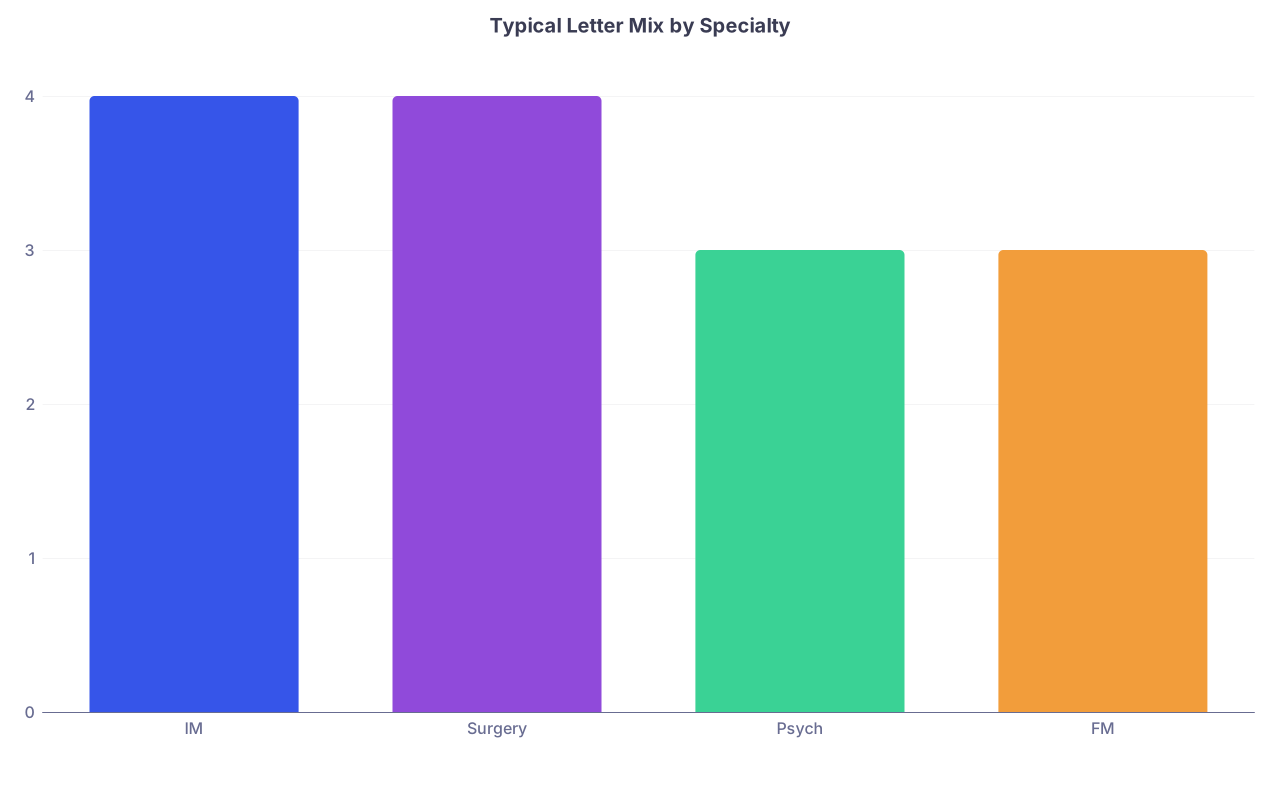
| Category | Value |
|---|---|
| IM | 4 |
| Surgery | 4 |
| Psych | 3 |
| FM | 3 |
3. Decide on Chair/department letters
Some specialties (like IM at certain academic places) expect or strongly prefer a Chair letter.
- If your school provides a generic Chair letter automatically, know when it will appear.
- If a Chair letter is terrible and you know it (I have seen some one‑paragraph “I do not know this student” disasters), prioritize strong clinical letters instead.
At this point you should accept that what you have is what you are using. No new letter requests now, unless absolutely necessary.
Day -3: Program List and Application Strategy Fine‑Tune
Three days before submission, at this point you should be refining—not starting—your program research.
1. Build and prune your program list
Open your program spreadsheet or create a simple one with:
- Program name
- City/state
- Specialty
- Setting (community vs academic)
- Your interest level (High / Medium / Low)
- Deal‑breakers (visa, DO‑unfriendly, Step 2 cutoff, etc.)
Cross‑check with:
- Program websites for:
- Minimum score policies
- Visa sponsorship
- DO/IMG policies
- Your own preferences:
- Regions you would truly live in
- Places with your needed support (partner, family, childcare)
Cut obvious mismatches. You are not impressing anyone by applying to 120 places that will never interview you.
2. Calibrate competitiveness honestly
Use your Step scores, class ranking, and CV to stratify:
- Reach programs
- Target programs
- Safer programs
If you have a Step 1 fail, low Step 2, or major red flag:
- Intentionally overweight safer and community programs.
- Add a few extra programs now. Not in three weeks when rejections roll in.
3. Align personal statements and letters per program
For each specialty (and especially if dual applying):
- Decide which personal statement version each program receives.
- Decide which 3–4 letters each program gets.
Double‑check this in ERAS. Misaligned files are a silent self‑sabotage.

Day -2: Technical Check, Finances, and Backup Plans
Two days before submission, at this point you should treat your ERAS account like a system you are trying to break. If you skip this, you are volunteering for last‑minute chaos.
1. Log in and simulate submission (without clicking submit)
Go through ERAS section by section:
- Personal info: name, AAMC ID, contact email, phone, address
- Is your email professional? (If not, too late to fix perception, but you can at least redirect.)
- Citizenship/visa fields: accurate and consistent
- Exam scores: all present, correctly linked
- Photo: appropriate, professional, not a blurry crop from a wedding
Then go into the application:
- Click through each section as if submitting.
- Make note of any red error messages or missing required fields.
2. Financial readiness
You will spend real money in one shot:
- Application fees scale up quickly by number of programs.
- Some specialties and dual applicants end up spending over $1,000.
Today you should:
- Confirm your payment method:
- Valid credit/debit card
- Sufficient limit / balance
- Turn off international travel blocks if your bank is picky about large online charges.
If you are on a very tight budget:
- Identify 5–10 programs you would cut if forced.
- Mark them in your spreadsheet so you are not making panicked cuts in the payment screen.
3. Technical backups
Basic but neglected:
- Save your personal statements and CV locally (and in cloud).
- Take screenshots or export PDFs of your ERAS entries for your own records.
- Ensure 2‑factor authentication works on your phone. Do not discover a locked‑out account the morning of submission.
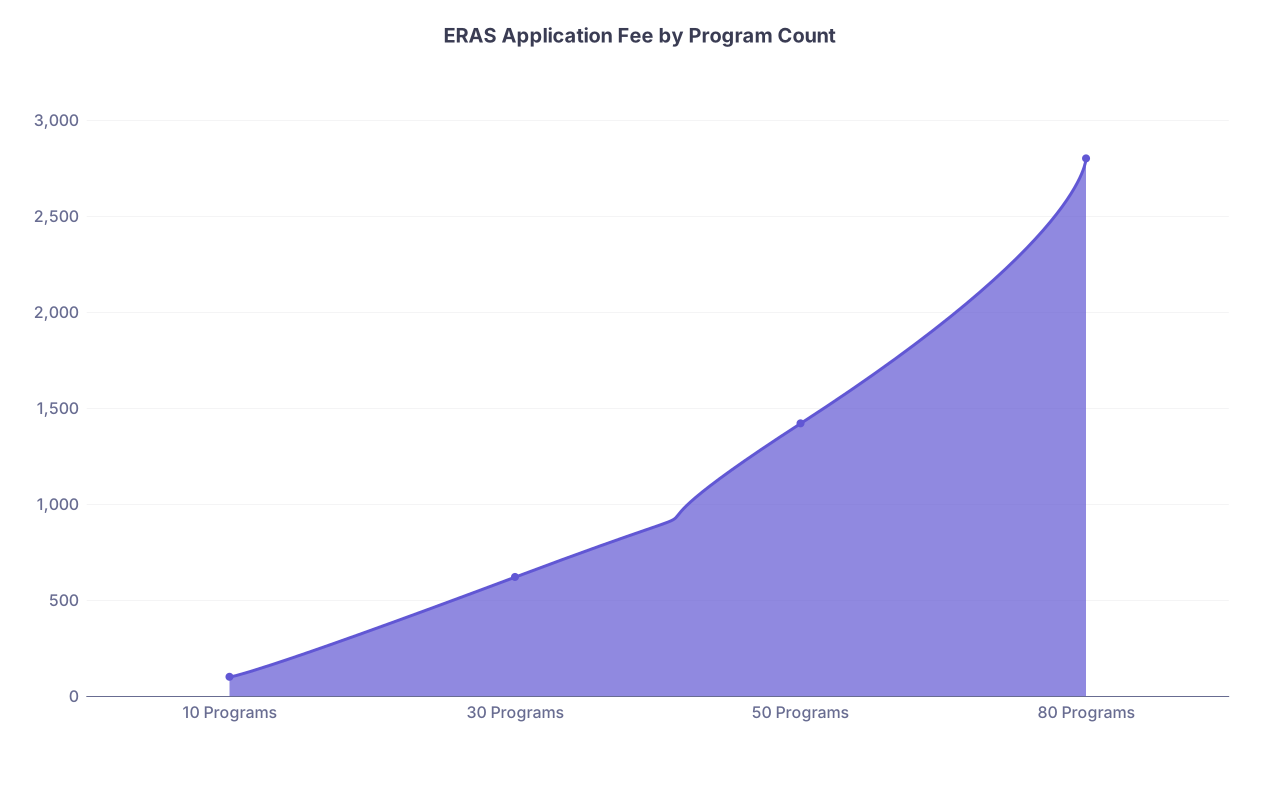
| Category | Value |
|---|---|
| 10 Programs | 99 |
| 30 Programs | 619 |
| 50 Programs | 1419 |
| 80 Programs | 2799 |
(Values are illustrative, not exact. Always check current ERAS fee tables.)
Day -1: Full Review and Pre‑Scheduled Submission
One day before submission, at this point you should behave like a program director trying to find reasons not to interview you.
1. Hard stop on new content
No new activities. No new “mini‑research project” you started last week. No last‑second PS overhaul triggered by a friend’s opinion.
You are in review‑only mode now.
2. Two‑pass full application review
Pass 1 – Content and consistency
Look for:
- Name consistency (use the same name format everywhere)
- Dates that make sense (no overlapping full‑time jobs and full‑time rotations unless clearly explained)
- Role inflation (if it feels exaggerated when you read it, it is)
- Obvious gaps that programs will question
- If a major gap exists (e.g., 1 year off), make sure it is at least briefly addressed somewhere (PS or experiences).
Pass 2 – Formatting and polish
- Capitalization consistent (job titles, committee names)
- Avoid all caps unless part of an official name.
- Remove internal abbreviations and define uncommon ones.
3. Confirm program list and document assignments
One more time, in ERAS:
- Open each specialty’s program list.
- For a few sample programs:
- Check assigned personal statement.
- Check assigned letters.
You do not need to verify all 60–80 individually if you grouped them logically—but verify each group at least once.
4. Sleep and timing
Set an alarm to be awake and functional at your planned submission time.
Do not stay up until 3 a.m. obsessing. The application will not get better; you will just be more likely to make a mechanical mistake in the morning.

Day 0: Submission Day – Execute, Do Not Tinker
On submission day, at this point you should be done making decisions. The only job is to submit cleanly and confirm.
Morning checklist (before clicking submit)
- Stable internet connection
- ERAS logged in and all sections showing complete
- Payment method ready
- Noise minimized (shut door, silence phone for 30–60 minutes)
Final micro‑check (10–15 minutes)
- Confirm your email and phone one last time.
- Glance at a few random experience entries for obvious typos.
- Confirm number of programs per specialty matches your spreadsheet.
Then submit.
Do not sit for an hour staring at the “Submit” button, imagining every possible flaw. This is how people miss early‑submission windows.
After submission (same day)
At this point you should:
- Save/print the confirmation page.
- Take a breath, then:
- Update your own tracking sheet to reflect “submitted” status.
- Notify any close mentors that you submitted and thank them.
And then stop refreshing. Programs are not reviewing your app in the first 15 minutes anyway. Go back to your rotation and be a functioning human.
Key Takeaways
- The week before ERAS submission is not for reinvention; it is for disciplined execution—lock decisions early (Day -7) and focus each subsequent day on a single theme.
- Daily structure matters: PS final on Day -6, experiences by Day -5, letters confirmed by Day -4, program list fixed by Day -3, technical and payment checks on Day -2, and a full review on Day -1.
- On submission day, your only job is clean execution: no new content, no last‑minute overhauls—just a calm, deliberate submission at your planned time.