
It’s three days before ERAS opens. Your application is technically “done” — personal statement written, programs selected, letters assigned. But you and I both know it’s not actually ready to send.
This is the window where people either:
- quietly lock in a clean, tight application
or - rush, miss obvious errors, and then spend the rest of the season wishing they had taken one more careful pass.
You’re here to avoid the second group.
I’ll walk you from T–72 hours all the way to the minute you hit “Certify and Submit,” with concrete tasks, no fluff. Assume your target is submitting within the first 24 hours ERAS opens, which is where you want to be for most competitive and mid-tier programs.
Big Picture: 72-Hour Timeline Map
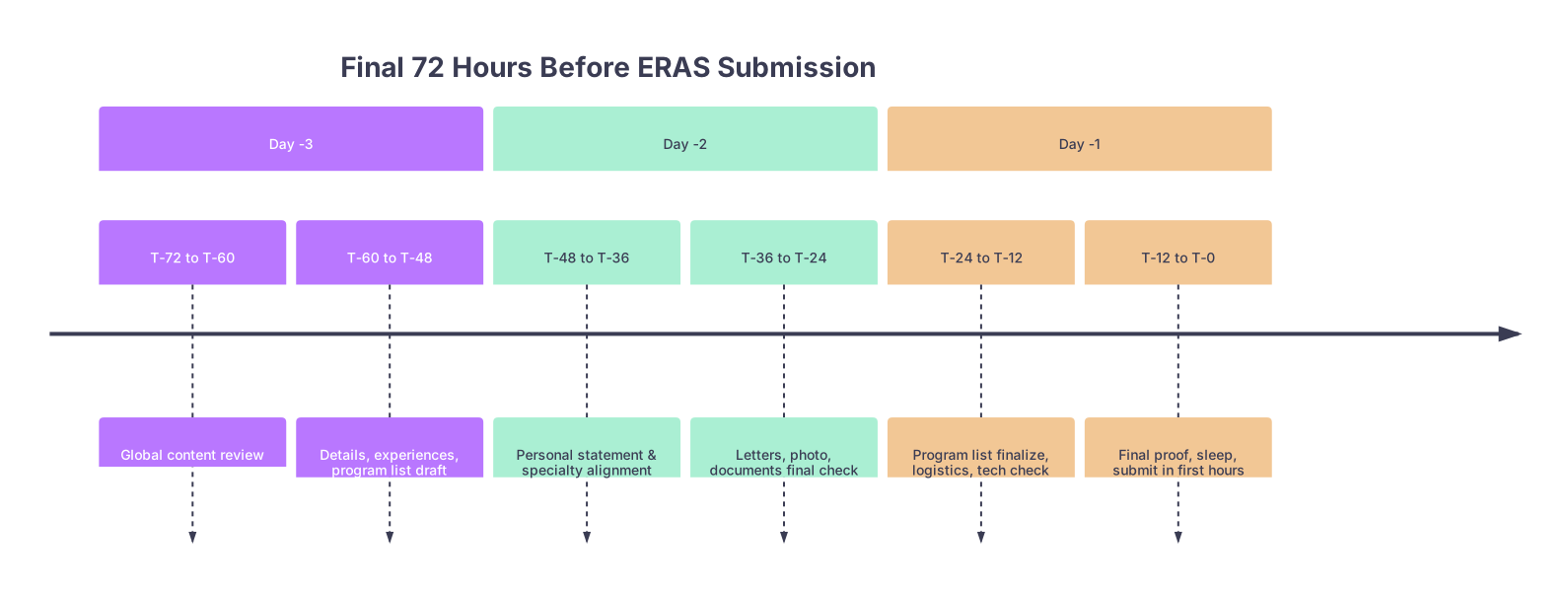
| Period | Event |
|---|---|
| Day -3 - T-72 to T-60 | Global content review |
| Day -3 - T-60 to T-48 | Details, experiences, program list draft |
| Day -2 - T-48 to T-36 | Personal statement & specialty alignment |
| Day -2 - T-36 to T-24 | Letters, photo, documents final check |
| Day -1 - T-24 to T-12 | Program list finalize, logistics, tech check |
| Day -1 - T-12 to T-0 | Final proof, sleep, submit in first hours |
Think of it in three passes:
- Content & consistency (Day –3)
- Narrative & supporting pieces (Day –2)
- Programs, logistics, and final submit (Day –1)
Now let’s go hour-by-hour.
T–72 to T–60 Hours: Global Application Audit
At this point you should stop “tweaking” and start auditing. This is the 10,000‑foot view.
Hour 72–69: Freeze the Version & Print-to-PDF
You’re 3 days out. First move:
- Open ERAS and export / print every section to PDF:
- Personal info
- Education
- Experiences
- Publications
- Licensure/Exams
- Personal statement (from your own doc)
- Save as:
LastName_ERAS_Tminus72.pdf - Do not make changes while you read. You’re just scanning.
Then, read your application as if you’re a PD:
- No editing. Just highlight or note:
- Awkward phrases
- Repetition (same phrase in 3 experiences)
- Tone shifts (overly casual in one description, stiff in another)
- Obvious gaps: missing explanation for a leave, low Step without any context anywhere
If you’re still editing “voice” at this stage, that’s fine. But this is the last major polishing window. After this, changes should be targeted, not “I feel like rewriting that whole thing at 3 a.m.”
Hour 69–66: Experience Section Tightening
Now you refine the experiences. At this point you should:
Check hierarchy of experiences
- Are your most important experiences marked “most meaningful”?
- Do they reflect:
- Direct patient care
- Leadership or initiative
- Longitudinal commitment
Run the 3-line test for each key experience:
- Line 1: What you did (concrete, not vague)
- Line 2: Scale or scope (how much, how often, how big)
- Line 3: Impact or what changed (for patients, team, or you)
Example of bad:
Helped in clinic and learned a lot about patient care and teamwork.
Better:
Led pre-visit chart prep for 15–20 complex patients per clinic day, flagging med discrepancies and overdue screenings, which cut visit delays and improved flow.
If you have generic fluff like “I learned the importance of communication,” fix it now.
Hour 66–60: Internal Consistency & Red Flags
Next, you’re doing an internal cross-check. At this point you should:
- Open:
- ERAS experiences
- CV
- Personal statement
- Any second specialty personal statement
Cross-check for:
- Timeline consistency
- No overlapping “full-time” commitments that are impossible
- No experiences dated before you were in med school that sound like resident-level tasks
- Name consistency
- Same organization names across all experiences and PS
- Same city/state formatting
- Red flag coverage
- If you have:
- Step failure
- Leave of absence
- Remediation
- Ask: Where is this addressed?
- Dean’s letter only?
- Or briefly but clearly in PS or an “education interruption” box?
- If you have:
You don’t need to over-explain, but hiding it is worse. You should be able to point to one specific place where it’s acknowledged in a straightforward, unemotional way.
T–60 to T–48 Hours: Details, Scores, and Program List Draft
Now you zoom in. This is where careless people lose points.
Hour 60–57: Demographics, Exams, and Certification
At this point you should clean the “boring” sections that can still hurt you if wrong.
Go line-by-line through:
Demographics & contact
- Permanent address and current address (especially if you moved for away rotations)
- Phone number and email (the email you actually check)
- Check that voicemail greeting is normal and professional
USMLE/COMLEX info
- Make sure:
- Every score you’ve received is entered correctly
- Dates match official score reports
- If Step 2 CK is pending and you’re planning a score release:
- Confirm your automatic release option is set how you want
- Make sure:
If you mess up a score or leave something blank that should be entered, it looks sloppy at best, deceptive at worst.
Hour 57–54: Photo and Document Check
At this point you should nail down your visual and attachments.
Photo:
- Professional headshot: neutral background, no white coat if guidelines suggest against it for your specialty, no selfies
- Check:
- File actually uploaded to ERAS
- Cropping (no weird cut at chin or forehead)
- Name matches your ERAS name
Documents:
- Personal statements:
- Correct version for each specialty
- Check titles in ERAS so you do not send “IM PS FINAL_2” to a surgery program
- CV copy (for your own use, not uploaded) updated and saved
- Any additional documents specific to your situation:
- Explanatory letter from dean (if arranged)
- Special pathway or visa-related documentation (IMGs in particular)
Hour 54–48: Program List – Rough Draft
Now you work on where this thing is going.
At this point you should have a spreadsheet or document listing:
- Program name
- ACGME code
- City/state
- Category:
- “Reach”
- “Target”
- “Safety/backup”
- Whether Step 2 CK is required at application vs before ranking
Now, pull this into a draft ERAS program list. Do not assign documents yet, just:
- Add all programs you’re realistically considering
- Tag them mentally or in your spreadsheet by priority
Use a simple rule set:
- Competitive specialties (Derm, Ortho, ENT, Plastics, etc.):
- For an average US MD: usually 60–80+ applications
- Middle-competitive (IM, EM, Anes, OB/GYN):
- 30–60 is common depending on geography and board scores
- Primary care / less competitive fields (FM, Psych, Peds):
- 20–40 targeted apps can be enough for solid applicants
People go wrong by either:
- Applying to 20 top programs only
or - Panic-adding 120 programs with zero geographic or academic strategy
T–48 to T–36 Hours: Personal Statement and Alignment
This block is all narrative. At this point you should be aligning what you say with what you show.
Hour 48–44: Core Personal Statement – Hard Edit
Print (or PDF) your personal statement and read it out loud. Slowly.
You’re checking:
First paragraph:
- Not a cliché (no “ever since I was 6,” no “medicine is the perfect blend of art and science”)
- Anchored in a specific moment or pattern, not a grand declaration
Middle:
- Links your experiences on ERAS to themes in the PS
- Uses actual details: “night float on cardiology at County Hospital,” not vague “clinical rotations”
- Shows at least:
- Clinical maturity
- Insight about your specialty
- Some evidence of resilience or growth
Ending:
- Forward-looking and specific:
- Type of program you want (academic vs community, patient population, teaching)
- What you bring (particular skills, attitude, niche interest)
- Forward-looking and specific:
Cut:
- Long patient vignettes that eat half the statement
- Repetitive language used in your experiences section
Fix:
- Typos (yes, even one can irritate someone on the 30th PS of the day)
- Overly flowery language that doesn’t sound like you
Hour 44–40: Secondary/Alternate Statements (Dual Applicants)
If you’re applying to two specialties (say IM + Neuro, or EM + FM), at this point you should:
Confirm you have distinct statements that:
- Clearly articulate why each specialty
- Don’t copy-paste the same story with just the word “neurology” swapped to “internal medicine”
Double-check:
- ERAS labels: “IM Personal Statement,” “PM&R Personal Statement,” etc.
- No internal specialty confusion in the text itself
I see people get burned when they accidentally send a surgery PS to an IM program. It happens every single year.
Hour 40–36: External Review (Optional but Strongly Recommended)
If you’re going to involve anyone else, this is the last realistic moment.
At this point you should:
- Pick 1–2 reviewers, not 5:
- Senior resident in your target specialty
- Advisor who actually reads PSs, not just “looks it over”
- Tell them explicitly:
- “I don’t need rewriting, just:
- Any cringe lines
- Anything unclear
- Any red flags you see”
- “I don’t need rewriting, just:
Send:
- Personal statement(s)
- PDF of your ERAS experiences
Give them a deadline: 24 hours. After that, you’re done changing major content.
T–36 to T–24 Hours: Letters, Assignments, and Supporting Pieces
Now we move to the hidden landmines: letters and assignments.
Hour 36–32: Letters of Recommendation Status Check
At this point you should log into ERAS and check every single letter.
Confirm:
- Correct letter writers are listed
- Each letter’s specialty designation is correct
- Letters that are supposed to be in are actually uploaded (status: “Received,” not just “Requested”)
If something is missing:
- Immediately email the writer’s assistant/office:
- Polite, concise, with your AAMC ID, and the ERAS LoR portal link again
- If it’s a critical letter (e.g., your only specialty-specific letter) and it’s still not there by T–24:
- Have a backup plan (another attending’s letter you can activate)
- You can still submit apps and assign that letter to later programs once it arrives, but early invites usually go to complete files
Hour 32–28: Letter Assignments by Program Type
Now you map letters to program categories.
At this point you should:
- Group programs by:
- Academic vs community
- Geographic region
- “Dream / Reach” vs “Realistic / Safety”
Then assign letters:
- For academic programs:
- Prefer research-heavy or big-name faculty letters
- For community programs:
- Strong clinical and “good team player” letters often carry more weight
Use a simple table in your notes:
| Program Type | Priority Letters |
|---|---|
| Top Academic IM | PD letter, Research PI, Sub-I Attg |
| Mid-tier Academic | PD letter, Sub-I Attg, Core IM Attg |
| Community IM | Sub-I Attg, Core IM Attg, PD letter |
| Backup Specialty | 2 specialty-specific, 1 PD/Core |
Then, in ERAS, assign letters to each program carefully. Double check each program’s combination.
Hour 28–24: Final Document & Photo Assignment
At this point you should:
Assign the correct personal statement to:
- Each program in specialty A
- Each program in specialty B (if dual applying)
Confirm:
- Every program has a PS assigned
- Correct photo is set and visible in the system
This is tedious. Do it anyway. This is where people mis-assign and only notice in December.
T–24 to T–12 Hours: Program List Finalization & Technical Prep
This is your last day before opening bell. Now you move from “content” to deployment.
Hour 24–20: Program List – Final Pass
At this point you should review your program list with a cold eye.
Ask yourself:
- Do I have a balanced spread of:
- Reach
- Target
- Safety
- Any geographic restrictions I’m ignoring?
- Partner/job/family commitments that realistically limit where you’d go
- Any programs on the list that you:
- Know nothing about
- Would be miserable at
- Added purely out of panic
Delete the truly unrealistic + truly undesirable. Submitting to programs you’d never attend is a waste of money and psychic energy.
If possible, run the list briefly by:
- A mentor in the specialty
- A recent graduate who matched in a similar situation
Hour 20–16: Cost Check and Funding
Now you do finance reality.
At this point you should:
- Use the ERAS fee calculator (or manually) to estimate total:
- Number of programs
- Cost per tier (first 10, 11–20, etc.)
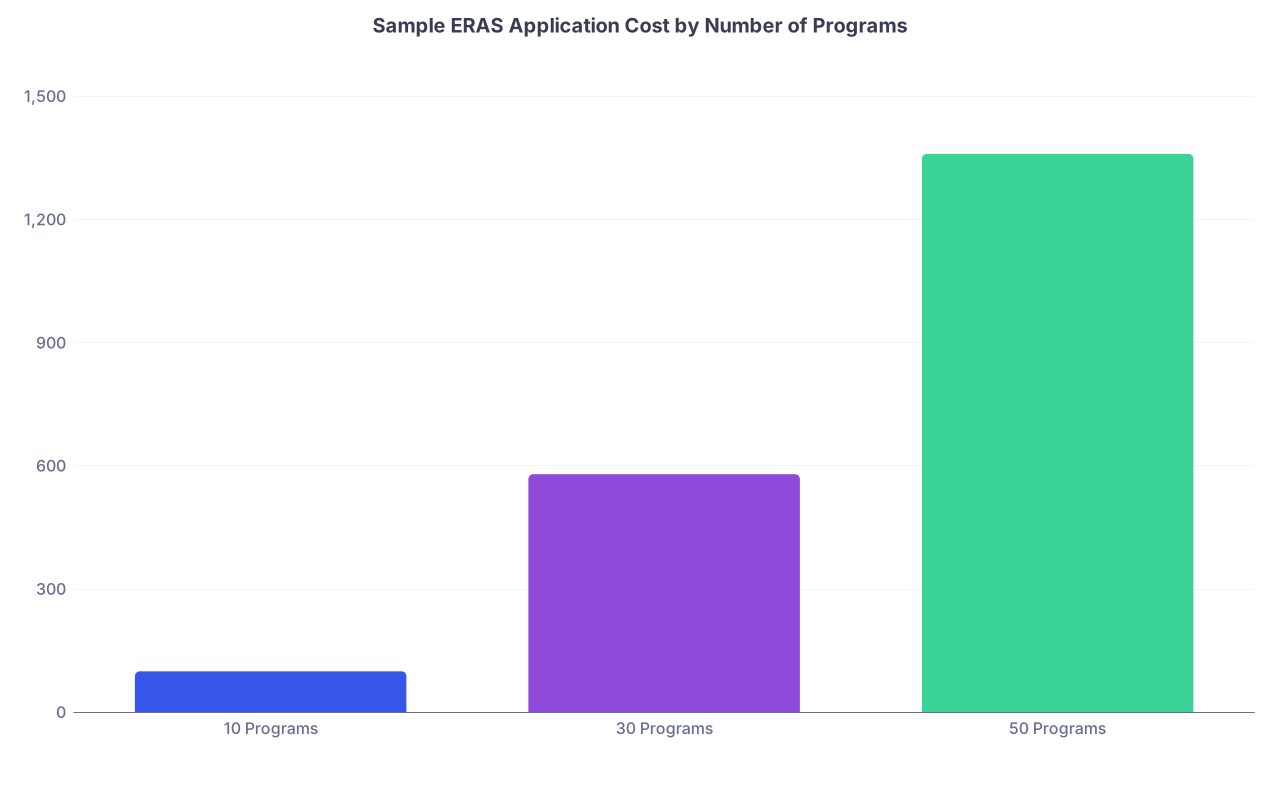
| Category | Value |
|---|---|
| 10 Programs | 99 |
| 30 Programs | 579 |
| 50 Programs | 1359 |
- Confirm:
- Credit card limit is sufficient
- Billing address matches your bank records
- You have a backup payment method if your first card fails
Nothing like getting an error at 6:05 a.m. on opening day and spending 45 minutes arguing with your bank fraud department.
Hour 16–12: Tech, Access, and Environment
At this point you should lock down the logistics.
- Check:
- ERAS login works
- AAMC account isn’t locked
- Prep your submission environment:
- Primary device (laptop/desktop) with stable internet
- Backup device (tablet or second laptop)
- Know where your phone hotspot is if Wi‑Fi dies
Decide when you’re submitting:
- Ideal: Within the first 2–4 hours of applications opening in your time zone
- But not at the exact minute if you know you panic-click under pressure
Plan:
- 1–2 hour window for final live review and submission
- No clinical duties or hard commitments overlapping that time if you can avoid it
T–12 to T–0 Hours: Final Proof, Sleep, and Submit
Now we’re in the last 12 hours. This is where people either rush and make mistakes or calm down and execute.
Hour 12–8: Final Global Read-Through
At this point you should do one last full read of your short ERAS PDF:
- Check:
- Name, contact info
- Education entries
- Experiences (no obvious typos)
- Publications (spelling of journal names, your position in authorship)
- Personal statement (final text as uploaded, not just your Word file)
You’re not rewriting. You’re hunting:
- Typos
- Missing words
- “MD candidate, expected gradution 2025” type mistakes
If you find a small number of clean fixes, go in and correct them now. Then regenerate your PDF so you know this is the true final.
Hour 8–5: Step Away and Sleep
Yes, seriously.
At this point you should:
- Close ERAS
- Back up your final documents to:
- Cloud folder
- Local drive
- Get:
- 6–7 hours of real sleep if you can
The quality of your decision-making plummets when you’ve been staring at the same words for 10 hours. Better to submit a clean, slightly imperfect app than a “perfect” one you butcher at 4 a.m.
Hour 5–2: Pre-Submit Routine
You wake up on submission morning.
At this point you should:
- Eat something light, hydrate
- Log in to ERAS and:
- Confirm the system is up and responsive
- Double-check:
- Program count
- Letters assigned
- Personal statements assigned
- Open your final ERAS PDF next to the live application and spot-verify:
- A few random experiences
- One or two publications
- Exam scores and dates
Don’t re-edit your narrative now unless it’s catastrophic. You’re playing not to introduce new errors.
Hour 2–0: The Actual Submission
Now it’s time.
At this point you should:
- Go to the Certify and Submit section.
- Slowly walk through:
- Certification statements
- Fee summary
- Confirm:
- Total program count matches your expectation
- Payment method is correct
Then:
- Take a deep breath.
- Hit Submit.
Watch for:
- Confirmation page
- Email receipt from ERAS
- Screenshot or PDF the confirmation for your records
You’re done. Stop refreshing. Stop second-guessing.
After Submission: The First Few Hours
Technically beyond the “72 hours before,” but you’ll do this immediately after.
- Save:
- Final ERAS confirmation
- Final list of programs
- Start a simple tracker:
- Program
- Date submitted
- Date of any communication
- Interview offer / rejection
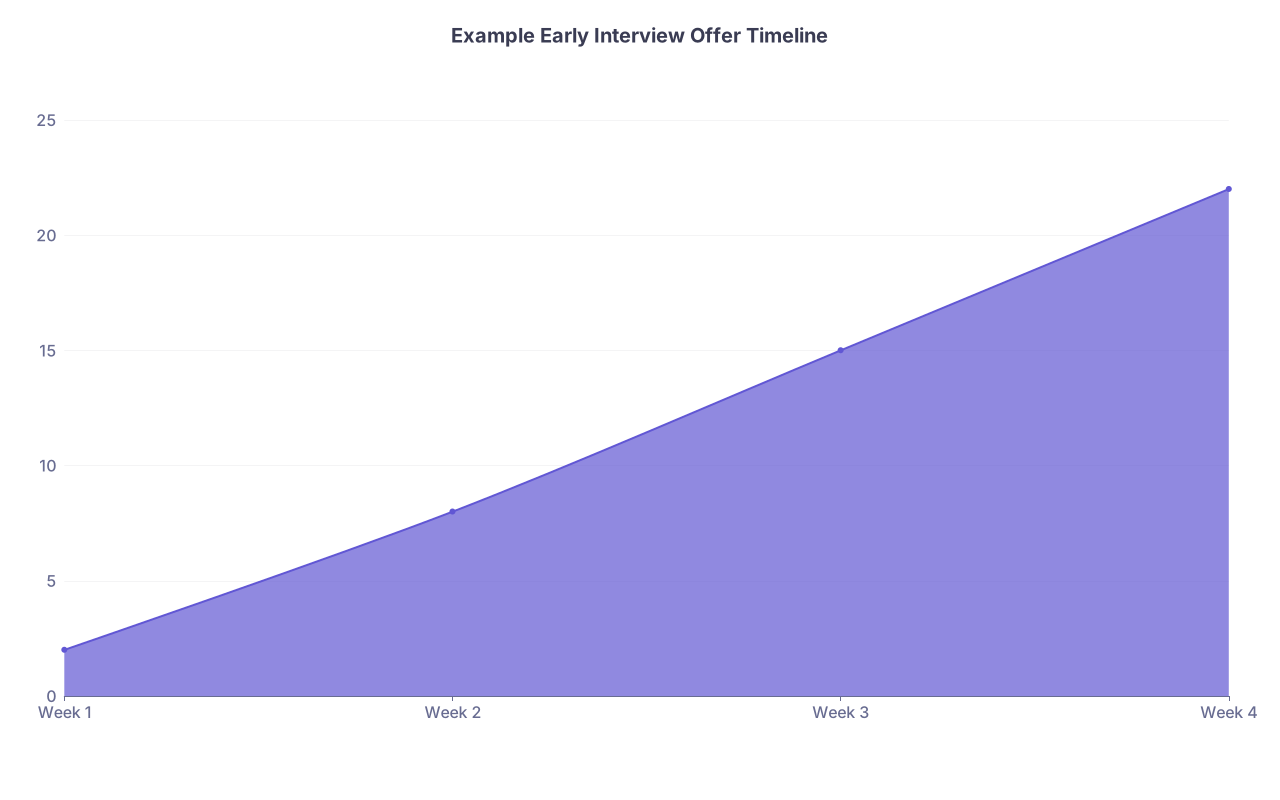
| Category | Value |
|---|---|
| Week 1 | 2 |
| Week 2 | 8 |
| Week 3 | 15 |
| Week 4 | 22 |
Do not start emailing programs “just to express interest” 30 minutes after submitting. That comes later, if at all, and should be targeted.
Core Takeaways from the Last 72 Hours
- Treat the last 72 hours as an audit phase, not a rewrite phase: tighten experiences, check consistency, and stop massive edits by about T–24.
- Letters, assignments, and program list management are where people quietly wreck their applications; check every mapping twice.
- Submit early in the first 24 hours with a rested brain, stable tech, and a locked‑in plan—panic edits at 3 a.m. cause more harm than one or two minor imperfections ever will.