

The worst remote patient monitoring (RPM) startups are built around dashboards. The best ones are built around workflows.
You are post-residency, staring at the job market, and thinking: “I can do better than these bloated RPM vendors.” You might be right. But if you do not get the clinical workflow design right from day one, you will become just another abandoned tab in a browser full of ‘solutions’.
Let me break this down specifically.
1. Start With the Unromantic Truth: RPM Is a Billing and Workflow Product
If your RPM startup does not fit cleanly into how clinicians document, bill, and communicate, it dies. Clinical value and shiny technology are necessary but not sufficient.
In the US, RPM today is anchored around a few CPT codes (e.g., 99453, 99454, 99457, 99458 – I am assuming you know the basics). That means your startup is not just:
- “Monitoring patients remotely”
- “Using AI to detect deterioration”
- “Empowering patients with data”
You are actually offering three concrete things to a clinic:
- A repeatable way to enroll appropriate patients.
- A reliable way to generate reimbursable minutes and documented clinical actions.
- A way to do this without blowing up staffing and burnout.
Think like a practice manager, not a product manager.
| Stakeholder | Primary Concern |
|---|---|
| Physician | Liability, time, outcomes |
| Practice Manager | Staffing, revenue, churn |
| Nurse/MA | Workload, clarity, tools |
| Patient | Effort, trust, usefulness |
| Payer | Overuse vs measurable ROI |
If your workflow blueprint does not answer each of these stakeholders’ needs in operational terms, you are building a toy.
2. Define the “Ideal” Clinical Day With Your RPM Product
Forget features for a moment. Describe a single day in a clinic that uses your RPM product.
Pick something like:
- 2–3 physicians
- 3–5 nurses / MAs
- 200–300 active RPM patients
Now map out where your product touches their day. Not theory. Actual time blocks.
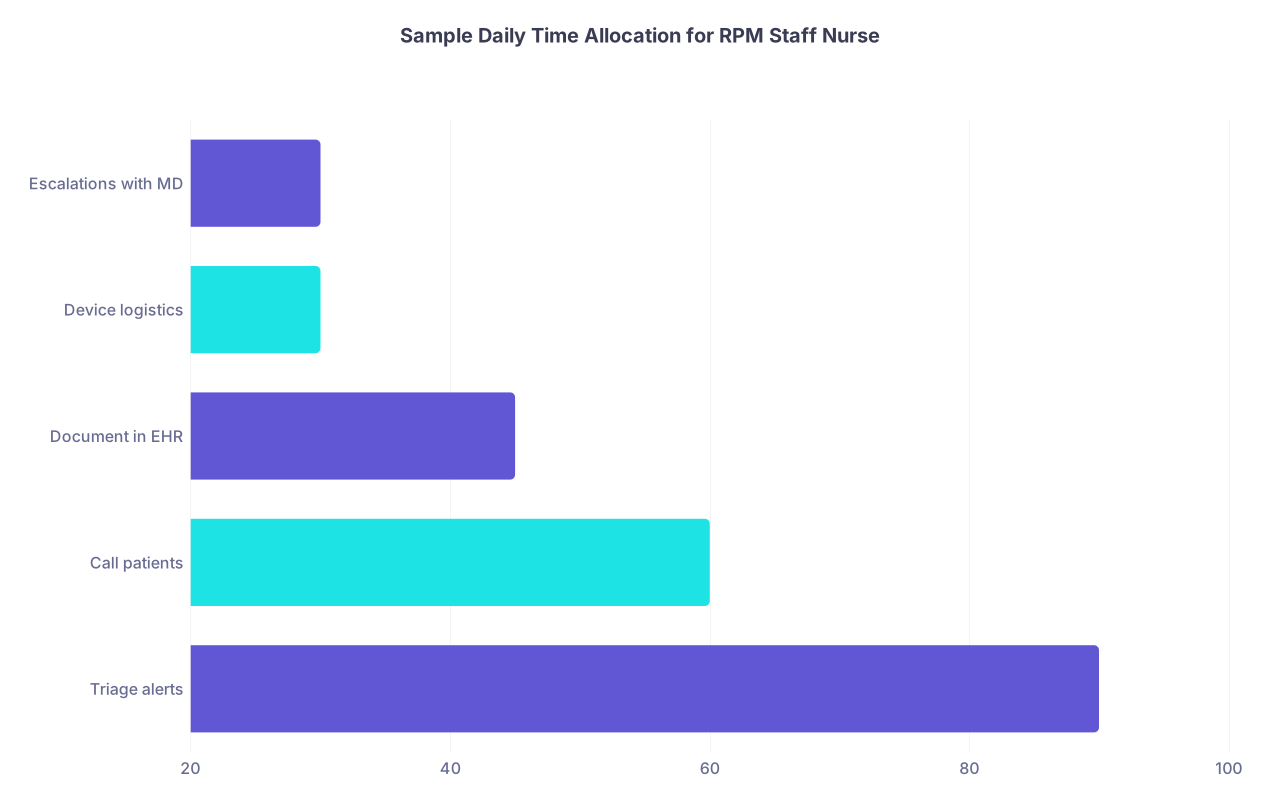
| Category | Value |
|---|---|
| Triage alerts | 90 |
| Call patients | 60 |
| Document in EHR | 45 |
| Device logistics | 30 |
| Escalations with MD | 30 |
If you cannot write a plausible schedule like that, you do not yet have a workflow product. You have a series of features.
The RPM Day: A Concrete Walkthrough
Let me sketch a realistic scenario. Imagine a mid-sized cardiology group using your platform for heart failure and HTN patients.
7:45–8:00
Nurse logs into your RPM console (or EHR-embedded view) before clinic opens. Overnight, 50 patients transmitted data. Your system surfaces:
- 6 high-priority alerts (e.g., weight gain > 2 kg in 48h, SBP > 180)
- 15 medium-priority alerts (gradual trend changes, adherence issues)
- The rest are normal
The nurse does not see a chronological list of alerts (which is useless). She sees:
- A prioritized queue
- Grouped by risk and type
- With de-duplicated events for each patient
8:00–9:30
She handles all 6 high-priority alerts:
- Opens each alert → sees vitals trend, last notes, meds
- Follows “RPM protocol” pathway for that condition (you provide the template)
- Documents outreach attempts:
- Spoke to patient
- Left voicemail
- Sent secure message
- If needed, escalates to MD via:
- In-basket/EHR message with structured summary
- Or same-day telehealth slot reserved for RPM
9:30–10:30
She works through medium-priority alerts:
- Edema worsening but BP stable → counseling call + med adherence check
- Several “no data for 3 days” → troubleshoot device, check engagement
She is not guessing what to do. Your product has prebuilt “playbooks”:
- Nurse step 1–3
- When to escalate
- Documented time counter for 99457/99458
11:30–12:00
She reviews “no-touch” time already captured:
- Your system tracks review-only time (chart review, trend interpretation)
- She confirms / edits auto-captured minutes
- One-click export or direct posting to EHR for coding
End of day:
She has a clear view of:
- Which patients meet 20 or 40 minutes RPM thresholds
- Who is at risk clinically
- What still needs escalation
If your system cannot support that exact story with minimal friction, you will not survive beyond pilot.
3. The Patient Journey: Every Hand-off Must Be Explicit
Startups love to talk about patient engagement. Clinics care about this question: “Who does what, when, and with whose time?”
Break the patient journey into hard steps. This is where most RPM startups fail in practice.

| Step | Description |
|---|---|
| Step 1 | Identify candidate |
| Step 2 | Obtain consent |
| Step 3 | Order RPM in EHR |
| Step 4 | Device shipped or given |
| Step 5 | Onboarding call |
| Step 6 | Daily data capture |
| Step 7 | Routine review and education |
| Step 8 | Nurse triage |
| Step 9 | Close with nurse plan |
| Step 10 | MD review or telehealth |
| Step 11 | Care plan updated |
| Step 12 | Bill RPM codes |
| Step 13 | Alert triggered |
| Step 14 | Need MD input |
Now we fill this with operations, not fluff.
Step 1: Identifying Candidates
Two options:
Embedded in clinic workflow (best):
- At discharge from hospital → flagged for RPM
- At chronic care visits → EMR prompt: “Meets criteria for RPM?”
- Rules engine: EF < 40%, recent HF admission, etc.
Retrospective lists (tolerable initially, bad long term):
- Your startup pulls daily lists from the EHR:
- Dx codes (I50.x, I10)
- Risk scores
- You feed call lists to RPM staff
- Your startup pulls daily lists from the EHR:
You want to minimize manual hunting. The cleanest approach is EHR-integrated prompts at visit closing or discharge. But in early-stage, pulling flat files and working with lists is more realistic. Just admit that and design around it.
Step 2: Consent and Enrollment
Do not underestimate how messy this is.
You need:
- Clear eligibility rules per payer
- Consent language that passes compliance review
- Documentation that actually lands in the EHR
Your workflow blueprint should specify:
- Who gets consent? MD during visit, or MA during checkout, or remote staff?
- Where is it recorded? EHR RPM consent form, scanned pdf, or custom integration?
- How is it triggered? Alert in EHR, your app’s enrollment button that pushes back, etc.
I have seen programs stall completely here. Especially when you ask already overloaded clinicians to remember “one more thing” to do for RPM enrollment.
Step 3: Device Selection and Logistics
You can be fancy later. At the start, keep devices boring and reliable.
Options:
- Cellular vs Bluetooth:
- Cellular: less tech friction, higher cost, more scalable for older patients.
- Bluetooth: cheaper hardware, more setup headaches, app installs, pairing issues.
Design this like you are the overworked MA:
- How does the order get placed? EHR order? Your portal? Fax (yes, still real)?
- Who hands out or ships the device?
- Who teaches the patient?
Your blueprint should decide:
- In-clinic onboarding vs remote onboarding
- Single-vendor vs device-agnostic (device-agnostic sounds nice, often a trap early)
- Replacement process for lost/damaged devices
If your value proposition depends on patients mastering a multi-step pairing workflow and an app store download, expect higher drop-off. It might be acceptable for younger, tech-savvy populations; it is a disaster for multimorbid elderly.
Step 4: Onboarding to Monitoring
The first 7 days determine if your RPM program will generate real data or a graveyard of “no readings”.
Your workflow must specify:
- Day 0: Device given/shipped, written instructions
- Day 1–2: Onboarding call or telehealth session:
- Confirm device use
- Check first readings show up
- Set expectations: how often to measure, what happens when there is an alert
- Day 3–7: Automated nudges plus human check if no data
Do not leave this to “we will send a reminder SMS”. You need a structured engagement protocol.
4. The Heart of Your Product: The Triage and Action Loop
This is where clinical workflow either works… or collapses under alert fatigue.
There are four non-negotiable elements:
- Signal selection (what triggers an alert)
- Triage flow (who sees it first)
- Action pathway (what they actually do)
- Documentation and time capture (how it gets paid and logged)
4.1 Alert Design: Over-Alert and You Are Dead
You must be ruthless about what constitutes an actionable alert.
Naïve approach:
- Red when out of generic range
- Yellow when borderline
- Green when normal
Clinics drown. Everyone hates you.
Smarter approach:
- Condition-specific rules
- Trend-aware thresholds
- Per-patient personalization over time
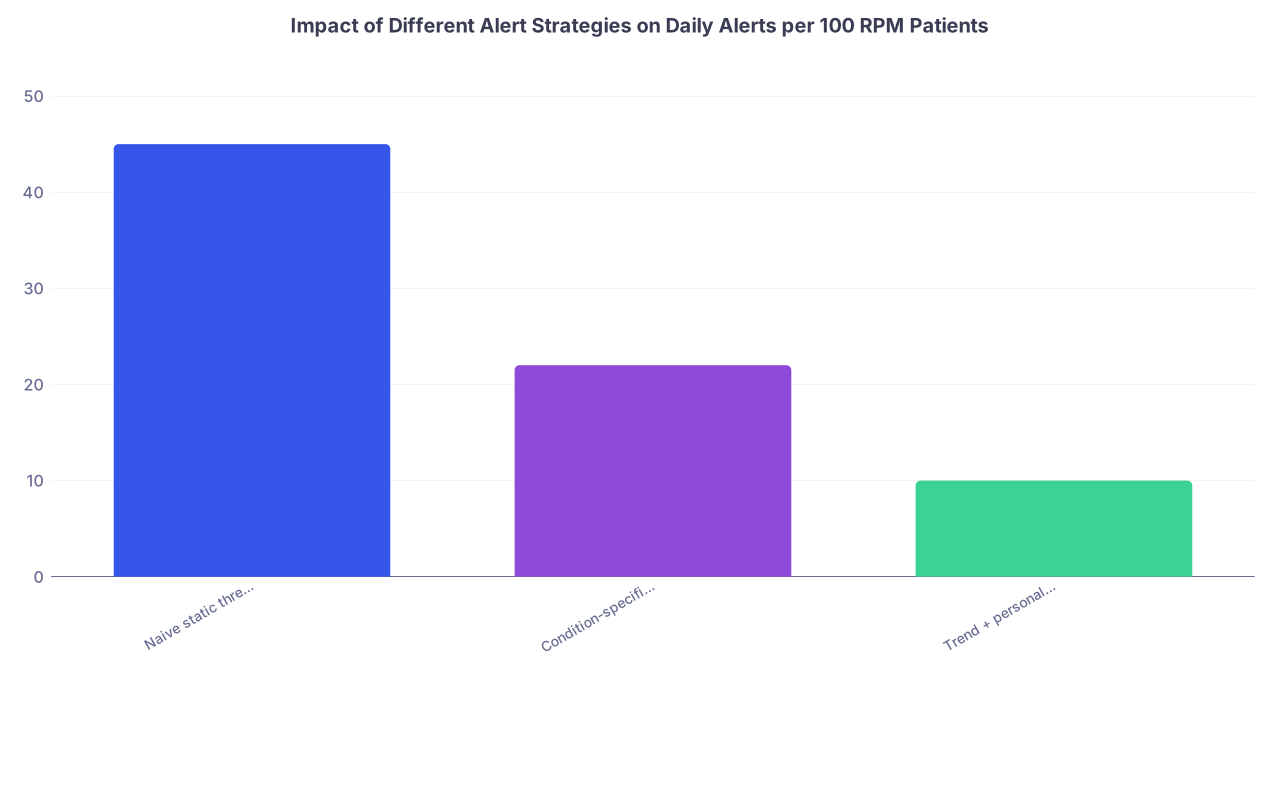
| Category | Value |
|---|---|
| Naive static thresholds | 45 |
| Condition-specific rules | 22 |
| Trend + personalized thresholds | 10 |
Your blueprint should define, for each condition you support:
- Exact vital signs used (e.g., BP, HR, weight, SpO2)
- Hard-stop alerts (e.g., SBP > 200, HR < 40)
- Soft alerts (e.g., SBP up 20% from patient baseline for 3 days)
- Non-vital alerts (no data for 3 days, device not connected)
Write them out like order sets, not vague “we use ML”.
4.2 Triage Ownership: Who Lives Inside Your Product?
There are three main models. Pick one deliberately.
In-house clinic staff (using your tool as co-pilot):
- Nurses / MAs review alerts during part of their day
- Your startup provides software, protocols, and support
Centralized RPM staff (employed by the health system):
- Dedicated remote nurse pool manages multiple clinics
- Your product is their core console
Vendor-provided clinical staff (your company runs the nurse layer):
- You staff nurses / APPs under collaborative agreements
- Clinic “outsources” the daily triage to you, MD sees escalations
Each has serious regulatory, financial, and workflow implications. Do not try to be everything.
Your workflow blueprint must specify:
- Where the triage nurse “sits” organizationally
- What their daily schedule is
- How they interact with the EHR and with physicians
4.3 Action Pathways: From Alert to Clinical Decision
For each alert category, define the exact steps. For example, heart failure weight gain:
Alert:
2.5 kg increase in 3 days OR 1.5 kg in 24 hours, with baseline > 70 kg
Nurse pathway:
- Review last 7 days vitals in your dashboard
- Open protocol: HF weight gain
- Call patient:
- Assess symptoms: SOB, orthopnea, edema, chest pain
- Review diet (salt), fluid intake, med adherence
- If mild and no red flags:
- Provide self-management advice per protocol
- Document in RPM encounter note
- If moderate or borderline:
- Message MD with suggested plan (e.g., increase diuretic x days)
- If severe / concerning:
- Escalate same-day: MD call, urgent telehealth, or ED depending
Your software:
- Guides the nurse through this in structured form
- Auto-populates a note
- Captures time spent
- Sends a concise summary into the EHR
If you dump free-text boxes and expect nurses to “figure it out”, you will get wildly variable care, coder nightmares, and physician mistrust.
5. Documentation, Billing, and Compliance: The Unsexy Core
You are post-residency. You know how much documentation pain shapes behavior. Use that.
Your RPM startup must treat documentation and billing as first-class features, not add-ons.
5.1 Time Capture and Audit Trail
For 99457/99458 you need:
- At least 20 minutes (and more for add-ons) of:
- Interactive communication
- Data review
- Care management related to RPM
Your workflow blueprint must decide:
- Do you auto-start timers when a patient chart is opened?
- Do you track phone calls made through your platform?
- Can staff adjust/attest minutes at the end of day/week?
- How do you prevent double-counting?
Good implementations:
- Auto-capture: “Nurse in patient chart for 4 minutes reviewing trend”
- Auto-capture: “Phone call through platform lasted 6 min”
- Manual add: “Additional 5 minutes spent documenting in EHR”
- At end of period: consolidated per-patient time with clear log
You must be able to show, if audited:
- Date, time, and nature of each interaction
- Who did it
- That it was clinically related to RPM
5.2 How the Note Actually Lands in the EHR
If your RPM platform generates notes that nobody ever sees in the actual chart, physicians will revolt.
You need a clear answer:
- Are you:
- Writing directly into the EHR via FHIR / APIs?
- Generating a document that is sent as a CCD / PDF?
- Using an in-basket message with attached text?
And:
- Who signs?
- Does the nurse sign their own RPM note?
- Does the MD co-sign? Only when escalation happens?
Your workflow design must keep EHR clutter under control. Ten unstructured notes a week per patient is a deal-breaker.
6. Integration Strategy: Don’t Overbuild Too Early
Founders get seduced by full EHR integration dreams. Yes, proper integration is powerful. No, you probably should not start there.
I will be blunt: early RPM startups often need an “integration humility” phase.
Stage 1: Light Integration / Parallel Workflow
You run:
- Separate RPM dashboard
- Secure web portal for staff
- Simple data sharing:
- Patient demographics imported via secure file or basic FHIR
- RPM summary notes sent back via in-basket / fax / upload
Clinics tolerate this if:
- You minimize duplicate data entry
- You create clean, concise summary notes
- Your support team handles most of the grunt work
Stage 2: Embedded Workflows
As you mature:
- RPM tab inside EHR (SMART on FHIR app, for example)
- Single sign-on
- Data flows:
- Device data visible as flowsheets
- RPM alerts visible as tasks/messages
- Billing support integrated with charge capture
But do not pretend you are there at MVP.
Your clinical workflow blueprint should be written assuming Stage 1, with a clear path to Stage 2. If you design only for “perfect” EHR integration that you cannot actually ship for a year, you will end up with a vaporware workflow.
7. Operational Roles: Who Does What, Exactly
Write out the job descriptions that your product requires to function in the real world. This is the missing chapter in most startup decks.
| Role | Primary Responsibilities |
|---|---|
| RPM Nurse | Triage alerts, outreach, notes |
| RPM MA/Tech | Device logistics, basic calls |
| Physician | Escalations, orders, oversight |
| RPM Coordinator | Enrollment, scheduling, reports |
| Biller/Coder | Claims creation, denials follow |
Now design your product so that each role has:
- A clear inbox/queue
- A finite set of workflows
- Metrics
RPM Nurse
Your product must support them to:
- Start day with sorted, deduplicated alert queue
- View patient vitals + recent notes + meds in one screen
- Follow clinical protocols with minimal clicks
- Document contacts with patients
- Message MDs quickly with templated summaries
RPM MA / Tech
Your product must:
- Track device inventory per patient
- Flag “no readings” for > X days
- Provide scripts for troubleshooting
- Generate re-shipping / replacement tasks
Physician
You must:
- Reduce their involvement in low-acuity noise
- Increase their confidence that high-risk issues will reliably reach them
So your blueprint must specify:
- How often and where MDs see RPM escalations
- Format: short, structured messages with clear recommendation
- How much time MDs are expected to spend per week per 100 RPM patients
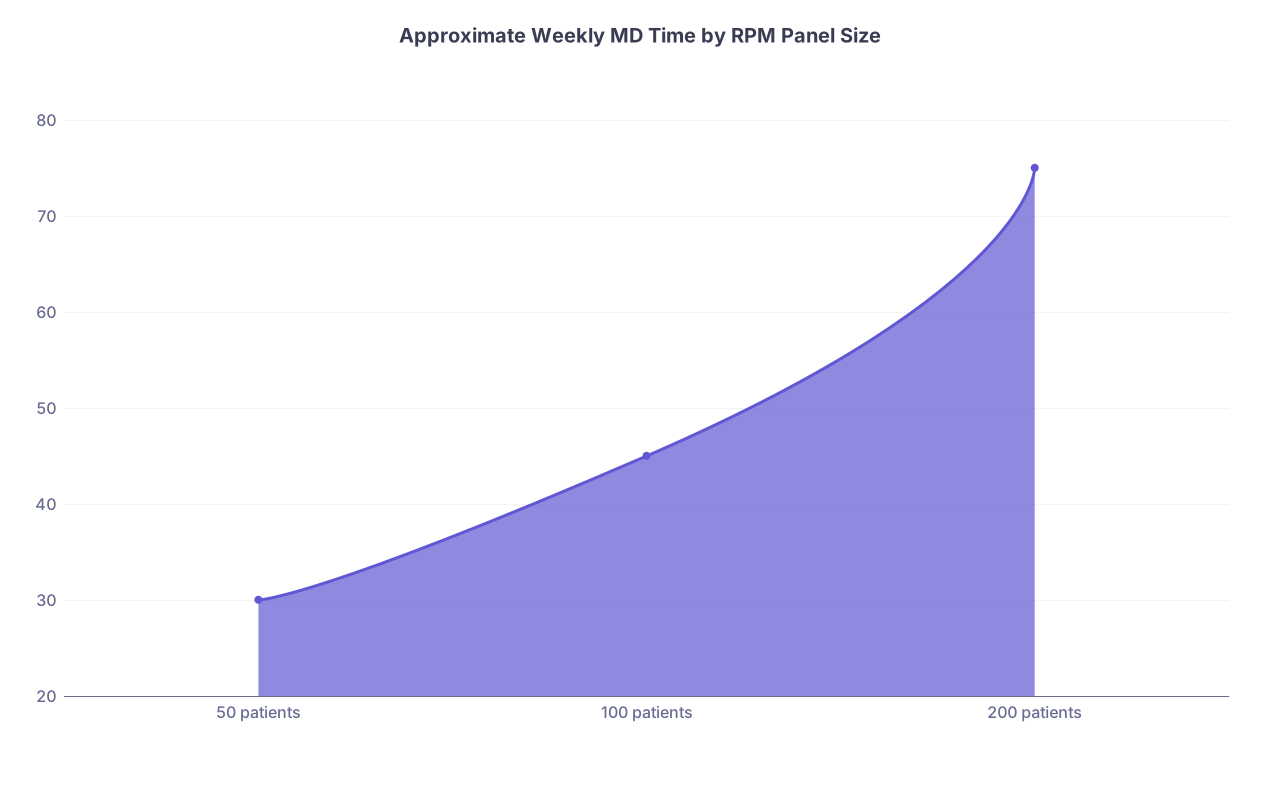
| Category | Value |
|---|---|
| 50 patients | 30 |
| 100 patients | 45 |
| 200 patients | 75 |
If your model quietly assumes physicians can absorb unlimited RPM work “because reimbursements will cover it”, you have not been in clinic lately.
8. Choosing Your Initial Clinical Use Case: Do Not Start Broad
Here is the honest truth: “We monitor everything” is a red flag.
Your first 6–12 months should focus on one or two tightly defined clinical domains. For each one, your workflow blueprint should be nearly textbook-level detailed.
Good starting candidates:
- Heart failure readmission reduction (cardiology or HF clinic)
- Hypertension control program (primary care groups)
- Post-op surgical monitoring (orthopedics, general surgery)
- COPD/asthma exacerbation prevention (pulmonology)
Pick based on:
- CPT + payer environment (are they actually reimbursing?)
- Clear clinical triggers and protocols
- A champion physician who actually cares
Then build a complete workflow for that disease, not a generic RPM shell.
9. Metrics That Actually Matter to Clinics (Not Just Investors)
Your clinical workflow blueprint is incomplete until you define how you will prove:
- That staff workload is manageable
- That revenue is real and predictable
- That outcomes trend in the right direction
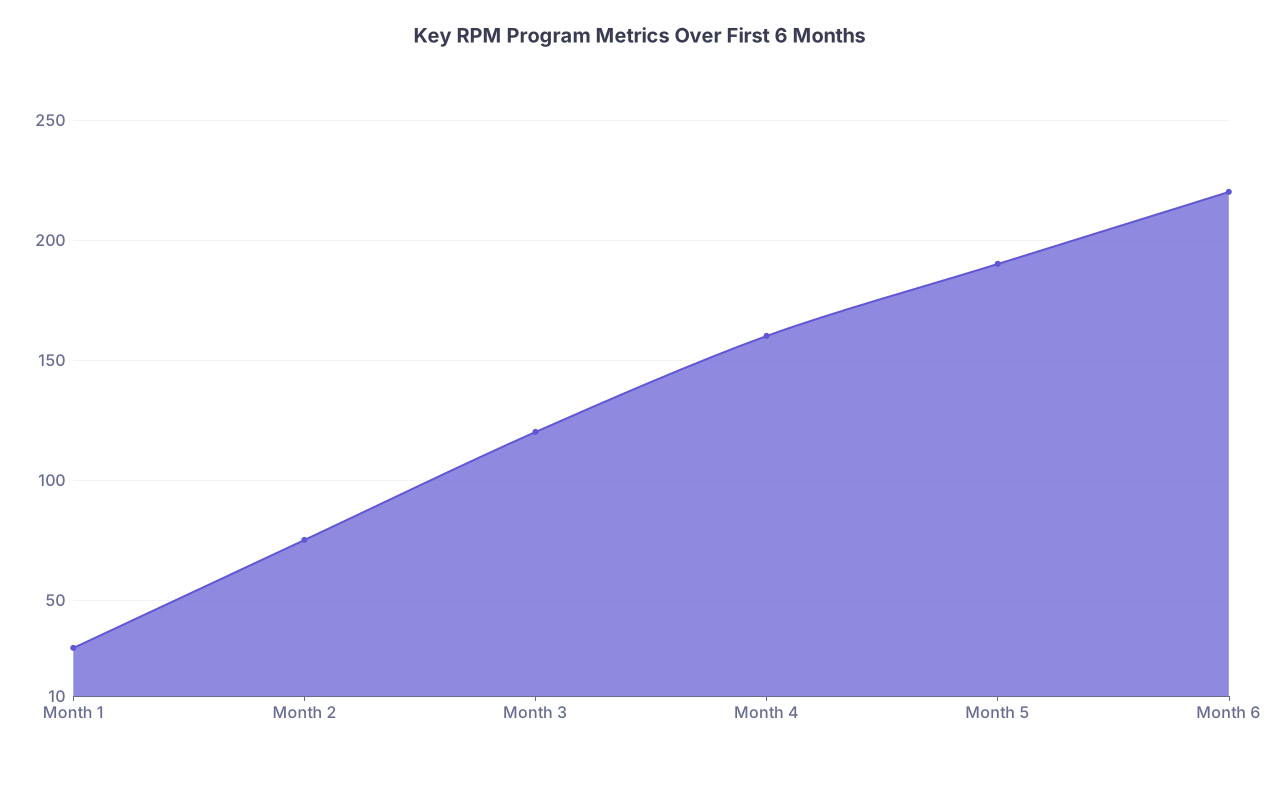
| Category | Value |
|---|---|
| Month 1 | 30 |
| Month 2 | 75 |
| Month 3 | 120 |
| Month 4 | 160 |
| Month 5 | 190 |
| Month 6 | 220 |
(Example: “Number of patients reaching 20+ minutes billed per month”)
Your product should surface metrics like:
Clinical:
- % of alerts resolved within target time (e.g., 24h)
- ED visits / admissions per 100 RPM patients vs baseline
- BP control rates, weight stability, etc.
Operational:
- Alerts per nurse per hour
- Average time from alert to resolution
- Enrollment → first reading → 30-day retention
Financial:
- Billed vs paid claims for RPM codes
- Average RPM revenue per enrolled patient per month
- Denial rate and reasons
This is not “for a dashboard demo”. Clinics will judge if your RPM startup should continue based largely on these numbers.
10. Implementation Blueprint: From First Pilot to Something Real
Let me outline the sequence I would actually use if I were building this company and signing my first clinic.
Phase 0: Pre-Commitment Mapping (2–4 weeks)
- Sit with:
- A real nurse who will be using your product
- The practice manager
- At least one physician champion
- Whiteboard:
- Which patients
- How many staff
- Daily schedule impact
- Device flow
- EHR integration level
Turn this into a 1–2 page operational spec, not a 40-slide pitch.
Phase 1: Narrow Pilot (3 months, <100 patients)
Single condition focus
Single site or tightly coupled small group
Work very closely with front-line users:
- Shadow the nurse using your product
- Time the tasks
- Watch what they ignore
Be ruthless about cutting or changing workflows that do not stick. If the nurse keeps using sticky notes next to your product, that is your product’s fault.
Phase 2: Scale Up (next 6–12 months)
- Add a second condition only after the first is stable
- Template and standardize:
- Protocols
- Training materials
- Documentation patterns
Then, and only then, consider:
- Deeper EHR integration
- Multi-site deployment
- Adding fancier analytics/AI layers

11. Common Mistakes I See RPM Startups Make
I have watched several teams repeat the same errors until they run out of patience or funding.
Let me call out a few:
Building for the physician instead of for the nurse.
Most day-to-day work in RPM is nursing or MA-level. If your main user is the MD, your design priorities are wrong.Underestimating device logistics.
Lost, dead, or unused devices kill programs. You must track ownership, usage, and replacement like a logistics company.Ignoring payer variability.
RPM policies are not uniform. You need configurable workflows:- Who is eligible
- What counts as time
- How often you need documented contact
No clear owner of the program.
Inside the clinic, someone needs to “own” RPM success. If you do not help define and empower that role, the program drifts and dies.Treating RPM as an “extra” rather than embedded care.
Your workflows should replace some existing follow-up patterns (e.g., telephone checks, nurse calls), not just pile on more tasks.

12. Translating Your Clinical Experience Into Startup Design
You are post-residency, which is an advantage, not a handicap. You have seen the chaos. Use that.
Here is how:
- Replay a real case in your head:
- The COPD patient who kept bouncing back to the ED
- The HF patient whose weight was creeping up for a week before decompensation
- Ask:
- If this patient had been on my RPM program, exactly what would have happened differently?
- On which day would an alert have fired?
- Who would have seen it?
- What script would they have used?
- What orders would I actually have given?
Then design your workflow around that specific story. Do this for 10 such cases and you will have a better product spec than any consulting firm can produce.

With a grounded, explicit clinical workflow blueprint, your RPM startup stops being “a dashboard with sensors” and becomes a real extension of care delivery. You are no longer selling features; you are offering a predictable way for clinicians to keep high-risk patients safer while actually getting paid for the work.
Once you lock this down for one tightly defined use case, then you earn the right to expand—more conditions, deeper integrations, smarter predictive models. That is where the fun, complex stuff starts to pay off. But that scaling story is a separate conversation. First, you need a workflow that a tired nurse will still open at 4:30 p.m. on a Friday and actually use.


