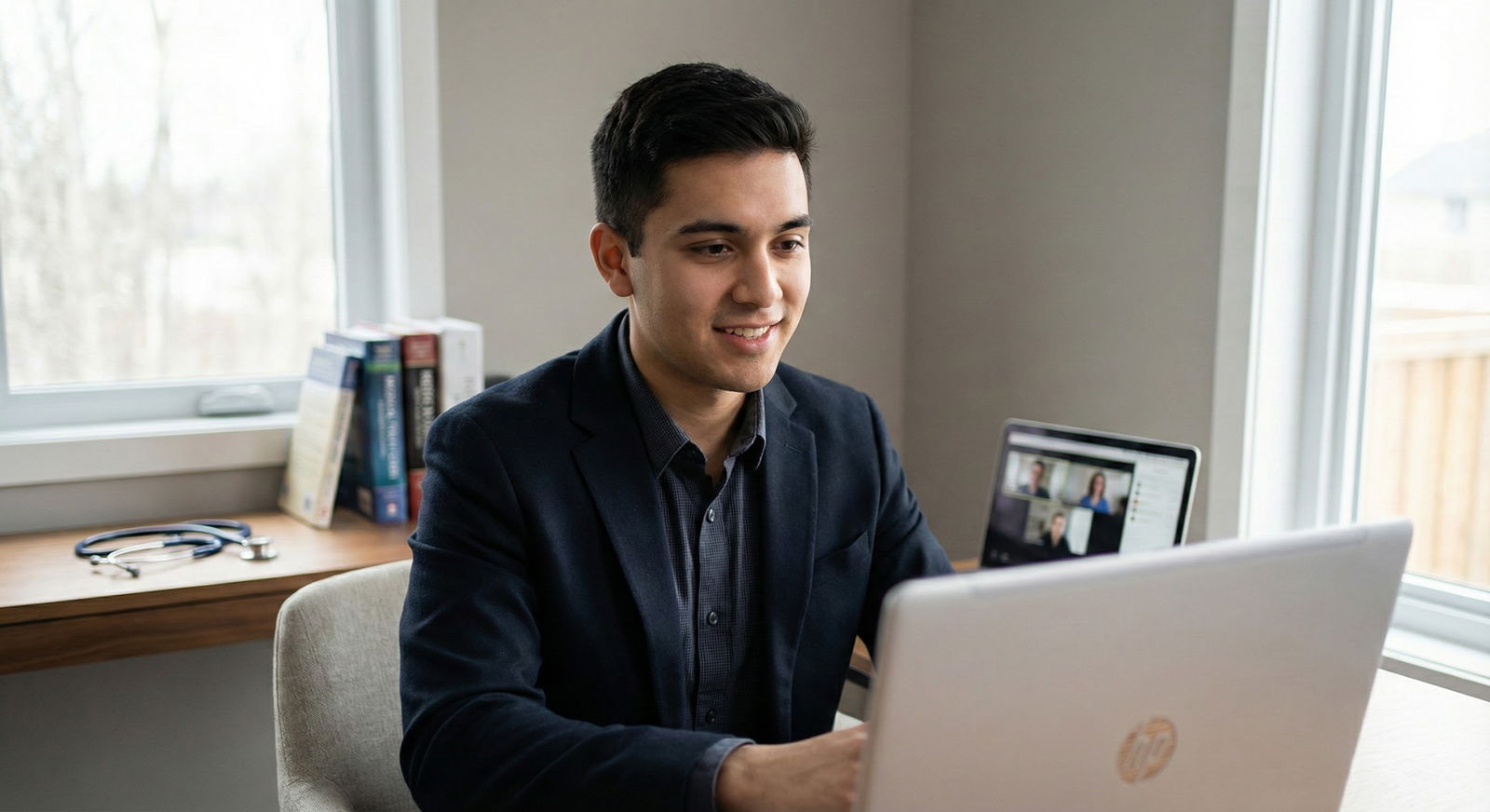
The way most applicants handle eye contact on virtual interviews is lazy – and programs can see it instantly.
You can have a 260+, glowing letters, and still come across as flat, distracted, and junior on Zoom. Presence is now part of your score whether anyone admits it or not. The good news: it is trainable. Very trainable.
Let me break this down specifically.
1. The Physics of Eye Contact on a Screen
“Look at the camera, not the screen” is incomplete advice. If it were that simple, we would not see so many otherwise strong applicants looking shifty and disconnected.
You are fighting optics and human perception:
- The camera is usually above your eyes, not in your line of sight.
- Your interviewers’ faces are lower and off-center.
- A few degrees of gaze deviation is enough for you to look disengaged or insincere.
The gaze angle problem
If your eyes are 10–15 cm below the camera and your face is 50–60 cm from the screen, the interviewer sees you as looking significantly downward. On a laptop, that often reads as:
- Anxious or submissive when your chin is tucked
- Disinterested when your chin is neutral but gaze drops
You need to minimize that angle, not by staring at a black dot for an hour, but by designing your setup so that “looking at the person” and “appearing to look at the person” become as close as possible.
Here is the practical hierarchy.
- Best: Camera directly behind the portion of the screen where the faces are.
- Acceptable: Camera slightly above eye level, faces as close to camera as possible.
- Weak: Laptop camera significantly below eye level, faces far down or to the side.
Most people are living in #3 and wondering why they look off.
Set your geometry like a pro
- Raise the laptop so the camera is just above your natural eye line. Stack textbooks if you have to.
- Sit 50–70 cm from the screen. Closer and your tiny eye shifts become exaggerated; farther and you become distant and flat.
- Position the Zoom/Teams window so the interviewer’s eyes are directly under the camera, not in the lower half of the screen.
If I walk “into” a student’s virtual mock interview and see the MD’s face floating in the bottom-left while the camera is way up top, I already know: their “eye contact” will fail even if they try.
2. Hardware and Software Tricks That Actually Work
Do not rely on default laptop gear unless you absolutely must. It is designed for casual calls, not high-stakes evaluations.
Camera: control the eye line
You do not need a $400 camera, but you do need:
- 1080p resolution
- Reasonable low-light performance
- The ability to mount or position near screen center
A basic Logitech C920 or similar is enough. The key is placement:
- Mount it centered at the top of your primary monitor.
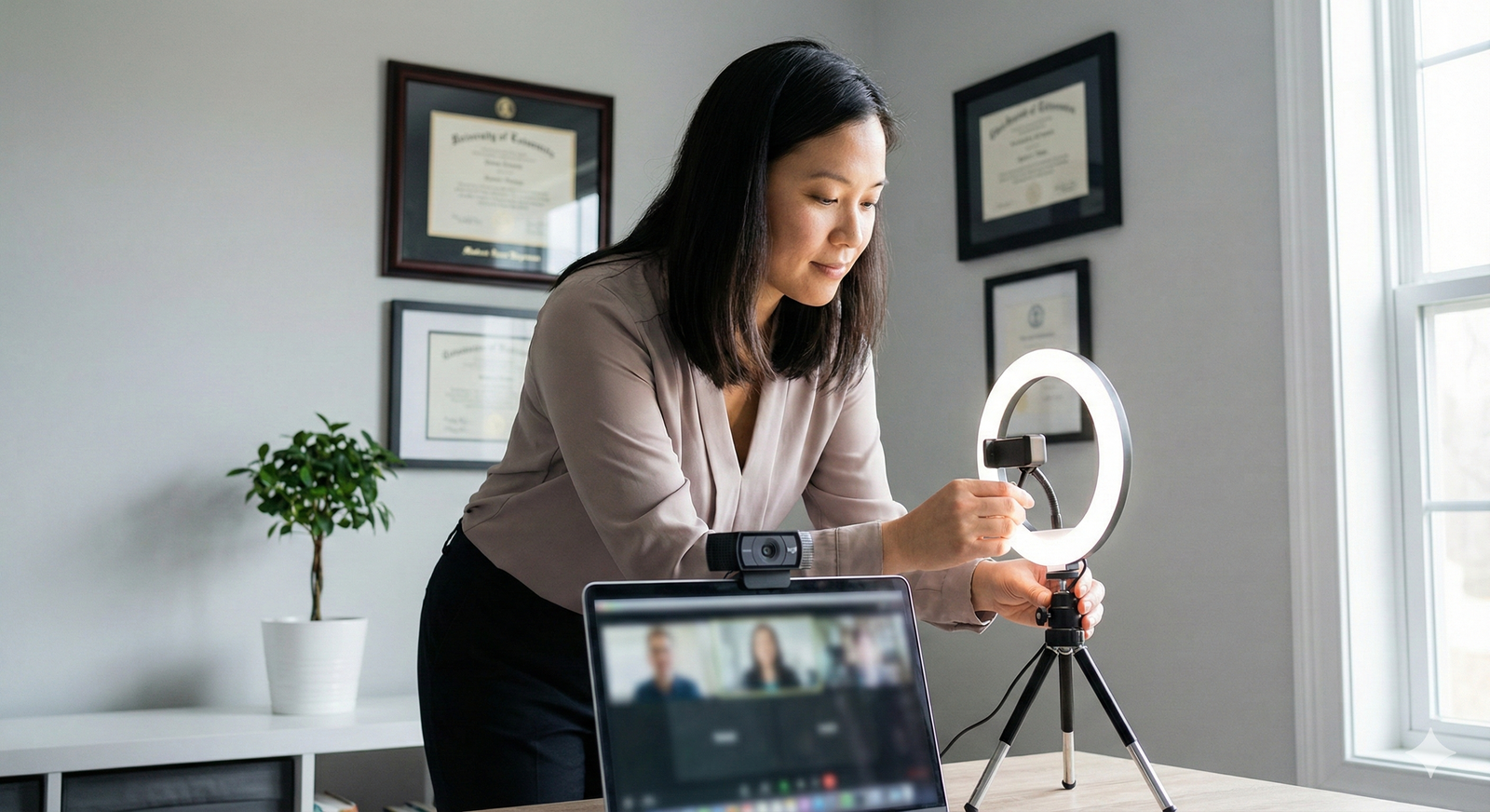
- Or better, use a small tripod or clip so the camera sits 1–3 cm above where the interviewer’s eyes appear on your screen.
This “near-eye-line” setup lets you look at them and still appear to look at the camera.
Screen layout: stop torpedoing your own presence
Most applicants blow this part. They spread windows across dual monitors, drag the video to a side screen, stack notes below the camera. Every time you glance sideways, your gaze screams “not focused on you.”
Do this instead:
- Use a single primary screen for the interview video.
- Full-screen the video or at least keep the video window centered.
- Move your own image thumbnail away from the center (top right is usually best) so you are not drawn to stare at yourself.
If you need notes (we will talk about that), keep them hovering just under the camera, not down near the keyboard.
3. Advanced Eye Contact: Looking at Them vs. Looking at the Lens
Here is the reality: you cannot stare into the lens 100% of the time and still read your interviewer’s facial micro-reactions. You will come off robotic. The trick is controlled alternation.
Think of three gaze “zones”:
- Lens zone – small area around the camera
- Eye zone – where the interviewer’s eyes appear on-screen
- Peripheral zone – below or to the side (notes, chat, clock, etc.)
Your job is to spend:
- Majority of time oscillating between lens zone and eye zone
- Minimal, deliberate micro-glances to peripheral zone
A simple pattern that works
Use a rhythm that feels natural:
- While you are listening: 70–80% of the time on the interviewer’s eyes on-screen, 20–30% micro-glances to the lens every 3–5 seconds.
- While you are speaking: flip it. 60–70% of the time at the lens (especially on key phrases), 30–40% briefly at their eyes to pick up reactions.
If you watch polished speakers on high-quality video calls, you will see exactly this pattern.
Focal points: training where your eyes land
Pick one physical landmark near the camera as a “soft anchor”:
- The rim of the camera
- A tiny sticker just below the lens
- The top edge of the screen directly under the camera
Practice answering questions while “talking to” that anchor, but then intermittently dropping your gaze 1–2 cm down to where the eyes on the screen are. Done correctly, your interviewers still perceive solid eye contact, because the shift is tiny.
What you must avoid:
- Large saccades to the bottom of the screen
- Sideways glances to another monitor
- Prolonged staring down at your own video
This is where I see “excellent applicants” suddenly look junior. The content is fine; their nonverbal signal is “distracted.”
4. Presence Is More Than Eye Contact: Posture, Framing, and Face
Eye contact without presence just makes you a well-framed cardboard cutout. Programs are assessing: would I trust this person alone with my patient at 3 a.m.? Your visual presence is part of that judgment.
Framing: how your head and shoulders sit in the box
Use the “news anchor” frame, not the “passport photo” and definitely not “floating head.”
Aim for:
- Top of your head ~1–2 cm below the top of the frame
- Upper chest visible, not just neck and head
- Centered vertically and horizontally
Too far away: you look detached and your micro-expressions are lost. Too close: you crowd the frame and every blink becomes exaggerated.
Posture that reads as confident, not tense
You do not need military posture. You do need deliberate, stable posture.
- Sit on the front 2/3 of the chair, not slumped into the back.
- Neutral spine, shoulders relaxed and slightly back.
- Feet flat or supported, not tucked and shifting.
Most students unconsciously rock, swivel, or bounce their leg. On a webcam, those tiny movements translate into jittery head movement and subtle camera shake. That screams nervous and ungrounded.
If you have a swivel chair, lock it or consciously plant yourself.
Face and micro-expressions
Your resting Zoom face probably looks more severe than you think. The camera flattens you. You need a baseline expression that conveys “warm, attentive, thinking.”
Practical cues:
- Slight upward tilt at the corners of the mouth. Not a grin. Just not a frown.
- Brows relaxed. No constant frowning squint of concentration.
- Head angle neutral or slightly forward (as if leaning into the conversation).
I have seen brilliant applicants sabotage difficult questions (e.g., “Tell me about a conflict with a nurse”) by furrowing their brow and looking down for five seconds. On a real screen that reads as: irritated + evasive.
Train yourself: when you think, look slightly to the side or slightly up, not straight down. Then come back to eye zone / lens.
5. Handling Notes Without Killing Eye Contact
Let us be honest: people use notes. Programs know this. The issue is not that you have prompts; the issue is that your eyes obviously keep diving off-screen.
If your gaze is leaving the camera for more than a second, or repeatedly during one answer, your presence drops. It looks rehearsed and insincere.
How to set up “invisible” notes
Your goals:
- Keep notes close to the camera line
- Reduce reading to single-word or short-phrase triggers
- Minimize gaze time away from your audience
Options that actually work:
Sticky notes around the lens
Place 2–4 small Post-its just below and to the sides of the camera. Each has 3–5 trigger words, not scripts. Your eyes barely move to glance; interviewers usually cannot tell.Narrow notes window under the camera
Shrink a text document and dock it directly under the central top edge of your screen. Font large, few words per line. You are looking slightly below the camera, which still reads as mostly direct.Single-page printed sheet at screen height
Tape a page just to the side of the monitor, at the same vertical level as the camera. Acceptable for quick peeks, but do not overuse it.
What you must not do: keep your full answer scripts in a Word doc down by the taskbar or on a second monitor. Every glance will be a big, obvious eye drop or sideways jump.
How to use notes like an adult
Treat notes as:
- Memory joggers for 2–3 key points per question type
- Lists of institutional names, project titles, or talking points you might blank on
Not:
- Full answers
- Story scripts
- Paragraphs you plan to “sort of read but not really”
A decent structure is one line per question type:
- “Why this specialty?” → variety, patient relationships, procedures, 3rd-year clerkship story
- “Weakness” → over-preparing, feedback from X, strategy you implemented
Your job: glance for 0.5 sec at the triggers, then look back at the lens and talk like a human.
6. Advanced Listening Presence: When You Are Not Talking
Most applicants obsess over how they look while answering questions and forget that they are being scored every second they are on screen. Your listening face and micro-behaviors matter.
“Active listening” for virtual interviews
Here is what translates well on camera:
- Small, occasional nods while the interviewer speaks
- Subtle shifts in facial expression that match the content (slight sympathy when they describe a challenging scenario, interest when they mention a research opportunity)
- Stillness. Not frozen, but not fidgeting.
Bad habits I see repeatedly:
- Constant nodding like a bobblehead
- Over-exaggerated “I’m so engaged” facial expressions
- Looking down at your phone or keyboard while they talk
Programs interpret those as either inauthentic or distracted. Sometimes both.
A good baseline: imagine you are listening to a patient’s family describe their concerns. That level of seriousness and presence transfers well to interviewers.
Managing multi-person panels
Panel interviews are especially punishing for weak virtual presence. You need to:
- Pick one person at a time as your “anchor” for eye contact (eye zone under the camera).
- While another interviewer speaks, shift your eye zone target to their video tile, but keep it as close to the camera as possible.
When answering:
- Direct 60–70% of your “lens” gaze to simulate addressing the whole group.
- Intentionally drop your gaze to different panelists’ tiles for a second or two as you touch on points relevant to them (“…and that is why I am particularly interested in your ICU experience, Dr Smith”).
That pattern reads as inclusive and intentional rather than scattered.
7. Environment, Lighting, and Background: Quiet Power
You can destroy solid eye contact and presence with a chaotic background or bad lighting. On the other hand, you can look significantly more senior than your PGY level simply by nailing your environment.
Lighting: this is non-negotiable
If I can only fix one problem for a student, I fix lighting.
Your face must be:
- Evenly lit from the front
- Slightly brighter than the background
- Free of harsh shadows or backlight halos
Simplest setup:
- Sit facing a window during the day.
- Or use a basic ring light / soft box placed just above and behind the camera, aimed at your face.
Avoid:
- Strong overhead lighting that creates eye sockets of darkness.
- Bright windows behind you. That will turn you into a silhouette.
- Colored LED lighting that makes you look like you are streaming on Twitch.
Good lighting softens your features, makes your micro-expressions visible, and lets your eye contact actually matter.
Background: neutral, not sterile
Programs are not looking for interior decorators, but they do notice chaos.
Aim for:
- Clean wall, bookshelf, or tidy office behind you
- Minimal visual noise – no piles of laundry, no busy posters, no distracting movement
Tiny, subtle flex: one or two visible professional cues. A shelf with a few textbooks, a small plant, maybe a framed diploma off to one side. You want “organized adult,” not “dorm room,” and not “I am clearly sitting in a call room.”
If you have no decent physical background, use a very simple virtual background that looks like a generic home office. But be aware: virtual backgrounds can introduce visual jitter and make any head movement look strange. If your hardware is borderline, this hurts your presence.
8. Training Protocol: How to Actually Build These Skills
Everyone thinks they will “just turn it on” on interview day. They will not. This is muscle memory plus desensitization. You need repetitions.
Here is a structured, concrete training plan that I use with residents.
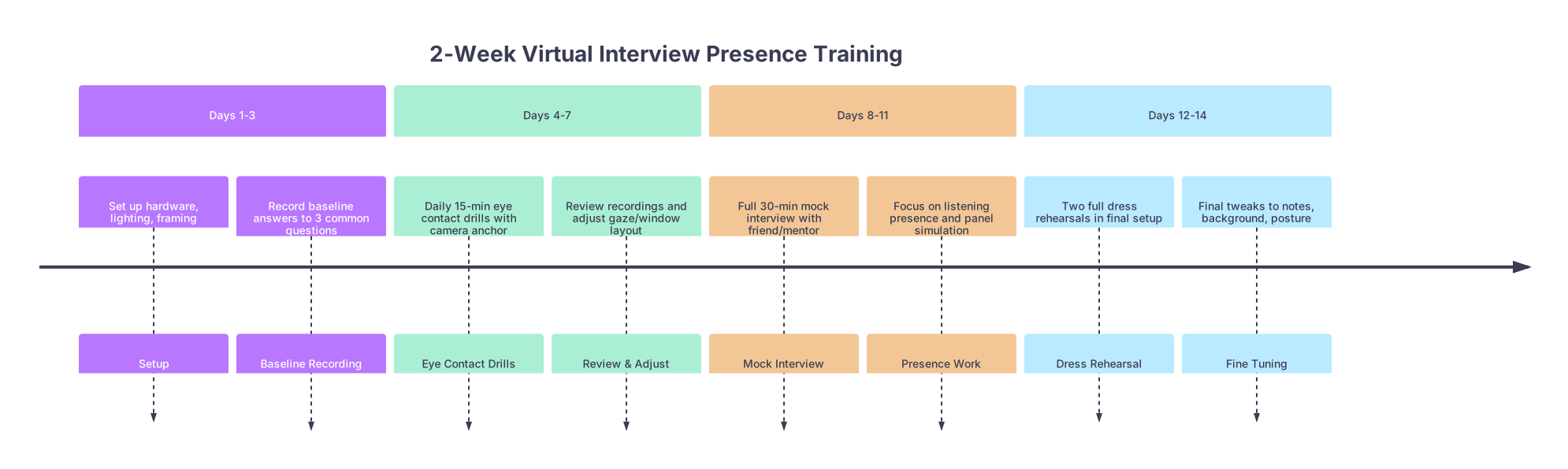
| Period | Event |
|---|---|
| Days 1-3 - Set up hardware, lighting, framing | Setup |
| Days 1-3 - Record baseline answers to 3 common questions | Baseline Recording |
| Days 4-7 - Daily 15-min eye contact drills with camera anchor | Eye Contact Drills |
| Days 4-7 - Review recordings and adjust gaze/window layout | Review & Adjust |
| Days 8-11 - Full 30-min mock interview with friend/mentor | Mock Interview |
| Days 8-11 - Focus on listening presence and panel simulation | Presence Work |
| Days 12-14 - Two full dress rehearsals in final setup | Dress Rehearsal |
| Days 12-14 - Final tweaks to notes, background, posture | Fine Tuning |
Step 1: Baseline and setup (Days 1–3)
- Arrange camera, screen, and lighting as described.
- Record yourself answering three core questions:
- “Tell me about yourself.”
- “Why this specialty?”
- “Tell me about a challenge or failure.”
Watch on a large screen. Brutal honesty: where do your eyes go? How stable is your face? Do you look like someone you would trust at 3 a.m.?
Step 2: Focused eye contact drills (Days 4–7)
Do short, targeted drills:
- Set a 10-minute timer.
- Pick one question.
- Answer it while intentionally following the lens–eye zone rhythm:
- First pass: 80% lens, 20% eyes.
- Second pass: 50–50 distribution.
- Third pass: attempt your “natural” rhythm, watch recording, adjust.
Replay at 1.5x speed. Eye movements look more obvious; you will see every bad habit.
This is tedious. It is also the single fastest way to improve.
Step 3: Listening presence and multi-person practice (Days 8–11)
Get two people on a call with you if possible. If not, simulate panel by using a recorded group video (or even multiple windows).
- Ask one to read prepared questions, one to interject side comments.
- While they speak, practice your listening face and occasional nods.
- While you answer, deliberately “address” both tiles with your eye zone but keep your gaze anchored near the camera.
Record and watch with audio off. Do you look focused, calm, and engaged even when you cannot hear the words? That is presence.
Step 4: Two full dress rehearsals (Days 12–14)
Do at least two 30–45 minute mock interviews:
- Full attire.
- Exact equipment and background you will use on the real day.
- Same time of day as your scheduled interviews if possible (fatigue and lighting change).
This is where you will discover:
- Your collar is rubbing against the mic.
- The sun hits your face differently at 4 p.m.
- Your eyes start drifting when you get tired.
Fix those now. Not during your first program interview.
9. Managing Anxiety So It Does Not Leak Through Your Eyes
Virtual interviews amplify subtle anxiety. Micro-shifts in gaze, facial tension, and breathing become obvious when you are framed in a 13-inch rectangle.
No, you do not need a full mindfulness retreat. You need simple, tactical control.
Pre-interview routine
15 minutes before:
- Walk away from screens for 5 minutes. Let your eyes and brain rest.
- 3 rounds of physiological sighs: inhale through nose, short top-up inhale, long slow exhale through mouth.
- One or two practice answers at a normal speaking volume to “warm up” your voice and face.
Do not keep reading notes until the last second. That locks your eyes into scanning mode and you carry that jitter onto the call.
On-call reset during the interview day
If you have multiple interviews back-to-back (which many residency programs now do):
- Between sessions, stand up and look at something at least 10–15 feet away for 30–60 seconds. This resets your eye strain.
- Release your jaw, roll your shoulders once or twice.
- Take one slow breath while the waiting room spins. Not a big visible sigh on camera, but a subtle, calming breath before the interviewer appears.
If you feel your eyes drifting or blinking excessively mid-interview, anchor yourself:
- Pick the camera rim as your focus point for one full answer.
- Then return to your normal lens–eye zone rhythm.
10. Common Failure Patterns I See – And How You Avoid Them
I will be blunt. These are the patterns that make programs say, “Something about them did not feel right,” even when they cannot articulate it.
The “screen-staring monologue”
Description: Applicant stares at the interviewer’s face on-screen the entire time, never once glancing up toward the lens. From the other side, it looks like they are always looking slightly down.
Fix:
- Shift their video tile to be just under the camera.
- Practice lens-anchor answers where you consciously hit the lens on key lines: “What excites me about this program is…” or “The most important thing I learned from that experience was…”
The “side monitor ghost”
Description: Applicant keeps glancing sharply to the left or right. Often corresponds to notes or email on a second screen.
Fix:
- Kill the second screen for interviews, or at least turn it off.
- Move all relevant material to the primary screen, near the camera.
- If you absolutely must use a second monitor (rarely justified), put it above, not to the side.
The “downward spiral thinker”
Description: Whenever a challenging question comes, their eyes drop far down. Long pause. Brow furrows. It reads as either guilt or panic.
Fix:
- Build a thinking habit that uses slight lateral or upward gaze. Actually drill this: ask a friend to toss you random questions and only allow yourself side/upward eye movements while you think.
- Pre-plan “stall phrases” you can deliver with stable eye contact: “That is a thoughtful question; let me think about a specific example.”
The “over-smiler”
Description: Applicant plasters on a constant grin to offset nerves. It looks fake within 10 seconds.
Fix:
- Allow your mouth to be neutral while listening, with only small periodic soft smiles.
- Actually talk about serious content with a serious face. Emotional congruence reads as maturity.
11. A Quick Comparison: Weak vs Strong Virtual Presence
| Element | Weak Behavior | Strong Behavior |
|---|---|---|
| Eye Contact | Stares at screen center or notes | Alternates lens and eye zone near camera |
| Posture | Slouched, chair swiveling | Upright, stable, slight forward lean |
| Lighting | Backlit, face in shadow | Soft, front-lit, clear facial features |
| Notes Use | Reading scripts off second monitor | Brief glances at triggers near camera |
| Listening | Blank or exaggerated expressions | Calm face, small nods, matched affect |
You want to live in the right-hand column by default, not by accident.
12. Final Layer: Integrating Content and Presence
A lot of very smart people separate “what I say” from “how I show up.” Programs do not. They experience one thing: you, as a coherent signal.
When your content and presence align:
- You say you are calm under pressure, and your eye contact and stillness show it.
- You say you are collaborative, and your listening presence in a panel demonstrates respect.
- You say you are detail-oriented, and your framing, lighting, and lack of technical glitches quietly prove it.
That is when committees start using phrases like “felt like an intern already” or “seemed very mature for a student.” They are responding to presence, even if they dress it up as “communication skills” on the score sheet.
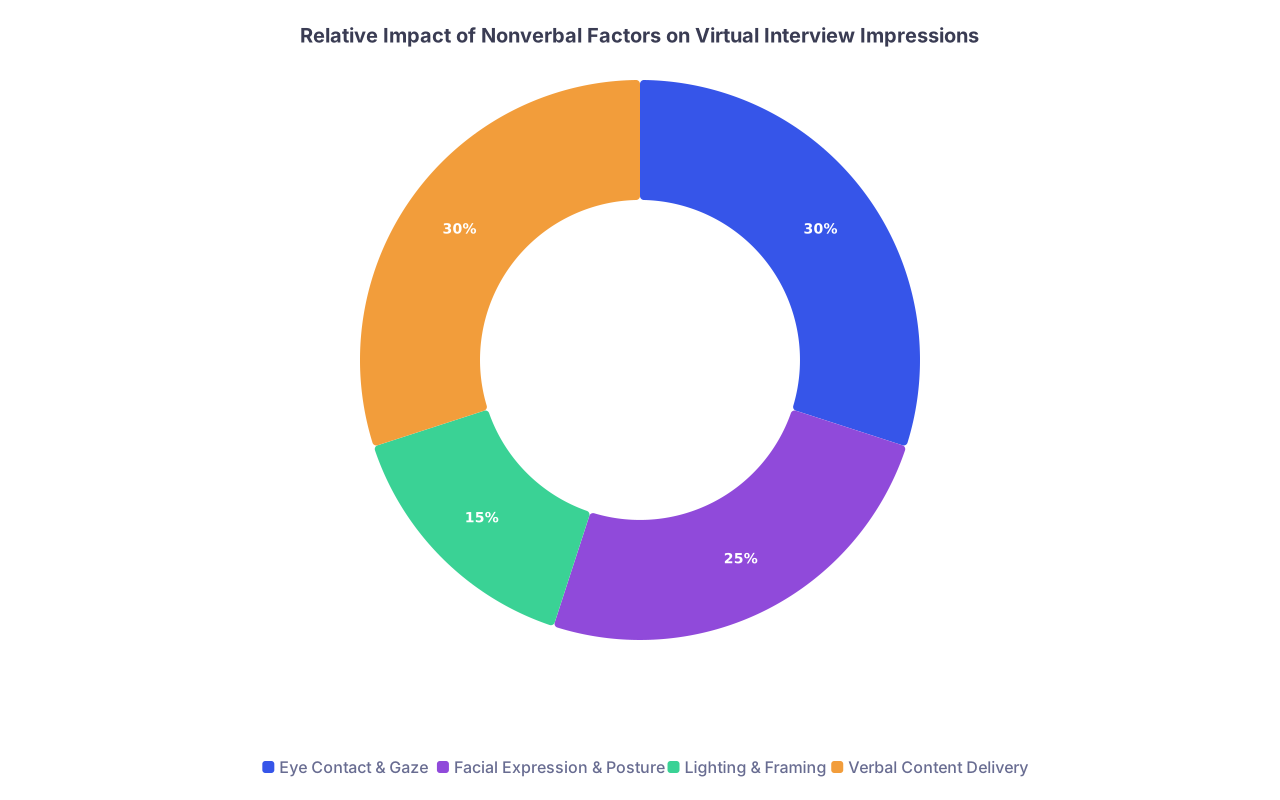
| Category | Value |
|---|---|
| Eye Contact & Gaze | 30 |
| Facial Expression & Posture | 25 |
| Lighting & Framing | 15 |
| Verbal Content Delivery | 30 |
You cannot control everything in this process. But you can absolutely control this.
Key Takeaways
- Virtual eye contact is a geometry problem first, a behavior problem second: fix camera placement, screen layout, and lighting before blaming your nerves.
- Presence comes from consistent micro-choices: lens–eye zone rhythm, stable posture, minimal fidgeting, and honest, congruent facial expressions.
- Treat this like a technical skill, not a personality trait: record, review, adjust, and rehearse until your on-screen presence finally matches the level of physician you actually are.