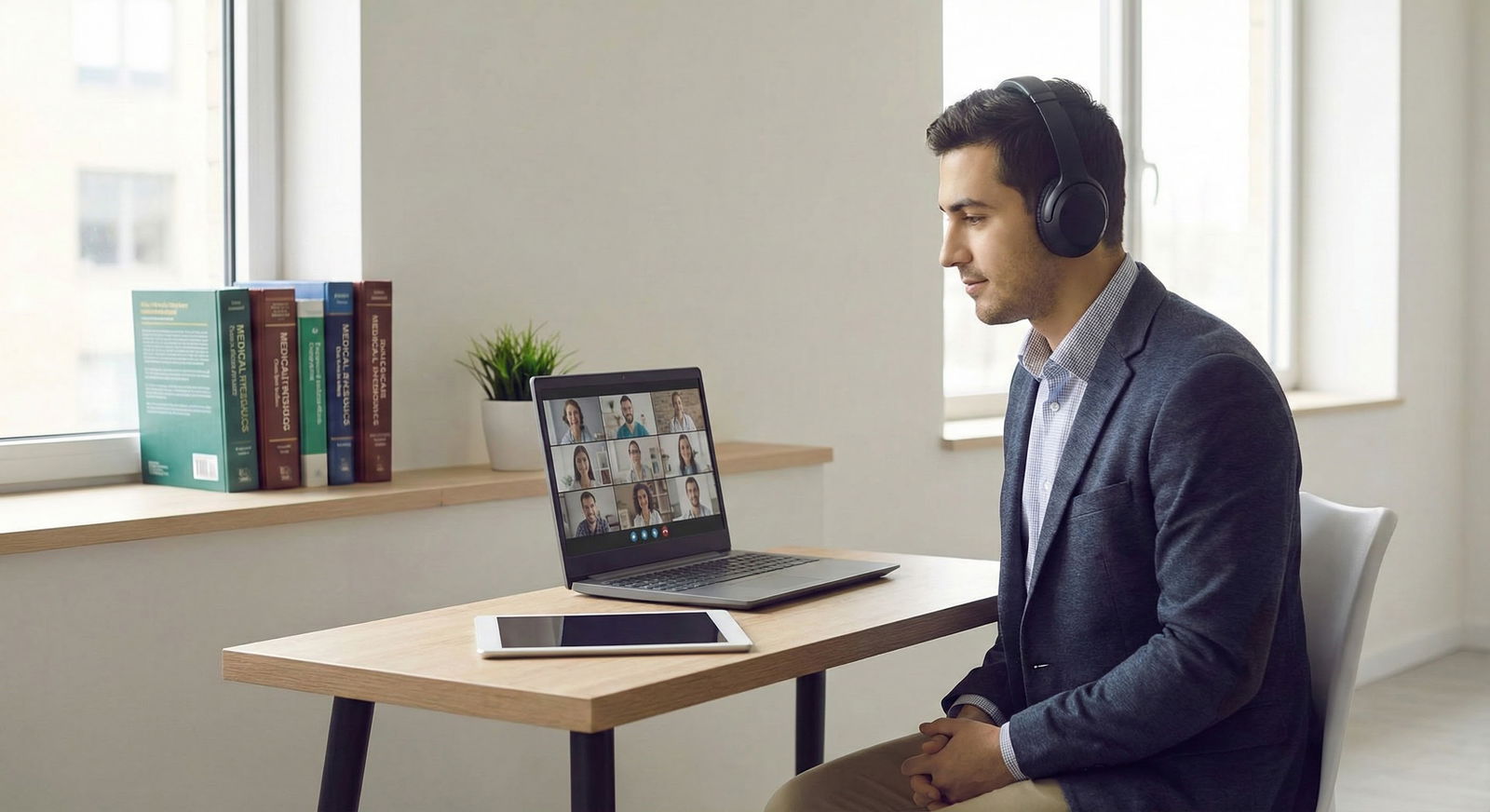
The way your Zoom background and tech are set up will quietly rank you before you even say your name.
Program directors won’t say this on panels. But on the selection committee side, your video square is judged just like your handshake and eye contact were in the pre-COVID days. I have sat in those virtual rooms. I’ve heard, “That guy’s background was chaos,” right before someone’s file slid down the rank list.
Let me walk you through what’s actually happening behind the scenes when you pop up on screen—and how to control every signal you’re sending.
What Programs Really See When You Log On
Here’s the part nobody tells you: by the end of interview season, faculty barely remember your Step scores. But they absolutely remember “the one with the unmade bed” or “the one with the Ring light reflection in the glasses who looked like they were in a TikTok studio.”
They’re not scoring your décor. They’re reading professionalism, judgment, and how you’ll look in front of patients and colleagues.
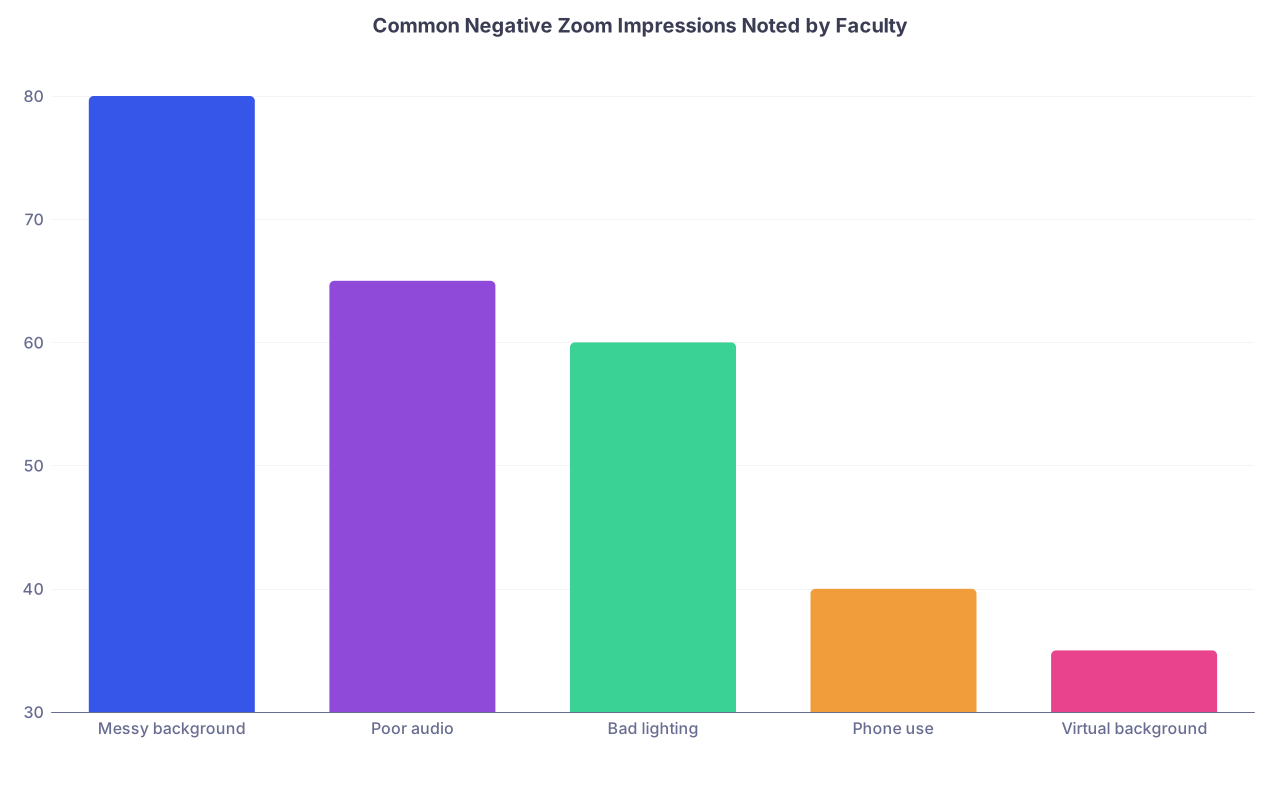
| Category | Value |
|---|---|
| Messy background | 80 |
| Poor audio | 65 |
| Bad lighting | 60 |
| Phone use | 40 |
| Virtual background | 35 |
Those numbers line up with the kinds of comments that show up in post-interview debriefs. I’ve seen the notes. Comments like:
- “Room looked chaotic, clothes on chair, distracting.”
- “Could barely hear her. Kept cutting out. Hard to engage.”
- “Camera pointing up his nose the whole time.”
- “Virtual background glitching whenever she moved—distracting.”
No one says, “We’re ranking them lower because of their background.” They say, “I just didn’t get a professional vibe,” or “Felt less polished than others.” Same outcome.
You’re not just fighting for “good enough.” You’re competing against the students who look like they’re already junior faculty on screen.
The Background: What It Says About Your Judgment
Your background doesn’t need to be fancy. It needs to be controlled.
The dirty secret: faculty absolutely judge you on what’s behind you, even if they’d never admit that publicly.
The hierarchy of backgrounds (from faculty eyes)
| Background Type | Faculty Impression |
|---|---|
| Real, tidy, neutral wall | Strongly positive |
| Simple bookshelf/office | Positive |
| Branded school background | Neutral to slightly pos. |
| Blurred real background | Neutral, slightly safe |
| Busy room, personal items | Negative |
I’ve heard actual lines like:
- “Her background looked like she rolled out of bed and opened Zoom.”
- “He was clearly in his parents’ cluttered dining room. Distracting.”
You don’t want to be memorable for the wrong reasons. You want to fade into the category of “looked professional,” and then let your personality and content be what they remember.
What works best
A neutral, real background wins. Period.
- Plain wall, maybe one simple framed item (diploma, neutral art, or a small school pennant).
- If you have a shelf, keep it curated: a few books, a plant, maybe a single professional memento. Not Funko Pops. Not a wall of gaming trophies.
- No bed in frame if you can avoid it. If your bed has to be in the room, make it hotel-level neat and try to angle the camera so only a corner is visible.
I watched a candidate at a top-tier IM program get quietly downgraded because the bed behind him was unmade with laundry piled on it. His file was otherwise solid. On paper, he was a “definitely.” After interview day? “Maybe.”
That’s how thin these margins are.
What quietly kills you
- Open closet doors with clothes spilling.
- Posters (bands, sports teams, anime) that make you look like you’re still living in an undergrad dorm.
- Food or dishes in the background.
- Other people moving in the background. Family, roommates, pets.
If somebody must be in your space (small apartment, shared bedroom), you plan your interview like a procedure. Door closed. Everyone warned. Phone on silent in another room. This is not flexible.
Lighting: Why You Look Tired, Shifty, or Untrustworthy
Lighting is where most applicants look worse than they actually are.
Faculty don’t think “bad lighting.” They think:
- “He looked exhausted.”
- “She seemed a bit checked out.”
- “He looked like he was hiding something.”
All lighting issues. Not personality.
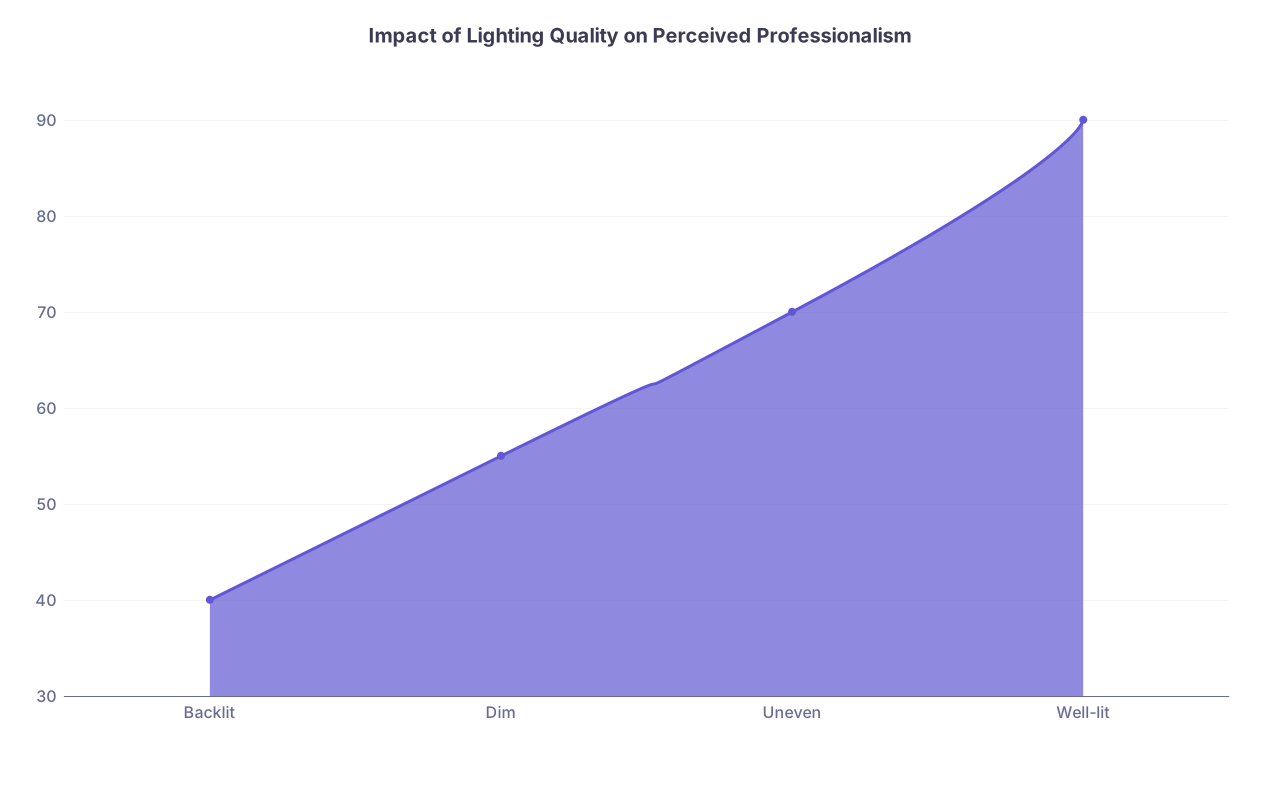
| Category | Value |
|---|---|
| Backlit | 40 |
| Dim | 55 |
| Uneven | 70 |
| Well-lit | 90 |
The basic rule
Light your face from the front, slightly above eye level. That’s it. But almost nobody does it correctly.
What you think: “I have a window, so that’s fine.”
What we see: Your face is half in shadow, your expressions are hard to read, and you look vaguely ominous.
Set it up like this
- Sit facing a window, not with the window behind you.
- If natural light isn’t enough or is inconsistent, get a basic desk lamp or ring light. Not the influencer intensity. A small, warm LED at eye level or just above, 2–3 feet in front of you.
- Avoid overhead only lighting. It highlights eye bags and makes you look more tired than you are.
One faculty member in EM once said after a long day of Zooms, “By the afternoon, I only had patience for the people I could see clearly. If I had to strain to see their face, I just mentally checked out.”
You do not want to be someone faculty have to work to see.
Camera Position: You’re Being Read Like a Patient
This part is non-negotiable: your camera has to be at eye level.
When your camera is below your eyeline, you look condescending or disinterested. Above your eyeline, you look submissive or anxious. That’s literally how humans are wired to interpret angles and gaze.
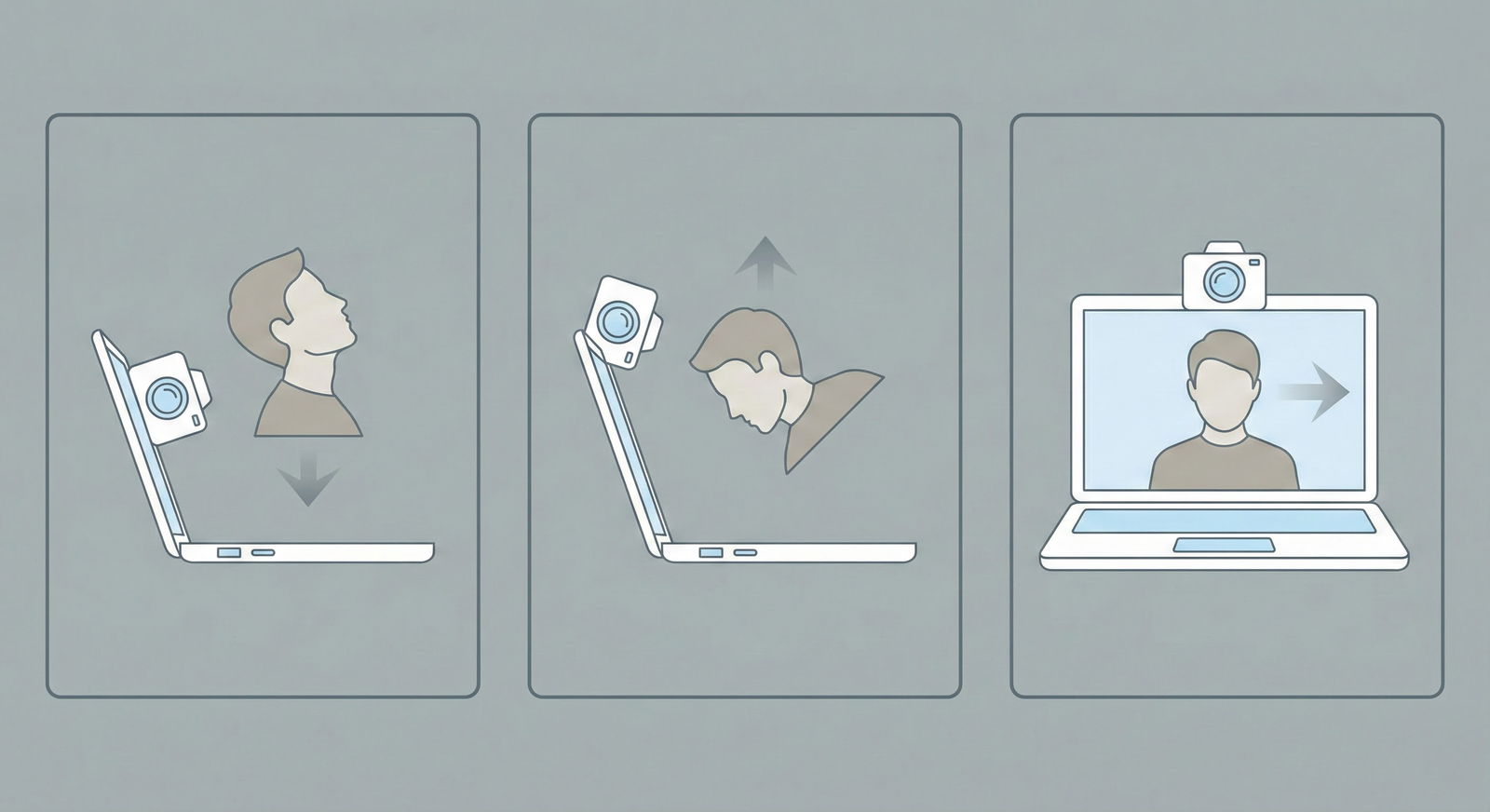
And yes, physicians notice this. We’re trained to read faces and posture.
The minimum standard
- Your eyes should hit about the top third of the screen.
- You should be framed from mid-chest up. Not just your chin. Not your entire torso like a CCTV angle.
- Raise your laptop on books or a box if you must. Everyone does this behind the scenes. You’re not the only one stacking textbooks under a MacBook.
You want it to feel like you’re sitting across a conference table from them. That’s the mental model.
I’ve watched multiple attendings literally push back from their screen and mimic a candidate’s posture or angle when we discussed them. “Remember the guy like this?” Then they tilt their head or slump. That’s how sticky those visuals are.
Audio: The Hidden Deal-Breaker
Here’s the piece that applicants consistently underestimate: if your audio is bad, your personality is gone.
If we have to keep asking you to repeat yourself, you will be remembered as “hard to talk to” regardless of how charming you are.
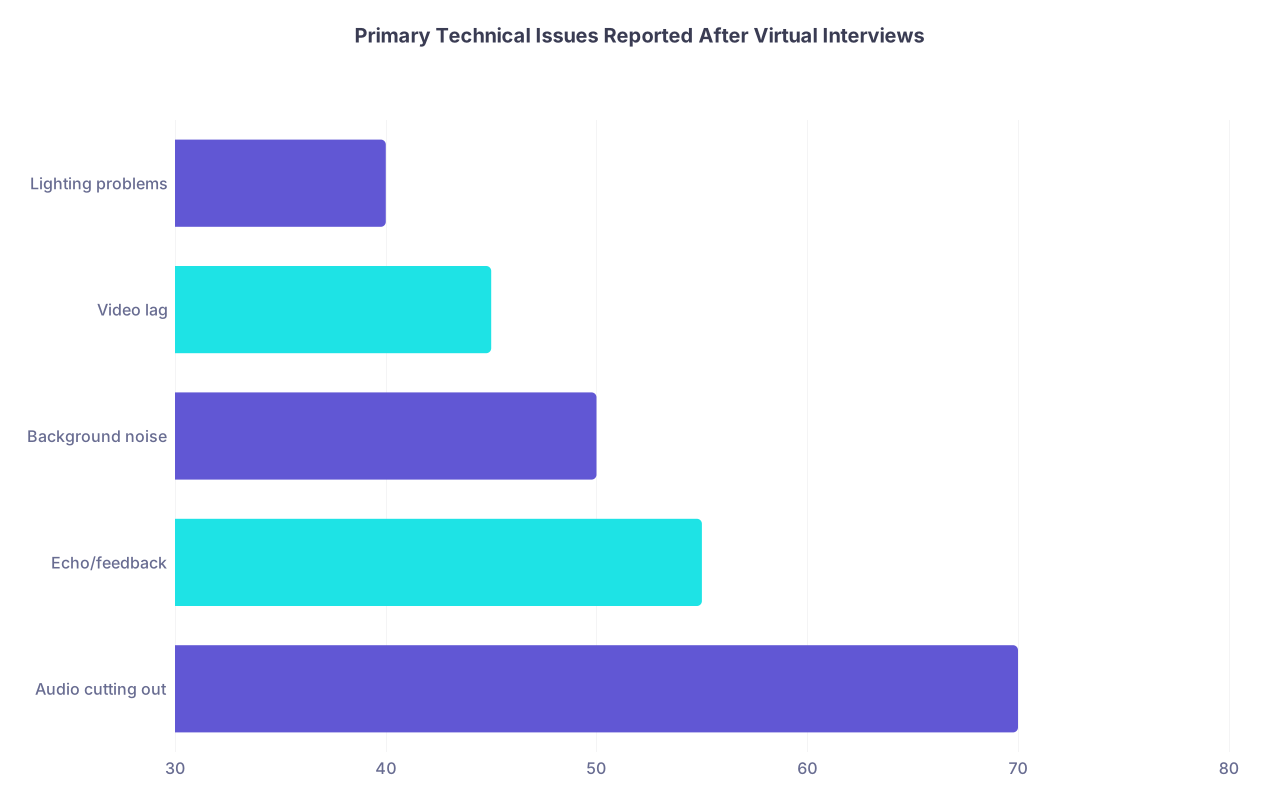
| Category | Value |
|---|---|
| Audio cutting out | 70 |
| Echo/feedback | 55 |
| Background noise | 50 |
| Video lag | 45 |
| Lighting problems | 40 |
What faculty actually say
- “Her audio kept cutting out—felt like I couldn’t get a full answer from her.”
- “Lots of echo, kept sounding like he was in a bathroom.”
- “Baby crying in the background the whole time. I felt bad, but it was really distracting.”
No one is going to fail you because you live in a busy household. But they will downgrade you if you haven’t done everything possible to minimize that impact.
How to fix it like an adult
Buy or borrow a wired or quality wireless headset with a mic. Not your laptop mic. Not one AirPod in noise.
Laptop mics pick up:
- Keyboard taps
- Fan noise
- Room echo
- Every door closing in the apartment
A decent $20–40 wired headset will outperform your built-in mic almost every time.
Test it on Zoom with a friend, not just the “Test Speaker & Microphone” button. Ask them:
- “Do you hear echo?”
- “Is there background hiss?”
- “Do my answers ever clip or cut off?”
You solve this before interview week, not the morning of.
Virtual Backgrounds and Blur: The Faculty Consensus
Let me be blunt: most faculty hate fake virtual backgrounds.
Not all. But enough that you shouldn’t risk it unless your real background is truly impossible to make presentable.
The biggest complaints I’ve heard:
- “The glitching around their hair was so distracting.”
- “It felt like they were hiding something.”
- “Looked like they were on a green screen news set, not a serious interview.”
Blur is better than a fake office-with-a-city-view template, but even blur sends a mild “I didn’t want to tidy up” signal if overused.
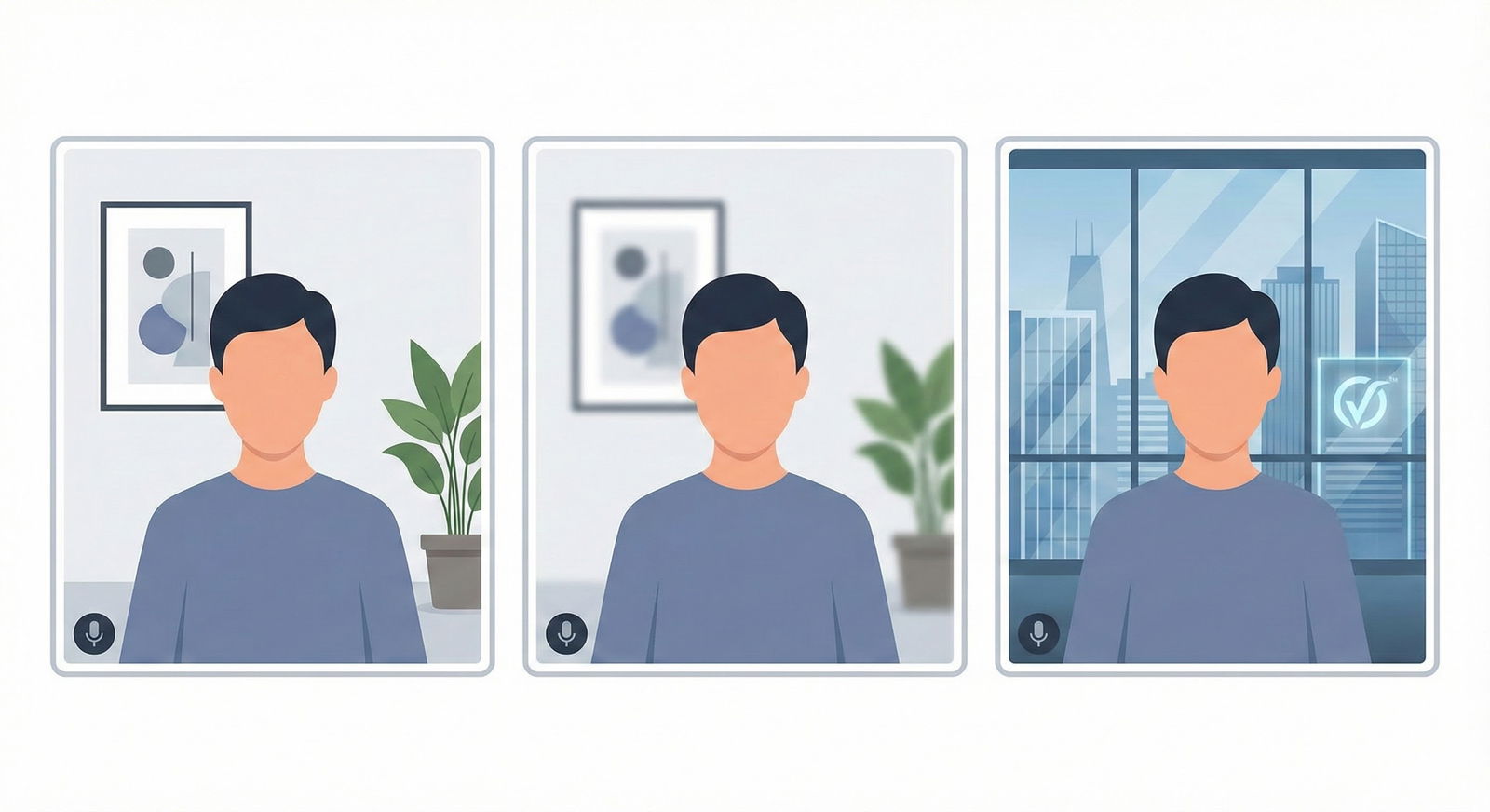
When a virtual background is acceptable
- Your only space is genuinely chaotic or shared and cannot be controlled.
- You choose a very simple branded background (school logo in a corner, solid color) that doesn’t flicker when you move.
- You’ve tested it and there are no weird halos around your hair or shoulders.
Even then, you’re aiming for “neutral, not ideal” rather than “impressive.”
If you have any realistic shot at using a real, simple background, do that.
Internet, Backup Plans, and How Panic Looks on Screen
No, programs won’t instantly blacklist you if your internet cuts out once. But if your connection is poor for the whole interview, it will absolutely affect how connected people feel to you.
I’ve sat through interviews where:
- The candidate froze mid-answer every 30 seconds.
- Audio and video were out of sync badly.
- Whole questions were missed.
Afterward, the room is full of, “I think that’s what they said,” and “Hard to get a read on him.”
Translation: you’re done.

| Step | Description |
|---|---|
| Step 1 | Before Interview |
| Step 2 | Test devices & internet |
| Step 3 | Proceed with primary setup |
| Step 4 | Arrange backup location/hotspot |
| Step 5 | Day-of Recheck 30-60 min prior |
| Step 6 | Complete smoothly |
| Step 7 | Politely notify interviewer in chat |
| Step 8 | Switch to backup plan |
| Step 9 | Connection stable? |
| Step 10 | Issue during interview? |
Here’s what adults do
- Hardwire if you can. Ethernet > Wi-Fi. No contest.
- If Wi-Fi only, make sure no one is streaming 4K Netflix or gaming during your interview block. Actually tell your household the time and ask for bandwidth.
- Have your phone charged and nearby only as a backup. Turn off notifications but keep it ready as a hotspot in case your internet dies.
If something does go wrong, the way you handle it is part of how they evaluate you.
You don’t melt down. You don’t apologize for 5 minutes. You say calmly: “Sorry, it seems my connection is unstable. If this continues, I have a backup hotspot ready—would you prefer I switch to that now or try to continue?”
That sounds like a resident solving a problem on call. That’s the impression you want.
Body Language in a 2D World
Even with perfect tech, your presence can still feel flat or chaotic. The screen compresses your energy. You have to manage that.
Eye contact: stop staring at yourself
You already know you should look at the camera. But hardly anyone actually practices it.
On our side, it’s blatant. The people who keep glancing at themselves in the lower corner look anxious and self-conscious. The ones who lock onto the camera during key phrases feel confident and grounded.
Trick: in Zoom, drag your own video window as close to the camera as possible. Or shrink it so small you can’t obsess over yourself.
Movement and fidgeting
I’ve watched applicants click a pen continuously, spin in a swivel chair, or rock back and forth. They probably had no idea they were doing it.
Faculty absolutely notice. One surg attending once sighed, “If he’s this fidgety in a 20-minute interview, I can’t imagine him in a 6-hour OR.”
Bad chair? Fix it. Nervous hands? Rest them loosely on the desk, out of frame if needed. Need something to fidget with? Fine—but something silent and invisible, not a pen and not your mouse.
The 24-Hour Tech Rehearsal You Actually Need
Most people do a 2-minute check the morning of. That’s amateur hour.
The serious applicants—the ones who look like they’ve been doing virtual grand rounds for years—do a full dress rehearsal at least once.
Here’s the sequence I’ve seen work:
- The day before, at the same time of day as your interview, log into Zoom with a friend or mentor.
- Wear the exact clothes you’ll wear.
- Sit in the exact spot, with the exact background, lighting, and audio you’ll use.
- Record 5–10 minutes of mock Q&A.
- Watch it back with brutal honesty.
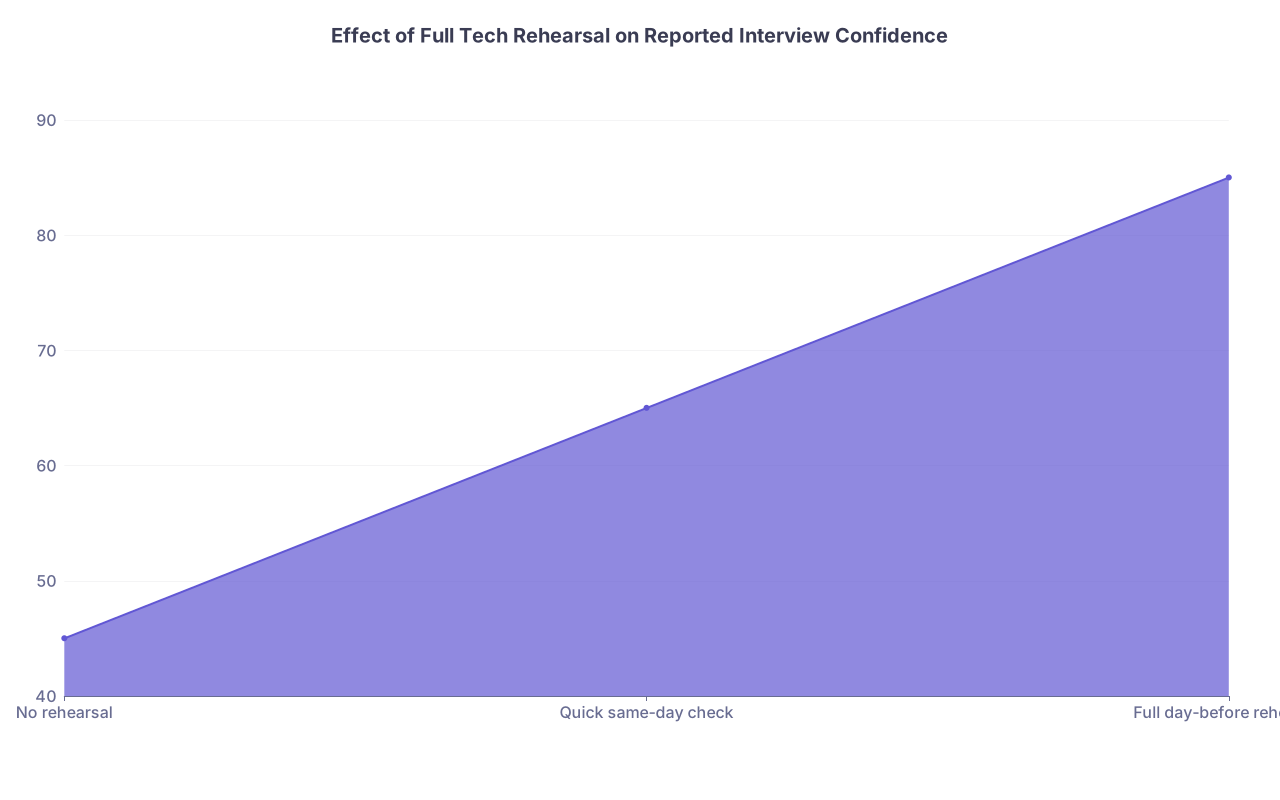
| Category | Value |
|---|---|
| No rehearsal | 45 |
| Quick same-day check | 65 |
| Full day-before rehearsal | 85 |
When I’ve done this with students, they almost always notice:
- “Wow, I look down way more than I thought.”
- “My background lamp is too bright on one side.”
- “My mic pops when I say certain letters.”
You fix all of that in advance. Then on interview day, you’re not burning mental energy on “Do I look okay?” You’re just talking.
The Hidden Equity Issue—and How to Work Around It
Let’s acknowledge something: not everyone has a home office, a quiet house, or space to themselves. Faculty know that too. Most are not monsters.
But they are choosing future colleagues. If you’re interviewing from a small shared apartment or complex home situation, here’s how to still project full professionalism.
- Claim one corner and make it consistent. Same wall, same setup for all interviews. Consistency reads as stability.
- Keep everything in frame controlled, even if the rest of the room is chaos.
- Talk about it once, if appropriate, and then move on. A simple, “I’m joining from a shared space today, but I’ve done my best to keep things quiet,” is enough if something happens.
I’ve seen applicants in genuinely cramped environments still come across as more professional than people in huge, messy homes—because they clearly took ownership of the small space they had.
FAQs
1. Is it really that big a deal if my background is a little messy as long as I interview well?
Yes. It signals how you manage details when you know you’re being evaluated. If you don’t control your environment for one of the highest-stakes days of your career, faculty reasonably wonder what corners you’ll cut when no one is watching. You’re not expected to have a designer office. You are expected to demonstrate you understand professionalism visually as well as verbally.
2. Should I use my school’s official Zoom background so they see my institution?
Only if your real environment is truly unsuitable. A subtle branded background is less offensive than a glitchy tropical beach, but it still looks less authentic than a real, neat space. If you go that route, choose the simplest one (solid color, small logo), and test it thoroughly. Between a clean real wall and a school-branded backdrop, the real wall usually wins.
3. What if my internet fails mid-interview despite all my preparation?
It happens. Programs have seen it. You won’t be automatically doomed if you handle it calmly and professionally. Rejoin as quickly as you can, briefly apologize once—“Sorry, my connection dropped; I’ve switched to my backup hotspot”—and move on. If you cannot rejoin, email the coordinator immediately and ask if any portion can be rescheduled. They’ll remember your composure more than the glitch if you’ve clearly prepared and have a backup plan.
Key points: Your Zoom setup is not cosmetic; it’s a proxy for judgment and professionalism. A simple, real, tidy background with good lighting, eye-level camera, and clear audio will put you ahead of a shocking number of applicants. And the way you prepare and troubleshoot your tech tells programs exactly what kind of resident you’re going to be at 3 a.m. when something goes wrong.