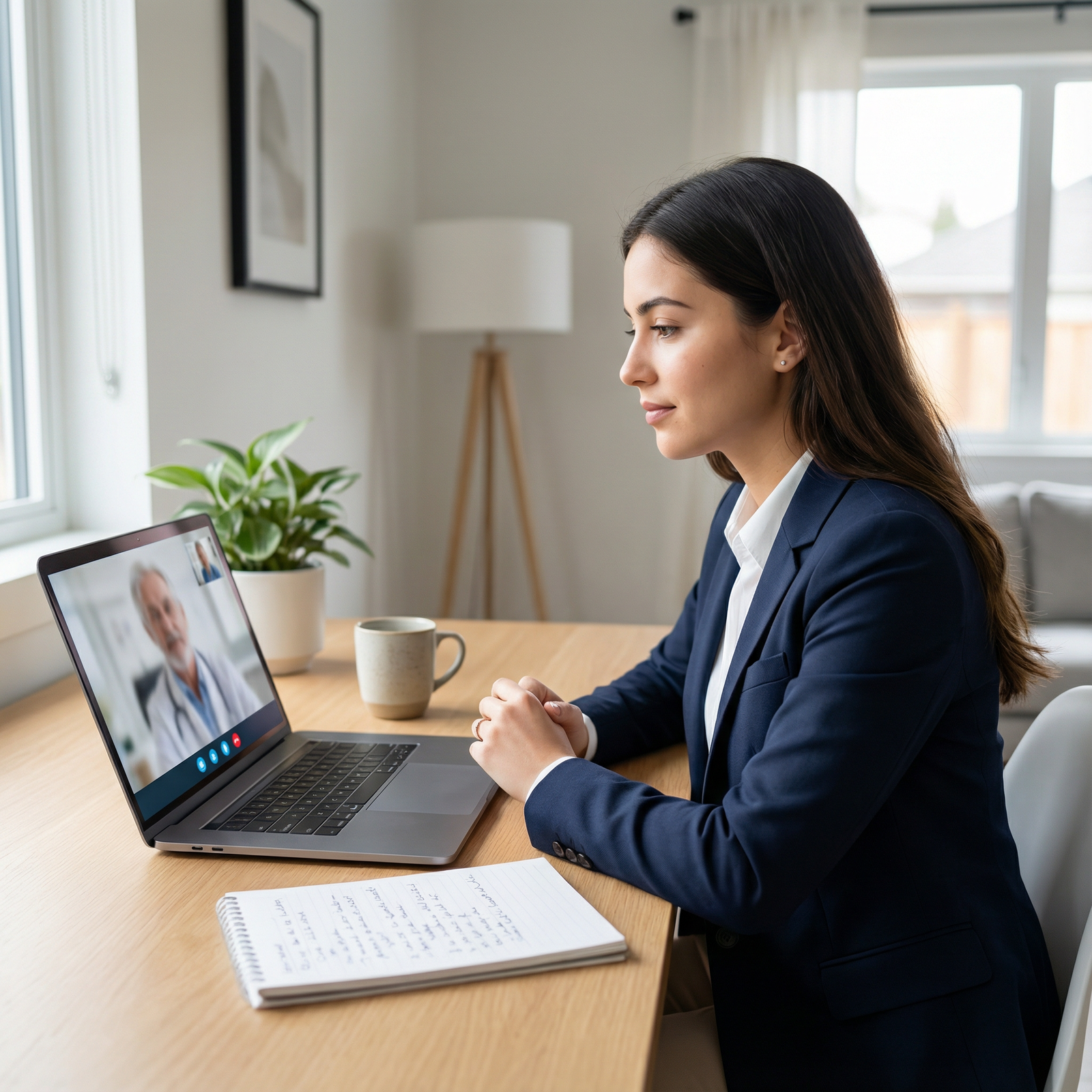
What do program directors say about you in the 5 seconds after you freeze, fumble for the mute button, and stare at the screen in silence?
Let me be blunt: most candidates are not rejected because they are stupid or unqualified. They are rejected because they look unprepared, disorganized, and unaware of how they come across on Zoom. And Zoom is brutal. It magnifies every small error.
You are competing against people who have tested their camera angles, rehearsed their answers, and learned how to use the mute button properly. If you stumble in with a laptop on your knees, bad lighting, and a noisy background, you are done before your first “Thank you for having me.”
You do not need to be perfect. But you absolutely cannot look unprepared.
Below are the common Zoom residency interview mistakes I see every year—and how to avoid being that applicant they still talk about in the ranking meeting, for all the wrong reasons.
1. Treating Zoom Like a Casual FaceTime Call
This is the first mistake and it kills candidates before they say a single word.
They sit on a couch. Or in bed. Laptop below their chin, camera pointed up their nose. Hoodie on. Hair half-done. Background a mess. They would never walk into an in‑person interview like this, but somehow Zoom makes them forget it is still a professional encounter.
Programs assume: if you do not take this seriously, you will not take patient care seriously either.
How this looks to interviewers
I have heard faculty say, almost word for word:
- “If they cannot be bothered to sit at a desk for an interview, what will they be like on call?”
- “They looked like they just rolled out of bed.”
- “It felt like they were hanging out, not interviewing.”
Zoom is not casual. It is compressed. Every visual signal is louder because they do not see you walk, shake hands, or sit in a room.
How to not make this mistake
Sit at a desk or table, in a chair, with your laptop stable on a hard surface. You should look like you could walk into a physical conference room wearing the exact same outfit and posture.
No couch. No bed. No lying down. No leaning back like you are watching Netflix.
If you would be embarrassed to be seen that way in a hospital hallway, do not appear that way on Zoom.
2. Terrible Camera Angle and Framing
The number of otherwise strong applicants who destroy their first impression with a bad camera angle is ridiculous.
Common sins:
- Laptop on your lap: camera pointing up into your nostrils.
- Camera too low or high, cutting off your forehead or chin.
- You are sitting too far back, tiny in the frame.
- You are way too close, face filling the whole screen.
You might not notice it on your own screen because your preview is tiny. Interviewers see your face full-size.
The professional framing standard
You want a straight-on angle, camera at eye level, with your head and upper shoulders visible. There should be a bit of space above your head. Not chopped off, not miles of ceiling.
The feeling should be: “I am talking across a table with you,” not “I am looking up your nose” or “you are peering down at me from a shelf.”
Fix it before interview day
Do not wait until the morning of your first interview. Test it days before.
- Put your laptop on a stack of books or a box so the camera is at eye height.
- Sit at a distance where your head and upper chest fill most of the frame.
- Check the preview in the exact platform (Zoom, Thalamus, Webex) the program uses.
If you refuse to do this, you are choosing to look amateurish.
3. Bad Lighting That Makes You Look Untrustworthy
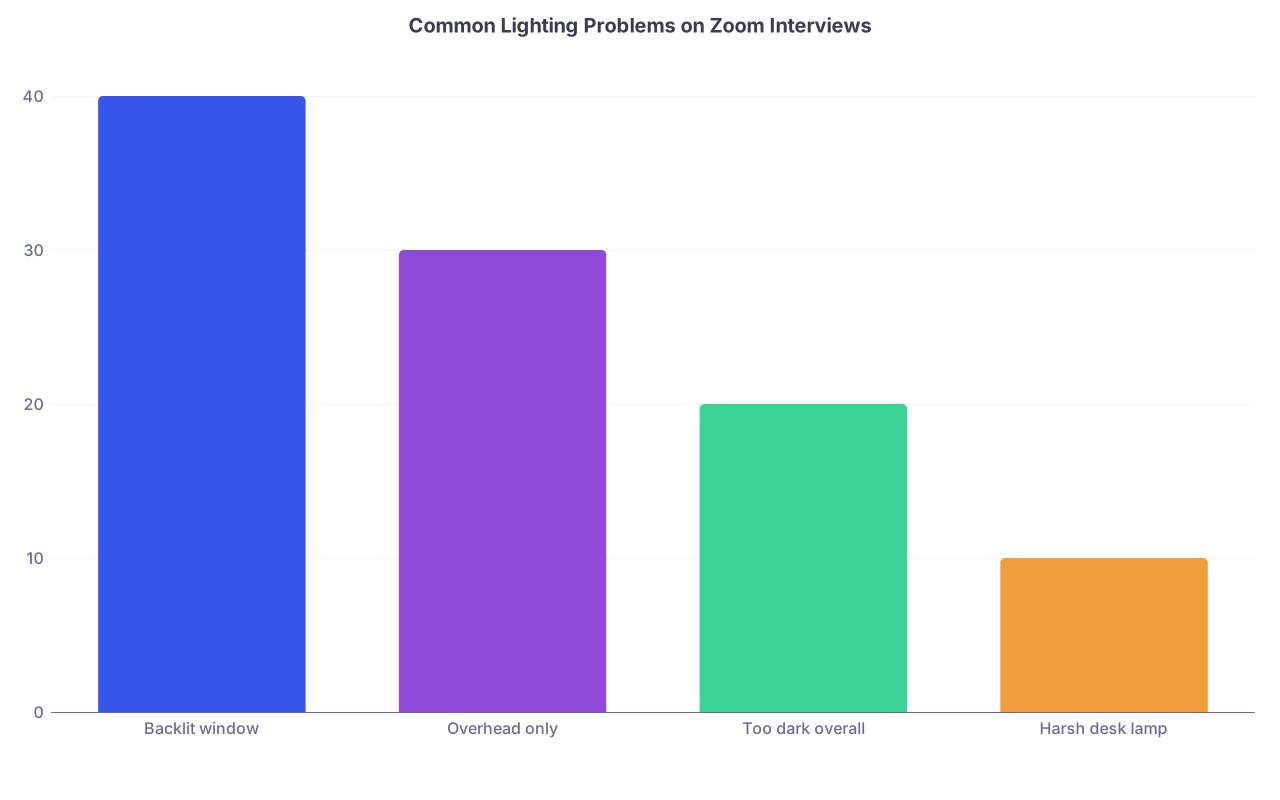
Harsh, but true: if your face is in shadow or backlit, you automatically look less trustworthy and less engaged. Humans are wired that way.
Common lighting mistakes:
- Sitting with a bright window behind you (you become a silhouette).
- Overhead light only, creating harsh shadows and weird under‑eye darkness.
- Using just the laptop screen as your main light.
| Category | Value |
|---|---|
| Backlit window | 40 |
| Overhead only | 30 |
| Too dark overall | 20 |
| Harsh desk lamp | 10 |
Programs may not consciously articulate it, but the effect is clear: “Something feels off.” And that is all it takes to push you from “strong” to “eh.”
Simple lighting rules
You do not need studio gear to fix this.
Follow three simple rules:
- Face the light. Window in front of you or at a slight angle, not behind you.
- If your room is dark, add a soft desk lamp behind your screen, not directly overhead.
- Check yourself on camera at the same time of day as your interview. Morning light and afternoon light can look very different.
If you pick one “extra” piece of equipment to buy, get a cheap ring light or small LED panel. But even that is optional if you use a window correctly.
Just do not show up as a dark, shadowy blob.
4. Audio Problems That Make You Sound Sloppy
Sometimes the smartest candidates sound unprepared simply because their audio is awful.
Common problems:
- Echo from bare walls or big empty rooms.
- Background hum from fans, AC units, or street noise.
- Built-in laptop mic picking up every keyboard tap and desk vibration.
- Volume too low or too loud.
Strong content delivered through bad audio is like a good lecture played through a broken speaker. Nobody remembers the message—only the annoyance.
Do not rely on the laptop mic by default
Most built‑in laptop microphones are barely acceptable.
Better options:
- A simple wired headset with a mic.
- Earbuds with a decent microphone that you have tested.
- A basic USB mic (if you want to go one level up).
The key word is tested. I have seen people use AirPods that kept disconnecting mid‑answer. They looked less competent than someone with a $15 wired headset that just worked.
Test under real conditions
Do not just record yourself in a quiet room at 11 pm and say, “Seems fine.”
Test at:
- The same time of day as your interview.
- In the same room.
- Using the same device and headphones.
Ask a friend to hop on Zoom and tell you honestly: “Can you hear background noise? Echo? Is my volume okay?” Fix it now, not during your first interview where you waste five minutes saying, “Can you hear me now?”
5. Distracting or Unprofessional Backgrounds
I promise you: nobody is impressed by your pile of laundry, messy bed, or roommate’s posters. They are not evaluating your interior design skills. They just do not want to have to ignore your clutter.
The worst backgrounds I have seen:
- Open doorway with people walking past.
- Bed in the frame that is clearly unmade.
- Alcohol bottles on shelves behind the candidate.
- Political signs, flags, or polarizing imagery.
This does not make you look “real.” It makes you look careless.
Virtual backgrounds: friend or enemy?
Virtual backgrounds are overused and often poorly executed. If your hair or shoulders keep disappearing into a fake beach or a blurred picture of a hospital you have never set foot in, it looks worse than a simple wall.
Use:
- Real background if possible: neutral wall, neat bookshelves, plant, simple art.
- Background blur if your environment is reasonably clean and your camera handles it smoothly.
Avoid:
- Fancy or themed virtual backgrounds.
- Busy images.
- Anything that looks like a stock photo of an OR or ICU.
If your room is small or not pretty, that is fine. Just keep it simple, tidy, and non-distracting.
6. Tech Setup That Screams “I Did Not Test This”
There is a particular kind of chaos that happens when someone clearly did not test their setup:
- They join late, saying, “Sorry, my Zoom needed to update.”
- Their display name is “iPhone” or worse, “user12345.”
- They fumble with audio, video, screen orientation.
- They get booted off Wi‑Fi twice.
Programs are not just judging your tech skills. They are judging your reliability. If you cannot show up on time and stable for a single one‑hour call that decides your training, how will you show up for sign-out at 6 am?
Do a full tech rehearsal
Not a quick glance. A full simulation.
The week before your first interview:
- Restart your device and update Zoom/Webex/Thalamus.
- Check your internet speed. If your Wi‑Fi is weak, position near the router or use an ethernet cable.
- Rename yourself in Zoom with “First Last – Medical School.”
On the actual day:
- Open the platform 20–25 minutes early.
- Log in 10–15 minutes before your scheduled time.
- Disable notifications and set your phone to Do Not Disturb.
This looks boring. That is the point. Boring reliability is very attractive to residency programs.
7. Awkward Eye Contact and “Shifty” Gaze
People underestimate how much eye contact matters on Zoom. And how easy it is to get wrong.
Common mistakes:
- Constantly looking at your own video, not the camera.
- Watching the interviewer’s video, which makes it look like you are always looking slightly down or off to the side.
- Glancing at notes on a second monitor, so your gaze keeps darting away.
Interviewers feel it even if they cannot articulate it. “They seemed a bit disengaged,” or “They were looking somewhere else the whole time.”
The trick: train your eyes to the camera
No, you cannot stare at the camera nonstop like a robot. But you need to treat the camera like the interviewer’s eyes, especially when you are giving key parts of your answer.
Practical adjustments:
- Put the Zoom window just below your camera so glancing between their face and the camera is a very small movement.
- Move your own video thumbnail away from the center of your screen so you are not tempted to look at yourself.
- Practice giving a full answer while looking into the camera lens. Record it. Watch it. It will feel weird but look better.
You are not trying to be perfect. You are trying to avoid the “detached and distracted” vibe.
8. Over-Reliance on Notes and Scripts
Here is a brutal truth: interviewers can tell, immediately, when you are reading from a script.
The visual tells:
- Your eyes are slightly down or to the side for the entire answer.
- The rhythm of your voice becomes flat and unnatural.
- Your phrasing sounds memorized, not conversational.
I have watched applicants give technically “excellent” answers that still felt fake and over‑rehearsed. They got ranked lower than people who were less polished but clearly authentic.
Notes: how much is too much?
Some brief bullet points near your screen? Fine.
Two pages of fully scripted answers? Terrible.
If you must have prompts:
- Use 1–2 keyword bullets per common question (e.g., for “Tell me about yourself”: hometown, undergrad major, med school, why this specialty).
- Place them near your camera, not down on the desk.
- Use them as a backup, not a teleprompter.
If you find yourself reading during practice, cut your notes in half. Then half again. You need to know your stories and themes, not the exact sentences.
9. Uncontrolled Environment: Noise, Interruptions, Chaos
Nothing tanks professionalism faster than a chaotic environment.
Common disasters I have seen:
- Dog barking repeatedly while the applicant tries to talk louder over it.
- Roommate walking behind them in a towel.
- Family member shouting from another room.
- Phone notifications pinging nonstop on the desk.
You cannot control the entire universe, but you can control your environment better than most people bother to.
Set firm boundaries
This is not “just a call.” It is your career.
Treat it like a high‑stakes exam:
- Tell everyone you live with: “From X to Y, I need absolute quiet. This is my residency interview.”
- Put a physical sign on the door.
- Silence your phone and put it out of reach.
- Close windows if there is street noise.
- If your home is chaotic, arrange to use a quiet office, library room, or a trusted friend’s place with stable internet.
Do not just hope it will be quiet. Hope is not a strategy.
10. Weak Zoom Etiquette and On-Screen Behavior
Programs notice how you “exist” in the virtual space:
- Do you join muted with camera on, name correct, and a professional demeanor?
- Do you interrupt constantly because of lag and impatience?
- Do you leave your camera off in big group sessions unless told otherwise?
I have heard PDs say, “They were interrupting everyone,” or “They were staring off-screen during other applicants’ introductions.” Yes, they are watching.
Basic Zoom etiquette for residency interviews
You should:
- Join with camera on, audio muted, and a small, neutral facial expression.
- Unmute quickly when spoken to and mute again in big group sessions if background noise is an issue.
- Keep your posture attentive even when others are speaking. No slouching, no phone checking, no obvious multitasking.
- Use brief nods and facial expressions to show you are engaged.

| Step | Description |
|---|---|
| Step 1 | Before Interview: Tech Check |
| Step 2 | Join 10-15 Min Early |
| Step 3 | Waiting Room |
| Step 4 | Group Welcome |
| Step 5 | Individual Interview 1 |
| Step 6 | Break / Transitions |
| Step 7 | Individual Interview 2+ |
| Step 8 | Q&A or Social Session |
| Step 9 | Exit Call and Immediate Notes |
Basic courtesy on Zoom is not extra credit. It is expected.
11. Ignoring the “Virtual” Part of the Interview Day
One of the biggest strategic mistakes: treating only the formal 1:1 interview blocks as “real” and acting casual the rest of the time.
You know the pre-interview social with residents? The breakout rooms? The “optional” sessions?
They talk about you afterward.
Slip‑ups I have seen:
- Applicant clearly drinking alcohol from a mug during the evening social.
- Camera off the entire time while others were visible and engaged.
- Candidate complaining about other programs, the Match, or their own school.
- Inappropriate jokes because “it’s just with residents.”
Residents have a voice. Sometimes a loud one. You do not know who is writing “would not want to work nights with this person” in the shared spreadsheet.
Treat every segment like part of the interview
Yes, even the 8 pm “informal” meet‑and‑greet.
- Keep dress code business casual at minimum (not a suit, but still professional).
- Be on camera unless they explicitly say off is fine.
- Ask questions. Show curiosity. Do not dominate the conversation, but do not sit in silence either.
- No negativity about other programs, people, or your own school.
You are not trying to be perfect. You are trying to show “I am someone you can imagine on your team at 3 am.”
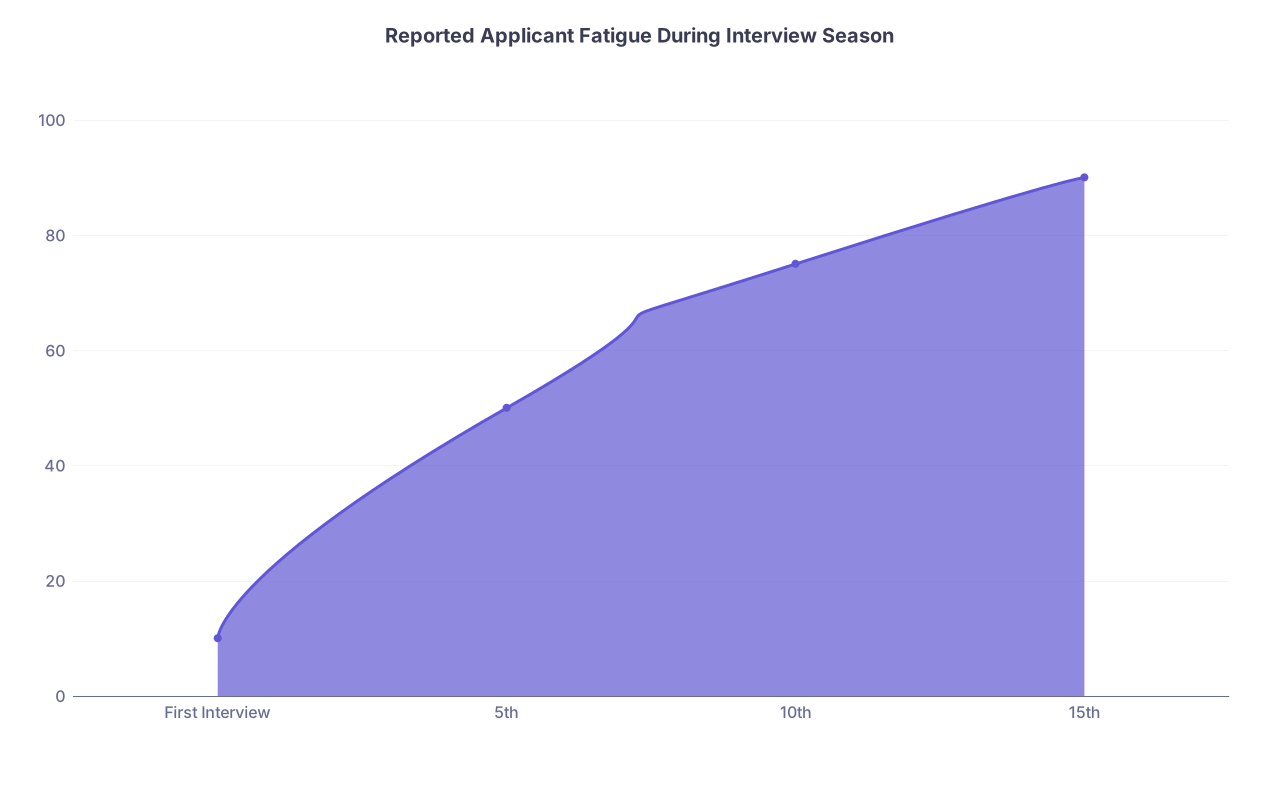
12. Underestimating Fatigue and Burnout On Screen
After your 6th or 10th Zoom interview day, you will be tired. Your face will hurt from smiling. Your brain will be mush. Programs will still expect energy, clarity, and professionalism.
Common late-season Zoom errors:
- Monotone voice that sounds bored or annoyed.
- Recycled, generic answers that sound lifeless.
- Confusing one program with another on camera. (“I’m really excited about your strong cardiology exposure” to a program that barely has a cardiology service. Yes, I have seen this.)
| Category | Value |
|---|---|
| First Interview | 10 |
| 5th | 50 |
| 10th | 75 |
| 15th | 90 |
Build systems to protect your performance
You are not a machine. So do not act like one.
- Space interviews when possible. Do not stack three full days back-to-back if you can avoid it.
- Before each day, review your notes about that specific program to avoid mixing them up.
- Have a short pre‑interview ritual: 5 minutes of walking, stretching, or deep breathing to wake up your voice and face.
- Between sessions, stand up. Do not just doomscroll on your phone in the same chair.
If you let Zoom fatigue win, your later interviews will suffer. Programs will think you are disinterested when you are just exhausted.
FAQ (Exactly 3 Questions)
1. Is it acceptable to use my phone for a Zoom residency interview if I do not have a good laptop?
Use a phone only as an absolute last resort. Most phones have good cameras, but the stability, audio, and screen size are worse for an interview. If you must use a phone: get a stand so it is stable at eye level, use wired headphones with a mic, and plug into power. But if there is any way to borrow or use a proper laptop or desktop with a larger screen and stable setup, do that instead.
2. How formal should my clothing be for a virtual interview compared with in-person?
Aim for the same level of formality as in-person: suit or equivalent. The mistake people make is “downgrading” because it is on Zoom. Programs still expect professional attire. Do not experiment with patterns that moiré on camera (tight stripes, loud prints). Solid, neutral colors are safest. And yes, you should wear proper pants, not just a top. People stand up on camera more often than they expect.
3. If something goes wrong (internet drops, noise, tech issues), how do I recover without looking unprepared?
Own it briefly, do not over-apologize, and move on fast. For example: “I apologize, my connection just dropped for a moment. Thank you for your patience.” Then continue your answer clearly from the last coherent point. What looks bad is panic, blaming others, or spending two minutes explaining your router problems. Have a backup plan—hotspot, alternate room—ready beforehand so if something fails, you can pivot quickly. Programs forgive problems; they do not forgive chaos.
Final Key Points
- Zoom does not lower the bar for professionalism; it raises the visibility of every mistake.
- Most “unprepared” impressions come from fixable issues: camera angle, lighting, audio, background, and tech rehearsal.
- Every moment on screen—from socials to big group sessions—is part of your interview; act like it, and you will already be ahead of many of your peers.