
The worst part of virtual residency interviews isn’t the questions. It’s the sheer terror that your Wi‑Fi will die mid-sentence.
You can prep behavioral answers, rehearse your “tell me about yourself” a hundred times, and still feel like one unstable router is going to tank your entire career. I’ve watched people spiral over this. Refreshing speed tests at 1 a.m. the night before. Carrying their laptop charger around like a security blanket.
You’re not crazy for worrying. Programs do remember the train wreck interviews. The frozen faces. The echo chamber audio. The candidate who disappeared for 10 minutes and came back sweating like they’d just sprinted a code.
But here’s the part nobody says clearly: tech issues almost never ruin you. Being unprepared for tech issues does.
Let’s fix that.
Step One: Assume Something WILL Go Wrong
Don’t plan for “maybe” glitches. Plan like the internet gods will pick your interview day to act up. Because sometimes? They do.
Your goal isn’t “no tech issues.” That’s fantasy. Your goal is:
If something breaks, you respond so calmly and professionally that it actually shows you can handle chaos. Like… a normal day in residency.
So instead of crossing your fingers, you build redundancy. Layers. Backup on backup.
Think like this:
- Zoom fails → you switch to Zoom in browser.
- Laptop dies → you switch to phone.
- Wi‑Fi dies → you use hotspot.
- Power dies → you move to your backup location.
You don't need perfection. You need enough redundancy that no single failure ends your interview.
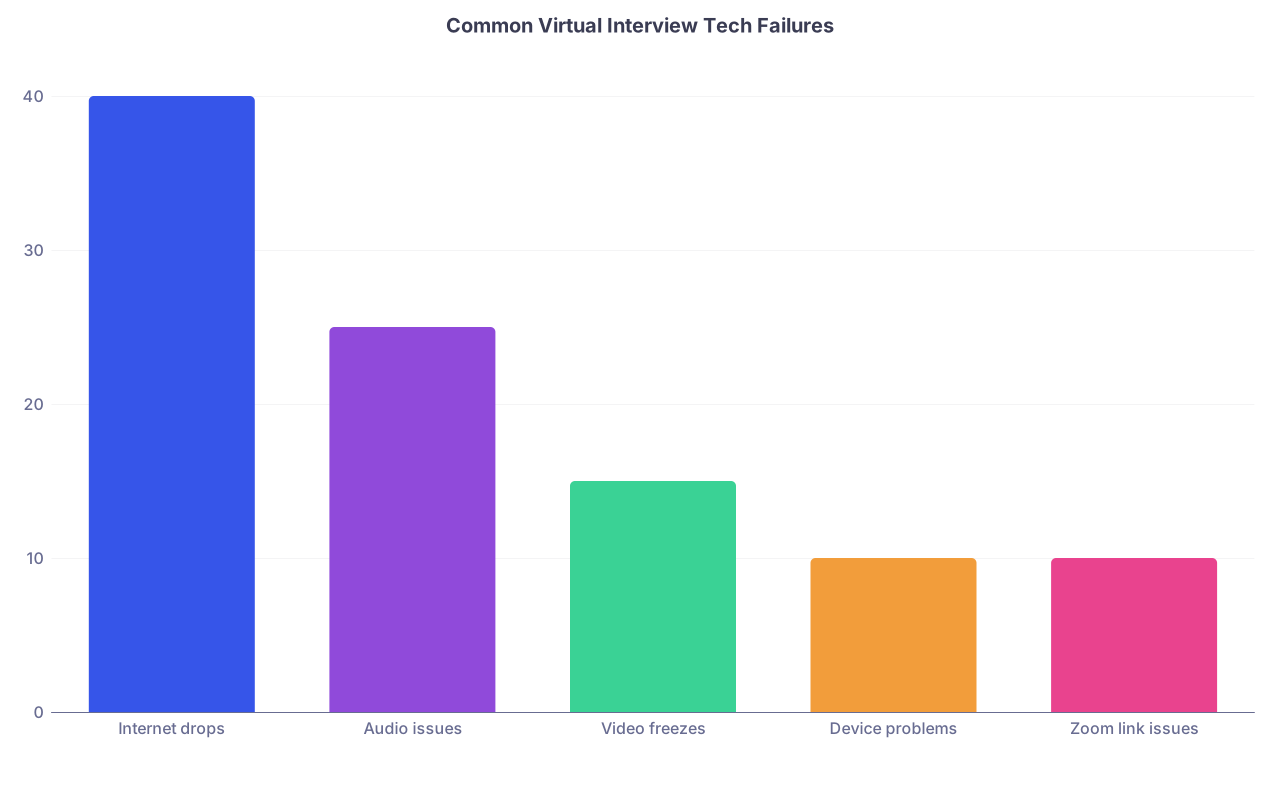
| Category | Value |
|---|---|
| Internet drops | 40 |
| Audio issues | 25 |
| Video freezes | 15 |
| Device problems | 10 |
| Zoom link issues | 10 |
I’ve watched people survive all of those and still match well. The ones who crash and burn are the ones who panic, apologize ten times, and never recover mentally.
We’re going to make sure you’re not that person.
Step Two: Build a Real Backup Tech Stack (Not Just “I Have a Phone”)
“I’ll just use my phone if something happens” is not a plan. It’s a wish.
You need a tested backup stack. Before interview season starts.
Your Primary Setup
Here’s what you want as your main setup, bare minimum:
- A computer you’ve actually used Zoom on, with the desktop app updated
- Wired power (no interviewing at 7% battery “but it should last”)
- Stable internet that you’ve tested at the same time of day as your interview
- Headphones or earbuds with mic, even if you think your laptop mic is “fine”
If your Wi‑Fi is sketchy, honestly, call your ISP and get a speed bump just for interview season, or hardwire Ethernet if possible. This is one of the few times spending money actually buys you peace of mind.
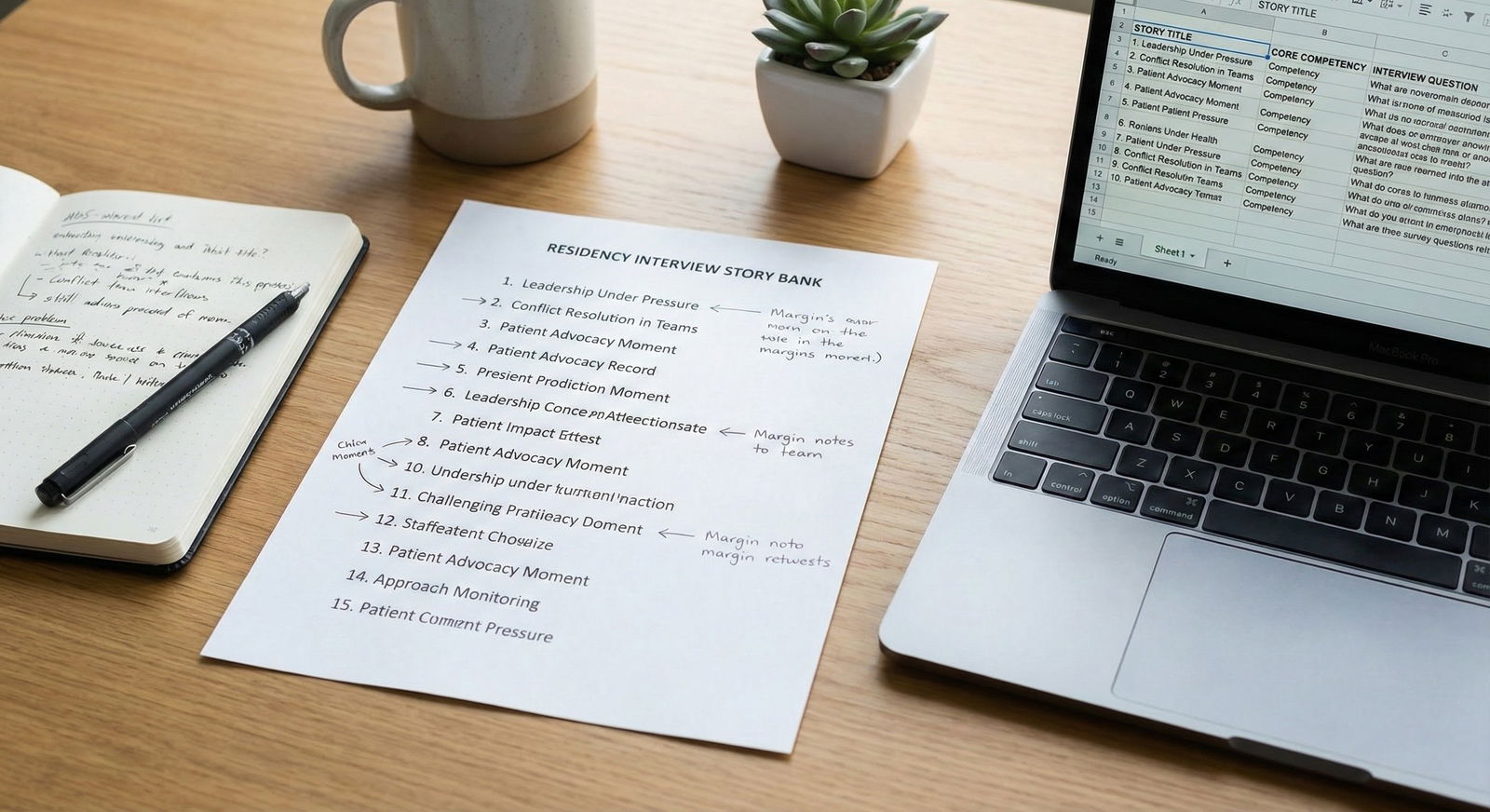
Your Backup Devices
You want two backup devices ready:
- Your phone with Zoom app installed, signed in, and notifications on
- A second device (tablet, old laptop, roommate’s computer) with Zoom app or browser ready
Actually join a test meeting on both. Make sure:
- Camera works
- Mic works
- It connects to your Zoom login or guest works with meeting links
Don’t just assume. I’ve seen people discover mid-interview that their phone mic needed permission, or their tablet camera was blocked by a case.
Your Backup Internet
You need a Plan B for internet that doesn’t rely on your main Wi‑Fi:
- Phone hotspot from your own data plan
- Backup location with reliable Wi‑Fi (see next section)
Test Zoom audio/video on hotspot before interview week. At the same time of day if possible. Some networks crawl in the evenings.
Step Three: Have At Least One Physical Backup Location
Staying home is great. Until your building’s internet goes out because someone decided that morning was perfect for “maintenance.”
You need at least one, preferably two, realistic alternative locations where you could do an interview on short notice.
Think:
- Friend’s or family member’s place with good Wi‑Fi and quiet space
- Hospital/med school library with reservable study rooms
- University study spaces you have access to
- Quiet coworking space if you can afford a day pass

Do a dry run somewhere else:
- Can you log into Wi‑Fi without weird login portals that drop every hour?
- Is there a door you can close?
- Any loud HVAC, construction, hallway noise, overhead announcements?
Have these ready the night before: address, access instructions, what time they open, where you’d sit. Save it in your phone notes as “Interview Backup Locations” so you’re not Googling in a panic at 7:45 a.m.
Step Four: Script Your “Something Broke” Line Now
The worst part of tech failure isn’t the glitch. It’s you, flustered, rambling apologies, losing your train of thought, and mentally replaying it for the next 20 minutes.
You need a scripted, rehearsed line for when something breaks. Short. Calm. Not groveling.
Use something like:
- “I’m so sorry about that, I had a brief connection issue. Thank you for your patience.”
- “My audio cut out for a moment there. Would you mind repeating the last question?”
- “It seems my Wi‑Fi dropped; I’ve switched to my backup connection now. Thank you for bearing with me.”
Say it out loud a few times now, so it doesn’t sound shaky or weird on the day.
And if things go really sideways and you get booted from the meeting entirely, your line when you get back:
“I apologize, my connection just dropped unexpectedly. I’ve switched to my backup setup and it should be stable now. Thank you for your patience.”
That’s it. Not a full monologue. Not, “This never happens, I swear, my internet is usually really good.” They don’t need a sworn affidavit from your ISP. They just want to move on.
Step Five: Pre-Write Your Emergency Email
You also need a drafted email sitting in your drafts folder for worst-case, true-disaster scenarios. Power outage. Full internet blackout. Zoom login meltdown. Whatever.
Something like:
Subject: [Your Name] – Technical Difficulties During Interview Today
Dear Dr. [Last Name] / Residency Coordinator,
I wanted to sincerely apologize for the technical issues during my interview today for the [Program Name] residency. I experienced [brief description: e.g., a complete internet outage in my building] that prevented me from maintaining a stable connection.
I’m very interested in your program and would be grateful for any opportunity to complete the remaining portion of the interview by phone or Zoom at your convenience.
Thank you for your understanding,
[Your Name]
AAMC ID: [ID]
Phone: [Number]
Copy it, tweak it, save it in your drafts with the subject line blank so you can customize quickly.
You probably won’t need it. But knowing it’s there actually drops anxiety by like 30%.
Step Six: Do a Real Mock Interview on Your Actual Setup
Not just “turn on Zoom and see my face.” A real practice.
Ask a friend, mentor, or advisor to hop on Zoom with you for 20–30 minutes and pretend to be a PD or chief resident. Use your exact interview setup: same room, same mic, same internet, same time of day.
Have them specifically check:
- Is your audio clear? Any echo, background noise, fan hum?
- Is your video bright enough? Are you backlit and shadowy?
- Is your background distracting or okay?
- Does the camera angle make you look like you’re looming or staring down?
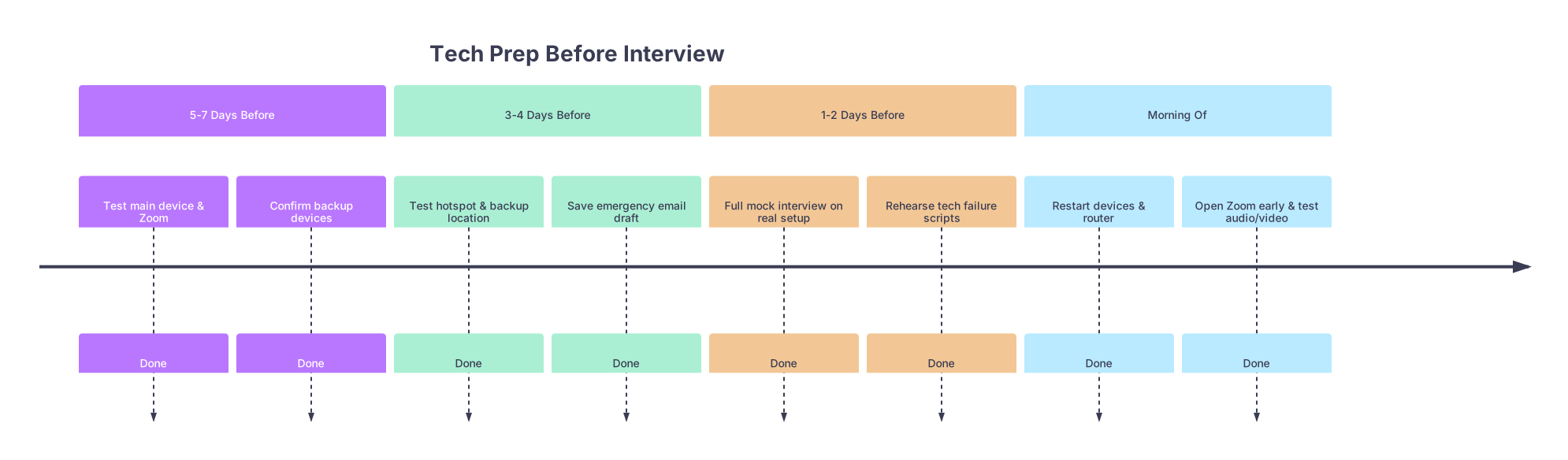
| Period | Event |
|---|---|
| 5-7 Days Before - Test main device & Zoom | Done |
| 5-7 Days Before - Confirm backup devices | Done |
| 3-4 Days Before - Test hotspot & backup location | Done |
| 3-4 Days Before - Save emergency email draft | Done |
| 1-2 Days Before - Full mock interview on real setup | Done |
| 1-2 Days Before - Rehearse tech failure scripts | Done |
| Morning Of - Restart devices & router | Done |
| Morning Of - Open Zoom early & test audio/video | Done |
If something feels off, fix it now. Move a lamp. Change walls. Grab cheaper wired earbuds if your fancy Bluetooth ones keep disconnecting.
You want zero surprises coming from your equipment.
Step Seven: Time Buffer and Morning Rituals (Yes, They Matter)
If your interview starts at 9:00 a.m., “clicking the Zoom link at 8:59” is not a thing you do if you’re already anxious about glitches.
Do this instead:
- Turn on your laptop at least 45 minutes early
- Restart your computer and router if you’re paranoid (lots of us are)
- Close every app that isn’t Zoom, calendar, or notes
- Log into Zoom 15–20 minutes before your scheduled time if there’s a waiting room
- Double-check: audio source, video source, name showing correctly
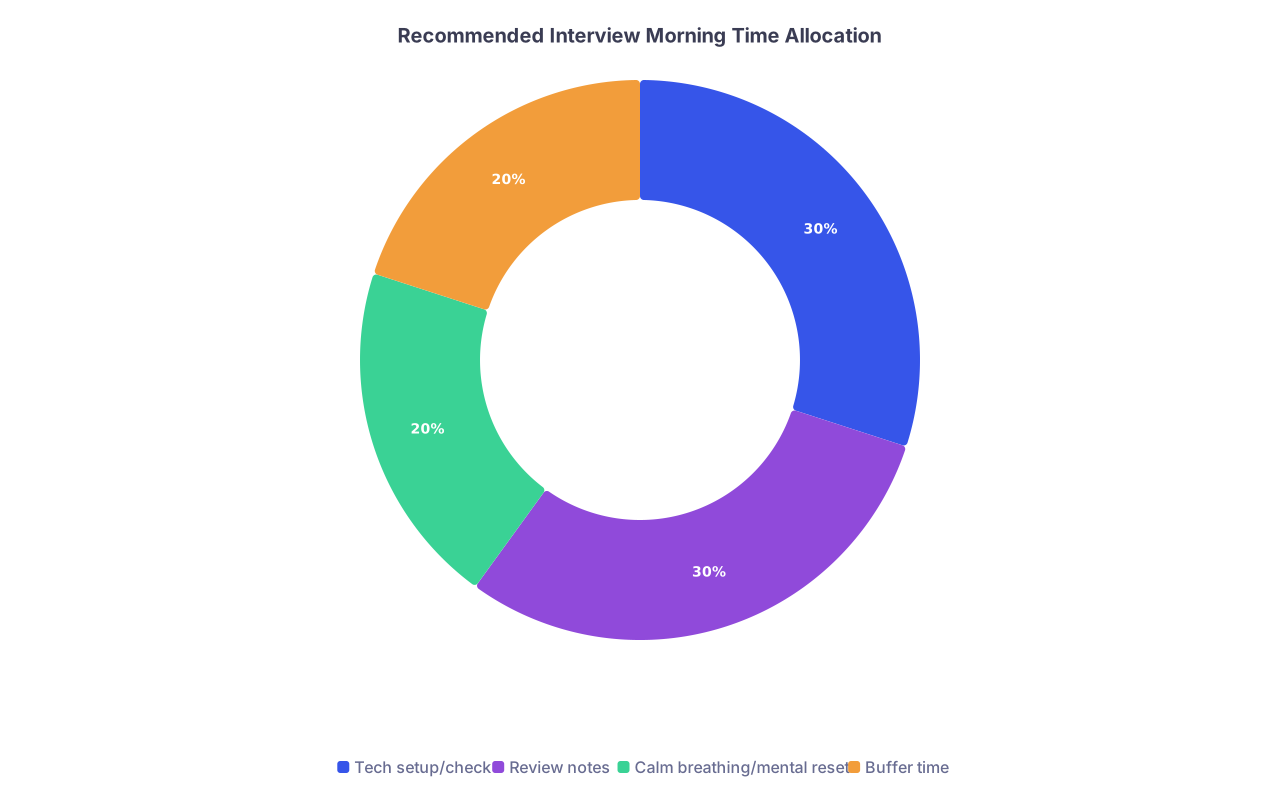
| Category | Value |
|---|---|
| Tech setup/check | 30 |
| Review notes | 30 |
| Calm breathing/mental reset | 20 |
| Buffer time | 20 |
You need buffer time not just for “in case something breaks” but for your brain. If your earbuds decide to randomly not connect at 8:47, you still have time to switch to wired and not walk in frazzled.
Step Eight: What If Everything Really Does Go Wrong?
Let’s walk through the true nightmare scenario. Because your anxious brain is doing it anyway.
Say:
- Your Wi‑Fi dies
- You get kicked from Zoom mid-answer
- Your laptop freezes when you try to rejoin
- You end up on your phone, late, flustered, sweating
- The audio is a little choppy
Is that ideal? No. Is that an automatic rejection? Also no.
Here’s what programs actually care about in that disaster:
- Did you communicate clearly what was happening?
- Did you try reasonable fixes (rejoin, backup device, hotspot)?
- Did you stay reasonably calm and respectful?
- Did you still show who you are once things stabilized?
You are not being evaluated on “internet perfection.” You’re being evaluated on how you handle stress and unpredictability. Which, last time I checked, is 80% of residency.
If it gets so bad that you literally can’t complete the interview, that’s when you send the emergency email. Short. Professional. Interested. No drama.
I’ve seen PDs reschedule. I’ve seen them move mid-interview to phone. I’ve seen someone match to a competitive program after doing half their interview by audio-only because their video kept cutting out.
What killed people was not the tech. It was giving up mentally because they thought the tech had already killed them.
Quick Comparison: Prepared vs Unprepared Candidate
| Aspect | Unprepared Applicant | Prepared Applicant |
|---|---|---|
| Backup device | “I’ll just use my phone… I think” | Phone + tablet/laptop fully tested |
| Backup internet | None | Hotspot + backup location identified |
| Emergency script | Panicked rambling | Short rehearsed tech-failure lines |
| Email plan | Writes in a panic | Polished draft already in email drafts |
| Mental state | Spirals after glitch | Recovers and refocuses quickly |
You can’t force the internet to behave. You can choose which column you’re in.
The Part You Really Need to Hear
You’re not behind because you’re this anxious about Zoom. A lot of people are pretending they’re chill and then obsessively checking their ping speed in private.
You’re actually ahead if you use that anxiety to build systems now, while you still have time. Anxiety is awful as a lifestyle, but it’s incredibly useful as a planning tool.
Set up the backups. Test them. Write the scripts. Save the email. And then, on interview day, when something small goes wrong—as it almost always does—you’ll feel this weird thing:
“Oh. I actually have a plan for this.”
And that feeling? That’s what lets you come across as steady, thoughtful, and resilient—even when Zoom is trying to sabotage you.
Years from now, you probably won’t remember whether your video froze for five seconds. You’ll remember that you kept going anyway.
FAQ – Zoom Glitch Panic Edition
1. If my Zoom cuts out during a critical question, am I basically done?
No. Annoying? Yes. Fatal? Almost never. When you reconnect, calmly say: “I’m sorry, my connection dropped for a moment. Would you mind repeating the question about [topic]?” Programs care much more about how you recover than the fact that it happened. I’ve known applicants whose video cut out multiple times who still got ranked highly because the conversation when it worked was strong and they stayed composed.
2. Is it unprofessional to do an interview from my phone if my laptop fails?
Not if you handle it like an adult. Ideally, you start on a laptop. But if something crashes and you rejoin quickly from your phone, explain once: “My laptop suddenly froze, so I’ve switched to my phone. The connection should be stable now.” Make sure your phone is propped up at eye level, not in your hand or at chin- or nose-angle. I’d rather see a stable, well-positioned phone setup than someone vanishing completely.
3. Should I tell programs in advance that my internet is unstable?
Usually, no. That can sound like, “Expect this to be a mess.” Instead, quietly build backups: hotspot, backup location, tested devices. If you already know you’ll be at a known-bad location (like overseas with very questionable Wi‑Fi), you can send a brief heads-up the week before only if you’re also proposing a solution, like confirming that phone audio-only is acceptable if video drops.
4. How many tech issues is “too many” before they judge me?
There’s no magic number, but here’s the reality: one or two brief glitches that you recover from? Fine. Even a 3–5 minute interruption that you handle maturely? Usually fine. An entire interview where you’re cutting in and out every 30 seconds and can’t answer anything fully—that’s when it truly hurts. Your job is to minimize that risk with backups, not chase “zero issues.” Programs understand everyone’s on Zoom. They’re having their own glitches on their end too.
5. I had a previous interview completely derailed by tech issues. Is that going to ruin my whole season?
No. One bad or chaotic interview does not sink an entire application cycle. Everyone has at least one interview that goes sideways—tech, nerves, weird vibes, whatever. You don’t need perfection across the board; you need enough solid impressions. Use that bad experience to adjust your setup, strengthen your backup plans, and refine your mindset. The point isn’t never having a disaster. The point is not letting one disaster infect the rest of your season.