
You are sitting in a borrowed conference room on Monday of SOAP week.
Your ERAS portal is open on one screen, email on another, your phone is buzzing with unknown numbers, and your dean’s office just sent a “call us ASAP” message.
You know every minute matters.
You also know that if you start winging it—random calls, scattered notes, panicked emails—you are going to miss something that actually mattered.
Here is how to run SOAP communication like an organized, ruthless operation instead of a frantic scramble.
1. Set Up Your Command Center Before SOAP Starts
If you are already in the middle of SOAP, do this right now. It will still help.
A. Physical setup
You want one place where everything happens. Not your couch. Not your car.
Minimum viable setup:
- Quiet room with a door that closes (library study room, school conference room, home office)
- Power outlets and chargers for:
- Laptop
- Phone
- Optional: second device (tablet or second laptop)
- Headphones with mic (for clearer calls, less background chaos)
- Pen + paper or notebook reserved only for SOAP
Label the notebook’s first pages:
- Page 1–2: “Master Program Log”
- Next pages: “Call Scripts”
- Then: “Email Templates / Notes”
You are going to use those, not improvise.
B. Digital setup
Have these open as separate, visible windows or screens:
- ERAS SOAP portal (main screen)
- Email (Gmail/Outlook) with notifications ON
- Calendar (for interview / call scheduling)
- Simple spreadsheet or note app (if you prefer digital tracking over paper)
Folder your email:
- Create folders/labels:
- “SOAP – Programs”
- “SOAP – School”
- “SOAP – Letters / Docs”
- “SOAP – Admin / NRMP”
This sounds trivial. It is not. When an offer drops and you are scrolling junk to find the right email, you will remember I told you so.
2. Build a Simple Tracking System You Actually Use
You need one master list that tells you, at a glance, who you have contacted, who responded, who interviewed you, and who might be about to call.
Use paper or a spreadsheet—does not matter. It just has to be complete and consistently updated.
Here is a simple table structure that works:
| Field | Example Entry |
|---|---|
| Program Name | University Hospital – IM Prelim |
| ACGME/NRMP Code | 123456789 |
| Contact Person | Dr. Jones / Ms. Rivera |
| Contact Info | phone, email |
| First Contact (date/time) | Mon 12:45 PM – Email |
| Last Contact | Tue 8:10 AM – Phone |
| Status | Interview scheduled / Pending |
Add columns if you want, but do not overbuild. Under stress, complicated systems die.
On your paper “Master Program Log” or spreadsheet, track:
- Program name and code
- Specialty and prelim/advanced/categorical
- How they contacted you (ERAS message, email, phone)
- What you did:
- Called (time + outcome)
- Emailed (time + topic)
- Interview scheduled? (date/time/platform)
- Current status:
- No response
- Awaiting interview
- Interviewed
- Rejected / not ranked
- Offer received (with timestamp)
Every time something happens, update this immediately. During SOAP, your memory is useless.
3. Know the Rules and Timelines Cold
SOAP is not a normal job search. There are hard rules and weird timing.
Before SOAP starts (or right now, if it already has):
- Read NRMP SOAP rules for:
- When you can contact programs
- How programs may contact you
- What counts as an offer and how long you have to accept
- Clarify with your dean’s office:
- Are they communicating with programs on your behalf?
- How will they loop you in? (email, text, phone)
- Who is your point person?
The reason this matters: you cannot mass-email programs outside the approved window or ignore an offer while “thinking about it” for hours. That is how people lose positions.
4. Establish Communication Priorities Hour by Hour
During SOAP, everything feels urgent. It is not. Some things are more urgent than others.
Here is a priority stack that works during active SOAP hours:
Incoming phone calls from unknown numbers
- High chance it is a program or coordinator.
- Answer unless you are actively on another important call.
- If you miss it, call back immediately. Do not wait and hope they call again.
ERAS / NRMP messages
- Program messages in ERAS often precede email.
- Check the portal every 10–15 minutes during peak hours.
Emails from program domains
- Anything from
@hospital.org,@university.edu, or obvious residency program domains.
- Anything from
Emails / calls from your school
- Deans, advisors, student affairs—they may be coordinating behind the scenes or relaying messages.
Text messages
- If a program or coordinator uses text (less common but does happen), treat as near-real-time.
Everything else
- Friends asking “Any news?” goes to the bottom.
- Do not let social noise interrupt real opportunities.
To keep yourself sane, run in cycles:
- Every 10–15 minutes:
- Quick ERAS check
- Quick email scan (subject + sender)
- Constant:
- Phone ringer on, volume high, vibrate enabled
5. Handle Phone Calls Like a Professional, Not a Panicked Applicant
Your phone habits can make you or break you during SOAP.
A. Basic phone setup
Before SOAP:
Change voicemail greeting to something clear and neutral:
“Hello, this is [Name]. I am unavailable to take your call at the moment. Please leave your name, organization, a callback number, and the best time to reach you. I will return your call as soon as possible.”
Make sure:
- Voicemail is not full.
- Your phone name / caller ID is reasonable (not “BigMike1996”).
- Call recording is off unless you are in a one-party consent state and you know the law; honestly, just take written notes instead.
B. Answering unknown calls
When an unknown number calls during SOAP, you answer like this:
- Deep breath before picking up.
- “Hello, this is [First and Last Name].”
Not “Hello?” Not “Yeah?”
Have a notepad and pen in hand every time you answer.
C. Quick call script for programs
You do not need Shakespeare. You need clean, short, and confident.
If they introduce themselves first:
- “Thank you for calling, Dr. [Name] / Ms. [Name]. I appreciate the opportunity to speak with you.”
If they ask if it is a good time:
- Unless you are in the OR, the answer is “Yes, absolutely.”
If you truly cannot talk (driving, in clinic with a patient):- “I am available, but I am not in a private space for a full conversation. May I call you back in [X] minutes?”
Don’t push them out more than 15–20 minutes if at all possible.
D. Taking notes during calls
On your “Master Program Log”, jot down:
- Date/time of call
- Name and role of caller
- Key points:
- Interview offer?
- Time options given?
- Any instructions (Zoom link to follow, documents to send, etc.)
- Tone / any hints about their timeline
Right after the call, before you move on, fill out the row completely.
6. Coordinating Emails Without Drowning in Your Inbox
Email during SOAP is where people lose time and miss things. Because they either overwrite every message or barely respond.
You are going to use templates with minor tweaks. That keeps you fast and professional.
A. Pre-build 3 core templates
Type these once into a document so you can copy-paste and edit.
- Initial reply to program interest / interview offer
“Subject: Re: [Program Name] – SOAP Interview
Dear [Dr./Ms./Mr. Last Name],
Thank you very much for reaching out and for considering my application for the [specialty, PGY level] position at [Program Name].
I would be very interested in speaking with you and learning more about your program. I am available at the following times: [provide 3–4 clear options in the program’s time zone].
If there are specific documents or details you would like from me in advance, I will be happy to provide them.
Best regards,
[Full Name]
AAMC ID: [ID]
Phone: [number]”
- Thank-you / follow-up after brief phone screen or interview
“Subject: Thank you – [Your Name], [Program Name]
Dear [Dr./Ms./Mr. Last Name],
Thank you for taking the time to speak with me today about the [specialty, PGY level] position at [Program Name]. I appreciated the chance to learn more about your program and the way you [one specific detail from the conversation].
I remain very interested in the opportunity to train at [Program Name] and would be excited to contribute to your team.
Please let me know if I can provide any additional information.
Sincerely,
[Full Name]
AAMC ID: [ID]
Phone: [number]”
- Scheduling confirmation
“Subject: Interview Confirmation – [Your Name], [Date/Time]
Dear [Dr./Ms./Mr. Last Name],
I am writing to confirm our interview scheduled for [Day, Date] at [Time, Time Zone] for the [specialty, PGY level] position at [Program Name].
Thank you again for the opportunity. I look forward to speaking with you.
Best regards,
[Full Name]
AAMC ID: [ID]
Phone: [number]”
These do not need to be perfect. They do need to be ready ahead of time.
B. Email response rules during SOAP
Aim to respond to any program email within:
- 10–15 minutes during business hours
- 30–60 minutes outside that, if possible
Keep messages:
- Short
- Polite
- Specific (time zones, positions, your name and AAMC ID included)
Use clear subjects:
- “Re: SOAP – [Specialty] Position at [Program Name]”
- “Interview Confirmation – [Date/Time] – [Your Name]”
Do not write essays. No one has time to read them.
7. Using ERAS Updates Without Missing Critical Messages
ERAS during SOAP is both your scoreboard and your inbox.
You want to use it deliberately, not randomly refresh out of anxiety.
A. What to watch in ERAS during SOAP
- Program messages
- Invitations / interview links (some programs use ERAS messaging instead of direct email)
- Status changes:
- New programs you applied to
- Withdrawals (if applicable)
- Offers or notifications
Set a simple pattern:
- Refresh every 10–15 minutes during active SOAP windows.
- Every time you refresh:
- Scan new messages
- Cross-check any new activity with your Master Program Log
If ERAS messages and email conflict (it happens):
- Use the most recent timestamp as your guide.
- If in doubt—reply to both:
- In email: “I also saw your message in ERAS and wanted to confirm by email as well.”
B. Do not rely on one channel
Some programs:
- Message via ERAS only
- Email from a generic GME account
- Call you directly from a clinic phone line
You have to assume any of these might be used.
So your pattern is:
- ERAS refresh
- Quick email scan
- Phone always ready
8. Synchronizing Calls, Emails, and ERAS: A Simple Workflow
You want one integrated workflow, not three parallel chaotic streams.
Here is a simple cycle you can follow during SOAP activity hours:
Phone rings → answer → take notes
- Immediately after call:
- Update Master Program Log
- If action needed (email confirmation, calendar hold, ERAS check), do it before taking any other calls/emails.
- Immediately after call:
New email from program → open immediately
- If it is:
- Interview offer → reply with availability, update Log, create calendar event.
- Request for documents → send requested files, confirm in email, log.
- Then mark as “flagged” or move to “SOAP – Programs” folder.
- If it is:
ERAS message appears → read → act
- If it is:
- Program reaching out → locate corresponding email (if any), respond via their requested channel, log.
- Formal notification (e.g., rejection) → mark status in Log and move on (do not waste emotional energy here; focus on live options).
- If it is:
Every 30–60 minutes → quick review
- Scan Log:
- Any “awaiting response from me”? Fix those.
- Any “no response from program since X”? Decide if follow-up email is reasonable and allowed within SOAP rules.
- Scan Log:
This cycle keeps you from reacting randomly. You are processing, then resetting, then scanning forward.
9. Protect Yourself From Unforced Errors
People sabotage SOAP communications with avoidable mistakes. I have seen:
- Missed calls because phone was on silent “to reduce stress.”
- Emails sent with wrong program name because templates were copy-pasted sloppily.
- Double-booked interviews because nothing was written down.
Here is how you avoid the predictable screwups.
A. Common mistakes and concrete fixes
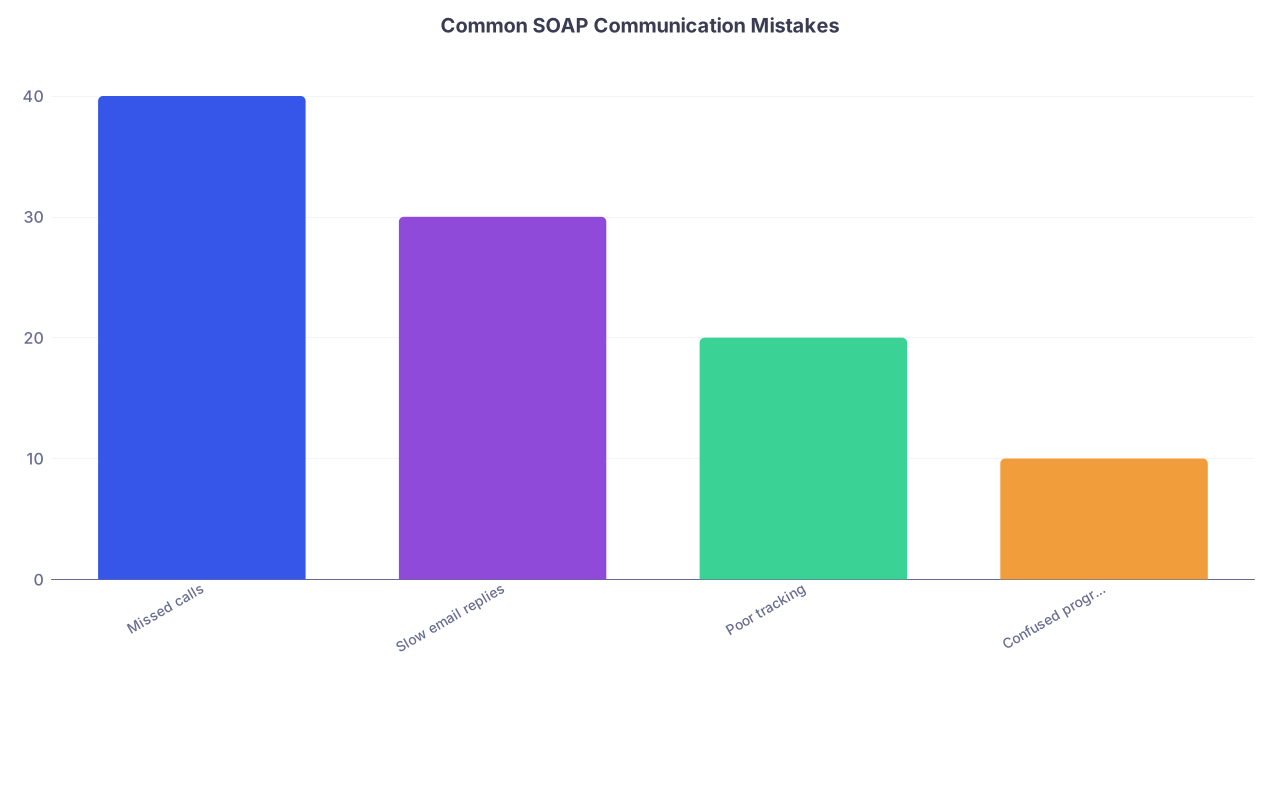
| Category | Value |
|---|---|
| Missed calls | 40 |
| Slow email replies | 30 |
| Poor tracking | 20 |
| Confused program names | 10 |
1. Missed / ignored calls
- Fix:
- Ringer high, vibrate on.
- Phone physically on the table, not in another room.
- No “Do Not Disturb” during SOAP windows.
2. Slow or messy email replies
- Fix:
- Pre-built templates.
- Keep subject lines program-specific and clear.
- Quickly proofread the program name and specialty before sending.
3. No tracking system
- Fix:
- Pick paper or spreadsheet. One. Not both plus random sticky notes.
- Update immediately after any interaction.
4. Mixing up programs
- Fix:
- Always include program name and specialty in:
- Email subject
- First line of your reply
- Before interviews, read your own Log entry on that program for 2 minutes.
- Always include program name and specialty in:
10. Working With Your School Without Getting Slowed Down
Your dean’s office can help or hinder. The way to make them an asset is to be clear and proactive.
A. Clarify roles early
Ask directly:
- “Are you reaching out to any programs on my behalf?”
- “If a program contacts you first, how will that be communicated to me?”
- “If I get an offer or an interview, do you want to be informed in real time, or just updated later?”
Then write down:
- Name and direct line of your main SOAP advisor
- Best backup contact if they are unavailable
B. Keep them in the loop without losing time
When something substantial happens (interview offer, strong interest, tentative commitment), send a short update:
“Subject: SOAP Update – [Specialty/Program]
Hi [Dean/Advisor Name],
Quick update: [Program Name, Specialty, PGY level] contacted me today. We [scheduled an interview / completed an interview]. It is scheduled for [Date/Time].
I will keep you posted on outcomes.
Best,
[Your Name]”
You are not writing novels. You are giving them enough information to advocate for you if they get a call from that program.
11. Time Management and Mental Bandwidth During SOAP
You are not a robot. After a few hours, your decision quality drops, and your email errors increase.
You cannot afford those.
A. Use intentional mini-breaks
Build micro-breaks into low-activity stretches:
- 5-minute walks (phone with you, volume up)
- 5 minutes to stretch, drink water, reset
Set a timer if you need to. The point is to avoid 8 straight hours of staring at ERAS and inventing imaginary offers.
B. Use a simple daily structure
During SOAP days, your schedule might roughly look like:

| Step | Description |
|---|---|
| Step 1 | Start Day - Log In |
| Step 2 | Check ERAS Messages |
| Step 3 | Scan Email |
| Step 4 | Review Master Log |
| Step 5 | Respond and Update Log |
| Step 6 | Prepare for Interviews |
| Step 7 | Short Break or Next Task |
| Step 8 | Incoming Call or Email? |
Not complicated. Just structured enough that you are not mindlessly refreshing portals.
12. After an Offer: Communication in the Last Crucial Minutes
The most chaotic moment in SOAP is when an offer appears or is communicated.
You have limited time. You must be decisive and clean in your communication.
A. When you receive an offer
Steps:
Confirm the details verbally or in writing:
- Specialty
- PGY level
- Start date
- Program name
Ask any absolutely critical clarifying questions:
- “Is this a categorical or prelim position?”
- “Is this a one-year position or guaranteed to continue if performance is satisfactory?”
Decide within the allowed timeframe. Do not play games. If this is an offer you can live with, you take it.
Once you accept:
- Confirm in writing:
- “I am confirming that I accept the [specialty, PGY] position at [Program Name] as offered.”
- Update Master Program Log.
- Immediately stop pursuing conflicting offers per NRMP rules.
- Confirm in writing:
B. Communicating with other programs once you have accepted
You do not send long apology emails. You send short, clear notifications if needed:
“Subject: SOAP Update – [Your Name]
Dear [Dr./Ms./Mr. Last Name],
Thank you again for considering my application for the [specialty, PGY level] position at [Program Name]. I wanted to let you know that I have accepted a position through SOAP and am no longer pursuing additional opportunities.
I appreciate your time and consideration.
Sincerely,
[Your Name]”
Professional. Done. Move on.
13. Visual Summary of Your SOAP Communication System
This is roughly how all the pieces tie together:
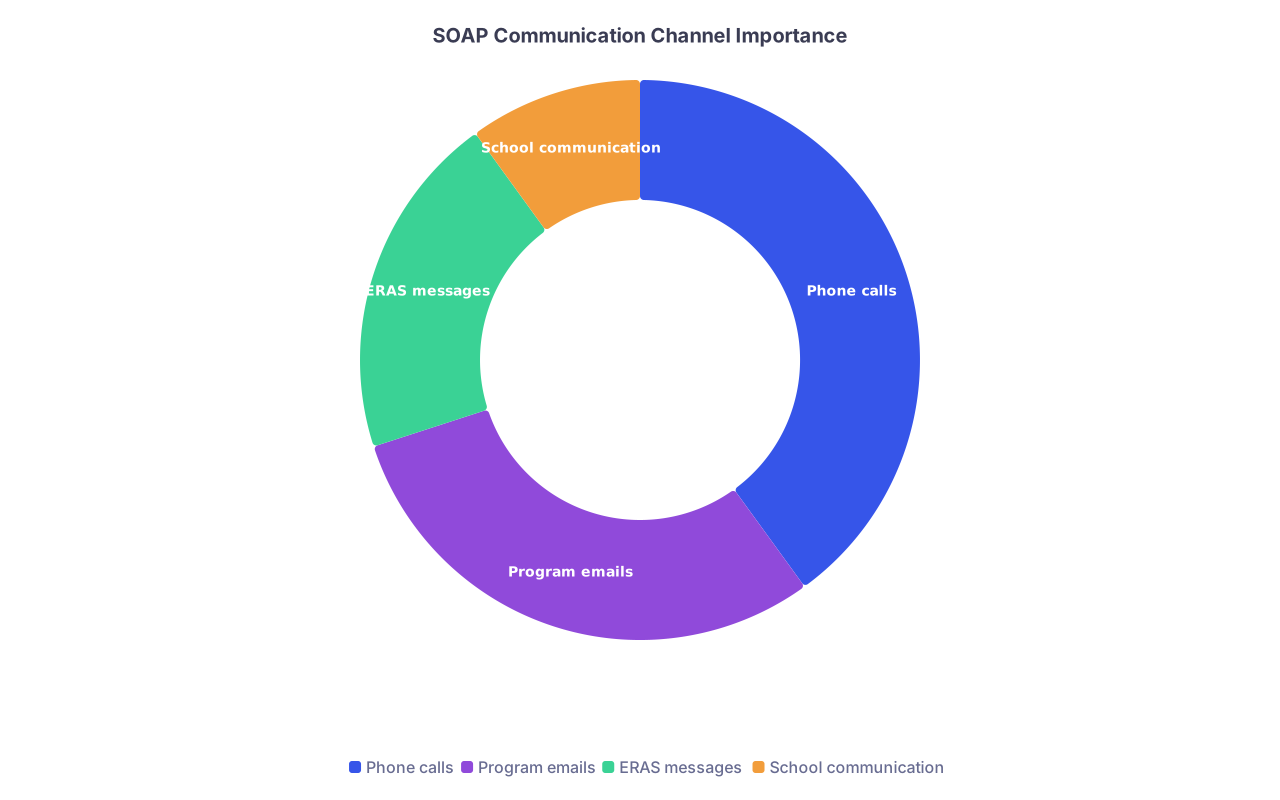
| Category | Value |
|---|---|
| Phone calls | 40 |
| Program emails | 30 |
| ERAS messages | 20 |
| School communication | 10 |
- Phone calls: live, highest-stakes, most time-sensitive
- Emails: documentation and scheduling backbone
- ERAS: official hub and message center
- School: support channel and sometimes backdoor advocate
You are coordinating all four, not living in just one.
And yes, having even a basic visual like this printed or scribbled on paper can remind you where to focus when your brain is fried.
FAQs
1. Should I cold-call programs during SOAP if I have not heard from them?
No. Blind calling programs you applied to during SOAP generally does not help and can backfire. Most programs are drowning in applications and following their own internal process. What you can do:
- Respond instantly and professionally to any contact they initiate.
- Ask your dean or advisor if they have relationships with specific programs and whether it is appropriate for them to reach out quietly.
- Focus your energy on programs that show concrete interest.
Unsolicited calls from applicants in the middle of SOAP often land as desperate and intrusive. Do not be that person.
2. How many follow-up emails are appropriate if a program goes silent?
One, maybe two at most, and only when it makes sense.
If a program:
- Offered you an interview and you confirmed → No follow-up unless you have not received the promised link / details within a reasonable timeframe.
- Expressed interest but did not schedule → You can send a short, polite follow-up after 24–48 hours.
- Has never contacted you directly → Do not spam them. They saw your application.
The follow-up should be short: confirm your interest, restate your availability, and thank them. If there is no response, you move on and keep your communication sharp for programs that actually engage.
Two key points to walk away with:
- You are running a live operation, not just “checking messages.” Command center, tracking system, and clear priorities turn chaos into something you can manage.
- Fast, professional, consistent responses across phone, email, and ERAS will not guarantee you a spot, but sloppy communication can absolutely lose you one. Do not let that be the reason.