
It is September 7th. You hit “Certify and Submit” on your ERAS at 9:02 AM because everyone online said, “Submit the first second it opens or you are dead.”
Now it is two weeks later.
You have:
- An updated Step 2 CK score pending
- A new letter promised from the PD of your away rotation
- A poster accepted to a national conference
- And you just noticed a small but sickening error in one of your experiences
You are asking yourself:
“Did I submit too early? Can I fix this? Can I update programs without looking chaotic or desperate? And what actually helps versus what just annoys coordinators?”
Here is the blunt answer:
You probably did not ruin your cycle.
But you do need a plan.
This is that plan.
1. What “Submitting Too Early” Really Means (And What It Does Not)
The panic usually starts when you see posts like:
- “PD told us they only look at what is there on Day 1.”
- “If your Step 2 is not in by the opening date you are done.”
- “My advisor said never email programs, it looks desperate.”
Most of that is half-true and badly oversimplified.
What early submission actually affects
Early submission influences:
- When you enter the initial download batches many programs run
- Whether your application is “complete” by their internal review date
- First impression based on what is present on the initial PDF they pull
What it does not permanently affect:
- Your ability to:
- Add letters
- Upload a new personal statement
- Update program signaling (through ERAS rules only, not by email)
- Send critical updates (scores, major honors, significant publications)
ERAS is not a stone tablet. Programs know applications evolve during the season. I have seen PDs filter again in October specifically to pull “now has Step 2” people.
When “too early” actually hurts
You genuinely submitted “too early” if:
- You certified ERAS before a critical element you knew was imminent:
- Step 2 CK score that was your main redemption strategy
- A crucial home or away LOR that completely reframes your file
- A major red-flag explanation you forgot to include, such as a leave of absence
- You submitted with:
- Obvious formatting issues in personal statements
- Wrong specialty name in multiple PSs
- Severe experience inaccuracies (wrong dates, wrong roles) that could be seen as dishonesty
Even then, this is usually fixable. But it requires structured updates, not random “FYI” emails.
2. What You Can and Cannot Change After Certifying ERAS
Before you start firing off updates, you need to know what levers you actually have.
| Item | Change Allowed After Certification? |
|---|---|
| Personal Statements | Yes (edit & reassign per program) |
| Letters of Recommendation | Yes (add & assign new letters) |
| USMLE/COMLEX Score Reports | Yes (release new scores) |
| Experiences Section Content | No (cannot edit text or dates) |
| Publication List | No (experiences section is locked) |
| Program List (where you apply) | Yes (add new programs anytime) |
Things you can still change or add
Personal Statements
- You can upload new versions and assign different ones to different programs.
- You cannot “pull back” what a program already downloaded, but many programs re-open the file before interviews.
Letters of Recommendation
- You can:
- Add new letters
- Change which letters go to which program (as long as they have not downloaded yet; after download, they see the original set)
- Late strong letters are often worth sending; I have seen them directly tip someone into an interview.
- You can:
Scores (Step 2, COMLEX Level 2, etc.)
- You can release updated transcripts as new scores post.
- Many programs run periodic “update pulls” for new scores through October.
New Programs
- You can add and pay for new programs any time in the season.
Things you are stuck with
Experience entries
- Titles, dates, descriptions—locked.
- This is where painful typos live permanently.
Publications listed inside experiences
- Also locked. New publications will have to be:
- Briefly mentioned in an update email
- Or, better, highlighted during interviews
- Also locked. New publications will have to be:
Certain demographics/background fields
- Name, AAMC ID, school, graduation year—fixed.
So: once you certify, your official ERAS “skeleton” is set. Everything else you do from here is about updates and signaling.
3. A Prioritized Update Strategy: What Is Worth Pinging Programs About
Now the real question: What is update-worthy and what is noise?
Here is a simple hierarchy.
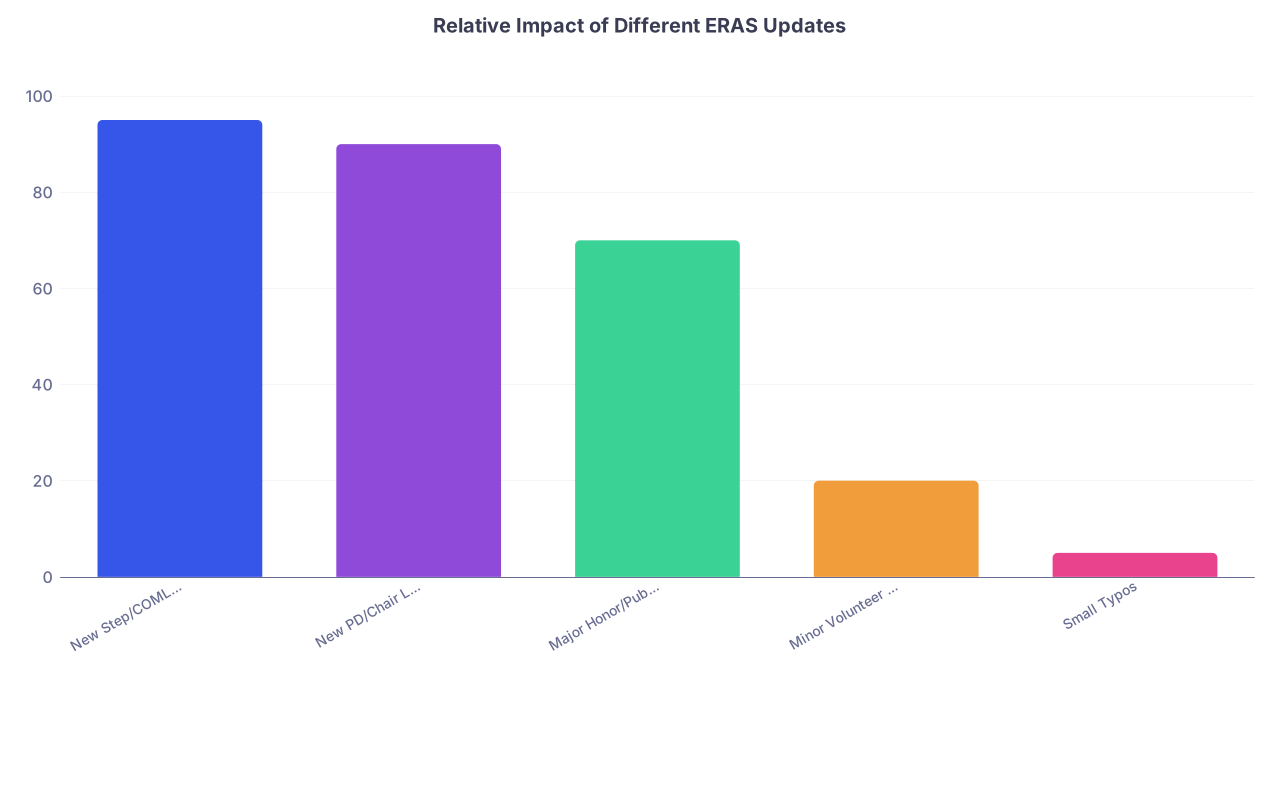
| Category | Value |
|---|---|
| New Step/COMLEX Scores | 95 |
| New PD/Chair LOR | 90 |
| Major Honor/Publication | 70 |
| Minor Volunteer Hours | 20 |
| Small Typos | 5 |
High‑value updates (you should send something)
These are worth communicating to programs, especially before they finalize interview invites.
Step 2 CK or COMLEX Level 2 score that improves your profile
- Example: Step 1 pass with concern, now Step 2 = 254. That changes where you sit in the pile.
- Or COMLEX 1 mediocre, COMLEX 2 strong.
Use:
- Automatic ERAS transcript update
- Optional short email to priority programs (more on how later)
Powerful new LORs
- PD letter (home or away) for that specialty
- Department Chair letter for competitive fields (Derm, Ortho, ENT, etc.)
When is an email justified:
- For home and away programs: yes
- For top 10–15 “reach/priority” programs you genuinely would rank highly: usually yes
- For every single program on your list: no, too noisy
Major academic or professional wins
- First‑author paper accepted in a solid journal
- National oral or poster presentation in the specialty
- Major award/honor (Alpha Omega Alpha, Gold Humanism, national society recognition)
These are high‑yield if:
- They are directly relevant to the specialty
- Or they clearly elevate your academic narrative
Medium‑value updates (conditional)
These may justify a targeted update if:
- You are borderline for that specialty, and
- You are reaching out to a short, curated list of programs
Examples:
- New ongoing research position in the field
- Leadership role in a national specialty‑specific organization
- Substantial new clinical responsibility (chief extern, significant QI project implementation)
These are most effective when:
- Tied to the program’s strengths (e.g., you are joining a diabetes QI project and the program has a big endocrine/QI track)
Low‑value or “noise” updates (don’t send)
Do not email programs about:
- “I completed 20 more hours of volunteering at the free clinic.”
- “I joined a new student interest group.”
- “I corrected a typo in my experiences.”
- “I changed my personal statement slightly.”
- “Just wanted to reiterate my strong interest.” (with zero new content)
Program coordinators get buried in vague “interest updates” that say nothing new. You do not want to be part of that noise.
4. How to Communicate Updates Without Looking Desperate
Your problem is not “Can I update?” It is “How do I update without looking scattered, needy, or unprofessional?”
Here is the protocol.
Step 1: Choose your priority tiers
Split your programs into 3 groups:
Tier 1 (Top 10–15 programs)
- Places you would be genuinely happy to match
- Often include home, away, geographic priority, or dream programs
- These are worth a well‑structured, personalized update
Tier 2 (Next 15–25 programs)
- You want interviews there, but they are not top dream tier
- Usually rely on automatic ERAS updates only
- Maybe a single mass‑style update if the new information is huge (e.g., Step 2 jump from 220 practice to 255 official)
Tier 3 (Everyone else)
- Do not email them unless:
- You have a very specific connection
- Or a PD/advisor explicitly tells you to
- Do not email them unless:
Step 2: Time your updates
General rule:
- Step 2 / COMLEX 2 scores
- As soon as they post and you release them—no delay.
- New PD/Chair LOR
- Once it is in ERAS and assigned to that program.
- New publication / big honor
- Once fully accepted (not “submitted” or “under review”).
Avoid the shotgun pattern of:
- Email Week 1: “Scores updated.”
- Email Week 2: “New letter.”
- Email Week 3: “Poster accepted.”
Combine when safe. Bundling updates into one strong message looks organized and respectful of their time.
Step 3: Use a professional, tight email format
Here is a template you can adapt.
Subject options:
- “ERAS Update – [Your Name], [Specialty] Applicant – Step 2 Score and New PD Letter”
- “Application Update – [Your Name] – New Publication and LOR”
Body:
Dear Dr. [PD Last Name] and [Program Name] Residency Selection Committee,
I am writing to share a brief update to my ERAS application for your [specialty] residency program.
Since submitting my application, I have:
– Received my Step 2 CK score: [###] (released through ERAS)
– Added a new letter of recommendation from [Name, Title, Institution], now assigned to your program
– [Optional, one more major item only: “Had a first‑author manuscript accepted in [Journal] on [brief topic].”]I remain very interested in [Program Name] because of [1–2 specific, genuine reasons that show you know the program].
Thank you for your time and consideration.
Sincerely,
[Full Name]
AAMC ID: [########]
Medical School: [School Name]
Key points:
- One paragraph of actual updates, bulleted.
- One short, program‑specific interest statement.
- No begging, no “I hope you strongly consider me.” The subtext is enough.
5. Fixing Mistakes and Typos Without Making It Worse
You noticed an error after submission. Welcome to the club.
Big question: When do you tell programs, and when do you shut up and move on?
Category A: Harmless / cosmetic errors
Examples:
- “I wrote ‘manger’ instead of ‘manager’ in an experience.”
- A minor date shift that does not change degree of involvement
- Repeated word or small grammar issue in the personal statement
Action:
Do nothing.
Every PD knows these forms are long and written under time pressure. Nobody rejects over a random typo.
Category B: Nontrivial but not ethical‑threatening errors
Examples:
- You wrote 850 hours of something that should have been 250.
- You slightly overstated a role (e.g., “co‑leader” when you were really a “committee member”).
- You mixed up start/end months but not years.
Action:
- Do not mass email every program. That dramatizes it.
- If you have an interview at a given program, clarify there:
- “I realized after submission that the hours were overestimated; the accurate number is closer to 250. I wanted to clarify that here.”
- If the error is large enough that it truly bothers you ethically:
- Consider a single, succinct update to your top Tier 1 programs:
- Brief statement correcting the data
- No self‑flagellation, just correction
- Consider a single, succinct update to your top Tier 1 programs:
Category C: Ethical/credibility landmines
Examples:
- You claimed “first author” but you are not.
- You listed a role you did not actually hold.
- You faked hours or involvement and now realize someone might verify it.
Action: You must fix this. Quietly, but directly.
Strategy:
Correct the record in an email to:
- Your home PD/advisor first (to get their guidance)
- Then to programs if advised, wording like:
I realized after submitting my ERAS application that I inaccurately listed my role for [Activity]. I was not [title]; my role was [accurate title]. I regret this error and wanted to correct it.
Understand this may cost you some interviews. But failing to correct it can cost you much more if discovered later (including contract termination).
The worst move is to hope it slides and then have it surface on a background check or via word of mouth.
6. Using New PS Versions and LORs to Undo Early Mistakes
Submitting early often means:
- You used a generic or weaker personal statement
- Your strongest LOR was not ready yet
- Your specialty focus sharpened after a late rotation
You can partially “rebuild” your application without recertifying.
Personal statements: targeted fixing
Here is how to use PS updates correctly:
Write a clean, specialty‑specific PS now
- Remove vague phrases like “any program where I can grow and learn”
- Add 2–3 specialty‑defining experiences/stories
- Make your “why this field” sharp and specific
Assign this improved PS to:
- All new programs you add from now on
- Any existing programs that:
- Have not yet downloaded files (your dean’s office can sometimes see this; otherwise, assume many already have)
- Or that tend to interview later (some community programs, prelims)
For programs that clearly already downloaded:
- Focus on interviews. Use them to convey the refined narrative in person.
Do not email to say: “I updated my personal statement.” Nobody cares.
LORs: late but powerful
Example scenario:
- You submitted on September 7th with 3 letters.
- PD from your September rotation uploads a fantastic letter on October 1st.
Plan:
Assign PD letter to:
- Home program
- That away program
- All your Tier 1 programs
Optional short email to home/away / selective Tier 1:
I wanted to share that a new letter of recommendation from [Name, PD at X] has been added to my ERAS file and assigned to your program.
No need for long explanations. Just enough for them to know there is a new piece worth a look.
7. When To Stop Sending Updates (Very Important)
Knowing when to stop is as important as knowing when to start.
Here is the basic rule:
- Before interview offers go out heavily (late September–mid October):
- One well‑timed major update is reasonable.
- After a program has clearly finished most invites:
- Additional “still very interested” emails with no new substance are useless.
- After you receive an interview:
- You can send:
- One concise thank‑you (optional)
- One post‑interview “this program ranks highly” style message if it is genuine
- Do not keep sending trickle updates unless they are huge (e.g., AOA announcement).
- You can send:
Programs see desperation patterns. Multiple emails with no new meaningful content get mentally filed under “clingy” at best and “does not understand professional boundaries” at worst.
8. Quick Decision Flow: Should I Send This Update?
Use this mental flowchart before you email:

| Step | Description |
|---|---|
| Step 1 | New Info After Submission |
| Step 2 | Do NOT send update |
| Step 3 | Send targeted update to Tier 1 programs |
| Step 4 | Maybe mention during interviews or in 1-2 key emails |
| Step 5 | Does it significantly change my strength or profile? |
| Step 6 | Is it scores, PD/Chair LOR, or major honor/publication? |
| Step 7 | Is it minor / local but relevant? |
If you are between E and G and still unsure, assume:
- Competitive specialties (Derm, Ortho, ENT, Plastics, Rad Onc):
- Lean toward fewer, higher‑impact updates
- Less competitive or broader specialties (FM, IM, Peds, Psych):
- Can tolerate a bit more communication, but still keep it tight
FAQs
1. I submitted ERAS before my Step 2 score. It came back great. Should I email every program?
No. Release the score in ERAS so it officially attaches to your file. Then:
- Email:
- All home and away programs
- And your top 10–15 priority programs, especially if your Step 2 is a major improvement or you are below their usual Step 1 average.
- Do not mass‑blast all 80 programs with the same generic message. That adds noise and minimal benefit.
2. My PD letter came in late. Is it still worth assigning in October?
Yes. A strong PD or Chair letter is high‑value even late. Assign it to:
- Your home program and that PD’s associated institutions
- Top priority programs in that specialty
If invitations are still rolling out, a late PD letter can absolutely help. If it is December and you already have or clearly do not have an interview from them, the impact is limited but still not zero for rank list impressions.
3. I found a serious error in my experiences section after submitting. What exactly should I do?
First, classify it:
- If it is minor (typo, slight overestimation of hours): let it go or clarify during interviews if it comes up.
- If it meaningfully misrepresents your role or hours:
- Talk to your dean’s advisor or trusted faculty first.
- For top programs or those where you have strong relationships, send a brief correction email.
- Accept that you are choosing integrity over optics, which is the only sustainable choice in medicine.
Do not send dramatic apology essays. One clean correction is enough.
4. Programs have not emailed me back after I sent an update. Did I make things worse?
Probably not. Most programs will not respond to update emails at all. Silence is standard, not a signal.
You made things worse only if:
- You sent multiple repetitive emails with no new substance
- Your email was overly emotional, unprofessional, or way too long
- You corrected a serious misrepresentation so late that it raised trust concerns
If your update was concise, relevant, and sent once, move on. The rest is on their side of the process.
Key Takeaways
- Submitting ERAS “too early” is rarely fatal. You still have levers: scores, LORs, targeted updates, refined personal statements.
- Only send updates that materially change your file—scores, PD/Chair letters, major honors or publications—and send them to a prioritized subset of programs.
- Fix real errors with one clean correction, accept the consequences, then stop poking at it and focus on what you can still control: interview performance, professionalism, and your rank list.