You are not “bad at documentation.” You are using a broken, unsustainable system.
If you are constantly behind on notes, staying late, charting at home, or half-writing H&Ps in random Word docs, the problem is not your work ethic. The problem is that you are trying to brute-force a documentation workload that requires a system.
Let me give you one.
This is a concrete, step-by-step protocol to:
- Catch up on a scary backlog of notes in 48–72 hours without wrecking your sleep.
- Prevent that backlog from happening again.
- Get faster at notes without cutting corners that anger attendings or risk patient care.
Use this like a checklist, not like “general advice.”
Step 1: Stabilize the Bleeding (Today–Tomorrow)
You cannot catch up if you keep falling behind every day. First priority: stop the daily leak.
1.1 Define “Behind” clearly
Vague guilt is useless. You need numbers.
Write this down on paper or in your phone:
- How many unfinished notes do you have?
- H&Ps: ___
- Progress notes: ___
- Consults: ___
- Discharge summaries: ___
- For each, note the date of service and patient initials/MRN.
Now you know the actual size of the monster.
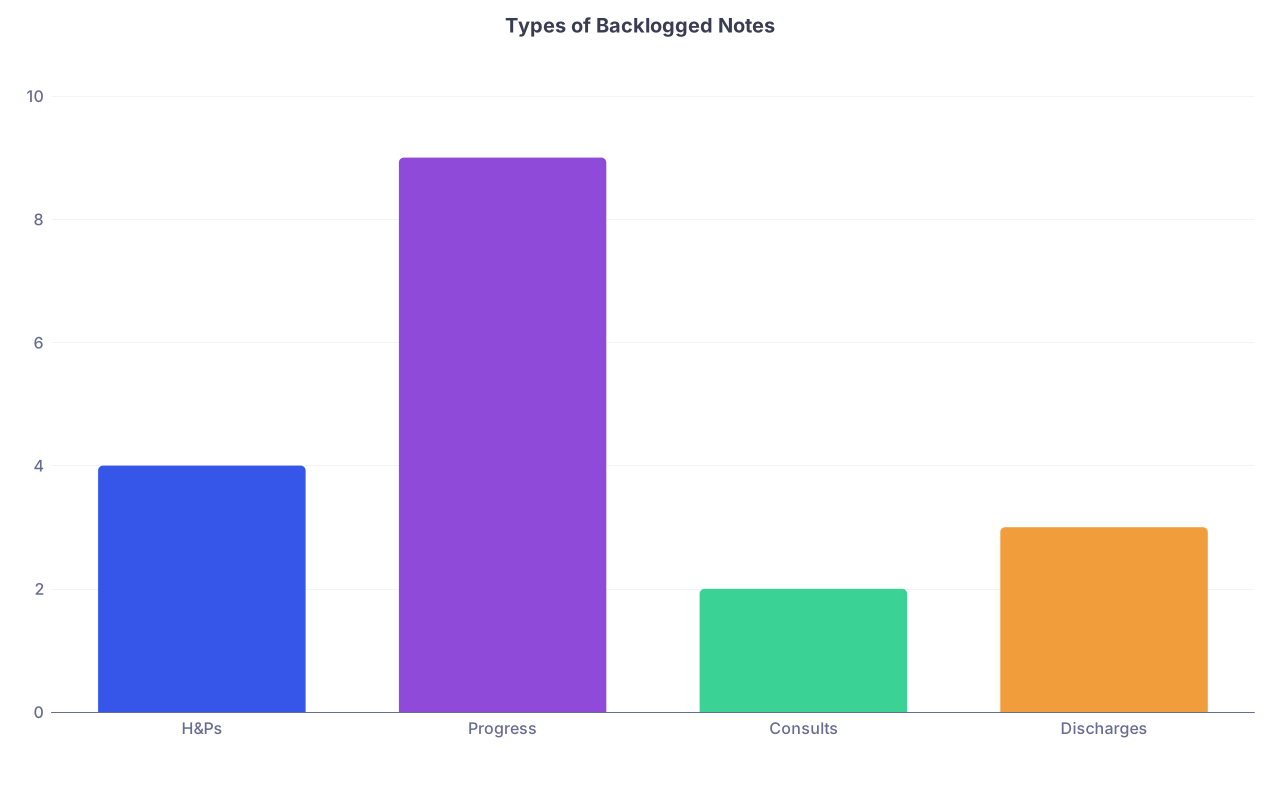
| Category | Value |
|---|---|
| H&Ps | 4 |
| Progress | 9 |
| Consults | 2 |
| Discharges | 3 |
That bar chart is what I routinely saw from students on busy inpatient rotations. You are not unusual.
1.2 Make a hard rule: same-day notes get priority
From this moment, you stop adding to the backlog.
New rule: Today’s patients get today’s notes. Old notes are “extra work,” not the default.
Priority order for the rest of this week:
- Notes on today’s patients – must be done before you leave or within 1 hour of leaving.
- Time-sensitive old notes (e.g., discharges, billing-dependent notes).
- Remaining backlog, in chronological order (oldest first) when possible.
If you keep working old notes and ignore today’s, you will drown. I have watched this play out in residents and students over and over.
1.3 Protect a daily “note block” on the schedule
You are not going to “find time” for notes. You are going to schedule time for notes.
Pick two daily protected windows (even on call days):
- Block 1: Midday, 20–30 minutes (often after rounds or just after lunch).
- Block 2: End of day, 45–60 minutes (before you physically leave or within 1 hour of getting home).
Tell your resident, once, in a professional way:
“I am making a point of finishing notes the same day. After we’re done with X, I’m going to sit down and knock out my notes for our patients.”
Most will appreciate this. The ones who do not? They are not staying up till midnight writing your notes.
Step 2: Build a “Fast Note” Template for This Rotation
Your notes are slow because you reinvent the wheel every time. Fix that.
2.1 Steal a good note and reverse-engineer it
Find one note your attending or senior resident likes from your service. Ideally:
- Same service (e.g., medicine, surgery).
- Same type (H&P vs progress vs discharge).
- Recently written and not a bloated copy-paste disaster.
Study it:
- What sections do they always include?
- How long is it really? Count lines, not just vague “short vs long.”
- What phrases repeat over and over?
You are not writing literature. You are building a repeatable product that matches the expected house style.
2.2 Build your own skeletal template (outside the EHR first)
Open a blank text file, OneNote, Notion, or whatever you use. Draft a bare-bones structure.
Example: Inpatient Medicine Progress Note Skeleton
ID:
“[Age] y/o [sex] with PMH of [X, Y] admitted on [date] for [chief problem] currently hospital day [#].”Interval Events (1–3 bullets)
- Overnight:
- Day:
Subjective (1–3 lines)
- “Feels [better/same/worse]. [Key symptoms status]. No [red flag symptoms].”
Objective – Short
- Vitals: Only abnormal / trend changes
- Exam: 4–6 key systems, one line each.
- Labs/Imaging: Only what changed or matters today.
Assessment: 2–4 problem list items
- Problem 1 – 2–3 sentences
- Problem 2 – 1–2 sentences
- Chronic problems only if they changed or matter to current issues.
Plan by problem: bullets only
That is it. Most good inpatient notes template to ½–1 page of real text when printed.
2.3 Convert your skeleton into EHR templates and shortcuts
Now put it into the system you actually use.
- In Epic:
- Use “My SmartPhrases” (.myprogress, .myhpn, etc.).
- Build a couple:
.msprogmed– standard medicine progress note.mshpmed– full H&P template
- In Cerner / others: whatever your institution uses for macros or templates.
Add 3–5 of your own SmartPhrases for high-frequency items you keep typing:
.rosstable– standard “10-point ROS negative except as above.”.ptedDVT– your short DVT prophylaxis counseling script..dmplan– standard DM management bullets you customize slightly.
Do this once. You save dozens of hours over a month.

Step 3: A 48–72 Hour Catch-Up Protocol (Without All-Nighters)
Now you have:
- A clear backlog list.
- A basic template system.
- Daily protected note time.
Here is how you chew through the backlog without nuking your sleep.
3.1 Triage your backlog
Take your list and mark each note type:
Tier 1: Time-sensitive / legally critical
- Discharge summaries for patients already gone.
- H&Ps for admitted patients without any note.
- Anything your attending specifically asked for.
Tier 2: Still clinically relevant
- Progress notes from the last 2–3 days.
- Consult notes that impact current management.
Tier 3: Old, low-impact
- Notes >5–7 days old where several subsequent notes exist.
- Ancillary documentation that no one will ever read unless there is a legal question.
You will still complete Tier 3, but you will speed-compress them aggressively.
| Tier | Note Type Example | Strategy |
|---|---|---|
| 1 | Yesterday's discharge | Full accurate note |
| 1 | Missing H&P on admit | Full accurate note |
| 2 | Progress note from 2 days ago | Short, focused |
| 3 | Progress note from 7 days ago | Minimal, factual |
3.2 Use “batching” with strict time caps
For the next 2–3 days, add one extra 60–75 minute block in the evening purely for backlog notes. Not 3 hours. Not midnight sessions. Hard cap: 75 minutes.
Each session:
Pick a single note type (e.g., “old progress notes only”).
Set a timer for 25 minutes (Pomodoro style).
In those 25 minutes, aim to complete:
- 2–3 short progress notes, or
- 1–2 H&Ps/discharges.
5-minute break.
Repeat 2–3 cycles, then stop.
You will be tempted to keep going “since you’re on a roll.” That is exactly what destroys your sleep and burns you out. Respect the cap.

| Step | Description |
|---|---|
| Step 1 | List all backlogged notes |
| Step 2 | Assign Tier 1/2/3 |
| Step 3 | Protect daily same-day note block |
| Step 4 | Add 60-75 min backlog block x3 days |
| Step 5 | Batch by note type each session |
| Step 6 | Stop at hard time cap |
| Step 7 | Recount remaining notes |
| Step 8 | Finish next day in regular time |
| Step 9 | <= 3 notes left? |
3.3 How to write older notes without paralysis
The biggest time killer with old notes is you trying to reconstruct the day like a historian.
For notes more than 48 hours old:
- Use brief, factual language.
- Do not invent detail you do not remember. Pull from:
- Vital trends
- Orders placed
- Nursing notes
- Subsequent provider notes
Example for an older progress note:
“Patient remained clinically stable on hospital day 3. No acute events documented in nursing or overnight notes. Vitals within acceptable range. Continued on prior management plan including [meds/interventions].”
You are documenting the course, not writing a novel from memory.
If anyone questions the brevity later, the EHR shows the actual data.
Step 4: Make Same-Day Notes Practically Inevitable
The long-term fix is not just templates. It is how you structure your day so notes almost finish themselves.
4.1 Pre-write skeletons before you see the patient
You should never be starting from a blank screen at 4:30 PM.
Before rounds or before you walk into the room, spend 30–60 seconds per patient:
- Pull in:
- Last note
- Current vitals
- Overnight labs
- Drop in your macro/template.
- Update:
- Hospital day
- Problem list headings
- Leave “[ ]” for subjective and updated exam.
You now have a pre-built framework. After seeing the patient, you fill in the blanks while the encounter is fresh. This alone can shave 5–10 minutes per note.
4.2 Learn the right speed target
Most students underestimate how fast attendings really are with notes.
On inpatient rotations, realistic per-note targets once you have templates:
- Simple progress note: 5–8 minutes
- Complex medicine note with multiple problems: 10–12 minutes
- H&P: 15–20 minutes once skilled
(initially it will take you 30–40; that is fine, you are learning)
Track this for 2–3 days. Time yourself for 3 notes a day. Just write the times on your list:
- Pt A – 11 min
- Pt B – 7 min
- Pt C – 6 min
You can not improve what you do not measure.
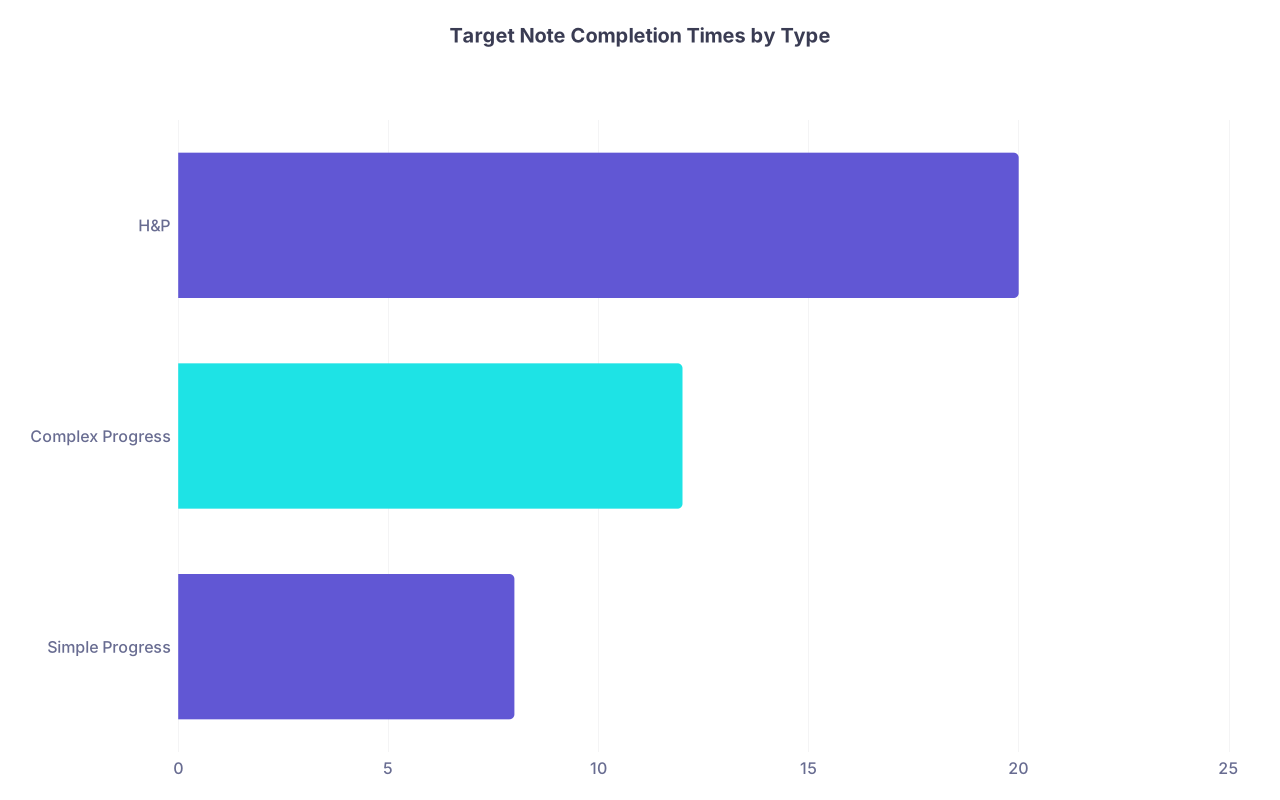
| Category | Value |
|---|---|
| Simple Progress | 8 |
| Complex Progress | 12 |
| H&P | 20 |
4.3 Use “micro-notes” during downtime instead of doomscrolling
Every rotation has micro-gaps:
- Waiting for an attending to arrive.
- Transport delays.
- Post-call lull.
- 10 minutes before conference starts.
Most students pull out their phone. You are going to pull out your laptop or a workstation instead.
Aim for 1 quick note per micro-gap:
- Have your pre-built skeleton ready.
- Add subjective + key objective.
- Type your assessment/plan bullets.
You will be amazed how often a “random 7 minutes” is enough to finish a note you already skeletonized.
Step 5: Clean, Attending-Friendly Note Content (That Is Still Fast)
Speed means nothing if your notes are trash. You will just create more work defending them.
Here is how to write fast and clean.
5.1 Cut the fluff mercilessly
Attending complaints I have actually heard:
- “Why is this note five pages?”
- “I do not need yesterday’s CT in every single note.”
- “Stop pasting the entire BMP for the last week.”
Your daily goals:
- Only document what changed or matters today.
- Keep the Assessment & Plan problem-focused and concise.
- Avoid copying old notes into new ones without editing.
Ask yourself for each line: “Will this help the team manage the patient or understand today’s story?” If not, delete.
5.2 Use consistent, scannable formatting
Do your future self and your team a favor. Make your notes easy to skim.
Simple rules:
Use problem numbers:
- Sepsis secondary to pneumonia
- Type 2 diabetes mellitus
- CKD stage 3
Put the disposition thought at the bottom:
- “Anticipate discharge in 1–2 days if afebrile and stable O2 requirement.”
Use short, clear bullets under each problem. Example:
- Sepsis due to pneumonia
- Clinically improving; afebrile x 36h, HR 80s
- Continue ceftriaxone + azithromycin, day 3/5
- Wean O2 as tolerated; goal SpO2 > 92%
- Follow up repeat CXR only if clinical worsening
- Sepsis due to pneumonia
This is fast to write and fast to read.
5.3 Build 2–3 “stock” plans for common problems
On inpatient medicine, you will keep rewriting the same plans:
- Chest pain workup
- CHF exacerbation
- COPD flare
- DKA
- UTI / pyelo
- CAP vs HAP
Do yourself a favor and create smartphrases or text snippets for your top 3–5 frequent problems. Keep them tight, not bloated.
Example .capplan:
- CAP, day #[ ] of [ ]-day course
- Continue ceftriaxone + azithromycin
- Monitor vitals, O2 requirement, WBC trend
- Encourage IS and mobilization
- Expected duration of therapy 5 days if continues to improve
You edit details as needed. The skeleton is done.
Step 6: Protect Your Time and Sanity Long-Term
The point of this is not just “finish notes.” It is “finish notes and still have a life.”
6.1 Set a personal “documentation curfew”
Pick a daily time after which you will not be doing notes unless it is a bona fide emergency (code stroke, crashing patient, pre-op note needed for the OR, etc.).
For most students:
- Curfew between 9:00–10:00 PM works.
Once you hit that hour:
- Close the laptop.
- Put your phone down.
- You are done. Tomorrow is another workday, and you are not a robot.
You will work more efficiently when you know you have a hard stop.
6.2 Have a plan for days you blow the system
You will have days that explode:
- Admits keep coming.
- Attending wants last-minute presentations.
- Code blue in the middle of the afternoon.
On those days, the system still stands, but modified:
Same-day rule stays: At least write mini-notes:
- 2–3 sentences documenting the day’s key changes/plan.
- Complete them into full formal notes next day.
Use a quick memory aid:
- After leaving the hospital, voice-record a 15–30 second summary for each patient in your phone (HIPAA-safe: no names/MRNs; just “pt 1 with CHF – diuresed +3L, improved SOB, plan repeat echo tomorrow”).
Next morning, use that to solidify your notes during your first protected block.
You do not need perfection every day. You need a resilient system that recovers quickly.
6.3 Ask for targeted feedback — not vague judgment
Once you are not in constant survival mode, ask one attending or senior:
“Could you look at one of my notes and tell me two things:
- One thing to cut or shorten,
- One thing to add or clarify?”
That framing gets you actionable feedback, not generic “write more concisely” nonsense.
In my experience, they will say things like:
- “You can drop 90% of these lab details.”
- “Start with the big picture in the assessment — I do not care about creatinine drift until I know how sick they are.”
Then you integrate that into your template and get faster and cleaner at the same time.
Common Pitfalls That Keep Students Behind on Notes
A few patterns I see repeatedly.
1. Writing notes “for the grade,” not for the team
You try to squeeze everything you know about the disease into the note. Pathophys paragraphs. Long differential lists that no one is actually considering.
Solution: Keep your learning in a separate document or notebook. Keep your notes about today’s patient and their actual problems.
2. Starting notes too late in the day
If your first keystroke for a note is after 3 PM, of course you are staying late.
Fix: Pre-skeleton early. Even 30 seconds per note before seeing the patient cuts your afternoon load in half.
3. Letting perfectionism stall completion
You keep revising phrases, reorganizing sections, rereading for style.
Remind yourself:
- This is a medical document, not an essay.
- Clarity > cleverness.
- Done, factual, and readable beats perfect and late.
Give yourself a hard limit: no more than one reread per note unless your attending found an error.

4. Not tracking how long notes actually take
Most students operate completely blind here. They just “feel” slow.
Once you track a week of durations, you see patterns:
- Mornings faster than evenings.
- H&Ps swallowing massive time.
- Certain patients consistently taking longer because you keep rewriting from scratch instead of building a reusable plan.
Then you can fix the specific bottleneck.
Quick, No-BS Example: 3-Day Catch-Up Scenario
You: On IM, 10 patients. You realize on Wednesday you are behind:
- 2 old H&Ps incomplete
- 6 progress notes from earlier in the week
- 3 partially done discharge summaries
Day 1 (Wednesday)
- Midday:
- Protect 25 minutes after rounds: finish today’s 10 progress notes using skeletons.
- End of day:
- 45 minutes: complete all of today’s notes. No backlog yet.
- Evening backlog block (60 min):
- Triage.
- Knock out the 2 discharge summaries and 1 H&P (Tier 1).
Remaining backlog: 1 H&P, 6 old progress notes.
Day 2 (Thursday)
- Midday + end of day: same-day notes only.
- Evening (60–75 min):
- Finish remaining H&P.
- Do 3 of the old progress notes (Tier 2, oldest first).
Remaining backlog: 3 old progress notes (Tiers 2–3).
Day 3 (Friday)
- Same-day notes as always.
- Shorter evening session (45–60 min):
- Finish last 3 progress notes with shorter, factual documentation.
Backlog = 0.
You never stayed up past 10 PM. You did not skip all your life outside the hospital. You built skills that will save you hours every single week of your career.
FAQs
1. What if my resident keeps adding new tasks and I never get protected time for notes?
Two moves:
Preemptive communication early in the day:
“I am working on being more efficient with notes. After rounds, I am going to take 20 minutes to finish progress notes while details are fresh. After that, I can help with discharges / admits / follow-ups.”Bundle your asks:
Do not ask for mini-breaks all day. Finish a chunk of tasks, then say:
“Labs checked, consult called, imaging followed up; I am going to sit and knock out notes for our patients now so they are in before sign-out.”
If someone still steamrolls you every time, you will occasionally have to finish at home. But you should treat that as the exception, not your default plan.
2. Is it ever acceptable to shorten or skip old notes once several days have passed?
You do not skip. You compress.
For notes >5–7 days old with multiple subsequent notes present:
- Write a brief, factual summary of that day, informed by vitals, orders, and nursing notes.
- Example:
“Hospital day 5. Patient remained hemodynamically stable, tolerating oral intake, and continued on existing management plan for CHF exacerbation. Diuresis ongoing with net negative ~1.5L over 24h. No new events documented.”
That meets legal and clinical documentation needs without pretending you remember the full subjective and exam from a week ago. It also lets you catch up without sacrificing sleep to reconstruct ancient history.