
The way most students "take notes" for boards is broken. You are not building a system. You are hoarding chaos.
Let us fix that and turn your random scraps into an actual board review book you can rely on.
Step 1: Decide What You Are Actually Building
Before you touch a single note, make a decision: your end product is a board review book, not a bottomless archive.
That means:
- It has pages, chapters, and sections
- It is finite and curated
- It is written as if you are explaining to your future self during dedicated
- It is built around testable facts, not every interesting thing from lecture
You are not an archivist. You are an editor-in-chief.
Pick the Format (Paper, Digital, or Hybrid)
Here is the blunt truth: any of these can work if you commit. The worst choice is switching formats every three weeks.
| Format | Pros | Cons |
|---|---|---|
| Paper Binder/Notebook | Tactile, easy to flip, good for memory, minimal tech friction | Harder to search, backing up is manual, heavy |
| Word/Google Docs | Easy to edit, search, copy-paste, can export to PDF | Can become messy if styles are inconsistent |
| OneNote/Notion/Evernote | Flexible structure, tagging, decent search, good for tables/images | Risk of over-complication, sync issues |
| PDF with Annotations | Simple, portable, preserves layout, easy highlighting | Hard to restructure, editing is clunky |
My recommendation for most medical students:
- If you like writing: 3–4 inch binder + printed sections + handwritten additions
- If you like typing: One main document per subject (Word/Google Docs) with a strict template
Commit now. No “I will see how I feel later.” That is how you end up with five half-built systems.
Step 2: Dump Everything Out of Your Head and Hard Drive
You cannot organize what you cannot see. The first real move is consolidation.
2.1. Collect All the Raw Material
Gather:
- Lecture notes (handwritten, typed, PowerPoints)
- Anki “extra” fields you have been ignoring
- Qbank notes (UWorld, AMBOSS, etc.)
- Screenshots, photos of whiteboards, WhatsApp pearls from classmates
- Random PDFs from attendings, Morning Report handouts
- Margins and scribbles in First Aid / B&B / Sketchy printouts
Put them in a single staging area:
- Digital: create a folder
Board_Book_RAWon your computer / cloud - Physical: one box or pile on a table for all physical papers
Do not filter yet. Just gather. This is the messy part.
2.2. Quick Triage: Trash, Archive, or Candidate
Now you are going to give each item one of three fates:
- Trash – never going to be useful
- Archive – keep, but not in your main book
- Candidate – will become part of the board book
Run through quickly. 10–15 seconds per item. Ask:
- Is this board-relevant?
- Is there anything here that I do not already have in my main resources?
- Is it too detailed for the level of exam I am taking?
Examples:
- A 65-slide lecture on obscure immunology pathways with 3 testable facts → extract those 3 later, archive the rest.
- A UWorld explanation screenshot highlighting a perfect summary of nephrotic syndrome features → candidate.
- A blurry photo of a whiteboard with half sentences → usually trash.
Be ruthless. Hoarding is not studying.
Step 3: Choose a Spine: The Master Outline
You should not be inventing structure from scratch. The structure already exists: NBME content outline + a good review book.
3.1. Pick Your “Spine” Resource
Use one of these as your skeleton:
- For USMLE Step 1: First Aid, Boards & Beyond topic list, or Amboss library outlines
- For Step 2/3 or shelf exams: UWorld subject outline, OnlineMedEd outline, or NBME content outline
- For COMLEX: Savarese / COMBANK topic list plus NBOME blueprint
You are not rewriting these. You are writing into them.
3.2. Build a High-Level Table of Contents
If digital: create one master document called Board_Review_Book_[Exam].
Outline the major sections:
- General Principles
- Cardiology
- Pulmonology
- GI
- Renal
- Endocrine
- Heme/Onc
- MSK/Derm
- Neuro/Psych
- Repro
- Infectious Disease
- Pharmacology
- Biostats/Ethics
Or use whatever system your spine uses. Just keep it consistent.
If paper: create section dividers in your binder with the same headings.
You have now built the slots your random notes will drop into.
Step 4: Create a Strict Page Template
Here is where most students fail. They paste random content into a document, and it turns into a wall of text.
You are going to use a standard template for each topic. Same format every time so your brain knows where to look.
4.1. The “One Topic, One Page” Rule (as much as possible)
Aim for one major topic per page (or a two-page spread in a binder). For example:
- “Acute Myocardial Infarction – Diagnosis and Management”
- “Nephritic vs Nephrotic Syndromes”
- “Diuretics – Mechanism, Effects, Side Effects”
If a topic needs more space, fine. But the default is compact.
4.2. Page Layout Template
Use something like this for each topic:
- Title (e.g., “Asthma – Path, Presentation, Treatment”)
- High-Yield Summary (3–5 bullets) → what you would tell a panicking classmate the morning of the exam
- Pathophysiology / Conceptual Anchor (2–4 bullets or a small diagram)
- Key Clinical Features – table or short list
- Diagnosis – must-know tests, cutoffs, patterns
- Management – first-line, second-line, special cases
- Common Question Traps – 2–3 bullets from Qbanks
- Associated Images/Diagrams – if relevant
This is your board review book template. Everything you include should fit into or around this.
Step 5: Convert Raw Notes into Book Pages (Systematically)
Now you actually build. Topic by topic, not resource by resource.

| Step | Description |
|---|---|
| Step 1 | Pick Topic |
| Step 2 | Scan All Sources for That Topic |
| Step 3 | Highlight Unique High-Yield Facts |
| Step 4 | Fill Page Template Sections |
| Step 5 | Condense & Edit for Clarity |
| Step 6 | Tag with Source and Date |
| Step 7 | Add to Master Board Book |
5.1. Work by Topic, Not by Source
Do not “go through all of UWorld” and then “all of lectures” and then “all of Amboss”. You will miss overlaps and you will repeat yourself.
Instead:
- Choose a topic (e.g., Heart Failure)
- Pull all material on that topic:
- Lecture slides / notes
- UWorld questions tagged with heart failure
- Sketchy / B&B notes
- Any handouts, clerkship pearls
- Keep only what can live on 1–2 pages following your template.
This is slower than dumping text. It is also the part that actually makes you learn.
5.2. Distill, Do Not Transcribe
Indicators you are doing it wrong:
- You are copying full UWorld explanation paragraphs
- You are retyping half of First Aid
- You never delete anything
Your goal is:
- Condensation: 10 lines of confusion → 3 lines of clarity
- Integration: combine lecture detail with UWorld nuance and First Aid summary into one coherent note
- Simplification: write like you are explaining it out loud to a tired friend
Example: turning a messy set of notes into a clean section.
Messy input from multiple sources:
- “HFpEF vs HFrEF – EF >50% vs <40%”
- “UWorld q: older woman with HTN, dyspnea, normal EF but diastolic dysfunction”
- “Attending said ‘stiff ventricle, cannot fill’ on rounds”
- “First Aid page 300: causes of diastolic HF – HTN, obesity, infiltrative”
Clean output on your page:
Heart Failure – Preserved vs Reduced EF
Key Distinction
- HFrEF: EF < 40%, systolic dysfunction, dilated ventricle
- HFpEF: EF ≥ 50%, diastolic dysfunction, stiff ventricle, impaired filling
Typical Patient
- HFrEF: ischemic cardiomyopathy, post-MI, dilated cardiomyopathy
- HFpEF: older, long-standing HTN, obesity, often female
Pathophys Anchor
- HFrEF: weak pump, low contractility → low EF
- HFpEF: normal squeeze but cannot fill → high LVEDP, normal EF
Boards Traps
- Normal EF does NOT rule out HF → HFpEF
- HFpEF patients decompensate quickly with AFib or volume overload
One glance. That is what you want.
Step 6: Standardize Visuals, Tables, and Mnemonics
Random scribbles and inconsistent tables kill recall. You want visual patterns that repeat.
6.1. Use Repeated Table Formats
For differential diagnoses, drug classes, and syndrome comparisons, pick 2–3 table styles and stick to them.
Example template for drugs:
| Drug/Class | Mechanism | Clinical Use | Major Side Effects |
|---|
Fill the same way every time. Your brain remembers the layout as much as the content.
6.2. Recycle Mnemonics, Do Not Hoard Them
You do not need five different mnemonics for the same bug.
- Keep one mnemonic per list
- Prefer the one you can picture or connect to something personal
- Write the mnemonic and the expanded list clearly in your book
Bad: “Lots of PANCE mnemonics from that random PDF, I’ll keep them all.”
Good: “For nephritic syndrome features → I will use PHAROH and write it out cleanly once.”
Step 7: Build a Tagging and Cross-Reference System
Your board book is only as useful as your ability to find and connect ideas quickly.
7.1. Tag Sections with Sources and Dates
At the bottom of each page, in small text:
Sources: UW Q#1234, B&B Cardio 12, FA2023 p.220Last revised: 2026-01-05
This lets you:
- Track what is based on what
- Quickly update after finding new information
- Prioritize older pages for review and revision
7.2. Cross-Reference Related Topics
When topics link, make it explicit.
Examples:
- On “SLE” page:
See also: Lupus nephritis (Renal), Antiphospholipid syndrome (Heme) - On “Beta-blockers” page:
See: CHF therapy (Cardio), Arrhythmia mgmt (Cardio)
Digital: hyperlink between sections.
Paper: write “→ Cardio-12” referencing the section tab or page number.
This is what real textbooks do. You are building one.
Step 8: Integrate Qbank Learning Without Letting It Explode
This is where things can spiral. Students start pasting half of UWorld into their book. Useless.
8.1. Set a Hard Rule: Max 3 Facts per Question
- What new or tricky thing did I learn here?
Add at most 3 items to your book, for that topic:
- A new association (“Bite cells → G6PD deficiency”).
- A clarifying distinction (“Dry vs wet beriberi – neuropathy vs cardiomyopathy”).
- A question trap (“NSAIDs worsen renal function in cirrhosis ascites”).
Format them under a small subsection:
- From Questions / Traps or Exam Pearls
Example:
Heart Failure – Exam Pearls
- Do not use beta-blockers in acute decompensated HF with pulmonary edema
- ACE inhibitors improve survival in reduced EF, even if asymptomatic
- A patient with HF and rising creatinine after ACEI → think bilateral renal artery stenosis
Clear. Bounded. Controlled.
8.2. Use Symbols for Priority
You can indicate relative importance:
- ★★★ – must know, test favorite
- ★★ – useful, seen a few times
- ★ – nice to know, low yield
Keep it small in the margin. When you are doing last week of dedicated, you will scan only the ★★★.
Step 9: Put the Book to Work Immediately
If you treat this like a side project “for later,” you are wasting 80% of the value. The process of building it is the studying.
9.1. Attach It to Your Weekly Study Rhythm
Example weekly loop during preclinical or clerkship:
Mon–Thu
- Do questions / watch lectures
- Before closing the laptop, spend 20–30 minutes updating 1–2 topic pages based on today’s learning
Fri
- Pick 1–2 systems (e.g., cardio + renal)
- Read through only your book pages for those systems
Sat
- New questions
- Add only the highest-yield new facts to book
Sun
- Brief skim of tags “last revised > 1 month ago” and refresh 3–5 pages
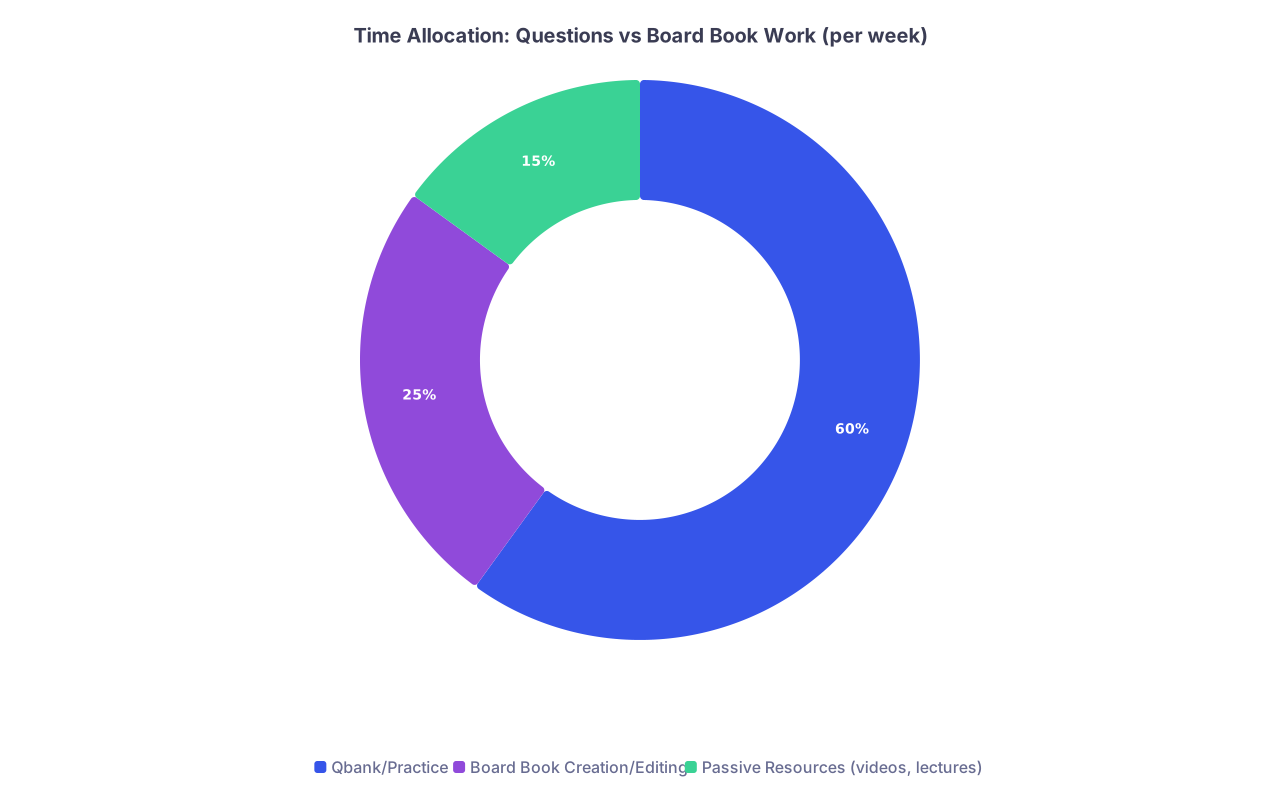
| Category | Value |
|---|---|
| Qbank/Practice | 60 |
| Board Book Creation/Editing | 25 |
| Passive Resources (videos, lectures) | 15 |
This keeps the book alive, not a static monument.
9.2. Use It While Doing Questions
When you miss a question:
- Open the relevant topic page in your book.
- Ask: does this concept live here already?
- If yes → improve or clarify that part.
- If no → add a concise bullet under the right section.
This forces integration instead of fragmented note islands.
Step 10: Clean Up and Version Before Dedicated
Two to three months before your board exam, you need to freeze the structure.
The goal: by the start of dedicated, your board book is:
- Relatively stable in organization
- Missing only a few gaps
- Lean enough to re-read cover to cover at least 2–3 times
10.1. Do a System-by-System Audit
For each major system:
- Flip through all pages (or scroll)
- Mark:
- Red: bloated, repetitive sections
- Yellow: incomplete or messy sections
- Green: clean, exam-ready sections
Cut aggressively:
- Delete duplicated facts that appear in multiple places unless necessary
- Remove paragraphs that you have never actually read in months
- Shorten wordy sentences into bullet points
10.2. Create a “Dedicated Version” Snapshot
Digital:
- Copy your whole folder/doc →
Board_Book_Step1_FINAL_v1 - This is the version you will mainly use in dedicated
- You can still tweak, but keep structure stable
Paper:
- If your binder is a disaster, reprint only final pages and reassemble cleanly
- Use new tabs, clean dividers, no extra scrap paper stuffed inside
This gives you psychological clarity: “This is my book now.”
Common Pitfalls (And How to Avoid Them)
Let me be blunt about the mistakes I see over and over.
1. Turning Your Book into a Second UWorld
If you have:
- Page-long blocks of text with no structure
- Screenshots pasted whole with no interpretation
- Repeated “see UWorld Q1234” without explanation
You did not create a book. You created clutter. Fix:
- Rewrite in your own words
- Max 3 pearls per question
- Only reference Q IDs in small text, not as the main content
2. Perfectionism Paralysis
Some of you will spend 45 minutes choosing the right color for your section headers. Stop.
Rules:
- Black text + maybe one highlight color is enough
- Ugly but done beats pretty but empty
- You can always beautify once structure and content exist
3. Ignoring It During Rotations
Clinical life is chaotic. But the best time to solidify your book is when you see the pathology in front of you.
On medicine service and you saw a case of DKA?
- That night: open your Endocrine → DKA page
- Add: specific insulin drip rates you used, fluid sequence, attending’s one-liner about potassium
- That page will stick in your mind forever
Visual Example: Topic Page Structure
Just to give you a mental picture, here is a stylized structure of a single topic page. (You will build this in your doc / notebook.)

Top to bottom:
- Clear title
- 3–5 “if you only remembered this” bullets
- Brief pathophys explanation ± small sketch
- Table comparing variants / differentials
- Diagnosis and management bullets
- 2–3 exam pearls from questions
- Tiny footer with sources + last updated date
This is not art. It is a tool.
Putting It All Together: A 4-Week Build Plan
If you are starting from chaos today, here is a realistic 4-week plan to get to a functional first version.
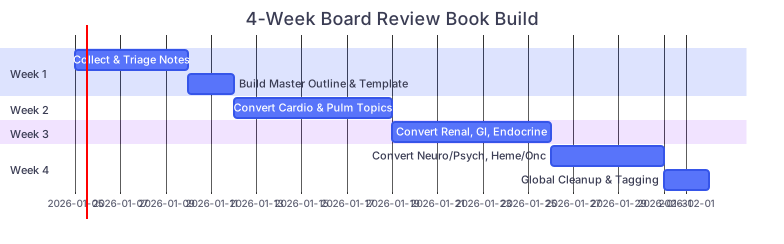
| Task | Details |
|---|---|
| Week 1: Collect & Triage Notes | a1, 2026-01-05, 5d |
| Week 1: Build Master Outline & Template | a2, after a1, 2d |
| Week 2: Convert Cardio & Pulm Topics | b1, 2026-01-12, 7d |
| Week 3: Convert Renal, GI, Endocrine | c1, 2026-01-19, 7d |
| Week 4: Convert Neuro/Psych, Heme/Onc | d1, 2026-01-26, 5d |
| Week 4: Global Cleanup & Tagging | d2, after d1, 2d |
You will obviously continue adding/refining, but within a month, you can have:
- A consistent template
- Most core systems covered with at least a first-pass page per major topic
- A single place where your learning lives
FAQ (Exactly 3 Questions)
1. Should I even bother if good commercial review books already exist?
Yes, because the value is not just the end product. It is the processing. When you convert raw notes, Qbank misses, and lecture fragments into your own structured page, you are doing exactly what your brain needs for boards: active organization, prioritization, and integration.
Commercial books are your reference and spine. Your book is your personalized, curated layer on top. The students who do best usually have both.
2. How long should my final board review book be?
For Step 1‑level content, a typical sweet spot:
- Digital: ~150–250 pages of dense but readable notes
- Paper binder: 2–3 inches thick, not five
If your book is approaching the size of a full textbook, you are not editing enough. Remember: this is meant to be read multiple times in the final weeks. If you cannot realistically re-read it, it is too big.
3. What if my notes are so messy that starting fresh feels easier?
If your notes are genuinely unusable, then yes, starting mostly fresh with a good spine (First Aid / UWorld outline) can be smarter. But do a fast pass through your old stuff first. You will often find:
- 10–20% of your old notes are actually gold
- The rest you can safely archive
Pull the gold, dump the rest, and then build systematically from that point on. Do not torture yourself trying to rescue every scrap.
Remember:
- Your goal is not a perfect archive. It is a lean, structured, personal board review book you can actually use.
- Work by topic, not by source, using a consistent template and ruthless editing.
- The act of building and constantly refining this book is a major part of your board studying, not a side hobby.