

The biggest mistake MS3s make in December is pretending they still have time. You do not. By December of third year, the electives and acting internships that will shape your entire application year are already getting taken by the students who moved early.
This month is decision time.
Below is a concrete, time-stamped guide: what you should be doing in early December, late December, and what absolutely must be finished by January to avoid getting boxed out of the rotations you actually want.
Big-Picture Timeline: Where December of MS3 Fits
At this point in MS3, the calendar looks roughly like this:
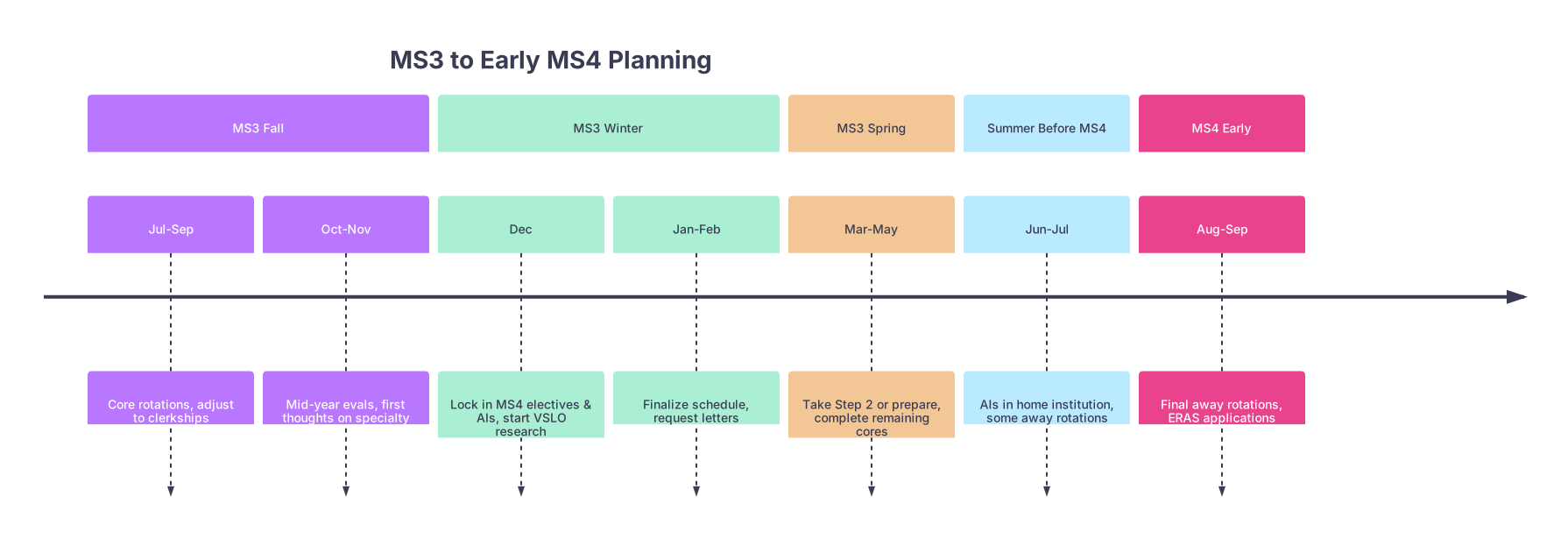
| Period | Event |
|---|---|
| MS3 Fall - Jul-Sep | Core rotations, adjust to clerkships |
| MS3 Fall - Oct-Nov | Mid-year evals, first thoughts on specialty |
| MS3 Winter - Dec | Lock in MS4 electives & AIs, start VSLO research |
| MS3 Winter - Jan-Feb | Finalize schedule, request letters |
| MS3 Spring - Mar-May | Take Step 2 or prepare, complete remaining cores |
| Summer Before MS4 - Jun-Jul | AIs in home institution, some away rotations |
| MS4 Early - Aug-Sep | Final away rotations, ERAS applications |
At this point you should:
- Have a short list of specialties you are seriously considering (ideally 1, at most 2).
- Know your school’s MS4 curriculum rules: required AI(s), sub-Is, ICU, EM, etc.
- Have at least a rough idea of your competitiveness (Step scores, clerkship grades).
If you do not have these, your first week of December is officially triage time. You must sort this out before you click a single “request” button on the scheduling portal.
Early December (Week 1–2): Clarify, Commit, and Map Requirements
The first two weeks of December are not for “thinking about it.” They are for making decisions and gathering data fast.
At this point you should:
1. Lock Your Primary Specialty (or Narrow to Two)
You cannot plan electives and AIs while still “maybe” between four fields.
By the end of Week 1 of December, you should:
Decide:
- Primary specialty (e.g., Internal Medicine, General Surgery, Pediatrics, EM, etc.)
- Backup or secondary interest if you are truly split (IM vs Neuro, Peds vs Med-Peds).
Reality-check with:
- A clerkship director or advisor in that field.
- ONE trusted upper-level (MS4 or resident) in that specialty.
You ask them very directly:
- “If I want to match in X from this school, how many AIs do I need?”
- “Do I need away rotations for this specialty?”
- “What months are ideal for AIs and away rotations for this coming cycle?”
Write their answers down. Not in your head. In a document you will use to build your schedule.
2. Map Core Requirements vs Elective Space
By mid-December you must know how many free months you actually have in MS4. Not theoretical. Actual blocks.
Pull your school’s MS4 curriculum guide and make a simple grid:
| Block | Requirement Type | Notes |
|---|---|---|
| Jul | Acting Internship | Required home AI |
| Aug | Elective/Away | Ideal away rotation month |
| Sep | Elective/Away | Backup away or interview buffer |
| Oct | Required ICU | Graduation requirement |
| Nov | Elective | Lighter month during early interviews |
| Dec | EM Requirement | Graduation requirement |
At this point you should:
- Identify:
- Total blocks you can dedicate to acting internships in your chosen field.
- Potential months for away rotations (if needed for your specialty).
- Where you want a lighter month during heavy interview season.
You will find you do not have as much flexibility as you thought. This is why December is the month you must plan, before the desirable AI months vanish.
3. Learn Your School’s Scheduling Mechanics
Each school plays this game differently. Some open MS4 scheduling in December, some in January, some in a chaotic lottery.
In early December, you should:
Find out:
- When MS4 scheduling opens.
- Whether it is:
- First-come, first-served
- Lottery
- Priority by class ranking or other rules
- Which system is used (Oasis, MedHub, internal scheduler, etc.).
Ask very concretely:
- “If I want a July medicine AI, when do I have to click to have a real shot?”
- “Historically, which months fill first for [your specialty] AIs?”
Upperclassmen are the best data source here. Not the website. Ask an MS4 who just went through it.
Mid December (Week 2–3): Build the Draft Schedule and Rank Priorities
Now you know your specialty, your graduation requirements, and your scheduler’s rules. Time to design the year like an application strategy, not random blocks.
At this point you should:
4. Decide AI and Elective Timing Strategically
You are balancing three things:
- What programs want to see.
- What fits with ERAS timing.
- Your sanity.
For most core specialties (IM, Peds, Gen Surg, OB/Gyn, EM), a typical structure looks like:
- June/July of MS4: Home AI in your chosen specialty.
- July–September: Away rotations (if applicable) or additional AIs.
- August–October: Mix of electives and required rotations, with at least one “lighter” month during heavy interview season.
For each potential AI, answer:
Where?
- Home institution mandatory AI.
- Additional subspecialty AI in same department (e.g., GI for IM, Surgical Oncology for Surg).
- Away rotation at a program you might rank highly.
When?
- Earlier AIs (June–August) help with letters and open doors.
- Slightly later ones (September) still help but risk letter timing.
Why that block?
- July AI to impress home program PD early?
- August away at a dream program?
- September elective in a related field to round out your application?
Write out two to three candidate schedules. Then pick one. Indecision kills good options.
5. Build a Ranked List of “Must-Have” vs “Nice-to-Have” Rotations
December is about prioritization. You will not get everything.
Make a table like this for yourself:
| Priority Level | Rotation Type | Target Month | Notes |
|---|---|---|---|
| Must-Have #1 | Home AI in IM | July | Critical for IM letters |
| Must-Have #2 | Away AI in IM | August | At strong academic program |
| Must-Have #3 | Required ICU rotation | October | Prefer not during ERAS opening |
| Nice-to-Have | Cardiology elective | November | Interest area, interview-friendly month |
| Backup | Nephrology elective | January | If Cardiology not available |
At this point you should have:
- 2–3 non-negotiable rotations (AIs / requirements in specific months).
- 3–5 flexible electives with backup options and alternate months.
- A clear understanding of what you are willing to compromise on if slots are gone.
Late December (Week 3–4): Lock in Home Electives and Prepare for Scheduling Day
You cannot fully control away rotations yet (VSLO timing, external program rules). But your home electives and AIs? December is when you set those up or at least position yourself to.
At this point you should:
6. Meet (Briefly) with Key People Before They Vanish for the Holidays
Do not wait until January when everyone is “busy.”
Targets:
Clerkship Director / Department Advisor
- Show them your proposed MS4 schedule (one page).
- Ask: “Given my interest in [X], does this schedule make sense for applications?”
- Ask: “Is there a month I should absolutely avoid for my AI?”
-
- If you already know one or two faculty who like you and your work:
- Send a short email: “I am planning my MS4 schedule and am hoping to do an AI in [month]. I would appreciate any advice on timing for strong letters and exposure.”
- You are not asking for the letter yet. You are putting yourself on their radar.
- If you already know one or two faculty who like you and your work:
7. Prepare for Your School’s “Scheduling Day” Like It Is an Exam
For first-come, first-served systems, the opening minute matters.
At this point you should:
Have:
- Your ranked list of blocks and backups open in a document.
- Your login credentials tested on the actual scheduling system.
- A clear plan:
- First clicks: Must-have #1 → Must-have #2 → Must-have #3.
- Then fill in electives and easier-to-get rotations.
Know:
- Whether you can trade later with classmates.
- How easy it is to switch blocks after initial scheduling.
Think like this: “If I only get my top 2 choices before things fill, which do I absolutely need?” Then click in that order.
If your school uses a lottery, your job in December is:
- Submitting your ranked preferences accurately and aggressively.
- Putting your must-have rotations at the very top, even if they feel like a long shot.
- Talking to students above you about over- vs under-demanded months and sites.
Parallel Track in December: Away Rotations and VSLO Prep
While you are fixing your home schedule, you also need to lay the groundwork for away rotations (if your specialty uses them heavily: EM, Ortho, Derm, ENT, some IM subspecialties, etc.).
At this point you should:
8. Identify Where Away Rotations Actually Matter
Not every specialty requires aways. Over-rotating is a real problem; people burn months trying to impress programs that were never going to rank them highly anyway.
Use this rough guide:
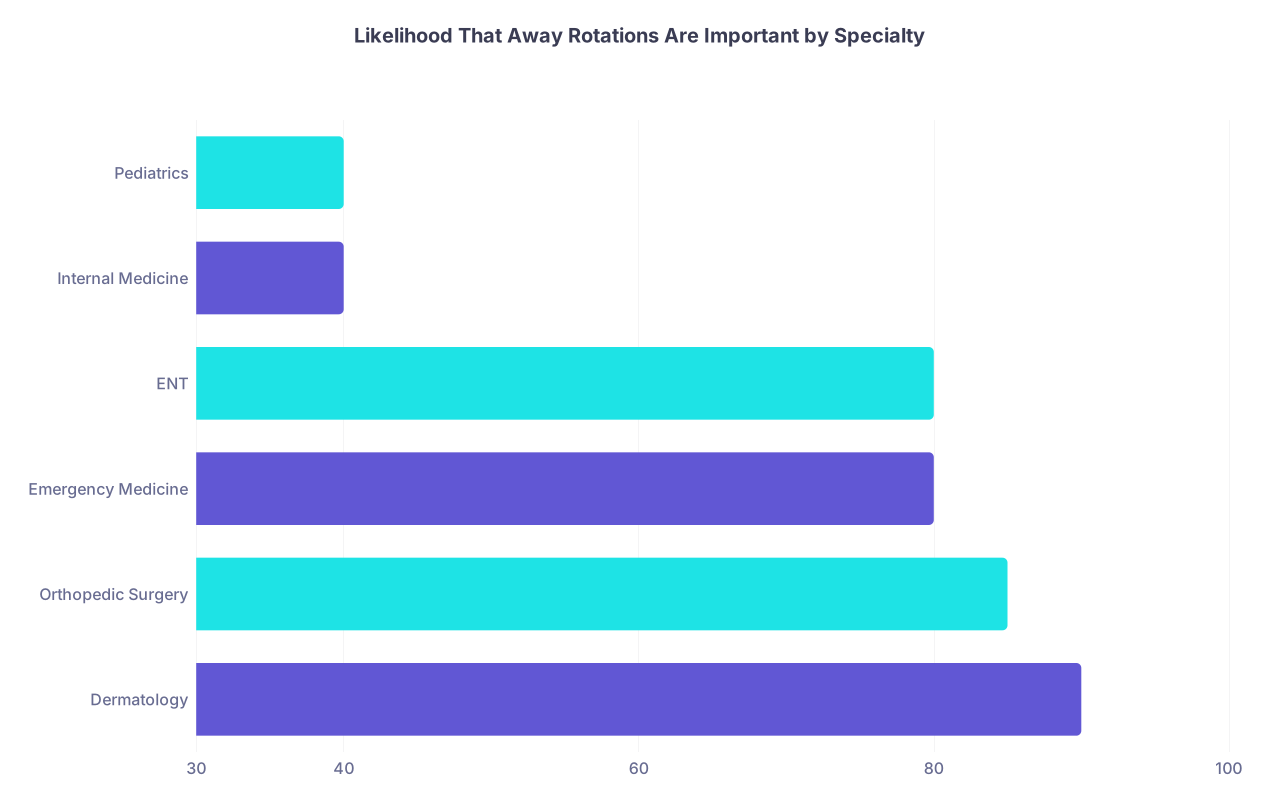
| Category | Value |
|---|---|
| Dermatology | 90 |
| Orthopedic Surgery | 85 |
| Emergency Medicine | 80 |
| ENT | 80 |
| Internal Medicine | 40 |
| Pediatrics | 40 |
If you are in a specialty where aways are “nice but not mandatory” (IM, Peds for most applicants), you can safely prioritize home AIs and a strong, rational schedule over chasing 3 different aways.
If you are in a field like EM or Ortho, your December job is to:
- Identify 2–4 realistic away sites.
- Confirm:
- When their VSLO apps open.
- Whether they require Step 1/COMLEX scores.
- LOR requirements.
- Specific AI/course numbers you must request.
9. Build Your VSLO Materials Folder
Do not wait until March to scramble for away applications. You can prep 80% of it now.
By the end of December you should have:
- Updated CV (1–2 pages, rotation-focused).
- Drafted personal statement paragraph or short summary of interest for that field.
- PDF copies of:
- USMLE/COMLEX scores.
- Immunization records and TB test.
- BLS/ACLS if applicable.
- A simple spreadsheet tracking:
- Program
- Application open date
- Application deadline
- Rotation months offered
- Priority level

This prep prevents the classic MS3 move of missing ideal away rotation months because “I did not know VSLO opened that early.”
Day-by-Day Focus: A Sample Two-Week December Sprint
You asked for specifics. Here is a realistic 10–12 day December sprint to get this done.
Days 1–2
At this point you should:
- Decide on primary specialty (or narrow to two).
- Email:
- One advisor in each candidate specialty asking for a 15–20 minute meeting.
- Pull:
- Your school’s MS4 handbook.
- Last year’s MS4 rotation schedule overview (often in a class shared drive).
Days 3–4
You should:
- Meet with at least one specialty advisor (in person or virtual).
- Sketch:
- Your graduation requirements.
- Number of free elective months.
- Create:
- First draft of your MS4 schedule with:
- 2–3 must-have AIs.
- 2–3 elective ideas.
- First draft of your MS4 schedule with:
Days 5–6
You should:
- Refine schedule with:
- Input from one MS4 in your desired specialty.
- Arrange:
- Quick check-in with clerkship director if available.
- Test:
- Your school’s scheduling system login.
- Where and how to “request” specific courses.
Days 7–8
You should:
- Finalize ranked list:
- Must-have rotations (with month and site).
- Nice-to-have electives.
- Backup electives.
- Prepare:
- A one-page PDF or doc of your schedule plan for reference on scheduling day.
- Clean up:
- Your CV.
- Any personal statement snippets you might use for away apps.
Days 9–10
You should:
- Deep dive VSLO targets:
- Identify 2–4 away rotation programs.
- Record their application windows.
- Set:
- Calendar reminders 1–2 weeks before each VSLO open date.
- Email:
- Any potential letter writers you hope to work with on your AI, letting them know your planned AI month (optional but smart).

| Step | Description |
|---|---|
| Step 1 | Day 1-2: Choose Specialty |
| Step 2 | Day 3-4: Map MS4 Requirements |
| Step 3 | Day 5-6: Draft Schedule + Advisor Input |
| Step 4 | Day 7-8: Finalize Rotation Priorities |
| Step 5 | Day 9-10: Prep VSLO Targets & Materials |
This is aggressive, yes. That is the point. December is compression month.
Common December Mistakes (And How to Avoid Them)
I have watched people repeat the same errors every year.
At this point you should not be:
“Keeping options open” between three completely different specialties.
- Fix: Pick one real target and one backup. Plan for the target.
Scheduling your AI for November or later “so I will be more ready.”
- Bad move. You need letters early. Front-load at least one AI (June–August).
Ignoring how brutally competitive your desired AI months are.
- Fix: Accept you might not get July. Have an August/September backup plan.
Filling early MS4 with random subspecialty electives.
- Your AI and core field exposure matter more than “interesting” subspecialties in terms of matching.
Assuming you can rearrange everything later.
- Some rotations are tradable. A lot are not. Especially AIs and required blocks.
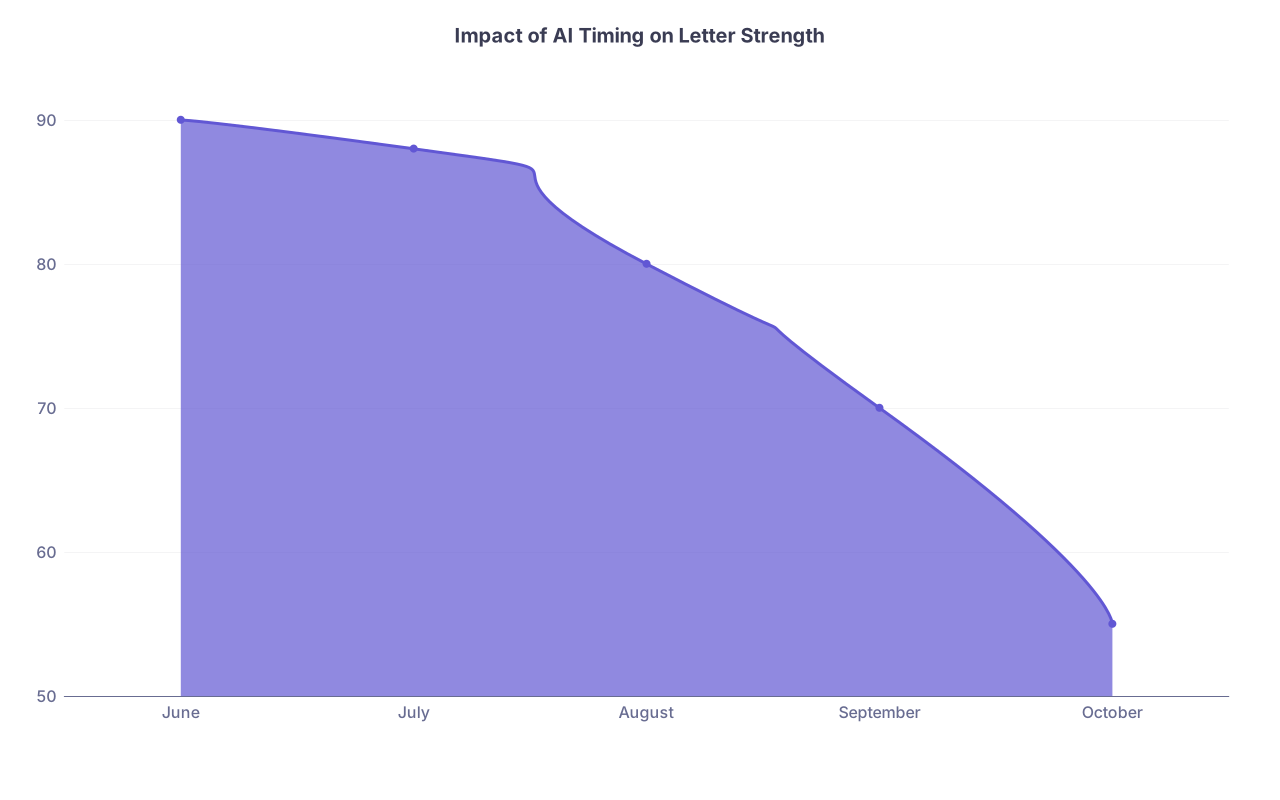
| Category | Value |
|---|---|
| June | 90 |
| July | 88 |
| August | 80 |
| September | 70 |
| October | 55 |
Earlier AIs do not just generate letters; they also give department faculty more time to advocate for you, mention you to PDs, and get your name into early discussions. December is when you position yourself to get one of those blocks.
When to Officially “Lock In” Electives and Acting Internships
Let me answer your title question directly.
By December of MS3, you should:
Lock in your strategy:
- Primary specialty decided.
- Ideal AI and elective timing mapped out.
- Rotation priorities ranked.
Lock in your home institution plan:
- Be ready to click on AIs and key electives the minute your school’s scheduler opens (often Dec–Jan).
- Treat that opening like an exam time, not a suggestion.
Prepare to lock in aways:
- You usually will not submit VSLO in December.
- But by the end of December, you should know:
- Where you want to apply.
- Which months you are targeting.
- Exactly when applications open so you are not behind.

If You Are Already Behind
If you are reading this in late December and you have done none of this:
- Compress the early-December steps into 3–4 brutal days.
- Prioritize:
- Choosing specialty.
- Mapping requirements.
- Drafting your ideal MS4 year.
- Then immediately:
- Book a meeting with a specialty advisor.
- Confirm AI timing.
- Prepare for scheduling day.
Do not wait for some mythical “January reset.” The schedule will not wait for you.
Final Takeaways
- December of MS3 is not “early planning.” It is the real deadline to decide your specialty focus and design a strategic MS4 year built around AIs and key electives.
- By the time your school’s scheduler opens (usually Dec–Jan), you should already know your must-have rotations, ideal AI months, and backup plans—and be ready to act in minutes, not days.
- Away rotations (for fields that need them) are prepared in December even if they are applied for later: choose targets, understand their timelines, and build your VSLO materials now so you are not locked out of the best months by simple delay.


