
You’re standing in a small conference room just off the med-surg floor. It’s 7:15 am. Your old attending walks in with coffee, looks at your screen, and says, “So… this thing is going live Monday, right?”
Your product is finally getting rolled out at your first pilot site. You’re post-residency, technically “on the job market,” but let’s be honest: this startup is your job. The hospital gave you a pilot, and if this goes well you’ll have your first real proof-of-concept. If it goes badly, you’ll be the story people tell for the next five years about “that app that broke triage for a week.”
You do not have time to improvise this.
Here’s the go-live timeline I’d use if I were sitting where you are. Month-by-month, then week-by-week, then day-by-day.
3–4 Months Before Go-Live: Lock the Pilot and the Scope
At this point you should be:
- Locked into a single pilot site (or a clearly defined unit/service line)
- Clear on what problem you’re solving and for whom
- Done with “big” product pivots; now you’re refining, not reinventing
3–4 Months Out: Define the Pilot Box
You need a box: clear boundaries so you do not get eaten alive by scope creep.
Your checklist:
- Choose the narrowest viable scope:
- One unit (e.g., 5 West Oncology), or
- One clinic (e.g., cardiology follow-up clinic), or
- One workflow (e.g., pre-op H&P intake only)
- Define success metrics in sentences an ICU nurse would understand:
- “We will reduce average discharge summary completion time from 90 to 60 minutes.”
- “We will increase completed PROs before visit from 20% to 60%.”
- Identify clinical owner and administrative owner:
- Clinical: respected attending, director, or nurse manager
- Admin: someone who actually gets things done (operations, quality, or IT)
Put these in writing. Not a 30-page deck. One-page pilot charter.
| Element | Example for a Med Startup Pilot |
|---|---|
| Scope | Oncology clinic symptom tracking app |
| Pilot Duration | 12 weeks |
| Primary Metric | 50% reduction in phone triage calls |
| Clinical Owner | Dr. Lee, Oncology Director |
| Admin/IT Owner | Maria, Ambulatory Ops Manager |
3 Months Out: Build Your Stakeholder Map
At this point you should:
- Know who can kill your pilot with a single email
- Know whose lives get harder in the first week of go-live
List them:
- IT / InfoSec
- Compliance / Privacy (especially if PHI touches your system)
- Risk management
- Nursing leadership
- Front desk / schedulers (they suffer quietly and then revolt)
- Residents / APPs / fellows (if they’re users)
- Superusers you’ll train early (your local champions)
Schedule short, focused meetings now. Agenda:
“What will make this pilot fail in your world?” and “What do you need from us to be comfortable?”
Write their concerns down and fold them directly into your rollout plan.
2 Months Before Go-Live: Technical & Workflow Readiness
Now you move from “cool concept” to “this actually has to work at 2 am.”
At this point you should be:
- Integrating with hospital systems (or proving you can survive without)
- Mapping your product into existing clinical workflows
- Doing ugly, manual, no-frills tests with real data
8–6 Weeks Out: Technical Integration and Safety Checks
If your product touches the EHR, orders, results, or messages, this phase is where most startups stumble.
Your tasks:
- Finalize data flows:
- What data do you pull? (e.g., meds, allergies, problems, appointments)
- What do you write back, if anything? (notes, questionnaires, flags)
- Define failure modes:
“If our system goes down, what happens?”
You need a default answer that never risks patient safety:- “If our system is down, appointments proceed without it; nurses fall back to paper or previous workflow.”
- “If sync fails, no orders are placed. Ever.”
- Get through security/privacy review before you promise a go-live date publicly.
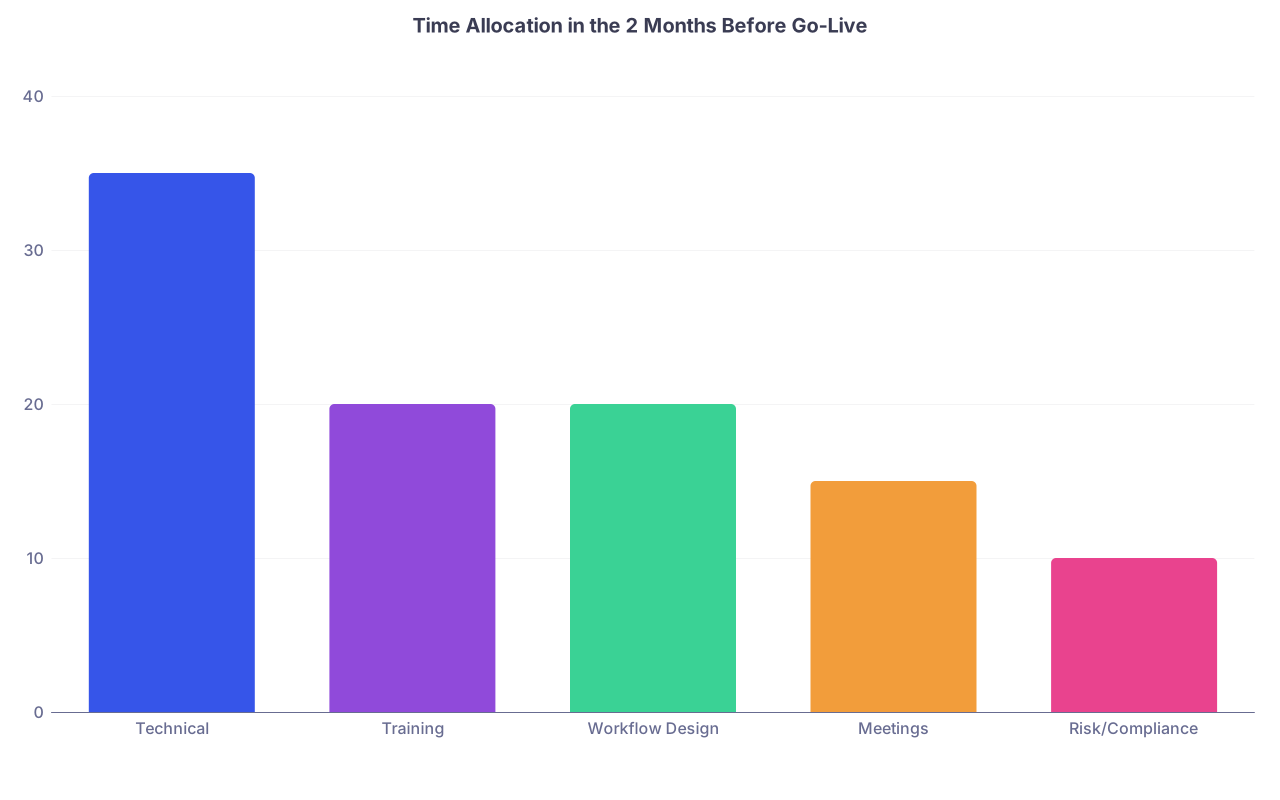
| Category | Value |
|---|---|
| Technical | 35 |
| Training | 20 |
| Workflow Design | 20 |
| Meetings | 15 |
| Risk/Compliance | 10 |
Run a sandbox test:
- Take 10–20 de-identified or test patients
- Walk through the workflow end-to-end:
- Scheduler → patient → nurse/MA → provider → documentation
- Look for:
- Screens that confuse staff
- Steps that add more clicks than they save
- Any place someone could chart on the wrong patient or wrong encounter
If you can’t do a sandbox because IT is moving slowly, simulate with printed screens and fake data. Crude, but very effective.
6–4 Weeks Out: Workflow Mapping With Real Humans
Now it’s time to sit in the clinic or unit with a notebook and shadow.
At this point you should:
- Have a written workflow diagram of “current state” and “future state”
- Know exactly who uses the product and when in their day
Build two simple flows:
- Today (no product)
- After go-live (with product)
Then you ruthlessly remove steps. If your “future state” has more steps and more people… you’re going to have adoption problems.

| Step | Description |
|---|---|
| Step 1 | Patient arrives |
| Step 2 | Front desk check in |
| Step 3 | Nurse rooming |
| Step 4 | Provider visit |
| Step 5 | Checkout |
| Step 6 | Front desk check in |
| Step 7 | Nurse uses product intake |
| Step 8 | Provider reviews product summary |
Sit with:
- 2–3 nurses/MAs
- 2–3 attendings
- 1–2 front desk staff
Ask: “Where does this feel like extra work?” Believe them. Fix it now or accept lower adoption.
4 Weeks Before Go-Live: Lock the Date, Announce, and Start Training
Now the clock is very real. People need to see dates, not vibes.
At this point you should:
- Have a firm go-live week agreed with IT and clinical leadership
- Have training materials ready in draft form
- Be acting like this is a small product launch, not a casual experiment
4 Weeks Out: Announce the Pilot (Correctly)
Do not send a vague, 3-paragraph email and call it done.
You need:
- A short announcement from someone with authority (department chair, service chief, nurse manager)
- One-liner: “What this does for you”
- When it starts
- What’s expected of staff (specific and modest)
- Where to get help / who to call
Example structure:
- Subject: “New symptom tracking pilot starting March 4 on 5 West”
- Paragraph 1: Why (“we’re losing calls, patient messages are exploding”)
- Paragraph 2: What this product does
- Bullet list: What changes for staff, in plain language
- Contact: “Questions? Email Alex, MD (clinical lead) or Maria (ops).”
3–2 Weeks Out: Training and Superuser Prep
At this point you should:
- Have superusers identified on every shift
- Have training sessions scheduled and attended, not theoretical
Your training priorities:
- Train superusers first (1–2 weeks before everyone else)
- Then do:
- 1–2 large group sessions
- Plus short, 10–15 minute huddles on the floor
Focus training on:
- The 3–4 most common use cases
- What to do when the system is slow or down
- How to get help in < 60 seconds when you’re in a room with a patient
Don’t obsess over every feature. Nobody cares. They care: “What button do I push in the room?” and “What happens if I ignore it?”
2 Weeks Before Go-Live: Dry Runs and Final Readiness
This is where you simulate the chaos of real life without the litigation risk.
At this point you should:
- Run at least one live-fire rehearsal using staff and test patients
- Have a written runbook for launch week
2 Weeks Out: Live-Fire Rehearsal
Pick a half-day. Treat it like mini go-live with fake data.
Your steps:
- Have front desk act out check-in with test patients
- Have nurses/MA use the product as they would live
- Have a provider do a full “chart” using the outputs
Watch for:
- “I forgot what to click”
- “This screen doesn’t match reality”
- “This takes longer than my normal flow”
Fix these fast. You want zero surprises during actual go-live.
10–7 Days Out: Final Technical Lockdown
At this point you should:
- Freeze all non-critical product changes
- Finalize your support and escalation tree
Create a simple go-live runbook:
- Who’s on-call from your team (by name, not “engineering”)
- How staff reach you (pager, phone, Teams, Slack, etc.)
- What issues go to:
- IT help desk
- EHR analysts
- Your dev team
- What must trigger an immediate rollback or disable:
- Any data mismatch between patient and chart
- Anything that delays or blocks order entry
- Documented patient harm or near miss involving your tool
Print this and hand it to nurse managers and the help desk.
Go-Live Week: Day-by-Day Plan
Here’s where most startups either build trust or burn it.
At this point you should:
- Be present on site
- Over-communicate
- Fix small issues same-day
Let’s walk this week day by day. Assume your official go-live is Monday.
Friday Before Go-Live (T‑3 Days)
- Confirm with IT: all config is in production, feature flags set
- Send a short reminder email:
- “Starting Monday, we’ll be using [Product] in [Unit].”
- “We’ll be on the unit all week for help—look for [names].”
- Check any printed materials / QR codes / training posters in the unit
- Meet with superusers briefly:
- Reconfirm roles: “You’re the first line for ‘how do I…’ questions.”
Sunday Night (T‑1 Day)
- Manual smoke test (if possible in production or maintenance window):
- Log in as real or test user
- Walk a fake workflow through each major step
- Confirm your team’s schedule and roles for Monday:
- One person: floor presence
- One: tech/infra
- One: data/metrics tracking
Sleep. Seriously. You’ll be more useful rested than tweaking buttons at 1 am.
Monday (Go-Live Day, T)
You should be on-site before the first shift change.
Morning (6–10 am):
- Be physically present at:
- Handover / huddles
- Nursing and provider rounds if relevant
- Reintroduce the product in 30 seconds:
- What it does
- What changes today
- How to get help
Your job today:
- Stand behind people as they use it—with permission
- Watch, don’t talk, for the first minute
- Then ask, “What’s confusing right now?” and fix or note it
Capture:
- Top 3 recurring problems
- Any safety issues (real or near-miss)
- Any quick wins (“this actually saved me 5 minutes” → write that down)
Afternoon (10 am–5 pm):
- Keep at least one team member on the floor
- Triage issues:
- Safety-critical → escalate immediately
- Workflow annoyance → log, patch if trivial
- Feature requests → capture, but do not promise
End-of-day 15-minute huddle with clinical owner:
- “What went well?”
- “What made your staff curse under their breath?”
- “Any patients impacted negatively?”
Decide: are we comfortable proceeding to Day 2 as planned?
Tuesday–Wednesday (T+1 to T+2)
At this point you should:
- Be stabilizing workflows
- Reducing noise and confusion
Your focus:
- Refine training:
- Hit the night shift if you didn’t already
- Short, targeted micro-sessions: 5–10 minutes at the nurses’ station
- Fix the “paper cuts”:
- Default values that are wrong
- Buttons in the wrong place
- Wording that confuses clinicians
Don’t ship major UI overhauls mid-week. Tiny, tactical fixes only.
Start tracking early metrics:
- Adoption rate (% of eligible encounters using the product)
- Error rate (user-facing errors, failed syncs)
- Support volume (how many “help” interactions per shift)
Thursday–Friday (T+3 to T+4)
At this point you should:
- Have fewer new issues and more pattern recognition
- Start thinking about Week 2, not just surviving today
Tasks:
- End-of-week review with:
- Clinical owner
- Admin/ops lead
- IT partner
- Bring data:
- How many users actually used it
- Any early signal on your core metric (even if noisy)
- Decide on any configuration tweaks for Week 2:
- Notifications too frequent? Dial down.
- Certain visit types shouldn’t see it? Turn those off.
Do not expand scope yet, even if it’s going well. Resist the “let’s add the other unit now” temptation. Stabilize first.
Weeks 2–4 After Go-Live: Stabilize, Prove Value, and Document
You survived Week 1. Good. Now you prove this is more than a toy.
At this point you should:
- Be running a steady-state workflow
- Be collecting and communicating results
Weeks 2–3: Stabilization Phase
Focus on:
- Reliability:
- Uptime
- Latency in any EHR calls or API syncs
- Usability:
- Fewer “how do I do X” questions
- Clear documentation for common scenarios
Do short, focused check-ins:
- 1:1s with 3–5 representative users:
- One fan
- One skeptic
- One overworked but honest midliner (often the most useful feedback)
Ask:
- “What would make you miss this if we turned it off?”
- “Where does this still get in your way?”
Use this to prioritize your next two product iterations—not your 2-year roadmap.
Week 4: Early Results and Next Steps
By the end of the first month, you need a simple, clear story, even if sample sizes are small.
Pull:
- Usage data
- Any early impact on your core metric
- 2–3 concrete anecdotes
Package it in 2 pages max:
- Page 1: What we set out to do, what’s happening so far
- Page 2: What we’re changing next, what we’re asking for (continue pilot, expand, or adjust)
This is what you’ll use to:
- Get a second pilot site
- Pitch hospital leadership
- Convince investors this is real, not a demo
Common Failure Points on the Go-Live Timeline (And When to Handle Them)
Let me be blunt about the patterns I’ve seen.
You’re late if:
- You’re still debating scope 4 weeks before go-live
- Superusers haven’t touched the product 2 weeks before
- You don’t have a written, specific rollback plan 1 week before
You’re in danger if:
- Day 1 issues are mostly “I don’t know what this is for”
- Nurses are bypassing it entirely by Day 3
- Your clinical owner isn’t showing up to check-ins
If any of those are true, your timeline priority shifts:
- Freeze expansion
- Shorten the pilot if needed
- Salvage data and learnings without forcing usage that’s clearly failing
Three Things to Remember
- A pilot go-live is not about features; it’s about trust. Every step in this timeline is designed to prevent surprises for clinicians and patients.
- Scope sends the signal. A tight, disciplined pilot that works beats a sprawling, half-broken “vision” every time.
- Being present during go-live week is non-negotiable. At that point you should be on the floor, listening, fixing, and proving you’re the kind of founder clinicians actually want to work with.