The way you email and text on rotations is sabotaging your reputation more than your fund of knowledge.
Not your test scores. Not your Step score. Your phone and your inbox.
I have watched students with 260+ on Step 2 quietly downgraded because they looked sloppy, entitled, or unreliable on email and text. You do not want to learn this the hard way, during the month that could have secured you a letter or a top rank.
Let me walk you through the biggest landmines.
1. The “Casual Text” That Makes You Look Unprofessional

The first big mistake: treating texts with residents or attendings like group chats with your friends.
You know the type of message:
“hey lol just running 5 late be there soon”
Or:
“yo can I skip tomorrow clinic and still be good for eval?”
This is how you quietly get labeled:
- “Immature”
- “Unprofessional”
- “Not someone I would trust with my patients”
You are texting people who can influence your grade, your narrative comments, your letters, and your reputation in an entire department. They screenshot. They forward. They remember.
Red flags in rotation texts
Do not send texts that:
- Start with “hey” / “yo” / “lol” / “haha” / “thx”
- Have no greeting, no name, and no signature
- Use abbreviations a teenager would use, not a professional
- Ask for special favors in a casual tone (“I’ll prob just skip tmrw?”)
- Use emojis, memes, gifs, or reaction images
- Argue by text about feedback, schedules, or evaluations
You want your texts to read like short, polite emails.
Safer pattern to follow
Use this basic structure:
- Greeting + their name
- Clear context
- Direct, specific question or update
- Thanks + your name
Example of how not to text:
“hey I might be late are we still rounding at 7ish”
Better version:
“Good morning Dr. Smith, this is Alex (MS3 on Medicine). My bus is delayed and I may arrive a few minutes after 7:00. I will head straight to the floor and check in with the team. Thank you, Alex.”
Too formal for text? Good. You are not going to get in trouble for being overly professional.
2. The Timing Mistakes That Make You Look Clueless
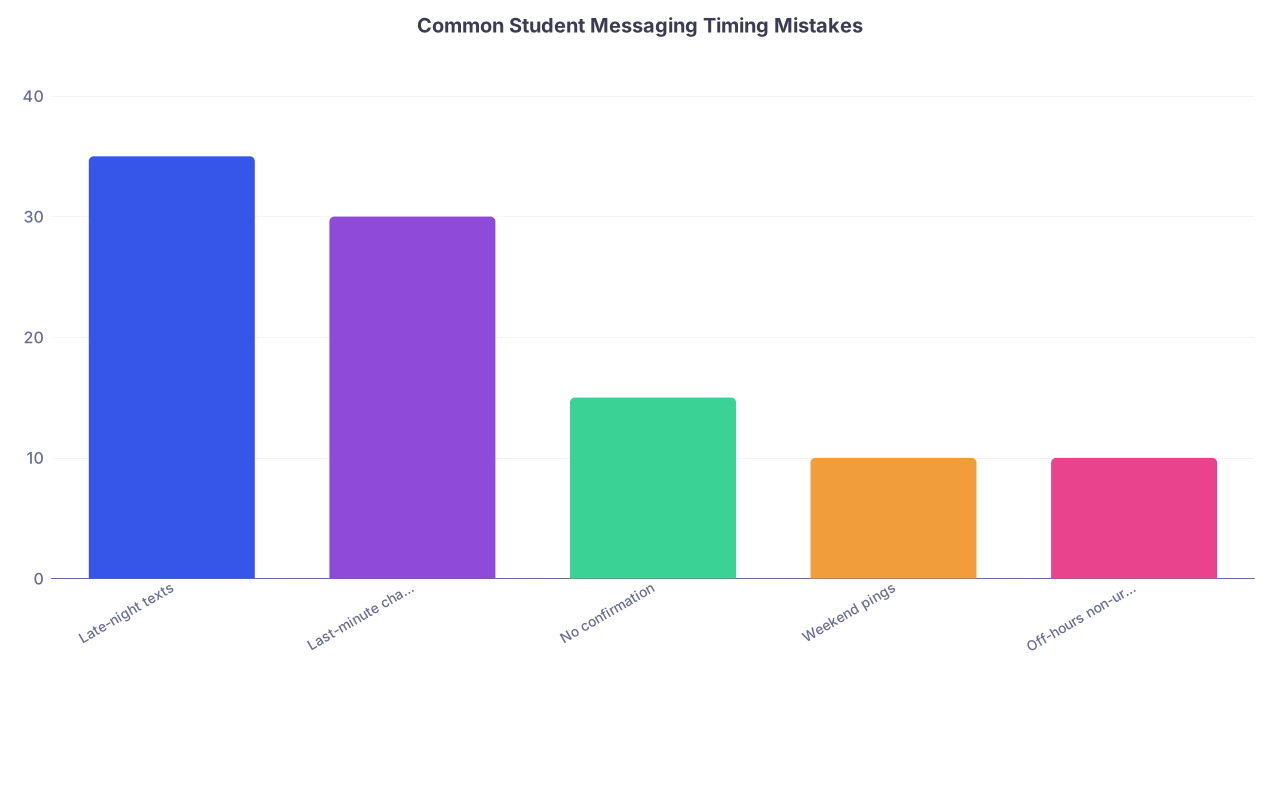
| Category | Value |
|---|---|
| Late-night texts | 35 |
| Last-minute changes | 30 |
| No confirmation | 15 |
| Weekend pings | 10 |
| Off-hours non-urgent | 10 |
You can write the most polite, perfect message in the world and still annoy people if you send it at the wrong time.
Here are the timing errors that repeatedly burn students.
2.1 Late-night non-urgent messages
Texting your attending at 11:37 PM:
“Hi Dr. Lee, quick question about the H&P for tomorrow…”
No. Save it. Unless it is time-sensitive or patient-safety related, you are interrupting their off time. They will not say anything. But their internal note: “Doesn’t understand boundaries.”
Rule of thumb:
- Residents: Try to keep messages between 6:00 AM and 8:00 PM unless they explicitly text you first at a later time.
- Attendings: Even stricter. 6:30 AM to 7:00 PM for non-urgent things.
If you are drafting something late at night, write it in Notes and send it in the morning.
2.2 Last-minute schedule messages
This is one of the fastest ways to lose trust:
- Texting 10 minutes before start time that you are “running late”
- Emailing the night before about a known appointment you sat on for days
- Asking to switch a call or clinic the day before because “something came up”
If you know about:
- A doctor’s appointment
- A family event
- A religious holiday
- A required school session
and you wait until the last minute to tell the team, you look disorganized and self-centered.
Better pattern:
- As soon as you know, email the coordinator/attending and THEN confirm by text with your resident if appropriate.
- Offer a solution: extra call shift, extra clinic time, more notes, etc.
3. The Sloppy Email That Gets You Written Off

Many of you write emails like you are replying to a group project thread. Which is why you get ignored, brushed off, or quietly downgraded for “communication skills.”
Here is what sabotages you.
3.1 Vague subject lines
Subject line: “Question” or “Tomorrow” or “Schedule”
Faculty and residents live in chaotic inboxes. When you send a useless subject line, your email:
- Gets buried
- Gets ignored
- Gets read too late to help you
Use specific subject lines that make it easy to triage.
Examples:
- “MS3 Alex Rivera – Absence request for 2/14 AM clinic”
- “MS4 Jane Doe – Thank you and follow-up question from 1/12 lecture”
- “MS3 – Surgery rotation – Post-call schedule clarification”
3.2 Missing your identity and rotation
Do not assume anyone knows who you are from your email address.
You send:
“Hi, I had a question about the patient we saw today…”
Which patient? Which rotation? Which level are you? They are supervising 8 students, 12 residents, 30 patients.
Every rotation email should make it obvious:
- Your full name
- Your level (MS3, MS4)
- Your service / rotation
- The attending or team if relevant
One clean way to do this: a simple signature block.
Example:
Alex Rivera
MS3, Internal Medicine – Team B
University Medical School
Phone: (xxx) xxx-xxxx
3.3 Wall-of-text emails
Another classic mistake: sending a massive, dense paragraph for something simple. People skim. Busy clinicians skim even more.
Do not make them dig for:
- The actual question
- The requested action
- The date/time you are talking about
Use short paragraphs. Occasional bullet points. Bold or caps only sparingly.
Bad:
“Hi Dr. Patel, I wanted to see if it was possible to leave a bit earlier one day next week because I have an appointment and also there is a school event that I am supposed to attend and I am trying to figure out how to fit everything in…”
Better:
Subject: MS3 – Request for early departure on 10/12 afternoon
Dear Dr. Patel,
I have a required school session on Thursday 10/12 from 3–5 PM. Would it be possible for me to leave wards by 2:30 PM that day to attend?
I am happy to:
- Pre-round on additional patients
- Stay later another day that week
- Help with additional discharges or notes
Thank you for considering this.
Sincerely,
Alex Rivera
MS3, Medicine – Team C
Make their decision easy.
4. The Group Chat Behavior That Destroys Trust

| Step | Description |
|---|---|
| Step 1 | Unprofessional message in team chat |
| Step 2 | Resident annoyed |
| Step 3 | Screenshotted to chief or faculty |
| Step 4 | Labelled as unprofessional |
| Step 5 | Worse evals & weaker letters |
Team chats (WhatsApp, GroupMe, iMessage) are not your safe space. They feel casual. They are not.
Things I have seen students do in group chats that later blew up:
- Making jokes about specific patients, even without names
- Complaining about an attending or chief in the team chat
- Making snide comments about nurses or other staff
- Posting memes during rounds or in conference
- Venting about hours or call while seniors are still in the hospital
Screenshots move. Fast.
Hard rule: never put anything in writing you would not want forwarded to the PD
If your gut says, “…this might be a bit much,” delete it. Vent to a classmate privately, in person, after the shift.
Safer group chat use:
- Clarifying meeting times and locations
- Sharing logistics (codes, door access, parking instructions)
- Letting the team know about patient care updates when HIPAA-safe and appropriate
- Confirming schedule changes everyone already discussed verbally
And remember: “Seen” does not equal “approved.”
5. The Content Mistakes That Signal Poor Judgment

Your tone and timing matter. But the actual content of what you send can create even bigger problems.
5.1 Casual mentions of protected information
No, you cannot safely text:
- Room numbers + specific diagnoses (“the Crohn’s flare in 432”)
- Distinctive clinical situations (“the pregnant woman who jumped from a balcony”)
- Any combination of unusual age + condition + location
Even without a name, you can breach privacy in a small community.
Use:
- Initials or bed numbers only when required, and only in secure, hospital-approved messaging apps
- Neutral language whenever possible (“our new admission with GI bleed”)
Regular SMS / WhatsApp for identifiable patient info is a bad habit. Many hospitals explicitly ban it.
5.2 Asking for letters or favors over text
Another way to look inexperienced: texting for big things.
“Hi, would you mind writing me a strong letter of recommendation?”
“Can you bump my grade to honors?”
Do this in person or via a formal email. Text is for logistics or brief clarifications, not major career moves or negotiations.
5.3 Arguing or defending yourself in writing
You get feedback you do not like. Your instinct is to respond with a long justification by email or text.
Resist.
Examples that backfire:
- “I only left early that day because…”
- “I disagree with that because I actually…”
- “I feel like that is unfair since…”
You are locking your defensiveness into a permanent written record.
Better approach:
- Reply simply: “Thank you for the feedback.”
- Ask, in person if possible: “Could we set up a brief time to talk about how I can improve?”
- Listen more than you speak in that conversation.
6. The “Silent Student” Problem: Not Communicating Enough
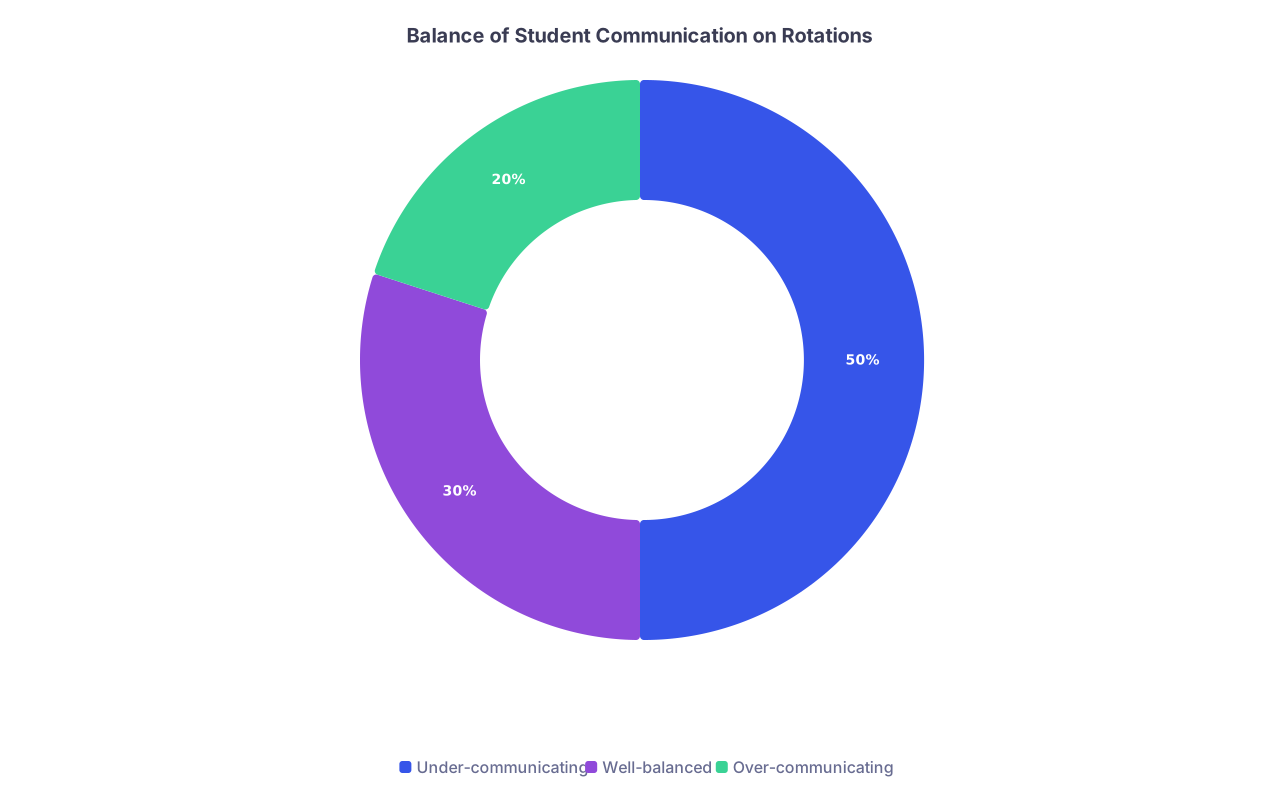
| Category | Value |
|---|---|
| Under-communicating | 50 |
| Well-balanced | 30 |
| Over-communicating | 20 |
There is another group that gets hurt: the students who basically disappear digitally.
They think, “If I never text or email anyone, I cannot get in trouble.” Wrong. They just get labeled as:
- Disengaged
- Hard to reach
- Poor communicators
Here is how under-communication sabotages you:
- You do not confirm schedule expectations → you show up at the wrong place or time
- You do not tell anyone you are sick until an hour after rounds start → people panic, then get angry
- You do not ask clarifying questions → you repeat errors that could have been prevented
The team should never be wondering, “Where is the student?” or “Did the student get this message?”
Minimal baseline:
- Respond to rotation-related texts within 30–60 minutes when awake and not scrubbed.
- If on a procedure or in a case, reply as soon as you are out: “Just finished in OR, saw your message.”
- Confirm any schedule changes in writing: “Got it, I will be at clinic at 1 PM instead of OR tomorrow.”
You are not bothering people by confirming things. You are showing you are reliable.
7. Practical Templates You Should Steal
Let me make this easier. Here are simple patterns you can adapt without sounding robotic.
7.1 Running late (text to resident)
Good morning Dr. [Last Name], this is [Your First Name], the [MS3/MS4] on [Service]. My [transportation/childcare] is delayed and I may arrive around [time]. I will join the team as soon as I get in and catch up on my patients.
Thank you,
[Name]
7.2 Sick and cannot come (text + email)
Text (early, before start time):
Good morning Dr. [Last Name], this is [Name], the [MS3/MS4] on [Service]. I woke up with [fever/violent GI symptoms] and do not feel safe coming in. I have notified the clerkship office as well. I apologize for the short notice.
– [Name]
Email (clerkship + coordinator):
Subject: MS3 – Illness absence on [date] – [Your Name]
Dear [Clerkship Director/Coordinator],
I woke up this morning with [brief description – e.g., fever and vomiting] and will not be able to attend my [Service] rotation today, [date]. I have notified my team.
Please let me know if any documentation is required.
Sincerely,
[Name]
MS3, [School]
7.3 Asking for feedback (email)
Subject: MS3 – Request for mid-rotation feedback – [Your Name]
Dear Dr. [Last Name],
I wanted to ask if you would be willing to share any brief feedback about how I am doing on the rotation so far, and any specific areas I could focus on over the next [timeframe].
Thank you for your time and teaching.
Best regards,
[Name]
MS3, [Service]
Use these as starting points and adapt.
8. Quick Comparison: Behaviors That Help vs Hurt
| Behavior Type | Helps You Look | Hurts You By Looking |
|---|---|---|
| Tone in texts | Professional, brief | Casual, slangy, emotional |
| Response time | Prompt but not frantic | Unreachable or constantly pinging |
| Subject lines (email) | Specific and clear | Vague or empty |
| Content boundaries | Patient-safe, career-safe | Gossipy, identifiable, venting |
| Channel choice | Text for logistics, email for major issues | Texting about grades, letters, conflicts |
FAQs
1. Is it ever acceptable to use emojis or casual language with residents?
Occasionally, once they have clearly set that tone first. If a senior resident sends you a laughing emoji or very informal text, you can mirror it lightly. But do not be the one to initiate that level of casual tone. And never use emojis or slang with attendings, program directors, or anyone you might ask for a letter. When in doubt, stay professional.
2. What should I do if I already sent an unprofessional text or email?
Do not spiral. Do not send a long apology novel. If it was minor (a casual “hey” or “lol”), correct your tone going forward and let your consistent professionalism override the one slip. If it was more serious (inappropriate joke, venting, questionable patient detail), a short follow-up can help: “I realize that message was not appropriately professional. I apologize for that.” Then stop. And do not repeat the behavior.
3. How quickly do I need to respond to messages on rotations?
During daytime hours when you are not scrubbed or with a patient, aim for within 30–60 minutes for texts related to patient care or schedules. During pre-rounding and rounds, your focus is real-time care, not your phone. After about 8–9 PM, it is acceptable to respond the next morning unless it is clearly urgent. For emails, 24 hours is usually reasonable, sooner if it is about the next day’s plans.
Open your most recent text thread with a resident or attending and your latest rotation email. Ask yourself, very bluntly: “If this got forwarded to the program director, would I be proud of it?” If not, fix your patterns today—before someone else quietly fixes your grade.