
The myth that “CV templates don’t matter” is nonsense. Layout absolutely changes how program directors perceive you—and there’s data to back it up.
No, a pretty template will not rescue a weak application. But pretending layout is just “cosmetic” is like saying sterile technique is just about “looking clean.” Format drives how quickly your key strengths are seen, how credible you seem at a glance, and whether a tired reviewer can stand to keep reading you at application #146 of the night.
Let’s dismantle the myth and then I’ll tell you exactly what actually helps—and what’s just Canva fluff.
The Myth: “Content Is All That Matters”
You’ve heard versions of this:
- “Directors only care about scores and letters.”
- “Any Word template is fine, they barely look at the CV.”
- “As long as you list everything, you’re good.”
This is wrong on three levels.
First, human cognition does not work that way. We process layout, hierarchy, and visual structure before we consciously read content. That’s not opinion—that’s eye-tracking data and decades of usability research.
Second, PDs and faculty reviewers are not reading your CV in a vacuum. They’re skimming it in piles, under time pressure, comparing you to others. In that setting, structure becomes a filter. Clean = competent, organized, reliable. Messy = extra work, extra risk.
Third, residency selection is not just “are you good enough?” It’s also “are you going to be a nightmare to supervise, email, or hand off patients to?” Sloppy CVs are a proxy for sloppy notes, chaotic sign-outs, disorganized thinking. They may not always correlate—but they signal it.
You are not just listing facts. You are signaling how you operate.
What The Data Actually Shows About Layout And Perception
Let’s start outside medicine, because HR research is clearer there—and human brains don’t magically change in hospitals.
- A classic usability finding: structured documents with clear headings, consistent fonts, and logical grouping improve reading speed and recall dramatically—often 20–40% faster scanning and better information retention.
- Experiments in hiring show that visual clarity (white space, alignment, consistent formatting) systematically boosts perceived competence and professionalism, holding content constant.
- Eye-tracking on résumés: reviewers typically spend 6–10 seconds on an initial pass. They don’t read. They bounce between headings, dates, current role, and a few key bullets.
Now plug that into the residency reality:
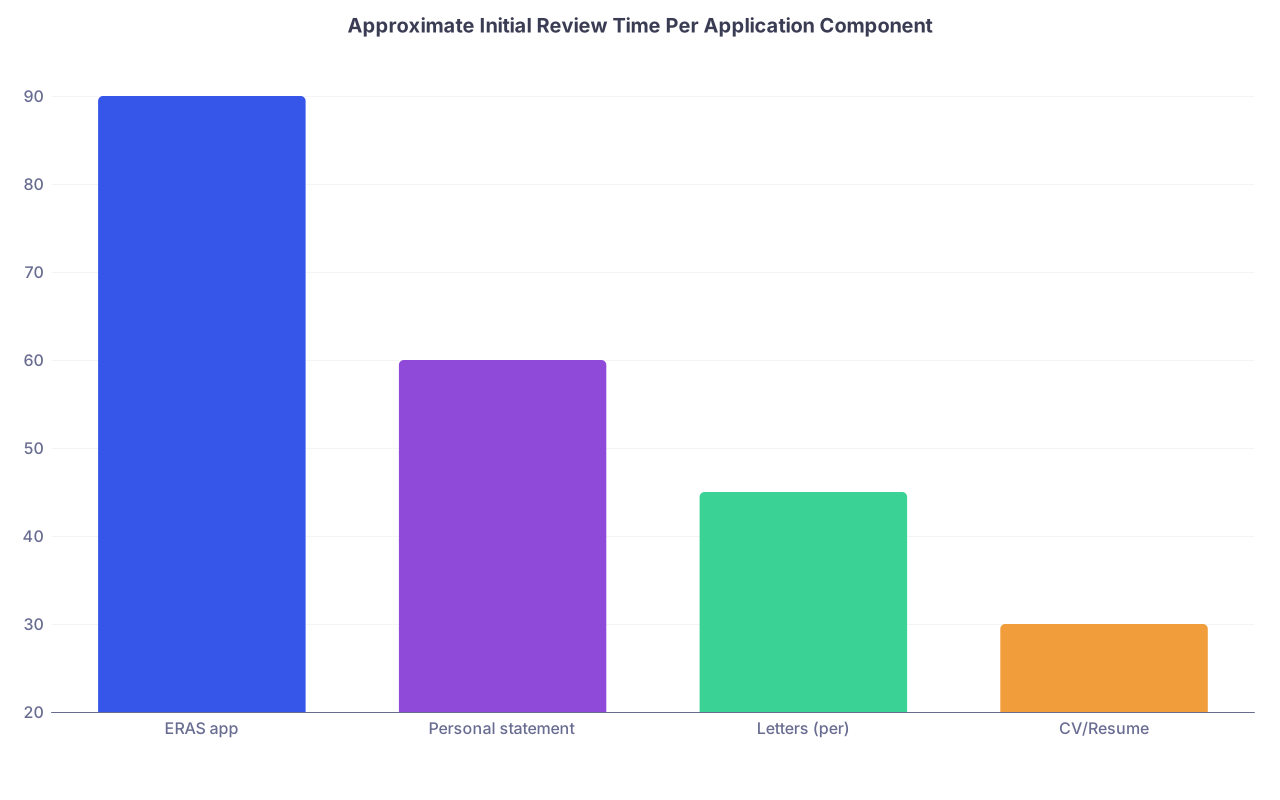
| Category | Value |
|---|---|
| ERAS app | 90 |
| Personal statement | 60 |
| Letters (per) | 45 |
| CV/Resume | 30 |
Most PDs and faculty I’ve spoken with say they spend maybe 20–40 seconds on a CV on first look—often less if the ERAS app repeats content. That means:
- If your leadership roles and major publications are buried in a wall of text? They’re invisible.
- If your dates jump around, fonts are inconsistent, or bullets are misaligned? You get subconsciously tagged as “sloppy.”
- If the layout clearly surfaces “this person is productive and focused”? That impression sticks before they ever meet you.
This is not formal, standardized, or “fair.” It’s just human cognition under time pressure.
How Layout Actually Changes Perception (With Concrete Examples)
Let’s get out of theory and into what happens when someone opens your CV.
1. Visual hierarchy = what they think you’re about
I’ve watched faculty flip through student CVs in real time. Their eyes go to:
- Name, current status (MS4, PGY-1, etc.), institution.
- Education and current training.
- Research/publications or Work/leadership (depending on specialty culture).
- Dates and continuity.
Good CV templates make this scan unavoidable. Section headings are clear, order is logical, spacing makes each block easy to isolate.
Bad templates scatter priorities. I’ve seen:
- “Hobbies” in the first third of a 3-page CV.
- An “Objective” paragraph (completely useless in residency) occupying the entire top third, pushing education and training to page 2.
- Publications mixed into “Experience,” with poster abstracts hiding between volunteer entries.
Same applicant, different layout, yields totally different first impressions:
- Version A: Looks like a clinically focused student with strong, sustained research activity.
- Version B: Looks like a scattered person who volunteers a bit and dabbles.
Nothing changed but structure.
2. Consistency = perceived reliability
Tiny layout details matter because they reflect habits.
- Are dates all aligned on the right, same format (Aug 2021 – May 2024, not “08/2021–5/24” randomly).
- Are roles bolded the same way, institution names formatted consistently.
- Are bullet points parallel (start with strong verbs, similar length, same punctuation).
When this is tight, the reaction is usually something like, “This person is meticulous.” When it’s off, even slightly, the vibe becomes, “This is going to be someone whose notes and handoffs I have to fix.”
And yes, several PDs explicitly say: “If you can’t be consistent on a 3-page document you had months to prepare, how are you at medication lists and orders at 3 a.m.?”
3. White space and brevity = cognitive ease
You know the CV that’s 3 pages but feels like 10 because every millimeter is text?
Densely packed text, no line breaks between roles, bullet lists that are really paragraphs—this creates cognitive friction. Reviewers bail faster or skim more aggressively.
A strong layout does the opposite:
- Enough white space between sections that the brain can chunk information.
- 2–4 bullets per role, not 9.
- Section titles that clearly label what’s going on: “Peer-Reviewed Publications,” “Quality Improvement Projects,” “Teaching Experience.”
This doesn’t just make it “prettier.” It makes it easier to build a mental model of you in seconds: “Research-oriented, steady leadership, some teaching, probably high-performing.”
The Right Template for Residency: What Actually Matters
You do not need something fancy. In fact, many “creative” templates popular online are actively harmful for residency.
Here’s what consistently works across programs:
| Feature | Helpful for Residency | Harmful for Residency |
|---|---|---|
| Clean left-aligned headings | Yes | — |
| Single, readable font (11–12) | Yes | Fancy script, < 10 pt |
| Consistent date alignment | Yes | Dates scattered |
| Subtle bold/italics for roles | Yes | Color blocks, shading |
| 1–2 pages (med student) | Yes | 4+ pages of fluff |
If you want rules, here are the ones I actually care about:
Simple structure, in a rational order
Name and contact → Education/Training → USMLE/COMLEX scores (if included) → Clinical experience → Research/publications → Leadership/teaching → Service/volunteering → Skills/honors.Absolutely no graphics-heavy or “designer” CVs
Columns, icons, rating bars for skills (“Python: ★★★☆☆” … seriously?), colored sidebars—these are built for marketing, not medicine. They also break badly in PDFs and printouts.Ruthless control of spacing
Extra line between roles. Clear separation of sections. No bullet running more than 2 lines unless it’s a major project.Parallel structure inside sections
Every research experience: Role, PI, institution, brief description, outcomes (poster, paper, abstract).
Think like a tired chief resident trying to understand you in 30 seconds. If your template helps that person, you’re winning.
Common Layout Myths That Need To Die
Let’s run through a few persistent lies I see repeated in school “CV workshops.”
Myth 1: “You must keep it to 1 page”
Not for residency. You’re not applying to McKinsey.
If you have substantial clinical work, multiple research projects, real leadership, and a few publications, 2–3 pages is completely fine. The key:
- Everything must earn its space.
- No padding.
- No micro-details of every 2-hour shadowing from college.
A good heuristic: if a reviewer can scan the full thing in under 60–90 seconds while still seeing the main highlights, you’re okay.
Myth 2: “Fancy design shows creativity”
In medicine, “creative CV layout” reads as “doesn’t understand the culture.”
I’ve seen CVs with:
- Headshots embedded in the header.
- Colored progress circles for “Clinical skills.”
- A two-column layout that collapses into nonsense when printed.
You are applying to environments where their “template aesthetics” are Epic note macros and ACGME case logs. Creativity is welcome in QI and problem-solving, not in basic professional documentation.
If they can’t easily print your CV in black and white and mark it up with a pen, it’s a bad CV for residency.
Myth 3: “Templates from X top university are automatically good”
I’ve seen “official” CV templates from big-name medical schools that are terrible for residency:
- Education buried after “Professional Affiliations.”
- Page 1 eaten by personal statements or “Career Objectives.”
- Sections with vague titles like “Professional Preparation” that mix everything—employment, research, training.
Many of these are optimized for academic faculty jobs, not residency applications. Use them with caution. Strip them down and reorder.
How PDs And Faculty Actually Use Your CV
This is the part students almost always misunderstand: your CV is not read once, in full, by one person. It’s used in different ways by different people at different stages.

| Step | Description |
|---|---|
| Step 1 | Initial Application Review |
| Step 2 | Screen for Interviews |
| Step 3 | Interview Day Prep |
| Step 4 | Rank List Discussions |
Initial screen
Someone (PD, APD, chief, coordinator) looks at your ERAS common app and CV for 30–60 seconds. They’re answering: “Interview or not?” Here, layout determines whether your biggest wins surface instantly.Interview day
Faculty glance at your CV between interviews. They’re trying to find hooks: main projects, leadership roles, research themes. If your template isolates those clearly, you get better, more substantive conversations.Rank meeting
Sometimes your CV gets pulled up when people disagree about you. They’ll scan: “What did this person actually do?” If your layout lets them quickly confirm, “Oh right, this is the one who led that clinic QI project,” that sticks.
Bad layouts get you forgettable. Good layouts make your strengths easy to recall when it matters.
A Practical Blueprint: What A Strong Residency CV Template Looks Like
You can stop hunting for the “perfect” downloadable file. Use any clean, single-column template and enforce these principles:
Page header
- Full name, degree
- Email, phone, city/state, optional LinkedIn
- Optional: ERAS AAMC ID (small)
No photo. No colored header band. No “Curriculum Vitae” in 48-point font.
Section order (for most applicants)
Education & Training
- Med school, expected graduation
- Prior degrees
Keep it tight—no thesis title paragraphs here.
Board Exams (if included)
- USMLE/COMLEX Step 1 (P/F)
- Step 2 CK score + date (once available)
Clinical Experience
- Sub-internships, externships, significant paid clinical jobs.
- Clear roles, locations, dates.
Research Experience
- Role, mentor, institution, topic area.
- Focus on outcomes (posters, manuscripts, grants).
-
- Actual citations, consistent style.
- Separate peer-reviewed vs abstracts vs posters.
-
- Titles, organizations, scope, 1–2 impact bullets.
Service & Volunteering
- Prioritize longitudinal and clinically relevant things.
Honors & Awards
- Scholarships, Phi Beta Kappa, AOA, prizes.
Skills & Interests (brief)
- Language fluency, relevant technical skills, 1-line interests.
You’ll notice “Objective” is missing. Because it’s useless. The objective is obvious: match into the specialty you’re applying to.
Where Templates Genuinely Help (And Where They Don’t)
Templates help most in three places:
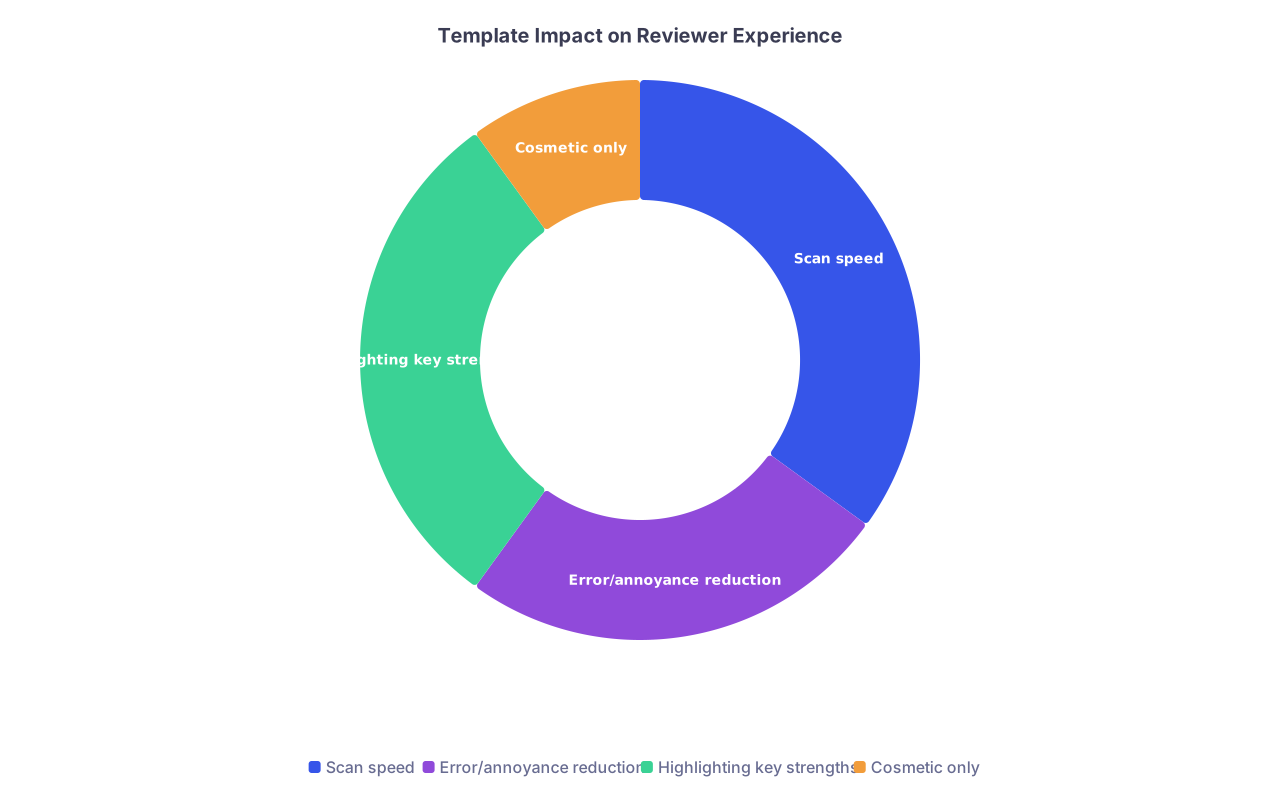
| Category | Value |
|---|---|
| Scan speed | 35 |
| Error/annoyance reduction | 25 |
| Highlighting key strengths | 30 |
| Cosmetic only | 10 |
- Scan speed: headings, fonts, spacing—this is where a good template earns its keep.
- Error reduction: baked-in styles for headings, bullets, and spacing reduce the chance your formatting goes off the rails when you edit.
- Highlighting strengths: a layout that foregrounds research for a competitive academic specialty, versus clinical experience for community IM, actually changes perception.
Where templates don’t help:
- They cannot invent substance. A pretty template with “Research Experience” filled by one summer of pipetting with no outputs is still weak.
- They won’t fix poor wording. Vague, passive bullets stay vague and passive in any font.
- They won’t compensate for obvious red flags (massive gaps, multiple failures, chaotic trajectory). Those need separate strategy, not just design.
How To Use A Template Without Letting It Use You
Last piece: stop being a prisoner of whatever file you downloaded.

Three practical moves:
Customize section order to your story
Applying to academic neurology with 8 pubs? Move “Publications & Presentations” up. Switching from a prior career with serious leadership? Put “Leadership & Management Experience” higher.Strip out template fluff
Many templates include boxes for “Career Objective,” “Summary,” decorative lines, icons. Delete them. If you’re fighting the template to keep it readable, you’ve picked the wrong one.Print it and do the 10-second test
Literally hand it to someone who doesn’t know you well (resident, advisor, even a friend from another specialty) and say: “You get 10 seconds. Tell me the three things you remember.”
If they don’t mention your true top strengths, your layout is failing.
Final Verdict: Do CV Templates Matter?
Yes. They do. And pretending they don’t is self-sabotage.

If you want the core takeaways:
- Layout is not decoration; it’s a cognitive tool. It controls what gets seen, how fast, and how it feels.
- In residency applications, a clean, disciplined template signals organization and professionalism and makes your actual strengths more visible.
- You do not need a fancy design. You need a simple, consistent, single-column structure that a tired PD can scan in under a minute and walk away knowing exactly why you’re worth interviewing.