
The usual advice about “consistent daily study blocks” collapses the second your pager goes off.
If you are on call, your life is not consistent. Trying to study like someone with a 9–5 is why you feel behind, guilty, and permanently tired. You do not need more motivation. You need a scheduling system that assumes chaos and still works.
Here is how you build that system.
Step 1: Define Your Realistic Weekly Capacity
You cannot plan a weekly study schedule until you know your actual usable hours. Most students lie to themselves here. They plan like they are robots, then wonder why the schedule explodes by Tuesday.
You are on unpredictable call. That means:
- Some days will vanish completely.
- Some evenings will self-destruct at 6:17 p.m. with a single page.
- Some “post‑call” days will be spent staring at a wall.
So we plan for capacity ranges, not fixed hours.
1. Do a brutally honest time audit (one week)
For 7 days, track:
- Start/end of clinical time
- Call status (home call vs in‑house, post‑call, pre‑call)
- Sleep time
- Commute time
- Actual study minutes (not intention, reality)
You can use:
- A simple phone notes file (day divided into time blocks)
- Google Calendar with time blocks tagged “study / sleep / clinical”
- An app like Toggl if you like timers
At the end of the week, label each day:
- Heavy: >11 hours clinical/call, emotionally draining
- Medium: 8–11 hours, some mental space left
- Light: <8 hours clinical or structured time
Now look at how many real study hours you had on each type of day.
The pattern usually looks something like:
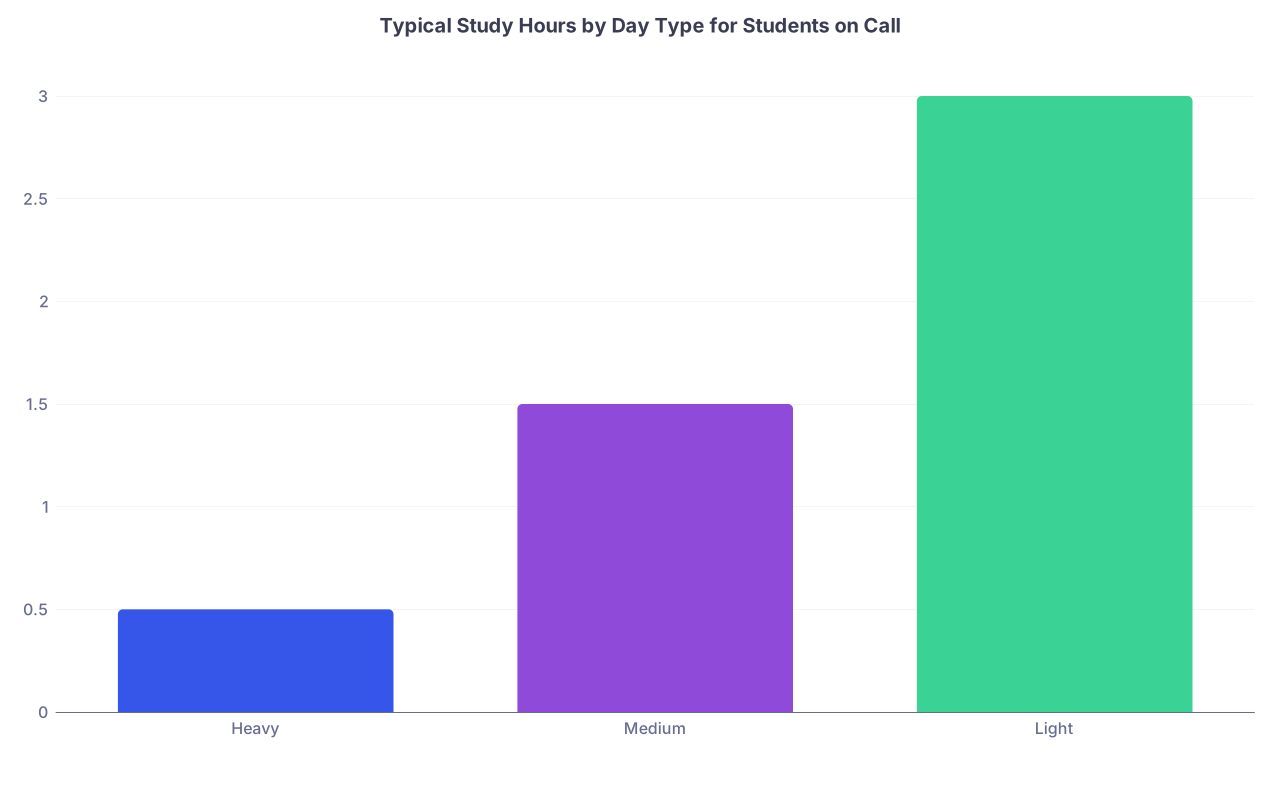
| Category | Value |
|---|---|
| Heavy | 0.5 |
| Medium | 1.5 |
| Light | 3 |
If you are like most students on busy clerkships:
- Heavy days: 0–1 hour of real, focused study
- Medium days: 1–2.5 hours
- Light days: 2–4 hours
This is your starting reality. Not the fantasy schedule you saw on Reddit.
2. Convert that into a weekly baseline
Count how many of each day you typically have in a call week. For example:
- Heavy days: 3 (in‑house call + pre‑call + a crazy clinic day)
- Medium: 2
- Light: 2
Multiply by your realistic study hours:
- Heavy: 3 days × 1 hr = 3 hrs
- Medium: 2 days × 1.5 hrs = 3 hrs
- Light: 2 days × 3 hrs = 6 hrs
Total realistic study capacity: 12 hours / week
Now you have a ceiling. Your schedule must fit under this or it will fail.
Step 2: Set Weekly Targets, Not Daily Promises
On call, daily goals are landmines. Miss one because of a code or admission cluster, and you spend the next day “catching up” instead of doing what you actually need.
You move to weekly, outcome‑based targets.
1. Translate exam prep into weekly units
Instead of “2 hours a day of Anki,” you define targets that are countable:
- X Anki cards
- X UWorld questions
- X pages or chapters
- X recorded lectures
For example, if you are 6 weeks out from a shelf and you want:
- 1,200 UWorld questions → 200 per week
- 2,400 Anki reviews → 400 per week
- 1 full pass of your summary notes → 1/6 of them per week
That is your weekly workload:
200 questions + 400 reviews + section A of notes
Now match it to your capacity from Step 1.
If you have 12 realistic hours and you try to do:
- 200 questions (~5 blocks × 40 minutes = 200 minutes + review ~ 3–4 hours)
- 400 Anki reviews (~2–2.5 hours)
- 3 hours of note review
You are at roughly 8–9 hours. That fits. Good.
If your numbers push beyond your weekly capacity, you do not “hope” it works. You reduce something:
- Fewer UWorld questions per week, start earlier
- Lower Anki load (suspend low‑yield cards)
- Shorten notes or use high‑yield summaries instead of full reading
You cannot beat math with optimism.
Step 3: Build a Tiered, Call‑Resistant Study Plan
You do not need the same kind of brain for every task. On call you might be:
- Half‑asleep at 2 a.m. between pages
- Post‑call and foggy
- Alert on a lighter clinic day
- Completely fried after a rough admission night
So you create tiers of study tasks that match energy and unpredictability.
Tier 1: “Pager‑friendly” micro‑tasks
Stuff you can do in 5–15 minutes and drop instantly:
- Anki reviews (especially mobile)
- Single UWorld explanations you flagged earlier
- Reviewing pre‑made summary tables (electrolytes, antibiotics, murmurs)
- Flashcards inside question banks (Amboss cards, for example)
Use Tier 1:
- While waiting for labs or imaging
- When you are stuck in the ED with your resident on a slow moment
- During slow periods at night when leaving the call room is not smart
Set a rule:
Every time you instinctively open Instagram, you do 5–10 cards first.
Tier 2: Focused but interruptible 25–30 minute tasks
These need more concentration but can tolerate interruptions:
- One 10–15 question UWorld block (timed or tutor)
- Reviewing part of a topic (e.g., all the nephrotic syndromes)
- Skimming one short guideline or UpToDate summary
- Watching 15–20 minutes of a board review video
Use Tier 2:
- At home pre‑call when you are not mentally dead yet
- In the call room at the very start of the night if it is quiet
- Early evening on medium days
Tier 3: Deep work for your light days
Tasks that actually move the needle, but require a rested brain:
- Long question blocks with full review (20–40 questions)
- Building or editing your own condensed notes
- Reviewing missed questions in detail
- Simulated practice exams
Use Tier 3:
- On your lightest days
- Post‑post‑call (i.e., the day after you finally sleep)
- Weekends with no call
Now, link this to your weekly targets:
- UWorld: Mostly Tier 3 (full blocks) + sometimes Tier 2 (short blocks)
- Anki: Tier 1 every day, no matter what
- Notes: Tier 3, maybe Tier 2 if broken into small chunks
Step 4: Create a “Template Week” That Assumes Chaos
You are not going to predict which exact night will implode. You can predict which type of day you are on: pre‑call, on‑call, post‑call, or “normal.”
So build a template around those states, not random days of the week.
| Day Type | Primary Goal | Study Focus |
|---|---|---|
| Pre‑call | Front‑load work | Tier 2 + small Tier 3 |
| On‑call (day) | Survival work | Tier 1 only |
| On‑call (night) | Opportunistic | Tier 1, maybe 1 small Tier 2 |
| Post‑call | Minimal | Sleep, maybe 10–20 min Tier 1 |
| Off / Light | Heavy lifting | Tier 3 + some Tier 2 |
Example schedule structure
You do not write: “Monday 6–8 p.m.: UWorld 40q.”
You write rules like:
Pre‑call day (home by 6–7 p.m.)
- 30–45 min: UWorld (10–15 questions + quick review)
- 20–30 min: Anki (finish daily queue)
- 20–30 min: Notes review on current core topic
On‑call day
- Morning: Nothing formal. See patients.
- Afternoon lull (if any): 10–15 min Tier 1 cards
- Early night: If quiet, one 10‑question mini‑block or some cards
- Do not plan more. Anything above this is bonus.
Post‑call day
- Sleep first. Non‑negotiable.
- Evening: If you can, 20 minutes of Anki. If not, skip guilt‑free.
- No questions or heavy work unless you feel unusually sharp.
Light/off day
- 2–3 hours total split up:
- Block 1 (60–90 min): UWorld 20–40 questions + review
- Block 2 (45–60 min): Notes + missed questions
- Block 3 (30–45 min): Anki backlog and clean‑up
You plug your actual call schedule into this template every Sunday.
Step 5: Use a 3‑Layer Scheduling System
This is where most students fail. They pick either:
- Hyper‑detailed daily schedules that collapse with one consult.
- Vague weekly intentions that never turn into action.
You need both. High‑level and granular.
Layer 1: Weekly planning (10–15 minutes, once)
Once a week (ideally Sunday), do:
Look at:
- Call schedule
- Clinic / OR / rounds expectations
- Known exams, OSCEs, quizzes
Mark each day as:
- Heavy, medium, light
- And label: pre‑call, on‑call, post‑call, off
Allocate your weekly targets to specific days in pencil:
- 200 UWorld questions → 3 light/medium days (e.g., 80 + 60 + 60)
- 400 Anki reviews → daily
- Notes → light/off days only
You end with something like:
- Mon (pre‑call, medium): 40 questions, 60 Anki, notes 20 min
- Tue (call): Anki only
- Wed (post‑call, heavy): Anki 20 min
- Thu (medium): 40 questions, 60 Anki
- Fri (light): 80 questions, 100 Anki, 45 min notes
- Sat (off): 40 questions, 80 Anki, 45 min notes
- Sun (off): rest or light Anki
You are not scheduling times yet. Just “what happens on which type of day.”
Layer 2: Daily planning (5 minutes, morning or pre‑bed)
Each day, glancing at your energy and actual schedule, you answer:
- When are the 1–2 blocks I could realistically study today?
- Which tier goes where?
For example, for a pre‑call day:
- 7:00–7:30 p.m.: UWorld 15q + quick review (Tier 2)
- 7:30–7:50 p.m.: Anki
- 9:00–9:20 p.m.: Notes review if not exhausted (optional)
On call afternoon:
- No fixed times. Just a rule: “Any waiting time: do 10 cards.”
You keep this on a sticky note or small notebook you carry.
Layer 3: Micro‑decision rules (moment to moment)
You create tiny rules so you do not waste willpower debating each time.
Examples:
- “If I sit down in the call room, I open Anki before my phone.”
- “If a consult is delayed, I do 5 cards or 1 question explanation.”
- “If I get home after 9 p.m. and I am wiped, Anki only.”
This is how you turn chaos into automatic behavior.
Step 6: Prioritize Questions, Not Passive Review
On call, you do not have time for inefficient study. You want maximum exam gain per minute.
Clear hierarchy for exam prep:
- Active questions (UWorld, NBME style)
- Active recall (Anki, self‑quizzing from notes)
- Targeted review of question explanations
- Passive watching or reading
So your weekly schedule should be built around:
- Question blocks on your best, lightest days
- Cards and recall on your worst, heaviest days
A practical split for someone with 10–15 study hours a week:
- 50–60%: Questions + review
- 25–30%: Anki / active recall
- 10–20%: Notes / focused reading
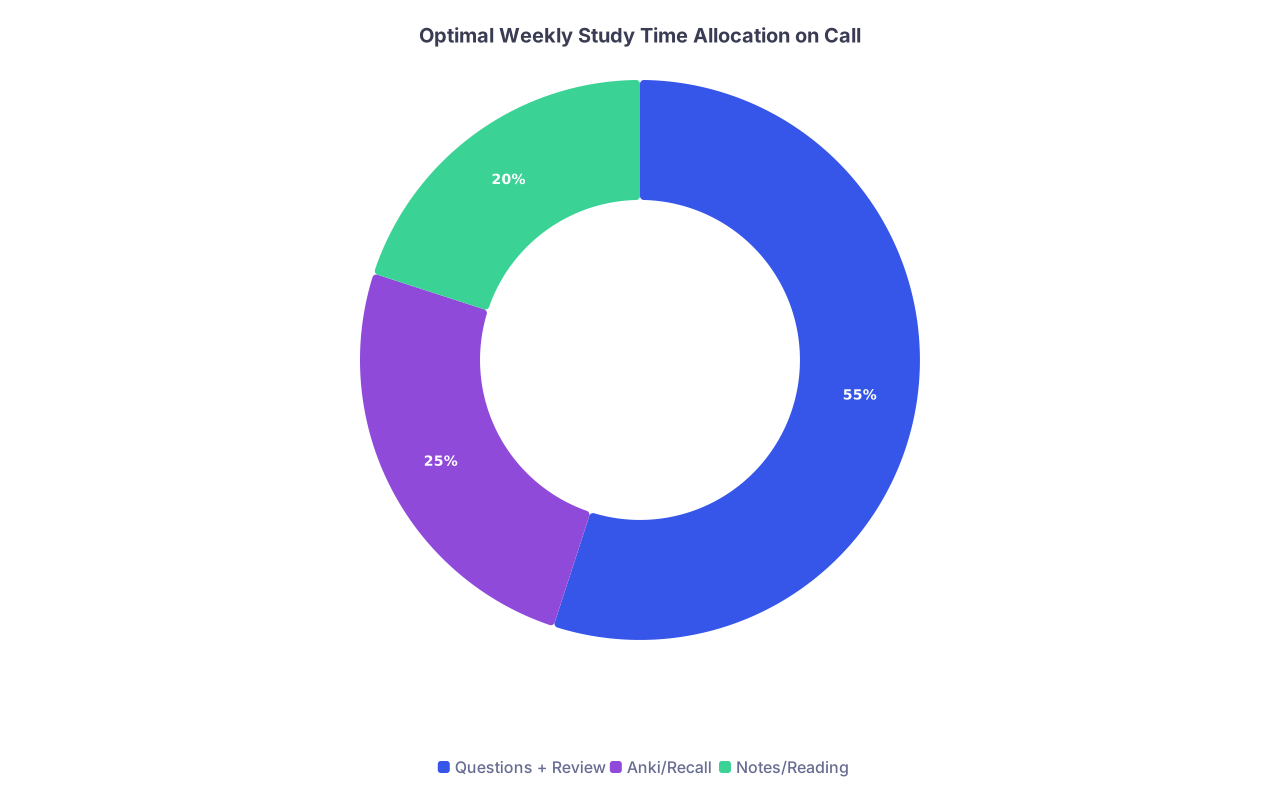
| Category | Value |
|---|---|
| Questions + Review | 55 |
| Anki/Recall | 25 |
| Notes/Reading | 20 |
If your “study schedule” is you exhausted in bed watching videos at 1.25x, you are burning time for almost no retention. Ruthless but true.
Step 7: Build Recovery Directly Into Your Schedule
Call without recovery ruins any plan. You start each “study block” with half a brain and expect miracles.
So you do something most students resist: you schedule recovery and guard it like a study session.
Non‑negotiable rules
Post‑call sleep is sacred.
You do not trade it for studying. You will lose more in efficiency than you gain in minutes.Minimum sleep floors. Set a hard floor, even during crazy rotations:
- Absolute minimum: 5–5.5 hours
- Target: 6+ when not on call
If sleep regularly drops below this, your study plan is not your main problem. Your rotation boundaries are.
Protected off‑duty blocks.
At least one block per week where you explicitly do not study. Might be:- A meal with friends
- A walk with a podcast
- An hour of doing nothing
Call is chronic stress. Your brain cannot consolidate if you never let it idle.
Step 8: Handle Weeks That Completely Implode
You will have those weeks. Four admissions at 3 a.m., a sick patient you worry about all night, a resident who rounds like they are paid by the minute.
Instead of “I failed,” you run a specific recovery protocol.
1. Switch from plan to damage control
During meltdown weeks, your study goal becomes:
- Maintain Anki streak at any cost (even 10 cards a day)
- 0–1 new question blocks. That is fine.
Your schedule temporarily shrinks to Tier 1 only.
2. Use a “minimal viable day” rule
Define the absolute minimum that keeps you from sliding backward:
- 20 Anki cards
- Review one prior missed question explanation
If you hit that on a disaster day, you count it as success. Not failure.
3. Run a “catch‑up light” week after
The mistake is trying to compensate with a “superhuman” catch‑up week. You double or triple your targets, then burn out harder.
Instead:
- Spread the missed work over 2–3 weeks
- Slightly bump weekly targets, not double them
For example:
- You missed 60 questions last week
- Add 20 extra per week for 3 weeks
instead of 60 extra in one week
You are not a machine. You will be on call again. Think sustainable, not heroic.
Step 9: Coordinate With Your Rotation Reality
Different rotations = different call chaos. A medicine ward call is not the same as psych home call or OB nights.
So you tweak your schedule structure depending on rotation.
Common patterns and what works
1. In‑house q4 medicine or surgery call
- Pre‑call: Front‑load questions (smaller blocks)
- Call: Only Tier 1 + maybe 1 Tier 2 in early evening
- Post‑call: Sleep + minimal cards
- Non‑call days: Heavier question and note sessions
2. Home call (e.g., some psych, neuro, peds)
- Evening is theoretically free, but you get random pages
- Plan:
- 1 focused block early evening (before the worst call influx)
- After 8–9 p.m.: Tier 1 only, flexible
3. Night float
- Your “day” moves. Do not cling to daylight.
- Identify your two best alert windows:
- Usually 1–3 hours after waking
- Or right before starting shift if you wake up early
- Put questions there, cards around shift, nothing post‑shift except sleep.
If you notice a rotation has a predictable “chaos window” (e.g., 4–9 p.m.), you simply do not schedule anything heavy there. You are tired of being disappointed. Stop planning against reality.
Step 10: Use Tools That Actually Work on Call
You are not going to carry three textbooks on nights. You need tools that:
- Live on your phone
- Sync across devices
- Work offline when hospital Wi‑Fi dies
Minimum loadout:
- Anki mobile (or AnkiWeb + browser) with:
- Tags by system and priority
- A “Call‑friendly” filtered deck of shorter, simpler cards
- Question bank app (UWorld, Amboss) with:
- Option to do small 5–10 question blocks
- Note system:
- Notion, OneNote, or a simple Google Doc for quick reference tables
- Or a physical small notebook if you are analog‑minded
And for scheduling:
- Google Calendar or Apple Calendar for:
- Blocking your Tier 3 sessions
- Marking call / post‑call clearly
- A tiny pocket notebook or index card:
- Daily plan for today only
- Checkboxes for: “Questions / Anki / Notes”
High‑tech is optional. Honest, visible plans are not.
Step 11: Build Feedback Into Your Week
If you never look back, you just repeat the same failed pattern.
Once a week, spend 5 minutes asking:
- Did I meet my weekly targets? Why or why not?
- Which blocks worked well? (Time of day, duration, location)
- Which tasks I kept avoiding? (Maybe they need to be smaller, or different days)
- Was I overestimating my capacity on heavy days?
Then adjust:
- Drop daily targets that never happen on call days.
- Move heavier tasks to light days or mornings if evenings are dead zones.
- Reduce total weekly questions if you are consistently falling short by >30%.
This review is what turns a generic plan into your plan.
A Visual Example: Putting It All Together
Here is a rough “week on medicine with q4 in‑house call” layout:

| Step | Description |
|---|---|
| Step 1 | Sunday Plan Week |
| Step 2 | Mon Pre-call |
| Step 3 | Tue On-call |
| Step 4 | Wed Post-call |
| Step 5 | Thu Medium Day |
| Step 6 | Fri On-call |
| Step 7 | Sat Post-call |
| Step 8 | Sun Off Day |
| Step 9 | UWorld 15q + Anki + Notes |
| Step 10 | Anki Only + Micro Tasks |
| Step 11 | Sleep + 20 Anki |
| Step 12 | UWorld 20-40q + Anki |
| Step 13 | Anki Only + Micro Tasks |
| Step 14 | Sleep + Light Anki |
| Step 15 | UWorld 40q + Notes + Anki |
You can swap days, but the pattern holds:
- Pre‑call: front‑load
- On‑call: survive + maintain streaks
- Post‑call: recover, minimum work
- Off: heavy lifting
The Bottom Line
Three points to walk away with.
Plan for the life you actually have, not the one on productivity blogs.
Use realistic weekly capacity, tier your tasks, and stop pretending 3 a.m. on call is a good time for 40 UWorld questions.Structure your week around call states, not days of the week.
Pre‑call, on‑call, post‑call, off. Each state has its own default study plan. You plug your real schedule into that template every Sunday.Protect your floor: sleep and minimal study streaks.
On your worst weeks, you keep Anki and a tiny amount of active work alive. Then you gently ramp back, not with heroics, but with consistent, targeted blocks on your lighter days.
You cannot make call predictable. You can make your study system resistant to chaos. That is the real win.