
The fastest way to destroy your credibility as a clinical educator is not by being wrong. It’s by looking amateur online.
In-person, your title and white coat buy you some respect. Online, your audio, slides, and structure do. Trainees will forgive minor content gaps. They will not forgive you wasting their time in a chaotic, low-effort course that feels like a bad Zoom meeting from 2020.
Let me be blunt: a lot of excellent clinicians are unknowingly teaching like rookies online. And their residents, fellows, and CME participants can tell.
Below are the most common online teaching errors that instantly scream “amateur” to trainees—and what to do instead so you do not fall into those traps.
1. Garbage Audio and Visuals: The “I Don’t Respect Your Time” Signal
Most people obsess over their slides and completely ignore the two things trainees notice first: sound and video.
The audio sins that make people click away
I’ve seen attending-run “national” webinars where:
- The mic is clearly a laptop microphone from 2015
- You can hear kids, dishes, or hallway pages in the background
- Volume fluctuates like a broken radio
- Every third word clips or echoes
Trainees read that as: “You didn’t care enough to test this.”
Common mistakes:
- Using the built-in laptop mic, especially on a noisy unit or at home
- Sitting too far from the mic or facing away from it while talking
- Loud keyboard tapping while advancing slides
- HVAC noise or a loud ceiling fan roaring constantly
- No audio test before a high-stakes session
Do this instead:
- Buy a basic USB microphone or a decent headset. You don’t need a podcast studio; a $40–80 mic is night-and-day better than your laptop.
- Always, always run a 30-second audio test in the actual platform before the session.
- Mute all device notifications. The “ping” of Epic, WhatsApp, and Outlook mid-talk drives people crazy.
- If you’re on a ward computer or shared space, don’t teach from there unless you’ve tested audio while the room is at “normal” noise levels.
Video mistakes that make you look like you’re teaching from a bunker
You don’t have to look glamorous. But you can’t look like a shadowy figure in witness protection.
Common video errors:
- Backlighting so strong your face is a silhouette
- Camera angle from below your chin (instant unflattering, instantly distracting)
- Dirty or chaotic background—overflowing laundry, messy shelves, patient identifiers on the wall
- Grainy 240p camera quality because your lighting is awful
- Staring at a different screen instead of the webcam the entire time
Do this instead:
- Face a window or use a small ring light. Light in front of you, not behind you.
- Put the camera at eye level. Stack a few books under the laptop if you must.
- Choose a neutral, clean background. Blurred background is fine; just make sure there’s nothing unprofessional behind you.
- Look at the camera when you make key points. That’s your “eye contact” online.
If your audio and visual setup looks like you threw it together 30 seconds before class, don’t be surprised when trainees treat your teaching the same way.
2. Sloppy, Overloaded Slides That Scream “I Just Exported My Old PowerPoint”
Face-to-face, you can sometimes save a bad slide deck with your presence. Online, your slides are the room. If they look neglected, so do you.
The classic slide disasters
I see this constantly in med ed:
- 40+ slides for a 30-minute talk. You’re flying, not teaching.
- Dense wall-of-text paragraphs, 10-point font, zero white space
- Copy-pasted tables from NEJM so tiny nobody can read them
- Irrelevant clip art or cheesy transitions that look like 2003
- Inconsistent fonts, colors, and alignment
Trainees don’t think “Oh, this person is busy.” They think: “They don’t know how to teach online.”
Do not make this mistake: reusing your exact in-person slide deck without modification.
When people are staring at a screen, cognitive load is higher and attention is thinner. Your slide standards need to be stricter, not laxer.
Core rules:
- One main idea per slide. If you can’t summarize the slide in a single short sentence, it’s overloaded.
- Use large fonts: 24+ for body text, 32–40 for headings.
- Replace paragraphs with 3–5 short bullets max, and make them phrases, not essays.
- For tables/figures from papers, recreate only the piece you’re actually teaching. Don’t throw the whole four-column monstrosity onto a slide.
Visual clutter = mental clutter
Here’s what trainees quietly judge you on:
- Are important points visually emphasized, or do they blend with everything else?
- Is there a consistent color scheme?
- Are there clear visual cues for “key take-home messages”?
They shouldn’t have to work to find the signal in your noise. If they do, the problem is you, not them.
3. Ignoring Interaction: Turning Your Session into a Monologue Podcast
The single biggest sign of an amateur online educator? Zero planned interaction.
I don’t mean asking “Any questions?” at the end when half the class has already mentally logged off. I mean building engagement into the structure of the session.
Common mistakes:
- Talking nonstop for 45–60 minutes with no breaks, no questions, no shift in format
- Never using polls, chat, or breakout rooms even when the content screams for it
- Ignoring the chat box completely; questions pile up and die there
- Calling on people cold in an online setting without warning or clear norms
Here’s how trainees interpret that: “This is a recording with a live hostage situation.”
What a minimum viable interactive session looks like
You don’t need fancy EdTech. But you do need intentional touchpoints.
At minimum, in a 60-minute session:
- Early quick poll (first 5–10 minutes) to check baseline knowledge or experience
- Midpoint interaction: a short case vignette with 1–2 multiple-choice questions
- One structured Q&A block (e.g., at 40–45 minutes), not just “if there’s time”
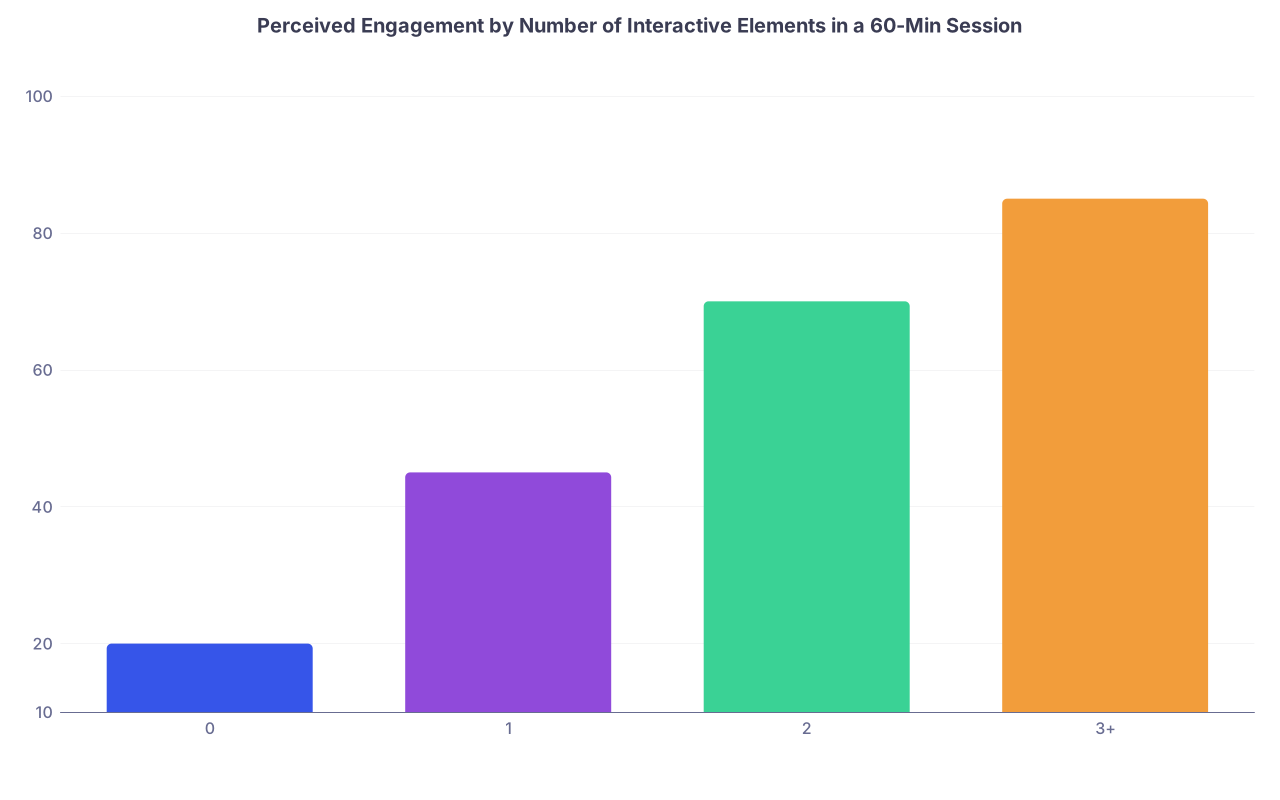
| Category | Value |
|---|---|
| 0 | 20 |
| 1 | 45 |
| 2 | 70 |
| 3+ | 85 |
What I’ve heard from residents repeatedly:
- “If there are no polls, it feels like a lecture from 1998.”
- “I’ll stay engaged if I know I’ll be asked to think every 10–15 minutes.”
- “Chat questions that never get answered? That’s a sure sign the faculty isn’t used to teaching online.”
You don’t have to turn every talk into a game show. But if you design for passive consumption, that’s exactly what you’ll get.
4. Chaos With Tech Platforms: Looking Like You’ve Never Used Zoom
Nothing telegraphs “I don’t belong here” like wrestling with basic tech in front of trainees.
Everyone has occasional glitches. That’s forgivable. What isn’t forgivable is clearly never having opened the platform until the moment you’re teaching.
Common amateur moves:
- “Can someone tell me how to share my screen?” while 60 people wait
- Screen-sharing your entire desktop with open patient info, email, and personal browser tabs visible
- Not knowing how to switch from slides to a video or browser window smoothly
- Forgetting to enable audio share when playing a clip and wasting two minutes fixing it
- Constant “Can you see my slides?” because you never checked presenter view
Trainees don’t expect you to be an IT engineer. But they do expect bare-minimum competence.
Do a dry run. Every time the setup changes.
New platform? New room? Multiple monitors? Do not assume it will “just work.”
At least once before a high-stakes session:
- Open the actual platform (Zoom, Teams, Webex, whatever).
- Test:
- Screen sharing slides only (not your whole desktop).
- Switching between slide deck and browser/video.
- Polls (if you use them).
- Breakout rooms (if you plan them).
- Confirm host/co-host roles so you’re not demoted to “participant” mid-talk.
And for the love of privacy, stop screen-sharing your entire desktop. Share the application window only. Anything else is asking for trouble.

| Step | Description |
|---|---|
| Step 1 | Schedule Session |
| Step 2 | Choose Platform |
| Step 3 | Test Audio and Video |
| Step 4 | Open Slides and Browser |
| Step 5 | Share App Window Only |
| Step 6 | Run Quick Poll Test |
| Step 7 | Join 10 Min Early |
| Step 8 | Start Teaching |
5. No Clear Structure or Timing: Letting the Session Drift
Online, time feels different. An unstructured 60-minute talk feels like three hours on Zoom.
The amateur mistake is thinking you can “wing it” because you know the content well. Clinical expertise does not equal online teaching structure.
What trainees notice immediately:
- No stated objectives. They have no idea what they’re supposed to get out of it.
- No roadmap at the start. Just a firehose of content.
- Rushing the last 15 slides because you mismanaged time.
- Ending 10–15 minutes late, wrecking clinic schedules and pager coverage.
- Or ending abruptly 20 minutes early with “Well, that’s all I’ve got.”
You’re not just wasting their time—you’re signaling you can’t plan.
Build and show a simple structure
At the start, tell them how the hour will go:
- 0–5 min: What we’re covering and why it matters clinically
- 5–35 min: Core content with 1–2 cases
- 35–45 min: Application/case discussion or breakout
- 45–55 min: Q&A
- 55–60 min: Summary and key takeaways
You don’t have to display this formally, but you should at least communicate it.
And then respect the clock. If you routinely run over because “there’s so much to cover,” that’s not a badge of honor. It’s a planning problem.
Trainees will remember the faculty who always made them late for consult rounds. Not fondly.
6. Ignoring the Realities of Cognitive Load and Zoom Fatigue
Content that works in a live lecture can fail miserably online if you pretend people can pay attention the same way.
Amateur online courses:
- Pack dense, high-intensity content for a full hour with no breaks
- Jump rapidly between topics with no signposting or recap
- Throw massive guideline tables onto slides and read from them
- Expect residents post-call to parse complex physiology at 8 p.m. virtually
More isn’t better. It’s just more.
Design for a tired, distracted brain—not an ideal one
Most trainees are:
- Sleep-deprived
- Multitasking (yes, they are; no, your “no multitasking” rule won’t stop it)
- Juggling pages, messages, and family life
Plan with that in mind:
- Use “micro-chunks”: ~7–10 minutes per subtopic, then a pivot (poll, question, recap).
- Explicitly signal transitions: “We’ve finished pathophys—now let’s switch to management.”
- Give quick, one-sentence recaps: “If you remember one thing about X, it’s this…”
And don’t be delusional about cameras: forcing everyone on-camera for an hour doesn’t guarantee attention, it just guarantees camera fatigue and resentment. Focus on interaction, not surveillance.
7. Zero Asynchronous Support: Forcing Everything Into Live Time
Another common amateur move: assuming everything must be live.
So you cram updates, didactics, cases, discussion, and Q&A into a single Zoom slab, then wonder why nobody is fully engaged.
In continuing medical education especially, people have unpredictable schedules. You look behind the curve if you offer no flexibility.
What this looks like:
- No recordings available for residents on nights or clinic
- No slides or handouts shared before or after
- All announcements and instructions given verbally during live time
- No short pre-work (assigned podcast, 5-minute video, one-page guideline summary)
You’re basically betting that everyone will be in the room, on time, fully alert, with pen in hand. That’s not adult learning. That’s wishful thinking.
Use asynchronous elements to make your live time actually valuable
Break the “everything live” habit:
- Record your sessions whenever possible (respecting patient privacy and institutional policy).
- Share:
- PDF of slides
- Key reference links
- 1-page summary with take-home points
- Move low-level content (e.g., basic definitions, simple algorithms) to short pre-recorded videos or readings.
Then use live time for:
- Cases
- Gray areas
- Q&A
- Application to local practice
Trainees notice when you’ve thought about their reality. It feels respectful. And professional.
8. Poor Online Professionalism: Blurred Boundaries and Sloppy Behavior
You can be informal without being careless. Too many educators confuse “relaxed” with “unprofessional” online.
I’ve seen all of this in real courses:
- Faculty taking the call while driving
- Eating loudly on mic, camera on, during teaching
- Making jokes that might have slid in person but sound harsher or more awkward online
- Checking their phone constantly on camera
- Making visible facial expressions of annoyance when tech or trainees stumble
Every one of those chips away at authority.
Basic professionalism rules that shouldn’t need saying (but clearly do):
- Do not teach from your car while driving. Ever. Trainees immediately judge you as reckless.
- If you must eat (long session, weird time), do it off camera and on mute, during a clear break.
- Watch your sarcasm. Without body language and context, it can land badly and kill participation.
- Be explicit about norms: cameras optional/encouraged, chat use, how to ask questions, expected response times if you assign online work.
Remember: online sessions are often recorded. Your misstep lives forever.
9. No Feedback Loop: Flying Blind and Repeating the Same Mistakes
The most amateur thing an experienced clinician-educator can do? Assume they’re good online because they’re good in person—and never check.
Signs you’re doing this:
- You’ve never once asked for structured feedback on your online sessions.
- You use the same deck and format year after year with no iteration.
- You dismiss resident complaints about Zoom teaching as “they just don’t want to learn.”
Trainees are actually pretty generous with feedback—if you ask in a way that feels safe and you act on it.
| Method | Time Cost | When to Use |
|---|---|---|
| 1-question poll | 1–2 min | End of any session |
| Anonymous form | 3–5 min | After course blocks |
| Chat prompt | 1–2 min | Mid-session check-in |
| Peer observation | 15–30 min | Once or twice per year |
Good questions to ask trainees:
- “What’s one thing that helped your learning today?”
- “What’s one thing I should change next time?”
- “Was the pace too slow, too fast, or about right?”
The mistake isn’t having flaws. It’s refusing to see or fix them.
10. Treating Online Teaching as “Less Real” Than In-Person
Underlying all of these errors is one big mindset problem: many clinicians still treat online education as a second-tier, temporary, or lesser form of teaching.
That attitude leaks into everything:
- Minimal prep “because it’s just Zoom”
- No coordination with course directors on objectives
- Weak assessment plans
- No alignment with in-person curriculum
Trainees can feel when your online course is an afterthought. They also know which faculty took it seriously.
Here’s the uncomfortable truth: online is not going away. Hybrid and virtual CME, tele-education, digital fellowships—all of it is growing, not shrinking.
If you cling to “real teaching only happens in a classroom,” you’re telling trainees you’re out of date.
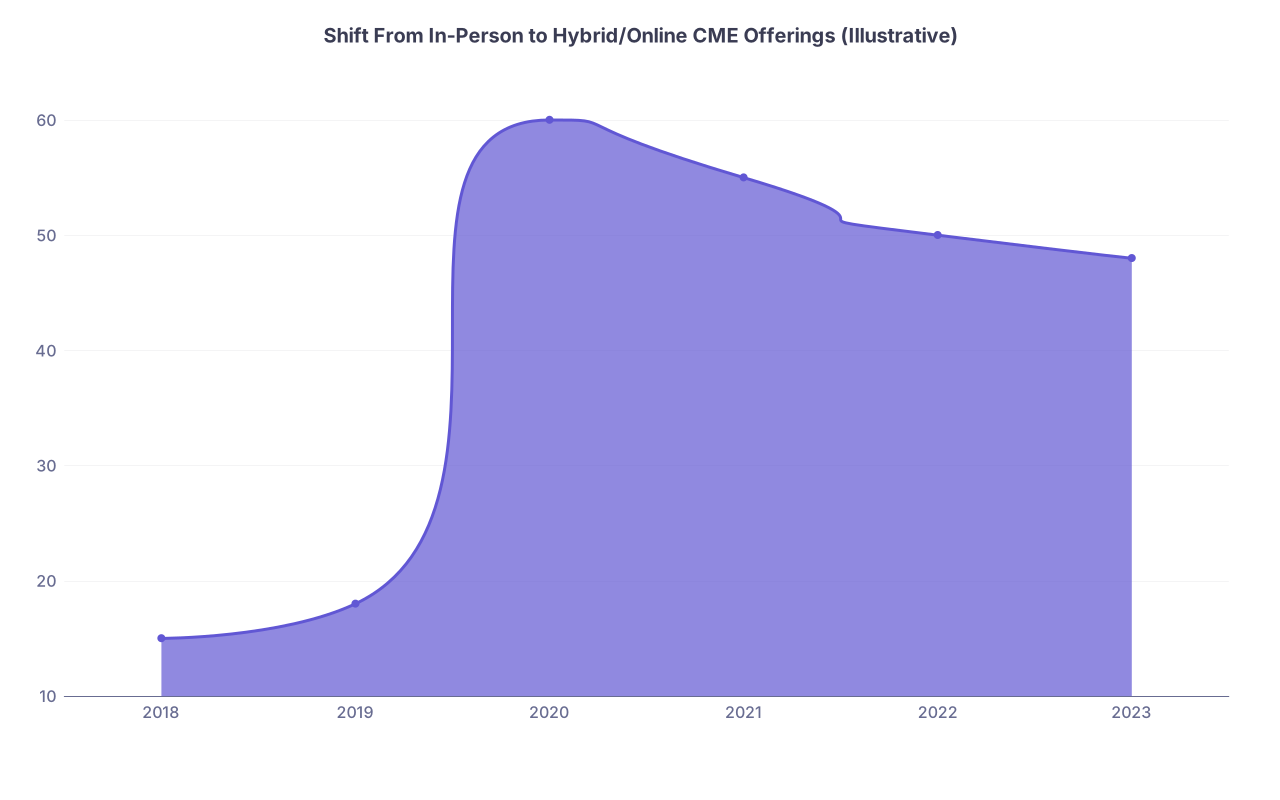
| Category | Value |
|---|---|
| 2018 | 15 |
| 2019 | 18 |
| 2020 | 60 |
| 2021 | 55 |
| 2022 | 50 |
| 2023 | 48 |
You don’t have to love Zoom. But you do have to be competent at online teaching if you want to be taken seriously as a modern medical educator.
The Bottom Line: How Not to Look Amateur
If you remember nothing else, remember this:
- Sloppy audio/visuals and chaotic slides are not “small” issues online. They’re read as “I didn’t care enough to prepare.”
- A professional online educator plans interaction, tests the tech, respects time, and designs for a tired, distracted brain—not an ideal one.
- Treat online teaching as real teaching. Because trainees do. And they’re constantly deciding which faculty they’ll trust, emulate, and listen to next time.