
You’re between patients in clinic. The AI tool your health system bought is humming along in the background, auto‑drafting your notes, patient letters, and prior auth appeals. You open one of its “helpful” drafts and your gut drops: it sounds nothing like you, it includes a diagnosis you only considered but never documented, and it confidently states the patient “denies alcohol use” when you know they drink nightly.
You don’t have time to rewrite everything from scratch. But you also know your name will be on whatever leaves the chart or your outbox.
Here’s the answer you’re looking for: you can use AI‑generated notes and letters safely, but only if you treat them like a risky intern draft, not a finished product. Your job is to control three things: what you feed it, what it can touch, and what you personally verify before you sign.
Let’s go step by step.
1. Start With One Rule: If You Sign It, You Own It
This is the rule I keep coming back to with attendings and new hires:
If your name or e‑signature is on the note or letter, you are legally and professionally responsible for every word. Regardless of who (or what) drafted it.
That means:
- “The AI wrote that” is not a defense in court, in a peer review, or in front of a credentialing committee.
- If it’s wrong, unclear, or misleading, it’s your problem.
- If it sounds canned, generic, or off‑tone, that reflects on you with patients and colleagues.
So the entire question of “How do I safely edit AI‑generated notes and letters?” is really “How do I make sure the final text is something I’d be willing to defend and re‑read in a deposition five years from now?”
Answer: you use AI as a drafter, not as an author. You control the workflow.
2. Know Where AI Helps — And Where It’s Dangerous
You’re practicing post‑residency, juggling clinical work and job market realities. You want efficiency, but you cannot afford sloppy documentation.
AI is actually very good at:
- Turning bullet points into full sentences and paragraphs
- Rewording your own content into a more formal or patient‑friendly tone
- Cleaning up spelling, grammar, and structure
- Summarizing long histories or hospital courses you already documented
- Drafting standardized letters (work notes, school notes, DME letters) from clear instructions
AI is dangerous when you let it:
- Infer facts you did not explicitly provide
- Fabricate exam findings, diagnosis codes, or history details
- “Summarize” messy or incomplete documentation without your oversight
- Draft medico‑legal language (disability forms, custodial issues, fitness for duty) without human review
- Communicate bad news or emotionally charged information without your own voice layered on top
Rule of thumb: if the content creates legal exposure (disability decisions, capacity statements, contentious family situations, malpractice risk), AI can maybe help you with structure or grammar, but you must control the substance line by line.
3. A Safe Editing Workflow: Four Passes That Don’t Take Forever
You do not need a ten‑step “AI governance” ritual. You need a tight, repeatable process. Think of it as four passes.

| Step | Description |
|---|---|
| Step 1 | Draft with AI |
| Step 2 | Fact Check |
| Step 3 | Clarify & Personalize |
| Step 4 | Compliance & Privacy Check |
| Step 5 | Sign or Send |
Pass 1: Fact Check — “Is every clinical claim actually true?”
Go line by line and look only for factual accuracy. Ignore style.
You’re hunting for:
- Wrong meds, doses, or routes
- Incorrect or added diagnoses
- Made‑up physical exam elements you didn’t perform
- Fabricated social history (AI loves to “fill in” smoking/alcohol details)
- Incorrect dates or timelines
- Vague phrases that imply more than you did (“extensive counseling”, “all options reviewed”)
Delete or correct immediately. If you’re too tired to do this carefully, you’re too tired to use AI on that document.
Pass 2: Clarify & Personalize — “Does this sound like me, and is it clear?”
Next, you tighten language:
Replace generic statements like “the patient was counseled” with what you actually did:
“We discussed risks and benefits of starting an SSRI, including side effects and expected timeline.”Strip unnecessary filler. AI loves fluff:
“In conclusion, it is important to note that…” → delete.Make it sound like you, especially for patient‑facing letters:
- If you usually say “We’ll” instead of “We will,” change it.
- If you use short sentences, trim the AI’s long ones.
You can even ask the AI to help you edit its own draft:
“Rewrite this paragraph at an 8th grade reading level and keep the medical facts unchanged.”
But you still review the output.
Pass 3: Compliance & Privacy — “Did I keep PHI where it belongs?”
Two separate issues here:
HIPAA / privacy
- If your AI is not truly integrated and covered by your institution’s BAA, you do not paste identifiable patient info into it. Period.
- That means no names, full DOBs, MRNs, phone numbers, addresses, employer, etc.
- If you’re using a consumer tool (ChatGPT web, non‑enterprise), you only ever feed de‑identified or fictionalized data.
Regulatory/organizational policies
- Many systems now explicitly say: AI can help draft, but you must review and are responsible.
- Some ban AI for certain document types (disability forms, legal letters). Respect that.
Your edit pass here is about stripping out any unnecessary identifiers you accidentally left in, and confirming that you’re using AI in a way your employer actually allows.
Pass 4: Final Read — “If this were on a billboard with my name, would I be okay with it?”
One clean read from top to bottom. Out loud if you can. Ask yourself:
- Is anything ambiguous, snarky, or overly casual?
- Could a patient misinterpret this as dismissive or judgmental?
- Could another clinician misread this and make a bad clinical call?
- If a lawyer read this in five years, does it show reasonable care and thought?
If the answer is yes, then sign or send. If your stomach clenches on a sentence, fix it.
4. How To Prompt AI So You Have Less To Fix
Half the danger comes from lazy prompts. “Write a letter to excuse patient from work” is how you get nonsense.
Instead, think like you’re talking to an intern:
Bad:
“Write my note for this patient with diabetes.”
Better:
“Using only the information I provide, draft a concise progress note for a 55‑year‑old with type 2 diabetes. Do not add any new diagnoses or history. Keep medications and doses exactly as written. Focus on assessment and plan.”
Then paste your structured bullets.
Same logic for letters:
Bad:
“Write a disability letter.”
Better:
“Draft a letter to the patient’s employer explaining functional limitations only, without making a legal disability determination. Use simple language. Include:
– patient age (40)
– diagnosis: lumbar disc herniation with radiculopathy
– restrictions: no lifting >15 lb, avoid prolonged standing >30 minutes, needs ability to change positions frequently
Do not state the patient is permanently disabled. Do not comment on job performance.”
You’re telling the AI what not to do. That’s key.
5. Common Document Types: What’s Safe, What’s Not
Here’s how I’d rate AI use across common post‑residency document types.
| Document Type | AI Use Level |
|---|---|
| Routine visit notes | Moderate (with review) |
| Patient education letters | High (content + tone review) |
| Work / school excuse notes | High (simple, standardized) |
| Prior auth appeal letters | Moderate (facts must be exact) |
| Disability / legal letters | Low (structure only) |
| Performance or HR letters | Low (heavily human-led) |
You can absolutely let AI help with:
- Turning your clinical bullets into organized SOAP notes
- Creating patient‑facing handouts tailored to your actual plan
- Drafting mundane letters (“Patient may return to work on X date with these restrictions”)
You should be very cautious and hands‑on with:
- Disability support letters
- Custody / legal conflict documents
- Workplace grievances or termination letters
- Complaints or responses to complaints
For anything that smells like it might show up in an adversarial context (court, board, HR investigation), AI is at best a grammar assistant. The content needs to be you.
6. Guardrails You Should Put In Place Now
If you want to use AI routinely without waking up at 2am worrying about it, put some simple guardrails in place.
Decide your personal “no‑go” list.
For example:- “I will not use AI to draft disability forms, capacity assessments, or guardianship letters.”
- “I will not let AI touch any documentation in ongoing legal cases.”
Create safe reusable templates.
Build your own human‑written templates for:- Work notes
- School notes
- Standard patient instruction frameworks
Then, have AI help you tweak language or fill selected fields — not invent content.
Use AI as a rewriter, not a mind reader.
Start from your own bullet points.
Example prompt:
“Rewrite these bullets into a clear, professional letter for a patient, at an 8th grade reading level, without changing any facts: [your bullets].”Separate “thinking” from “polishing.”
Do your diagnostic thinking and key clinical decision‑making before you involve AI.
If you’re using AI to help with reasoning (“What else could cause X?”), that’s a different discussion and should never bleed directly into documentation without your own synthesis.
7. Pitfalls I See Over and Over (Avoid These)
I’ll call out a few patterns I’ve actually seen in charts and letters:
AI changing patient quotes subtly.
“I sometimes drink” becomes “Patient reports only occasional alcohol use.” That’s not equivalent. Keep quotes as quotes.AI over‑stating your counseling.
“All treatment options were thoroughly discussed.” Were they? Really? If not, rephrase honestly.Copy‑pasted errors propagating.
Once AI mis‑labels a diagnosis (e.g., calling prediabetes “type 2 diabetes”), that error can repeat across letters and notes unless you catch it early.Overly formal, cold patient letters.
Patients can smell “robot letter” tone instantly. You lose trust. You may need to actually humanize AI drafts: shorter sentences, less jargon, a line that sounds like something you’d say in the room.Using AI on raw EHR exports.
Dumping disorganized chart text into AI and asking for a summary is a recipe for missed nuance. If you do this, you must still verify key facts yourself against the chart.
8. Legal, Ethical, and Job‑Market Realities
You’re not just a clinician; you’re a professional trying to protect your license, your reputation, and your earning power.
Three realities:
Regulators are catching up, but slowly.
Guidance from boards and societies (AMA, specialty orgs) is converging on one point: AI can assist, but you are responsible. Expect more explicit language in contracts and bylaws over the next few years.Hospitals and groups are watching for “AI sloppiness.”
I’ve seen candidates lose offers because their documentation samples looked obviously machine‑generated, with glaring inaccuracies. It screams “I don’t read what I sign.”Good AI use can actually be a selling point.
If you can say, “I use AI to reduce after‑hours charting while maintaining high‑quality, accurate notes via a structured review process,” that’s appealing to employers who care about burnout and quality.
So the safe editing process I laid out isn’t just about avoiding catastrophe. It’s also about being the clinician who uses new tools competently, not recklessly.
9. Quick Visual: Where Your Time Actually Goes
You might be worrying this review process will eat your day. It will not, if you’re disciplined.
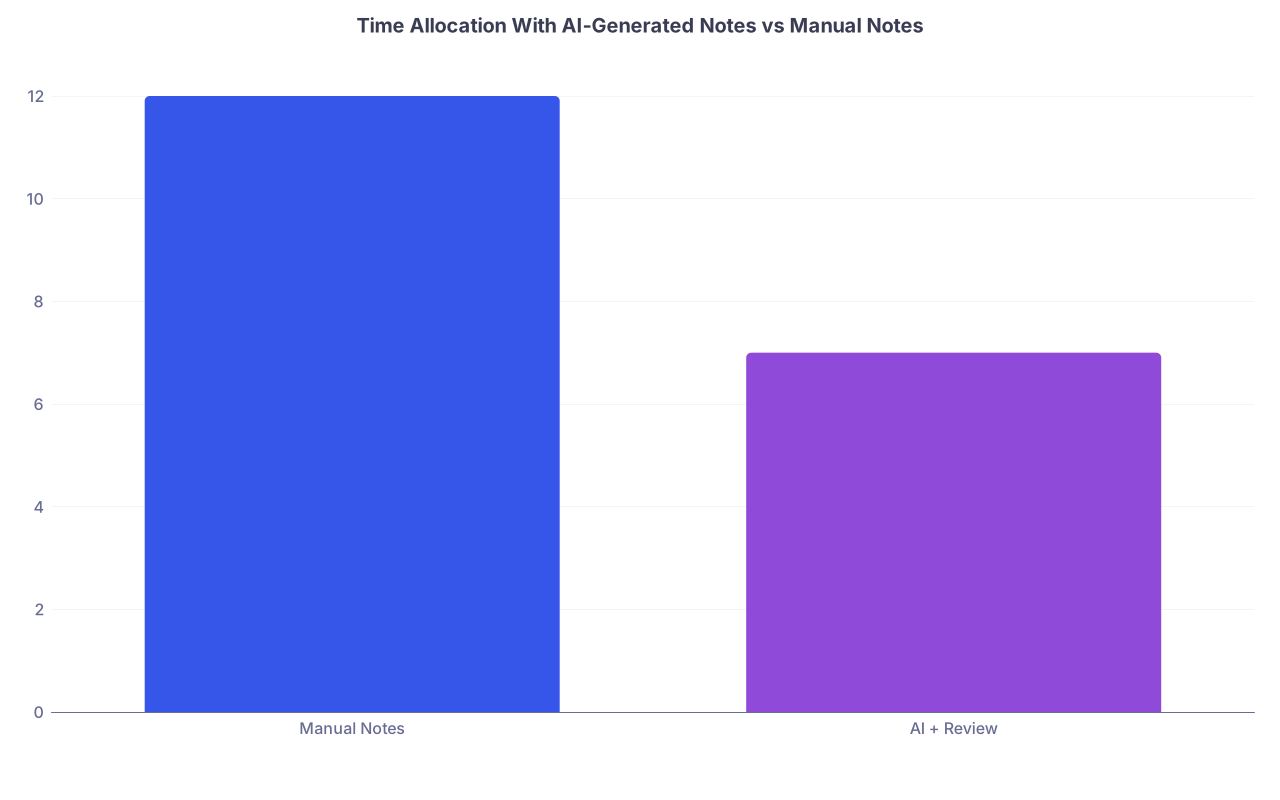
| Category | Value |
|---|---|
| Manual Notes | 12 |
| AI + Review | 7 |
Think 12 minutes for a fully manual complex letter vs 7 minutes for AI‑assisted with review. The gain is real, as long as you do not skip the review.
10. Concrete Examples: Safe vs Risky Editing
Let’s make it very real.
Example 1: Work Excuse Letter
AI draft:
“John Doe is a 42 year old male with severe chronic low back pain and radiculopathy, rendering him disabled and unable to work indefinitely. He should not lift any objects, bend, or stand for prolonged periods.”
Safe edit:
“John Doe, age 42, is under my care for low back pain with radicular symptoms. At this time, I recommend he remain off work through 02/01/2026. When he returns, he should avoid lifting more than 15 pounds and should be allowed to change positions frequently. Further restrictions may be needed depending on his clinical course.”
Changes you made:
- Removed legal disability determination (“disabled and unable to work indefinitely”).
- Replaced absolute “should not lift any objects” with specific limits.
- Added a clear time frame.
Example 2: Clinic Note Assessment
AI draft:
“Patient has longstanding uncontrolled type 2 diabetes, poorly compliant with medications, and was extensively counseled on diet and exercise.”
Safe edit:
“Type 2 diabetes, suboptimally controlled (A1c 8.4%). Patient reports missing metformin doses several times per week. We discussed increasing adherence by using a pillbox and setting phone reminders. Reviewed general dietary recommendations and plan to refer to nutrition if A1c not improving at next visit.”
Changes you made:
- Replaced “longstanding uncontrolled” with actual current data.
- Removed judgmental “poorly compliant.”
- Replaced “extensively counseled” with specific counseling content.
That’s safe editing in practice.
11. What You Should Do Today
Do not overhaul your entire workflow tonight. Start small and deliberate.
Here’s one specific, actionable step:
Pick one document you regularly write (for example, a standard work excuse letter or a simple follow‑up clinic note). Tomorrow, use AI to draft it from your own bullet points — then run it through the four‑pass review:
- Fact check line by line
- Clarify & personalize
- Compliance & privacy check
- Final read with the “billboard test”
Time yourself. Compare it to doing the same document completely manually. Then decide where AI actually helps you, and where it’s more trouble than it’s worth.
From there, you can deliberately expand AI to other low‑risk document types, instead of blindly letting it creep into everything you sign.