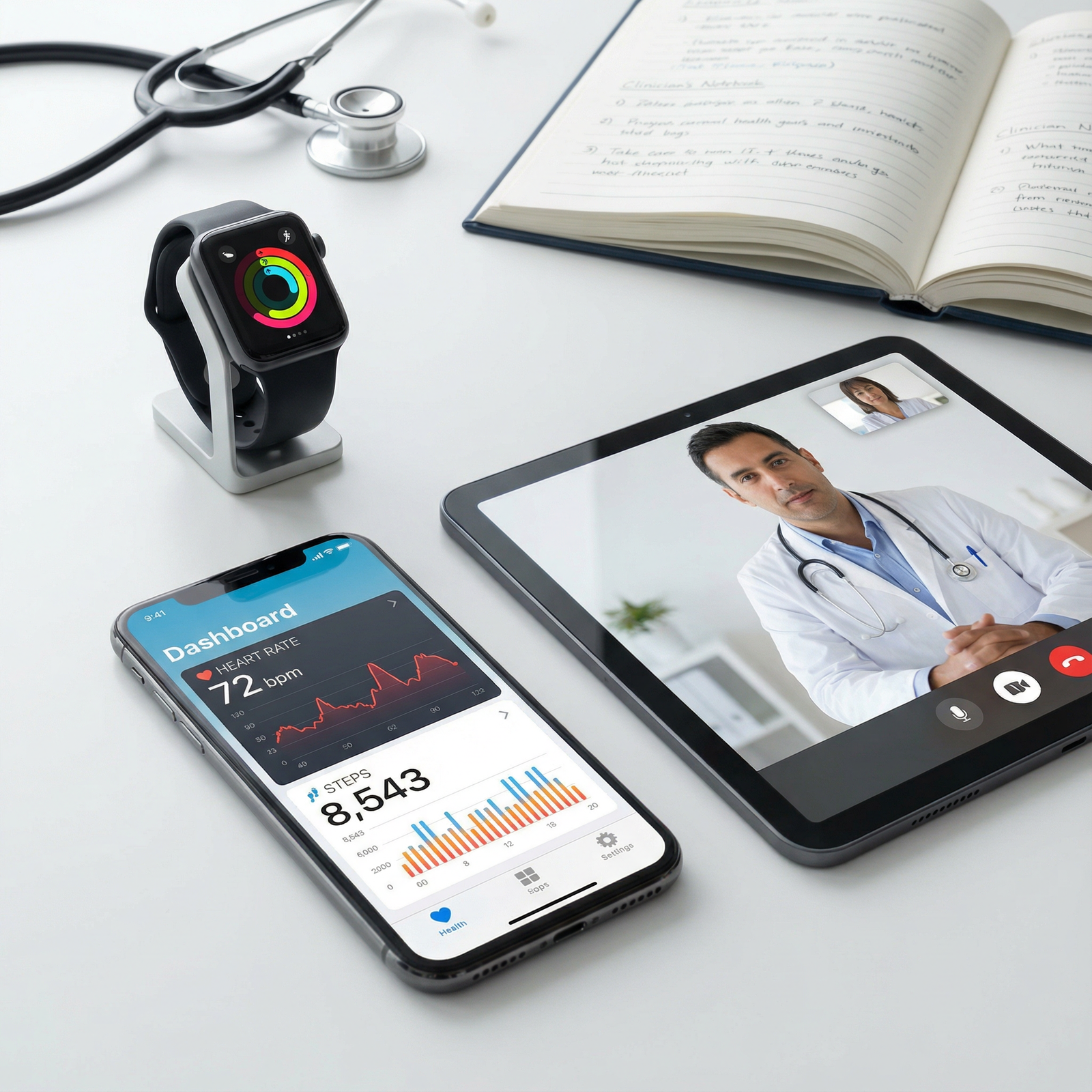
You’re post‑residency, working at two hospitals and a telehealth gig, and your brain is permanently stuck on the EHR loading screen. One place runs Epic, the other has Cerner, the telehealth platform uses some bargain-bin web EHR that looks like 2004. You’re wasting 30 minutes a shift just remembering where the damn “reconcile meds” button lives.
If that sounds like your life, this is for you. You do not need to “love technology.” You just need not to get buried by it.
First, Be Honest: This Is a Cognitive Tax, Not a “You Problem”
Every hospital CIO will tell you, “You’ll get used to it.” That’s half true and half lazy.
What you’re actually dealing with when you juggle multiple EHRs:
- Different mental models: Where meds live, where labs live, how to sign orders, all rearranged.
- Different shortcut keys and pathways: F2 here, F9 there, right-click vs hover menus.
- Different documentation expectations: Notes, macros, smart phrases, mandatory fields.
- Different messaging/tasking workflows: Inbasket vs message center vs “we faxed you something.”
If you treat each EHR as “a new software I’ll just figure out on the fly,” you will get crushed. Your brain has better things to do—like not missing a STEMI.
So the goal is not “master every EHR.” The goal is: minimize cognitive load and error risk while staying reasonably fast.
That means you need structures. Routines. Templates. And a bit of ruthlessness about what you refuse to tolerate.
Step 1: Build a Personal EHR Map for Each Site
Do this once per hospital or system. One evening. It will save you dozens of hours.
You’re going to create a 1-page “EHR map” for each system you work in. Not a manual. A map. The bare essentials you use every shift.
Use a physical sheet or a simple digital doc. Split it into sections like this:
Core Workflows
- Open patient / find chart
- Review: vitals, labs, imaging, meds, prior notes
- Write note
- Place orders
- Discharge / disposition
- Send message / task
High‑risk Items
- Allergy documentation
- Code status / advance directives
- Reconciliation of meds on admission and discharge
- Critical result notifications
Shortcuts / Time‑savers
- Smart phrases / macros
- Default order sets that actually work
- Best way to see “all today’s labs and results” at once
Then, during 2–3 shifts, deliberately pay attention and fill this in. Every time you think, “Where is that again?” write it down. Ask a nurse, scribe, superuser, or that one attending who is suspiciously fast.
You are not writing a reference novel. You’re building a single-page cheat sheet you can glance at for the first 10–15 shifts.
Once it’s built, print it. Tape it to the workstation you use most, if allowed. Or keep a folded copy in your white coat.
Step 2: Standardize What You Can Control (Even If the Hospital Won’t)
You cannot make Cerner look like Epic. You cannot force Meditech to grow a brain. But you can normalize how you interact with them.
Standardize your note structure across systems
Decide on your personal, standard note skeleton: for example, for an inpatient H&P:
- ID / CC
- Brief HPI
- Pertinent PMH/PSH/meds/allergies
- Focused exam
- Labs/imaging summary
- Assessment & Plan by problem
Then create versions of that skeleton as:
- A smart phrase in Epic (.MYHPITEMPLATE)
- A macro or favorite template in Cerner
- A copy-paste text block stored in a secure notes app if the system is too primitive
You want to be thinking clinically, not “Where does this EHR put Review of Systems again?” Your brain sees the same structure at each hospital, even if the buttons to insert it are different.
Do the same for:
- Progress notes
- Discharge summaries
- Consult notes
- Telehealth visit notes
Standardize order set “blocks”
You can’t fully standardize orders across hospitals—they have different formulary, protocols, etc. But you can make mental “blocks.”
Example: Typical CHF exacerbation admission block:
- Diagnostics: BNP, troponin, CMP, CBC, CXR, EKG
- Treatment: IV loop diuretic (per hospital formulary), oxygen PRN, strict I/Os, daily weights
- Monitoring: Telemetry, daily BMP, fluid restriction
Then, in each EHR:
- Build a favorite order set or “custom set” that approximates that block.
- Name it consistently if the system allows: e.g., “MY CHF ADMIT.”
Same idea for:
- Uncomplicated pneumonia
- DKA
- Sepsis bundle
- Generic med-surg admit
- Typical outpatient follow‑up
Different EHRs, same mental “blocks.” You select your block and then tweak.
Step 3: Create an “EHR Context Switch” Routine Between Hospitals
The dangerous time is the first 15–30 minutes after you switch sites. That’s when your fingers still assume Epic while Cerner is staring at you, offended.
You need a small ritual. Literally 2–3 minutes.
When you start a shift at Hospital B after working last night at Hospital A, do this:
- Before opening charts, glance at your Hospital B EHR map (that 1‑pager you made).
- Mentally run through:
- “Right, orders are here. Labs view is this tab. Discharge meds are reconciled in this screen.”
- Open a test patient or a non-urgent chart and:
- Click the notes screen
- Click orders
- Pull up labs and imaging
- Open your template list / macros
You’re reminding your muscle memory, “We’re in Cerner now,” before the high-stakes cases appear.
Sounds small. It’s not. This is the difference between putting an order in the wrong encounter vs not.
Step 4: Decide What You Will Not Compromise On (Patient Safety Drills)
Multiple EHRs = more risk for:
- Wrong patient / wrong chart
- Orders placed on the wrong encounter
- Outdated meds copied forward
- Missed abnormal results because the inbox is different everywhere
So you draw a hard line. A few rules that are non‑negotiable for you, across all systems.
For example:
Two‑patient identifiers every single time before placing orders or signing notes, even if the EHR does not force it:
- Name + DOB or MRN, out loud or in your head.
Click “All Results Today” or similar once per patient before disposition:
- Some EHRs make you hunt for “results you have not seen.” Have your own process: before you discharge or sign out, hit the all-results screen and scroll once.
Meds and allergies: always open the dedicated screen, never just glance at a sidebar.
- It’s often out of sync. Open the real med list and allergy list at least once per admission or new patient visit.
When you’re tired: slow down the first order on each new chart.
- Instead of “I can do this in 3 clicks” mode, deliberately go slower on the first order to sync with the system you’re in.
If a hospital’s EHR design or policies make these safety steps impossible or absurdly hard, I’m blunt: think very carefully about staying there long-term. You carry the malpractice risk, not the CIO.
Step 5: Use Shortcuts, But Don’t Outsource Your Brain
You’ll hear stuff like, “Just use this mega-macro, it writes the whole note for you.” That’s how you end up with a 6‑page note saying the patient is a 36‑year‑old female when they’re a 74‑year‑old male on hospice.
Good shortcut use looks like this:
- Smart phrases that insert headings and boilerplate, not made‑up clinical details.
- Favorite order sets that cover 70–80% of your standard treatment, with you filling the rest.
- Dot phrases for common counseling (e.g., return precautions, med instructions) that you personalize each time.
If you work on multiple EHRs, keep your smart phrases conceptually parallel:
- Epic:
.MYDISCHARGEINSTR - Cerner: Macro named
MY_DISCHARGE_INSTR - Telehealth: Text snippet “Discharge – standard follow up / safety” in your clipboard tool
Your fingers should know: “I type ‘mydis…’ and I get my standard discharge block, no matter where I am.”
Step 6: Manage Your Own Training (Because No One Else Really Will)
Post-residency, orientation is often:
- One rushed class.
- A couple of PDFs.
- “Ask the superuser” who is never around when the ED is drowning.
You’re going to have to be more intentional than your hospital is.
Here’s how to do it without losing your mind:
Find a real human power user at each site.
Not the IT person demoing a fake workflow. The actual doc or nurse who flies through charting and orders.Ask them:
- “Show me how you do a full admit from scratch.”
- “What 3 things save you the most time in this system?”
- “What do new people always screw up here?”
Practice one workflow per shift intentionally.
For example:- Shift 1: Optimize how you review charts (labs, imaging, vitals)
- Shift 2: Optimize admission order workflow
- Shift 3: Optimize discharge process
Do not try to “learn everything” at once. One workflow at a time sticks better.
Use downtime for micro-reps, not browsing.
Five minutes between admits? Open a test patient and:- Explore filters for labs.
- Build or tweak your favorite order set.
- Add or modify one smart phrase.
Small reps compound. You’ll wake up in 2 months and realize you’re 30% faster across two systems without ever doing a 4‑hour training.
Step 7: Protect Your Brain: Scheduling, Fatigue, and Reality Checks
Balancing multiple hospitals is not just a tech problem. It’s a fatigue problem.
You want to avoid the deadliest combo: new EHR + new workflow + sleep-deprived.
A few practical boundaries:
- Avoid back‑to‑back night shifts at different hospitals if they use different EHRs. If you must, treat the second shift as higher-risk and slow yourself on high‑stakes orders.
- If you’re adding a new site with a new EHR, reduce shifts at other sites for the first month if you can. Your brain cannot deep-learn three systems at once and still be fully sharp clinically.
- During your first 5–10 shifts at any new system, bias toward:
- Over-documentation rather than “I’ll clean it up later.”
- Double-checking meds, allergies, and orders with nurses or pharmacists.
- Asking questions instead of guessing where something lives in the EHR.
This is not about being fragile. It’s about managing cognitive load like a professional.
Step 8: Use Simple External Tools (Legally and Safely)
You can’t fix hospital IT. But you can build a lightweight layer on top of your own brain.
Some options that won’t get you fired:
Non‑PHI personal reference file
Google Doc, Notion, OneNote, whatever. Contains:- Your note skeletons.
- Reminder of each system’s quirks.
- List of your most‑used smart phrases for each site.
- “Gotchas” you’ve discovered (e.g., “At Site B, make sure to change default DVT prophylaxis dose in cirrhotics.”)
Plain-text snippets tool on your personal, non‑hospital device
For telehealth or systems that don’t support built-in macros. Just make absolutely sure you never paste PHI into external apps that are not approved.Paper cards
Old-school but effective. Small laminated card with:- “Hospital A EHR: key shortcuts / screens”
- “Hospital B EHR: key shortcuts / screens”
- A tiny checklist of your personal safety drills
Do not store screenshots with PHI, do not email yourself patient summaries, do not sync PHI to your phone notes. Career-ending-level stupid.
Step 9: When to Say No: Recognizing a Truly Bad Setup
Some systems are just clunky but usable. Others are dangerous. You should know the difference.
Red flags that the combination of EHR + workflow is not just annoying, but unsafe:
- It’s hard to tell which encounter you’re in, and people routinely place orders on the wrong visit.
- Closing a chart does not warn you about unsigned or pending orders.
- Critical imaging or lab results do not trigger a clear, visible, and auditable alert.
- Medication reconciliation is actively confusing, with home meds and inpatient meds blended together in the same list.
If you see this:
Document specific examples (without PHI when you talk about it).
Raise it—formally—through:
- Department meetings
- Safety/quality officers
- A brief email: “We had X near-miss because Y. Here’s the exact step.”
Give the system a defined trial period. For example:
- “I’ll work here 3–6 months and see if they fix any of this or offer better workflows.”
If they do nothing and you have better options, leave. You are not obligated to absorb institutional risk because leadership bought the cheapest EHR package.
Quick Comparison: What You Should Standardize Versus Customize
| Item | Standardize Yourself | Customize Per EHR |
|---|---|---|
| Note structure | Yes | Only formatting |
| Smart phrase naming | Yes | Syntax/details |
| Order set “blocks” | Conceptually | Exact orders |
| Safety checks (ID, meds) | Yes | Screen location |
| Keyboard shortcuts | No | Yes |
| Inbox / result workflows | Process | Exact clicks |
Example: A Week in the Life with 3 EHRs (And How to Stay Sane)
Let’s say your setup looks like this:
- Mon/Tue: Hospital A – Epic
- Wed: Telehealth – Web EHR
- Fri/Sat: Hospital B – Cerner
Here’s how you’d actually apply the strategy:
- Before your first Monday at Hospital A: build your Epic 1‑page map; set up your H&P, progress, and discharge note templates.
- Between Monday and Tuesday: tweak any shortcuts that annoyed you on Monday.
- Wednesday morning, telehealth:
- Use the same note skeleton, pasted from your own snippets file.
- Create 2–3 text blocks: standard counseling, follow‑up plan, red‑flag warnings.
- Thursday (your “admin” day):
- Spend 30 minutes at home reviewing the Cerner tip sheet and your own notes.
- Write out what your standard workflows should look like and where you think things live.
- First Friday at Hospital B:
- Use your “context switch” routine.
- Shadow or ask a fast colleague, watch them do one full admit and one discharge.
- On break, refine your Cerner 1‑page map.
Within 2–3 weeks, your brain will have three distinct “EHR modes” it can slip into on command. Not perfect. But much less chaos.
Visual: How Your EHR Learning Curve Should Look
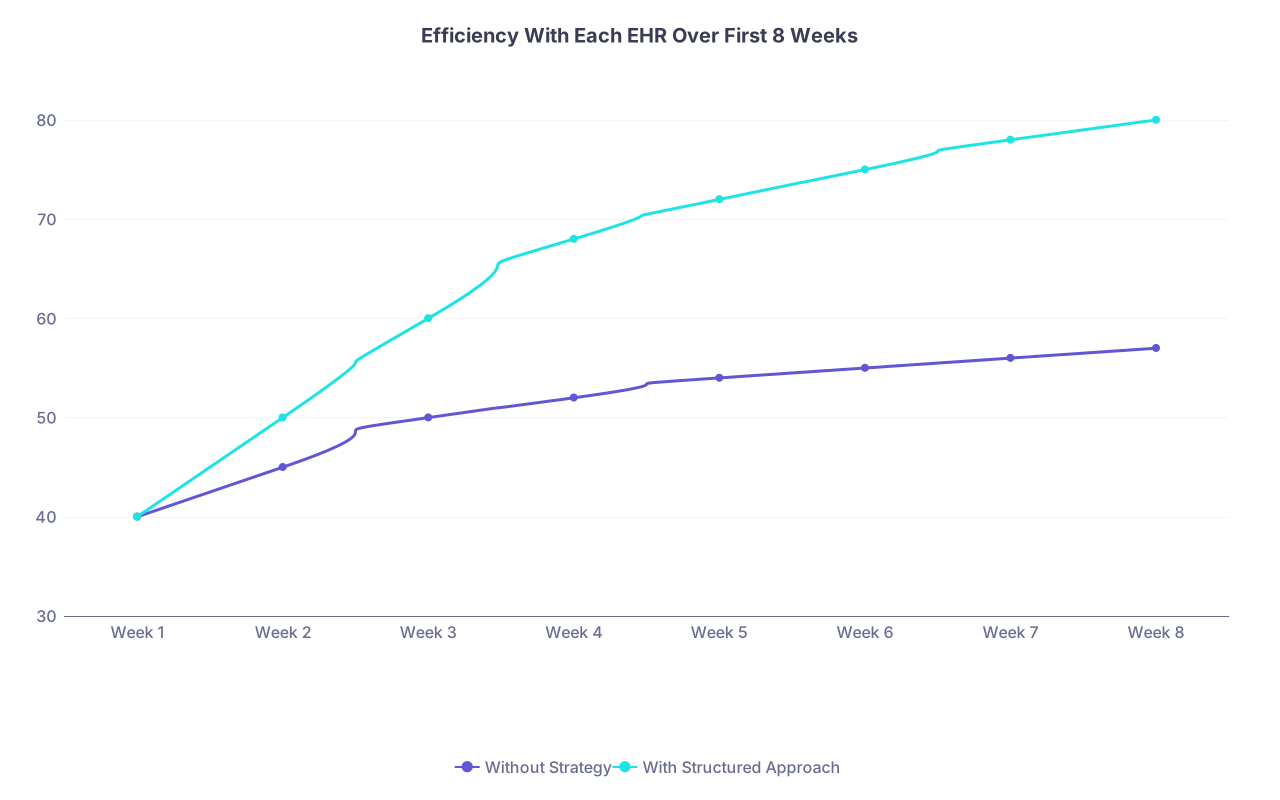
| Category | Without Strategy | With Structured Approach |
|---|---|---|
| Week 1 | 40 | 40 |
| Week 2 | 45 | 50 |
| Week 3 | 50 | 60 |
| Week 4 | 52 | 68 |
| Week 5 | 54 | 72 |
| Week 6 | 55 | 75 |
| Week 7 | 56 | 78 |
| Week 8 | 57 | 80 |
Working With Scribes, APPs, and Team Members
If you’re lucky enough to have scribes or APPs who know one system cold, use that.
But don’t abdicate.
- Have a shared checklist: “Before discharge, we always confirm: meds, follow-up, results reviewed” — regardless of EHR.
- Ask your team: “What slows you down most in this system? What do you wish the attendings did differently?”
Often they’ll give you two workflow tweaks that save everyone 10 minutes a shift.
And when you’re the new person on a team that’s used the EHR for years, drop the ego and just say: “Show me exactly how you do a standard admit. I want to copy your workflow and then tweak it.”
You’ll jump 6 months ahead in one shift.
A Simple Workflow Diagram You Can Copy

| Step | Description |
|---|---|
| Step 1 | Upcoming Shift at Hospital B |
| Step 2 | Review Hospital B EHR map 2 minutes |
| Step 3 | Open test chart and click through notes, orders, labs |
| Step 4 | Load personal note templates and favorite orders |
| Step 5 | First real patient - slow and deliberate |
| Step 6 | Refine shortcuts during downtime |
FAQ (Exactly 4 Questions)
1. Is it a bad idea to work at multiple hospitals with different EHRs early in my career?
Not automatically bad, but high risk if you do it blindly. Your first year out is when you’re still refining your clinical judgment and documentation style. Adding multiple EHRs on top of that is doable if you’re deliberate: build your templates early, keep your schedule sane during the first few months at each new site, and be obsessive about safety checks. If the main reason for multiple sites is money, at least make sure one of them is your “home base” where you become extremely comfortable with both the EHR and the workflows.
2. How long should it take to feel competent in a new EHR?
With a structured approach, you should feel “not dangerous and reasonably functional” in 5–10 shifts, and genuinely efficient in 20–30 shifts. If you’re 2–3 months in and still constantly lost, that’s not normal. Either the training is garbage, your workflows are inefficient, or the system is badly designed. At that point, ask an expert user to watch you for 15–20 minutes and critique your clicks. You’ll usually find 2–3 big fixes right away.
3. What about voice recognition and AI note tools — do they help when juggling systems?
They can, if you treat them like tools, not magic. Voice recognition (Dragon, built-in Epic tools, etc.) helps standardize your note structure across systems, because you’re dictating in your own pattern. AI note summarizers can help pull in data, but they also copy forward junk and errors if you are not watching carefully. Use them to generate drafts, then edit aggressively. Never let them auto-populate assessments or plans unreviewed; that’s how inaccurate nonsense proliferates across three EHRs.
4. How do I push for EHR improvements without being labeled “difficult”?
Be specific and frame it as safety and efficiency, not complaining. For example: “In the current workflow, it’s easy to place orders on the wrong encounter because the visit header looks identical. Could we add a bright visual cue or a confirmation pop‑up for cross-encounter orders?” Submit issues through official channels, give 1–2 concrete examples, and propose a practical fix. If you do that a few times and the answer is always “no” or silence, that’s a data point about the culture. At that stage, changing hospitals is more realistic than changing their EHR.
Open your calendar for the next week and circle your first shift at each site. Then block 20 minutes the day before each one to build or update your 1‑page EHR map and note templates for that hospital. That single step will make every shift feel less like software roulette and more like actual doctoring.