
The fantasy that administrators will “see the light” and suddenly fund scribes is just that—a fantasy. If your clinic has already said no, they probably mean it. Stop begging. Start engineering workarounds.
You are not powerless. You are just not going to get a human scribe handed to you on a budget line. So you use what you can get: tech that’s either free, cheap, or already sitting underused in your system.
Here is what to do if you’re drowning in clicks, nobody will pay for scribes, and you still want to get home before 8 p.m.
Step 1: Get Clear On Your Actual Pain Points
Before you throw AI at the problem, you need to be honest about what’s eating your time. “Documentation” is too vague. Break it down.
The usual time-wasters I see:
- Hunting for old notes, labs, and imaging during visits
- Typing HPI/assessment/plan while patients talk
- Inbox messages that should’ve been a 30‑second protocol response
- Prior auth and forms that require copy‑pasting from your note
- Rebuilding the same assessment and plan 25 times a day
Spend one week and actually measure:
- How many notes are unfinished at 5 p.m.
- Average time from opening a chart to signing a note (for a typical follow‑up)
- How many clicks or keystrokes to document a bread‑and‑butter visit (e.g., HTN/DM f/u)
- How many after-hours minutes you spend in the EHR
You do not need a fancy time-motion study. A tally sheet on a clipboard or a quick log in Notepad is enough.
Why this matters: different problems need different tools. If your main pain is inbox chaos, a dictation tool won’t change your life. If your issue is slow typing, AI note generation might be a godsend.
Step 2: Use Voice Aggressively (But Correctly)
If you’re still typing 90% of your note, you’re leaving free speed on the table.
There are three layers here:
- Built-in EHR voice tools (Dragon embedded in Epic, Nuance DMO, Epic “Hey Epic,” Cerner integrated voice, etc.)
- OS-level dictation (Windows, macOS, iOS, Android)
- Third-party speech-to-text and AI summarizers
Minimum setup you should have
At the bare minimum, do this:
- Get a decent microphone or wired headset. The $15 random USB mic with static and hallway noise will sabotage everything.
- Turn on OS-level dictation on your main device (clinic desktop/laptop, iPad, or phone).
- Dictate assessment and plan and telephone encounters religiously.
Do not start by dictating the entire HPI. Start with the parts that require the most narrative and exact wording—your brain is already formulating those sentences out loud in the room when you explain things.

EHR-integrated dictation vs OS dictation
If your clinic won’t pay for a full Dragon license, you may still have:
- A covered “Dragon Medical One” license through your hospital group
- A limited but functional voice dictation tool already embedded in your EHR
- System‑approved microphones in a supply closet no one uses
Ask these precise questions to IT or your CMIO, not “Do we have dictation?”:
- “Do we have any existing Dragon Medical or voice dictation licenses tied to our EHR?”
- “Is microphone support already configured in our exam rooms?”
- “If I bring my own USB mic, will it work with our setup?”
Do not ask vague questions; you’ll get “no” or “I’m not sure.” Be specific and technical.
If the answer really is no, use OS dictation:
- Windows: Win+H in a text box → start talking
- macOS: Fn key (or hold Command) twice to dictate
- iPhone/iPad: mic icon on the keyboard
- Android: Google Voice Typing
Set one rule: anything over 1–2 sentences gets dictated, not typed.
Step 3: Use AI Note Tools Without Getting Fired
Here’s where things get interesting. You can approximate a scribe using AI audio tools—but you need to stay inside policy.
Know your boundaries
You are probably under at least one of these:
- “No PHI in non-approved apps or outside the EHR”
- “No recording patient encounters without explicit consent”
- Regional privacy laws (HIPAA, GDPR, state laws on audio recording)
So you do not just install a random AI app and hit record with the patient in the room.
You have three safer options:
- System-approved AI documentation tools embedded in your EHR
- “Draft outside, paste inside” with de-identified or structured prompts
- Using AI just on your own dictation, not raw patient dialogue
Option 1: Integrated AI documentation (if you’re lucky)
Some systems now offer:
- Epic: DAX Copilot, ambient note tools, “AI draft” buttons for notes
- Athena, eClinicalWorks, Elation, etc.: AI-based visit note summaries
- Vendor add-ons: Nuance DAX, Suki, Augmedix, DeepScribe, Notable
If your organization already pays for these and just hasn’t turned them on for you, that’s criminally wasteful.
Ask leadership/IT:
- “Does our instance of [Epic/Cerner/etc.] have any ambient documentation pilots?”
- “Which clinicians are already using AI note-generation tools here?” (Find them; watch them use it.)
- “Can I be added to the next cohort? I’m willing to give feedback.”
Clinics will refuse to fund scribes but may say yes to a systemwide AI tool sponsored by the health system. Different budget; different politics.
Option 2: De-identified AI drafts
If there’s absolutely no approved AI solution and local policy forbids PHI in outside apps, you still have a narrow lane:
You can:
- Create templates and smart phrases with AI outside work (no PHI) and paste them into your EHR
- Have AI help you design very tight, efficient macros for your bread‑and‑butter visits
- Write de-identified sample notes and let AI polish structure and phrasing
You don’t upload real patient content to ChatGPT, Google, or any other external system if your policy prohibits it. That part is simple.
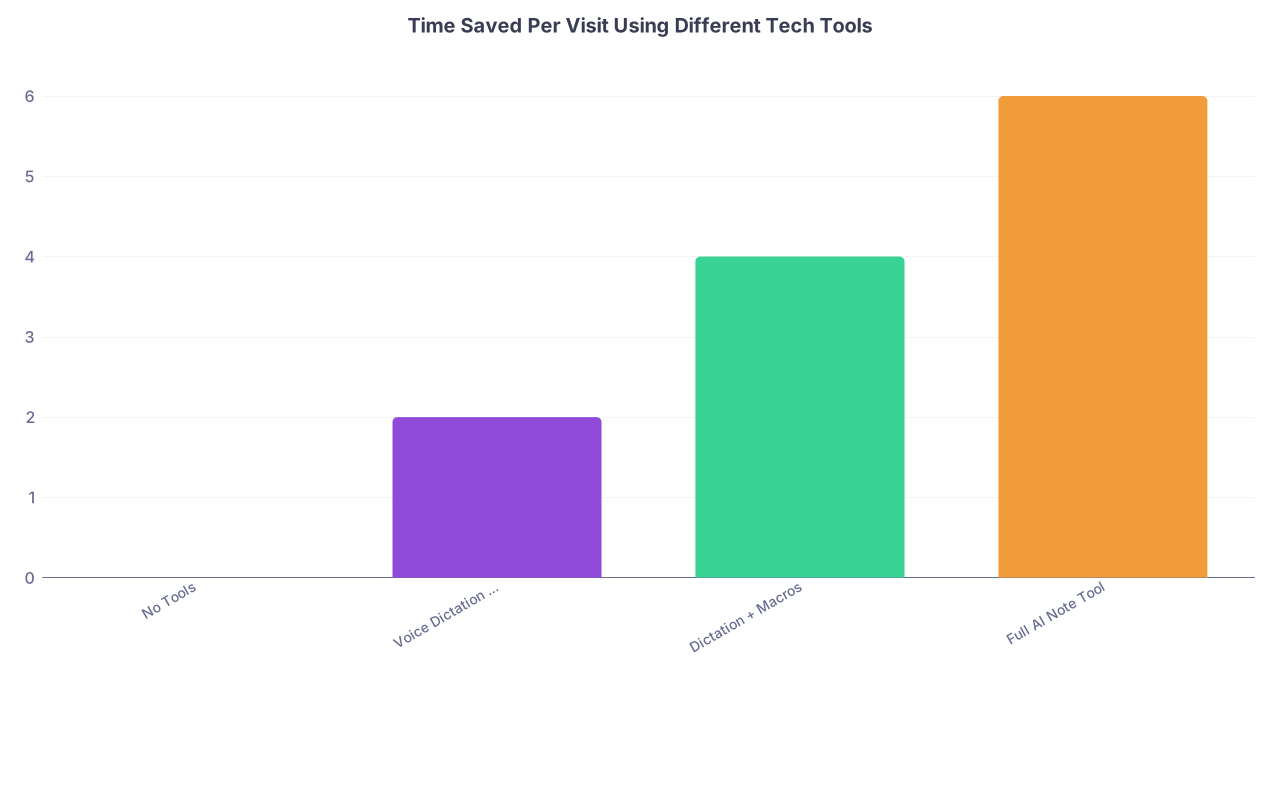
| Category | Value |
|---|---|
| No Tools | 0 |
| Voice Dictation Only | 2 |
| Dictation + Macros | 4 |
| Full AI Note Tool | 6 |
Option 3: AI on your own dictation (safer gray zone)
One useful compromise: you dictate a structured summary right after the visit, then have AI clean it up. For example, you record on your work device into an approved app or your EHR voice field:
“I saw a 58-year-old male, established, with history of HTN, DM2, CKD3. Main issues today: uncontrolled BP, med adherence. Vitals stable, BP 152/96…” etc.
If your system bans any AI outside the EHR, you stop here—use built-in voice only.
If they allow AI with a BAA (business associate agreement) or an approved vendor, you might have:
- A HIPAA-compliant AI tool already contracted
- A built-in “summarize this text” function in your EHR
In that case, you paste your dictation there, get a formatted SOAP note back, and then review line by line before signing. Human in the loop. Always.
Step 4: Macro the Hell Out of Your Common Visits
You cannot out-type the EHR. You can out-template it.
Most physicians have a few half-baked smart phrases for DM or HTN. They don’t go nearly far enough.
You should have:
- One macro for each top 10–15 visit types
- Built-in smart links for labs, meds, vitals
- Dropdowns or bracketed options for common variations
Example for a primary care HTN/DM follow-up (conceptually):
- A single phrase like
.dmhtnvisitexpands into:- Pre-populated HPI skeleton: “Patient here for follow up of hypertension and type 2 diabetes. Since last visit…”
- ROS with checkboxes or quick deletables
- PE template that pulls in vitals automatically
- Assessment with smart links to last A1c, microal, BP trends
- Plan sections with bracketed options: med changes, lifestyle, labs ordered, follow-up interval
This doesn’t eliminate thought. It eliminates repeated typing of sentences you say 40 times a day.
You can even design these with AI help at home (de-identified). Ask it: “Create a concise, guideline-based template for a routine follow-up of stable hypertension and type 2 diabetes for use in an EHR smart phrase. Include all the headings but leave specific meds blank.” Then tweak for your style.
| Template Type | Priority | Typical Use/Day |
|---|---|---|
| HTN/DM follow-up | High | 8–15 |
| Annual wellness/preventive | High | 4–8 |
| Simple acute (URI, UTI, rash) | High | 5–10 |
| Med refill/televisit | Medium | 3–8 |
| Post-op/post-discharge | Medium | 1–3 |
Step 5: Structure Your Visit Flow Around the Tech
Tech won’t save you if your workflow is chaos. You can’t use dictation well while the MA is still taking vitals and your inbox is pinging.
Here’s a flow that works in real clinics:
Pre-visit (30–60 seconds)
- Open chart, quick skim problem list, meds, last note
- Fire your macro: insert the note skeleton before the patient walks in
- If your EHR has “chart search,” use it instead of clicking 10 tabs
In-room
- For complex patients, jot 3–5 key words on a sticky note or small notepad
- Talk to the patient like a human; do not type the whole time
- If you’re comfortable, you can type bullets under HPI while they talk—but don’t let it derail rapport
End of visit (2–3 minutes)
- Before leaving the room, dictate a quick structured summary into A/P using your macro frame
- Example: “Assessment and Plan. One, hypertension: BP above goal, increasing amlodipine to 10 mg daily…” etc.
- Hit sign or leave minimal to finish later
Between patients (1–2 minutes)
- Clean up any remaining pieces of the last note. Don’t let them accumulate.
End of session
- Hard stop: no more than 3 unsigned notes when clinic ends
- Use AI or dictation to quickly close stragglers before you leave the building
The “scribe” here is a stack of tools and templates backing up a very intentional flow—not a person. But the impact can be similar if you’re disciplined.

| Step | Description |
|---|---|
| Step 1 | Pre-visit 30-60 sec |
| Step 2 | Insert macro template |
| Step 3 | Patient in room |
| Step 4 | Minimal bullets during HPI |
| Step 5 | End visit dictation in room |
| Step 6 | Between patient cleanup |
| Step 7 | End session - 3 or fewer open notes |
| Step 8 | More patients? |
Step 6: Attack the Inbox and Busywork with Protocols
Scribes usually don’t manage your inbox either, so let’s be honest—this part you have to fix with systems, not people.
Use tech and protocols:
- Create smart phrases for common MyChart replies: “refill too early,” “normal lab,” “slightly abnormal but not urgent, will review at visit,” “please schedule visit.”
- Ask nursing/MA leadership to build standing orders for typical messages: BP log upload, stable lab reminders, vaccine scheduling.
- Turn off every non-essential EHR alert you’re allowed to disable.
If you’re allowed to use AI on non-PHI or low-PHI messages (depends on policy), you can prototype message templates with it: “Draft a 2–3 sentence empathetic reply to a patient whose A1c rose from 7.2 to 7.9, inviting them to schedule a focused visit.”
Then you convert those into permanent smart phrases inside the EHR.
Step 7: Make the “No Scribes” Decision Hurt (Tactically)
I’ll be blunt: some administrators only care if you translate pain into numbers. And not just “I’m burned out.”
You’re playing the long game here.
Track these, starting now:
- Average notes unfinished at 5 p.m.
- Average time per visit blocked out vs actually needed
- RVUs relative to peers, before and after your tech changes
- After‑hours EHR time (most EHRs can show this)
Then test your tech tweaks for 4–6 weeks.
If your clinic still refuses scribes or tools and you’re maxed out, you now have data to argue for either:
- Reduced panel size
- Slightly longer visit slots
- Or system-supported AI tools as a cheaper “pseudo-scribe” alternative
Example conversation with your medical director:
“I’ve optimized with dictation, templates, and EHR tools. My average after-hours charting is still 10 hours/week and my unfinished notes average 8 by end of day. If we’re not funding scribes, I’d like to explore either ambient AI tools the system is piloting or modestly reducing my visit volume. Otherwise, this isn’t sustainable long-term.”
Not a tantrum. A problem statement with data and possible solutions.
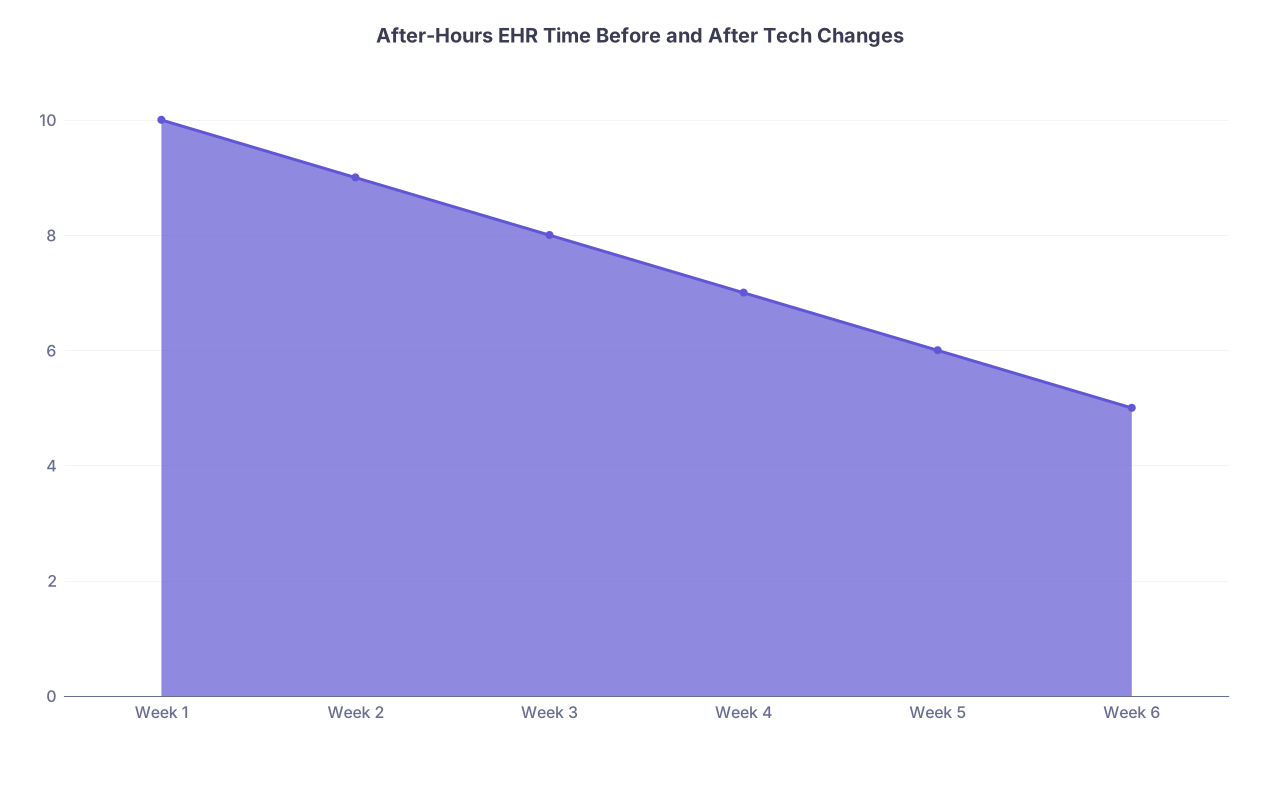
| Category | Value |
|---|---|
| Week 1 | 10 |
| Week 2 | 9 |
| Week 3 | 8 |
| Week 4 | 7 |
| Week 5 | 6 |
| Week 6 | 5 |
Step 8: Low-Budget Gear That Actually Helps
You don’t need a $400 mic and three monitors. But there are a few small upgrades that make this tolerable:
- Wired USB headset with a decent mic: cuts background noise, improves dictation accuracy. Avoid Bluetooth lag.
- Second screen if your clinic hardware allows it: one screen for EHR, one for imaging/labs/reference. Immensely reduces tab-juggling.
- Foot pedal for folks who use separate transcription or like to control start/stop recording without touching the keyboard.
All of this is usually under $200 total. If your clinic won’t pay, weigh it against reclaiming even 2 hours a week of your life. That’s a low buyout price for your sanity.

Step 9: Know When to Cut Your Losses
Sometimes, the reality is harsh. No scribes. No AI tools. No hardware upgrades. No visit length flexibility. Everything is “no.”
If you’ve:
- Optimized your templates and dictation
- Cleaned up your workflow
- Documented your metrics and presented them
- Got stonewalled on every practical solution
…then the problem is not tech anymore. It’s culture.
At that point, you stop trying to be a hero and start asking: “Is this a place I want to spend the next 5–10 years of my life?” There are clinics and systems now that do deploy AI scribes, ambient tools, and smart workflows precisely to retain physicians.
In job interviews, ask explicit questions:
- “What documentation support do you provide? Scribes, AI tools, templates?”
- “What’s the average after-hours EHR time for your clinicians?”
- “Are you piloting any ambient documentation systems?”
If they stare at you blankly, that tells you everything.
The Short Version
If your clinic refuses to fund scribes, you still have moves:
- Get ruthless with voice, templates, and visit flow so tech quietly acts like a pseudo-scribe.
- Stay inside privacy rules, but push for system-approved AI documentation tools using your own data.
- If an organization blocks scribes, AI, and sane workloads, recognize that as a red flag—not a personal failing—and be willing to walk.