
The way hospitals are rolling out AI right now is backwards.
They drop a half-baked tool into your workflow, call it “transformative,” and expect you to absorb all the risk.
You’re not imagining it. The burden lands on you: the attending trying to manage a full clinic, the hospitalist on nights, the surgeon in pre-op. Admin signs the contract; you carry the liability, the time hit, and the patient conversations.
Let’s walk through what to do when leadership suddenly mandates a new AI tool in your clinical workflow—documentation assistant, decision-support widget, risk score in the EHR, whatever—and you’re thinking, “Is this safe? Is this legal? Is this going to wreck my day?”
This is about survival, not theory.
Step 1: Clarify What This AI Actually Does (Not What the Slide Deck Says)
Most rollouts are a buzzword salad. “Augmenting provider efficiency with cutting-edge AI.” That tells you nothing.
You need concrete answers. In plain language. Ask, preferably in writing (email is your friend):
What specific tasks does this tool perform?
- Drafting notes?
- Suggesting diagnoses?
- Generating orders or order sets?
- Predicting readmissions or sepsis?
- Summarizing chart data?
Where does it show up?
- Within Epic/Cerner/Meditech as a SmartTool/side panel?
- Separate web app with PHI?
- Integrated into dictation (Dragon, Nuance, etc.)?
What can it do without your explicit approval?
- Auto-populate notes?
- Auto-add problem list diagnoses?
- Auto-fire orders or only suggest?
What is logged and stored?
- Is PHI sent to an external vendor?
- Is it de-identified (actually, not theoretically)?
- Is the text you type into the AI used to “improve the model”?
You’re looking for specific phrases. If you don’t see them, you push.
| Topic | Exact Question to Send Admin/IT |
|---|---|
| Function | What concrete actions can this AI perform in the EHR? |
| Autonomy | Can it change orders/notes/problem lists without my explicit approval? |
| Data Handling | Where is patient data processed and stored (internal vs vendor)? |
| Audit Trail | How is AI-generated content labeled and tracked in the record? |
| Liability | How is responsibility allocated if AI suggestions are wrong? |
You’re not doing this to be difficult. You’re building a record: “I requested clarity about functionality and risk.” That matters later if something goes sideways.
Step 2: Separate What’s “Mandated” From What’s “Marketed as Mandatory”
Admins love to say “We’re all using this now.” Often, that’s bluff.
Ask these questions bluntly:
- Is use of this AI tool required for my clinical role?
- Is there a written policy that specifies required use?
- Are there any metrics or performance evaluations tied to usage?
- Are there carve-outs for high-risk scenarios (complex diagnoses, oncology, NICU, etc.)?
You’re drawing a line between:
- “The button exists in the EHR”
- vs.
- “You must click and follow it every time or be disciplined.”
Watch their wording. “We expect broad adoption” is not the same as “Mandatory for all ED notes starting May 1 per policy X-123.”
If you get a policy PDF, read the parts that matter:
- Scope: Which departments? Which note types?
- Limitations: “For use as a documentation aid only; does not replace clinician judgment.”
- Monitoring: “Usage audits will be reviewed quarterly.”
If it’s vague, reply with something like:
I want to make sure I’m using this correctly. Can you please clarify specific scenarios where use is mandatory vs optional? For example, are H&P notes required to be AI-assisted, or is that at the clinician’s discretion?
Force them to define the box. Once the box is defined, you can work at the edges strategically.
Step 3: Protect Yourself Medico-legally From Day One
Here’s the hard truth:
If the AI makes a bad suggestion and you follow it, the plaintiff bar will come for you, not the vendor rep who brought cookies to the committee meeting.
So you build your own guardrails.
Treat every AI output as an uncredentialed intern’s suggestion
- Never accept diagnoses, problems, or plans without your own independent reasoning.
- If it writes your note: read line by line. Delete anything you would not testify to under oath.
Use explicit disclaimers in your mental model, not as note bloat
- You don’t need a sentence in every note saying “AI was used.”
- You do need to be able to say later: “I reviewed and edited all AI-generated content before finalizing.”
Watch for these landmines in AI-generated text:
- Overconfident language: “The patient has X” when your data only supports “concern for X.”
- Incorrect time references, labs, or imaging results pulled from wrong dates.
- Fabricated details the patient never said (AI is still capable of hallucinating).
- Generated review of systems that doesn’t match your actual encounter.
Keep your own short documentation habit:
- After a bad AI suggestion or error you caught, send a short email to yourself or secure note (no PHI) summarizing:
- Date
- Tool name
- Type of error (“AI suggested adding CHF to problem list despite normal EF and no symptoms.”)
- You’re building a contemporaneous pattern. That’s powerful if a later review questions your skepticism or “underutilization.”
- After a bad AI suggestion or error you caught, send a short email to yourself or secure note (no PHI) summarizing:
Step 4: Decide Your Adoption Strategy: Minimal Compliance vs Strategic Use
You don’t have infinite energy. So you pick your battles.
I tend to see three modes physicians fall into with new AI tools:
- Defensive Minimalist – Use it only where clearly required, in the least risky way
- Strategic Optimizer – Use it aggressively in low-risk tasks to claw back time
- Local Champion – Take on shaping the implementation for everyone (only do this if you have political and emotional bandwidth)
Let’s break these down.
Defensive Minimalist: “I’ll comply, but on my terms”
When to choose this:
- You don’t trust the tech
- You’re burned out
- You’re early in your attending career and don’t want extra risk
How to do it:
Use AI only for:
- Skeleton note structures (HPI template, basic formatting)
- Rewriting your own text for clarity (no clinical changes)
- Low-stakes patient education drafts you then heavily edit
Avoid using AI for:
- Differential diagnoses
- Risk scores that drive disposition or anticoagulation decisions
- Auto-populated ROS, exam, or history you didn’t personally verify
Phrase to admin:
I’m using the tool where it clearly supports documentation efficiency, but I’m cautious about relying on it for diagnostic or management decisions given current evidence and medico-legal uncertainty.
You’re signaling you’re not a Luddite, you’re a cautious professional.
Strategic Optimizer: “I’ll squeeze value out of this without getting burned”
When to choose this:
- You’re reasonably comfortable with tech
- The tool seems decent but not magic
- You’re drowning in documentation
Typical pattern:
Use AI heavily for:
- First-pass note drafting after you input key facts
- Summarizing long outside records or prior notes
- Drafting appeal letters, prior auth letters, or insurance messages
- Generating patient instructions, then simplifying
But you set hard “no-go” zones:
- No blind acceptance of orders or med changes
- No copying AI’s interpretation of subtle imaging or EKG findings
- No auto-import of ROS/exam you didn’t perform
You build your own mental checklist: “These 5 things AI can help with, these 5 things I ignore.”
Local Champion: “If I’m stuck with it, I’m going to shape it”
You’re that person who can’t watch a slow train crash without intervening.
If that’s you:
- Ask to join the AI oversight or clinical informatics group
- Demand:
- Clear labeling when content is AI-generated
- Specialty-specific guardrails (for example, don’t let AI suggest chemo regimens)
- Metrics that include error rates, not just adoption rates
- A straightforward feedback channel inside the EHR (“Report AI issue” button)
You’re trading time and some annoyance for long-term sanity—for yourself and your colleagues.
Step 5: Learn the Failure Modes Quickly (On Your Own Time, Once)
The worst way to learn how an AI tool fails is in front of a live patient.
Block 30–60 minutes once to sandbox it:
- Create dummy or test patients if your system allows; if not, use de-identified text or your own writing.
- Throw tricky scenarios at it:
- Complex comorbidities
- Elderly, polypharmacy, borderline vitals
- Rare but important conditions in your specialty
Watch for:
- Confident but wrong suggestions
- Missing obvious red flags
- Fabricated references to labs/imaging that don’t exist
- Weird phrasing that sounds nothing like you
That one hour can save you months of subtle risk.
Then in real clinical use, start narrow:
- Maybe use it only on follow-up notes for stable chronic patients for two weeks
- Then decide if you expand or keep it contained
Step 6: Document Concerns and Push Back Professionally (Not Emotionally)
If the tool is bad—and many are—you’re not powerless. But your pushback has to be structured.
Here’s what doesn’t work:
- Angry rant emails
- “This is stupid” in the hallway
- Total refusal without rationale
What does work:
Concrete examples
- “On 3/14, the AI suggested removing X med in a patient with Y condition, which would have been harmful.”
- “It repeatedly pulls in outdated problem list items and presents them as active.”
Patient safety framing
- “This increases risk of missed diagnoses because it over-summarizes complex histories.”
- “There is no visible indicator that this section is AI-generated, which may lead secondary clinicians to over-trust it.”
Workload framing (admins actually listen to this)
- “I’m spending extra 5–10 minutes per note correcting AI errors. This is a net negative to efficiency in its current form.”
Consider sending feedback to:
- CMIO or clinical informatics lead
- Risk management or patient safety officer
- Your department chief
Short, focused note example:
I wanted to share a concern about the new AI documentation assistant in Epic.
On 4/3 and 4/5, the tool populated my note with diagnoses and historical details that were inaccurate or obsolete (see MRN ending 4321 and 9077). Correcting these added time to my workflow and could be unsafe if missed. I’d recommend either limiting its scope to formatting/grammar or adding stronger warnings that all content may be inaccurate and requires full clinician review.
That’s hard to ignore.
Step 7: Manage Patient Perception (Because They Will Ask)
Patients are not stupid. They notice when your notes look different or when you say, “I’m just going to let the computer summarize this.”
You need a clean, honest line you can live with.
A few options:
- “We’re using some new software that helps draft my notes faster. I still review and edit everything before it goes into your chart.”
- “This tool helps pull information together, but my decisions are based on your history, exam, and my training—not just the computer’s suggestions.”
- If they ask, “Is AI deciding my care?”
- “No. It may suggest phrasing or highlight information, but I’m responsible for your diagnosis and treatment.”
Avoid:
- Overhyping it (“The AI will catch everything.”)
- Lying (“We don’t use AI here.” when you clearly do)
- Offloading responsibility (“The system recommended this.”)
Step 8: Watch for Subtle Creep: From “Assistant” to “Standard of Care”
Here’s the long game admin and vendors are playing—often without saying it out loud.
First: “This AI is optional and just helps you be more efficient.”
Later: “Why aren’t you using the sepsis/risk model? All our quality metrics assume it.”
Eventually: “Failure to respond to the AI alert has been highlighted in this adverse event review.”
So you track a few things:
- Are AI-derived scores or alerts starting to appear in quality dashboards?
- Are peer review cases referencing “ignored” AI alerts or suggestions?
- Are payers or external reviewers citing AI tools in their expectations?
If that starts happening, you adapt your practice:
- Either:
- You incorporate the tool consistently and document your reasoning when you override it (“AI sepsis score low but clinical concern high due to X.”)
- Or:
- You build written specialty-level norms together with colleagues:
- “In our cardiology group, we do not rely on AI tool X for adjustment of anticoagulation dosing due to insufficient validation in patients with Y.”
- You build written specialty-level norms together with colleagues:
That way, if you’re questioned, it’s not “Dr. Smith vs AI,” it’s “Our specialty group standard vs an unvalidated model.”
Step 9: Know When to Escalate Hard
Sometimes the right response isn’t quiet adaptation. It’s escalation.
Escalate strongly when:
- The AI tool is making frequent, clinically dangerous suggestions
- There’s no audit trail of what it suggested vs what you did
- It is clearly worsening equity (for example, mis-triaging certain demographics)
- Leadership keeps framing it as “safer” despite no local validation
Possible next steps:
- File a formal safety event report with concrete examples
- Request a temporary pause in a specific high-risk use case
- Bring your specialty society’s position statements or guidelines into the conversation
- Loop in risk management and legal if needed
You’re not being dramatic. You’re trying to stop harm before a sentinel event forces the same conversation under far worse circumstances.
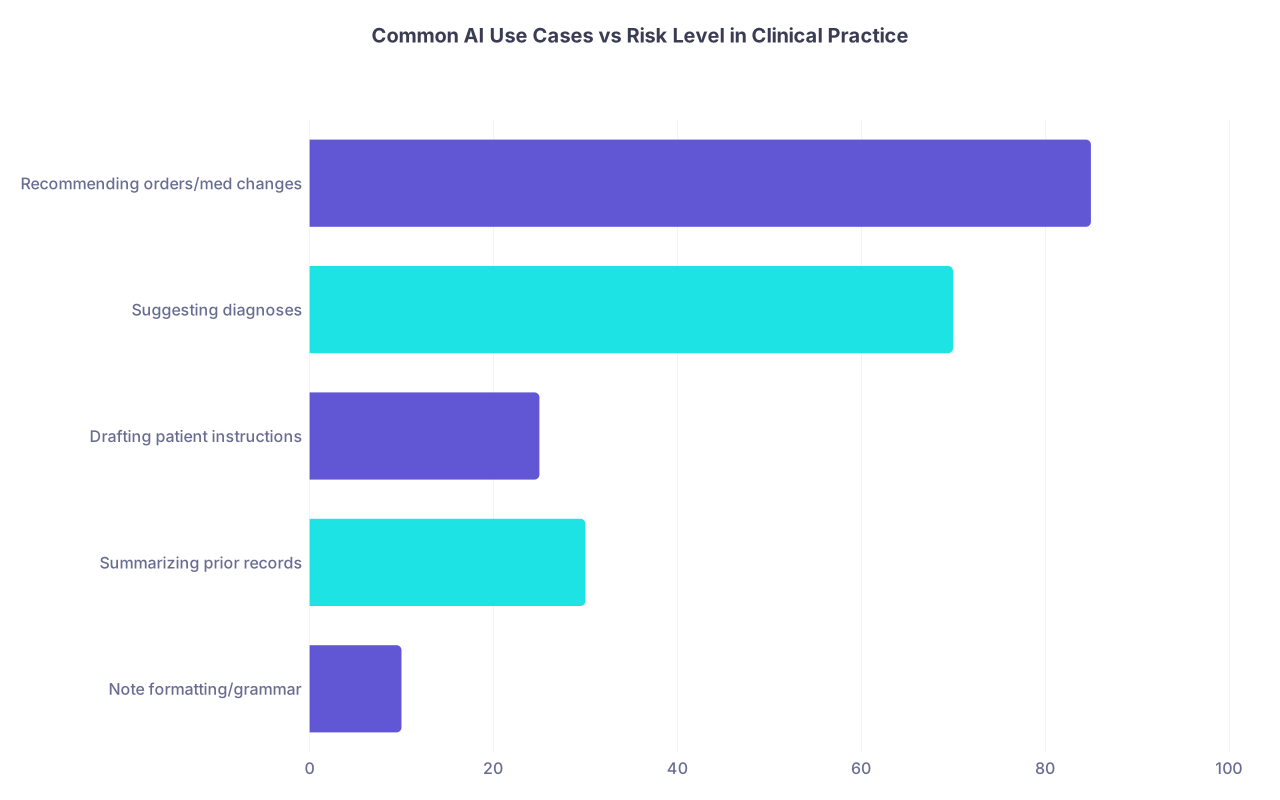
| Category | Value |
|---|---|
| Note formatting/grammar | 10 |
| Summarizing prior records | 30 |
| Drafting patient instructions | 25 |
| Suggesting diagnoses | 70 |
| Recommending orders/med changes | 85 |
Step 10: Decide What Skills You Want Out of This Mess
Like it or not, AI isn’t going away. You don’t have to love the specific tool admin forced on you, but you can still extract something useful for your career.
Consider deliberately building:
- Literacy in AI limitations and failure modes in your specialty
- Comfort articulating risk/benefit of AI to patients and colleagues
- Basic informatics chops: workflows, user feedback, safety escalation
- A short “AI practice policy” for yourself:
- Where you’ll use it
- Where you won’t
- How you’ll review its output
These are the skills that’ll matter when you’re interviewing for leadership roles, negotiating with another hospital, or even testifying as an expert.
You don’t need to become “AI Person.” You just need enough clarity so you’re not the one being pushed around every time a new model drops.

Quick “If You’re in This Exact Situation” Playbook
Let’s put this into a concrete scenario.
You’re a new attending hospitalist. Admin emails:
“Starting Monday, use the new AI note assistant for all H&Ps and progress notes.”
What you do this week:
Day 1–2:
- Reply to the rollout email:
- Ask what’s mandatory vs optional
- Ask about audit trail and data handling
- Watch the shortest training video you can find (yes, really)
Day 2–3:
- Sandbox it on low-risk follow-up notes
- Learn its quirks: what it gets wrong, how it phrases exam/ROS
Day 3–5:
- Decide your rule set:
- “I’ll use it to draft narrative sections after I’ve seen the patient.”
- “I will never accept ROS/exam it generates without editing.”
- “I won’t use it for new-onset undifferentiated complaints.”
Week 2:
- Start collecting 3–5 specific examples of errors/inefficiencies
- Send a short, focused email to your chief/CMIO with those examples and proposed guardrails
Meanwhile:
- Develop your one-liner explanation to patients if they ask about AI
- Document your work pattern (mentally or briefly in a note) so you can defend it later
You’re not just “coping with a new feature.” You’re shaping your own practice standard on purpose.

| Step | Description |
|---|---|
| Step 1 | Admin announces new AI tool |
| Step 2 | Clarify what it does and where it appears |
| Step 3 | Define minimum safe usage |
| Step 4 | Choose selective adoption |
| Step 5 | Sandbox on low risk cases |
| Step 6 | Identify failure modes and guardrails |
| Step 7 | Document concerns and concrete examples |
| Step 8 | Escalate to leadership and safety |
| Step 9 | Refine personal and group standards |
| Step 10 | Mandatory use? |
| Step 11 | Unsafe or harmful? |

FAQ (Exactly 3 Questions)
1. Can I refuse to use the AI tool altogether if I think it’s unsafe?
Sometimes, but you have to be smart about it. If there’s a written policy mandating use, outright refusal without documented safety concerns can come back to bite you. The better move is to: a) identify specific safety risks with examples, b) document them to leadership and patient safety/risk management, and c) propose a restricted use pattern (for example, use for formatting only, not for clinical content) until those issues are addressed. If you genuinely believe use would endanger patients in a specific context, you’re on solid ethical ground limiting it there—as long as you can articulate your reasoning.
2. Should I mention in my notes that AI was used to help write them?
In most current environments, no, you don’t need to add a sentence like “This note was drafted with AI assistance.” What matters legally and clinically is that you personally reviewed and accepted the final content. The note is yours. That said, if your institution has a policy on labeling AI-generated content, follow it. Internally, keep your own clear mental rule: you never sign anything you haven’t read and are willing to defend as your own words and reasoning.
3. How do I balance speed gains with the risk of subtle AI errors?
Think in tiers. Use AI aggressively only where errors are low-impact and easily caught (formatting, grammar, reorganizing your own text, summarizing non-critical information). Use it cautiously where subtle shifts in wording could alter clinical meaning (assessment, plan, problem list, diagnoses). In those higher-risk zones, it should never replace your own cognitive work—at most, it can help you express what you’ve already decided. If you notice that “reviewing AI output” is taking longer than just writing a shorter note yourself, that’s your sign to scale back its role. Efficiency that erodes safety or clarity isn’t efficiency—it’s admin’s fantasy.
With that sorted, you’re better positioned not just to survive this AI rollout, but to keep your clinical judgment at the center where it belongs. The next frontier? When AI starts creeping into your performance metrics and pay. But that’s a fight for another day.