
The myth that after‑hours charting is “just part of being a doctor” is lazy and wrong.
You are not paid to be your own data‑entry clerk until 10 p.m. every night. You are paid to think, decide, and lead care. The rest you should systematize or automate.
This is fixable. You can turn 2–3 hours of soul‑sucking pajama time into a tight, 30‑minute daily tech routine. But you have to stop treating charting like an art form and start treating it like a workflow and engineering problem.
Here is exactly how to do it.
Step 1: Diagnose Your Actual Charting Problem (Not the One You Complain About)
“Epic is terrible.”
“Cerner is awful.”
“I just have complex patients.”
I have heard all of that in physician lounges. It is mostly noise. The real problems are almost always one or more of these:
- You do not have a defined, repeatable documentation workflow.
- You are doing low‑value tasks manually that your tools can automate.
- You mix thinking work and clicking work all day instead of batching.
- You have no hard stop or daily close process.
First, you need data, not vibes.
Do a 5‑Day Time and Error Audit
For the next 5 clinic days, track:
Minutes spent charting during clinic
- Start timer when you open the first encounter of the session.
- Stop when you walk into the first room.
- Restart only between visits if you are charting.
- Add any dedicated documentation blocks.
Minutes spent charting after clinic
- From last patient exit to final note closed.
- Include inbox messages and order sign‑offs.
Backlog stats at end of day
Error friction points
Keep a scratchpad and write a tally mark each time something annoys you:- “Clicking 6 places to order the same 4 meds”
- “Hunting for the same patient instructions again”
- “Typing the same assessment and plan 20 times”
You are not doing this forever. Just 5 days to see patterns.
Now classify where the bleed is:
| Pattern | What It Looks Like |
|---|---|
| Front-end failure | Notes barely started in room; huge pile at 5 p.m. |
| Template failure | Typing long free text on common problems repeatedly |
| Tooling failure | Not using macros, SmartPhrases, voice, or order sets |
| Boundary failure | Letting messages and notes spill into late night |
Once you know which one is killing you, you can fix it with targeted tech and workflow changes.
Step 2: Build a 3‑Block Daily Documentation Architecture
You need structure. Right now, charting is smeared across your day like peanut butter. You want three distinct blocks:
- Real‑time or near‑real‑time in‑room documentation
- Mid‑session batch clean‑up (10–15 minutes)
- End‑of‑day 30‑minute tech routine
Think of it as:
- Capture in room.
- Clean during the day.
- Close in one tight block.
Block 1: In‑Room Capture (Stop Leaving Blank Shells)
The worst habit: seeing 18 patients, dropping 18 “.briefnote” lines, and lying to yourself that you will write good notes at 8 p.m. You won’t. You will write defensive, vague, rushed notes.
Fix it this way:
Use a standard note skeleton for each visit type
Example for primary care follow‑up:- Chief concern
- 3–5 problem list summary with bullets
- Focused ROS (only relevant)
- Brief exam template
- Assessment and Plan by problem
Pre‑load the skeleton before you walk in
- Open note
- Insert template (SmartText/SmartPhrase/dot phrase)
- Pull in last note, problem list, meds with one click
In‑room capture strategy
- For 80–90% of visits, you should fully complete:
- CC, HPI, ROS, exam, diagnoses, and at least draft A/P during the visit.
- Document while the patient talks, but narrate your thinking:
- “I am just going to type as we talk so I get this right.”
Patients will accept this if you are still making eye contact periodically and explaining.
- “I am just going to type as we talk so I get this right.”
- For 80–90% of visits, you should fully complete:
If your clinic culture makes in‑room typing tough, then create a 1–2 minute hallway rule: you do not walk into the next room without entering:
- Dx list
- Key assessment bullets
- Orders / meds queued
- One‑line plan per problem
That alone cuts your end‑of‑day chaos by more than half because you are not reconstructing encounters from memory.
Block 2: Mid‑Session Clean‑Up
Insert one short documentation block:
- Morning: 10 minutes after your first 6–8 patients
- Afternoon: same thing
In that time:
- Close any notes that are >80% complete.
- Send any patient instructions or messages that were delayed.
- Finalize labs and imaging orders.
This is where technology starts to matter. You will speed through these if:
- Your common visit types are templated.
- Your orders are bundled.
- Your macros are dialed in.
We will build those next.
Step 3: Turn Templates, Macros, and Order Sets into Weapons
Most physicians use maybe 5–10% of their EHR’s automation capabilities. The rest of the power sits there unused while you type the same paragraph for the 700th time.
You are post‑residency now. This is not optional. This is part of your professional tooling.
Step 3A: Inventory Your Top 20 Repetitive Scenarios
Look at the last month’s schedule and quickly list:
- Top 10 diagnoses you see
- Top 5 visit types
- New patient
- Chronic disease follow‑up for condition X
- Post‑op
- Medication follow‑up
- Telehealth check‑in
- Top 10 standard orders / bundles
- Diabetes labs
- Hypertension workup
- Pre‑op clearance labs
- Imaging families (e.g., low back pain imaging variants)
This is your automation target set.
Step 3B: Build SmartPhrases / Dot Phrases that Actually Reflect How You Think
Do not create bloated, legalistic macros. You are not writing a novel. You want tight, modular building blocks you can combine.
Examples:
“.dm2plan”
- Short summary line (e.g., “T2DM with suboptimal glycemic control, A1c 8.2”)
- Bullet options:
- Adjust meds section with quick choices
- Lifestyle / diet counseling line
- Follow‑up timing line
You can then customize a word or two, not the whole structure.
“.htnoptions”
- 3–4 blocks of text for:
- Stable BP on current regimen
- Mildly elevated BP, adjust meds
- Stage 2, adding second agent
Each as a selectable or deletable block.
- 3–4 blocks of text for:
“.rxrisks”, “.statinCounsel”, “.opioidContract”
Short, precise, non‑fluffy counseling documentation that matches what you actually say.
The trick: always write macros to match your real language, not some generic template from another doctor. When the style is yours, you barely have to edit.
Step 3C: Use Reusable Exam and ROS Blocks
Instead of typing “normal” 30 times, create:
“.cvexamnormal”
- “Cardiovascular: RRR, no murmurs, rubs, or gallops. No peripheral edema.”
“.respExamStable”, “.neuroExamScreen”, etc.
Then build abnormal variants for commonly encountered findings.
This lets you construct a precise exam with 3–4 dot phrases and a few edits.
Step 3D: Order Sets and Preference Lists
Every click you do more than twice a week should probably live in:
- An order panel
- A preference list
- Or a smart set (depending on your EHR)
Examples:
- “DM follow‑up panel”: A1c, BMP, lipids, microalbumin, +/- TSH
- “Annual labs”: CBC, CMP, lipids, +/- others
- “New chest pain” imaging and labs bundle
- “New ADHD adult” initial labs and rating scale toggles
Yes, setting this up costs you 2–3 evenings of up‑front work. That buys you hundreds of hours back over the next few years.
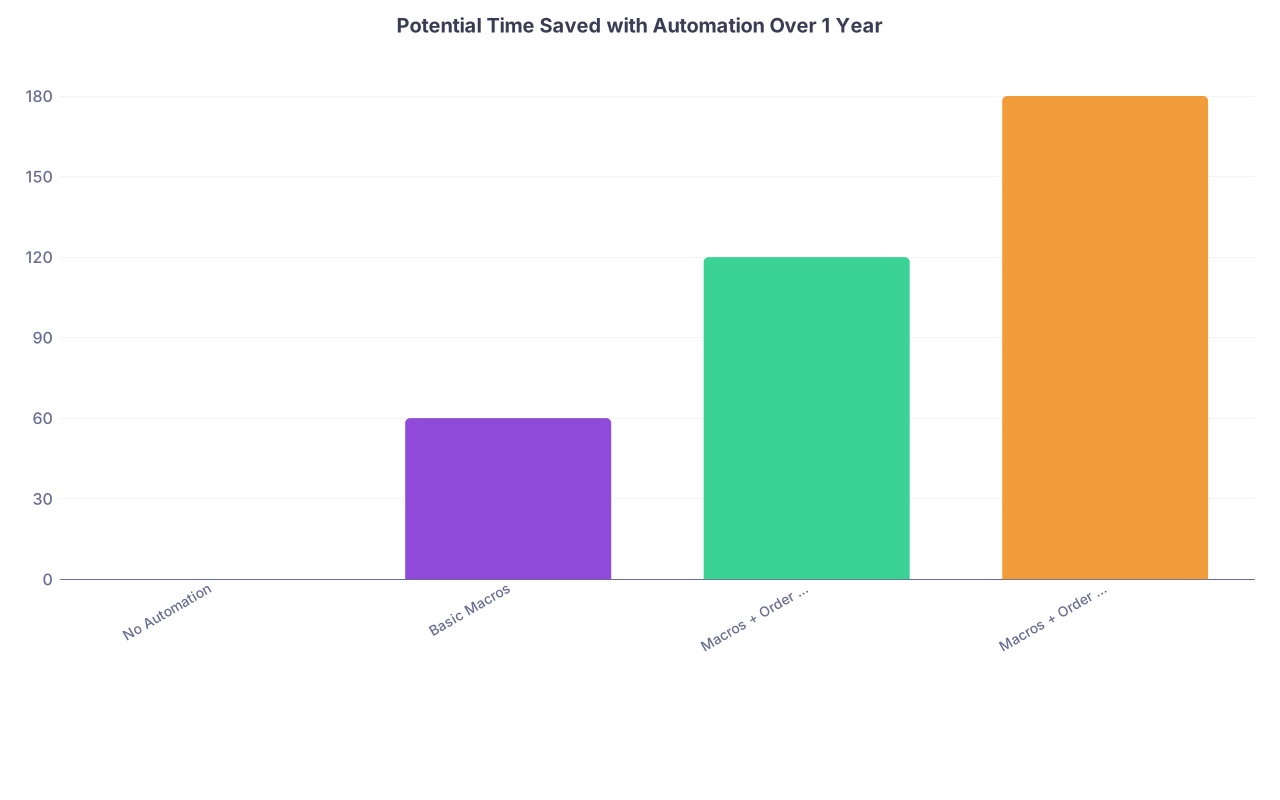
| Category | Value |
|---|---|
| No Automation | 0 |
| Basic Macros | 60 |
| Macros + Order Sets | 120 |
| Macros + Order Sets + Voice | 180 |
(Values are conservative estimates of hours saved annually.)
Step 4: Add Voice Tech the Right Way (Not as a Gimmick)
Poor use of voice dictation slows you down. Smart use makes you 20–30% faster without destroying accuracy.
Choose Your Tool Wisely
You have three broad categories:
| Option Type | Example Tools | Best For |
|---|---|---|
| Built-in EHR voice | Epic Dictation, Dragon embedded | Systems with good integration |
| Cloud-based medical dictation | Nuance Dragon Medical One, Saykara | Busy outpatient clinicians |
| Device-based general tools | iOS/Android native, Mac dictation | Short, simple phrases only |
If your system offers Dragon Medical One or tightly integrated voice, use it. If not, push your group to pilot one of the modern, cloud‑based AI scribes that write structured notes from ambient audio.
Basic Voice Workflow
Do not dictate everything. Use it for:
- HPI narratives
- Decision rationale that is hard to template
- Complex A/P where you really need nuance
Example pattern:
- Insert your usual template with a dot phrase.
- Use voice to fill in the HPI paragraph in natural language.
- Use voice for the tricky interpretive part of the A/P:
- “Given his prior intolerance of ACE inhibitors and current renal function, we will…”
Speed tip: create voice commands that trigger your dot phrases (Dragon can do this). Saying “insert diabetes plan” is faster than searching with keyboard.
Step 5: Design Your 30‑Minute End‑of‑Day Tech Routine
Now we put it all together.
Your goal: at the end of clinic, you have:
- 0 open encounters
- 0 unsigned notes
- Only the inbox items that truly can wait until the next scheduled inbox block
This is not fantasy. I have watched groups of physicians go from 40–60 open charts to consistently staying under 3–5 by adopting a simple, rigid closure routine.
Here is the structure that works.
The 30‑Minute Daily Close Protocol
Right after your last patient leaves (no detours):
2 minutes – Triage the battlefield
- Open the EHR “workspace” showing:
- Today’s encounters list
- Documentation status for each
- Inbox summary
- Sort visits by “open notes / incomplete.”
- Open the EHR “workspace” showing:
15–20 minutes – Close encounters, fastest first
- Start with the low‑complexity visits whose notes are already 70–90% done.
- For each visit:
- Apply relevant macros / dot phrases to fill gaps.
- Use voice dictation for A/P where needed.
- Place any missing orders or referrals.
- Close and sign.
- Use a “two‑pass rule”:
- Pass 1: close all visits that can be finished in under 2 minutes.
- Pass 2: tackle the 1–2 complex cases that need careful thought.
5–10 minutes – Inbox / results with strict rules
- Apply a 3‑bucket rule to inbound messages and results:
- Bucket A – 1‑minute actions (sign simple labs, quick yes/no, route to staff): Do now.
- Bucket B – 5‑minute actions requiring thinking or patient call: Either do now if time remains or schedule for your next dedicated inbox block.
- Bucket C – Non‑urgent / can wait for next day (refill in 1 week, upcoming visit, FYI messages): leave for next inbox session.
- The key: do not let the inbox expand to fill your entire evening. Time box it. The hard stop is non‑negotiable.
- Apply a 3‑bucket rule to inbound messages and results:
3 minutes – Final scan and next‑day prep
- Check for:
- Any remaining open encounters from today.
- Any charts older than 24 hours: you either finish them now or explicitly block time tomorrow to handle them.
- Pre‑load tomorrow’s schedule:
- Identify 2–3 complex patients for whom you might need to pre‑review imaging, consult notes, or labs.
- This makes tomorrow’s documentation easier.
- Check for:
Total: 25–30 minutes.

| Step | Description |
|---|---|
| Step 1 | Last patient leaves |
| Step 2 | Open workspace |
| Step 3 | Pass 1 - quick closes |
| Step 4 | Pass 2 - complex notes |
| Step 5 | Inbox triage |
| Step 6 | Finish 5-min items |
| Step 7 | Schedule remaining work |
| Step 8 | Final scan and next day prep |
| Step 9 | Logout - done |
| Step 10 | Any open encounters? |
| Step 11 | 30 min reached? |
Protect the Hard Stop
This only works if you:
- Set a fixed logout time and treat it like a clinic end time.
- Refuse to open the EHR from home unless there is a genuine patient safety issue.
If your group culture expects you to be an always‑on, free data clerk, you have a different problem: a job problem, not a charting problem. That is a longer discussion, but the routine above still reduces your total burden substantially.
Step 6: Use Support Staff and Team‑Based Documentation Intelligently
If you are still doing everything yourself while working with capable MAs or nurses, you are wasting professional time.
You should offload:
- Structured data gathering
- Screening tools
- Simple documentation pieces that do not require MD judgment
Train MAs / Nurses for Pre‑Charting
Concrete assignments:
Before entering room, MA:
- Updates vitals, allergies, meds reconciliation
- Enters chief complaint and a short triage HPI based on their intake script
- Launches appropriate templates (e.g., depression visit, diabetes check)
During or immediately after visit:
- MA documents physical exam findings you verbally confirm.
- MA starts patient instructions in the portal under your supervision.
You then:
- Verify, edit, and sign.
- Focus on assessment, plan, counseling, and medical decision making.
Yes, this requires training and is painful for 2–4 weeks. Then it becomes second nature and saves you hours.
Step 7: Keep a Simple Metrics Dashboard So You Do Not Slide Back
After‑hours charting creeps back in quietly. You need visible metrics.
Track weekly:
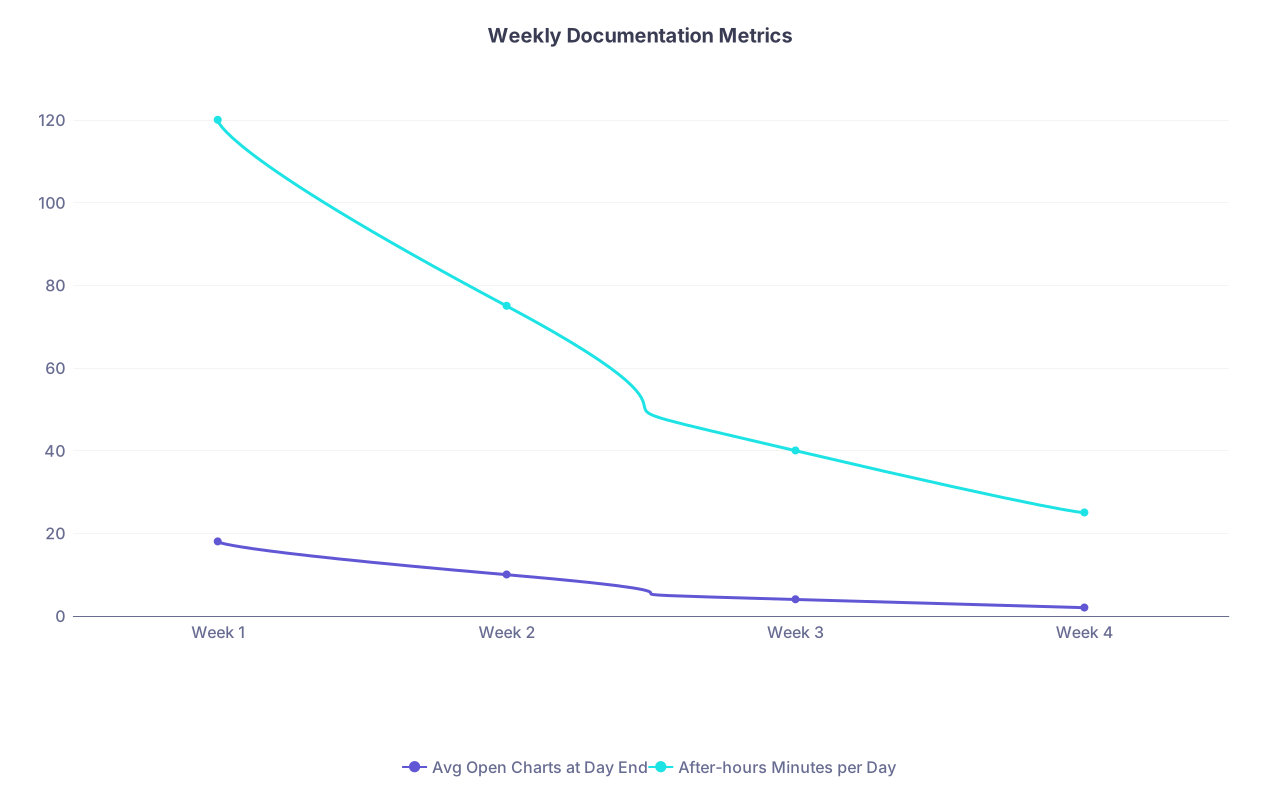
| Category | Avg Open Charts at Day End | After-hours Minutes per Day |
|---|---|---|
| Week 1 | 18 | 120 |
| Week 2 | 10 | 75 |
| Week 3 | 4 | 40 |
| Week 4 | 2 | 25 |
Core metrics:
- Average after‑hours charting minutes per weekday
- Average # of open encounters at end of day
- Longest age of any open chart
Set targets:
- After‑hours charting: ≤30 minutes most days
- Open encounters at day end: ≤3
- Oldest chart: <48 hours
If you miss the target for 2 weeks in a row:
- Re‑audit your workflow for leaks.
- Ask: where am I ignoring my own system?
- Fix one thing, not ten.
Bringing It All Together: A Sample Day in Practice
Let me spell out what this looks like once it is working.
Morning
7:45 – 8:00: Pre‑clinic
- Review schedule; star 3 complex patients.
- Pre‑load any needed templates or labs.
8:00 – 12:00: Patient block
- For each visit:
- Open note and insert template before entering room.
- Document most of note during or immediately after visit with dot phrases and voice.
- 10:15 – 10:25: Mid‑session clean‑up
- Close 4–6 nearly finished notes.
- For each visit:
Afternoon
- 1:00 – 4:30: Patient block
- Same pattern.
- 2:30 – 2:40: Second mid‑session clean‑up.
End of Day – The 30‑Minute Routine
4:35 – 5:05:
- Pass 1: Close 8 quick visits (using macros + minimal edits).
- Pass 2: Dictate nuanced A/P on 2 complex cases.
- Inbox triage with 3‑bucket rule.
- Final check there are 0 open notes for the day.
5:05:
- Log out.
- Go home. Do not reopen charts on the couch.

You will still have bad days. Emergencies. Clinic overruns. But your baseline will shift from “constantly drowning” to “occasional rough days.”
Common Pitfalls (And How to Avoid Them)
Building massive templates that are unusable
- Fix: Make small, modular smart phrases you can mix and match.
Trying to change everything in one week
- Fix: Pick one domain per week:
- Week 1: dot phrases for top 5 diagnoses
- Week 2: exam blocks
- Week 3: order sets
- Week 4: daily close routine
- Fix: Pick one domain per week:
Letting exceptions become your new normal
- Rough day? Fine. But restart your 30‑minute close the very next clinic day.
Refusing to offload anything to staff
- If you “do it yourself because it’s faster,” you will never scale. Train once, reap benefits for years.

Quick Implementation Roadmap (4 Weeks)
If you want this to become real instead of another good idea you forget, follow this:
Week 1 – Baseline and Dot Phrases
- Do the 5‑day charting audit.
- Build 10–15 dot phrases:
- 5 for common diagnoses
- 5 for exams
- 3–5 for counseling / risk discussions
Week 2 – Order Sets and Workflow Blocks
- Create 3–5 order sets / panels.
- Add two 10‑minute mid‑session clean‑up blocks to your template schedule.
- Start doing in‑room or 1‑minute hallway documentation.
Week 3 – Voice Integration and Staff Training
- Get voice dictation installed and working.
- Train MAs to pre‑chart and open templates.
- Use voice only for HPI and complex A/P initially.
Week 4 – Lock in the 30‑Minute Close
- Set a hard daily close time.
- Run the 30‑minute routine every clinic day.
- Track your metrics and adjust.
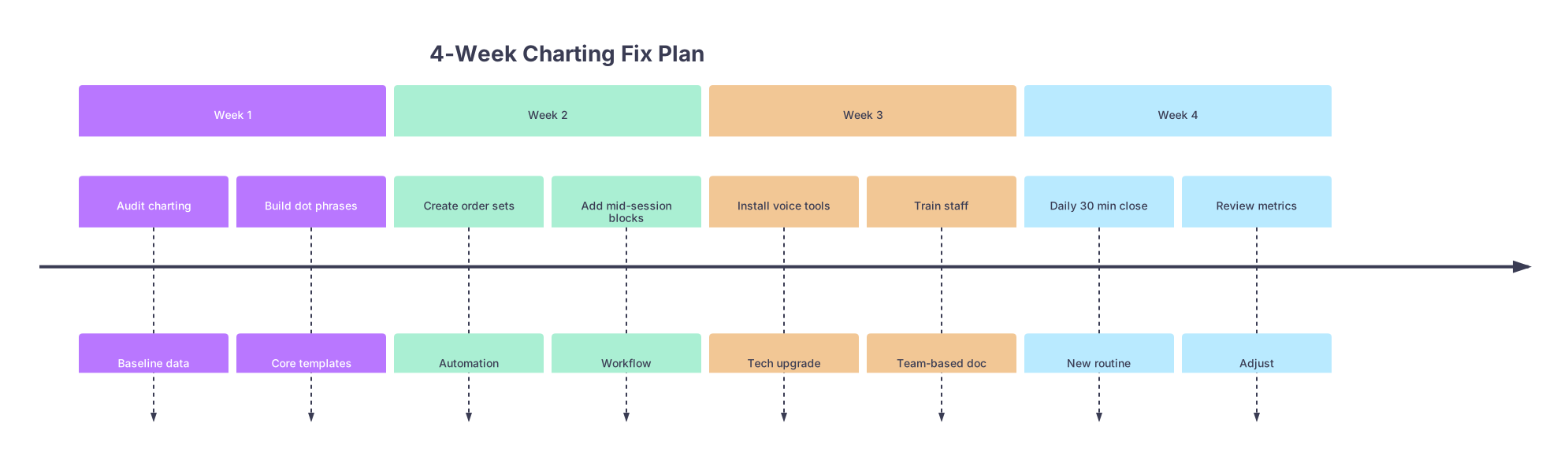
| Period | Event |
|---|---|
| Week 1 - Audit charting | Baseline data |
| Week 1 - Build dot phrases | Core templates |
| Week 2 - Create order sets | Automation |
| Week 2 - Add mid-session blocks | Workflow |
| Week 3 - Install voice tools | Tech upgrade |
| Week 3 - Train staff | Team-based doc |
| Week 4 - Daily 30 min close | New routine |
| Week 4 - Review metrics | Adjust |
This is not theoretical. I have seen physicians in high‑volume outpatient practices cut their after‑hours charting from 2–3 hours to under 30 minutes within 4–6 weeks by doing exactly this.
FAQs
1. What if my practice or hospital will not invest in better tech or voice tools?
Then you squeeze every drop out of what you already have:
- Max out dot phrases and templates; they cost you nothing.
- Create order sets and preference lists; most EHRs support them even if no one talks about it.
- Use free built‑in OS dictation for short segments if no medical voice tool is funded.
- Push for small policy changes: protected 10‑minute mid‑session blocks, recognition of charting time in RVU or productivity discussions.
If leadership still ignores the problem, document your after‑hours workload and burnout risk and put it in writing. Sometimes the only real leverage is showing them the risk they are ignoring. And if nothing changes over time, you start looking for a job where your time is not treated as disposable.
2. Is it safe to rely so heavily on templates and macros from a medical‑legal standpoint?
Templates are dangerous only when they are misused:
Bad:
- Leaving irrelevant normal findings in the exam.
- Copying assessment language that no longer reflects your thought process.
- Auto‑importing huge prior notes without editing.
Safe and smart:
- Using concise, accurate templates and then editing actively for each patient.
- Keeping your macros short and modular so you remove what does not apply.
- Documenting your actual reasoning with brief free text or voice dictation where needed.
Courts and boards care that your note reflects what you actually did and thought. Automation that helps you document accurately and consistently is an asset, not a liability, when used with judgment.
Key points to remember:
- Treat charting like a workflow engineering problem, not a personal failing.
- Build a three‑part structure: real‑time capture, mid‑session clean‑up, and a rigid 30‑minute end‑of‑day close.
- Invest up front in templates, macros, order sets, and voice tools so you stop typing the same thing 2000 times a year.