
The way most physicians handle the EHR inbasket is broken—and the system is eating your life because of it.
You are not drowning because you are lazy or disorganized. You are drowning because you are trying to do high‑stakes, high‑volume knowledge work in a chaotic, interrupt-driven environment with almost no structure. That is fixable.
This is a 4‑week protocol to regain control of your inbasket and keep it under control—while actually seeing patients and having a life. I am going to give you a concrete, stepwise system. No fluff. No “just set better boundaries” nonsense.
Week 0: Baseline Reality Check (One Evening, 60–90 Minutes)
Before you change anything, you need to see the problem clearly. Right now, it just feels like “too much.” That is not actionable.
You will do this once, preferably at home with a notepad, accessing your EHR remotely.
Step 1: Measure Your Current Inbasket Load
Open your inbasket. Capture three numbers:
- Total number of messages right now
- Number older than 3 days
- Number older than 7 days
If your system lets you filter by type (results, patient messages, Rx, forms, etc.), grab those counts too.
Put them in a simple table like this:
| Category | Count |
|---|---|
| Total messages | 325 |
| >3 days old | 140 |
| >7 days old | 45 |
| Patient messages | 110 |
| Results | 95 |
| Refill requests | 60 |
| Other/admin | 60 |
Do not obsess over precision. Ballpark is fine. You want a baseline.
Step 2: Track One Typical Day
For one clinic day, do not change your behavior yet. Just document:
- Start and end time for inbasket work
- Number of “sessions” (how many times you opened the inbasket)
- What actually interrupted you (nurses, MA, phone calls, EHR pop‑ups, your own anxiety)
At the end of the day, write down:
- How many messages you completed
- Whether the total number went up or down
This gives you your “burn rate.” Many physicians are shocked to see they handled 80 messages yet the box only went down by 10. That is because of new inflow. You are bailing a leaking boat with a coffee cup.
We will fix both sides: speed and volume.
Week 1: Build the Structure (Time Blocking, Rules, and Delegation)
Week 1 is not about clearing the backlog. It is about building the frame you are going to run for years. You will slow down slightly this week to go faster later.
Step 1: Time‑Block Inbasket Sessions
You cannot do complex cognitive work if you are pecking at your inbox in 2‑minute bursts between every patient. That is how you burn out and still fall behind.
You will create 2–3 dedicated inbasket blocks per day, 15–25 minutes each, with a hard rule: you do not open the inbasket outside those times unless it is true emergency coverage.
Example for a full clinic day (8–5):
- 08:10–08:25: Pre‑clinic inbasket block
- 12:10–12:30: Midday inbasket block
- 16:40–17:00: End‑of‑day inbasket block
If you already start at 7:30 and finish at 6:30, I know what you are thinking: “There is no slack.” That is exactly why you must carve these blocks out deliberately. If you do not, inbasket work will ooze into your nights and weekends forever.
Put these blocks in your schedule template, visible to staff. Label them “Inbasket – Do Not Book.”
Step 2: Decide What You Will No Longer Do Yourself
A shocking amount of inbasket work you are doing personally is either:
- Within the license and skill of your staff
- Or should never have arrived as a message in the first place
You are going to write down three columns:
- Must be me (legal/clinical risk or complex judgment)
- Could be staff with protocol
- Should not exist (broken workflow, bad patient education, bad system design)
Quick examples:
- Must be me: critical results, new serious diagnoses, complex med changes, disability determinations, high‑risk psych messages.
- Could be staff: routine lab normal notifications, straightforward refills of stable meds, work/school notes with clear criteria, routing to correct provider.
- Should not exist: refill requests for meds that auto‑renew, duplicate result messages, patient portal chats used as visit substitutes without payment.
Take 20–30 representative messages from last week. Sort them into those three lists.
You are going to use the “could be” and “should not exist” lists heavily in Weeks 2–3.
Step 3: Set “Clinical Rules of Engagement” with Your Team
If you want out of the swamp, your team has to help you build drainage. This part is not optional.
Call a 20‑minute huddle with your MA, nurse, and admin lead. Agenda:
- Explain clearly: “My inbasket is not sustainable. We are going to change how we handle it so I can respond faster to the right things and not drown in the wrong things.”
- Present your three lists (must be me / could be staff / should not exist).
- Ask: “What do you already feel comfortable handling without me? What would you feel comfortable with if there was a clear protocol?”
You will leave with:
- A starter list of message types staff will handle first (normal lab result notification with prepared text, simple work notes, appointment routing, etc.).
- A list of items that need simple written protocols (e.g., which blood pressure readings trigger what advice, which refills are automatic versus require review).
Do not overcomplicate the protocols. One‑page, bullet‑level, easy to reference.
Week 2: Clean the Backlog and Standardize Responses
Now you are going to reduce the backlog to something psychologically manageable. Not to zero—that is fantasy for many outpatient practices—but to “I know every message newer than X days has been touched.”
Step 1: One‑Time “Backlog Cleanout” Sessions
You will schedule two extended inbasket cleanout sessions this week, 60–90 minutes each, ideally:
- One early morning before clinic
- One protected afternoon hour or early evening
This is “spring cleaning.” Tell your admin lead you are doing this so they can buffer interruptions.
Process for the backlog session:
- Sort by oldest first.
- Skim subject and sender.
- Apply the “one‑touch rule” relentlessly:
- If it takes under 2 minutes, do it now and close.
- If it requires more, add a short note or task and push it to future you, but do something visible so it is not truly untouched.
You are not writing essays. You are triaging.
Your goal: by the end of Week 2, you have no messages older than 7 days sitting untouched. If you have hundreds, completing some and documenting why others are delayed is enough. Patients and staff care less about instant perfection, more about visible movement.
Step 2: Create and Use Smart Templates (Dot Phrases / Quick Text)
If your EHR has no quick‑text functionality, fight for it. If it does, you are probably underusing it.
You need templates for your top 10–15 recurring message types. Examples:
- Normal lab panel
- Mildly abnormal but not urgent lab with plan
- Blood pressure slightly above goal, with home monitoring instructions
- Routine refill for stable chronic med
- “This is complex, let us schedule a visit” message
- “Portal is not for emergencies” safety reminder
You can go from 60–90 seconds per message to 10–20 seconds with good templates.
Here is what a solid lab result template looks like (you will adapt to your context):
“Your recent labs are overall reassuring.
– Kidney and liver function: within normal range.
– Electrolytes (sodium, potassium, etc.): within normal range.
– Blood counts: within normal range.
– Cholesterol: [insert brief comment].
Please continue your current medications. We can review these in more detail at your next visit. If you develop new or concerning symptoms (chest pain, trouble breathing, severe weakness, or anything that feels like an emergency), call 911 or go to the nearest emergency department rather than using the portal.”
You drop the template, customize one or two lines, send. Done.
Spend one evening or one protected hour building these templates inside Week 2. Every time you catch yourself typing something you have typed before, stop and convert it into a template.
Step 3: Standardize Triage Categories
Your inbasket is a triage system, whether you treat it that way or not. You will stop processing messages in random order.
Decide the priority order you will always use within each 15–25 minute block:
- Critical / urgent clinical (flagged messages, abnormal high‑risk results, suicidal/homicidal ideation, true red‑flags)
- Time‑sensitive logistics (pre‑op clearances due this week, forms with deadlines)
- Routine clinical (non‑urgent refills, stable lab follow‑up)
- Nonclinical / admin / FYI
In each block, you will:
- Scan the subjects and flags
- Tackle priorities 1 and 2 first
- Only then work down to 3 and 4
This alone cuts the “I missed a critical thing buried in junk” anxiety dramatically.
Week 3: Optimize Teamwork, Routing, and EHR Settings
Now that you have structure and templates, you will tune the system so less junk lands in your lap and more gets handled before it ever hits you.
Step 1: Tighten Delegation Rules
Go back to your Week 1 lists. For every item in “could be staff with protocol,” you will:
- Write a one‑paragraph protocol
- Review it with staff
- Turn it into practice
Example: Refill protocol for stable antihypertensives
- If last visit with any provider in last 12 months AND
- BP readings in chart or patient log mostly < 140/90 AND
- No alerts in chart about adverse reaction
Then: MA or nurse may refill for up to 90 days + 1 refill, using standard message template:
“We have refilled your [medication name]. Please schedule a follow‑up visit in the next [timeframe] if you have not already.”
If any condition is not met, staff routes to you with a brief note:
“Refill request – last visit 14 months ago, BP borderline. Please advise.”
You reduce cognitive load for yourself by 70–80% on these.
Create similar micro‑protocols for:
- Normal labs: staff sends template with your name attached
- Simple work/school letters within parameters
- Non‑clinical portal messages (billing, scheduling) → routed straight to admin
Step 2: Fix Routing and Pool Settings
A lot of message chaos comes from bad routing:
- Results going to three different people
- Group pools where nobody “owns” the message
- Or everything routed to you “just to be safe”
Sit down with your clinic manager and:
- Review inbasket pools and routing rules
- Ensure nursing/MA pools own what they should (vitals, some protocols, vaccine questions)
- Re‑route pure admin messages (billing, forms for employer without medical content, record requests) away from you
Your mantra: “The physician inbox is the most expensive resource. Protect it.”
This is where you may need to push back gently on the “we’ve always done it this way” crowd. But I have yet to see a group where routing could not be significantly improved.
Step 3: Turn Off or Tune Nonessential Notifications
Most EHRs are sadistic by default. Every consult note, every outside document, every auto message becomes a new inbox item. That is insane.
Within your EHR options (sometimes under “preferences” or “notification settings”), look for:
- Auto‑notification of every note that mentions you → restrict to specific types (e.g., consult reports only, not every imaging study)
- Duplicated test results (lab + pool + patient) → choose 1–2 channels instead of 3
- FYI alerts that do not require action → turn off where possible
If your system blocks you from changing some of these, document specific examples and bring them to your EHR governance committee or CMIO. Do not just complain vaguely. Show them: “I get 40 duplicate results a day because of this setting.”
Week 4: Speed, Habits, and Long-Term Maintenance
By Week 4, you should see:
- Fewer new messages hitting you directly
- A smaller backlog
- Less “surprise criticals buried in noise” anxiety
Now you focus on efficiency and sustainability.
Step 1: Refine Inbasket “Micro‑Habits”
In each inbasket block, you will follow a strict mini‑protocol:
- Set a timer for the session (15–25 minutes).
- Distraction barrier:
- Silence phone
- Close unrelated EHR windows
- Tell staff: “I am in inbox for 20 minutes unless there is a true emergency.”
- Prioritize:
- Scan for urgent/flagged
- Handle those immediately
- Work in batches:
- Do all refills together
- Then all lab results
- Then all patient portal messages
Batching matters more than you think. Switching between types of messages burns time and cognitive energy.
When the timer hits zero, you stop. Go back to patient care. Trust that the next block is coming.
Step 2: Create a “No Perfect Replies” Rule
Perfectionism is killing your speed. You are crafting 10‑sentence essays to respond to things that need three clear lines.
Create a rule for yourself:
- 80–90% of messages should be solvable in under 2 minutes
- If you are over 4–5 minutes and still typing, you probably need a visit, not another paragraph
For complex messages (multi‑symptom, long narrative, unclear problem), use a standard response:
“You have raised several concerns that require a more thorough discussion and possibly an exam. Portal messages are not a safe way to handle complex problems. Please schedule an in‑person or video visit so we can address this properly.”
You are not being rude. You are practicing safe medicine.
Step 3: Establish Weekly Review and Reset
Once a week, ideally Friday afternoon or early evening, you do a 20–30 minute review:
- Check number of messages older than 3 days.
- Look at patterns:
- Are there message types you see over and over that could be templated or delegated?
- Is there one staff member whose routing is causing extra work (mis‑routed messages)?
- Do a quick “mini cleanout” of anything older than 5–7 days.
Track one metric only for the first month:
- Messages older than 7 days
Your goal: keep that at or near zero.
To visualize your progress, something like this is helpful:
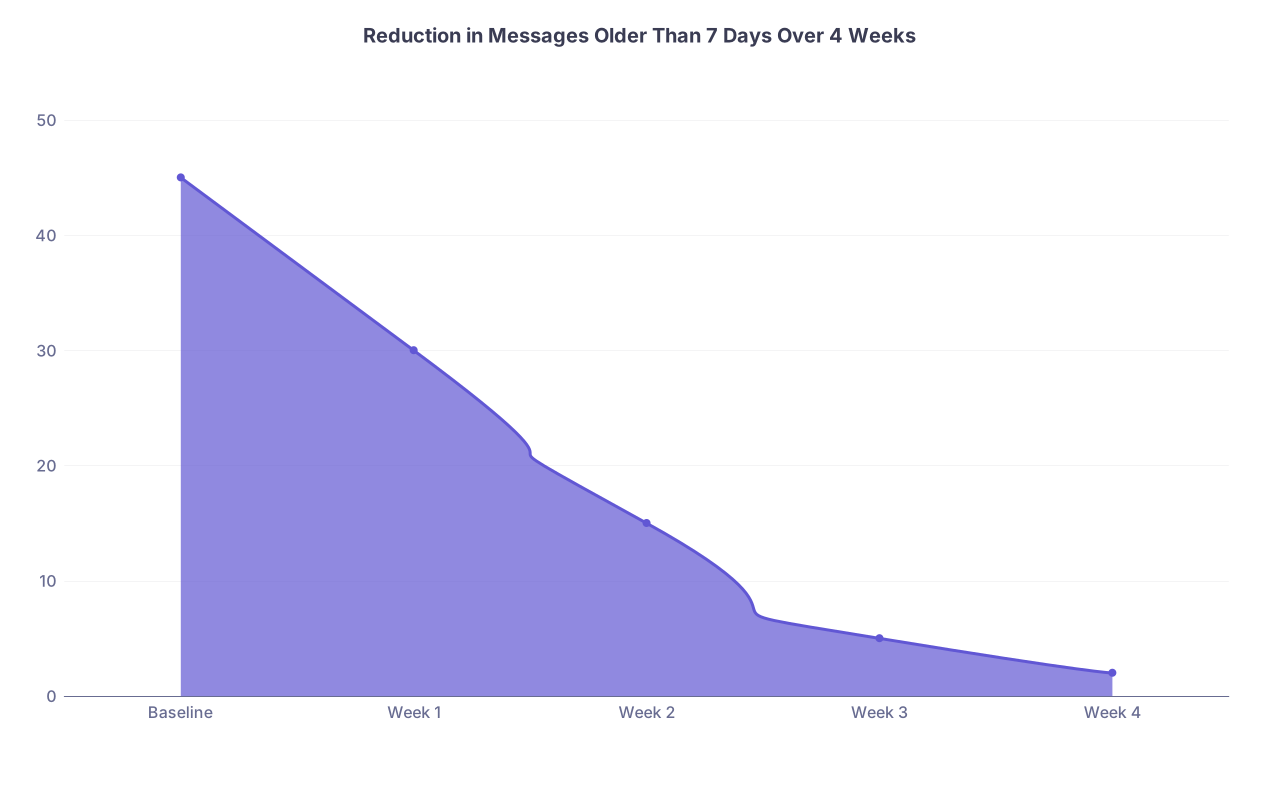
| Category | Value |
|---|---|
| Baseline | 45 |
| Week 1 | 30 |
| Week 2 | 15 |
| Week 3 | 5 |
| Week 4 | 2 |
Advanced Levers: Changing Inputs, Not Just Outputs
At this point you have tuned your own system. To get real relief, you must also reduce the inflow.
1. Fix Recurrent Patient Education Gaps
Look at common message themes:
- “What were my instructions again?”
- “Do I still take X?”
- “How do I use the portal?”
These are signals of broken communication upstream.
Solutions:
- Standard after‑visit summaries (with plain language medication and follow‑up instructions)
- Prebuilt patient education handouts attached for common conditions
- At the end of visits, say: “If you have a quick clarification question, the portal is fine. If you have a new or complex issue, please schedule a visit rather than sending a long portal message.”
2. Negotiate Portal Message Billing Where Applicable
Some systems now allow billing for certain time‑intensive portal work. Use it correctly and consistently.
Set expectations clearly in your after‑visit script and on patient handouts:
- What is free quick messaging (simple clarifications)?
- What will be converted into a billable encounter (new problems, med management requiring review)?
I have watched physicians go from 25 long portal novels a week to 5 once patients understood that lengthy, complex requests are essentially visits and will be treated as such.
3. Use Technology Properly (And Avoid the Toys That Waste Time)
There is a difference between tools and toys.
Good tools:
- Speech‑to‑text integrated into the EHR for quicker replies
- EHR smart folders that group similar message types
- “Bulk sign” or “bulk respond” features where safe (normal results with template)
Toys that waste time:
- Overly clever AI that drafts 6 paragraphs where 2 lines suffice
- Extra dashboards you never look at
- Fancy color‑coded inbox tricks that no one else uses
If a technology does not cut your clicks or time per message within a week or two, drop it.
Here is a simple comparison of tool impact:
| Tool / Change | Impact on Time per Message |
|---|---|
| Templates / dot-phrases | High |
| Staff protocols | High |
| Better routing rules | High |
| Speech-to-text | Moderate |
| Extra dashboards / widgets | Low |
Putting It All Together: A 4‑Week Implementation Snapshot
Let me stitch the whole protocol into a simple visual so you can see the arc.

| Step | Description |
|---|---|
| Step 1 | Week 0 - Baseline |
| Step 2 | Week 1 - Structure |
| Step 3 | Week 2 - Backlog and Templates |
| Step 4 | Week 3 - Team and Routing |
| Step 5 | Week 4 - Habits and Maintenance |
| Step 6 | Measure load |
| Step 7 | Track one day |
| Step 8 | Time block sessions |
| Step 9 | Define what only you do |
| Step 10 | Meet with team |
| Step 11 | Backlog cleanout |
| Step 12 | Create templates |
| Step 13 | Standard triage |
| Step 14 | Staff protocols |
| Step 15 | Fix routing |
| Step 16 | Tune notifications |
| Step 17 | Inbox micro habits |
| Step 18 | No perfect replies |
| Step 19 | Weekly review |
That is the map. You do not need to improvise. Just follow it.
FAQs
1. What if my administration will not protect time for inbasket work?
Then you create the protection yourself inside your schedule template. Block 15 minutes at the start and end of every session as “admin” or “results review.” Most systems will allow this as long as you are not reducing net RVU potential dramatically.
If leadership pushes back, do not argue about “burnout” in the abstract. Show data: number of messages, delay in results communication, risk of missed critical items. Frame it as a patient safety and risk management issue, not your personal preference. Administrators listen more when liability is on the table.
And if they still refuse, you quietly enforce your own boundaries: you do not check inbasket outside your chosen windows. You work your blocks efficiently. You let the natural backlog data talk for you.
2. What if my specialty is different and my inbox is inherently worse?
Every specialty thinks its inbox is uniquely terrible. Cardiology consults, oncology portal messages, pediatrics parent novels, psych safety concerns—you name it. The content differs, the problem is the same.
You adapt the thresholds and protocols:
- High‑risk specialties create stricter rules for what staff can handle and what triggers immediate escalation.
- You might need 3–4 shorter inbasket blocks instead of 2–3 longer ones to keep turnaround fast.
- Your templates will be more nuanced, especially around warning signs and when to seek urgent care.
But the backbone—time blocking, templating, delegation, routing control, and weekly review—does not change. The physicians who say “my inbox is too unique for systems” are usually the ones still drowning years later.
Key takeaways:
- You are not the problem; the lack of structure is. Build time blocks, triage rules, templates, and delegation in 4 weeks.
- Stop doing work that staff or systems can do just as safely. Your inbasket is the most expensive inbox in the building—protect it.
- Treat this as an ongoing protocol, not a one‑time cleanup. Weekly review plus strict inbasket habits keep you in control instead of underwater.