
You just finished clinic. It is 5:10 PM. You are staring at 34 unfinished notes and 18 unsigned orders. Your inbox is a mess, and you have exactly 60 minutes blocked with “IT – EHR Optimization” before your evening cases or family obligations start.
You know what usually happens.
Someone from IT screenshares, asks vaguely, “So…what are your pain points?” People complain for 45 minutes. Someone promises “We’ll take that back to the team.” Nothing actually changes.
Let’s not do that.
Here is how to run a 60‑minute EHR optimization session that actually fixes things. Step‑by‑step, with scripts, agenda, and what to ask IT for in plain English.
Step 0: Pre‑Session Setup (Done 1–3 Days Before)
If you walk in cold, you will waste the hour. Preparation does not need to be elaborate, but it must be intentional.
1. Decide the scope for this 60‑minute session
You cannot “fix the EHR” in one meeting. You can absolutely fix 2–3 very specific workflows.
Pick one primary workflow and one backup. Examples:
- Clinic:
- New patient visit documentation
- Follow‑up visit documentation
- Medication refills
- Lab result review and follow‑up
- Messaging / inbox workflows
- Hospital:
- Admission orders + H&P
- Discharge summary and meds reconciliation
- Daily progress notes
- Procedure documentation
Your rule: if it does not touch these workflows, it waits for another session.
2. Collect real screenshots and examples
Spend a single half‑day clinic or call shift capturing friction:
- Take screenshots (with PHI redacted) of:
- Click‑heavy sequences
- Confusing screens
- Alerts that fire too often or at the wrong time
- Write down:
- “To enter a simple refilled lisinopril script I had to click 11 times”
- “Lab follow‑up: I had to open 4 different screens to see trend, prior notes, and send patient a message”
You want truth from the trenches, not vague complaints.
3. Define success in concrete terms
For this 60‑minute session, your success metrics should be brutally simple, like:
- Reduce documentation clicks for a standard follow‑up visit from 24 → 14
- Make one discharge summary template that auto‑pulls meds, problem list, and hospital course
- Create or fix 3 smartphrases that cover 70% of your routine note content
- Turn off or modify 2 low‑value alerts that fire >10 times per day
Put those in an email to the IT lead before the meeting:
“For this session I want to focus on:
- Follow‑up visit documentation – aim: 30–50% fewer clicks for a typical visit.
- Lab inbox follow‑up – aim: one-screen workflow from viewing result → documenting plan → messaging patient.”
You have just given them a target. That alone already separates you from 90% of “optimization” meetings.
Step 1: Structure the 60 Minutes (Agenda That Works)
Here is the agenda that actually produces change:
- Minutes 0–5 – Reset expectations and confirm scope
- Minutes 5–15 – Live demonstration of your current workflow
- Minutes 15–35 – Co‑design: IT proposes options, you stress‑test them
- Minutes 35–50 – Build and implement quick wins on the spot
- Minutes 50–60 – Lock in follow‑ups, ownership, and deadlines
You run the session like a short OR case. Time‑boxed, deliberate, and outcome‑focused.
Step 2: Minute‑by‑Minute Playbook
Minutes 0–5: Take Control and Narrow the Scope
Sit down. Do not let this become a general gripe session.
Say something close to this, right away:
“Thanks for joining. Let me be clear about what I want from this hour.
We are not trying to fix the entire EHR.
Today we are going to:
- Walk through how I document a follow‑up visit now.
- Identify specific steps to cut time and clicks.
- Build or configure at least one concrete change before we end this meeting.”
Then ask:
“Is there any limitation I should know about up front? Anything in this workflow you absolutely cannot change?”
You want constraints early, so you do not waste time on fantasy features your vendor will never support.
Minutes 5–15: Show, Do Not Tell
This is where most clinicians blow it. They complain in abstractions. IT does not live your day. They need to see it.
You:
Share your screen (or use a training environment if needed)
Log into the EHR exactly as you would in clinic.Pull up a de‑identified or test patient
- Reproduce a real scenario you documented the day before.
Narrate every step out loud
Example:- “I click here to open the previous note because my template does not pull in assessment and plan.”
- “Now I am hunting for the last echo. It is buried under ‘Outside Records,’ which takes 3 more clicks.”
- “I am typing this sentence manually every single time: ‘Discussed risks and benefits; patient verbalized understanding.’ This should be a smartphrase.”
Do not apologize. Do not rush. This is the diagnostic exam.
Encourage IT to ask “Why are you doing that there?”
Often you will answer, “Because that is how I figured it out five years ago,” which is code for, “There may already be a better way.”
Minutes 15–35: Co‑Design the Better Workflow
You have shown them the disease. Now you work together on the treatment.
Ask the IT analyst explicitly:
“If you had to cut 40% of the clicks from what I just did, what tools do we already have to do that? Templates, preference lists, smartphrases, order sets, macros – what am I not using that I should be?”
Now work through options.
Typical levers that give big wins fast:
Note templates and smartphrases
- Build:
- A single, clean follow‑up note template with:
- Chief complaint
- Interval history
- Medications (auto‑pulled)
- Problem‑oriented assessment and plan with checkboxes
- A single, clean follow‑up note template with:
- Convert:
- Repeated manual paragraphs into smartphrases (
.medrecdone,.riskbenefits,.followuplabs).
- Repeated manual paragraphs into smartphrases (
- Build:
Order sets and preference lists
- Bundle:
- Your “standard HTN follow‑up” orders: BMP, refill lisinopril, BP check in 6 months, etc.
- Remove:
- Useless or outdated orders clogging your favorites.
- Bundle:
In‑basket / inbox rules
- Decide:
- What absolutely requires physician review vs. RN vs. MA.
- Build:
- Routing rules so low‑acuity refill requests or normal lab notifications go directly to support staff with protocolized responses.
- Decide:
Display tweaks
- Change column order or sort defaults.
- Add or remove unnecessary columns that force scrolling.
- Turn on snapshot views that combine key info in one screen.
You are aiming for a “draft new workflow” by minute 35. Not perfect. Just clearly better.
Minutes 35–50: Build Quick Wins Now, Not “Later”
Most sessions die here. IT says, “We will take this back and prototype something.” Translation: you will never hear about it again.
Push for changes you can implement during the meeting:
Use this line:
“Which of these ideas can we actually build or turn on right now, in this session, without needing change control or a major governance process?”
Common “do it now” changes:
- New or modified smartphrases tied to your user profile.
- Personal preference lists.
- Personalized order panels.
- Display sort order, filters, and column sets.
- Quick actions in your inbox (e.g., a single button that both signs and sends a standard message).
Have IT share their screen while they build. You confirm each step.
Then – and this is crucial – you test it immediately with a real example:
- Use a test patient.
- Run through the new workflow from start to finish.
- Time it. Count clicks. Compare to your baseline from earlier.
If it is still clunky, say so bluntly:
“This is better, but I am still doing double work here and here. How can we remove this extra step?”
Keep iterating until you are at “good enough to start using tomorrow,” not theoretical perfection.
Minutes 50–60: Lock It In – Ownership and Next Steps
The last 10 minutes decide whether anything survives beyond tomorrow.
You need three things written down before the meeting ends:
- What changed today
- What will change later (and by when)
- How you will measure if it helped
1. Document what changed today
Open a simple shared doc or email and write bullet points while everyone watches:
- “Created new follow‑up clinic note template
FUP_GEN_2025on my profile.” - “Built smartphrases:
.htnplan,.riskbenefits,.labsfollowupfor my user.” - “Updated personal order set
HTN Followupto include BMP, lipid panel, med refills.” - “Changed inbox view to show problem list and recent labs on same panel.”
Ask IT to confirm each bullet: “Is that accurate?”
2. Assign owners and deadlines for remaining work
For things that need more time or governance:
- “IT – Jane Doe: Propose disabling or re‑scoping low‑value alert ‘XYZ_123’ for cardiology by 2/15.”
- “Physician – You: Pilot new note template for two weeks and send feedback by 1/30.”
- “Nursing lead – [Name]: Review which lab results can be protocol‑managed by nurses by 2/1.”
Again, write this down. Names and dates. No “we” and “sometime.”
3. Decide how you will know it worked
Make this simple and measurable; this is not a quality improvement grant, just reality check.
Options:
- Manual time‑tracking:
- “I will time 5 consecutive follow‑up visits before and after. Goal: average documentation time from 7 minutes → 4 minutes.”
- EHR metadata:
- Ask IT: “Can you pull pre vs. post average time-in-note or clicks for this note type for my user profile?”
- Subjective but structured:
- 1–10 rating of “after hours EHR burden” before vs. 2–4 weeks after.
Agree to a 15‑minute follow‑up huddle in 4–6 weeks to review if it actually helped or if you need another iteration.
What To Ask For: Concrete EHR Changes That Actually Help
Let me give you a short, pragmatic menu. You are not expected to know vendor jargon. You just need to know what is worth pushing for.
| Target Area | Typical High-Value Change |
|---|---|
| Notes | Templates, smartphrases, problem-based A/P |
| Orders | Custom order sets, preference lists |
| Inbox / Messages | Routing rules, quick actions, standardized texts |
| Results Review | Combined views, default filters, trends |
| Alerts | Suppress low-value alerts, tweak thresholds |
1. Notes
Ask IT for:
- “One note template that matches how I actually think and document during a follow‑up.”
- “Smartphrases for the 5 paragraphs I type most often.”
- “Problem‑based assessment and plan, so I am not repeating the same plan three times for each problem.”
2. Orders
Ask for:
- “A bundled order set for my 3 most common clinical scenarios.”
- “Clean up my favorites – remove junk from residency days, add what I actually use now.”
- “Default duration and refills for my bread‑and‑butter meds.”
3. Inbox and Messaging
Ask explicitly:
- “Which messages are legally or policy‑required for me to address personally, and which can be safely routed to RN/MA with protocols?”
- “Can we add canned responses for normal lab results and simple medication refills?”
4. Results Review
Request:
- “A single view with last 3 labs, recent notes, and problem list visible at the same time.”
- “Default filter that shows only labs from the last 6 months unless I choose otherwise.”
5. Alerts
Be ruthless here. Click fatigue is real.
Ask:
- “List the top 10 alerts firing for my specialty. Which have override rates >90%?”
- “Which of those can be removed, delayed, combined, or made passive (banner instead of blocking popup)?”
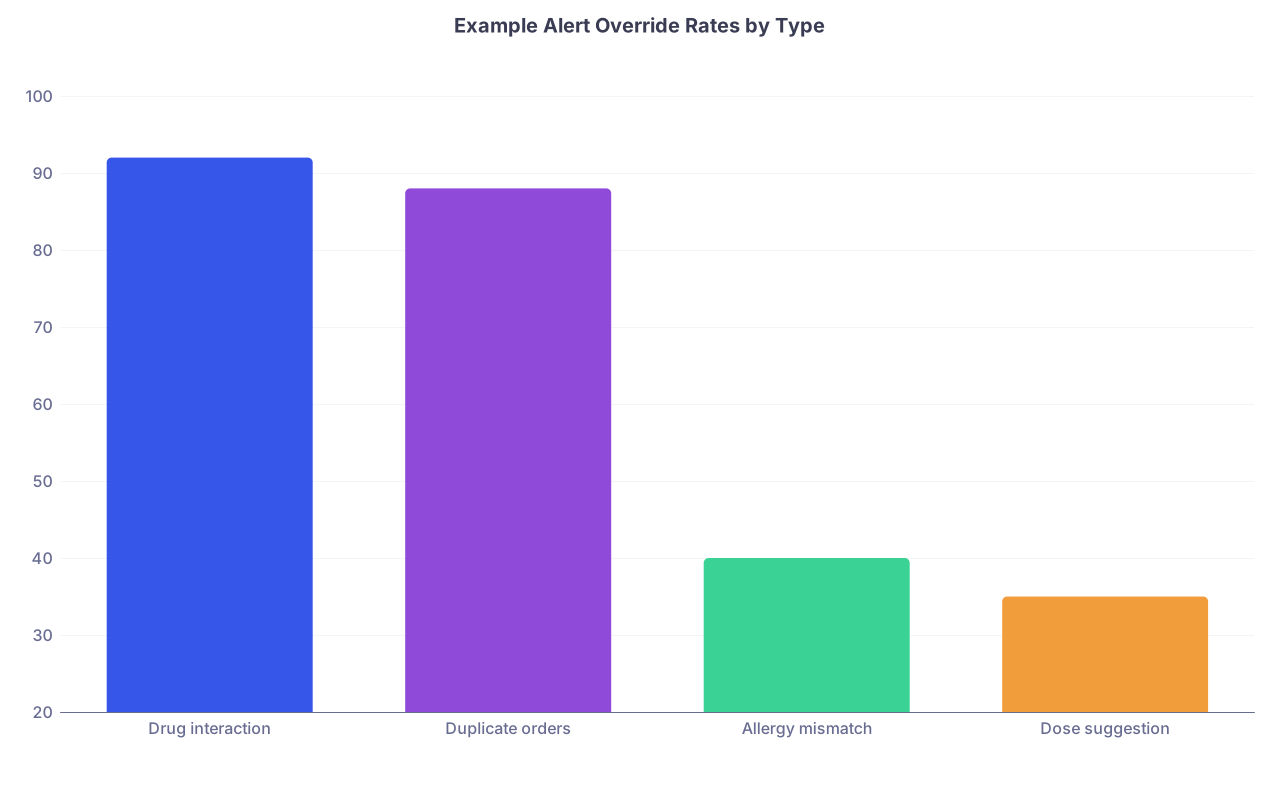
| Category | Value |
|---|---|
| Drug interaction | 92 |
| Duplicate orders | 88 |
| Allergy mismatch | 40 |
| Dose suggestion | 35 |
Use this kind of data to prioritize which alerts to attack first.
Who Should Be in the Room (and Who Should Not)
You do not need 14 people.
Must‑haves
- You (or another hands‑on clinician) – ideally the one who actually uses the EHR heavily.
- One IT analyst / builder – someone empowered to change templates, lists, views on the spot.
- Optional but powerful: one nurse or MA – they see different pain points that affect you indirectly.
Nice‑to‑have (for specific issues)
- Practice manager or clinic lead if workflows cross front desk / scheduling / triage.
- Physician champion familiar with local governance if you are hitting bigger changes (alerts that affect multiple departments, system‑wide templates, etc.).
Who not to invite to a 60‑minute build session:
- Large steering committees.
- Senior executives who want status updates but cannot help you build.
They belong in separate meetings. This hour is about work, not theater.
How to Handle Common Roadblocks
You will hit resistance. Some of it valid, some of it lazy.
“The system cannot do that”
Sometimes true, sometimes code for “I do not know how.” Respond like this:
“Show me exactly where the limitation is. Is this a vendor hard limit, a local policy, or just something we have never built?”
Then:
- If it is truly impossible: accept and move on.
- If it is policy: ask, “Who owns that policy, and can we ask for an exception or change for our specialty?”
- If it is knowledge gap: schedule time for the analyst to check with a super‑user or vendor rep and bring back options.
“We need to go through governance; this affects everyone”
Fair. Larger changes require process.
Your move:
- Ask, “What can we adjust locally just for my profile or clinic while we wait?”
- Request to see data: “How many people does this really affect? What is the override or usage rate?”
- Volunteer to be the pilot: “Configure it for our group first. If metrics improve, you can take it to the governance committee with data.”
“We do not have time today to build that”
Do not argue. Triage.
“Fine – let us identify the 1–2 changes we can build today. Then before we end, I want a written list of the other changes with owner and target date.”
You are protecting the quick wins from being drowned by bigger projects.
Example: A Real 60‑Minute Session in Practice
Let me walk through a plausible case for a hospitalist starting a new job.
Context:
You are a hospitalist in a community hospital using Epic (or Cerner, or Meditech – does not matter). Discharges take forever. You stay 90 minutes late every third shift just finishing discharge summaries.
Your scope for the session:
- Primary: Discharge summary + discharge med reconciliation.
- Goal: Cut average discharge documentation time per patient from 15 minutes → 8 minutes.
What actually happens in the 60 minutes:
- Minutes 0–5:
- You state: “We are focusing only on discharges. I want at least one new discharge template built today that I can start using on my next shift.”
- Minutes 5–15:
- You pull up a recent discharge (PHI removed).
- Narrate: “I copy/paste the hospital course from prior notes because the note template does not pull it; I manually type every follow‑up appointment; the med rec screen does not show the primary care provider clearly,” etc.
- Minutes 15–35:
- IT suggests:
- Auto‑pulling problem list, procedures, and hospital course from daily notes.
- Building smartphrase for standard follow‑up instructions.
- Adding PCP contact info to the discharge summary header.
- You quickly agree on layout: hospital course with bullets by problem, then follow‑up, then instructions.
- IT suggests:
- Minutes 35–50:
- Analyst builds:
DC_HOSP_GENERAL_2025template. - Adds smartphrases
.dcrisks,.dcfup,.dcmedchange. - You test on a test patient, realize meds are in the wrong section, tweak it.
- Analyst builds:
- Minutes 50–60:
- You document:
- “New discharge summary template built and assigned to my profile.”
- “Next step: IT to explore adding automatic PCP appointments feed into summary by 3/1.”
- Schedule 15‑minute check‑in three weeks later.
- On your next shift, you try it on 5 discharges and record before/after times.
- You document:
Half the battle, won in an hour.
Visual: What Your 60‑Minute Session Flow Looks Like

| Step | Description |
|---|---|
| Step 1 | Start Session |
| Step 2 | Set Scope 5 min |
| Step 3 | Demo Current Workflow 10 min |
| Step 4 | Discuss Improvements 20 min |
| Step 5 | Build Quick Wins 15 min |
| Step 6 | Summarize and Assign Tasks 10 min |
| Step 7 | Schedule Follow Up |
FAQs
1. How often should I run these 60‑minute EHR optimization sessions?
For a new attending job or a new EHR, I recommend one focused session every 1–2 months for the first 6–9 months, each time with a different scope (notes, inbox, orders, then discharges, etc.). Once your personal environment is reasonably optimized, drop to twice per year or when there is a major upgrade that changes workflows.
2. How do I get IT to take these sessions seriously?
Show that you are serious first. Come prepared with:
- Screenshots
- Concrete examples
- Clear goals (click reductions, time reductions, specific templates)
Then be explicit about impact:
“If we can save 3 minutes per note and I do 18 patients per day, that is almost an hour of physician time recaptured per clinic day.”
IT hears that as justification for prioritizing your requests. Also: send a brief thank‑you email highlighting wins and copying your medical director. Positive visibility helps them too.
3. What if my group wants changes, not just me as an individual?
Use your individual session as a pilot. Optimize for yourself first. Track simple outcomes (time per note, after‑hours charting). After 4–6 weeks, bring that back to your group and say:
“Here is what changed for me, and here is the benefit. Let us schedule a group optimization session to roll this out for everyone.”
Bring data and a working prototype. Commit to being the “champion” who helps colleagues adopt it. Groups follow what is already working, not abstract proposals.
Key takeaways:
- Treat the 60‑minute EHR session like a procedure: defined scope, live demo, build, test, and document.
- Push for concrete, on‑the‑spot changes: templates, smartphrases, order sets, inbox rules – not vague promises.
- End every session with written owners, deadlines, and a short follow‑up to see if your daily life actually improved.