
The way most physicians build a tech stack for private practice is backwards. They buy software first and only later ask, “What data do I actually need?” That’s how you end up with five logins, no visibility, and a mess.
You’re going to do the opposite.
You’re going to spend 12 months building a data-driven stack on purpose—month by month—so by the time you open (or overhaul) your practice, every tool is chosen around one question:
What do I need to measure to make smarter decisions?
Below is your 12‑month roadmap, with clear “at this point you should…” milestones. Assume you’re 6–12 months from opening a practice or taking over a small group as a new attending.
Months 1–2: Define the Practice and the Data You Actually Need
At this stage, do not buy software. At all. You’re defining the questions your data must answer.
Month 1: Vision, constraints, and essential metrics
By the end of Month 1 you should: have a clear practice profile and a first-pass list of core metrics.
Clarify your practice model Write this down in one page or less:
- Solo vs group?
- Specialty and key services? (e.g., outpatient psych with TMS; ortho with in-office imaging; primary care with DPC model)
- Payer mix targets: percent commercial, Medicare, Medicaid, cash-pay.
- In-person only, hybrid, or virtual-first?
Define your non‑negotiable constraints Examples:
- “I will not chart at home after 7 pm.”
- “I need to see 12–15 patients/day, not 25+.”
- “We must support telehealth for at least 20% of visits.” These constraints drive tech choices.
List the decisions you’ll need data for Think like this:
- “When do I hire an MA or front‑desk?”
- “Which payers are not worth keeping?”
- “Which visit types are profitable vs time sinks?”
- “Is marketing actually working?”
Translate those decisions into metrics You’re not building a research database. Just enough.
Core financial/operational metrics:
- New patients/month
- Show rate / no‑show rate
- Visits by type (new, follow‑up, procedure, telehealth)
- Revenue per visit and per hour
- Days in A/R
- Denial rate and top denial reasons
- Payer mix by revenue, not just volume
Core clinical/access metrics:
- Time to third next available appointment
- Patient portal activation rate
- Telehealth vs in‑person ratio
- Standard quality measures relevant to your specialty (e.g., A1c control for primary care)
At this point just define them. You’ll wire them up later.
Sketch your “one screen” dream dashboard One page. If you could see only 10–15 numbers/charts weekly, what would they be?
That imagined dashboard will keep you from buying random tools that don’t feed the right data.
Month 2: Map the tech categories before picking vendors
By the end of Month 2 you should: know which categories of tools you need and how they must integrate.
You’re designing the ecosystem, not the brand names yet.
Core components for a data‑driven private practice:
- EHR/EMR & e‑prescribing
- Practice management (PM) – scheduling, insurance, superbills, billing workflows
- Billing / RCM – internal or outsourced service
- Patient intake & forms
- Patient communication – reminders, texting, phone, portal
- Telehealth platform (can be built‑in to EHR)
- Payments & merchant processing – card on file, online payments
- Analytics / BI layer – where your data comes together
- Marketing/CRM – lead capture, website forms, email campaigns, tracking conversions
Now, connect them. Literally draw boxes and arrows.

| Step | Description |
|---|---|
| Step 1 | Website and Ads |
| Step 2 | Marketing CRM |
| Step 3 | Patient Calls or Online Booking |
| Step 4 | Practice Management |
| Step 5 | EHR |
| Step 6 | Billing and RCM |
| Step 7 | Accounting |
| Step 8 | Telehealth |
| Step 9 | Patient Communication |
| Step 10 | Clinical Quality Data |
| Step 11 | Operational Data |
| Step 12 | Financial Data |
| Step 13 | Analytics Dashboard |
At this point, you should:
- Decide if you want an all‑in‑one system (EHR + PM + patient comms) or a best‑of‑breed mix.
- Commit to one “source of truth” for each data type:
- Clinical data → EHR
- Operational (scheduling, no‑shows) → PM
- Financials → billing system + accounting
- Marketing → CRM/website analytics
- Final rolled‑up truth → analytics dashboard
Months 3–4: Vendor Shortlist, Demos, and Reality Checks
Now you start touching products—but still no contracts until you’ve seen data and workflows.
Month 3: Create vendor shortlists and comparison criteria
By the end of Month 3 you should: have 2–3 serious options per major system.
- Pick your EHR/PM tier You don’t have time to “try them all,” so start here based on practice size and complexity.
| Practice Type | EHR/PM Examples | Typical Size |
|---|---|---|
| Small outpatient | Athenahealth, Elation, DrChrono | 1–5 clinicians |
| Behavioral health | SimplePractice, TherapyNotes | Solo–group |
| Ortho/surgery | NextGen, Modernizing Medicine | 3+ surgeons |
| DPC / membership | Canvas, Hint, Elation | Solo–small group |
| High-volume primary care | eClinicalWorks, Athenahealth | 3–10+ |
Ask colleagues in your specialty which systems:
- Actually support your workflows
- Don’t destroy your evenings with documentation
- Have usable reporting that doesn’t require an analyst
Define integration requirements For each system, write:
- “Must integrate natively with [EHR name] or via HL7/FHIR/API.”
- “Must export data to CSV or database monthly.”
- “Must support automated appointment data export for no‑show tracking.”
Build a vendor evaluation checklist Include:
- Time to go live
- Cost structure (per provider/month, per visit, % of collections)
- Contract length and exit terms
- Reporting and analytics capabilities
- Ability to access raw data (not just PDFs)
- Usability—how many clicks per note, per refill, per lab order
Month 4: Run focused demos and get behind-the-scenes numbers
By the end of Month 4 you should: have a front‑runner for EHR/PM and a rough sense of total monthly tech cost.
When you do demos:
Bring real scenarios:
- “New patient, commercial insurance, telehealth follow‑up, needs lab orders and prior auth.”
- “Medicare patient with 3 chronic problems and refills.”
Ask only hard, data‑centric questions:
- “Show me how I pull a report of no‑show rates by appointment type for the last 90 days.”
- “How do I get payer mix, revenue per payer, and denial rates out of your system?”
- “Can I automate weekly exports of scheduling and billing data?”
Demand sample metrics and dashboards:
- If they can’t show you operational and financial reports in the demo, assume they’re weak.
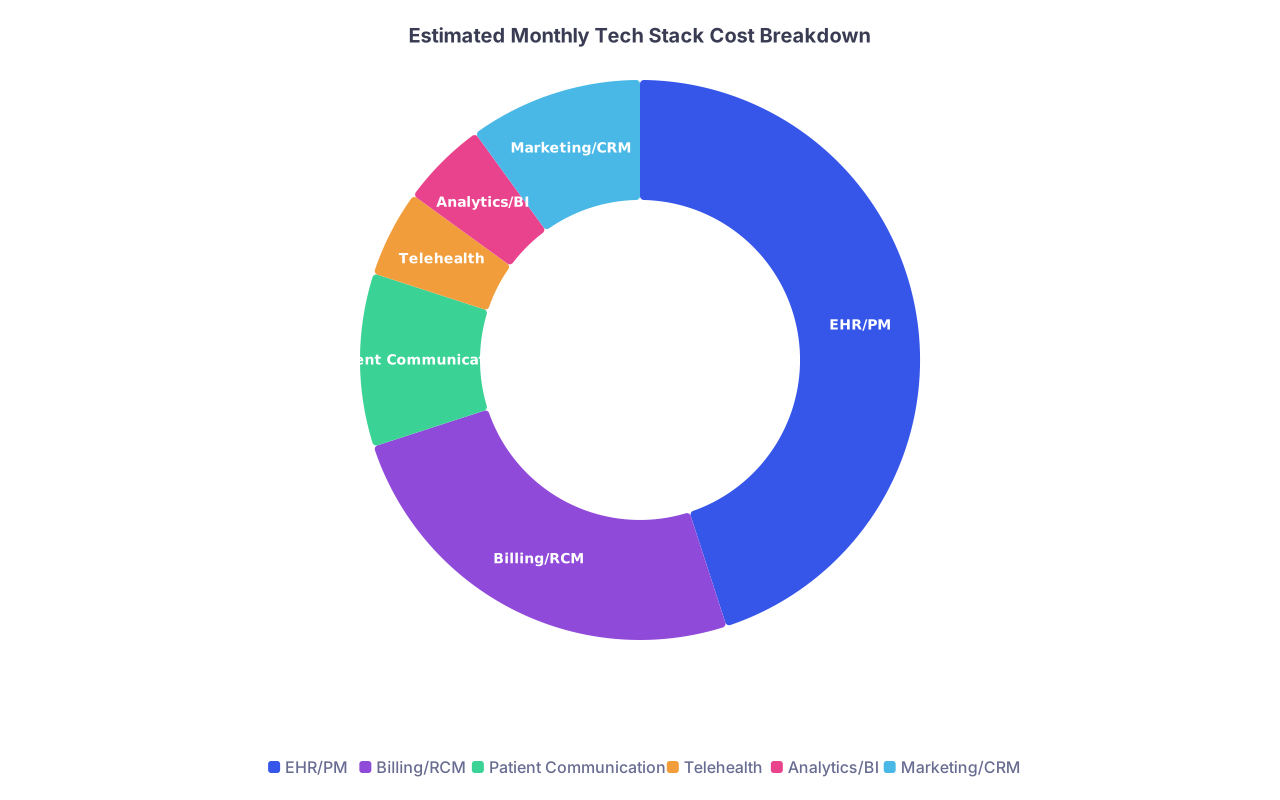
Track monthly recurring cost estimates as you go.
| Category | Value |
|---|---|
| EHR/PM | 45 |
| Billing/RCM | 25 |
| Patient Communication | 10 |
| Telehealth | 5 |
| Analytics/BI | 5 |
| Marketing/CRM | 10 |
Interpretation: roughly 45% of your tech spend will land in EHR/PM, 25% in billing (if outsourced), and the rest spread across communication, analytics, and marketing.
Months 5–6: Lock Core Systems and Build Data Foundations
Now you start committing. This is where people either create clean data or a permanent mess.
Month 5: Sign core contracts (EHR/PM, billing, communications)
By the end of Month 5 you should: have signed contracts for EHR/PM, billing, and patient communication tools.
-
- Confirm:
- Scheduling rules support your visit types.
- Templates are customizable for your specialty.
- Reporting covers your Month 1 metrics or can be extended.
- Confirm:
Decide on billing / RCM Options:
- In‑house billing using PM system
- Outsourced billing company (percentage of collections)
Non‑negotiables:
- You can access line‑item claims data.
- Regular denial reason codes reports.
- Days in A/R by payer.
Choose patient communication & telehealth Often, this is built into your EHR/PM:
- Appointment reminders (SMS + email)
- Broadcast messaging for cancellations
- Online booking (if you want to reduce phone volume)
- Telehealth that logs as a visit type in the system
At this point you should also:
- Set a go‑live date 3–5 months out.
- Confirm training timelines for you and staff.
Month 6: Set up data structures, templates, and workflows
By the end of Month 6 you should: have standardized templates that make data structured, not random text.
Standardize visit types Define a short, consistent list:
- New patient – in person (NP‑IP)
- New patient – telehealth (NP‑TH)
- Follow‑up – 15 min / 30 min, IP/TH
- Procedure types specific to your field Each must map cleanly in the PM/EHR so you can report by type.
Template your documentation
- Use structured fields (checkboxes, dropdowns, numeric entries) wherever possible for:
- Diagnoses
- Procedures
- Quality measures
- Avoid free‑text everything. Free text is where data goes to die.
- Use structured fields (checkboxes, dropdowns, numeric entries) wherever possible for:
Create reason-for-visit and referral source fields
- Reason for visit: headache, follow-up, med check, etc.
- Referral source: PCP, self, Google, social media, specific campaign. These fields will power your marketing ROI later.
Define data governance basics Not a full committee. Just some rules:
- “We always enter referral source for new patients.”
- “We always close encounters same day.”
- “We never use ‘Other’ if a more specific code exists.”
Months 7–8: Intake, Marketing, and Early Analytics Layer
You have the core systems decided. Now you wire patients into them and set up your first analytics pathways.
Month 7: Patient intake & website/marketing integration
By the end of Month 7 you should: have end‑to‑end digital intake and basic marketing tracking.
Implement digital intake
- Use either:
- Built‑in EHR patient forms, or
- A HIPAA‑compliant forms tool that pushes data into the EHR/PM.
- Collect:
- Demographics and insurance photos
- Consent forms e‑signed
- Screening tools (PHQ‑9, GAD‑7, etc., if relevant)
- Use either:
Build or refine your website
- Online request/booking that feeds:
- Directly to PM, or
- To a marketing/CRM tool that then triggers scheduling.
- Track:
- Which pages people submit from.
- How many become scheduled appointments.
- Online request/booking that feeds:
Set up minimal CRM or tracking You don’t need a huge CRM package. But you do need:
- A place to log leads (inquiries that didn’t schedule yet)
- Status: “left voicemail,” “no insurance,” “scheduled,” “lost”
- Simple email/text sequences (appointment reminders, post‑visit education)
At this point you should know:
- How many inquiries you get per week
- What fraction convert to scheduled visits
Month 8: First analytics stack and data flows
By the end of Month 8 you should: have a basic but real dashboard for core operational metrics.
You have three options for analytics:
- Built‑in EHR/PM reports + manual spreadsheets
- Mid‑tier BI tools (Power BI, Tableau, Looker Studio) with data exports
- A healthcare‑specific analytics add‑on from your vendors
For most new practices, the path is:
- Export CSVs monthly → connect to Power BI/Looker Studio → build simple dashboards.
Start with only a few dashboards:
- Volume:
- Visits per day/week
- New vs established
- Visit type mix (in‑person vs telehealth)
- Operations:
- No‑show rate
- Cancellation reasons
- Time to third next available appointment
- Finance:
- Charges, payments, write‑offs
- Payer mix
- Denial counts and top reasons
| Category | Value |
|---|---|
| Visits | 420 |
| New Patients | 85 |
| No-show Rate | 8 |
| Days in A/R | 32 |
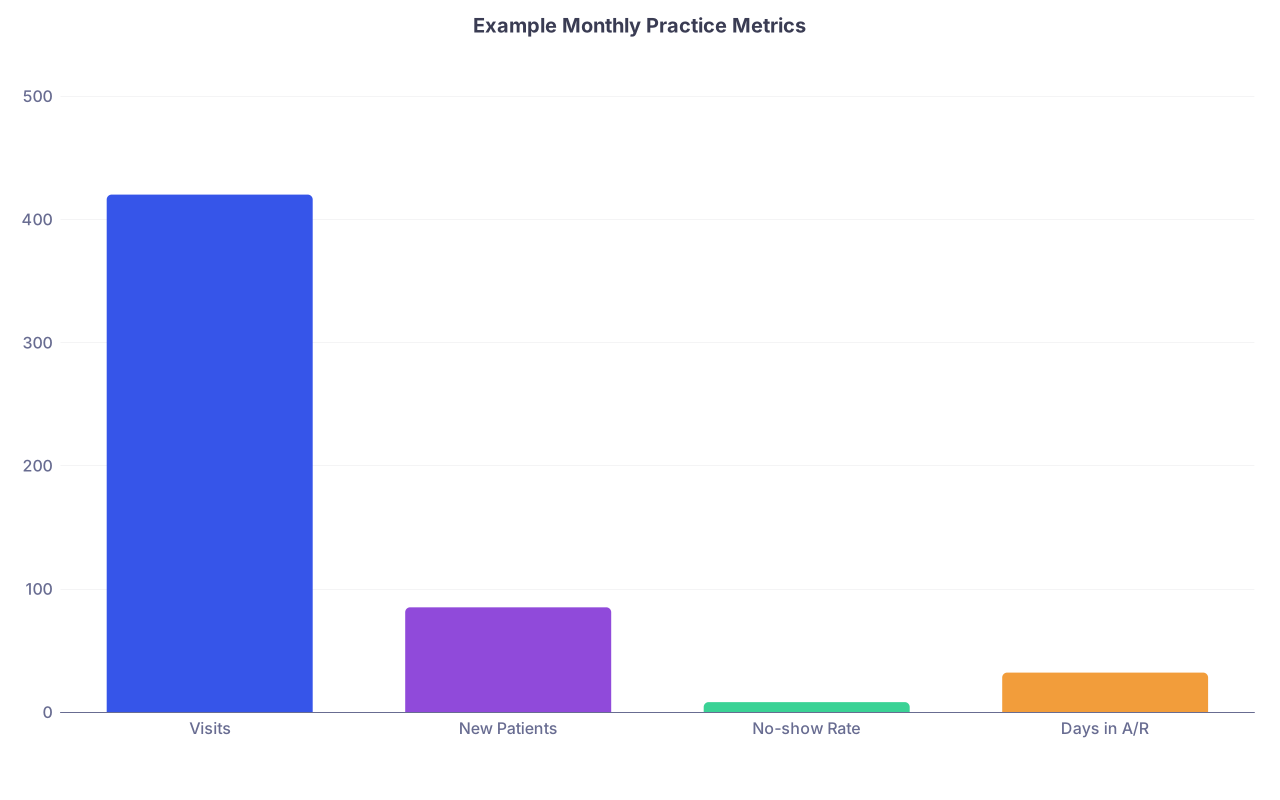
These are dummy numbers, but you get the idea. You want one screen like this when you open.
Months 9–10: Stress Test, Workflow Refinement, and Pre‑Launch
By now, you’re 2–3 months from opening or from fully flipping the switch to your new stack. This is where details make or break you.
Month 9: Dry runs, staff training, and data quality checks
By the end of Month 9 you should: have run realistic simulations and confirmed your data fields are usable.
-
- Register fake patients.
- Run them from online inquiry → scheduling → intake → visit → billing.
- Create 10–20 scenarios with different insurances, visit types, telehealth vs in‑person.
Audit the data trail After the mock day, pull:
- Schedule report: Are visit types consistent?
- Intake: Did referral source and reason for visit come through?
- EHR: Are diagnoses and quality measures coded, not just free text?
- Billing: Are CPT/ICD‑10 codes and modifiers correct and linked to visits?
Refine workflows and templates Based on the audit:
- Reduce dropdown options that staff keep mis‑using.
- Add required fields where people skip important data.
- Remove clutter from templates that slows you down.
Train staff on “why,” not just clicks They don’t need a lecture on data science. Just:
- “We always choose a referral source because that tells us what marketing works.”
- “We always document no‑show reasons so we can adjust policies later.”
Month 10: Pre‑launch metrics baseline and financial modeling
By the end of Month 10 you should: have a basic pro forma and clear metric targets for the first 6–12 months.
Build a simple pro forma Include:
- Expected visits per day/week/month
- Average reimbursement per visit by payer
- Projected payer mix
- Overhead: rent, staff, tech stack, malpractice
Define early warning metrics Examples:
- If no‑show rate > 12% for 4 weeks → review reminder workflows.
- If days in A/R > 40 → call billing company and review claims.
- If new patients < X/month → increase marketing budget or adjust access.
Set “launch dashboard” targets When you open, you’ll track:
- Weekly:
- Visits
- New patients
- No‑show rate
- Monthly:
- Revenue
- Payer mix
- Days in A/R
- Denial rate
- Weekly:
These become your first set of “management by metrics” habits.
Months 11–12: Launch, Iterate, and Tighten the Feedback Loops
At this point you should have contracts signed, workflows tested, and dashboards sketched. Now it’s about execution and iteration, not theory.
Month 11: Go live and run the first 4 weeks like an experiment
By the end of Month 11 you should: be live and performing weekly reviews of operations and data.
Launch with constraint Don’t open 5 days/week full tilt on day one.
- Start 3–4 days/week.
- Cap daily volume to keep time for troubleshooting.
Weekly 30‑minute “numbers meeting” Just you (and staff if you have them). Same agenda every week:
- Visits and new patients vs target
- No‑show and cancellation rates
- Any obvious documentation or billing bottlenecks
- Quick win: one small change to test next week
Capture edge cases Keep a running list:
- Prior auth nightmares
- Chronic documentation time sinks
- Insurance plans that constantly deny Then fix upstream with:
- Better templates
- Scheduling rules
- Payer contracting decisions
Month 12: Refine stack, cut waste, and plan v2 improvements
By the end of Month 12 you should: have a stable tech stack, clear metrics, and a shortlist of upgrades for year 2.
Audit the tech you’re actually using Look at each tool and ask:
- Do we use this weekly?
- Does it give us unique data or capabilities?
- Can any tools be consolidated into the EHR/PM or dropped?
Tighten your analytics layer
- Automate data exports if they’re still manual.
- Improve dashboards:
- Add trends over 3–6 months.
- Segment by payer, visit type, referral source.
Start using data for strategic decisions Examples:
- If commercial payer X has low reimbursement and high denial rate → consider dropping or renegotiating.
- If telehealth follow‑ups show low no‑show rates → expand telehealth slots.
- If one referral source sends high‑complexity, well‑insured patients → build that relationship.
Plan year‑two enhancements Now, and only now, consider:
- Care management platforms
- Advanced patient engagement apps
- Population health tools
- More sophisticated CRM/marketing automation
Because you’ll plug them into a system that already has clean, structured, meaningful data.
Key points to walk away with:
- Start with questions and metrics, not software logos. Your 12 months are about defining what you want to measure, then picking tools that serve that.
- Every system you add must feed a clear “source of truth” and roll into a simple analytics layer you actually look at weekly.
- Treat the first year as a series of structured experiments, with tight feedback loops, not a one‑time setup. The stack is never “done”—but by Month 12, it’s working for you, not the other way around.