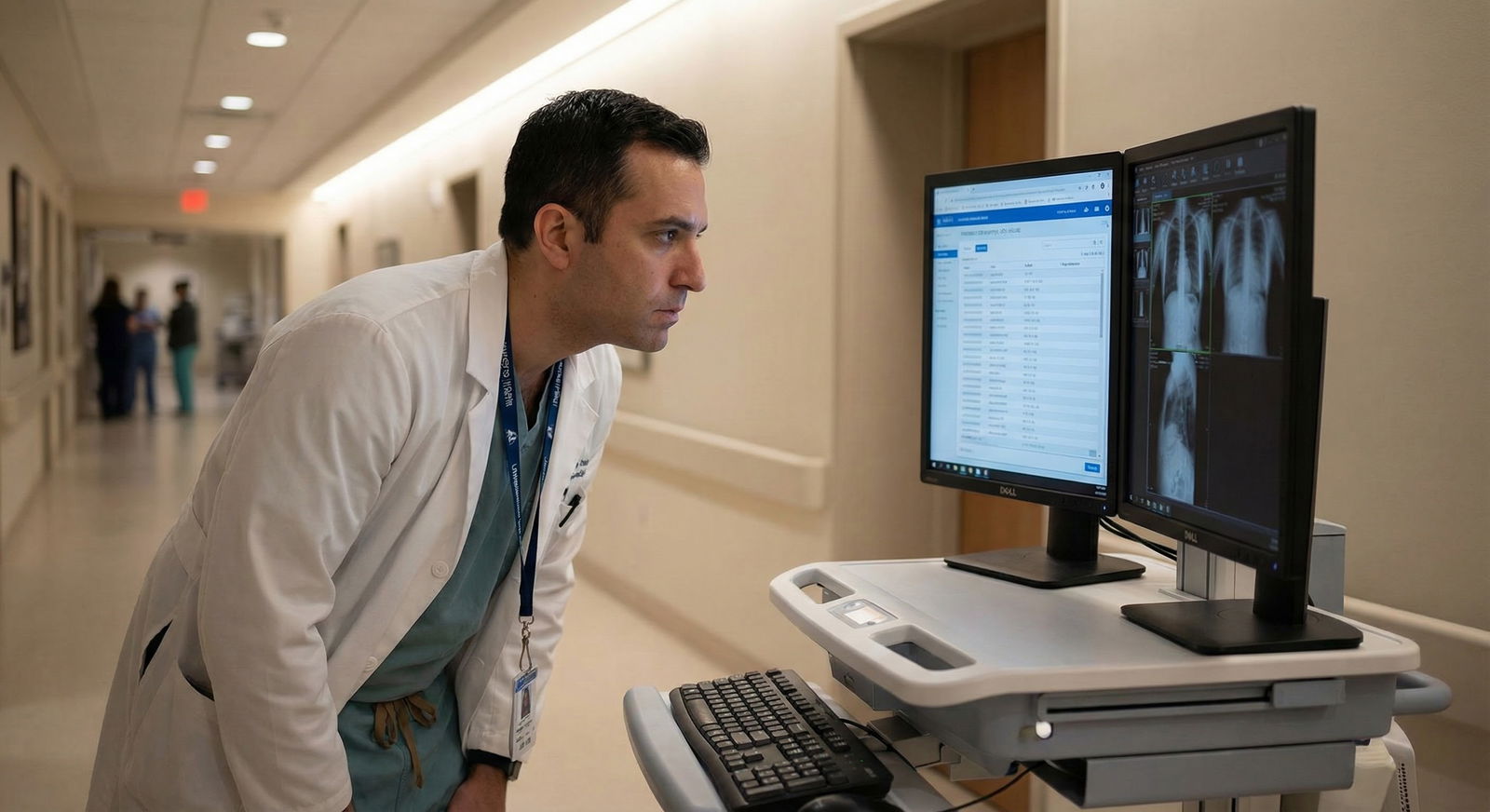
The biggest career mistakes after residency are not about salary. They are about technology you did not ask about.
You can fix a mediocre paycheck in a few years. You cannot easily fix a toxic EHR, chaotic telehealth setup, or a metrics dashboard that quietly throttles your RVUs. So you handle the tech before you sign.
I am going to walk you from pre‑contract to your first weeks on the job. At each point: specific tech questions, how to ask them, and what answers should raise alarms.
3–6 Months Before Start Date: Pre‑Contract Reality Check
At this point you should treat technology like a core contract term, not an afterthought.
Step 1: Before You Even Interview – Baseline Tech Intel
In the weeks before interviews, you should:
Research the organization’s tech stack
- What EHR do they use? (Epic, Cerner, Meditech, athena, eClinicalWorks, etc.)
- Are they in a health system with shared records, or a small standalone?
- Are they heavily into telehealth or remote monitoring?
Prep a short tech question list Bring this to every interview. Do not rely on “I’ll remember.”
Core early questions:
- “Which EHR do you use, and do you have any major upgrades or EHR transitions planned in the next 2–3 years?”
- “How long are typical appointment slots in the schedule, not in policy documents?”
- “Do you use scribes, templates, or voice recognition tools for documentation?”
- “What percentage of visits are telehealth right now?”
- “How are performance metrics tracked and shared with physicians?”
If people give you vague answers or get defensive about the EHR, that is not a good sign.
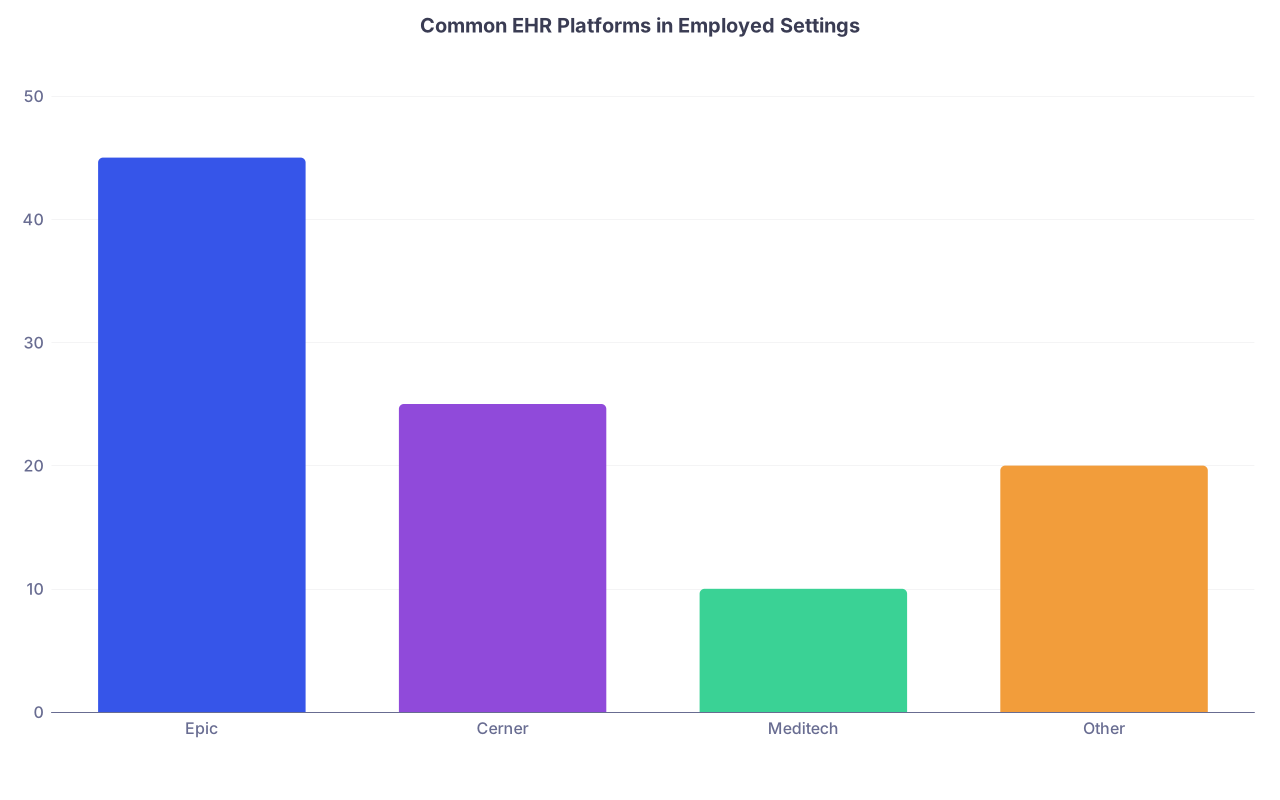
| Category | Value |
|---|---|
| Epic | 45 |
| Cerner | 25 |
| Meditech | 10 |
| Other | 20 |
Step 2: During Interviews – Dig Into Daily Tech Pain
Now you are in the room (or on Zoom). At this point you should move from generic to workflow‑level questions.
Ask frontline people, not just leadership:
- Partners or senior associates: “What slows you down most in the EHR?”
- Nurses/MA lead: “Where do orders or messages commonly get stuck?”
- Clinic manager: “What IT support do you have on‑site versus centralized help desk?”
Specific questions by domain:
EHR & Documentation
- “How long does it usually take a new physician to finish notes during clinic hours?”
- “How many in‑basket messages do physicians typically get per day?”
- “Do you have standard templates or order sets for common conditions/procedures?”
Red flags:
- “Most people finish notes at home after the kids go to bed.”
- “Everyone has their own way of documenting; we do not really have standards.”
- “The in‑basket is kind of intense, but you get used to it.”
Telehealth & Remote Work
- “Which platform do you use for telehealth? Is it integrated with the EHR?”
- “Are telehealth visits scheduled differently from in‑person visits?”
- “Do you provide remote access hardware (laptops, cameras, headsets)?”
Imaging, Labs, and Data Access
- “Can I see outside records and images from other systems easily?”
- “How do you handle outside imaging – do they get imported or just reports?”
- “Is there a data analyst or informatics person available to build reports or dashboards for us?”
You want to hear that they have:
- Standard templates and order sets
- Reasonable in‑basket volumes
- Technical support that is not purely “submit a ticket and pray”
Contract Negotiation Phase: Lock Tech Expectations in Writing
Once an offer is coming, you stop being vague. At this point you should turn tech into contractual clarity.
Non‑Negotiable Tech Questions Before Signing
These are not “nice to know.” They drive your burnout risk.
Ask the recruiter, medical director, or practice administrator:
EHR and Access
- “Will I have remote EHR access? Are there any restrictions on chart completion from home?”
- “Is there an expectation for after‑hours in‑basket work? Is that compensated?”
- “Can I review a sample of your documentation standards and policies?”
Productivity and Metrics
- “How are RVUs or productivity calculated? Is everything documented in the EHR, or are there parallel systems?”
- “What quality metrics am I accountable for, and how are they tracked technically?”
- “Will I have a physician dashboard? Can I see a screenshot of what you use now?”
Support Structure
- “Do you use scribes? If so, are they in‑person, virtual, or software‑based?”
- “Is there dedicated physician IT support or a physician informatics lead?”
- “How often do you update order sets and templates, and who can request changes?”
Hardware and Workspace
- “What will my exam room and office setup look like – number of screens, device types?”
- “Will I have a personal computer or shared workstations only?”
- “Do I get a private office or shared hot‑desking space?”

What You Should Try To Get in Writing
You will not get everything. But you should push for language around:
- Documentation expectations:
- “Physician will be expected to complete documentation within X days; the organization will provide necessary technology and support to achieve this.”
- Protected non‑clinical time:
- “0.1–0.2 FTE is reserved for EHR optimization, quality work, or informatics projects if productivity targets are met.”
- Tech support and training:
- “Employer will provide on‑site EHR training and go‑live support for at least [X] days.”
- Telehealth and after‑hours work:
- Specify if telehealth or e‑consults are part of clinical FTE or “extra.”
- Clarify whether inbox work is considered clinical time.
If a group promises “great IT support” but will not put anything related to tech infrastructure or expectations in writing, assume enthusiasm will vanish after you sign.
6–8 Weeks Before Start: Onboarding and System Access
Now you are post‑signing. At this point you should shift from negotiation to preparation.
Confirm Your Tech Timeline
You want dates. Not “sometime before you start.”
Ask HR/onboarding:
- “When will my EHR training occur? How many hours, and is it specialty‑specific?”
- “When will I receive my hardware (laptop, tokens, phones, etc.)?”
- “When will my accounts (EHR, PACS, messaging, email) be activated?”
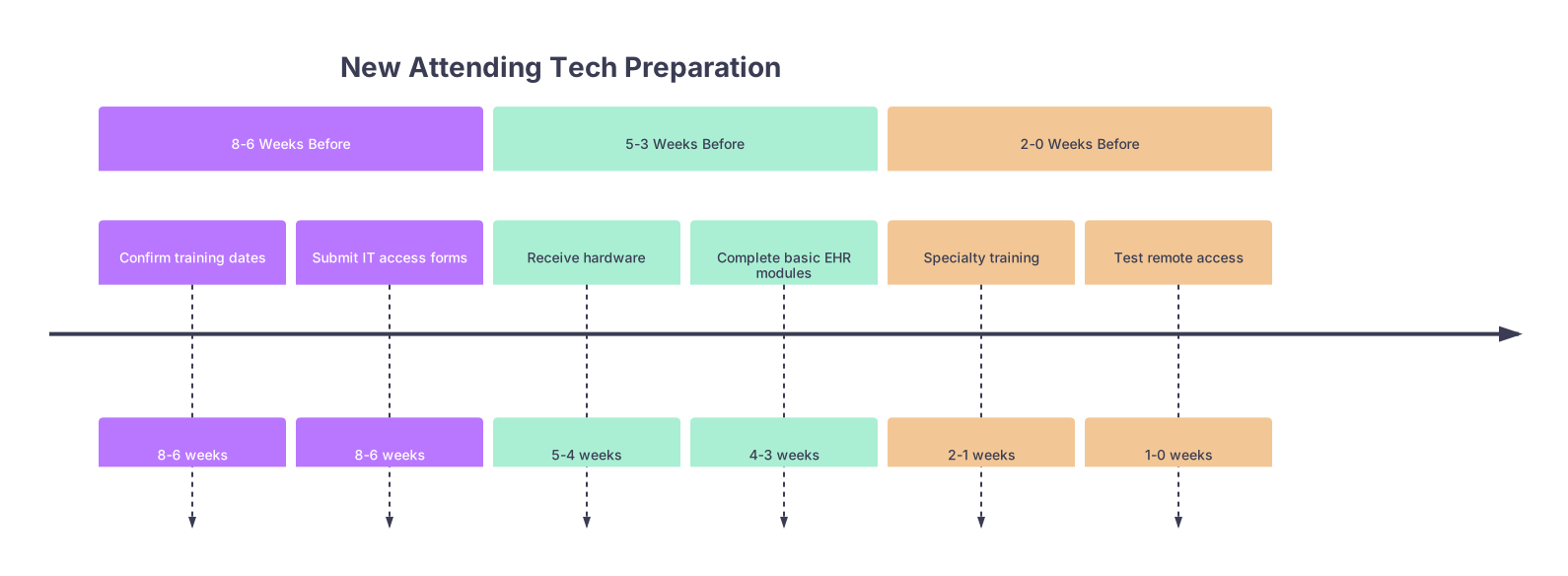
| Period | Event |
|---|---|
| 8-6 Weeks Before - Confirm training dates | 8-6 weeks |
| 8-6 Weeks Before - Submit IT access forms | 8-6 weeks |
| 5-3 Weeks Before - Receive hardware | 5-4 weeks |
| 5-3 Weeks Before - Complete basic EHR modules | 4-3 weeks |
| 2-0 Weeks Before - Specialty training | 2-1 weeks |
| 2-0 Weeks Before - Test remote access | 1-0 weeks |
What You Should Have Ready 1–2 Months Before Day 1
1. Access and Credentials
You should already have:
- EHR login and multi‑factor authentication set up
- Email and calendar access
- Remote VPN access tested on your home network
- Access to imaging (PACS), lab results, and any clinical communication tools (Teams, Slack, secure messaging)
2. Early Training
Push for more than just generic online modules.
Ask:
- “Can I have a specialty‑specific EHR training session (for example, cardiology, OB, hospitalist)?”
- “Is there a way to shadow another physician in the EHR before I start seeing patients?”
- “Can I get a sandbox or training environment to practice order sets and documentation?”
Spend 1–2 evenings in that sandbox building:
- Smart phrases
- Note templates
- Common order sets
- Favorite meds, imaging, labs
Yes, it is unpaid time. But it will buy you back weeks of stress.

2 Weeks Before Start: Stress Test the System
At this point you should pretend it is your first day and see where things break.
Checklist: Tech Dress Rehearsal
Sit down at your home computer (and if possible, your future clinic workstation) and test:
Remote Access
- Log into VPN
- Open EHR, PACS, and messaging
- Check that MFA works reliably
In‑Clinic Hardware
- Confirm your exam room assignment
- Verify:
- Number of screens
- Reliable Wi‑Fi or wired connection
- Printer/scanner access if relevant
- Ask to spend 30 minutes in your actual workspace clicking through the EHR
Workflow Simulation Create 2–3 “fake” patient encounters in the training environment:
- New patient with multiple chronic conditions
- Follow‑up visit with lab review and med changes
- Simple acute visit with note + work excuse letter
Time yourself. If a basic note and orders take you 30+ minutes in training, you want lighter schedules for your first weeks.
Week 1 On the Job: Protect Your Tech Learning Curve
Now you are live. At this point you should optimize survival, not efficiency.
Day 1–3: Learn Where the Landmines Are
Your goals:
- Meet your “EHR person”
- Super‑user physician or nurse
- Local IT contact
- Learn:
- Where orders commonly get misrouted
- How to fix mistaken orders
- How to quickly find outside records
Questions to ask colleagues right away:
- “Where do new attendings usually get stuck in the system?”
- “What shortcuts or smart phrases are must‑haves here?”
- “Who do you email when the EHR is blocking you from doing something reasonable?”
Document what they say. Literally keep a running list in a note.

Week 1 Scheduling and Tech Load
If you have any leverage, you want:
- 50–70% of a full patient load
- Longer appointment times than established physicians
- Protected time blocked each day to close charts
If they refuse to adjust your schedule even slightly, that tells you how they view physician time.
Weeks 2–4: From Surviving to Streamlining
By the end of the first month, you should shift from “How do I click this?” to “How do I make this faster for the next 3 years?”
Week 2: Formalize Your Tech Tools
Sit down for 1–2 hours and:
- Refine your:
- Smart phrases
- Common note templates
- Favorite orders, imaging, labs, referrals
- Create quick‑click panels for:
- Standard follow‑up instructions
- Patient education materials
- Work notes, FMLA, school forms
Ask IT or the EHR analyst:
- “Can someone review my templates and suggest best practices?”
- “Are there shared specialty templates I should be using instead of reinventing the wheel?”
Week 3–4: Audit Your Own Metrics and Workflow
At this point you should start looking at your data, not just your feelings.
Ask for:
- Access to your personal dashboard (productivity, quality)
- A brief session with a physician informaticist or analyst
Review:
- Average time to close charts
- In‑basket volume
- Telehealth vs in‑person mix
- Any quality metrics you are already being scored on
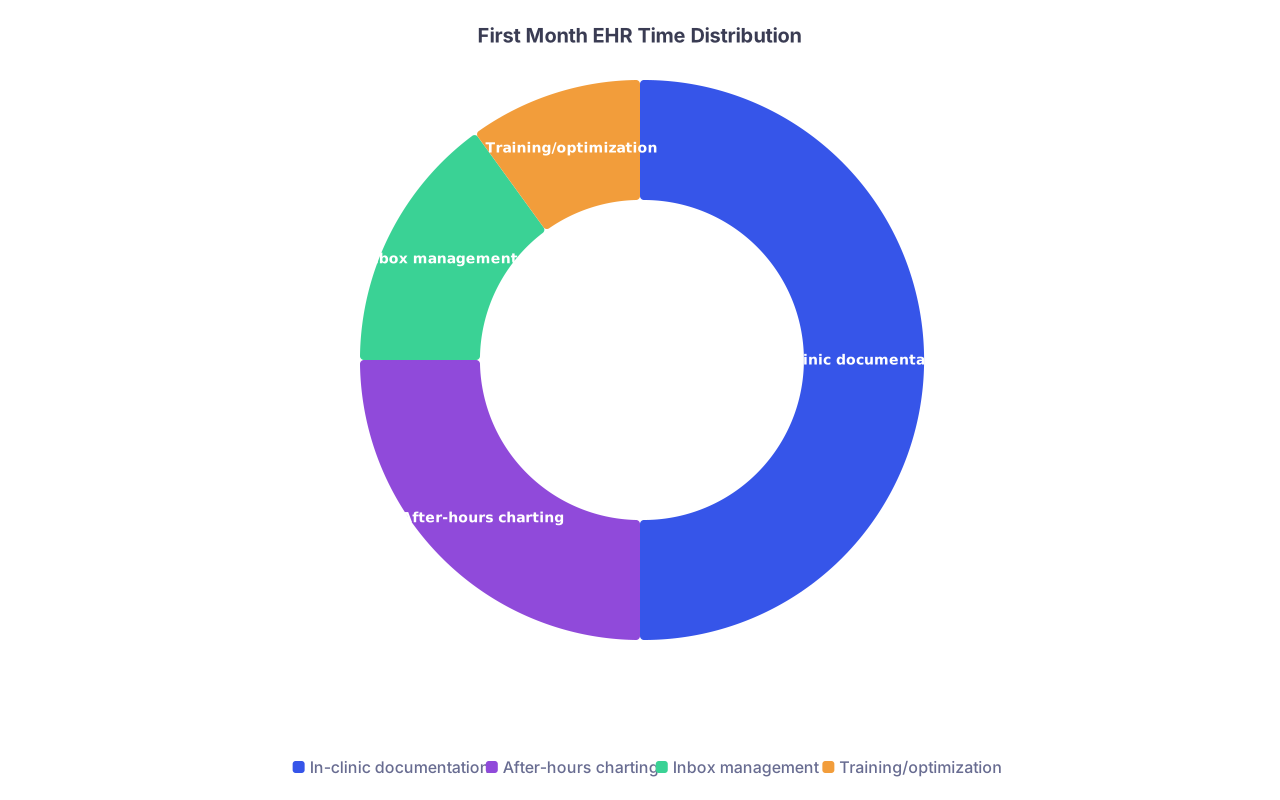
| Category | Value |
|---|---|
| In-clinic documentation | 50 |
| After-hours charting | 25 |
| Inbox management | 15 |
| Training/optimization | 10 |
If after‑hours charting is climbing, you need to:
- Shorten certain note sections
- Use structured templates more aggressively
- Negotiate small adjustments in schedule or support (for example, part‑time scribe for complex clinics)
2–6 Months In: Tech as a Career Lever, Not Just a Nuisance
Once you are stable clinically, you should turn technology from a burden into a bargaining chip.
Month 2–3: Fix What Is Clearly Broken
Make a short list of the top 3 tech problems hurting your practice. For example:
- Lab or imaging results routing incorrectly
- Referral workflows that constantly require phone calls
- Telehealth appointments without enough tech support for older patients
Bring concrete examples to your clinic manager or physician lead:
- 2–3 specific cases
- Time lost
- Patient safety or satisfaction impact
Then ask:
- “Who owns this workflow?”
- “Is there an existing project to fix this?”
- “Can I be involved in a small workgroup to improve it?”
That is how you edge into informatics or leadership without sounding like you are just complaining about the EHR.
Month 4–6: Position Yourself for Future Leverage
If you are interested in medical technology beyond just survival:
- Ask about:
- Clinical informatics committees
- EHR optimization groups
- Pilot projects (AI scribes, remote monitoring tools, decision support)
- Offer:
- “I am willing to pilot new tools if it comes with some protected time and real input into how they are implemented.”
| Phase | Key Question |
|---|---|
| Pre-interview | What EHR and telehealth platforms? |
| Contract negotiation | How is inbox/after-hours work handled? |
| 6–8 weeks pre-start | When do I get training and hardware? |
| First month on the job | Who is my EHR super-user contact? |
| 2–6 months in | How can I join optimization efforts? |
Organizations quietly value physicians who can speak clinical language and tech. That is how you get committee seats, extra FTE, or eventually medical director roles.
FAQ (Exactly 4 Questions)
1. I am desperate to get a job. Do I really have leverage to ask all these tech questions?
Yes. You may not have leverage to change everything, but you absolutely have leverage to know what you are walking into. Asking specific tech questions signals that you are serious, organized, and thinking long‑term. Good groups will respect that. Bad groups will be annoyed. That difference alone is useful data.
2. What is a clear tech dealbreaker for a first job after residency?
Two big ones I have seen go badly, repeatedly:
- An impending EHR transition in your first year with no extra support or schedule reduction.
- A heavy telehealth or inbox burden that is not counted in your clinical FTE or RVU expectations.
If they say, “We are switching EHRs in 6 months; everyone just powers through it,” and there is zero acknowledgment of training, reduced panel, or support, expect chaos.
3. Should I avoid small practices because they usually have weaker tech?
Not automatically. Small practices can be fantastic if:
- The EHR is reasonably functional.
- You have direct access to whoever configures it.
- They are honest about limitations and open to your input.
What you must avoid is a small practice with a clunky, home‑grown tech setup and no willingness to change. Ask, “When was the last time you upgraded your EHR or changed major workflows?” If the answer is “We have done it this way for 10 years,” be cautious.
4. How do I ask about tech without sounding like I care more about computers than patients?
Pair every tech question with a patient‑care or burnout rationale. For example:
- “I have seen poor EHR setups hurt both patient safety and physician well‑being. Can you tell me how your system supports safe ordering and efficient documentation?”
- “Inbox volume is a huge driver of burnout. How do you manage message routing and expectations here?”
You are not a gadget‑obsessed nerd by default. You are a physician who understands that the tech stack is now the air you breathe at work.
Open your offer email or letter right now and add a one‑page “Tech Questions” document. Before you reply, make sure you can answer every question on that page with specifics, not guesses.