
The EHR inbox will beat you your first year—unless you treat it like a rotation and train for it.
Most new attendings underestimate it. They obsess over RVUs, contract details, and call schedules, then get blindsided by 80–150 inbox items a day: refills, routing messages, lab results, portal novels, prior auths. By Month 3, they are staying two hours late just to “finish a few messages.”
You are not going to “work harder” and win. You need a month‑by‑month plan that builds durable systems, habits, and team workflows. Think progressive overload training, not heroic sprints.
Below is exactly that: a structured 12‑month plan to tame EHR inbox overload in your first year as an attending.
Month 1: Baseline and Survival Mode
At this point you should stop trying to optimize and just learn what you are dealing with.
Week 1–2: Measure the beast
Spend the first two weeks treating your inbox like a patient you are diagnosing.
Track for 5 consecutive workdays:
- Total new inbox items per day
- Categories:
- Patient messages
- Refill requests
- Lab/diagnostic results
- Staff messages / internal admin
- Prior auths / external forms
- Average time per item (rough estimate is fine)
- What time of day new messages peak
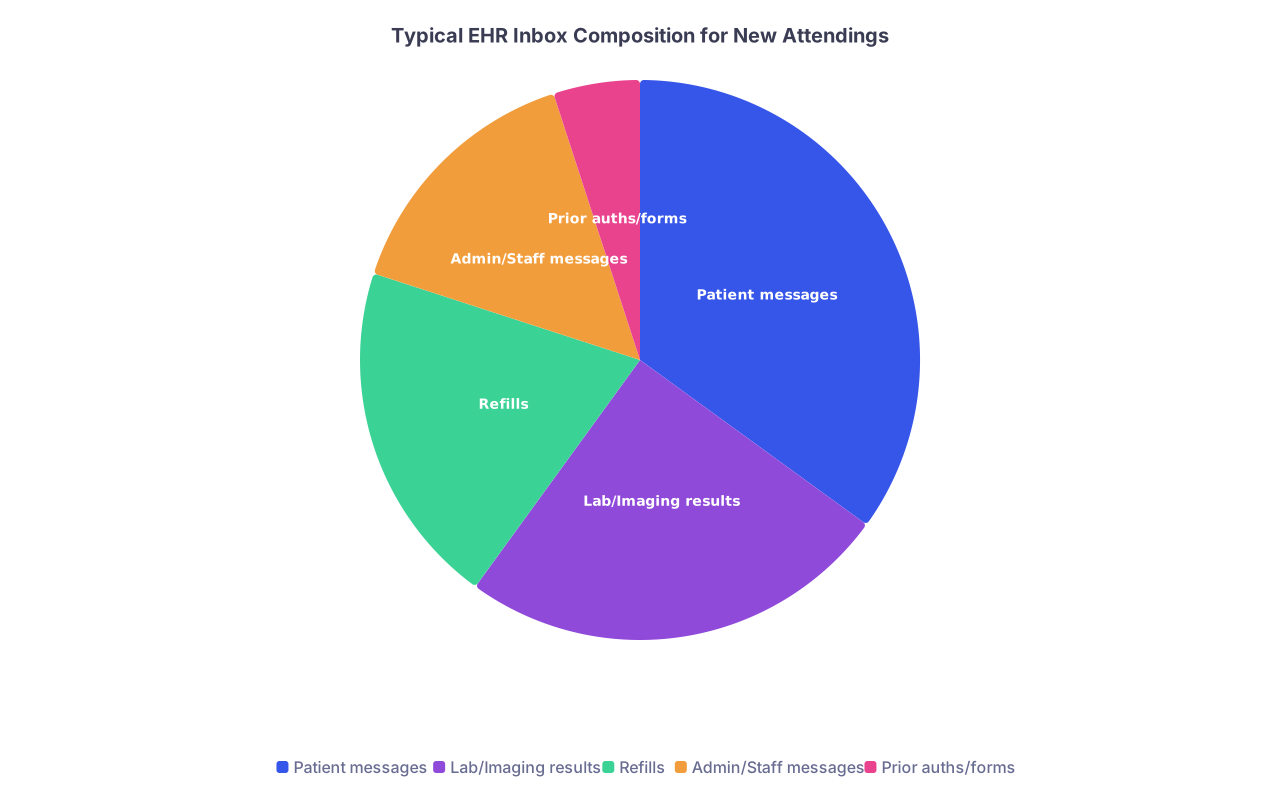
| Category | Value |
|---|---|
| Patient messages | 35 |
| Lab/Imaging results | 25 |
| Refills | 20 |
| Admin/Staff messages | 15 |
| Prior auths/forms | 5 |
Create a simple tally in a notebook or spreadsheet. I have seen people assume “most” of their inbox is patient messages when it is actually refills and result sign‑offs clogging the pipe.
At this stage:
- Do NOT build complicated templates yet.
- Do NOT promise patients same‑day portal epics.
- Focus on responsiveness and safety, not speed.
Week 3–4: Establish minimum structure
Now that you roughly know volume and categories:
Block protected inbox time daily
- Two blocks to start:
- 30–45 minutes mid‑morning
- 30–45 minutes late afternoon
- Put it in your schedule like a clinic session. Guard it. Close the door.
- Two blocks to start:
Quick‑response triage rule
During these blocks, follow a strict rule:- If it takes ≤2 minutes, do it now.
- If it takes >2 minutes, flag/tag it and batch similar tasks (e.g., “refills,” “lab follow‑ups,” “forms”).
Safety first protocol
For any result or message that feels even slightly “this could go bad”:- Add to a “Same‑Day Call List” you keep at your desk.
- Call or have staff call before the end of the day. Do not debate this with yourself.
Your Month 1 goal: End each day with no unreviewed critical items, even if “non‑urgent chatter” piles up. Survival, not elegance.
Month 2: Templates, Phrases, and Rules of Engagement
At this point you should stop free‑typing every response. The fastest attendings I know live off smart phrases and clear rules.
Week 5–6: Build message templates
Use your Month 1 tally to pick the top 5–7 most common message types. For each, build a quick phrase/template:
Examples:
Normal lab with minor abnormality
- “NormalLab1” → “Your recent lab results are overall reassuring. [Insert 1‑line explanation]. No change in your current medications or treatment plan is needed. We will continue to monitor this at your next visit.”
BP slightly above target but not urgent
- “BPFollowUp” → “I see that your recent blood pressure readings are slightly above our goal. This is not an emergency, but I would like to review your readings and medications in more detail. Please schedule a follow‑up visit in the next 2–4 weeks, or we can address this at your upcoming appointment if one is already scheduled.”
Refill appropriate, due for follow‑up
- “RefillDueVisit” → “I have sent a refill for your medication. To prescribe safely, I need to see you at least once every [X] months. Please schedule an appointment so we can review how this medication is working for you.”
Aim for:
- 2–3 templates for labs
- 2 for refills
- 2–3 for common portal complaints (mild pain, minor side effects, chronic issue worsening)
Week 7–8: Set expectations with patients and staff
You cannot control volume without managing expectations.
Clinic visit script
Start telling patients in person, using a short script:- “Portal messages are best for brief questions or clarifications. Anything complex or new usually needs a visit so I can give it proper attention.”
Auto‑reply / portal policy
Work with your clinic or IT to ensure there is:- A standard auto‑reply: “Messages are typically answered within 2–3 business days. For urgent issues, call the clinic or go to urgent care / ER.”
- A clear policy on what will be billed as a message visit vs redirected to an appointment.
Team huddle about inbox
Have a direct conversation with your nurse/MA/front desk:- Define which messages they can handle before routing to you (routine scheduling, paperwork status, basic instructions you pre‑define).
- Establish urgency tags or folders (e.g., “Today,” “This week,” “Non‑clinical”).
Month 2 goal: Reduce free‑text typing and random expectations. The same work, but 20–30% faster and less chaotic.
Month 3: Delegation and Team‑Based Workflows
At this point you should stop being the hero who touches everything. That is how people burn out by Month 6.
Week 9–10: Create a delegation protocol
Sit down with your nurse/MA and map what they can own:
Refills
- You define refill protocols by medication class:
- Safe auto‑refill vs. requires BP, labs, or visit.
- Staff queues refills into pending with appropriate durations; you bulk sign with quick review.
- You define refill protocols by medication class:
Normal results
- Staff can release clearly normal labs with a short, pre‑approved script, then route to you for sign‑off only if questions arise.
Non‑clinical messages
- All scheduling, form status, records requests handled by front desk or staff pool, never reaching you directly.

| Step | Description |
|---|---|
| Step 1 | New Inbox Item |
| Step 2 | Staff handles and closes |
| Step 3 | Route to MD as High Priority |
| Step 4 | Use protocol or template |
| Step 5 | MD reviews in batch |
| Step 6 | Clinical decision needed |
| Step 7 | Urgent safety risk |
Put these rules in writing. Even a one‑page “Inbox Playbook” printed and taped by your MA’s station works.
Week 11–12: Batch and bulk actions
Start using your EHR’s batch tools aggressively:
- Sign refills in batches
- Release normal results in batches where allowed
- Use filters: “Labs,” “Refills,” “Patient messages” and clear each in focused bursts
And add a strict cut‑off time for opening new work:
- Example: after 4:30 pm, you do not start non‑urgent message threads. You acknowledge and plan, but you are not starting 10‑minute portal epics that keep you there until 7.
Month 3 goal: You only handle what truly needs your license and judgment. Everything else is systematized or delegated.
Months 4–6: From Survival to Control
You have basic systems. Now you optimize.
Month 4: Refine your daily and weekly rhythm
At this point you should refine your schedule like you refine a clinic template.
Keep two daily inbox blocks, but experiment with:
- Shorter, more frequent bursts (3 × 20 minutes)
- One “deep work” block for complex messages (30 minutes, no interruptions)
Add a weekly 30‑minute “Inbox Cleanup” session:
- Clear old flags and reminders
- Update any templates that are clunky or repetitive
- Identify new common messages that deserve a template
Track again for 1 week:
- Average inbox items per day
- Average time per day in the inbox
Compare to Month 1. You should see clear reduction in chaos, if not yet volume.
Month 5: Start charging appropriately and redirecting
This is where a lot of new attendings fail because they are afraid of complaints. You cannot keep doing full visits in the portal for free.
Work with billing/compliance to:
- Clarify criteria for billable e‑visits and your institution’s documentation requirements
- Set internal rules for yourself:
- If I spend >5 minutes with chart review and documentation, I consider a billable e‑visit.
- If the issue is new/complex, I redirect to a visit instead of a massive thread.
Start doing this consistently for 1 month. You will:
- Reduce message length (patients learn complexity = visit)
- Recover some RVUs/time for the cognitive work you are already doing
Month 6: Mid‑year audit and redesign
At the half‑year mark you should audit your inbox like quality improvement.
Pull 2 weeks of data:
- Daily volume by type
- Turnaround time
- After‑hours inbox time
| Metric | Month 1 (Baseline) | Month 6 (Target) |
|---|---|---|
| Items per day | 100 | 100–110 |
| Daily inbox time | 2.5–3 hours | 1–1.5 hours |
| After-hours inbox time | 60–90 minutes | ≤15–20 minutes |
| % handled by staff first | 10% | 40–60% |
| Avg response time | 1–2 days | 1–2 days |
If after‑hours time is still high, tighten:
- Harder cut‑offs
- More delegation
- Turn some message‑heavy patients into early follow‑up visits
- Consider shortening portal message lengths with clearer front‑end instructions (“Messages should be brief: 1–2 focused questions.”)
Months 4–6 goal: By the end of Month 6, the inbox is predictable and bounded, even if it is still big.
Months 7–9: Advanced Optimization and Team Training
Now you move from “my inbox” to “our inbox system.”
Month 7: Train your staff like you train residents
At this point you should treat your MA or nurse as an inbox partner, not just a runner.
Schedule a 30–45 minute training session:
- Review real messages from your inbox together.
- For each, ask: “How far can you go before you need me?”
- Adjust protocols: add more auto‑handled buckets where safe.
Create quick reference sheets:
- Refill rules by medication
- Standard responses they can send without routing to you
- When to label as “High Priority”
Month 8: Create “complex care” pathways
Some patients generate 5–10 messages a month. They are not bad people. They just need structure.
Pick the top 10 “heavy portal users”:
- At next visit, explain:
- “You have complex issues and I want to take good care of you. The portal is not great for managing everything. Let us schedule more structured visits so we can address things in depth.”
Set:
- Standing follow‑up visits (e.g., monthly or every 6–8 weeks)
- Clear rules:
- Portal for quick clarifications and brief updates
- Visits for new problems, medication changes, flare‑ups
Month 9: Use reports and IT tools
Most EHRs have some form of:
- Inbox work reports (volume, turnaround times)
- Result routing rules
- Task delegation options
Work with IT or your “EHR superuser” colleague:
- Shorten or simplify routing pathways so fewer items bounce between pools
- Auto‑route specific labs or imaging types to staff pools first
- Clean up notification preferences to kill unnecessary alerts
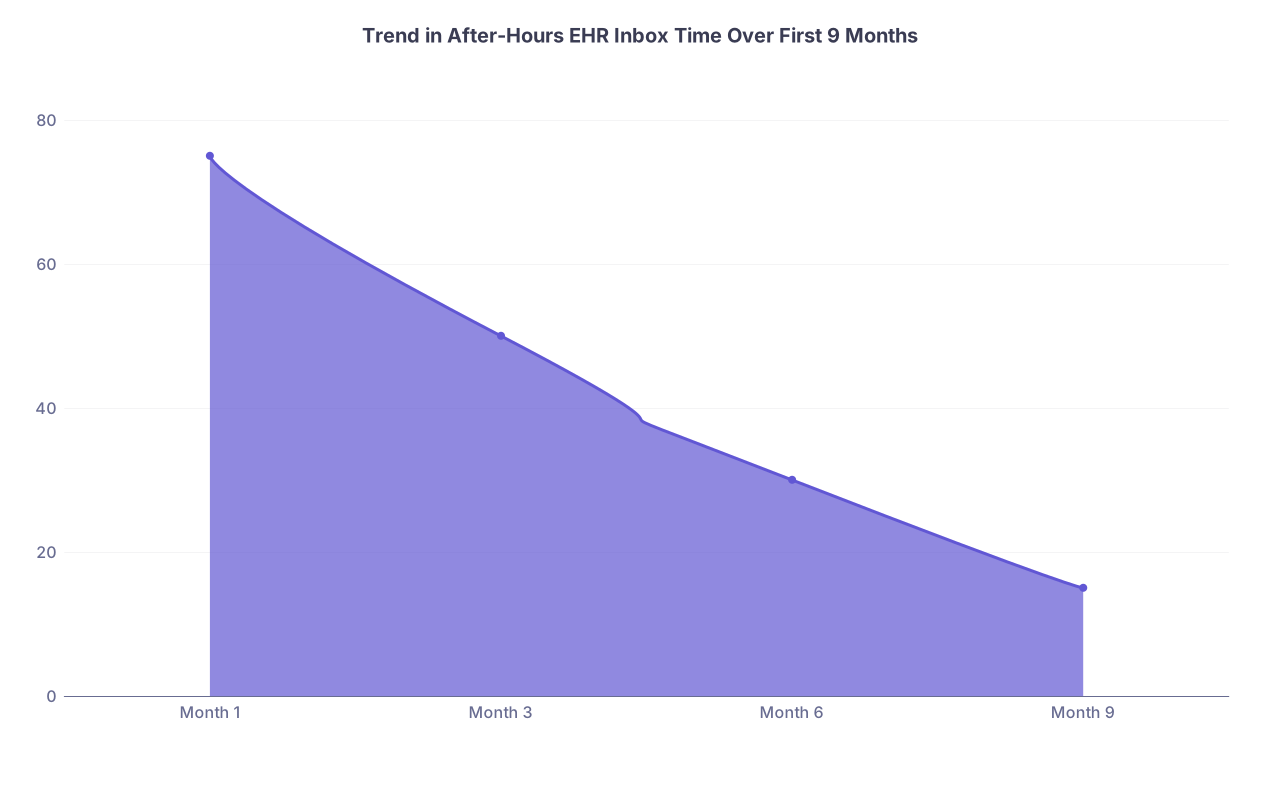
| Category | Value |
|---|---|
| Month 1 | 75 |
| Month 3 | 50 |
| Month 6 | 30 |
| Month 9 | 15 |
Months 7–9 goal: Most of your inbox is pre‑filtered and pre‑processed before you see it. You are now editing, not doing everything.
Months 10–12: Consolidation and Long‑Term Habits
By this stage you are no longer shocked by your inbox. Good. Now you make it sustainable.
Month 10: Hard boundaries and personal rules
At this point you should formalize boundaries you can live with for the long term.
Examples I have seen work:
- No non‑urgent portal replies after 5:30 pm
- One weekend block only (e.g., Saturday morning 20–30 minutes max) to clear safety‑sensitive items if your system demands it
- If you are off clinic that day, you still check once or have coverage defined—no constant “just peeking” every hour
Write down your rules. Share them with your family/partner so they know what to expect too.
Month 11: Peer comparison and fine tuning
Talk to 2–3 colleagues:
- One who seems “always behind”
- One who seems “weirdly calm” and efficient
Ask very specific questions:
- How many inbox blocks per day?
- How long?
- How much do they delegate to staff?
- How often do they bill e‑visits?
Borrow 1–2 concrete practices that fit your style.
Month 12: Annual review and reset
End of year. At this point you should treat your inbox like part of your professional identity, not an annoying side quest.
Do a final year‑end review:
- Average daily volume
- Total daily time in inbox
- After‑hours time
- Your personal stress level: low / moderate / high
Then decide:
- What will be non‑negotiable rules next year?
- What needs system‑level advocacy (clinic leadership, EHR optimization, staffing)?
- What 1–2 habits still drag you into the inbox more than necessary (doom scrolling, answering from your phone constantly, over‑explaining messages)?
Write a one‑page “Inbox Manifesto” for Year 2—simple bullets of how you will handle this piece of your work. Tape it in your workspace if you have to.
Quick Month‑by‑Month Snapshot
For reference, here is the high‑level arc:
- Month 1 – Measure and survive. Establish daily inbox blocks.
- Month 2 – Build templates and set expectations with patients/staff.
- Month 3 – Delegate systematically and use batch tools.
- Month 4 – Refine daily/weekly rhythm.
- Month 5 – Start appropriate billing and visit redirection.
- Month 6 – Mid‑year audit, tighten leaks.
- Month 7 – Deep staff training and shared protocols.
- Month 8 – Special pathways for high‑message patients.
- Month 9 – IT optimization and routing rules.
- Month 10 – Hard personal boundaries and time rules.
- Month 11 – Peer benchmarking, steal what works.
- Month 12 – Annual review, design Year 2 strategy.