It is July 1st. Your name badge just changed: Attending Physician. Your inbox is already full, your EPIC/InBasket (or Cerner, or Meditech) looks like a slot machine that will not stop, and IT handed you a login sheet that you promptly folded into your white coat and forgot.
This is the window where you either build clean, sustainable technology habits… or you let the systems own you for the next decade.
Here is a day-by-day, week-by-week, and month-by-month guide to locking in strong medical tech habits during your first 90 days as an attending.
Week 0–1: Before and Just After You Start – Baseline Setup
At this point you should not be “winging it” with the EHR or your devices. You should be deliberately deciding how you will practice with tech.
Days -7 to 0: Pre-start tech prep
If you can, get your accounts before your official start date. A boring afternoon with IT now saves you dozens of hours later.
At this point you should:
-
- Set up:
- Network login
- EHR account (EPIC/Cerner/etc.)
- PACS/radiology viewer
- Remote access (VPN, Citrix, Duo, etc.)
- Secure messaging (TigerConnect, Voalte, Microsoft Teams, Spok, WhatsApp Business for some systems)
- Configure multi-factor authentication on:
- Smartphone
- Backup device (tablet or second phone if allowed)
- Set up:
Standardize your personal tech Pick your ecosystem and stick to it for the first year. Constant app-juggling is how residents lose results and miss messages.
- One smartphone as your primary clinical device
- One laptop or tablet for:
- Remote notes
- Reviewing labs and images
- Cloud storage with HIPAA-safe options (hospital-provided OneDrive, Box, etc. – not your personal Google Drive)
Decide your “clinical stack” Choose and install:
- 1 drug reference (Lexicomp, Micromedex, or UpToDate’s drug monographs)
- 1 broad clinical reference (UpToDate, DynaMed, etc.)
- 1 calculator app (MDCalc, QxMD)
- 1 secure note/task app (hospital-approved or paper + scanning workflow)
| Category | Example Apps |
|---|---|
| Drug reference | Lexicomp, Micromedex |
| Clinical reference | UpToDate, DynaMed |
| Calculators | MDCalc, QxMD |
| Secure chat | TigerConnect, Voalte |
| Task capture | OneNote, Notion (if allowed) |
Days 1–7: Survive and observe
You are not optimizing yet. You are watching your own behavior and pain points.
At this point you should:
Shadow your own workflow For two or three shifts, literally write down:
- Where do clicks pile up?
- Which orders do you place 10+ times per day?
- What do you keep re-typing in notes?
- Where do messages fall through (phone vs pager vs secure chat vs EHR inbox)?
Create a “tech friction log” Simple, ugly list – paper or digital:
- “Discharge prescriptions take 8 minutes each”
- “Cannot find last echo easily”
- “No standard lactulose order set; keep forgetting rectal route option”
You are going to fix these systematically in Weeks 2–6.
Meet the power users Identify:
- 1 nurse who documents faster than everyone else
- 1 NP/PA who always has their notes done on time
- 1 senior attending who never seems buried in the EHR
Ask them one concrete question:
“What two EHR tricks save you the most time each day?”
Weeks 2–4: Lock-In Phase 1 – EHR, Orders, and Notes
By the end of week 4, your basic digital workflow should feel repeatable, not chaotic.
Week 2: EHR personalization and templates
Stop accepting the default EHR. It was built for everyone and fits no one.
At this point you should:
Build smartphrases / dot phrases for 5–10 high-yield scenarios
- New patient H&P for your common conditions
- Follow-up note structure
- Discharge summary skeleton
- Common counseling scripts (anticoagulation, heart failure, new diabetes, etc.)
Example:
.afibnewdx– pulls in:- Brief template for CHA₂DS₂-VASc
- Anticoagulation decision tree
- Follow-up plan fields
Create favorite orders and order sets For:
- Admission bundles (labs, imaging, telemetry, DVT prophylaxis)
- Common ED admit packages for your service
- Standard post-op orders if surgical
- Chronic meds with your usual doses and frequency
Pin key flowsheets and reports Customize:
- Your rounding list columns (vitals, key labs, code status, discharge date)
- A single “results review” view that pulls in:
- Labs
- Microbiology
- Imaging reports
Set EHR keyboard shortcuts Assign rapid keys for:
- New note
- New order
- Results review
- Messaging
Week 3: Message and inbox discipline
Your InBasket / message center can ruin your job satisfaction if you let it.
At this point you should:
Define message handling rules
- What will you:
- Handle immediately (critical labs, STAT messages, patient crises)
- Batch twice daily (routine refills, low-risk questions)
- Delegate (simple forms, work notes that can be templated)
- What will you:
Block protected inbox time On your calendar:
- 2 fixed windows per day, e.g.:
- 11:30–12:00
- 16:30–17:00
Turn off other distractions and clear everything that meets your “less than 2-minute” threshold.
- 2 fixed windows per day, e.g.:
Create refill and result templates
- Standard phrases for:
- “Medication refilled – due for visit”
- “Lab normal – continue plan”
- “Lab abnormal – please schedule”
Your goal is single-click + smartphrase for 70–80% of messages.
- Standard phrases for:
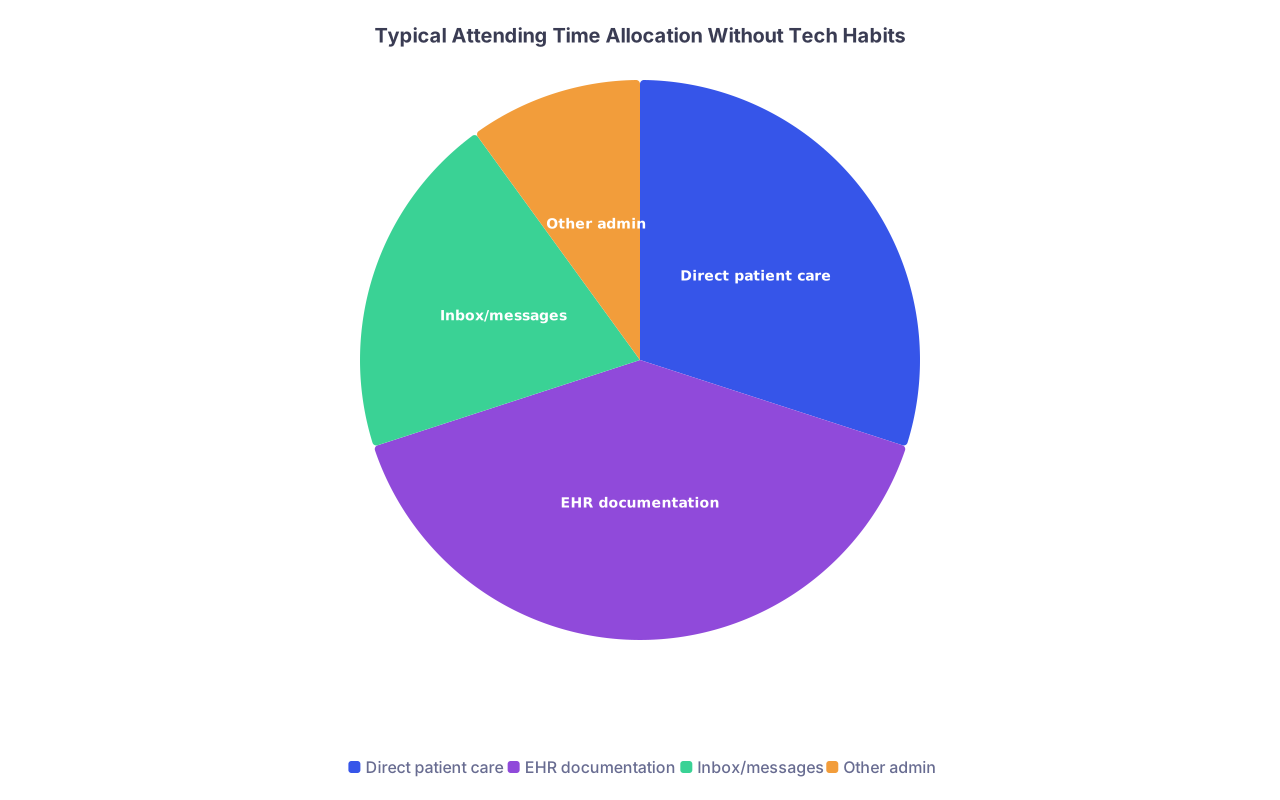
| Category | Value |
|---|---|
| Direct patient care | 30 |
| EHR documentation | 40 |
| Inbox/messages | 20 |
| Other admin | 10 |
Your aim over months is to shrink that “Inbox/messages” wedge by systematizing it.
Week 4: Note quality and legal safety nets
Now refine your documentation so it is efficient but defensible.
At this point you should:
Build problem-based note structure
- No “wall of text” Assessment & Plan
- One problem per subheading with:
- Working diagnosis
- Key supporting data (brief)
- Plan, with timelines and contingencies
Add safety and communication phrases For high-risk scenarios, include:
- Documented shared decision making
- Specific follow-up instructions
- “Return to ED if…” language in discharge notes
Set up a quick “handoff” note style Inside the EHR or a dedicated handoff tool (e.g., CORES, hospital handoff module):
- One-line situational awareness for each patient:
- “Post-op day 2, watch for ileus; if vomiting, NG + KUB, page me.”
- One-line situational awareness for each patient:
Weeks 5–8: Lock-In Phase 2 – Devices, Communication, and Data Hygiene
At this point you should feel less lost and more annoyed by specific inefficiencies. Perfect. Now you target them.
Week 5: Phone, pager, and secure messaging rules
Your device habits will decide if you ever feel “off duty.”
At this point you should:
Create notification tiers on your phone
- Tier 1 (always allowed):
- Pager app or physical pager
- STAT call numbers
- Hospital secure chat “urgent” tag
- Tier 2 (work hours only):
- Routine secure chats
- Non-urgent voicemail alerts
- Tier 3 (never on shift):
- Social media, personal email
- Tier 1 (always allowed):
Clarify how staff should reach you Tell your teams explicitly:
- “Urgent changes – call or page only.”
- “Non-urgent questions – secure message.”
- “Anything complex – put it in the chart and send an EHR message so I can document the answer.”
Set boundaries for off-hours
- Silence non-critical work apps after a set time (e.g., 18:00 on clinic days)
- Use Focus modes or Do Not Disturb with exceptions for the hospital main line or answering service.
Week 6: Imaging, labs, and decision-support tools
You want clean, fast access to the information that actually changes your decisions.
At this point you should:
Customize your PACS / imaging viewer
- Default layouts for:
- CT vs MRI vs X-ray
- Keyboard shortcuts for:
- Window/level
- Scrolling
- Side-by-side comparison with priors
- Default layouts for:
Create standard “review patterns” For example:
- Every ICU patient: vent settings → vitals trends → input/output → last 24-hour labs → latest imaging → microbiology.
- Every new outpatient consult: problem list → meds → allergies → last three clinic notes → recent labs → imaging.
Integrate clinical calculators into your workflow Do not eyeball risk scores when they exist:
- CHADS-VASc, HAS-BLED
- PERC, Wells, HEART
- MELD-Na, Child-Pugh
Keep MDCalc or equivalent on your phone dock. If you use a score more than once per week, create a note template section to paste in the values.
Week 7: Data hygiene and information clutter
Messy data is how you lose track of patients and miss follow-ups.
At this point you should:
Standardize your patient lists
- One active list per service/clinic
- Shared lists with your partners for cross-coverage
- Remove discharged patients at a set daily time
Create a “follow-up needed” tracking habit You need one, and only one, source of truth for:
- Tests pending after discharge
- Patients you promised to call back
- Abnormal results waiting on your decision
Options:
- EHR reminder flags
- A dedicated tagged section in your task manager
- Clinic’s recall system (if robust; many are not)
-
- Delete junk screenshots and irrelevant photos from your phone
- Archive old documents from desktop into labeled folders
- Close out completed EHR tasks and reminders

Week 8: Analytics and feedback
Now you have baseline habits. Time to see where you are actually wasting time.
At this point you should:
Pull your EHR efficiency report (if available) Many systems (especially EPIC) provide:
- Time spent in chart review
- Time in notes
- Time in orders
- After-hours charting (“pajama time”)
Compare yourself to peers Look for:
- Are you spending 2x more time in notes than peers?
- Is most of your charting happening after 19:00?
- Are you barely using templates or workflows the system supports?
Pick two metrics to improve over the next month Example:
- Reduce after-hours charting from 90 minutes to 30 minutes per day
- Cut average time-to-close encounter from 3 days to same day
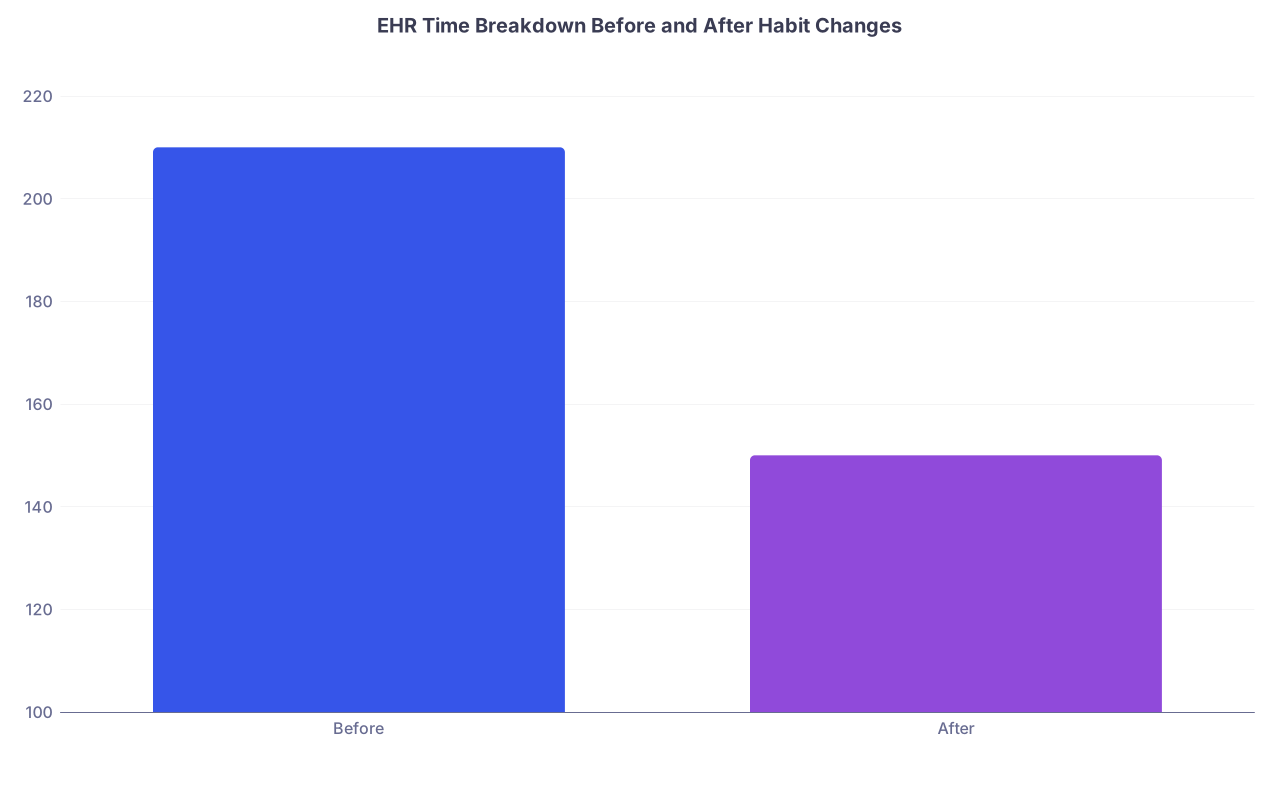
| Category | Value |
|---|---|
| Before | 210 |
| After | 150 |
(Values represent minutes per day in EHR – the point is the direction, not the exact numbers.)
Weeks 9–12: Lock-In Phase 3 – Automation, Team Habits, and Long-Term Systems
Now you stop thinking like a solo operator and start designing systems for your whole team.
Week 9: Team tech norms and shared templates
If everyone documents differently, handoffs and coverage become unsafe and slow.
At this point you should:
Share and standardize core templates with your group
- H&P structure
- Progress note format
- Discharge summary layout
- Common order sets
Agree on communication conventions With your immediate team (NPs, residents, colleagues):
- What counts as “urgent” in secure chat?
- Which things must always be a phone call?
- When is email acceptable versus not?
Build a “startup kit” for new hires Simple shared document:
- Recommended EHR personalization steps
- Links to power tip videos or screenshots
- Your dot phrases and instructions to import them
Week 10: Advanced tools – voice recognition, macros, and remote work
Now that your basics are solid, you can actually benefit from the fancy tools instead of drowning in them.
At this point you should:
Pilot voice recognition for notes (if available)
- Start with:
- H&P narratives
- Discharge summaries
- Keep structured plan sections as templates and type those.
Watch:
- Error rate on drug names and dosages
- How much post-dictation editing you are doing
- Start with:
Use macros and automation Examples:
- Keyboard macro tools (if allowed) for repeated phrases
- QuickText/SmartText for long patient education blocks
- EHR automation for pulling in labs/imaging into notes correctly
Refine your remote charting setup
- External monitor
- Real keyboard and mouse
- Stable VPN with your key clinical apps pinned

Week 11: Personal knowledge management
The tech habit nobody teaches you: how to not lose what you learn.
At this point you should:
Choose a single system for clinical learning Options:
- OneNote notebook labeled by organ system
- Obsidian or Notion for linked notes
- A simple folder of Word documents, if that is sustainable
Create a workflow for “cases worth remembering” For selected patients (de-identified, obviously):
- What was unusual?
- What guideline or article changed your management?
- What would you do differently next time?
Link your references
- Save key guideline PDFs into a dedicated folder
- Keep a running list of “must-read” topics with dates you actually read them
Week 12: Audit, adjust, and protect your future self
Ninety days in, your bad habits are trying to calcify. You need to prune them now.
At this point you should:
Do a one-week time and tech audit For 7 days:
- Log start/stop times for:
- Pre-rounding chart review
- Rounding
- Notes
- Inbox/messages
- Note when work spills into home time
- Log start/stop times for:
Identify the 3 biggest tech pain points that remain Examples I see constantly:
- “I document after dinner every night.”
- “I cannot find old notes quickly.”
- “I am getting messages on four platforms.”
Create one concrete change per pain point
- Move note writing earlier into the day and close 80% of notes before lunch
- Learn and use search functions and filters in your EHR more aggressively
- Collapse communication into as few channels as your system allows
Schedule a check-in with IT or a super-user
- 30 minutes with a real EHR trainer
- Bring your friction log and your metrics
- Ask for specific workflows to shorten your slowest tasks
Summary: What You Must Lock In
Over these first 90 days as an attending, three things matter more than the rest:
Control the EHR before it controls you.
Build templates, order sets, and inbox rules early. Do not accept the default system.Be ruthless about communication channels.
Decide how you want to be reached, when, and for what. Teach your team and stick to it.Design systems, not heroics.
Every repeated annoyance is a workflow problem, not a personal failing. Fix the system once, and your future self will thank you every single shift.