
The biggest mistake clinicians make when starting a new job is assuming IT will “handle it.” They will not. If you show up on Day One without your tech life wired, you will lose weeks of productivity and look disorganized in front of people who matter.
Here is a hard, chronological playbook: what you should have done by 60 days, 30 days, and 7 days before you badge into your new hospital or medical technology role.
60 Days Before Day One: Infrastructure and Access Foundations
At the 60-day mark, you are not “early.” You are exactly on time. Large health systems move slowly. Credentialing, EHR access, and hardware requests all get stuck in the same clogged pipeline.
At this point you should lock down four things: identity, hardware, core systems, and data.
1. Lock In Your Digital Identity with the New Employer
By ~60 days out, you should have:
- Offer letter signed and returned
- HR packet submitted
- Initial contact from IT or onboarding coordinator (or you have chased them down)
Your checklist:
Confirm your official name and email format
- Ask: “What will my primary email and username be?” (e.g.,
[email protected],jsmith3). - Make sure it matches what will be printed on badges, pagers, and EHR accounts. Inconsistent name formats cause epic confusion when nurses cannot find you in the order entry screen.
- Ask: “What will my primary email and username be?” (e.g.,
Clarify which systems need separate credentials Common ones:
- Network / domain login
- EHR (Epic, Cerner, Meditech, Allscripts, etc.)
- PACS / VNA (e.g., Sectra, GE, Fuji, Philips)
- LIS / RIS
- Dictation / transcription (Dragon, M*Modal, Nuance)
- Secure messaging (Voalte, TigerConnect, PerfectServe)
- Scheduling (Amion, QGenda, Intrigma)
- Learning management / compliance (HealthStream, Cornerstone)
Ask for a list of all systems you’ll be expected to use and whether access is automatic or requires separate requests.
Get your IT onboarding contact You want a name. Not “the help desk.” Something like, “Your IT onboarding partner is Sarah in Clinical Informatics.” That person can accelerate everything when something stalls.
2. Hardware: Decide What You Will Use and Where
You cannot run modern clinical practice on a random outdated personal laptop. At 60 days you are deciding hardware strategy.
Your checklist:
Clarify employer-issued hardware
Ask:- “Will I receive a hospital laptop? Desktop? Tablet?”
- “Is there a standard clinical laptop model for physicians / technologists?”
- “Is remote access allowed on personal devices or only corporate devices?”
If remote work is part of your role (teleradiology, tele-ICU, telepathology, remote consults):
- Confirm telehealth or remote reading setup:
- Home workstation specs (monitors, graphics card, calibration if imaging)
- VPN requirement and hardware token vs app-based MFA
- Secure voice / video platform used (Zoom for Healthcare, Teams, Doxy, etc.)
- Confirm telehealth or remote reading setup:
If you are expected to buy your own equipment (common in small groups, private practices):
- Ask for minimum specs for:
- CPU, RAM, OS
- Monitor resolution (especially if reading imaging)
- Supported browsers and versions
- Ask for minimum specs for:
Plan for your mobile device
- Will they enroll your phone in MDM (Mobile Device Management)?
- Will you need a separate work phone?
- What apps are mandatory (secure messaging, authenticator, EHR mobile app, pager app)?
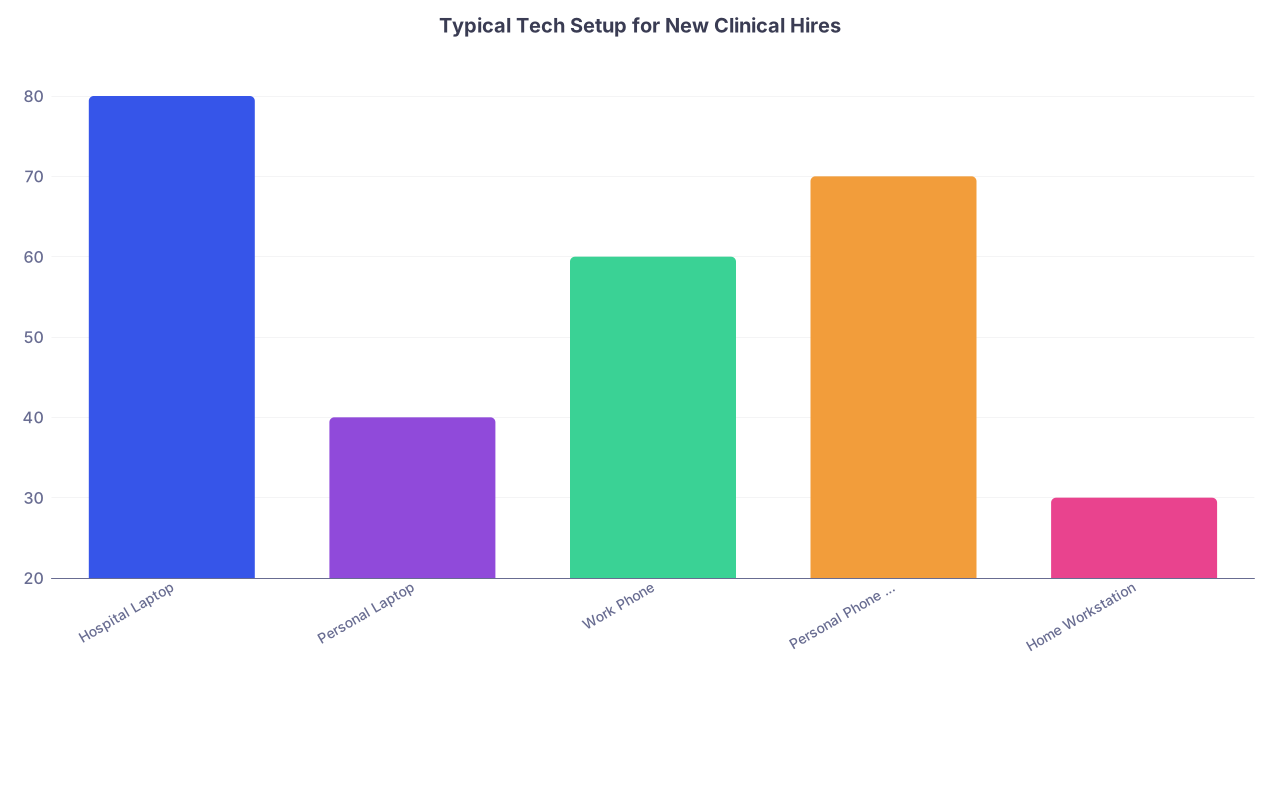
| Category | Value |
|---|---|
| Hospital Laptop | 80 |
| Personal Laptop | 40 |
| Work Phone | 60 |
| Personal Phone w/ MDM | 70 |
| Home Workstation | 30 |
(Values approximate percentage of clinicians I have seen using each as a primary work device in large systems. Yes, there is overlap.)
3. Core Clinical System Access Requests
If you are 60 days out and nobody has started your EHR access, that is a red flag. Push.
At this point you should:
Send a single organized email to IT onboarding + HR that includes:
- Full legal name
- Preferred name if different
- Start date and primary site(s)
- Role (hospitalist, IR fellow, clinical informaticist, lab supervisor, etc.)
- Required systems list with checkboxes, for example:
- EHR (Epic inpatient + outpatient)
- PACS (diagnostic + clinical viewer)
- LIS (for lab roles)
- Device integration dashboards (telemetry, smart pumps, etc.)
- Quality / analytics tools (Tableau, Qlik, internal dashboards)
Clarify your EHR role/profile
- Each EHR has role-specific templates and privileges. You do not want to show up with the generic “Physician – Other” profile.
- Ask: “Can you assign me the same EHR template as existing [hospitalist / ED physician / med tech lead] at [primary site]?”
Ask when EHR training is scheduled
- Many hospitals require formal training modules before you can log in to production.
- Get the date on your calendar now. If it is only offered monthly, you cannot afford to miss it.
4. Data and Digital Clutter: Begin the Transition
Your old job’s data will follow you if you do not aggressively manage it.
At 60 days you should:
Audit your current devices
- Identify:
- Work email
- Secure messaging logs
- Spreadsheets, call schedules, QA data
- Personal notes or templates (smart phrases, macros)
- Identify:
Separate personal from institutional
- Move personal content (non-PHI) from work accounts to personal accounts.
- Export only what is legally and contractually allowed.
- Personal procedure log (de-identified) – usually fine.
- Institutional QA data with MRNs – absolutely not.
Plan your template / macro migration
- EHR smart phrases, order sets, macros you rely on:
- Export text versions or screenshots.
- Store in a secure personal note system.
- You will rebuild them at the new site, but you want the content.
- EHR smart phrases, order sets, macros you rely on:
30 Days Before Day One: Systems, Security, and Workflow Design
Now you are one month out. The big tasks: verify access actually exists, harden security, and design your day-to-day workflow with real tools, not hypotheticals.
1. Verify Every Account Is Created (Do Not Assume)
At this point you should:
Collect all initial usernames and temporary passwords
- Network login
- EHR
- PACS
- Secure messaging
- Dictation
- Scheduling
Test logins where possible
- Many systems allow access only from inside the hospital network or via VPN. Still:
- Try at least: email, VPN, learning management system.
- If you cannot log in yet, ask for confirmation of creation and activation date.
- Many systems allow access only from inside the hospital network or via VPN. Still:
Schedule a 30-minute call with IT onboarding
- Walk through:
- “What access is confirmed active today?”
- “What will be active by my start date?”
- “What is still pending, and who is the approver?”
- Walk through:
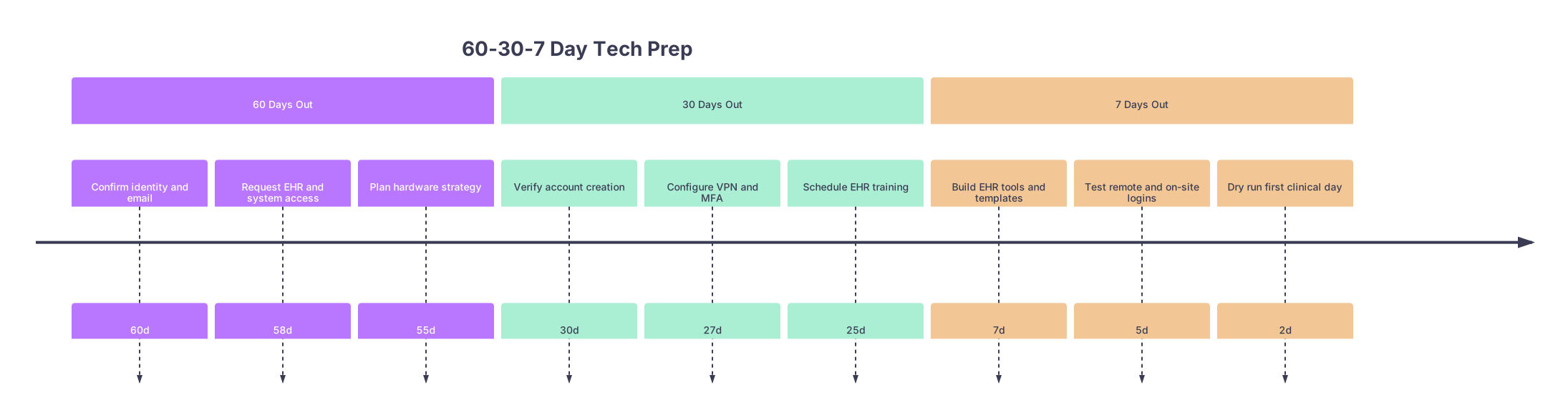
| Period | Event |
|---|---|
| 60 Days Out - Confirm identity and email | 60d |
| 60 Days Out - Request EHR and system access | 58d |
| 60 Days Out - Plan hardware strategy | 55d |
| 30 Days Out - Verify account creation | 30d |
| 30 Days Out - Configure VPN and MFA | 27d |
| 30 Days Out - Schedule EHR training | 25d |
| 7 Days Out - Build EHR tools and templates | 7d |
| 7 Days Out - Test remote and on-site logins | 5d |
| 7 Days Out - Dry run first clinical day | 2d |
2. Security Stack: VPN, MFA, and Device Hygiene
By 30 days you should be locking down the environment you will actually use.
VPN and remote access
- Install the VPN client they support (Cisco AnyConnect, GlobalProtect, FortiClient, etc.).
- Confirm:
- It connects from your primary work location (home or office).
- You know exactly which resources are reachable via VPN (EHR, shared drives, PACS, etc.).
Multi-factor authentication (MFA)
Decide whether you will use:
- Phone app (Duo, Microsoft Authenticator, Okta Verify)
- SMS codes (not ideal, but some sites still use it)
- Hardware token (RSA, YubiKey, hospital-issued fob)
Test:
- Log into webmail or portal with MFA enabled.
- Confirm recovery options (backup device, recovery codes if they provide them).
Device hygiene
At this point you should:
- Update OS and anti-malware on any personal device you will use for work.
- Turn on full-disk encryption:
- Windows: BitLocker
- macOS: FileVault
- Configure:
- Automatic screen lock (≤ 5 minutes).
- Strong device password or biometric plus passcode.
If your employer has an MDM solution (Intune, MobileIron, Workspace ONE), expect a profile that enforces many of these for you. Do not fight it; resisting MDM at a hospital job is how you get quietly blacklisted from projects.
3. EHR Training and Customization Prep
At 30 days you should not just have EHR training booked. You should be preparing to use it like an adult, not like a first-year resident.
Your checklist:
Get access to training environments or sandbox if available.
- Ask for a training login or practice environment.
- Even an hour of clicking through will save you on Day One.
Bring your old workflows in text form
- Common items to pre-plan:
- Admission note structure
- Discharge summary checklist
- Common order sets (CHF, COPD, DKA, sepsis)
- Imaging protocol phrases (for radiology / cardiology / IR)
- Lab panels you order constantly
- Common items to pre-plan:
Identify “super users” in your new department
- Ask your future chief or practice manager: “Who is the go-to person for Epic/Cerner tips on our service?”
- Set a 15–20 minute call with that person. Ask:
- “What 3–5 EHR tools do you actually use every day?”
- “What templates or order sets did you build that you wish you had on Day One?”
You are not trying to become an informatics expert. You are trying to avoid spending 4 hours a day fighting clicks that your colleagues solved three years ago.
4. Communication, Paging, and On-Call Systems
This is where a lot of new attendings get embarrassed. They can place orders but cannot figure out who is on call or how to reach them.
At 30 days you should:
Get the on-call schedule platform login (Amion, QGenda, etc.):
- Confirm you are listed with the correct role and site.
- Verify your call assignments line up with your offer / contract.
Read the messaging norms
- Ask:
- “Do we page consults or use secure chat?”
- “Do nurses mostly call, text, or message within the EHR?”
- “What is the expectation for response time?”
- Ask:
Configure critical contact methods
- Make sure:
- Your cell phone is on file and correct.
- Your pager or pager app is configured and tested.
- Backup contact (charge nurse, operator) knows how to find you.
- Make sure:

5. Cloud and File Management Strategy
If you are in a clinical tech leadership role, informatics, lab management, or anything with documents and dashboards, you need a sane file strategy.
At this point you should:
Confirm approved cloud storage:
- OneDrive, SharePoint, Google Drive (enterprise), Box, or internal network drives.
- Understand what is forbidden (personal Dropbox, personal Google Drive).
Setup:
- A “Workflows and Templates” folder.
- A “Projects” folder for ongoing initiatives.
- A “Reference” folder for policies, pathways, and guidelines you will download.
You will thank yourself in six months when you can actually find the sepsis order set policy you skimmed during orientation.
7 Days Before Day One: Dress Rehearsal and Fine-Tuning
At one week out, everything should be technically active. Now you run the full simulation of your first day.
1. Confirm Final Access and Passwords
At this point you should:
Log into every single system you have been assigned
- From the location where you will work most (home for tele, or on-site if you have early building access).
- Minimum list:
- Email and calendar
- EHR (production, not just training)
- PACS / imaging viewer
- Secure messaging
- VPN
- Scheduling / on-call system
- Learning management system (to check mandatory modules)
Fix any password / MFA issues now
- If you are going to lock yourself out of Duo, better now than while admitting a crashing patient.
Check your name and role display in systems
- Verify:
- Correct credentials on EHR provider banner.
- Correct phone / pager attached to your profile.
- Correct department / specialty tags.
- Verify:
I have seen new hospitalists show up labeled as “Consultant – Undefined” in the EHR. Every single consult request went to the wrong pool. That is not a fun way to start.
2. Build Practical EHR Tools for Day One
This is where you move from basic access to actual efficiency.
At 7 days you should:
Create core templates (even if rough):
- Admission H&P note – with sections that reflect how you actually think.
- Progress note template (SOAP or problem-based, whichever your group uses).
- Discharge summary skeleton: key headings pre-written.
- For imaging: basic report templates for your 5–10 most common studies.
Set up preference lists / favorites
- Medications you order constantly (with typical doses).
- Lab panels (CBC, BMP, Mg/Phos, etc.).
- Imaging orders and protocols.
- Common order sets:
- Example: “Sepsis admit,” “Chest pain obs,” “Post-op day 1.”
Configure your EHR workspace
- Default view for patient lists (team, personal, census).
- Preferred layout for sign-out and rounding lists.
- Notification preferences (critical labs, imaging results, messages).
| Area | Day-One Must-Have Item |
|---|---|
| Notes | Admission and progress note templates |
| Orders | Favorites for top labs and meds |
| Imaging | Templates for 5–10 common studies |
| Lists | Personal rounding and sign-out lists |
| Messaging | Inbasket / message pool access confirmed |
3. Run a Full “Mock Day” Scenario
Do not just click around randomly. Simulate your actual work.
At this point you should:
Pick a representative case
Example for a hospitalist:- 68-year-old with CHF exacerbation being admitted from ED.
Walk through in the EHR (training or production, de-identified)
- Admit the patient (conceptually).
- Find admission order set.
- Place meds, labs, imaging.
- Write an H&P using your template.
- Enter discharge meds and follow-up orders (even if pretend).
Time yourself
- Your goal is not speed. Your goal is zero tech surprises.
If anything feels clumsy or hidden, fix it now—adjust templates, add favorites, ask IT to tweak access.
4. On-Site Logistics: Badges, Workstations, and Wi-Fi
The most “low-tech” details are often the ones that wreck your morning.
At 7 days you should:
Confirm:
- Where to pick up your badge.
- Where to park on Day One.
- Which entrance to use before 7 a.m. or after hours.
- Where your primary workroom / workstation is located.
Ask:
- “Are the workstations badge-tap login or username/password?”
- “Is there a separate login for medication dispensing (Pyxis, Omnicell) or lab analyzers?”
Test (if you can visit early):
- Log into a physical workstation.
- Tap to log in / out (if supported).
- Access EHR and PACS from that workstation.
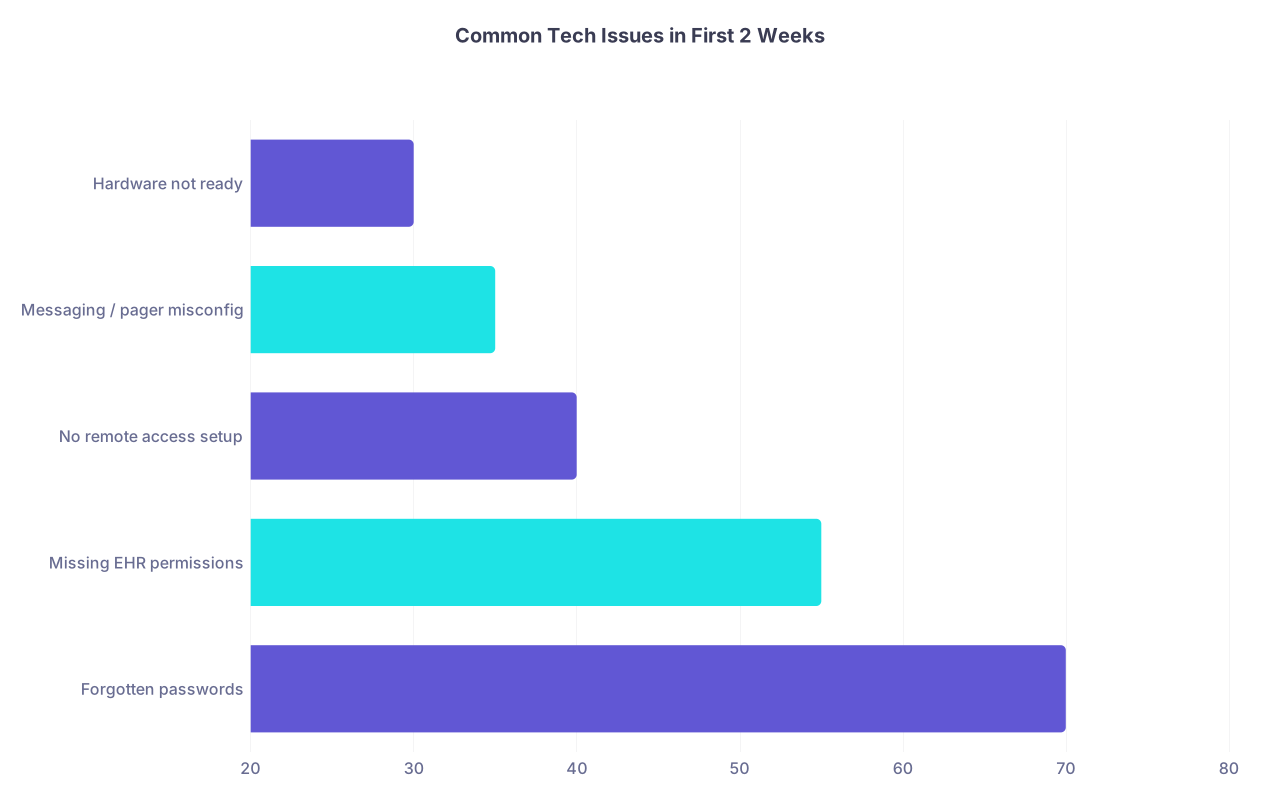
| Category | Value |
|---|---|
| Forgotten passwords | 70 |
| Missing EHR permissions | 55 |
| No remote access setup | 40 |
| Messaging / pager misconfig | 35 |
| Hardware not ready | 30 |
These numbers track pretty closely with what I have seen in multiple hospitals. Half of these are avoidable if you follow the timeline.
5. Final Personal Tech Cleanup
Last week is also when you shut the door on your old tech identity.
At this point you should:
- Remove old hospital apps and VPNs from personal devices.
- Archive old email if you have legal access, then log out. Do not forward patient-related mail. Ever.
- Secure your personal cloud:
- Double-check you did not accidentally sync work files with PHI to personal storage.
- Update professional profiles (optional, but clean):
- LinkedIn, Doximity, institutional directory once it goes live.
The Short Version: What Actually Matters
By the time you walk into your new job:
Every critical system must already work.
You should have logged into EHR, PACS, VPN, email, messaging, and scheduling at least once from a realistic location.Your core workflows should be pre-built, not improvised.
Notes, order favorites, and communication channels should be set up so you are practicing medicine, not fighting software.Your old digital life should be closed cleanly.
No stray PHI on personal devices, no half-migrated templates, no ghost accounts at your prior institution.
If you hit those three, you will look like you have done this before—even if it is your first attending job. That is the point of a real tech prep checklist.