
The way most physicians “optimize” their digital tools after residency is backwards. They keep installing more apps and buying more devices, then wonder why their days still feel chaotic.
You do not need more tools. You need a weekly audit ritual.
Below is a structured, time-based system for auditing your digital workflow once you are post‑residency and in the job market or early attending life. Week by week, then quarter by quarter. At each point I will tell you exactly what you should be reviewing, in what order, and what to cut or change.
Week 0: Set Up Your Baseline Audit System
At this point you are either finishing residency or early in your first attending role. Your digital life is already bloated: residency EHR shortcuts, random cloud folders, half‑dead to‑do lists.
Before running weekly reviews, you set the baseline infrastructure.
Step 1: Pick Your “Home” Systems (No More Than 3)
By the end of Week 0, you should have:
One task manager
Examples that actually work in medicine:- Todoist
- Microsoft To Do (common in health systems)
- Things 3 (Apple ecosystem)
- OmniFocus if you are a power user
One calendar
- Your institution’s Outlook/Exchange calendar as primary
- Personal Google/Apple calendar mirrored or subscribed in one place
One reference system
- Cloud notes: OneNote, Evernote, Notion, or Apple Notes
- Clinical reference stays in dedicated apps (UpToDate, DynaMed, institutional resources), but you link or log key items in your notes system.
Your rule from this point forward: every digital commitment, event, or note must land in one of these three.
Step 2: Create a Weekly Review Template
You are going to use the same checklist every weekend. Create a note titled:
“WEEKLY REVIEW – [Your Name]”
Include sections like:
- Calendar check
- Task manager audit
- EHR + inbox cleanup
- Files & documents
- Learning & research
- Career & job market
- Metrics
You will refine this over the first four weeks.
| Category | Primary Tool Options |
|---|---|
| Tasks | Todoist, MS To Do, Things |
| Calendar | Outlook, Google, Apple |
| Notes/Reference | OneNote, Evernote, Notion |
| Clinical Info | UpToDate, DynaMed, Micromedex |
| File Storage | OneDrive, Google Drive |
Your Weekly Review Ritual: The 60–90 Minute Block
Lock this in first. From now on:
- When: Same time every week (e.g., Sunday 5–6:30 PM)
- Where: Same physical location if possible (home office, quiet call room)
- Devices: Laptop + phone, ideally also your tablet if you use one
Standing Order of Operations Each Week
In this order. Do not improvise.
- Inbox sweep (all channels) – 10–15 minutes
- Calendar audit – 10–15 minutes
- Task manager audit – 15–20 minutes
- EHR & clinical digital workflow – 15–20 minutes
- Files, notes, knowledge – 10–15 minutes
- Career & job market review – 10–15 minutes
You can compress or expand, but the sequence stays.

| Step | Description |
|---|---|
| Step 1 | Start Weekly Review |
| Step 2 | Inbox Sweep |
| Step 3 | Calendar Audit |
| Step 4 | Task Manager Audit |
| Step 5 | EHR Workflow Review |
| Step 6 | Files and Notes Cleanup |
| Step 7 | Career and Job Review |
| Step 8 | Plan Next Week |
Weeks 1–4: Build the Habit and Stop the Bleeding
At this point your primary objective is not perfection. It is consistency and reducing noise.
Week 1: The First Full Audit
During your first real weekly review, move through this script.
1. Inbox Sweep (All Channels)
You should touch:
- Email (work + personal)
- EHR inbox (results, messages, refill requests)
- Messaging apps you actually use for work: Teams, Slack, secure messaging platform
- Voicemail if your system transcribes it digitally
For each item, decide:
- Action this week → create a task
- Scheduled → put on calendar
- Reference → archive in your notes / file system
- Trash → delete
Rule: no inbox should end with “unseen surprises”. Zero is ideal, but you at least know what is inside.
2. Calendar Audit
You should:
- Review last week:
- What meetings were pointless?
- What shifts or blocks overran their time?
- Review the next 2 weeks:
- Clinic days, OR days, call, moonlighting
- Credentialing deadlines, CME webinars, interviews, committee meetings
Mark:
- Time blocks for deep work (documentation catchup, research, CV updates)
- Protected blocks for job search if you are still in the market
You also cancel ruthlessly: anything that does not matter to your patient care, career progression, or sanity.
3. Task Manager Audit
You now:
- Dump all scraps:
- Paper notes from your coat
- Random reminders in Messages, WhatsApp, email stars
- Process every task:
- Clarify next physical action
- Set due date only if there is a real deadline
- Group by context: “Clinic,” “Home,” “Admin,” “Research,” “Job Search”
Kill tasks that no longer matter. Post‑residency, people drag along half‑dead research or committee work that costs energy and gives nothing back.
4. EHR + Clinical Workflow
You should review:
- SmartPhrases / templates you actually used this week:
- Promote the useful ones
- Delete or merge redundant ones
- Order sets:
- Identify 1–2 conditions you see constantly (e.g., uncomplicated UTI, heart failure follow‑up)
- Start building or refining order sets for them
- Inbox rules / pools:
- Are you seeing messages that should go to staff first?
- Can you adjust pools or routing?
Log what costs you the most time in the EHR this week. One sentence is enough.
5. Files & Notes
- Clean your desktop and “Downloads” folder from the last 7 days
- File or delete:
- CV versions
- CME certificates
- Conference programs
- Job descriptions
- In your note system, create:
- “Job Market – Leads”
- “Job Market – Offers/Contracts”
- “Clinical Pearls – [Specialty]”
6. Career & Job Market
At this point, post‑residency, you should be tracking:
- Applications sent
- Recruiter contacts
- Interview dates
- Contract versions
- Licensing/credentialing:
Create a simple table or tracker in your notes or a spreadsheet.
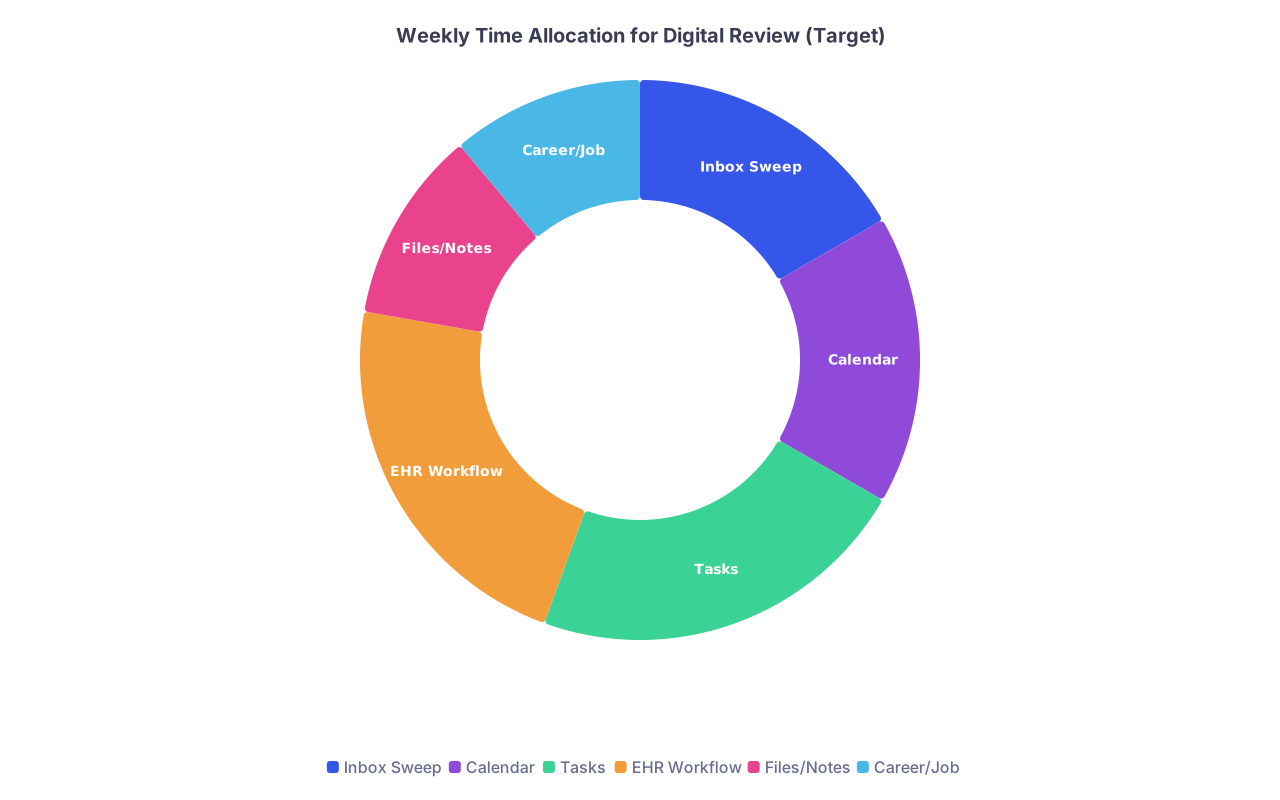
| Category | Value |
|---|---|
| Inbox Sweep | 15 |
| Calendar | 15 |
| Tasks | 20 |
| EHR Workflow | 20 |
| Files/Notes | 10 |
| Career/Job | 10 |
Weeks 5–8: Optimize for Speed and Reliability
Now the habit exists. At this point you refine.
Week 5: Shorten the Review to 60 Minutes
Goal: trim dead weight.
During this week’s review, you should:
- Time each segment roughly
- Identify which step regularly runs long (it is usually email or EHR)
Then:
- Create 1–2 quick rules:
- Example: “No more than 5 minutes cleaning Downloads folder”
- Example: “If an email will take longer than 2 minutes to answer, it becomes a task”
You are turning your review into a predictable, repeatable ritual.
Week 6: Tighten Your Capture Channels
By now you will notice leaks:
- Tasks that never made it into your system
- Messages you saw but did not act on
- Verbal promises in clinic with no written trace
In this week’s review, you should:
- List all places tasks appeared this week:
- Sticky notes, email flags, staff notebooks, text messages, etc.
- Cut to 2 capture points:
- Your main task app
- One backup (e.g., a physical pocket notebook)
During the coming week, you aim to capture exclusively in those.
Week 7: EHR Micro‑Audit
This week’s review focuses heavily on clinical digital work.
You should:
- Pull your EHR usage report if your system provides it
- Time in charting vs inbox vs orders
- Identify top 3 time sinks:
- Re‑typing the same instructions?
- Re‑writing near-identical notes?
- Searching for the same orders repeatedly?
Then, during the review:
- Create or refine:
- 2 new SmartPhrases
- 1 new order set or preference list
- 1 “follow‑up care” template for common discharge or post‑visit plans
This is the week you stop complaining about the EHR and start weaponizing it.
Week 8: Job Market & Career Deep Dive
At this point, if you are still in the job market or early in your first role, you should dedicate half of your weekly review to career.
You:
- Review your job log:
- How many applications this month?
- How many real leads (phone calls, interviews, site visits)?
- Update your CV and LinkedIn (or equivalent) with:
- Recent speaking, QI projects, teaching roles
- Audit your digital brand:
- Google your name
- Clean up outdated or sloppy profiles
- Make sure institutional profiles are current
You also decide: what is your career experiment for the next 4 weeks?
Examples:
- Launch a small QI project
- Present at a local hospital conference
- Start a subspecialty clinic half‑day
- Begin building a teaching portfolio
Then you put the steps in your task manager with target weeks.
Months 3–6: Quarterly Deep Audits on Top of Weekly Reviews
By now the weekly ritual is standard. At this point you add quarterly “big reviews” to restructure your digital life.
Quarterly Review Structure (Every 3 Months)
Block 2–3 hours. Treat it like a meeting with your future self.
1. Systems Check: What Still Earns Its Keep?
You should list every digital system you touch regularly:
- Task manager, calendar, notes
- EHR modules, secure messaging tools
- Research tools (reference managers, PubMed alarms)
- Communication platforms (Teams, hospital email, specialist messaging)
For each, ask blunt questions:
- Does this save me time net?
- Is there a simpler way to do this?
- Do I trust the data here?
Kill or consolidate at least one thing every quarter.
2. Workflow Mapping
Draw your actual work week. Literally on paper or a whiteboard:
- Clinic days
- Inpatient days
- Administrative blocks
- Teaching
- Job search / career-building time
Then overlay your digital workflow:
- When do you check EHR inbox?
- When do you do documentation?
- When do you process email?
- When do you review your task list?
You should end with fixed routines, for example:
- Morning: 10‑minute email + schedule check
- Midday: 15‑minute EHR inbox and quick responses
- Late afternoon: documentation catchup block
- Evening (2x/week only): job search or career project block
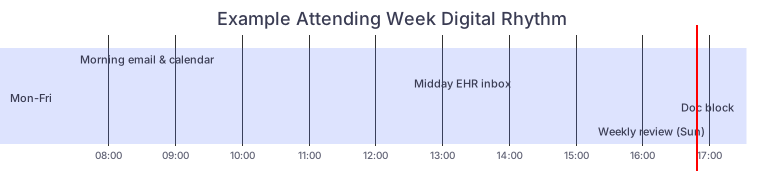
| Task | Details |
|---|---|
| dateFormat HH | mm |
| axisFormat %H | %M |
| Mon-Fri: Morning email & calendar | a1, 07:30, 0:20 |
| Mon-Fri: Midday EHR inbox | a2, 12:30, 0:15 |
| Mon-Fri: Doc block | a3, 16:30, 0:45 |
| Mon-Fri: Weekly review (Sun) | a4, 17:00, 1:30 |
3. Metric Review
This is where you act like an attending of your own time.
Track simple, meaningful metrics:
- Average daily time in EHR (if available)
- Number of overdue tasks at end of week
- Number of job-related actions this quarter:
- Applications
- Calls
- Interviews
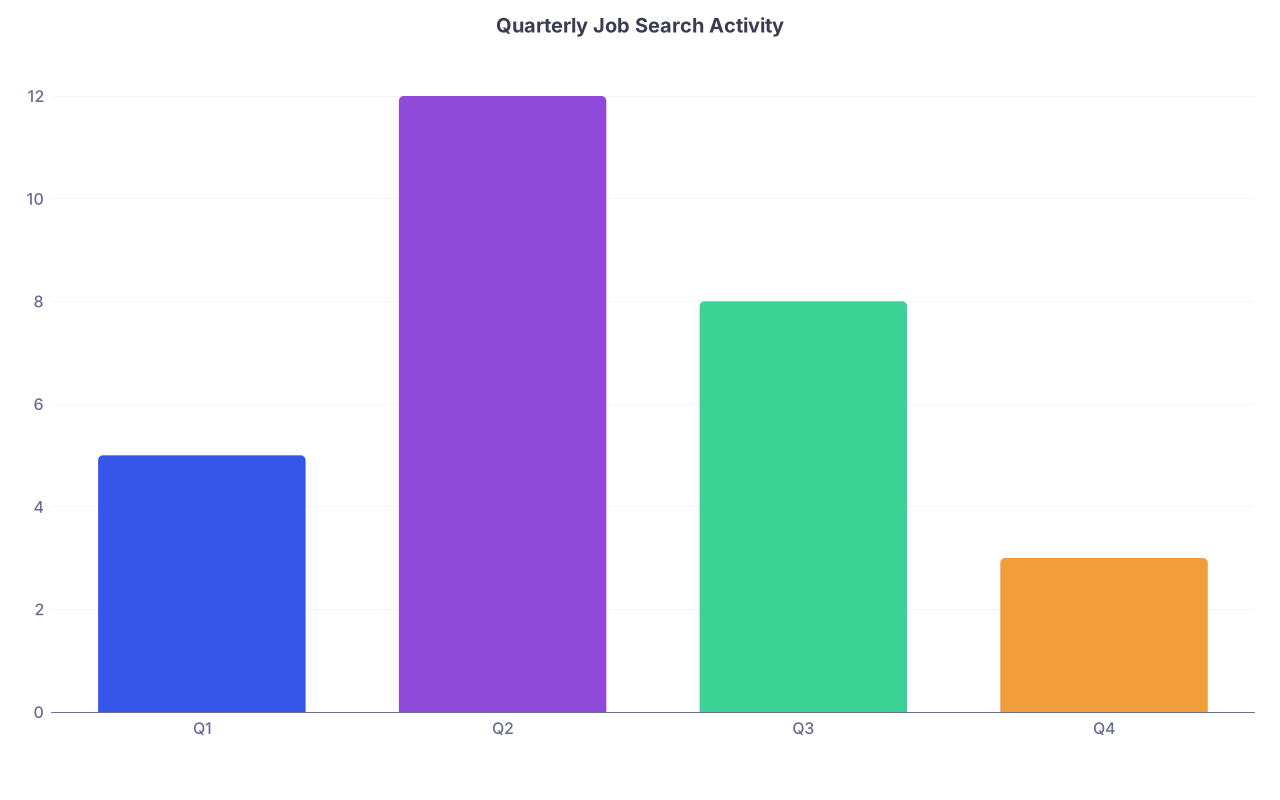
| Category | Value |
|---|---|
| Q1 | 5 |
| Q2 | 12 |
| Q3 | 8 |
| Q4 | 3 |
You compare quarters and ask: is this moving in the direction I say I want?
Day‑to‑Day Micro‑Habits That Make Weekly Reviews Work
Weekly rituals collapse if the rest of your week is chaos. You need a few daily guardrails.
Morning (5–10 Minutes)
At this point each morning you should:
- Open calendar first, not email
- Look at today + tomorrow:
- Clinics, OR, call
- Meetings, interviews, deadlines
- Open task manager:
- Flag 3–5 realistic tasks for today, not 20
Micro rule: no rescheduling tasks more than twice. After 2 deferrals, you either do it, delete it, or break it into smaller steps.
Midday (5–10 Minutes)
Sometime between cases or clinics:
- Quick scan of EHR inbox
- Respond to anything under 2 minutes
- Convert the rest to tasks or schedule time blocks
This prevents the weekly review from becoming a 3‑hour EHR clean‑up.
End of Day (5–10 Minutes)
Before you walk out:
- Clear your desk of paper — anything that needs action becomes a task
- Jot 2–3 “open loops” from the day:
- Follow‑up labs
- Call backs
- Patient you want to read more about
These become first items in your weekly review inbox section.

Month‑By‑Month Focus: First Post‑Residency Year
Here is what you should emphasize as the year unfolds.
Months 1–2: Stabilization
Focus:
- Make the weekly review non‑negotiable
- Clean up the worst digital messes (inboxes, desktop, random notes)
- Get basic EHR templates functioning
Checklist for end of Month 2:
- Weekly review completed at least 6 of 8 weeks
- Inbox zero or “inbox understood” at least once per week
- 3–5 high‑yield EHR templates created
- One clean, current CV file saved and backed up
Months 3–4: Career Infrastructure
Focus:
- Systematic job market tracking
- Digital reputation and profile
- Research/teaching documentation
By the end of Month 4 you should:
- Have a single log of all job interactions
- Know exactly which states/hospitals you are credentialed in and which are pending
- Have a basic portfolio:
- Teaching evaluations scanned
- Project summaries written
- Conference talks listed
Months 5–6: Efficiency and Boundaries
Here you use your weekly data to cut waste.
You should:
- Compare EHR time before and after template improvements
- Set communication expectations:
- When staff/patients can expect replies
- When you are not available
- Adjust notifications aggressively:
- Turn off non‑critical alerts
- Batch low‑importance channels

Months 7–12: Strategic Projects
At this point your weekly review should feel routine, not fragile. You use it to drive:
- A QI project
- A new clinic model
- A teaching curriculum
- A formal job switch or negotiation
Each weekly review:
- Check progress on 1–2 strategic projects
- Adjust task and calendar blocks
- Decide what to pause or kill to protect time
By the end of Year 1 post‑residency, your weekly review should give you a very clear picture of:
- How you actually spend your digital time
- Which tools are genuinely helping
- Where your career is headed, not just where the schedule pushes you

The Core of the Ritual
Keep the essence simple:
Same time every week.
Do the review even when you are tired. Especially then.Same order, every time.
Inbox → calendar → tasks → EHR → files/notes → career. Do not improvise.Cut something every week.
A meeting, a template, a useless app, a dead task. Your digital life should get lighter over time, not heavier.
Do that for one year post‑residency, and your digital workflow stops being the enemy. It becomes one of the main reasons your job – and your career moves – start to feel under control.