
The worst thing you can do with AI after residency is binge‑adopt everything at once. The second worst is to ignore it completely. Your job now is to time your adoption so AI makes your life lighter, not heavier.
You are entering practice in the first real wave of usable clinical AI. Not the hype slides. Actual tools that can help with notes, inbox, triage, imaging, and documentation. If you get the timing wrong, you drown in alerts, pilot projects, and terrible interfaces. If you get it right, you offload 1–2 hours of nonsense per day.
Here is a structured, time‑anchored plan from the last 6 months of residency through the first 3 years post‑residency: what to adopt when, what to defer, and how to avoid burning yourself out as the department “AI person” by accident.
6–3 Months Before Graduation: Reality Check and Groundwork
At this point you should stop thinking “AI” as a buzzword and start thinking “workflow slots.”
You do not need tools yet. You need clarity on where your time is being wasted.
Month ‑6 to ‑5: Map your actual pain points
Spend two months just observing yourself.
- Track 5 workdays each month:
- Minutes on documentation
- Minutes on inbox / messages
- Minutes on order entry / click‑paths
- Minutes on data hunting (old notes, labs, imaging)
- Note which EHR you are on (Epic, Cerner, Meditech, athena, etc.) and whether your likely employer uses the same system.
- Pay attention to phrases you say:
- “I type the same thing over and over.”
- “Why am I manually summarizing this 8‑year chart?”
- “This consult note is 90% boilerplate.”
Those phrases are your first AI use‑cases later. Not “general AI in medicine.” Specific tasks.
Month ‑4: Learn the landscape, not the products
At this point you should get concept‑level literacy, not tool‑level obsession.
Block 2–3 hours total, not per week. You are still finishing residency.
Focus on four categories:
- Ambient documentation
- Examples: Nuance DAX, Abridge, Suki
- What they do: Listen during encounters, auto‑generate notes.
- EHR‑embedded copilots
- Examples: Epic “AI‑assisted notes,” Cerner copilots, in‑basket summarizers.
- Imaging / diagnostic support
- Examples: Chest X‑ray triage, stroke CT tools, derm image classifiers.
- Productivity / general AI
- Examples: ChatGPT‑style tools, hospital‑approved LLMs for drafting letters, patient instructions, protocols.
Do not demo five products each. Just grasp:
- Where they live in the workflow.
- What data they touch.
- Whether they are already live at your current or future institution.
Month ‑3: Start asking targeted questions on interviews / job talks
Now you connect tech reality to job choice.
When you interview or negotiate:
- Ask the CMIO, department chief, or lead PA/NP:
- “What AI tools are actually live in your clinics / OR / ED?”
- “Which ones do most attendings actually use?”
- “Who supports them when they break?”
- “Are residents or new faculty expected to pilot new tools?”
Red flag: “We are very innovative, we are exploring lots of vendors” with no concrete deployed tools. That usually means chaos and extra unpaid work for you.
Green flag: “We have DAX in primary care, AI note assist in Epic for consults, and a pilot in one hospitalist unit with clear opt‑in.”
Final Month of Residency: Set Your Baseline Before AI
Resist the urge to “practice with AI” in your last month. At this point you should lock in your non‑AI baseline.
Week‑by‑week:
Week ‑4 to ‑3: Time and quality snapshot
On 3 separate days:
- Count:
- Notes per day
- Average time per note
- In‑basket messages handled
- Time from end of clinic to note completion
- Rate your stress at end of day: 1–10
- Save a few anonymized samples of your notes (for your own quality comparison if allowed by policy; if not, just record approximate length and structure).
This baseline will matter later when you ask, “Is this AI tool actually helping or just adding clicks?”
Week ‑2 to ‑1: Set boundaries for your first attending job
Write down your rules before you are pressured:
- “I will not sign up for more than one AI pilot in my first 6 months.”
- “If an AI tool adds more than 3 clicks per note, I will drop it unless there is clear ROI.”
- “Inbox tools before imaging toys” (or vice‑versa, depending on your specialty).
If you do not define this now, someone will voluntell you into three committees by October.
Months 0–3 as a New Attending: Stabilize First, Then Layer Light AI
Your first 90 days are not the time to become an AI superuser. At this point you should focus on survival and minimal, low‑risk wins.
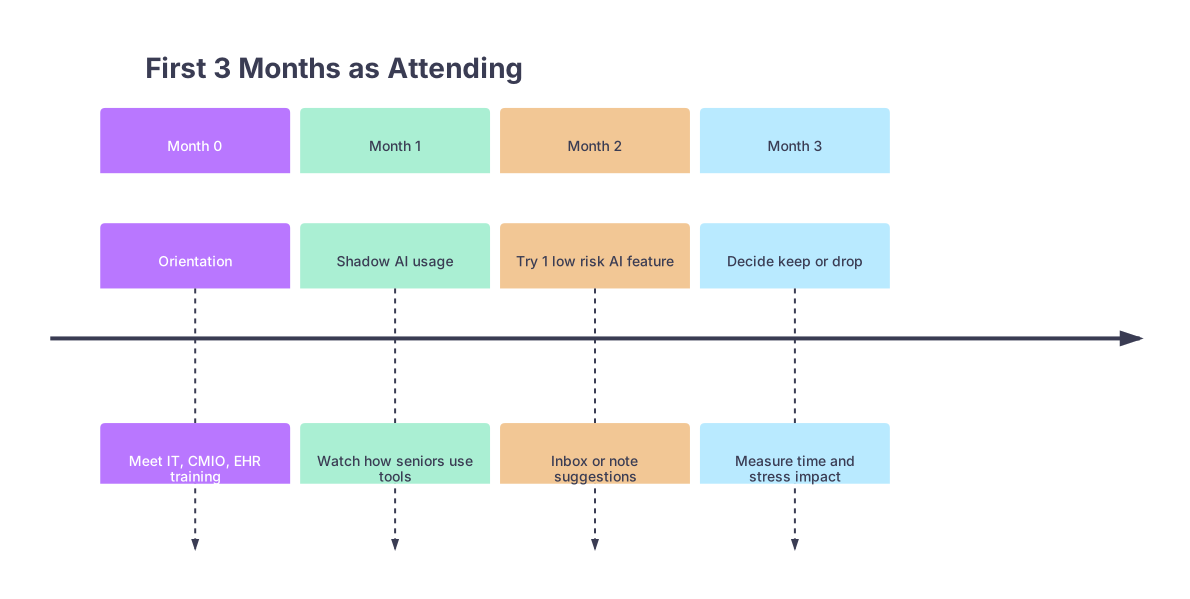
| Period | Event |
|---|---|
| Month 0 - Orientation | Meet IT, CMIO, EHR training |
| Month 1 - Shadow AI usage | Watch how seniors use tools |
| Month 2 - Try 1 low risk AI feature | Inbox or note suggestions |
| Month 3 - Decide keep or drop | Measure time and stress impact |
Month 0: Orientation and information gathering
During EHR and hospital orientation:
- Ask specifically:
- “Which AI or automation features are turned on in our EHR right now?”
- “Are there recommended settings for new attendings?”
- “Who is the point person if features misbehave or slow charting?”
- Watch how 2–3 senior attendings actually use the system:
- Do they use AI note suggestions?
- Are they ignoring half the AI buttons?
- What do they grumble about?
You are not committing yet. You are observing default culture.
Month 1: No new tools, only passive exposure
Rules for Month 1:
- Do:
- Use whatever AI features are already on by default if they do not add steps (e.g., auto‑suggested diagnoses you can accept or ignore rapidly).
- Ask peers what they turned off and why.
- Do not:
- Sign up for optional pilots.
- Add external AI tools (personal dictation apps, unofficial note generators, etc.).
- Spend your evenings tweaking prompts.
Your main job: learn how to be an attending. AI adoption is secondary.
Month 2: Add exactly one light‑touch AI assist
Now you test one thing. Not three.
Pick from this short list (whichever your system already supports):
Inbox summarization / response suggestions
- Use: Have the tool draft responses; you edit and send.
- Target: Patient messages, refill requests, result notifications.
AI‑assisted note “finishers” (EHR‑embedded)
- Use: You enter the key history / exam, tool suggests Assessment & Plan or wraps it into a structured note.
- Target: Common visit types you know cold (uncomplicated HTN follow up, stable CHF, routine post‑op checks).
Smart templates with AI text refinement
- Use: Start with your template, then use AI to tighten language, remove redundancy, or expand patient instructions.
For 2 weeks:
- Track:
- Time to close charts with vs without the tool (which days you used it).
- Number of notes still open after 24 hours.
- Any obvious hallucinations or unsafe output (write them down).
Month 3: Decide to keep, modify, or drop
At this point you should respect your data, not the hype.
If the tool:
- Saves you ≥ 15–20 minutes / day
- Does not increase error risk
- Does not noticeably increase cognitive load
…keep it and move on.
If not, drop it. You do not owe loyalty to a feature that slows you down.
Months 4–6: Deliberate Expansion Without Becoming IT’s Favorite Toy
By month 4 you usually have basic attending rhythm. Now you can widen.
Month 4: Add one “heavier” AI tool, ideally documentation‑focused
For many, this is when ambient scribe / DAX‑type tools come in.
At this point you should:
- Trial ambient documentation only if:
- Your schedule is reasonably stable.
- You are not changing clinics or sites.
- There is clear support (onboarding, troubleshooting, opt‑out paths).
Structure your trial:
- Use it for:
- 2 half‑days / week at first, not your entire clinic.
- Straightforward visits, not your most complex multi‑problem cases initially.
- Evaluate:
- Time from patient leaving room to note completion.
- Whether you spend more time editing than dictating.
- Patient reaction: are they okay with microphones / phones in the room?
Month 5: Introduce general AI for non‑clinical tasks
This is where tools like ChatGPT‑style systems or institution LLMs start to earn their keep — away from direct clinical decision making.
Use them for:
- Drafting:
- Patient instructions in plain language.
- Letters to insurers, employers, schools.
- Policy drafts, committee reports.
- Organizing:
- Lecture outlines.
- Orientation materials for students or residents.
You keep PHI out of these tools unless your institution has an approved, HIPAA‑compliant instance.
Month 6: Formal mini‑review of your tech load
At the 6‑month mark:
- List every digital tool you actively use:
- EHR core
- Built‑in AI note assists
- Ambient documentation
- Inbox AI
- General AI tools
- Rank them by:
- Time saved
- Cognitive load
- Error / risk potential
Then apply a hard rule: if a tool does not land in the top half of time‑saved and low risk, drop or scale it back.
| Tool Type | Keep, Modify, Drop |
|---|---|
| EHR AI Note Assist | Keep |
| Ambient Scribe | Modify (2 days/wk) |
| Inbox Summarizer | Keep |
| General LLM (non-PHI) | Keep |
| Extra Dictation App | Drop |
Months 7–12: Strategic Deepening and Saying “No” Correctly
At this point you should be using 1–3 AI tools comfortably. Now the system will try to load more onto you.
Month 7–9: Decide whether to be “the AI person” in your group
This is career‑shaping.
If you choose yes:
- Negotiate:
- Protected time for pilot work (0.05–0.1 FTE at least).
- Clear role description: testing, feedback, not 24/7 support.
- Focus:
- A single domain (outpatient documentation, imaging triage, or ED throughput).
Not all of the above.
- A single domain (outpatient documentation, imaging triage, or ED throughput).
If you choose no:
- Script your answer:
- “I am happy to be an end user and give feedback, but I am not taking on formal pilot leadership in my first 2 years.”
- Stay firm. Otherwise, your clinical time becomes unpaid QA work.
Month 9–12: Higher‑risk clinical decision AI — adopt cautiously or defer
By now, you will see tools claiming to “suggest diagnoses” or “guide treatment”.
At this point you should default to defer unless:
- The tool is:
- Endorsed by your specialty society and
- Fully integrated into your EHR with clear logging.
- Your institution:
- Has done a formal safety, bias, and outcome evaluation.
- Can show aggregate performance numbers, not just vendor slides.
If those conditions are not met, use these only as:
- Secondary reference.
- “Check my thinking” tools, never primary drivers.
You are an attending. You own the decision, not the algorithm.
Year 2: Optimization, Customization, and Guardrails
By your second year, your question shifts from “What AI exists?” to “Where exactly does AI give me unfair advantage?”
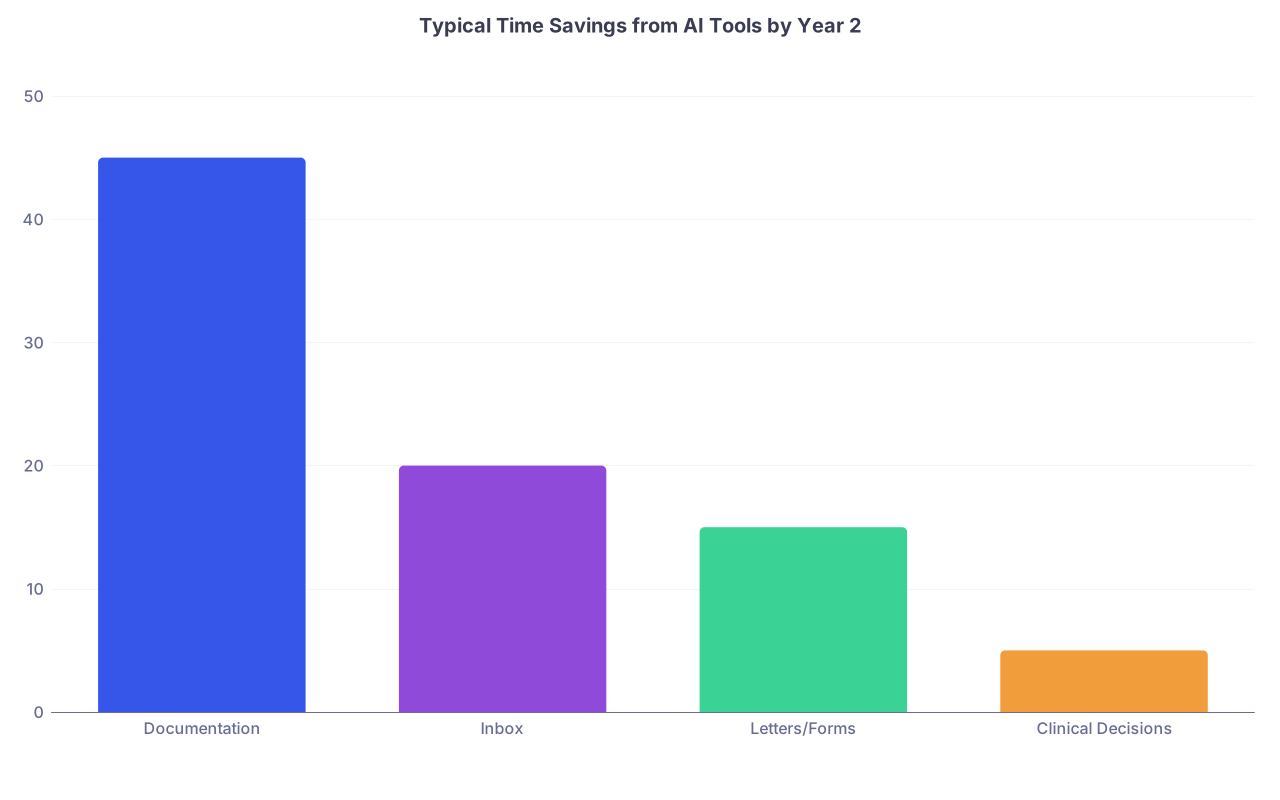
| Category | Value |
|---|---|
| Documentation | 45 |
| Inbox | 20 |
| Letters/Forms | 15 |
| Clinical Decisions | 5 |
Early Year 2: Tune your stack
At this point you should:
- Optimize templates and AI prompts around:
- Your 10 most common visit types.
- Your 5 most common inpatient scenarios (for hospitalists / intensivists).
- Standardize:
- Use similar structures for Assessment & Plan so AI suggestions become more accurate and easier to edit.
- Set hard limits:
- Max AI suggestions per note (too many = decision fatigue).
- Turn off “cute” features that do not save time (e.g., auto‑rewriters for already concise notes).
Mid Year 2: Use AI to protect your off‑time, not invade it
Danger zone: using AI at home to “just finish charts” more efficiently. That simply normalizes after‑hours work.
Reverse it:
- Aim for:
- 0 notes left at departure 4 days per week.
- Use AI only:
- During clinic blocks and scheduled admin time.
- If your use pattern shifts to late‑night sessions:
- Reduce tool complexity.
- Reassess panel size or schedule, not add more tech.
Late Year 2: Teaching and mentorship layer
Now you can responsibly bring trainees into the conversation.
You teach them:
- What AI is good at in your actual workflow.
- How you verify outputs (e.g., double‑checking suggested plans).
- Why you ignored certain tools that looked “cool” but added noise.
You also protect them from becoming unpaid AI QA labor for your system.
Year 3 and Beyond: Strategic Adoption, Not Gadget Chasing
By year 3, the landscape will look different. New toys, new hype cycles. Your approach should not change: staged, measured, skeptical.
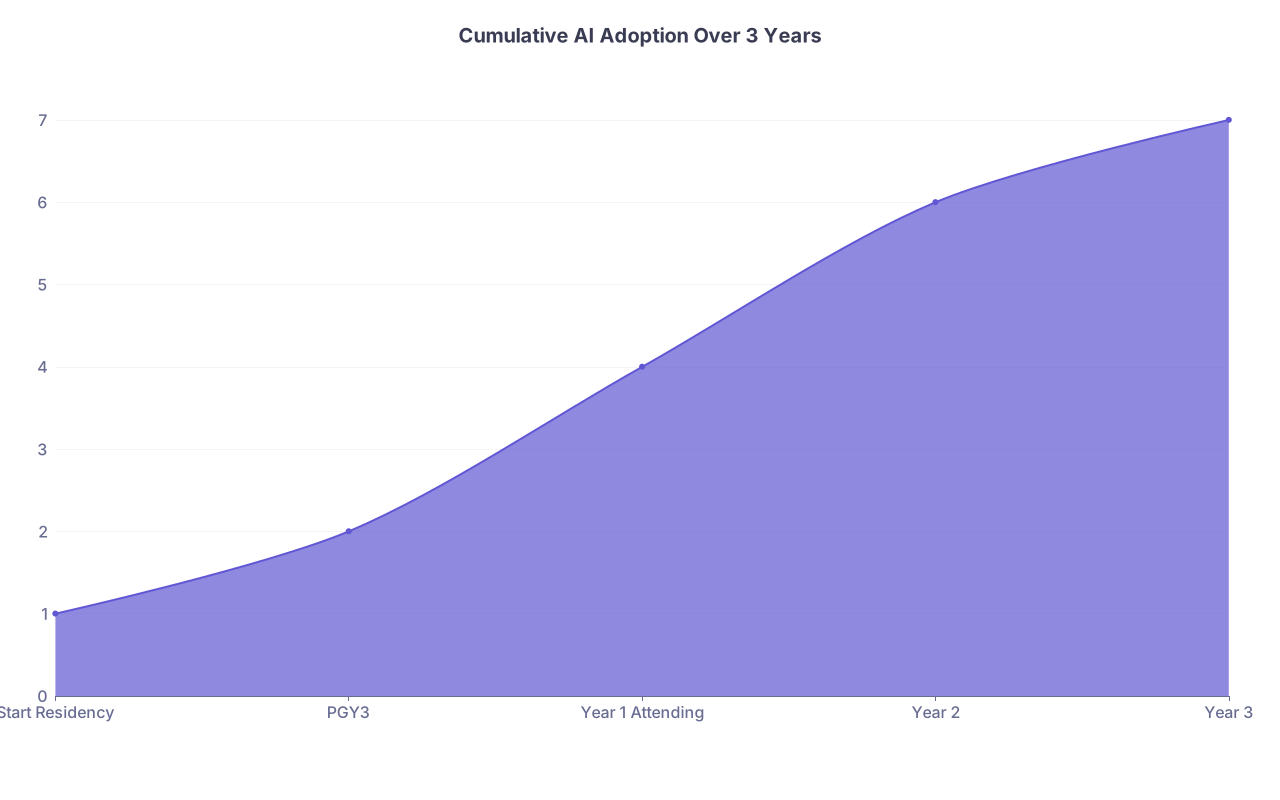
| Category | Value |
|---|---|
| Start Residency | 1 |
| PGY3 | 2 |
| Year 1 Attending | 4 |
| Year 2 | 6 |
| Year 3 | 7 |
Year 3: Periodic audits and intentional pruning
Once a year (pick a quiet month):
- Conduct a “tech fast” week:
- Turn off or bypass non‑essential AI features for 3–5 days.
- Notice which ones you actually miss.
- Drop:
- Anything you do not miss that week.
- Re‑evaluate new offerings:
- Only adopt tools with a clear, quantified benefit: time saved, reduced errors, or improved throughput.
Years 3+: When to consider more sophisticated AI (imaging, risk models)
At this point you should be selective:
- Adopt imaging AI if:
- You are in a field like radiology, ED, ICU where triage and detection have proven benefit.
- The tool’s performance is transparent (sensitivity, specificity, failure modes).
- Use risk prediction tools (e.g., readmission risk, sepsis alerts) only if:
- They are coupled with a clear action pathway, not just another popup.
No pathway = alert fatigue. Hard pass.
A Concrete Week‑By‑Week “Do This, Not That” Snapshot
To ground this, here is how a typical new hospitalist or outpatient internist should phase in AI over the first year.
| Timepoint | Focus Tool(s) | Adoption Rule |
|---|---|---|
| Month 1 | Default EHR AI only | Observe, no new pilots |
| Month 2–3 | Inbox or note assist | One tool, 2-week measured trial |
| Month 4–5 | Ambient scribe (optional) | Start 1–2 half days per week |
| Month 6 | General LLM (non-PHI) | Only for letters, instructions, admin |
| Month 9–12 | Carefully vetted clinical AI | Secondary reference, not driver |
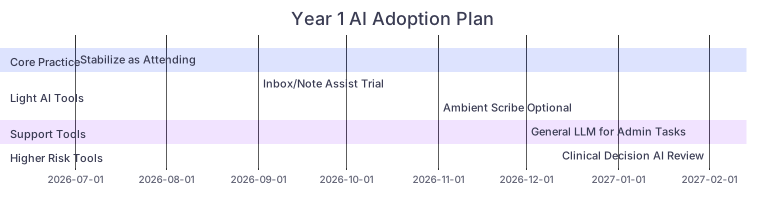
| Task | Details |
|---|---|
| Core Practice: Stabilize as Attending | done, m1, 2026-07,2m |
| Light AI Tools: Inbox/Note Assist Trial | active, m2, 2026-09,2m |
| Light AI Tools: Ambient Scribe Optional | m3, 2026-11,3m |
| Support Tools: General LLM for Admin Tasks | m4, 2026-12,2m |
| Higher Risk Tools: Clinical Decision AI Review | m5, 2027-02,3m |

How to Tell You Are Overloading Yourself
There are clear warning signs that your AI stack is too heavy:
- You cannot explain in one sentence what each tool actually does for you.
- You spend more time correcting AI output than you would writing from scratch.
- You feel obligated to try every new pilot “because you are young and tech savvy.”
- Your chart closure time has not improved, but your screen time has increased.
If you hit two or more of these, you are overloaded. Strip down. Keep only the one or two tools that materially change your day.

Final Checkpoints
Condensed to the essentials:
- In the first 3 months post‑residency, stabilize your practice first. Add at most one light AI tool and measure it ruthlessly.
- By 6–12 months, you can expand to 2–3 high‑value tools, but only if they clearly save time and do not increase your after‑hours work.
- From year 2 onward, your job is optimization and pruning, not endless adoption. AI should make your clinical life smaller and sharper, not busier and blurrier.
If a tool does not help you finish sooner, think more clearly, or sleep better, it is not worth your attention yet.