
The worst EHR go‑lives are not caused by bad software. They are caused by physicians who wait until two weeks before launch to start caring.
If your organization is six months from a new EHR go‑live, you are already in the critical window. At this point, “IT will handle it” is fantasy. What you do month‑by‑month from now will determine whether you are merely annoyed for a few weeks or clinically unsafe and working until midnight every night.
Let me walk you through the timeline.
6 Months Out: Get Oriented and Protect Your Time
At six months, your primary job is to understand what is coming and carve out time to deal with it. If you miss this step, everything else becomes reactive and painful.
In the first 2 weeks (Month –6, Weeks 1–2)
At this point you should:
Clarify the basics of the project
Get precise answers. Vague reassurance is useless.
Ask your CMIO, department chair, or project lead:
- What exact system and version are we going live on? (Epic, Cerner, Meditech, etc.)
- What is the official go‑live date and stabilization period (usually 4–12 weeks)?
- Are we doing a “big bang” (all areas at once) or phased go‑live?
- Will there be parallel systems for a time, or hard cutover?
Capture those dates on your own calendar. Not in your head. On the calendar.
-
You need dedicated hours for training, build review, and workflow redesign.
Minimum realistic allocation for a frontline physician over 6 months:
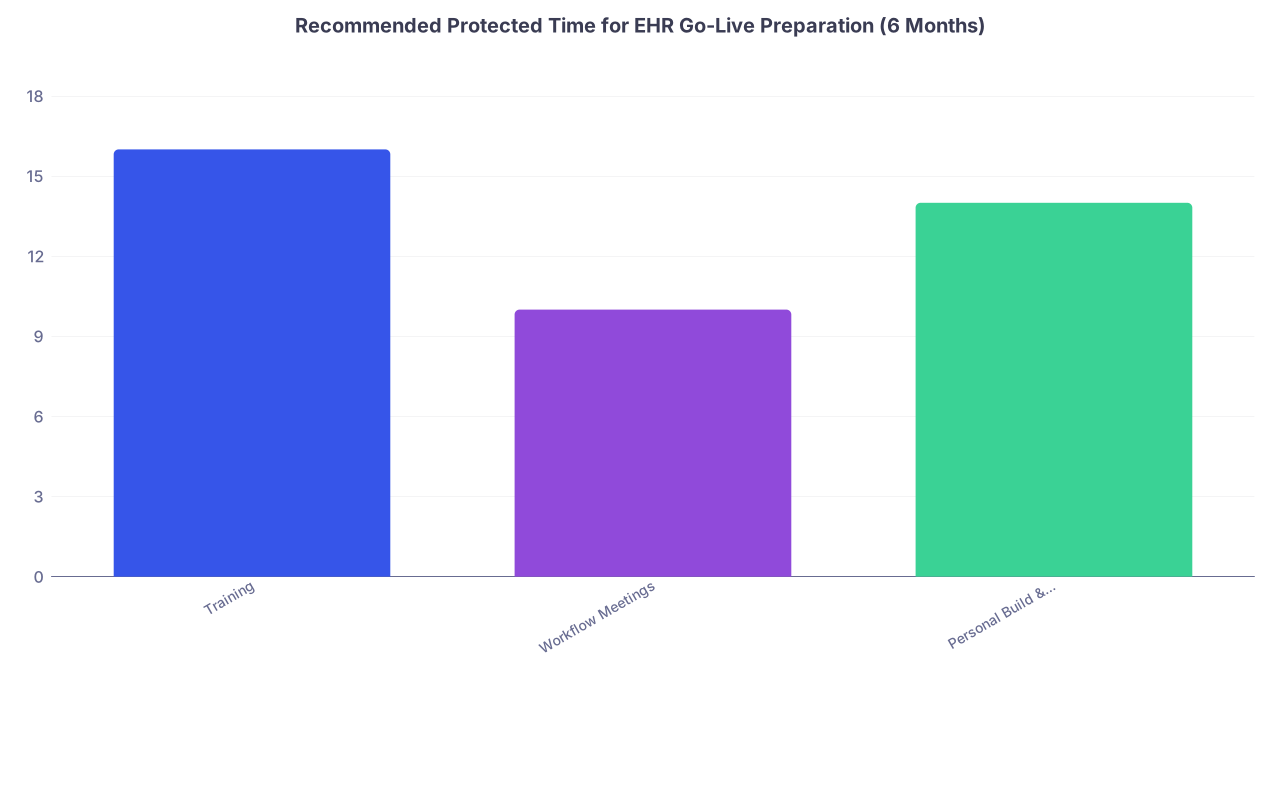
Recommended Protected Time for EHR Go-Live Preparation (6 Months) Category Value Training 16 Workflow Meetings 10 Personal Build & Practice 14 - 16 hours of formal training
- 10 hours of workflow/governance meetings
- 14 hours of personal build, practice, and optimization
Block these as recurring events:
- One 2–3 hour block every other week from now until go‑live.
- Additional half‑days in the 4 weeks before go‑live.
Identify your role
At this point you should decide where you sit on the spectrum:
- Clinical leader / champion – deeply involved in design and decisions.
- Engaged frontline – attends build reviews and actually tests things.
- Minimum compliance – does assigned training and nothing more.
If you are reading this, aim for “engaged frontline” at least. People who choose “minimum compliance” then complain loudly during go‑live are part of the problem.
Get on the right communication channels
Do not rely on forwarded mass emails.
- Ask to be on the provider advisory list.
- Join the MS Teams/Slack channel or distribution list for your specialty.
- Find out who your physician builder / super user is.
5 Months Out: Lock In Clinical Workflows and Requirements
By five months out, IT is building. If your requirements are not clear, they will guess. And you will not like their guesses.
Weeks 1–2 of Month –5: Map your current workflow
At this point you should:
Document how you actually work today
Do this for your core activities:
- Outpatient visits (new, follow‑up, complex)
- Inpatient admissions, daily rounds, discharges
- Orders that are frequent or high‑risk (antibiotics, anticoagulants, chemo, imaging)
- On‑call coverage and cross‑coverage
Make it concrete. A simple checklist or flow is enough:
- How do you get information now?
- Where do you document?
- Who does what (physician, nurse, MA, pharmacist)?
- What handoffs exist?
Flag failure points
Think: where do errors or delays already occur?
- Medication reconciliation at admission/discharge
- Critical results follow‑up
- Post‑discharge lab monitoring
- Procedure consents and prep instructions
These are the areas the EHR can either fix or make worse. Call them out now.
Weeks 3–4 of Month –5: Translate workflow into EHR needs
At this point you should sit down with the EHR team or your physician builder and convert your real workflow into build items:
Order sets needed for:
- Common diagnoses in your specialty
- Admission / post‑op / discharge
- Common consult triggers
Documentation tools you require:
- Note templates / SmartTexts
- SmartPhrases / macros
- Structured data elements you actually want to click (not 200‑item ROS checklists)
-
- Who sees what results?
- How are messages routed (RN pool, APP pool, attending)?
- What happens when you are off or on vacation?
Do not accept “we will figure that out later.” Later is when you are already live.
4 Months Out: Participate in Build Review and Usability Checks
Four months out is when you still have meaningful influence over build. By two months out, changes become “phase 2” (translation: you will live with the problem for a year).
Month –4: System tours and early testing
At this point you should:
Get in the sandbox / test environment
Ask for:
- Test patient charts with realistic data.
- Access to your specialty’s order sets and documentation templates.
- Ability to create your own SmartPhrases/macros.
Run through 3–5 common scenarios
For each scenario, walk it end‑to‑end:
- New patient visit → orders → referrals → patient instructions.
- Typical inpatient admission → orders → daily note → discharge summary.
- On‑call cross‑cover scenario at 2 a.m. with a critical lab.
Time yourself. If a routine task takes 3–4 times longer than your current state, say so now.
Give structured feedback
Do not just say “this is clunky.” Be specific:
- “These three clicks are redundant; can we default this field?”
- “This order set is missing our standard DVT prophylaxis choice.”
- “This alert fires for every low sodium; it should only fire below 120.”
Insist that critical safety issues be addressed pre‑go‑live, not “post‑stabilization.”
3 Months Out: Commit to Training and Personalization
Three months out is your make‑or‑break period for individual readiness. This is where most physicians sabotage themselves by “not having time” for training.
Month –3: Mandatory and smart training
At this point you should:
Schedule training early, not at the last minute
The worst sentence I hear: “I will just do the online modules the week before.”
Do this instead:
- Complete basic navigation and core training by 10–12 weeks before go‑live.
- Save advanced features and personalization labs for 6–8 weeks before.
Insist on role‑specific training
Generic “provider training” is almost useless.
You want:
- Specialty‑specific outpatient or inpatient workflows.
- Use cases that match your service (e.g., hospitalist vs surgeon vs oncologist).
- Examples using your real order sets and templates, not canned primary‑care cases if you are a cardiologist.
Start personalization early
Use training time to:
- Build personal order preference lists.
- Create SmartPhrases for:
- Common assessments and plans
- Patient instructions
- Procedures and consent language
- Set up default views for:
- Patient lists
- Result review
- Inbox
One physician who walks into go‑live with 50 well‑built SmartPhrases will beat another who “learns on the fly” every single time.
2 Months Out: Refine Workflows and Stress‑Test the System
Two months out, you shift from learning the system to attacking your weak points and high‑risk workflows.
Weeks 1–2 of Month –2: Team‑based dry runs
At this point you should:
Run team simulations, not solo demos
Sit with:
- Your nurses or MAs
- Any APPs in your group
- A representative from pharmacy or care management if relevant
Then run:
- A full clinic session with 2–3 mock patients.
- A rapid admission → stat imaging → antibiotic order scenario.
- A discharge with follow‑up labs and appointments.
Watch for:
- Who is doing which clicks.
- Where people are double‑documenting.
- Where orders or notes are missing required data.
Clarify division of labor
Decide, explicitly:
- What staff will pre‑chart versus what you will do.
- Who enters histories, vitals, and screening questionnaires.
- Who handles inbox tasks: refill requests, normal lab notifications, portal messages.
Write it down. If everyone assumes something different, you will find out during go‑live, which is the worst time.
Weeks 3–4 of Month –2: Address safety‑critical paths
At this point you should run focused checks on:
- Medication reconciliation: admission and discharge.
- High‑risk order sets (e.g., insulin, anticoagulation, chemotherapy).
- Result follow‑up workflow for critical and abnormal results.
- Escalation paths for nursing messages and rapid response situations.
Draw a simple map for each:
- Where is the information?
- Who is responsible?
- How does the EHR support this?
- What happens when a person is off‑service?
Fix obvious gaps now, or at least define temporary workarounds.
1 Month Out: Tighten Schedules and Prepare for Impact
One month out, you move from configuration to operational planning and personal schedule management. This is where you protect your sanity.
Month –1: Adjust clinical load and logistics
At this point you should:
Reduce patient volume for go‑live and the first 1–2 weeks
If you can influence schedules, here is a realistic reduction pattern:
Suggested Outpatient Schedule Adjustments for Go-Live Timeframe Suggested Volume Change Notes Go‑live Week 40–50% reduction Longer visits, more buffers Week 2 25–30% reduction Still in steep learning curve Weeks 3–4 10–15% reduction Gradual ramp‑up For inpatient roles:
- Aim for lighter elective volumes.
- Avoid stacking complex elective cases on day 1–3 of go‑live.
- Coordinate call schedules so not everyone is on nights during launch.
Plan your coverage strategy
Decide:
- How cross‑coverage will work in the new system.
- How notes and task handoffs will happen between daytime and nighttime teams.
- How you will handle being out of office (who covers your inbox, how delegation works).
Confirm at‑the‑elbow support
Ask for:
- Names and shifts of support staff assigned to your unit/clinic.
- Location of command center and hours.
- How to escalate critical IT issues vs basic “how‑to” questions.
If you do not see adequate coverage, say so now.
2–3 Weeks Before Go‑Live: Final personal prep
At this point you should:
Clean up your current system:
- Close old encounters.
- Resolve as many outstanding tasks and results as possible.
- Stop starting long‑term projects that will cross the cutover in a messy way.
Export or confirm:
- Important patient lists.
- Personal templates you might need to reference (where allowed / appropriate).
- Any specialty‑specific manual tools you rely on (spreadsheets, calculators).
Final 2 Weeks: Practicals, Checklists, and Mental Reset
Two weeks out, the build is effectively frozen. Now it is about preparation, not redesign.
Week –2: Dry‑run your first real day
At this point you should:
Simulate Day 1 in detail
Block 1–2 hours and literally walk through:
- Logging in, finding your patient list.
- Opening the chart, reviewing key data.
- Writing a basic note for the first encounter.
- Ordering labs, imaging, and medications.
- Sending a patient instruction via portal or printed summary.
Note where you hesitate or feel lost. Ask targeted questions, not “teach me the system again.”
Refine your SmartPhrases and favorites
- Add macros for:
- Normal exam templates
- Standard procedure descriptions
- Typical follow‑up plans
- Tighten order favorites:
- Remove rarely used items.
- Group them logically (by condition, by phase of care).
- Add macros for:
Prepare your physical workspace
Sounds trivial. It is not.
- Make sure your workstation actually works: monitors, keyboard, mouse.
- Ask for dual monitors if they are offered; they matter for efficiency.
- Have a backup plan if a workstation fails (nearby room, laptop, etc.).

Week –1: Set expectations with patients and colleagues
At this point you should:
Communicate to patients
Use clear language in appointment reminders or portal messages:
- “Our clinic is transitioning to a new electronic medical record next week.”
- “Your visit may take a bit longer as we learn the new system.”
- “We are doing this to improve your care long‑term.”
Most reasonable patients will be forgiving if you are transparent.
Align with your team
Brief discussion with:
- Fellow physicians / partners.
- APPs, nurses, MAs.
- Front desk / schedulers.
Cover:
- Expectations on running behind.
- How much “grace space” is built into the schedule.
- How to escalate issues during go‑live.
Protect your non‑clinical life temporarily
For the first 2 weeks after go‑live:
- Avoid scheduling big life events, trips, or major commitments.
- Expect to be mentally drained.
- Plan simpler evenings: you may be finishing notes after hours.
Go‑Live Week: Execution Mode, Not Perfectionism
Go‑live itself is its own beast, but your 6‑month plan sets the tone.
Here is the honest curve you are likely to live through:
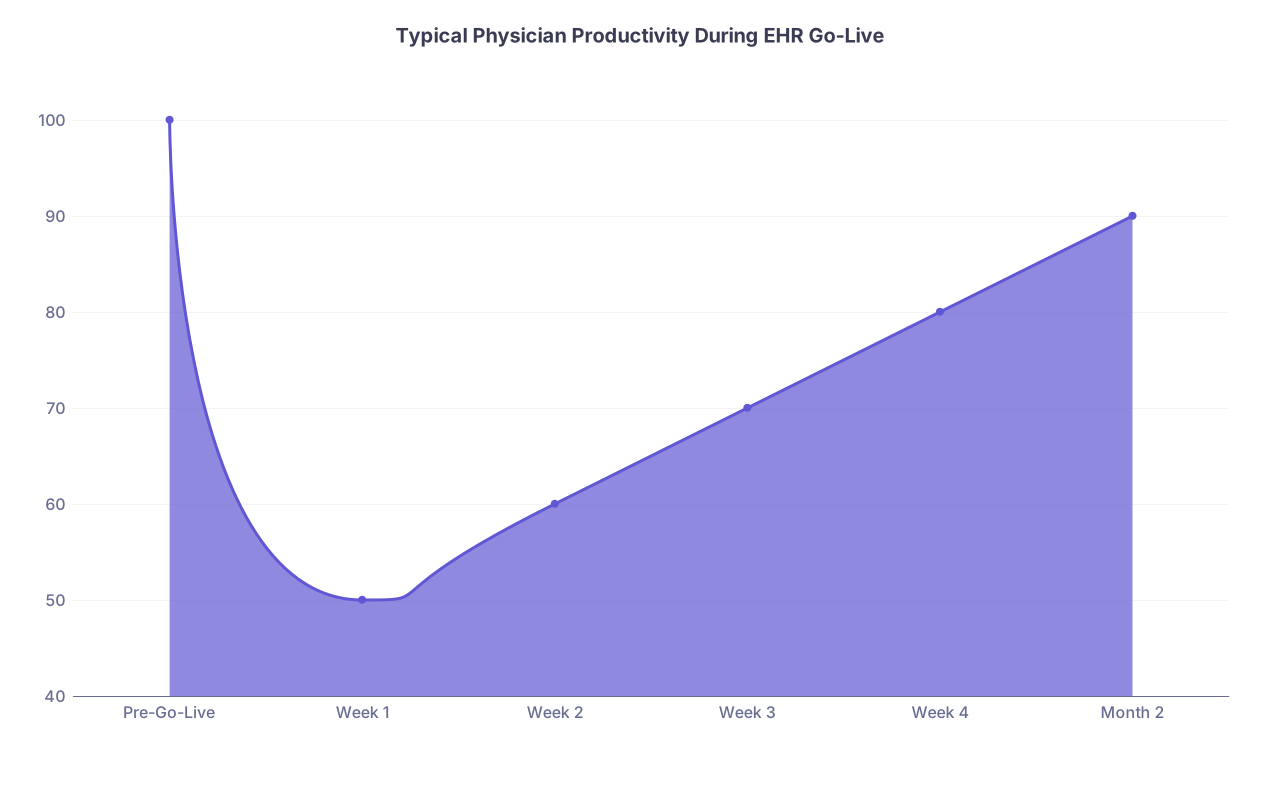
| Category | Value |
|---|---|
| Pre-Go-Live | 100 |
| Week 1 | 50 |
| Week 2 | 60 |
| Week 3 | 70 |
| Week 4 | 80 |
| Month 2 | 90 |
- Expect to be at 50–60% of previous productivity in week 1.
- Climbing back to 80–90% takes 4–8 weeks for most.
Your goal during go‑live is not to be fast. Your goal is:
- Safe orders.
- Complete documentation of critical thinking.
- Reliable communication and handoffs.
Daily during Go‑Live: A simple rhythm
At this point you should adopt a tight daily loop:
Start of day (10–15 min):
- Review list of known issues from prior day.
- Pick 1–2 specific system skills you will focus on improving today (e.g., inpatient handoff tool, result routing).
Midday (5–10 min):
- Jot down 3–5 pain points you encountered.
- Flag what is a personal knowledge gap vs a true system problem.
End of day (15–20 min):
- Clear as many notes/inbox items as possible; do not let a huge backlog form.
- Send 1–2 key issues to your super user / IT with concrete examples (patient MRN, timestamp, screenshot if allowed).

| Period | Event |
|---|---|
| Month -6 - Learn project basics | Engage with CMIO and project leads |
| Month -6 - Block protected time | Schedule recurring prep blocks |
| Month -5 - Map current workflows | Document real clinical processes |
| Month -5 - Define requirements | Order sets, notes, inbox rules |
| Month -4 - Test in sandbox | Run core clinical scenarios |
| Month -4 - Submit feedback | Request critical fixes |
| Month -3 - Complete core training | Navigation and essentials |
| Month -3 - Build personalization | SmartPhrases and favorites |
| Month -2 - Team simulations | Multidisciplinary dry runs |
| Month -2 - Safety checks | Med rec and critical results flows |
| Month -1 - Adjust schedule | Reduce volume for go-live |
| Month -1 - Final prep | Clean old tasks and finalize build |
| Final 2 Weeks - Day-1 rehearsal | Simulate first clinic/rounds |
| Final 2 Weeks - Set expectations | Communicate with patients and staff |
After Go‑Live: The First 2–4 Weeks
You asked about six months out, not post‑go‑live optimization, so I will keep this short. But planning now for the immediate aftermath matters.
At this point you should already have in mind:
A weekly 30–45 minute optimization huddle with your team to:
- Share new tips learned.
- Identify 2–3 priority issues for IT to fix.
- Agree on any temporary workarounds.
A personal rule: do not build bad habits as shortcuts.
- No copy‑forward walls of text you did not read.
- No bypassing med reconciliation because it is “too many clicks.”
- No ignoring inbox tasks “until it calms down.” It will not calm down by itself.

The Core Takeaways
You do not control the EHR vendor. You do control how prepared you are.
Three key points:
- Six months out is not early. This is when you must understand the project, protect time, and define how you actually practice so the system can support it.
- Training and personalization are non‑negotiable. The physicians who invest 20–30 focused hours before go‑live suffer far less and recover productivity far faster.
- Treat go‑live like a clinical procedure. Plan, rehearse, define roles, and expect a learning curve. Sloppiness here shows up as patient harm and burnout later.
Follow the timeline. Do the unglamorous preparation. You will still be tired at go‑live, but you will not be blind.