
The way most physicians “run” their practices is fundamentally broken: they fly blind while sitting on a gold mine of EHR data.
You already have the data to manage your practice like a high-performing business and a safer clinical operation. But your EHR was designed for billing and compliance, not for you. So you get clunky canned reports, endless PDF exports, and no real control.
You fix that by building your own personal dashboard. Not a fancy Silicon Valley toy. A practical, physician-centered control panel that answers five blunt questions:
- How am I actually practicing?
- Where am I leaking time?
- Where am I leaking revenue?
- Where are my clinical risks and outliers?
- Am I building a sustainable life or burning out slowly?
Here is how you build that—step by step—using the EHR data you already have.
1. Decide What You Want to See (Before You Touch the Data)
Most physicians start in the wrong place: they ask IT what reports exist. That guarantees you get whatever the vendor thought you wanted, not what you need.
Start from the other end. Ask: “What decisions am I trying to make each week or month?”
Break it into 4 domains:
- Clinical quality
- Operations and time
- Revenue and financials
- Personal well-being
Here is a focused starter set. If your dashboard shows only these, it is already better than what 90% of attendings have.
Clinical quality metrics (physician-view, not admin-view)
- Panel size (active patients; define “active” clearly – e.g., seen in last 18 or 24 months)
- Follow-up compliance:
- No-show rate
- Patients overdue for follow-up by >30, >60, >90 days
- Chronic disease anchors:
- % of diabetics with last A1c < target (e.g., <8 or <7 depending on your standard)
- % of hypertensives with last BP at goal
- High-risk meds:
- Number of patients on opioids above your MME threshold
- Patients on warfarin without INR in last X days
- Task backlog:
- Open inbox messages over 48 hours
- Open refill requests over 24 hours
- Unclosed charts >72 hours
Pick 3–5 to start. Not 20. You can expand later.
Operational/time metrics
You will not fix your schedule if you do not know where your time goes.
Track:
- Average visits per clinic day (scheduled vs completed)
- Template utilization:
- % of appointment slots filled at T-24h
- Same-day/urgent slots used vs available
- Charting burden:
- Average charts still open at end of clinic day
- Average time from visit end to chart completion
- After-hours work:
- EHR log-in time between 7 p.m. and 7 a.m.
- Weekend EHR time
Financial metrics (for employed and independent physicians)
Even if you are employed, your leverage in negotiation depends on objective numbers.
- wRVUs per month and per clinic day
- Payer mix:
- % Medicare
- % Medicaid
- % commercial
- % self-pay
- New vs established visits ratio
- No-show and late cancellation rate (you are bleeding revenue here)
- Collection rate / write-offs (if you have access)
Well-being and sustainability
You cannot manage what you refuse to measure.
- Burnout proxy: weekly after-hours EHR time
- Days off actually taken vs scheduled
- Clinic days worked vs contracted
- Vacation/PTO balance and actual use
Write your “must-see” metrics in a simple table like this and keep it in front of you as you build:
| Domain | Metric |
|---|---|
| Clinical | A1c control % in diabetics |
| Operations | Charts open >72 hours |
| Financial | wRVUs per month |
| Well-being | After-hours EHR time per week |
Only then do you move to: “Where do I get this in the EHR?”
2. Map EHR Data to Your Metrics (Without Getting Lost in the System)
You do NOT need to know every table in your EHR. You need just enough structure to pull what you care about.
You have three realistic paths depending on your environment:
- Academic / large system with IT analytics team → use their data warehouse / reporting (Clarity, Caboodle, etc.).
- Medium group practice → use EHR canned reports plus exports to Excel or BI tools.
- Small practice → direct exports from your practice management (PM) and EHR into spreadsheets or a low-cost BI tool.
First, identify the data sources:
- Scheduling/PM system: appointments, no-shows, payer type, charges, collections.
- EHR: diagnoses, labs, vitals, orders, encounters, note status.
- Time logs: EHR login timestamps, message timestamps, chart completion timestamps.
Create a simple “data map” document—1–2 pages, not a novel. For each metric, list:
- Data source (EHR module or report name)
- Filters you need
- Level: patient-level, encounter-level, or aggregate
Example for one metric:
- Metric: A1c control in diabetics
- Source: EHR registry or quality reporting module
- Population: Active patients, age ≥18, ICD-10 E11.x, seen in last 18 months
- Numerator: Last A1c value <8 in last 12 months
- Extract: Monthly counts (numerator/denominator) and % over time
That level of clarity saves hours of “why is this number wrong?” arguments later.
3. Choose Your Dashboard Stack (Low Friction or It Will Die)
You need something that:
- Pulls data regularly (monthly at minimum, weekly is better)
- Lets you filter by simple things: date, provider, location
- Shows trends over time, not just static snapshots
- Does not require an informatics degree to maintain
Here are practical options that actually work for physicians:
Option A: Built-in EHR dashboards
Most modern EHRs (Epic, Cerner, Athena, eClinicalWorks, etc.) have:
- “Provider dashboard” or “quality dashboard”
- Quality measure libraries
- Operational reports
Pros:
- No ETL (extract-transform-load) headaches
- Already integrated with your workflows
- Often includes peer comparison
Cons:
- Limited customizability
- IT-controlled; changes are slow
- Often designed for admin metrics, not your specific ones
Use this as your starting point. Then build what they did not give you outside the EHR.
Option B: Excel / Google Sheets + scheduled exports
Ugly but powerful. Especially for first iteration.
You:
- Export CSVs from the EHR or PM system monthly
- Create pivot tables and graphs
- Save as a template so each month is “paste new data, refresh”
Pros:
- Zero extra software cost
- Full control
- Easy to tweak
Cons:
- Manual work unless you automate exports
- Easy to break formulas
- Not ideal for real-time monitoring
Option C: Business intelligence tools (Power BI, Tableau, Looker Studio, Metabase)
This is where your dashboard feels like a real product.
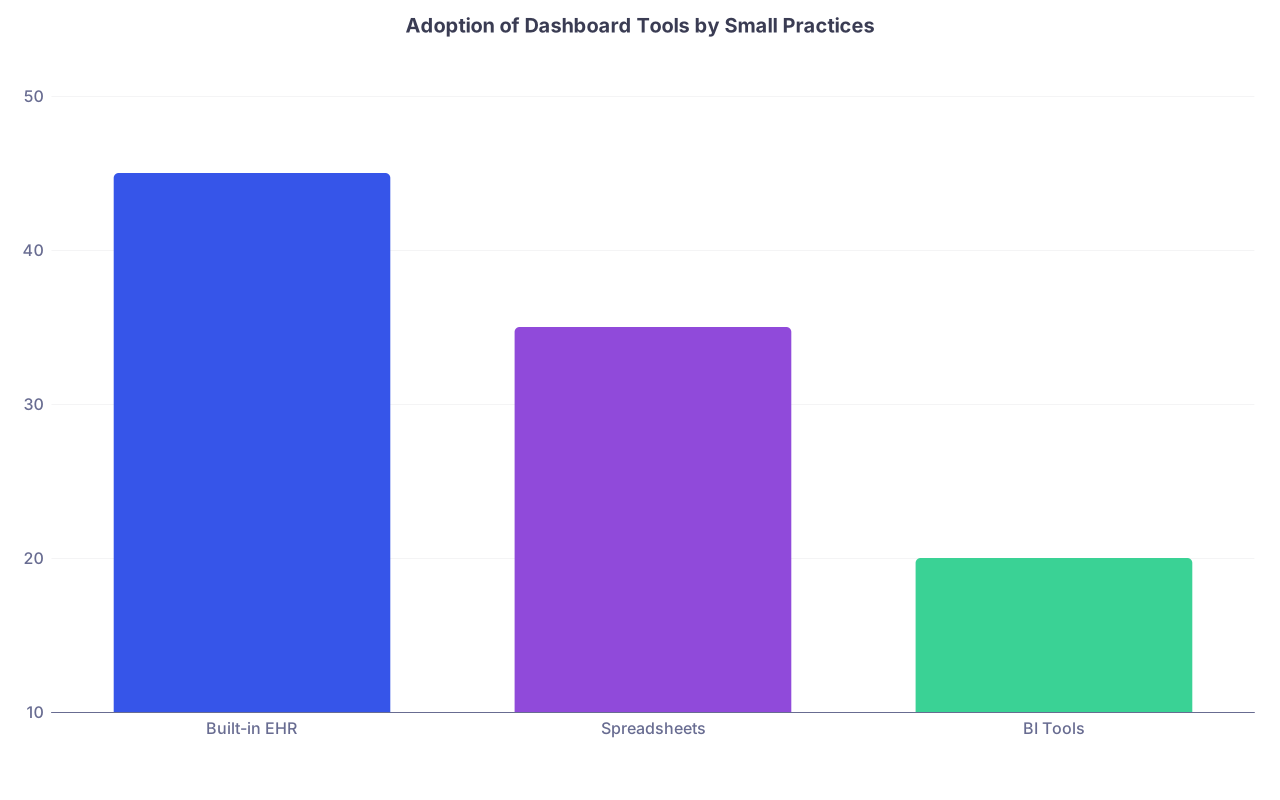
| Category | Value |
|---|---|
| Built-in EHR | 45 |
| Spreadsheets | 35 |
| BI Tools | 20 |
Pros:
- Beautiful, interactive dashboards
- Scheduled refresh (daily, weekly)
- Can combine EHR + PM + other sources
Cons:
- Steeper learning curve
- May need IT / data-warehouse access
- Licensing costs (less of an issue with free or low-tier plans)
If you are post-residency, aiming to grow a practice and your leverage, my blunt advice: start with spreadsheets for 2–3 months to prove what you really need, then move to a BI tool for stability and automation.
4. Design the Dashboard Layout: One Screen, No Noise
If you cannot take in the story of your practice at a glance, your dashboard is not a dashboard. It is a report graveyard.
The layout that consistently works:
- Page 1: At-a-glance summary (the “physician cockpit”)
- Page 2+: Deep dives (clinical quality, operations, financials, burnout/time)
Page 1 – The cockpit
This should answer, in under 15 seconds:
- Am I on track?
- What is on fire?
Structure:
- Top row: 4–6 KPI tiles (big numbers with trend arrows)
- wRVUs this month vs target
- A1c control %
- No-show rate
- Charts >72 hours
- After-hours EHR time this week
- Middle: One trend chart (last 12 months) for your most important metric. Usually wRVUs or a key quality measure.
- Bottom: A “hot list”
- Patients overdue for critical follow-up
- Open results > X days
- Charts still open >72 hours (count only, not listing names on this page for privacy if screen is visible)
Page 2 – Clinical quality
Include:
- High-level control metrics (A1c, BP)
- Trend charts by month
- Filters: age band, sex, location
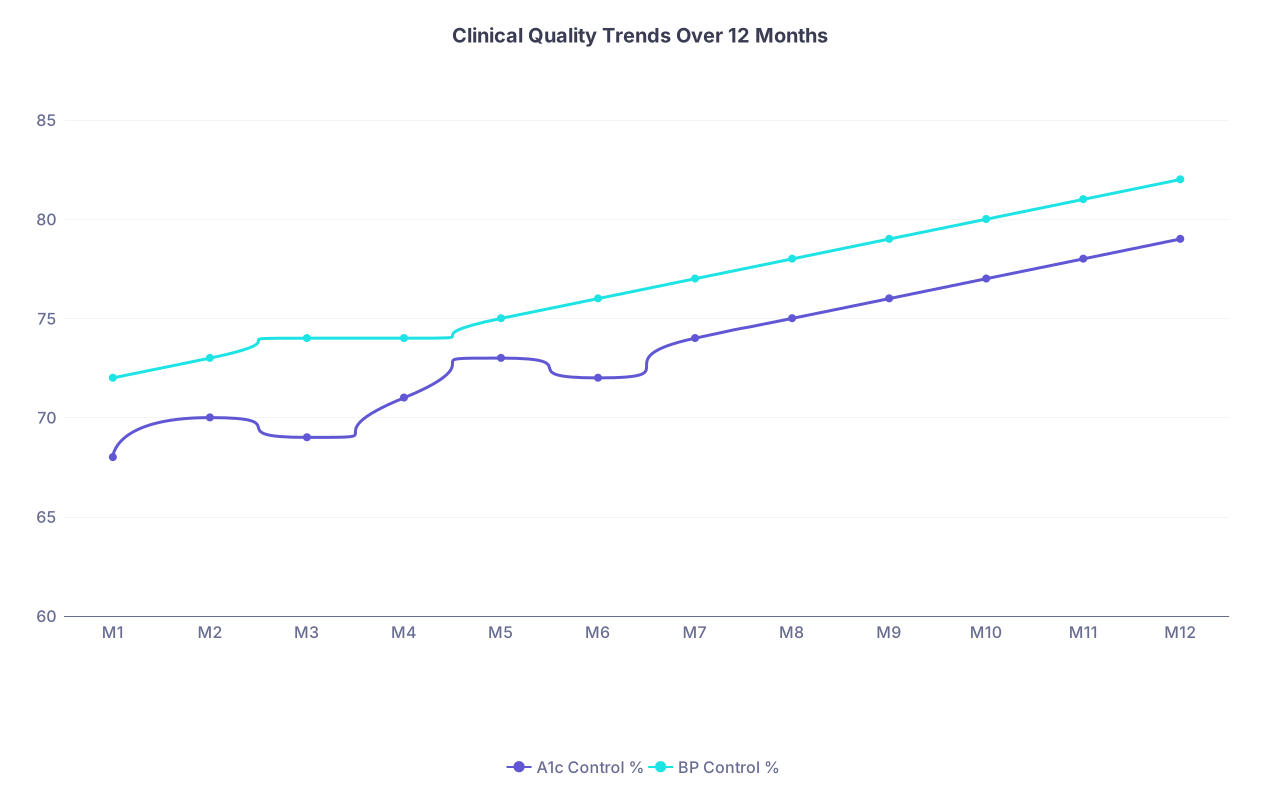
| Category | A1c Control % | BP Control % |
|---|---|---|
| M1 | 68 | 72 |
| M2 | 70 | 73 |
| M3 | 69 | 74 |
| M4 | 71 | 74 |
| M5 | 73 | 75 |
| M6 | 72 | 76 |
| M7 | 74 | 77 |
| M8 | 75 | 78 |
| M9 | 76 | 79 |
| M10 | 77 | 80 |
| M11 | 78 | 81 |
| M12 | 79 | 82 |
Do not dump every CMS measure in here. Stick to the ones that change your behavior.
Page 3 – Operations and time
This is where you fix your schedule and your evenings.
Charts and tables to include:
- Average time to close charts (trend)
- Charts open >72 hours (count and list)
- After-hours EHR time weekly (bar chart)
- Visits per clinic day with template utilization
Page 4 – Financial / productivity
At minimum:
- wRVUs by month vs previous year
- Visits by type (new vs established vs procedures)
- Payer mix pie chart
- No-shows and cancellations
If you are independent or in a group that shares data:
- Collections vs charges
- Revenue per visit
5. Build a Simple Data Pipeline (So You Do Not Become Your Own IT Department)
Your dashboard is only as good as its refresh schedule. Monthly is the bare minimum; weekly is ideal; daily is overkill for most.
Set up a recurring pipeline:
Extraction
- Use:
- EHR scheduled reports emailed as CSV
- Direct database queries (through IT or analytics)
- FHIR APIs (if your org is modern enough and will let you; many are not)
- Lock the file format. Changing columns every month is how dashboards die.
- Use:
Transformation
- Standardize:
- Dates (YYYY-MM-DD)
- Provider identifiers (NPI or internal ID)
- Patient status (“active” vs inactive)
- Create calculated fields:
- After-hours flag based on timestamp
- No-show flag
- Overdue follow-up flag
- Standardize:
Load into dashboard tool
- For Excel/Sheets: paste into the same tab, refresh pivots
- For BI tools: point to a folder where new files land; set up incremental refresh if available
Use a simple flowchart to map this, then hand it to IT or keep it for yourself:

| Step | Description |
|---|---|
| Step 1 | EHR Reports |
| Step 2 | Raw CSV Files |
| Step 3 | Clean and Transform Data |
| Step 4 | Load into BI Tool |
| Step 5 | Personal Dashboard |
| Step 6 | Weekly Review |
If your system has an analytics team, get one 30-minute meeting and walk them through exactly this. They will often wire up half of it for you once they see you know what you want.
6. Make It Safe: Privacy, Compliance, and Politics
This is where smart physicians get burned: they build a fantastic dashboard, then accidentally email PHI around or expose data in ways their institution hates.
Follow three rules religiously:
Keep PHI out of your personal devices unless formally permitted.
- No patient names on your home laptop Excel file.
- If you need a list (e.g., overdue visits), keep it inside the EHR or secure, hospital-controlled systems.
Use role-appropriate access only.
- If you are an employed physician, your dashboard should only show your data by default.
- Aggregated or departmental data should be de-identified or at least provider-ID-only if used for peer comparison.
Talk to compliance/IT early, not after you have a shadow database.
- Phrase it like this:
“I want a personal physician dashboard focused on my own panel to improve quality and reduce burnout. I want to do this in a way that is compliant and supported. Can you help me set this up safely?” - That language (“quality” and “burnout”) tends to lower defenses.
- Phrase it like this:
7. Use the Dashboard to Change Behavior (Yours and the System’s)
A dashboard is only useful if it changes what you do on Monday morning. So you need a routine.
Weekly 15-minute review
Block 15 minutes—same time every week. Non-negotiable.
Ask:
- Clinical:
- Are any core quality metrics trending in the wrong direction?
- Do I need to prioritize outreach for a specific subset (e.g., diabetics overdue for A1c)?
- Operations:
- How many charts did I leave open after each clinic day?
- Which days exploded my after-hours EHR time?
- Well-being:
- Did I creep back into working every evening?
- Do I need to block time for admin work in my schedule?
Then pick exactly one “micro-intervention” per week:
- Example: “This week, I will close every chart before I leave clinic two days out of five.”
- Example: “I will reduce my no-show rate by asking front desk to call all high-risk no-show patients 48 hours before.”
Track the impact.
Monthly deeper review
Once a month (or quarter), take 30–60 minutes.
You:
- Compare to previous month and same month last year
- Look for sustained trends, not random noise
- Decide on one operational change and one quality initiative
A simple area chart of a key variable over time makes trends obvious:
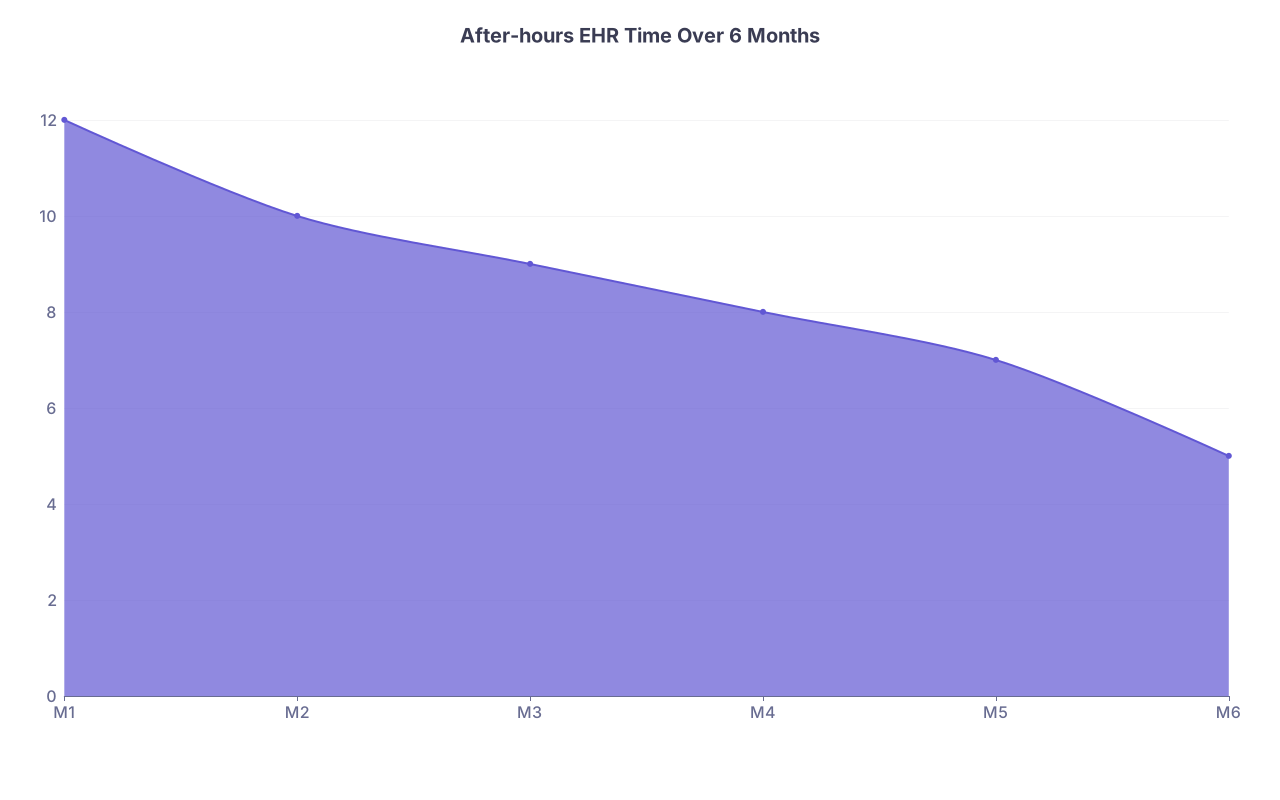
| Category | Value |
|---|---|
| M1 | 12 |
| M2 | 10 |
| M3 | 9 |
| M4 | 8 |
| M5 | 7 |
| M6 | 5 |
If your after-hours time is not trending down after 3 months, your interventions are cosmetic. Change something structural: template design, message routing, documentation tools.
8. Use Your Dashboard as Negotiation Ammunition
You are post-residency. You are not powerless. Data makes that real.
Ways your dashboard can strengthen your hand:
- Compensation negotiations (RVU-based or hybrid):
- “Here is my wRVU trend vs prior year and vs the median for my specialty. Here is the panel complexity and quality metrics to match.”
- Schedule changes:
- “My after-hours EHR time averages 9 hours per week, with consistent charting delays. Here is the correlation with double-booked template days. I want to pilot a schedule adjustment.”
- Support staff requests:
- “My inbox message volume and refill requests per 1000 patients are in the top quartile, but I have the same staffing as others. Here are the graphs.”
Hospital administrators respond to stories told in charts and numbers far more than they admit. If you show up with a clean dashboard printout instead of vague complaints, you move from “whiner” to “serious.”
9. Avoid the Common Failure Modes
I have seen physicians sink a lot of time into data with zero benefit. The failures repeat.
Watch for these:
Too many metrics.
- If you are tracking 40 things, you are tracking nothing.
- Cap your core KPIs at 8–10 on the main page.
Chasing perfection.
- Your first dashboard will be wrong in some details. Good. Iterate.
- Aim for “directionally correct and actionable,” not “statistically pure.”
No refresh discipline.
- If the data is 3 months old, it is a history lesson, not a dashboard.
- Automate refresh or put it on a calendar with teeth.
Building in isolation.
- Involve:
- One IT/analytics ally
- One colleague you trust
- They will see blind spots you will miss.
- Involve:
10. A Simple 30-Day Build Plan
If you want a timeline, here is a realistic one-month plan that works in real clinics.
Week 1: Define and map
- Select:
- 4–6 clinical metrics
- 3–5 operations metrics
- 2–3 financial metrics
- 2 well-being metrics
- Create your 1–2 page data map
- Set a 30-minute meeting with IT/analytics to review feasibility
Week 2: Get the data flowing
- Obtain:
- At least 12 months of historical data for each metric
- Build:
- A basic spreadsheet or initial BI model
- Validate:
- Spot check 10 random patients against EHR for accuracy
Week 3: Build v1 of the dashboard
- Create:
- Page 1 cockpit
- One deep-dive page (choose clinical or operations first)
- Review with a colleague and ask:
- “What does this actually tell you to do differently?”
Week 4: Refine and schedule the routine
- Fix confusing visuals
- Set up:
- Monthly or weekly refresh
- Weekly 15-minute review block
- Use the dashboard in one concrete ask:
- E.g., ask for schedule tweak, improved panel cleaning, or extra MA support
By the end of 30 days, you will have a living, physician-centered dashboard that is better than anything your institution gave you.