
The way most attendings chart is broken. Not because they are lazy or slow, but because the system assumes you are a data-entry clerk with a medical license. You are not. The fix is not “type faster.” The fix is building a personal AI workflow that turns charting into something you supervise, not something you grind through.
You want to cut charting time in half? You will not get there by installing one app and hoping for magic. You get there by building a system: standardized inputs, reliable prompts, clear boundaries, and tight integration into your daily work.
Let me show you exactly how to do that.
Step 1: Define What “Half the Time” Actually Means
Before you touch AI, you need a baseline and a target. Most people skip this. Then they cannot tell if anything actually improved.
1. Measure Your Current Charting Time
For 1 week, track three numbers every day:
- Start-of-day unfinished notes count
- End-of-day unfinished notes count
- Total after-hours charting minutes (phone timer is fine)
You are looking for:
- Average minutes spent per encounter
- Average after-hours charting per day
Example:
- 22 patients per day
- 130 minutes of charting (50 minutes in day, 80 minutes at home)
- That is ~6 minutes per patient
Your “cut in half” goal is then:
- 3 minutes per patient
- No more than 30–40 minutes total after-hours
Track again after 4–6 weeks of your new AI workflow. If the numbers did not move, you change the workflow. Not your imagination.
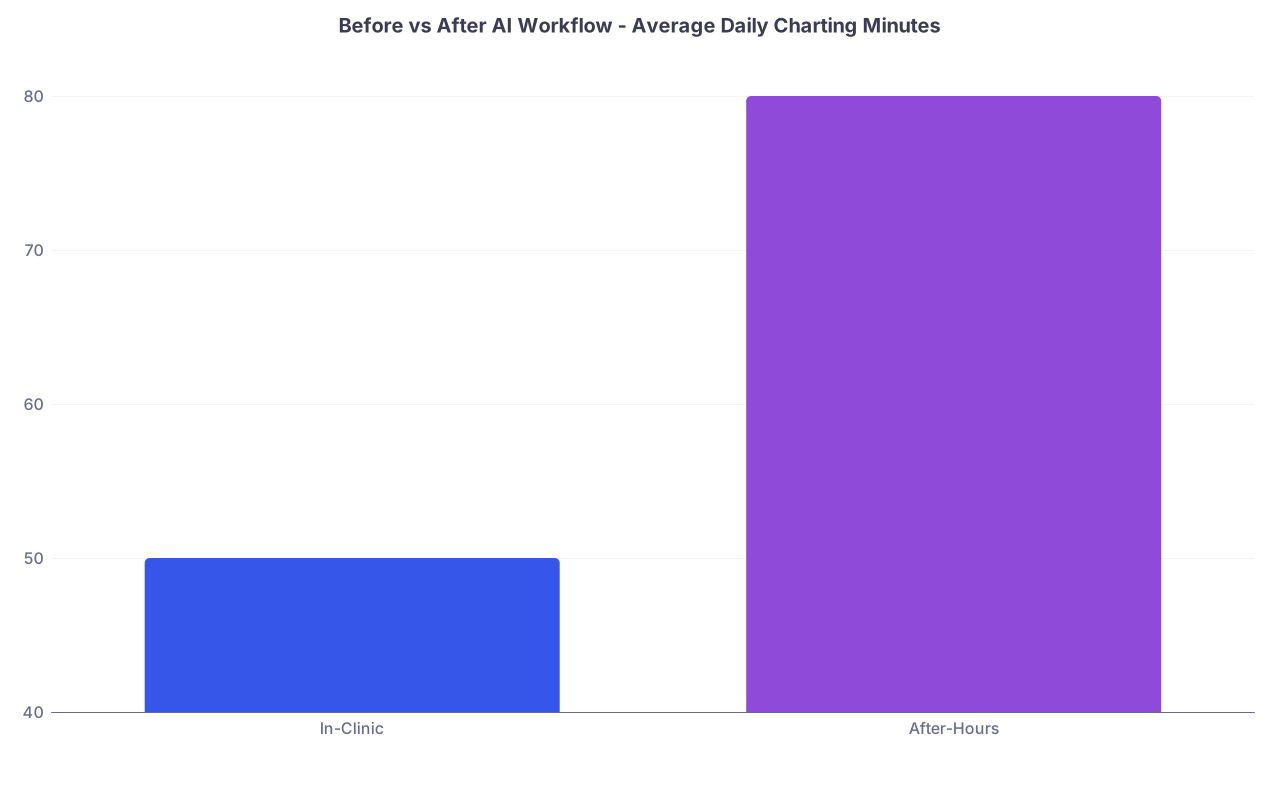
| Category | Value |
|---|---|
| In-Clinic | 50 |
| After-Hours | 80 |
Step 2: Choose Your AI Stack (Do Not Overcomplicate This)
You need two main components:
- A general-purpose LLM (for language and reasoning)
- A way to connect it to your EHR workflow (copy/paste, add-in, or integration)
Here is the reality: your organization’s IT will move slowly. Your personal workflow cannot depend entirely on “waiting for full EHR integration.”
2.1 Core AI Options (Choose One Main, One Backup)
You need something that can:
- Handle long text (full visit transcripts, long HPI)
- Follow structured prompts
- Keep PHI safe (HIPAA or at least strong privacy posture)
Common setups I see:
Enterprise / Hospital-supported
- Ambient scribe in the room: Abridge, Nuance DAX, Suki, DeepScribe
- Pros: HIPAA, integrated, minimal friction
- Cons: Expensive, limited customization, may not do everything you want
Personal / Non-integrated tools
- General LLM (e.g., ChatGPT Enterprise, other compliant tools)
- Local or on-device model if you are very privacy-conscious and tech-savvy
- Pros: Highly customizable prompts, can use across tasks (emails, letters, education)
- Cons: More copy-paste, must manage PHI carefully
If your institution offers an ambient scribe, use it as your backbone. Then layer your own AI prompts on top for the gaps: messages, letters, patient education, summaries.
If you have nothing: start with a single LLM that offers enterprise-grade privacy and does not train on your data.
Step 3: Map Your Charting Workflow – Then Attack the Right Parts
Most attendings complain about “charting” like it is one thing. It is not. It is several different cognitive and clerical tasks smashed together.
Break it up first:
During visit
- Collect story
- Perform exam
- Start note skeleton (sometimes)
Immediately post-visit
- Finish HPI/ROS/PE
- Document assessment and plan
- Place orders
- Queue patient education / instructions
End of session / after-hours
- Clean up unfinished notes
- Detailed letters (referral letters, disability notes, justification docs)
- In-basket: patient messages, refills, forms
Your AI workflow should target each segment differently. Trying to use one generic “AI charting prompt” for everything is why many people give up.

| Step | Description |
|---|---|
| Step 1 | Patient Check In |
| Step 2 | Visit and Conversation |
| Step 3 | Capture Notes or Transcript |
| Step 4 | AI Draft Note |
| Step 5 | Clinician Edits in EHR |
| Step 6 | Finalize Note and Orders |
| Step 7 | AI for Letters and Messages |
| Step 8 | AI Input Type |
Step 4: Standardize Your Inputs to Feed the AI
Garbage in, garbage out. You already know that. You want consistent, structured input so your AI output is predictable and fast to edit.
You have three main input modes:
- Full transcript of the encounter (ambient scribe or recorded audio)
- Dictated bullet points right after the visit
- Short template form that you fill with key fields
If you have ambient scribe, you already get #1. If not, build #2 and #3 yourself.
4.1 The Bullet-Point Dictation Pattern
Right after the patient leaves, you speak a tight, repeatable structure into your phone or microphone, then feed that into AI.
Example structure (outpatient internal medicine):
- Chief complaint: “…”
- Story summary: “…”
- Key positives: “…”
- Key negatives: “…”
- Exam highlights: “…”
- Data reviewed: “…”
- Assessment list: “1) … 2) … 3) …”
- Plan details per problem
You might say something like:
“Chief complaint: worsening shortness of breath.
Story summary: 68-year-old male with COPD, 40 pack-year history, here with 3 weeks of increased dyspnea on exertion and productive cough, no fevers. Key positives: increased use of rescue inhaler from 1–2 times per week to daily, sputum now yellow, some mild wheezing at night. Key negatives: no chest pain, no hemoptysis, no leg swelling, no recent travel.
Exam highlights: speaking full sentences, mild expiratory wheeze bilaterally, no crackles, O2 sat 95 percent on room air, HR 88, afebrile.
Data reviewed: last PFTs 2023, moderate obstruction; CXR 6 months ago clear.
Assessment list:
- COPD exacerbation mild to moderate
- Tobacco use ongoing
- Hypertension stable.
Plan details:- Start prednisone 40 daily x 5 days, increase scheduled inhaled therapy, close follow-up in one week, return precautions for increased dyspnea or red flags.
- Reinforce smoking cessation, patient not ready to quit, offer resources, motivational interviewing.
- Continue lisinopril at current dose, BP today 128 over 74, labs up to date.”
You then paste or send this text directly into your AI note generator.
4.2 The Quick Template Form
If you prefer typing, create a simple note template you complete quickly and feed to AI. For example:
HPI core:
- Onset:
- Duration:
- Severity:
- Modifying factors:
- Associated symptoms (pos/neg):
Exam summary:
- General:
- Cardio:
- Lungs:
- Other:
Problems and plan bullets:
Use this as raw material. The AI turns it into your full, cleaned, EHR-ready note.
Step 5: Build Your Core AI Prompts (This Is Where The Magic Actually Happens)
Your AI becomes powerful when you give it clear instruction + consistent structure + your preferences. Do this once, then reuse.
You should have at least three core prompts:
- Visit note generator
- Letter / narrative generator
- Patient education / after-visit summary helper
5.1 Core Prompt: Visit Note Generator
Here is a template you can adapt. Save it as a reusable instruction:
“You are assisting a [specialty] physician writing concise, accurate clinical notes in an [EHR name] system.
INPUT: I will give you either a transcript or bullet-point summary of a single clinical encounter.
TASK:
- Generate a structured note with the following sections, formatted as plain text:
- Chief Complaint
- History of Present Illness
- Review of Systems (only if documented, no auto-positive systems)
- Past Medical History (only what is mentioned)
- Medications (only what is mentioned / changed)
- Physical Exam (only documented findings)
- Assessment and Plan – problem-based, numbered
- Keep documentation factual only. Do not infer diagnoses or findings that are not clearly stated.
- Use full sentences. Concise. No fluff, no repeated disclaimers.
- Where there is uncertainty or missing information, leave placeholders in brackets like [clarify duration] rather than inventing details.
- For Assessment and Plan, for each problem, include:
- Brief one-sentence assessment
- Plan bullets: diagnostics, treatments, patient instructions, follow-up.
STYLE:
- Match a professional, attending-level documentation style.
- Avoid template nonsense phrases like “patient denies any other complaints at this time” unless actually stated.
OUTPUT: Only the final note. No commentary, no explanations.”
You then paste your transcript or bullet summary under “INPUT” and run it.
5.2 Core Prompt: Letter / Narrative Generator
Referral letters, insurance appeals, disability forms – these are exactly the kind of repetitive narrative work AI can crush.
Prompt example:
“You are writing a professional clinical letter for a [specialty] physician.
INPUT:
- Recipient type (e.g., cardiology consultant, insurance reviewer, employer)
- Key clinical details and timeline
- Goal of the letter (e.g., expedite consult, justify imaging, support work restrictions)
TASK:
- Produce a structured letter that:
- Clearly states the purpose in the first sentence
- Summarizes relevant history and key data only
- States the current assessment
- Justifies the requested action with concise, clinical reasoning.
- Do not add diagnoses or facts that were not provided.
- Keep length to 1 page or less in standard formatting.”
Feed it bullet points from your chart, get a polished letter to paste back.
5.3 Core Prompt: Patient Education / After-Visit Summary
You can have AI draft patient-friendly instructions in seconds, tailored to the visit.
Prompt example:
“You are creating a patient-friendly after-visit summary for an adult patient at approximately 8th grade reading level.
INPUT:
- Diagnoses and key issues from visit
- Medications started / changed
- Follow-up plan
- Specific return precautions
TASK:
- Produce 3 short sections:
- ‘What we discussed today’ – brief summary in plain language
- ‘Your medications’ – list with simple instructions
- ‘When to call or seek care’ – clear, bulleted red flag symptoms.
- Avoid medical jargon. Use everyday terms where possible.
- Keep it under 300 words.”
Paste the result into your AVS or patient portal message.
Step 6: Hard Boundaries – What Your AI Must Never Do For You
If you want this to stay safe, defensible, and trusted, you must enforce some rules. On yourself and on the tool.
Non-negotiables:
- No guessing diagnoses. AI can rephrase your judgment, not invent it.
- No fabricating exam or ROS findings. Ever. If it is not in your input, it does not go in the note.
- No autopopulating “complete ROS” garbage unless it actually happened, word for word.
- No unsupervised copying forward of old assessments/plans. AI is not your excuse to perpetuate outdated info.
- No PHI in non-compliant tools. If you would not email it over Gmail, do not paste it into a random AI app.
You are still the licensed professional. Think of AI as a very fast scribe who occasionally hallucinates and must be checked.
Step 7: Integrate Into Your Actual Day, Not Some Fantasy Schedule
The difference between “cool demo” and “cut my charting time in half” is integration.
Here is a schedule pattern that actually works for many attendings:
7.1 During the Visit
If you have an ambient scribe:
- Let it capture the visit
- Glance at the draft between patients
- Make quick edits while the case is fresh
If you do dictated bullet points:
- At the end of each visit, take 30–60 seconds:
- Dictate your structured summary
- Send to your AI note prompt
- Move to the next patient
- At the end of each visit, take 30–60 seconds:
7.2 Between Patients (Micro-Blocks)
You need 3–5 minute micro-blocks. Intensive, focused.
Pattern:
- Open yesterday’s incomplete note or the last patient you saw
- Paste AI-generated draft into your EHR template
- Edit Assessment and Plan first (this is what matters clinically)
- Scan HPI/ROS/PE for any errors or bloat; trim aggressively
- Sign
If you do this every 2–3 patients, you never build a mountain.
7.3 End of Session
Your goal: leave with zero open notes or a small, predictable number (e.g., max 3 complex ones).
End-of-session checklist:
- Sort remaining notes by complexity
- For straightforward follow-ups:
- Use AI draft + quick edit + sign. No overthinking.
- For complex cases:
- Use AI to structure your thinking, but spend the extra 2–3 minutes to ensure the assessment is exactly what you want.
If you still have more than 3–4 notes at the end of day regularly, your problem is not just documentation; it is scheduling or scope creep. AI will help, but cannot completely save you from overload.
Step 8: Extend AI to In-Basket and Forms (Hidden Time Sink)
After residency, this is where many physicians quietly drown: messages, refills, forms.
AI can trim a lot of this, safely, if you build tight patterns.
8.1 Patient Messages
You can have a dedicated prompt for response templates:
“You are helping a [specialty] physician respond to patient portal messages.
INPUT:
- Patient message
- Key chart facts (copy relevant portions, no full chart)
- Physician intent (e.g., reassure, recommend visit, adjust med, decline inappropriate request).
TASK:
- Draft a concise, empathetic reply from the physician that:
- Addresses the specific question
- Sets clear next steps
- Avoids new diagnoses or major medication changes unless explicitly instructed.
- Match professional tone, avoid slang.
- Keep under 200 words.”
You still review/edit/send, but you are starting from 80% done.
8.2 Refill Protocols
You can use AI to quickly outline whether a request meets your refill criteria by summarizing:
- Last visit
- Labs
- BP trends
- Any relevant risks
You predefine your criteria separately in your head or clinic policy. AI just gathers and presents the data:
“Summarize for this patient: last 3 BP readings, last creatinine, last office visit date, last medication change related to [drug]. Output as bullets only.”
You decide yes/no on refill. No freehand AI “I think this is safe” nonsense.
8.3 Forms and Disability / Work Notes
You provide:
- Key clinical facts
- Functional limitations
- Time frame
AI provides a grammatically clean, coherent paragraph that answers the questions directly. You paste, tweak, sign.
Step 9: Short Feedback Loop – Train the System Around You
The first week will feel clunky. You are designing your system while using it. That is normal.
The key is a deliberate feedback loop:
- Keep a running document: “AI Prompts – v1”
- Each time the AI output annoys you (too wordy, misses structure, wrong style):
- Add a 1-line rule to your prompt
- Example: “Do not include any social history unless it is directly relevant to the current visit”
- Save that as “AI Prompts – v2” and use going forward.
Every 2–3 weeks, your prompts become sharper. Your editing time shrinks. And the AI starts to feel like it “knows you” even though it is just following better rules.
| Week | Focus Area | Expected Change |
|---|---|---|
| 1 | Basic prompts & setup | 10–15% time reduction |
| 2–3 | Refine note prompts | 25–35% time reduction |
| 4–6 | Add letters & messages | 40–50% time reduction |
| 6+ | Fine-tune & automate | Stable 50%+ reduction |
Step 10: Guardrails for Legal and Ethical Safety
If you are post-residency, you are the one getting deposed, not your attending. You need a defensible answer when someone asks, “How do you document your care?”
Here is the safe, honest structure:
“AI drafts. I decide.”
- You create the judgment. AI rearranges your words.
- You always review the final note before signing.
No delegation of medical decision-making.
- You do not ask AI: “What workup should I do?” in the middle of a visit and follow blindly.
- You can ask for help wording your plan, but the content is yours.
Version control lives in the EHR.
- Once your note is in the chart, that is the legal record, regardless of how it was created.
- Keep AI use in the background; the signed note is what matters.
HIPAA respect.
- Use enterprise tools or those specifically contracted for PHI.
- If you are experimenting personally, strip identifiers: no names, dates of birth, MRNs, addresses.
Example: A Realistic Day Before and After AI Workflow
Let us make this concrete.
Before AI Workflow
- 22-patient clinic
- Notes partly started in room, mostly finished in 3 big chunks:
- Lunch: 20 minutes
- End of day: 45–60 minutes
- After kids asleep: 45 minutes catching up
- Total charting: 2+ hours, with 60–90 minutes at home
- In-basket spills to the next day constantly
After 4–6 Weeks with a Tight AI Workflow
- 22-patient clinic
- After each visit: 30–60 second bullet dictation
- AI drafts running in the background
- Between every 2–3 patients: 3–4 minutes to paste/edit/sign 1–2 notes
- Lunch: 15-minute catch-up (finish any complex notes, quick message batch with AI drafts)
- End of day: 20–25 minutes to clear final 3–4 notes and 5–10 key messages
- After-hours: 10–20 minutes max on bad days, often zero
Does this require discipline? Yes. But it is sustainable. I have seen attendings who were drowning in charting move to leaving on time four days a week using exactly this style of system.
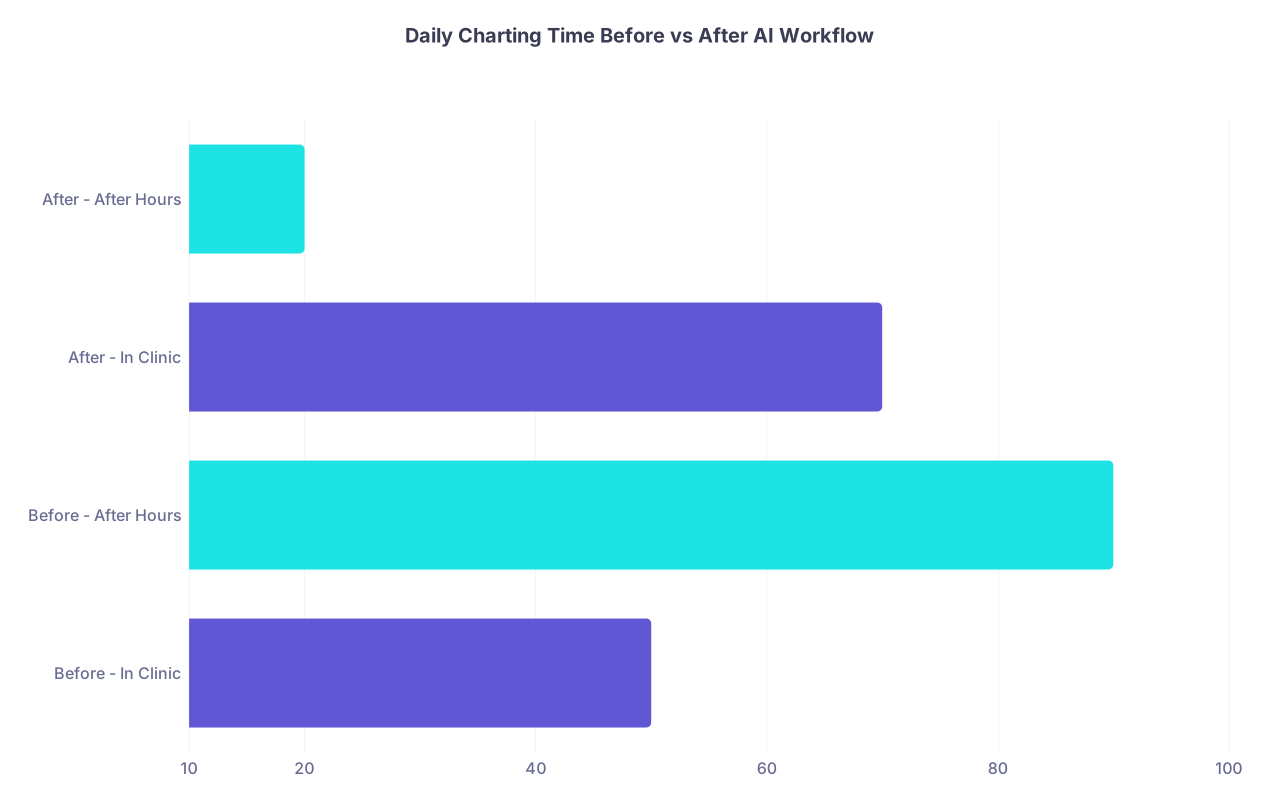
| Category | Value |
|---|---|
| Before - In Clinic | 50 |
| Before - After Hours | 90 |
| After - In Clinic | 70 |
| After - After Hours | 20 |
Implementation Roadmap: 30-Day Plan
If you want a step-by-step way to roll this out without wrecking your month, follow this:
Week 1 – Baseline and Setup
- Track your actual charting time and after-hours minutes
- Choose 1 AI tool for notes; set up access
- Create your visit note generator prompt (v1)
- Start using bullet-point dictation immediately after 3–5 encounters per day
Week 2 – Full Note Coverage
- Expand AI note generation to all non-complex visits
- Build your patient education / AVS prompt
- Aim to finish at least 50% of your notes before leaving clinic
Week 3 – Letters and Messages
- Build your letter/narrative prompt
- Build your patient message reply prompt
- Test AI-generated drafts on:
- 2–3 letters per week
- 5–10 patient messages per day
Week 4 – Refine and Measure
- Tighten prompts based on what annoyed you
- Re-measure your charting time as in Week 1
- Decide:
- What worked well (lock it in)
- What still feels clunky (fix or drop)
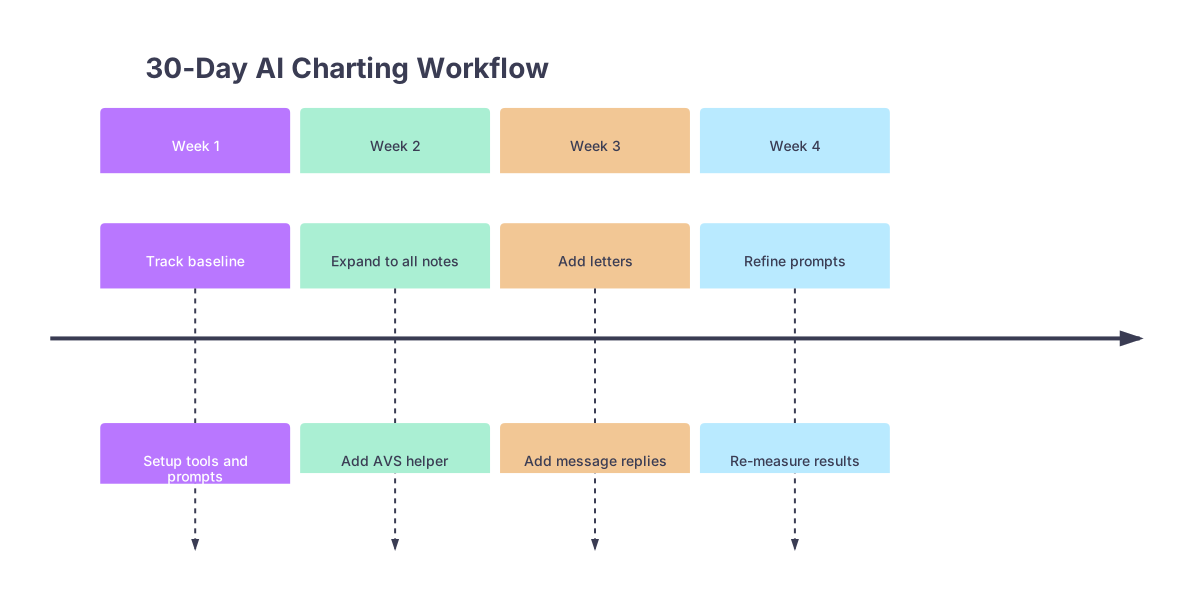
| Period | Event |
|---|---|
| Week 1 - Track baseline | Setup tools and prompts |
| Week 2 - Expand to all notes | Add AVS helper |
| Week 3 - Add letters | Add message replies |
| Week 4 - Refine prompts | Re-measure results |
Common Failure Modes (And How To Avoid Them)
I have watched a lot of physicians crash their AI attempts the same way.
Trying to perfect prompts before using them
- Fix: Start ugly. Improve while using.
Using AI only on “complex cases”
- Fix: Use AI on the routine to free your brain for the complex.
Not changing your schedule behavior
- Fix: Protect the between-patient 3–5 minute micro-blocks like your life depends on it. Because your evenings do.
Letting AI over-document
- Fix: In your prompt, explicitly cap fluff and eliminate boilerplate. Then edit ruthlessly.
No feedback loop
- Fix: Every time you edit something 3 days in a row, bake that preference into the prompt.

Final Thoughts: What Actually Cuts Charting Time in Half
You do not need to become a “tech person.” You do need to become intolerant of wasted effort.
Three things matter most:
Standardized inputs feeding a consistent AI prompt.
Bullet dictation or transcripts in a repeatable structure → predictable, fast-to-edit notes.Tight integration into your day, not your evenings.
Micro-blocks between patients and end-of-session cleanup, instead of massive late-night marathons.Relentless control over what AI does and does not do.
It drafts. You decide. No guessing, no fabrication, no outsourcing of judgment.
Build that, and “cut charting time in half” stops being a fantasy and starts being Tuesday.